
Konfiguration der Captive Portal-Weiterleitung auf Enterprise-Netzwerk-Controllern
Dieser maßgebliche Leitfaden beschreibt die technische Architektur und die herstellerspezifischen Konfigurationsschritte, die für die Implementierung der Captive Portal-Weiterleitung auf Enterprise-Netzwerk-Controllern erforderlich sind. Er bietet IT-Teams praxisnahe Anleitungen zur Konfiguration von Walled Gardens, zur Integration der RADIUS-Authentifizierung und zur Gewährleistung der Compliance mit GDPR und PCI DSS.
Diesen Leitfaden anhören
Podcast-Transkript ansehen
Executive Summary
Die Konfiguration einer Captive Portal-Weiterleitung auf einem Enterprise-Netzwerk-Controller ist eine grundlegende Voraussetzung für die Bereitstellung von sicherem, compliantem Gäste-WiFi. Bei korrekter Konfiguration fängt der Controller den nicht authentifizierten Client-Traffic ab und leitet ihn über einen HTTP-302-Redirect an ein externes Portal weiter, was die Authentifizierung, die Erfassung von Einwilligungen und die Netzwerksegmentierung ermöglicht. Bei einer Fehlkonfiguration führt dies zu unbemerkt fehlschlagenden Verbindungen, Sicherheitswarnungen im Browser und Compliance-Risiken.
Dieser Leitfaden beschreibt die technische Architektur und die herstellerspezifischen Konfigurationsschritte, die für die Bereitstellung externer Captive Portals auf Cisco Meraki, HPE Aruba, Ruckus, Juniper Mist und Ubiquiti UniFi erforderlich sind. Wir erläutern die Funktionsweise des Redirect-Flows, die genauen Anforderungen für die Walled-Garden-Konfiguration und die Integration von RADIUS für Authentifizierung und Accounting. Indem Sie diese Schritte befolgen, stellen Sie sicher, dass Ihr Gästenetzwerk die Segmentierungsanforderungen von PCI DSS erfüllt, die ausdrückliche GDPR-Einwilligung einholt und First-Party-Daten sicher an Plattformen wie Purple weiterleitet.
Technical Deep-Dive
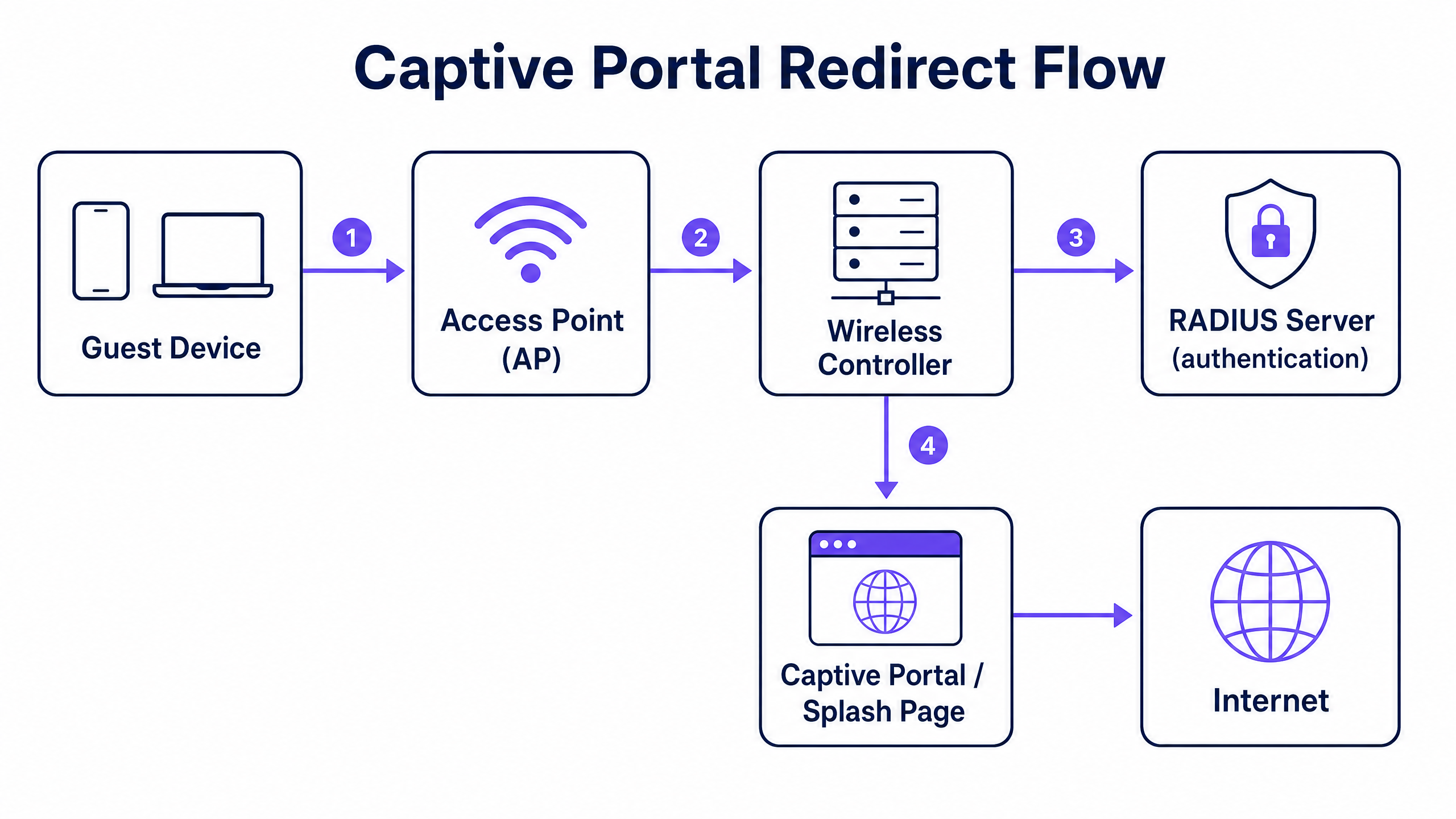
Der Captive Portal-Weiterleitungsmechanismus arbeitet auf der Ebene des Netzwerk-Controllers. Er basiert auf einer bestimmten Abfolge von Netzwerkstatusänderungen, um ein Client-Gerät abzufangen, zu authentifizieren und zu autorisieren.
Der Redirect-Flow
- Assoziierung und DHCP: Ein Gäste-Gerät verbindet sich mit der Gäste-SSID. Der Controller weist über DHCP eine IP-Adresse zu, versetzt den Client jedoch in einen eingeschränkten Pre-Authentication-Status (häufig einem bestimmten Pre-Auth-VLAN oder einer Rolle zugewiesen).
- Walled-Garden-Erzwingung: In diesem Pre-Authentication-Status wird der gesamte ausgehende Traffic verworfen, mit Ausnahme von DNS (Port 53), DHCP (Ports 67 und 68) und Traffic, der für bestimmte IP-Adressen oder Domänen bestimmt ist, die in der Access Control List (ACL) definiert sind. Diese ACL wird als Walled Garden bezeichnet.
- Abfangen und Weiterleitung: Wenn der Gast einen Browser öffnet und eine HTTP-Anfrage initiiert, fängt der Controller die Anfrage ab. Anstatt den Traffic ins Internet zu leiten, antwortet der Controller mit dem Statuscode HTTP 302 Found und leitet den Browser an die URL Ihres externen Captive Portals weiter. Moderne Betriebssysteme verwenden automatische HTTPS-Probes (wie den Captive Network Assistant von Apple), um diese Weiterleitung zu erkennen und einen Pseudo-Browser zu öffnen.
- Authentifizierung: Der Gast interagiert mit der Splash-Page, die auf dem externen Portal gehostet wird (z. B. Purple). Dies kann ein Social Login, das Ausfüllen eines Formulars oder ein einfacher Klick sein. Nach Abschluss kommuniziert das Portal mit dem Controller, um die Sitzung zu autorisieren.
- Autorisierung und Accounting: Das Autorisierungssignal wird in der Regel über eine RADIUS Access-Accept-Nachricht oder über eine herstellerspezifische API gesendet. Der Controller empfängt dieses Signal, verschiebt den Client in den Post-Authentication-Status (oft ein anderes VLAN), entfernt die Weiterleitungsregel und gewährt Internetzugang. Der Controller sendet dann eine RADIUS Accounting-Start-Nachricht, um die Sitzungsdauer und den Datenverbrauch zu protokollieren.
Implementierungsleitfaden
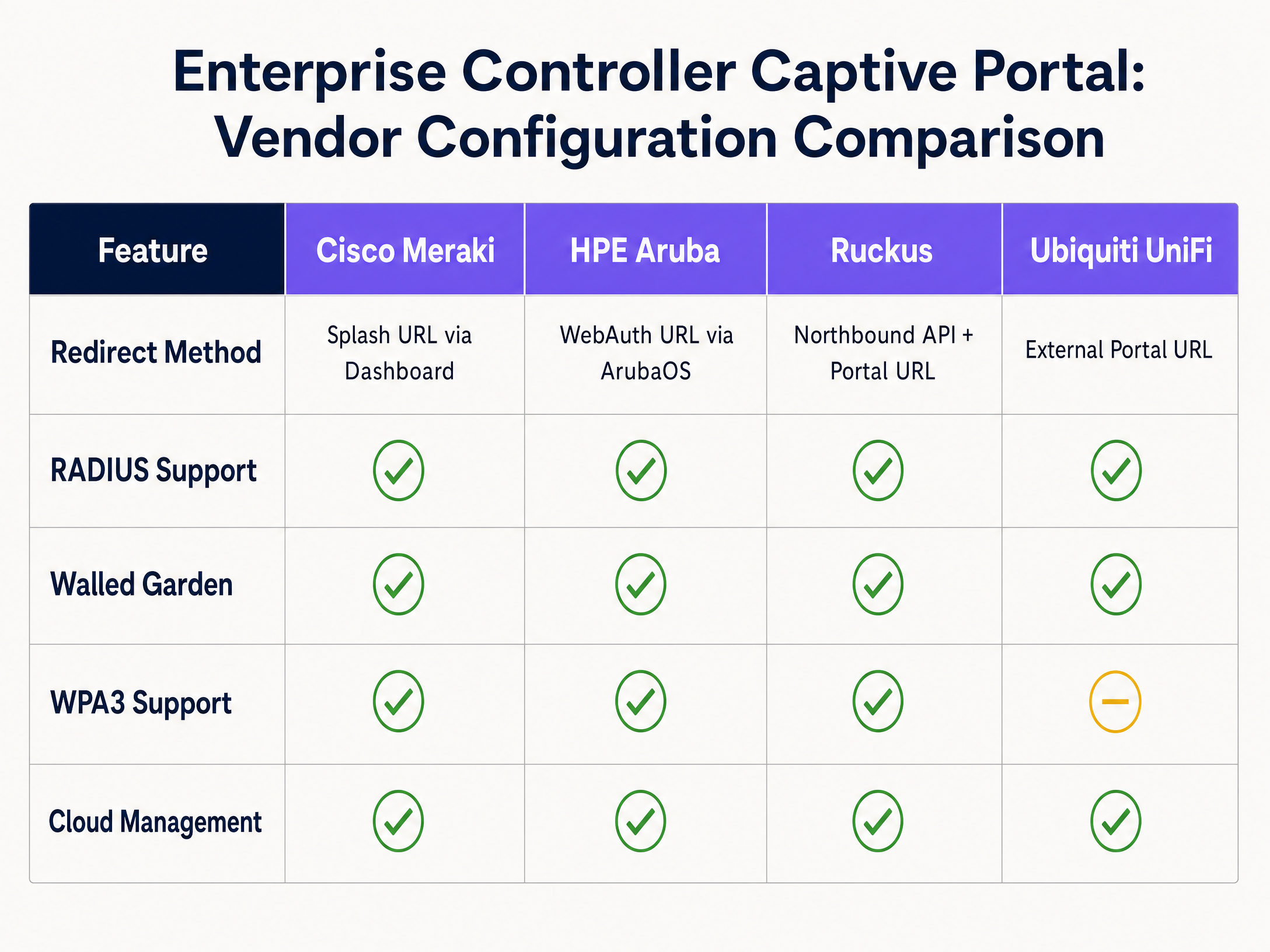
Die grundlegende Architektur ist herstellerübergreifend konsistent, aber die Konfigurationssyntax unterscheidet sich erheblich. Nachfolgend finden Sie die Schritte für die führenden Enterprise-Plattformen.
Cisco Meraki
Cisco Meraki konfiguriert Captive Portals vollständig über das Meraki Dashboard.
- Navigieren Sie zu Wireless > Access Control und wählen Sie Ihre Gäste-SSID aus.
- Wählen Sie unter Splash page die Option Sign-on with my RADIUS server (für anmeldedatenbasierten Zugriff) oder Click-through.
- Geben Sie im Feld Custom Splash URL die von Purple bereitgestellte URL Ihres externen Portals ein.
- Unter RADIUS geben Sie die IP-Adressen der primären und sekundären RADIUS-Server für die Authentifizierung (Port 1812) und das Accounting (Port 1813) sowie das Shared Secret ein.
- Scrollen Sie zu Advanced Splash Settings, um den Walled Garden zu konfigurieren. Fügen Sie die IP-Adressen oder Domänen Ihres Portalservers und aller erforderlichen CDNs hinzu.
HPE Aruba
Die Aruba-Konfiguration umfasst das Definieren eines Captive Portal-Profils und das Zuweisen zu einer Rolle.
- Navigieren Sie in ArubaOS zu Configuration > Authentication > L3 Authentication.
- Erstellen Sie ein neues Captive Portal Authentication Profile. Geben Sie unter Login URL die Adresse ein, die auf Ihre Purple-Splash-Page verweist.
- Erstellen Sie eine Server Group, die Ihre RADIUS-Server enthält, und weisen Sie diese dem Captive Portal-Profil zu.
- Navigieren Sie zu Configuration > Security > Roles. Bearbeiten Sie die Pre-Authentication-Rolle (oft als
logonbezeichnet). Stellen Sie sicher, dass die ACL DHCP-, DNS- und HTTP/HTTPS-Traffic zu Ihren Walled-Garden-IP-Adressen zulässt und das Captive Portal-Profil auf allen anderen HTTP-Traffic anwendet. - Weisen Sie die Rolle
logonals initiale Rolle in Ihrem AAA-Profil für die Gäste-SSID zu.
Ruckus SmartZone
Ruckus verwendet einen spezifischen WLAN-Typ für Hotspot-Bereitstellungen.
- Navigieren Sie zu WLANs und erstellen Sie ein neues WLAN. Stellen Sie den WLAN Type auf Hotspot (WISPr) ein.
- Wählen Sie unter Authentication Options die Option External RADIUS Server und geben Sie Ihre Serverdaten für Authentifizierung und Accounting ein.
- Unter Hotspot Portal wähct External und geben Sie Ihre Portal-URL ein.
- Konfigurieren Sie den Walled Garden, indem Sie die erforderlichen IP-Adressen oder Domains hinzufügen.
- Ruckus verlässt sich auf sein Northbound Portal Interface (NPI), um den Autorisierungsfluss abzuwickeln, was die Konfiguration der NPI-Einstellungen erfordert, um die Kommunikation von Ihrem Portalserver zuzulassen.
Ubiquiti UniFi
UniFi bietet eine unkomplizierte Benutzeroberfläche für externe Portale.
- Gehen Sie im UniFi Network Controller zu Settings > WiFi und wählen Sie Ihr Gastnetzwerk aus.
- Aktivieren Sie unter Advanced Options die Guest Policy.
- Gehen Sie zu Settings > Guest Control. Wählen Sie unter Portal Type die Option External Portal Server und geben Sie Ihre Portal-URL ein.
- Fügen Sie unter Access Control die erforderlichen IP-Adressen zur Liste Pre-Authorization Access (dem Walled Garden) hinzu.
- Konfigurieren Sie die RADIUS-Serverdetails unter Profiles > RADIUS und wenden Sie das Profil auf das Gastnetzwerk an.
Best Practices
1. Walled Garden-Konfiguration
Der Walled Garden ist die kritischste Fehlerquelle bei Captive Portal-Bereitstellungen. Wenn der Walled Garden unvollständig ist, kann der Browser des Gastes die Splash-Page nicht laden, was zu einem leeren Bildschirm oder einem Timeout-Fehler führt.
Sie müssen den Zugriff explizit zulassen für:
- Die IP-Adressen oder Domains des primären Portalservers.
- Die IP-Adressen des RADIUS-Servers.
- Alle Content Delivery Networks (CDNs), die vom Portal zum Laden von Schriftarten, Bildern oder JavaScript verwendet werden.
- Identity-Provider-Domains bei Verwendung von Social Login (z. B.
facebook.com,google.com).
2. Netzwerksegmentierung für PCI DSS
Wenn an Ihrem Standort Kartenzahlungen verarbeitet werden, erfordert die PCI DSS-Compliance eine strikte Isolierung des Gastnetzwerks von der Karteninhaber-Datenumgebung. Verlassen Sie sich nicht ausschließlich auf die SSID-Trennung. Sie müssen ein dediziertes Gast-VLAN auf Controller- oder Switch-Ebene konfigurieren, mit Firewall-Regeln, die das Routing zwischen dem Gast-VLAN und internen Unternehmens- oder Point-of-Sale-Netzwerken (POS) explizit blockieren.
3. RADIUS-Accounting
Konfigurieren Sie immer das RADIUS-Accounting. Während ein MAC-Autorisierungs-Bypass den Zugriff gewähren kann, ist das RADIUS-Accounting (Meldungen wie Accounting-Start und Accounting-Stop) erforderlich, um die Sitzungsdauer und den Datennutzung präzise zu erfassen. Ohne Accounting meldet Ihre Analyseplattform ungenaue Verweilzeiten und fehlerhafte Zahlen gleichzeitiger Nutzer.
Fehlerbehebung & Risikominderung
Fehler bei der HTTPS-Interzeption
Moderne Betriebssysteme verwenden HTTPS-Probes, um Captive Portals zu erkennen. Wenn der Controller eine HTTPS-Anfrage abfängt, aber ein ungültiges oder nicht vertrauenswürdiges SSL-Zertifikat für die Weiterleitung präsentiert, zeigt der Browser eine schwerwiegende Sicherheitswarnung an (z. B. „Ihre Verbindung ist nicht privat“) und blockiert die Weiterleitung. Um dies zu verhindern, stellen Sie sicher, dass Ihr Controller mit einem gültigen, öffentlich vertrauenswürdigen SSL-Zertifikat für seine virtuelle Schnittstelle ausgestattet ist, oder konfigurieren Sie den Controller so, dass er nur HTTP-Verkehr für die erste Weiterleitung abfängt.
DNS-Leakage
Wenn die Pre-Authentication-ACL uneingeschränkten ausgehenden DNS-Verkehr zulässt, können versierte Nutzer DNS-Tunneling verwenden, um das Captive Portal zu umgehen und ohne Authentifizierung auf das Internet zuzugreifen. Verhindern Sie dies, indem Sie den ausgehenden DNS-Verkehr in der Pre-Authentication-Rolle auf Ihre zugewiesenen DNS-Resolver beschränken und allen anderen Datenverkehr auf Port 53 blockieren.
Abweichungen beim Sitzungs-Timeout
Wenn das auf dem Wireless-Controller konfigurierte Sitzungs-Timeout kürzer ist als die im externen Portal definierte Gültigkeitsdauer der Sitzung, werden Gäste abrupt getrennt und zur erneuten Authentifizierung gezwungen. Stellen Sie sicher, dass das Idle-Timeout und das absolute Sitzungs-Timeout des Controllers auf das gewünschte Gasterlebnis abgestimmt sind (z. B. 24 Stunden in der Hotellerie, 8 Stunden im Einzelhandel).
ROI & geschäftlicher Nutzen
Die Bereitstellung eines ordnungsgemäß konfigurierten Captive Portals verwandelt das Gäste-WiFi von einem Betriebskostenfaktor in einen strategischen Vorteil. Durch die Integration von Enterprise-Controllern mit einer Intelligence-Ebene wie Purple können Standorte die ausdrückliche GDPR-Einwilligung einholen und wertvolle First-Party-Daten sammeln.
Purple verarbeitet jährlich 440 Millionen Logins an 80.000 Standorten. Diese Daten fließen direkt in CRM-Plattformen ein und ermöglichen zielgerichtete Marketingkampagnen auf der Grundlage tatsächlicher physischer Besuche. Beispielsweise können Betreiber im Einzelhandel die Besucherfrequenz und die Rate wiederkehrender Besuche messen, während Hotellerie -Betriebe Direktbuchungen fördern können, indem sie Gäste nach ihrem Aufenthalt ansprechen. Der ROI bemisst sich an einem höheren Customer Lifetime Value, einer verbesserten betrieblichen Effizienz durch präzise Frequenzanalysen und der Minimierung regulatorischer Risiken durch automatisisiertes Compliance-Management.
Schlüsseldefinitionen
Captive Portal
A web page that intercepts unauthenticated network traffic and requires user interaction—such as accepting terms or providing credentials—before granting internet access.
Used in enterprise networks to enforce security policies, capture first-party data, and ensure regulatory compliance.
Walled Garden
An access control list (ACL) applied to unauthenticated clients, permitting access only to specific IP addresses or domains required to load the captive portal.
Critical for ensuring the splash page loads correctly; missing CDN domains in the walled garden will cause the portal to render improperly.
RADIUS
Remote Authentication Dial-In User Service. A networking protocol that provides centralised Authentication, Authorization, and Accounting (AAA) management.
Used by network controllers to verify guest credentials against an external database and log session metrics.
VLAN Segmentation
The practice of dividing a physical network into multiple logical networks to isolate traffic.
Mandatory for PCI DSS compliance to ensure guest WiFi traffic cannot route to payment card environments.
HTTP 302 Redirect
A standard HTTP response status code indicating that the requested resource has been temporarily moved to a different URL.
The mechanism used by network controllers to intercept a guest's initial web request and push their browser to the splash page.
IEEE 802.1X
An IEEE standard for port-based network access control, requiring devices to authenticate before gaining access to the network.
Provides enterprise-grade security by ensuring each connection is individually authenticated, often backed by a RADIUS server.
WPA3-Enterprise
The latest Wi-Fi security protocol, providing robust encryption and requiring 802.1X authentication.
Recommended for secure enterprise deployments to protect against offline dictionary attacks and ensure data confidentiality.
MAC Authorisation Bypass (MAB)
A method of granting network access based on the client device's MAC address rather than requiring explicit user credentials.
Often used in click-through captive portals where the portal registers the MAC address after the user accepts the terms of service.
Ausgearbeitete Beispiele
A 350-room hotel needs to deploy a branded guest WiFi portal that captures email addresses for their loyalty programme, ensuring compliance with GDPR and isolating guest traffic from the corporate network.
The IT team deploys Cisco Meraki APs and configures a dedicated guest SSID on VLAN 100. In the Meraki Dashboard, they set the splash page to 'Sign-on with my RADIUS server' and enter Purple's portal URL. They configure the walled garden to include Purple's IP ranges and CDN domains. Firewall rules are applied to VLAN 100, denying routing to the corporate VLAN to ensure PCI DSS compliance. In the Purple platform, a branded portal is created with a data capture form and explicit GDPR consent checkboxes. The Purple CRM connector is configured to sync captured emails directly to the hotel's marketing platform.
A regional retail chain with 40 stores requires a consistent guest WiFi experience across all locations, with centralised management and store-level footfall analytics.
The retailer deploys HPE Aruba APs managed via Aruba Central. A single guest WLAN template is created with an external captive portal pointing to Purple. The pre-authentication role is configured with the necessary walled garden ACLs. This template is applied across all 40 sites using Aruba Central's group policy. In Purple, a unified portal design is deployed, with analytics dashboards configured to segment data by individual store locations.
Übungsfragen
Q1. A venue reports that guests connecting to the WiFi are seeing a blank screen instead of the branded splash page. The portal uses custom fonts hosted on Google Fonts. What is the most likely configuration error?
Hinweis: Consider what traffic is permitted before a user authenticates.
Musterlösung anzeigen
The walled garden is incomplete. The Google Fonts CDN domains have not been added to the pre-authentication ACL. The controller is blocking the request to load the fonts, causing the page render to fail.
Q2. To comply with PCI DSS, an IT manager creates a new SSID named 'Guest_WiFi' on the same subnet as the corporate network. Is this sufficient?
Hinweis: PCI DSS requires isolation of the cardholder data environment.
Musterlösung anzeigen
No. Creating a separate SSID on the same subnet does not provide network isolation. The guest network must be placed on a dedicated VLAN with firewall rules explicitly denying routing to the corporate or POS networks.
Q3. A retail chain notices that their analytics dashboard shows 1,000 authentications per day, but the average dwell time metric is missing or zero. What configuration step was missed?
Hinweis: Which protocol is responsible for tracking session duration?
Musterlösung anzeigen
RADIUS Accounting has not been configured on the controller. Without the Accounting-Start and Accounting-Stop messages, the analytics platform cannot calculate the duration of the sessions.
Weiterlesen in dieser Reihe
Enterprise-Gast-WiFi-Einrichtungsleitfaden: VLAN-Segmentierung, Sicherheit und Captive Portals
Dieser Leitfaden bietet einen technischen Entwurf für die Bereitstellung von Enterprise-Gast-WiFi mit Fokus auf VLAN-Segmentierung, Sicherheitsprotokolle und die Architektur von Captive Portals. Er beschreibt im Detail, wie Datenverkehr isoliert, Verschlüsselungsstandards durchgesetzt und First-Party-Daten an komplexen Standorten sicher erfasst werden.
Mitarbeiter-WiFi Captive Portal: Onboarding und Authentifizierung von Mitarbeitern
Eine umfassende technische Referenz für IT-Leiter zur Konzeption und Bereitstellung von Mitarbeiter-WiFi Captive Portals. Dieser Leitfaden behandelt EAP-TLS-Authentifizierung, BYOD-Onboarding, VLAN-Segmentierung und Bandbreitenmanagement zur Steigerung der betrieblichen Effizienz und Minimierung von Sicherheitsrisiken.
So konfigurieren Sie die WeChat-OAuth-Authentifizierung für Captive Portals
Dieser technische Leitfaden erklärt, wie Sie die WeChat-OAuth-Authentifizierung für Captive Portals konfigurieren. Er beschreibt detailliert die erforderlichen Plattformregistrierungen, den OAuth 2.0-Ablauf, die Scope-Auswahl und die Mechanismen zur Netzwerkdurchsetzung, die erforderlich sind, um First-Party-Daten von chinesischen Besuchern sicher zu erfassen.