
Enterprise-Gast-WiFi-Einrichtungsleitfaden: VLAN-Segmentierung, Sicherheit und Captive Portals
Dieser Leitfaden bietet einen technischen Entwurf für die Bereitstellung von Enterprise-Gast-WiFi mit Fokus auf VLAN-Segmentierung, Sicherheitsprotokolle und die Architektur von Captive Portals. Er beschreibt im Detail, wie Datenverkehr isoliert, Verschlüsselungsstandards durchgesetzt und First-Party-Daten an komplexen Standorten sicher erfasst werden.
Diesen Leitfaden anhören
Podcast-Transkript ansehen
Executive Summary
Die Bereitstellung von Enterprise-Gast-WiFi ist ein Infrastrukturprojekt, kein nachträglicher Gedanke. Wenn mehr als 80.000 Live-Veranstaltungsorte einer Plattform mit jährlich 440 Millionen Logins vertrauen, zeigen die Daten eine klare Realität: Eine ordnungsgemäße Architektur verhindert Sicherheitsverletzungen und ermöglicht eine GDPR-konforme Datenerfassung. Dieser Leitfaden beschreibt die technischen Anforderungen für die sichere Einrichtung von Gast-WiFi mittels VLAN-Segmentierung, WPA3-Verschlüsselung und einem konformen Captive Portal. Sie erfahren, wie Sie den Gast-Datenverkehr von Unternehmenssystemen isolieren, identitätsbasierte Zugriffskontrollen durchsetzen und durch die Erfassung von First-Party-Daten messbaren geschäftlichen Nutzen erzielen.
Technischer Deep-Dive
VLAN-Segmentierungsarchitektur
Ein Virtual Local Area Network (VLAN) isoliert den Datenverkehr auf der Sicherungsschicht (Data Link Layer). Ohne Segmentierung befindet sich ein Gastgerät im selben Netzwerk wie Ihre Point-of-Sale-Terminals und Property-Management-Systeme. Dies verstößt gegen die PCI-DSS-Anforderung 1.3 und setzt die interne Infrastruktur dem Risiko von Lateral Movement aus.
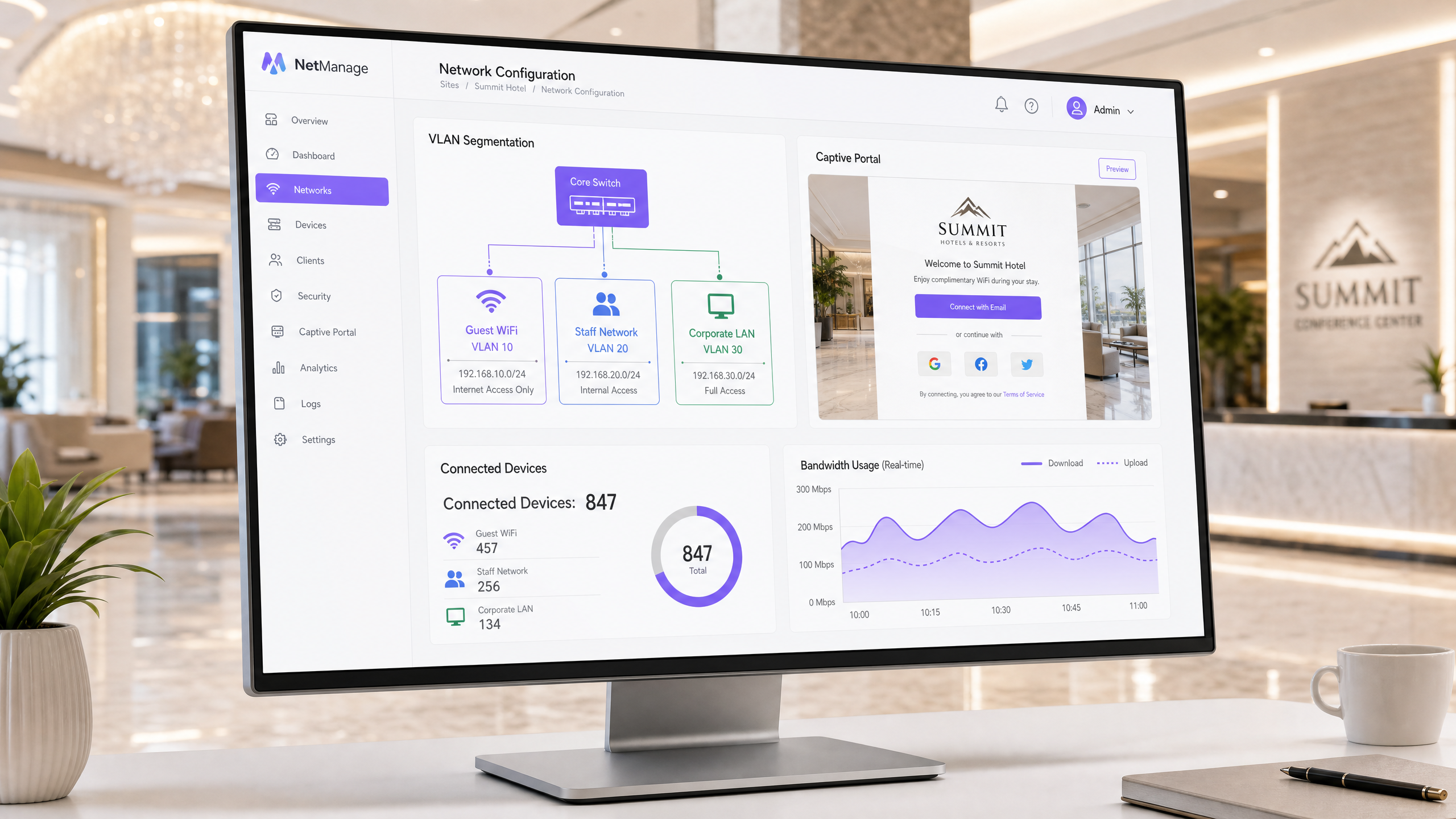
Die Standard-Enterprise-Architektur weist bestimmten Datenverkehrstypen eindeutige VLAN-IDs zu. Beispielsweise verarbeitet VLAN 10 das Gast-WiFi, VLAN 20 die Mitarbeiternetzwerke und VLAN 30 die Unternehmensinfrastruktur. Jedes VLAN arbeitet in seinem eigenen IP-Subnetz und DHCP-Bereich. Der Gast-Datenverkehr wird direkt ins Internet geleitet; er berührt niemals interne Routing-Tabellen.
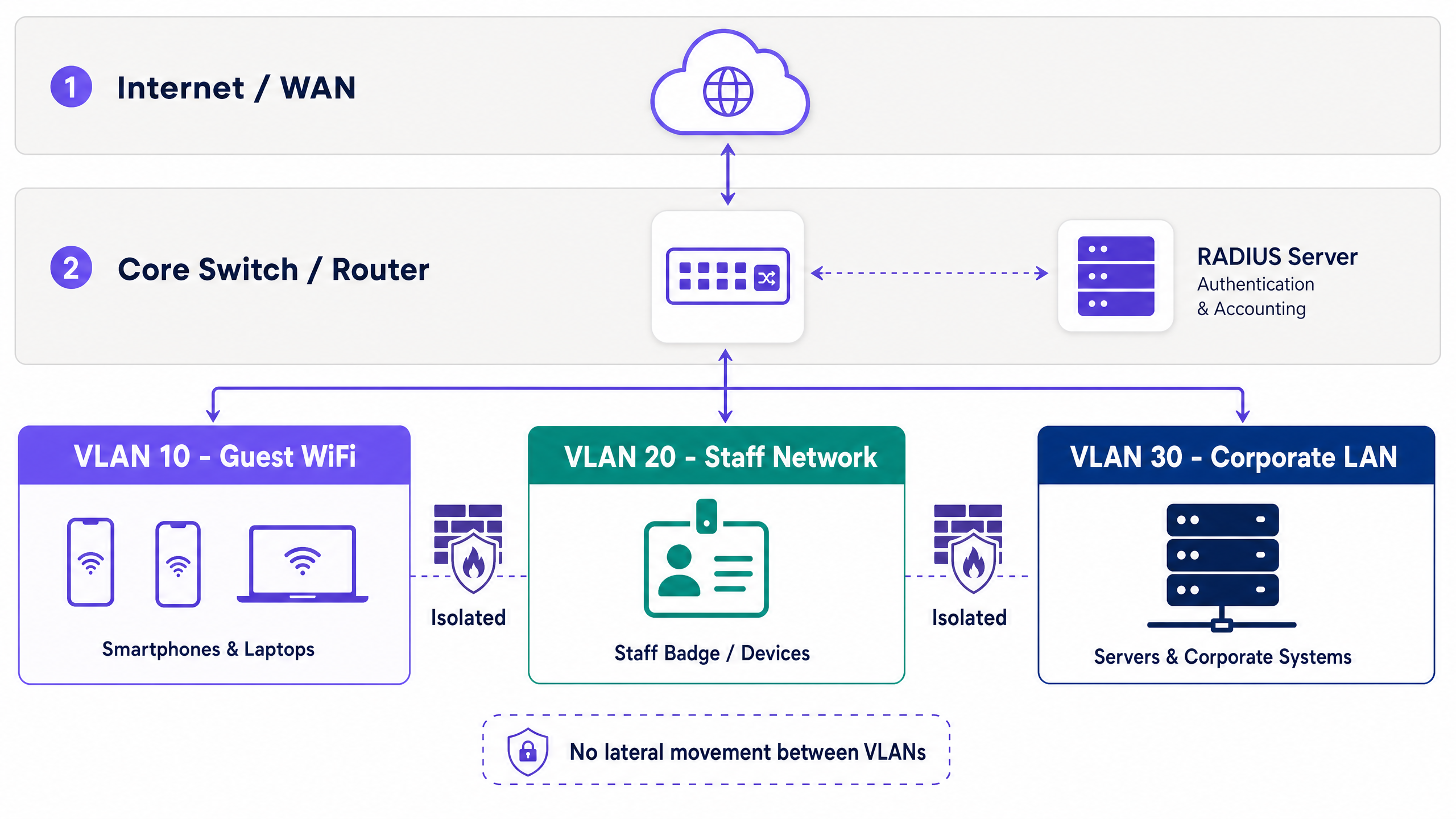
Eine hardwareunabhängige Bereitstellung ist Standardpraxis. Access Points von Cisco Meraki, HPE Aruba, Ruckus, Juniper Mist, Ubiquiti UniFi, Cambium, Extreme und Fortinet weisen SSIDs nativ VLAN-Tags zu. Managed Switches berücksichtigen diese Tags und gewährleisten so die Isolation im gesamten Kernnetzwerk.
Innerhalb des Gast-VLANs ist die Client-Isolation zwingend erforderlich. Diese Einstellung verhindert, dass Gastgeräte untereinander kommunizieren, wodurch Peer-to-Peer-Angriffsvektoren eliminiert werden.
Sicherheits- und Verschlüsselungsstandards
Die Wi-Fi Alliance schreibt WPA3 für moderne Bereitstellungen vor. Bei Gastnetzwerken ersetzt WPA3-SAE (Simultaneous Authentication of Equals) den anfälligen WPA2-PSK-Handshake und mindert so Offline-Wörterbuchangriffe.
Für Mitarbeiternetzwerke bietet 802.1X eine portbasierte Netzwerkzugriffskontrolle. Geräte authentifizieren sich an einem RADIUS-Server mittels EAP-TLS (zertifikatsbasiert) oder PEAP (anmeldedatenbasiert in einem TLS-Tunnel). EAP-TLS erfordert eine Public-Key-Infrastruktur (PKI) und lässt sich in Identitätsanbieter wie Microsoft Entra ID oder Okta integrieren.
Gästen fehlen Unternehmenszertifikate, was 802.1X für den öffentlichen Zugang unpraktisch macht. Die sichere Alternative ist iPSK oder PPSK (individuelle oder private Pre-Shared Keys). Jede Sitzung erhält einen eindeutigen Schlüssel, sodass Administratoren den Zugriff einzelner Benutzer widerrufen können, ohne ein globales Passwort ändern zu müssen. Purple automatisiert dies über seine Captive Portal-Integration.
Captive Portal und Datenerfassung
Ein Captive Portal fängt HTTP-Anfragen von nicht authentifizierten Geräten ab und leitet sie auf eine gebrandete Login-Seite weiter. Dieser Mechanismus setzt Nutzungsbedingungen durch und erfasst Identitätsdaten.
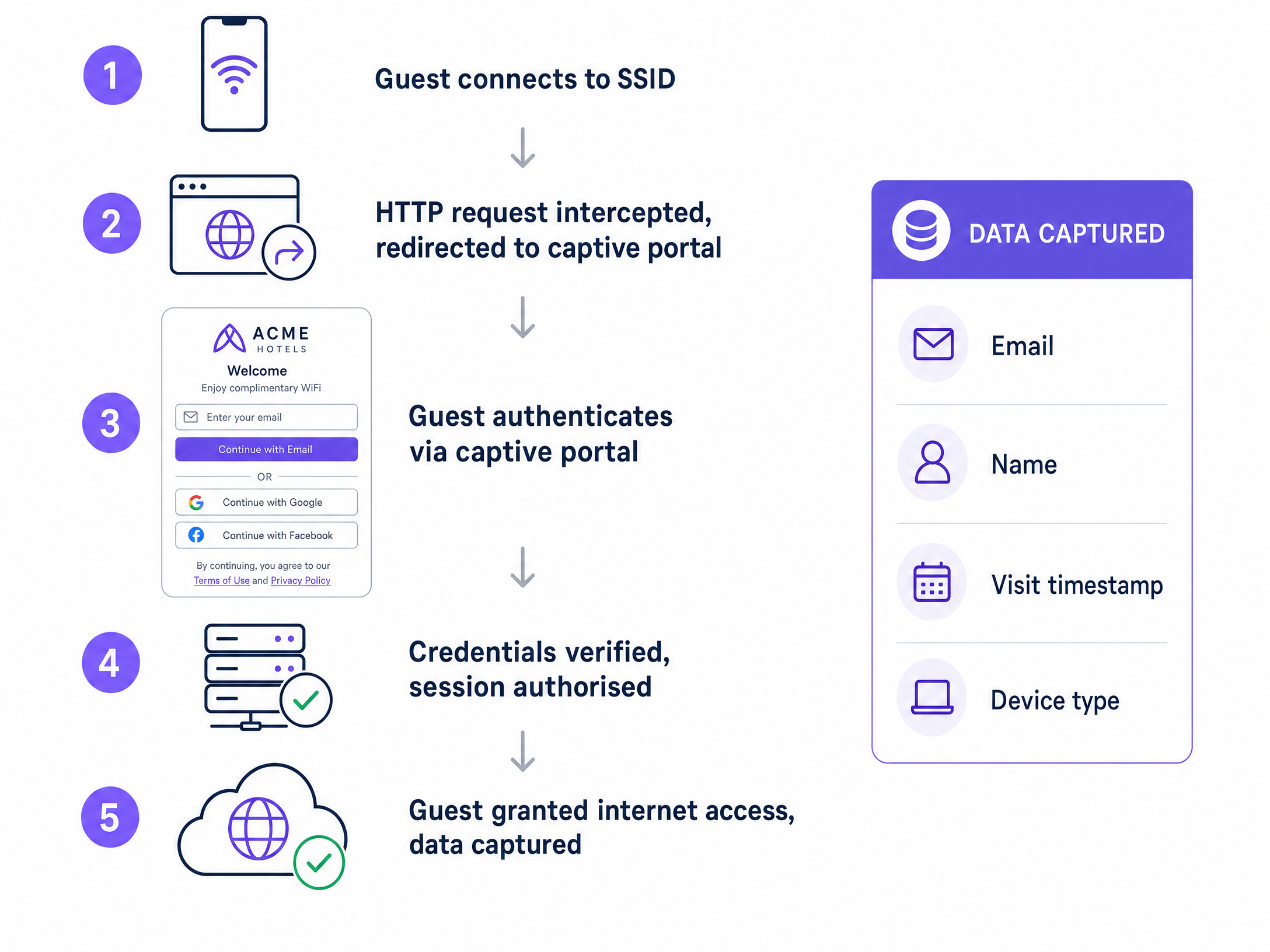
Die Authentifizierungsmethoden bestimmen die Datenqualität. Die E-Mail-Registrierung erfasst direkte Kontaktdaten. Social Login (Google Workspace, Facebook) reduziert Reibungsverluste. Die SMS-Verifizierung validiert Telefonnummern. Für Hochsicherheitsumgebungen validiert das Verify-Add-on von Purple offizielle Ausweisdokumente.
Die GDPR-Konformität erfordert explizite Opt-ins mit bewusster Entscheidung für Marketingkommunikation. Das Portal muss den Zeitstempel, die IP-Adresse, die MAC-Adresse und die spezifische Einwilligungsversion protokollieren. Purple verarbeitet dies automatisch und stellt einen vollständigen Audit-Trail bereit. Daten zeigen, dass Portale mit drei oder weniger Feldern deutlich höhere Abschlussraten erzielen.
Implementierungsleitfaden
Befolgen Sie diese Reihenfolge für die Bereitstellung:
- Architektur entwerfen: Ordnen Sie Datenverkehrstypen zu, weisen Sie VLAN-IDs zu, definieren Sie Subnetze und dokumentieren Sie Firewall-Regeln, bevor Sie die Hardware anfassen.
- Core-Routing konfigurieren: Legen Sie Inter-VLAN-Routing-Richtlinien fest. Der Gast-Datenverkehr erfordert eine Standardroute ins Internet und eine „Deny-All“-Regel für interne Subnetze.
- Access Points konfigurieren: Weisen Sie die Gast-SSID dem vorgesehenen VLAN zu und aktivieren Sie die Client-Isolation.
- Captive Portal bereitstellen: Integrieren Sie das Portal in Ihren RADIUS-Server und konfigurieren Sie GDPR-konforme Einwilligungsfelder.
- Testen und Verifizieren: Führen Sie einen Penetrationstest durch, um zu bestätigen, dass Geräte im Gast-VLAN keine internen IP-Adressen anpingen können.
Best Practices
- Schlüsselrotation automatisieren: Ersetzen Sie statische Pre-Shared Keys durch eine automatisierte iPSK-Generierung.
- Bandbreite begrenzen: Setzen Sie Bandbreitenbegrenzungen pro Benutzer im Gast-VLAN durch, um eine Netzwerkbeeinträchtigung zu verhindern.
- Sitzungsdaten protokollieren: Bewahren Sie DHCP- und RADIUS-Protokolle mindestens 90 Tage lang auf, um die Reaktion auf Sicherheitsvorfälle zu unterstützen.
- Portale einfach halten: Beschränken Sie Captive Portal-Formulare auf Name, E-Mail und ein eindeutiges Kontrollkästchen für die Einwilligung.
Fehlerbehebung & Risikominderung
Symptom: Gäste erhalten IP-Adressen, können aber nicht auf das Internet oder das Captive Portal zugreifen. Lösung: Überprüfen Sie die DNS-Auflösung im Gast-VLAN. Die Weiterleitung zum Captive Portal basiert auf DNS-Interzeption. Stellen Sie sicher, dass die Firewall-Regeln DNS (Port 53) und HTTP/HTTPS (Ports 80/443) eausgehend.
Symptom: Gastgeräte können sich gegenseitig anpingen. Lösung: Die Client-Isolierung ist auf dem Access Point oder Controller deaktiviert. Aktivieren Sie diese sofort, um Peer-to-Peer-Angriffe zu verhindern.
ROI & geschäftliche Auswirkungen
Ein richtig konzipiertes Gast-WiFi-Netzwerk verwandelt eine Kostenstelle in einen Umsatzbringer. Durch die Erfassung von First-Party-Daten über ein konformes Captive Portal bauen Standorte nutzbare Marketing-Datenbanken auf. Die Plattform von Purple integriert diese Daten in CRM-Systeme und ermöglicht so zielgerichtete Kampagnen basierend auf Besuchshäufigkeit, Verweildauer und demografischen Profilen.
Für die IT wird der ROI an der Risikominderung gemessen. VLAN-Segmentierung und die iPSK-Bereitstellung eliminieren die Hauptvektoren für Sicherheitsverletzungen im internen Netzwerk, die von öffentlichen Access Points ausgehen.
Weiterführende Ressourcen
- Erfahren Sie mehr über Gast-WiFi und unsere WiFi-Analytics -Plattform.
- Lesen Sie unseren Leitfaden Sicherheit von Enterprise-WiFi: Ein vollständiger Leitfaden für 2026 .
- Entdecken Sie Hardware-Integrationen wie die Integration von Grandstream GWN Access Points mit Purple WiFi .
- Sehen Sie sich branchenspezifische Lösungen für den Einzelhandel , das Gastgewerbe , das Gesundheitswesen und das Transportwesen an.
Schlüsseldefinitionen
VLAN (Virtual Local Area Network)
A logical partition of a physical network that isolates traffic streams.
Used to separate guest devices from corporate systems, preventing lateral movement and satisfying compliance requirements.
Captive Portal
A web page that intercepts unauthenticated users before granting network access.
The primary mechanism for capturing first-party data, enforcing terms of service, and securing GDPR consent.
Client Isolation
A wireless network setting that prevents devices on the same SSID from communicating with each other.
Essential for guest networks to block peer-to-peer attacks and protect user privacy.
RADIUS
Remote Authentication Dial-In User Service; a protocol for centralized authentication and accounting.
Validates user credentials from the captive portal or 802.1X supplicant before authorizing network access.
802.1X
An IEEE standard for port-based network access control.
Used on staff networks to require identity verification (via certificates or credentials) before granting access.
iPSK / PPSK
Individual or Private Pre-Shared Key; assigns a unique encryption key to each client session.
Replaces static global passwords on guest networks, allowing administrators to revoke single sessions securely.
WPA3-SAE
The modern encryption standard utilizing Simultaneous Authentication of Equals.
Protects guest network handshakes from offline dictionary attacks.
First-Party Data
Information collected directly from the user with their explicit consent.
The primary business value generated by the captive portal, used for CRM integration and marketing.
Ausgearbeitete Beispiele
A 200-room hotel needs to deploy guest WiFi alongside a new IP-based property management system (PMS) and staff tablets. How should the network be segmented?
Deploy three distinct VLANs. VLAN 10 (192.168.10.0/24) for Guest WiFi, routed directly to the internet with client isolation enabled. VLAN 20 (192.168.20.0/24) for Staff Tablets, secured via 802.1X PEAP authentication against Microsoft Entra ID. VLAN 30 (192.168.30.0/24) for the PMS and internal servers. Configure the core firewall to block all traffic originating from VLAN 10 to VLANs 20 and 30.
A stadium wants to collect marketing data from fans connecting to the WiFi, but previous attempts resulted in low login rates and GDPR complaints.
Deploy a captive portal with a maximum of two input fields: Name and Email. Implement a conscious-choice opt-in checkbox for marketing consent, clearly separated from the terms of service acceptance. Use Purple to automatically log the MAC address, timestamp, and consent version for the audit trail.
Übungsfragen
Q1. You are auditing a retail chain's guest WiFi. The network uses a single WPA2-PSK password printed on receipts. What are the primary security and business risks, and how do you resolve them?
Hinweis: Consider both encryption vulnerabilities and data capture opportunities.
Musterlösung anzeigen
The risks are twofold. Security: A static WPA2-PSK is vulnerable to dictionary attacks, and anyone with the receipt has permanent access. Business: The venue captures zero first-party data. Resolution: Deploy an open network with a captive portal for data capture, backed by iPSK to generate unique session keys, and ensure the SSID is mapped to an isolated guest VLAN.
Q2. A venue operator wants to pre-tick the marketing consent box on the captive portal to increase their database size. How do you advise them?
Hinweis: Refer to GDPR requirements for lawful basis of processing.
Musterlösung anzeigen
Advise against it immediately. Under GDPR, consent must be a conscious-choice opt-in. Pre-ticked boxes are legally invalid and expose the venue to significant regulatory fines. Instead, optimize the portal design by reducing the number of fields to increase legitimate completion rates.
Q3. A guest device on VLAN 10 attempts to access a printer on VLAN 30. The core switch routes the traffic successfully. What configuration is missing?
Hinweis: VLANs separate broadcast domains, but what controls traffic between them?
Musterlösung anzeigen
The inter-VLAN routing policy on the core firewall or Layer 3 switch is misconfigured. A deny-all rule must be applied to the guest VLAN interface, blocking traffic destined for any internal subnet (like VLAN 30) while permitting outbound internet traffic.
Weiterlesen in dieser Reihe
Konfiguration der Captive Portal-Weiterleitung auf Enterprise-Netzwerk-Controllern
Dieser maßgebliche Leitfaden beschreibt die technische Architektur und die herstellerspezifischen Konfigurationsschritte, die für die Implementierung der Captive Portal-Weiterleitung auf Enterprise-Netzwerk-Controllern erforderlich sind. Er bietet IT-Teams praxisnahe Anleitungen zur Konfiguration von Walled Gardens, zur Integration der RADIUS-Authentifizierung und zur Gewährleistung der Compliance mit GDPR und PCI DSS.
Mitarbeiter-WiFi Captive Portal: Onboarding und Authentifizierung von Mitarbeitern
Eine umfassende technische Referenz für IT-Leiter zur Konzeption und Bereitstellung von Mitarbeiter-WiFi Captive Portals. Dieser Leitfaden behandelt EAP-TLS-Authentifizierung, BYOD-Onboarding, VLAN-Segmentierung und Bandbreitenmanagement zur Steigerung der betrieblichen Effizienz und Minimierung von Sicherheitsrisiken.
So konfigurieren Sie die WeChat-OAuth-Authentifizierung für Captive Portals
Dieser technische Leitfaden erklärt, wie Sie die WeChat-OAuth-Authentifizierung für Captive Portals konfigurieren. Er beschreibt detailliert die erforderlichen Plattformregistrierungen, den OAuth 2.0-Ablauf, die Scope-Auswahl und die Mechanismen zur Netzwerkdurchsetzung, die erforderlich sind, um First-Party-Daten von chinesischen Besuchern sicher zu erfassen.