
How to Configure SCEP for Secure BYOD and 802.1X Network Authentication
This guide provides a comprehensive technical reference for configuring SCEP to deploy certificate-based 802.1X network authentication. It covers the architectural shift from shared passwords to EAP-TLS, Mobile Device Management integration, and strict network segmentation for secure BYOD access in enterprise environments.
Listen to this guide
View podcast transcript

Executive Summary
For IT managers and network architects operating across enterprise environments, managing BYOD (Bring Your Own Device) WiFi access has shifted from a convenience feature to a critical security imperative. Relying on pre-shared keys or basic captive portals for staff WiFi is a security vulnerability and an operational bottleneck. Modern network architecture demands 802.1X authentication using EAP-TLS, ensuring every device is cryptographically verified before accessing the network.
This guide provides a pragmatic, vendor-neutral framework for deploying secure BYOD WiFi using the Simple Certificate Enrollment Protocol (SCEP). We detail the precise configurations required to secure the modern enterprise edge, focusing on implementing 802.1X authentication, leveraging Mobile Device Management (MDM) for compliance, and enforcing strict network segmentation. By mapping these technical controls to business outcomes, IT leaders can deploy solutions that protect data integrity while maintaining operational efficiency.
Technical Deep-Dive: SCEP and 802.1X Architecture
The foundation of secure BYOD WiFi rests on abandoning shared passwords in favour of identity-based access control.
The 802.1X Standard and EAP-TLS
The IEEE 802.1X standard is the non-negotiable baseline for enterprise WiFi security. It provides port-based Network Access Control (PNAC), ensuring that a device cannot communicate on the network until it has been explicitly authenticated. For BYOD deployments, EAP-TLS (Transport Layer Security) is the gold standard. EAP-TLS relies on client-side X.509 certificates, eliminating the risk of credential theft and man-in-the-middle attacks.
SCEP (Simple Certificate Enrollment Protocol)
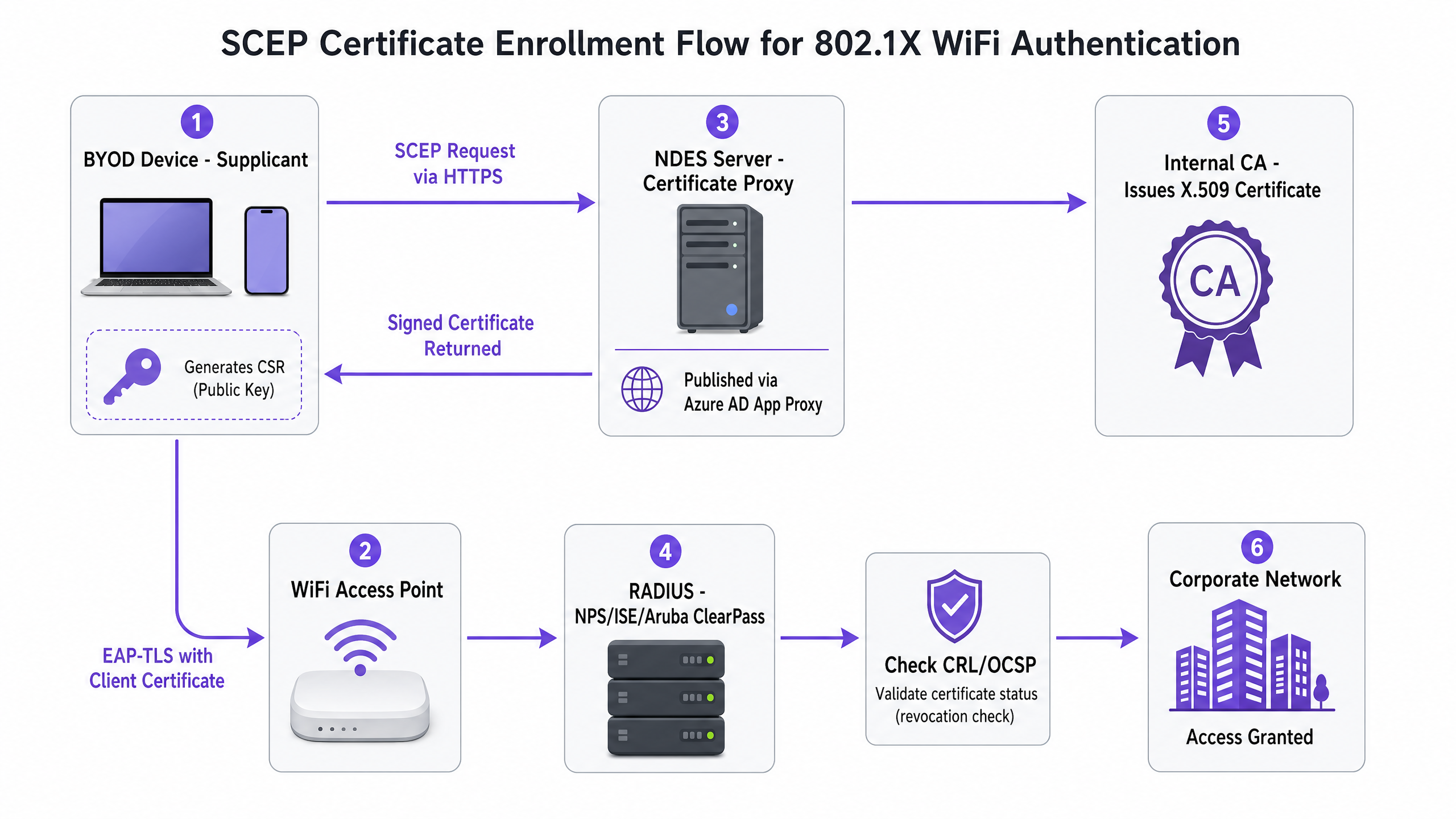
To deploy these certificates at scale, SCEP automates the issuance and management of certificates within a Public Key Infrastructure (PKI). In a SCEP workflow, the MDM service instructs the endpoint to generate its own private/public key pair. The device then creates a Certificate Signing Request (CSR) and sends it via a Network Device Enrollment Service (NDES) server to your Certificate Authority (CA).
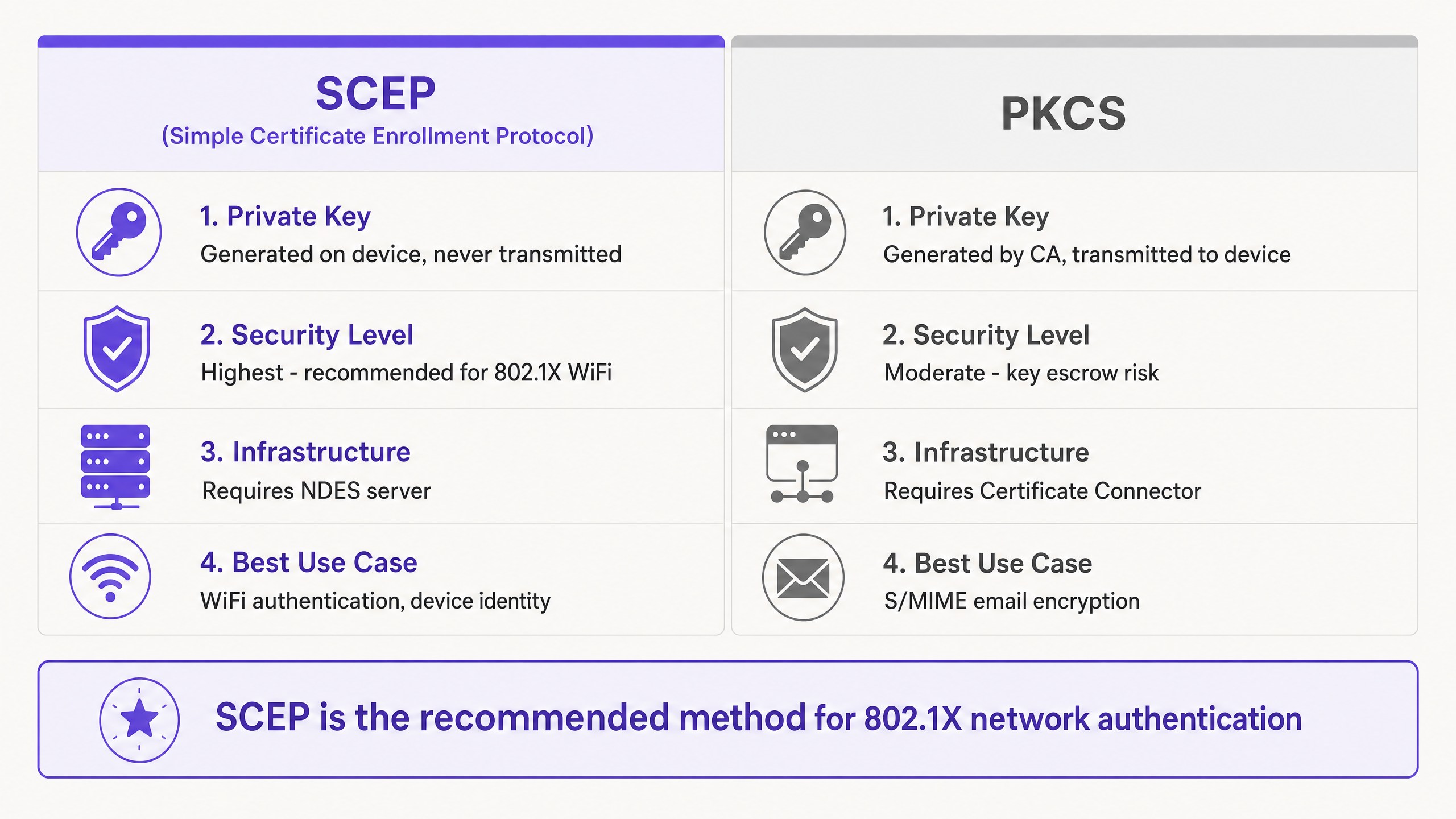
The critical security advantage of SCEP is that the private key never leaves the device. It is generated locally and stored in the device's secure enclave (such as the TPM on Windows or the Secure Enclave on iOS).
Implementation Guide: The Deployment Sequence
Successfully configuring SCEP for 802.1X requires strict adherence to a specific deployment sequence. Intune profile dependencies dictate that trust must be established before authentication can be configured.
Step 1: Deploy the Trusted Root Certificate Profile
Before any device can request a client certificate or trust your RADIUS server, it must trust the issuing Certificate Authority. Export your Root CA certificate as a .cer file and deploy this profile to your target device groups.
Step 2: Configure the SCEP Certificate Profile
Configure the SCEP profile to instruct devices on how to obtain their client certificate. Link this profile to the Trusted Root certificate profile created in Step 1 and provide the external URL of your NDES server.
Step 3: Deploy the 802.1X WiFi Profile
The final step is pushing the WiFi configuration that ties the certificates to the network SSID. Set the security type to WPA2-Enterprise or WPA3-Enterprise, set the EAP type to EAP-TLS, and select the SCEP certificate profile created in Step 2 as the client authentication certificate.
Best Practices and Network Segmentation
When implementing SCEP certificate deployment, adhere to the following vendor-neutral best practices to ensure compliance and reliability.
Strict Three-Zone Architecture
A flat network is a compromised network. Implement strict segmentation:
- Corporate Zone: Managed, company-owned devices with full access to internal resources.
- BYOD Zone: Employee-owned devices with internet access and restricted access to specific internal applications.
- Guest Zone: Visitor devices with internet access only and client isolation enabled.
NDES Server Placement
Publish the NDES URL using Microsoft Entra ID Application Proxy. This provides secure remote access without opening inbound firewall ports and allows you to apply Conditional Access policies to the enrollment flow.
WPA3-Enterprise and OpenRoaming
Transition from WPA2 to WPA3-Enterprise to benefit from mandatory Protected Management Frames (PMF). For seamless, secure connectivity across venues, consider implementing OpenRoaming. Purple acts as a free identity provider for OpenRoaming under the Connect license, simplifying secure access without manual onboarding.
Troubleshooting & Risk Mitigation
Even with meticulous planning, certificate deployment can encounter issues.
Group Targeting Mismatches
If the SCEP profile is assigned to a User Group, but the WiFi profile is assigned to a Device Group, the MDM cannot resolve the dependency. Ensure the Trusted Root, SCEP, and WiFi profiles are all deployed to the exact same group.
RADIUS and CRL Checking
If a device certificate is revoked, the RADIUS server must know immediately. Configure your Network Policy Server (NPS) or RADIUS server to enforce strict Certificate Revocation List (CRL) checking. Ensure your CRL Distribution Points (CDPs) are highly available.
ROI & Business Impact
Transitioning to SCEP 802.1X certificate deployment delivers measurable returns across security and operations.
- Helpdesk Ticket Reduction: Password-based WiFi generates a significant volume of support tickets. Certificate-based authentication is invisible to the user, typically reducing WiFi-related helpdesk volume by 70%.
- Enhanced Security Posture: EAP-TLS eliminates the risk of credential harvesting. This is critical for compliance with frameworks like PCI DSS and GDPR, particularly in Healthcare and Retail environments.
- Seamless Onboarding: Integrating SCEP with existing MDM workflows ensures a unified, zero-touch provisioning experience from day one.
For further reading on related topics, see Guest WiFi , WiFi Analytics , and our Enterprise WiFi Security: A Complete Guide for 2026 .
Key Definitions
SCEP (Simple Certificate Enrollment Protocol)
A protocol that allows devices to request digital certificates from a Certificate Authority, where the private key is generated and stored securely on the device itself.
The recommended method for deploying WiFi authentication certificates due to its high security and scalability.
EAP-TLS (Extensible Authentication Protocol - Transport Layer Security)
The most secure 802.1X authentication method, requiring both the server and the client to present valid digital certificates.
The target authentication protocol that the MDM WiFi and certificate profiles are designed to enable.
802.1X
An IEEE standard for port-based Network Access Control (PNAC) that provides an authentication mechanism to devices wishing to attach to a LAN or WLAN.
The foundational framework that prevents unauthenticated devices from passing traffic on the enterprise network.
NDES (Network Device Enrollment Service)
A Microsoft Windows Server role that acts as a bridge, allowing devices without domain credentials to obtain certificates via SCEP.
A required infrastructure component when implementing on-premises SCEP certificate deployment.
PKCS (Public Key Cryptography Standards)
A set of standards where both the public and private keys are generated by the Certificate Authority and then securely delivered to the endpoint.
Often used for S/MIME email encryption, but less ideal for WiFi due to the network transmission of the private key.
CRL (Certificate Revocation List)
A list published by the Certificate Authority containing the serial numbers of certificates that have been revoked prior to their scheduled expiration date.
RADIUS servers must check this list to ensure compromised or lost devices are denied network access.
RADIUS (Remote Authentication Dial-In User Service)
A networking protocol that provides centralized Authentication, Authorization, and Accounting (AAA) management for users who connect and use a network service.
The server that validates the client certificate during the EAP-TLS handshake.
VLAN (Virtual Local Area Network)
A logical subnetwork that groups a collection of devices from different physical LANs.
Used to enforce strict network segmentation between Corporate, BYOD, and Guest devices.
Worked Examples
A 400-room hotel needs to secure its staff WiFi network for 150 employees bringing their own smartphones, replacing an old WPA2-PSK network.
The hotel deploys a cloud-based MDM (like Microsoft Intune). They broadcast a provisioning SSID that directs users to a captive portal. The portal prompts users to enroll their device in the MDM. Once enrolled, the MDM pushes a Trusted Root profile, a SCEP profile, and an 802.1X WiFi profile. The device silently generates a key pair, requests a certificate via the SCEP URL, and connects to the secure BYOD SSID using EAP-TLS. The provisioning SSID is then forgotten.
A retail chain with 50 locations is experiencing mass authentication failures after migrating from PEAP to EAP-TLS using SCEP.
The IT team audits the RADIUS server logs and discovers that the CRL Distribution Point (CDP) is unreachable from the RADIUS server. Because strict CRL checking is enabled, the RADIUS server rejects all connection attempts when it cannot verify the revocation status. The team resolves this by publishing the CRL to a highly available internal web server and updating the CDP extension in the CA template.
Practice Questions
Q1. You are deploying Intune WiFi profiles for 802.1X. The devices receive the SCEP certificate successfully, but the WiFi profile fails to apply. What is the most likely cause?
Hint: Consider how Intune resolves dependencies between profiles.
View model answer
The most likely cause is a group targeting mismatch. The Trusted Root, SCEP, and WiFi profiles must all be assigned to the exact same Azure AD group (either all Users or all Devices). If assignments differ, Intune cannot resolve the dependency chain.
Q2. A hospital IT director wants to use PKCS instead of SCEP for their BYOD WiFi deployment because it requires less on-premises infrastructure. What security risk should you highlight?
Hint: Think about where the private key is generated.
View model answer
You should highlight that with PKCS, the private key is generated centrally by the CA and transmitted over the network to the device. For network authentication, SCEP is strongly recommended because the private key is generated locally on the device and never leaves the secure enclave.
Q3. During an EAP-TLS handshake, the client device rejects the connection to the RADIUS server, preventing a potential evil twin attack. Which configuration setting enables this protection?
Hint: What does the client check during mutual authentication?
View model answer
Enforcing server certificate validation on the client supplicant enables this protection. The MDM-deployed WiFi profile must specify the trusted CA and the expected RADIUS server name, ensuring the device only connects to the legitimate corporate RADIUS server.
Continue reading in this series
Integrating WeChat WiFi Authentication: Captive Portal Onboarding for APAC Customers
WeChat has 1.41 billion monthly active users, making it the primary digital identity for Chinese consumers globally. This guide explains how to integrate WeChat OAuth 2.0 authentication into enterprise captive portals for APAC venues, covering platform registration, scope selection, RADIUS Change of Authorisation enforcement, and dual-framework compliance with GDPR and China's PIPL. It is aimed at IT managers, network architects, and venue operations directors who need to act this quarter.
Configuring Captive Portal Redirection on Enterprise Network Controllers
This authoritative guide details the technical architecture and vendor-specific configuration steps required to implement captive portal redirection on enterprise network controllers. It provides actionable guidance for IT teams on configuring walled gardens, integrating RADIUS authentication, and ensuring compliance with GDPR and PCI DSS.
Configurando Redireccionamiento de Portal Cautivo en Controladores de Red Enterprise
This authoritative guide details the technical architecture and vendor-specific configuration steps required to implement captive portal redirection on enterprise network controllers. It provides actionable guidance for IT teams on configuring walled gardens, integrating RADIUS authentication, and ensuring compliance with GDPR and PCI DSS.