
Configuración del redireccionamiento de Captive Portal en controladores de red Enterprise
Esta guía autorizada detalla la arquitectura técnica y los pasos de configuración específicos de cada proveedor necesarios para implementar el redireccionamiento de Captive Portal en controladores de red enterprise. Proporciona orientación práctica para los equipos de TI sobre cómo configurar walled gardens, integrar la autenticación RADIUS y garantizar el cumplimiento de GDPR y PCI DSS.
Escuchar esta guía
Ver transcripción del podcast
Resumen ejecutivo
Configurar un redireccionamiento de Captive Portal en un controlador de red enterprise es un requisito fundamental para ofrecer un WiFi de invitados seguro y conforme a la normativa. Cuando se configura correctamente, el controlador intercepta el tráfico de clientes no autenticados y emite un redireccionamiento HTTP 302 a un portal externo, lo que permite la autenticación, la captura de consentimiento y la segmentación de la red. Si se configura de forma incorrecta, se producen fallos de conexión silenciosos, advertencias de seguridad en el navegador y riesgos de cumplimiento.
Esta guía proporciona la arquitectura técnica y los pasos de configuración específicos de cada proveedor necesarios para implementar Captive Portals externos en Cisco Meraki, HPE Aruba, Ruckus, Juniper Mist y Ubiquiti UniFi. Detallamos el funcionamiento del flujo de redireccionamiento, los requisitos precisos para la configuración de walled gardens y la integración de RADIUS para la autenticación y la contabilidad (accounting). Al seguir estos pasos, se garantiza que la red de invitados cumpla con los requisitos de segmentación de PCI DSS, capture el consentimiento explícito de GDPR y dirija de forma segura los datos de primera mano a plataformas como Purple.
Análisis técnico detallado
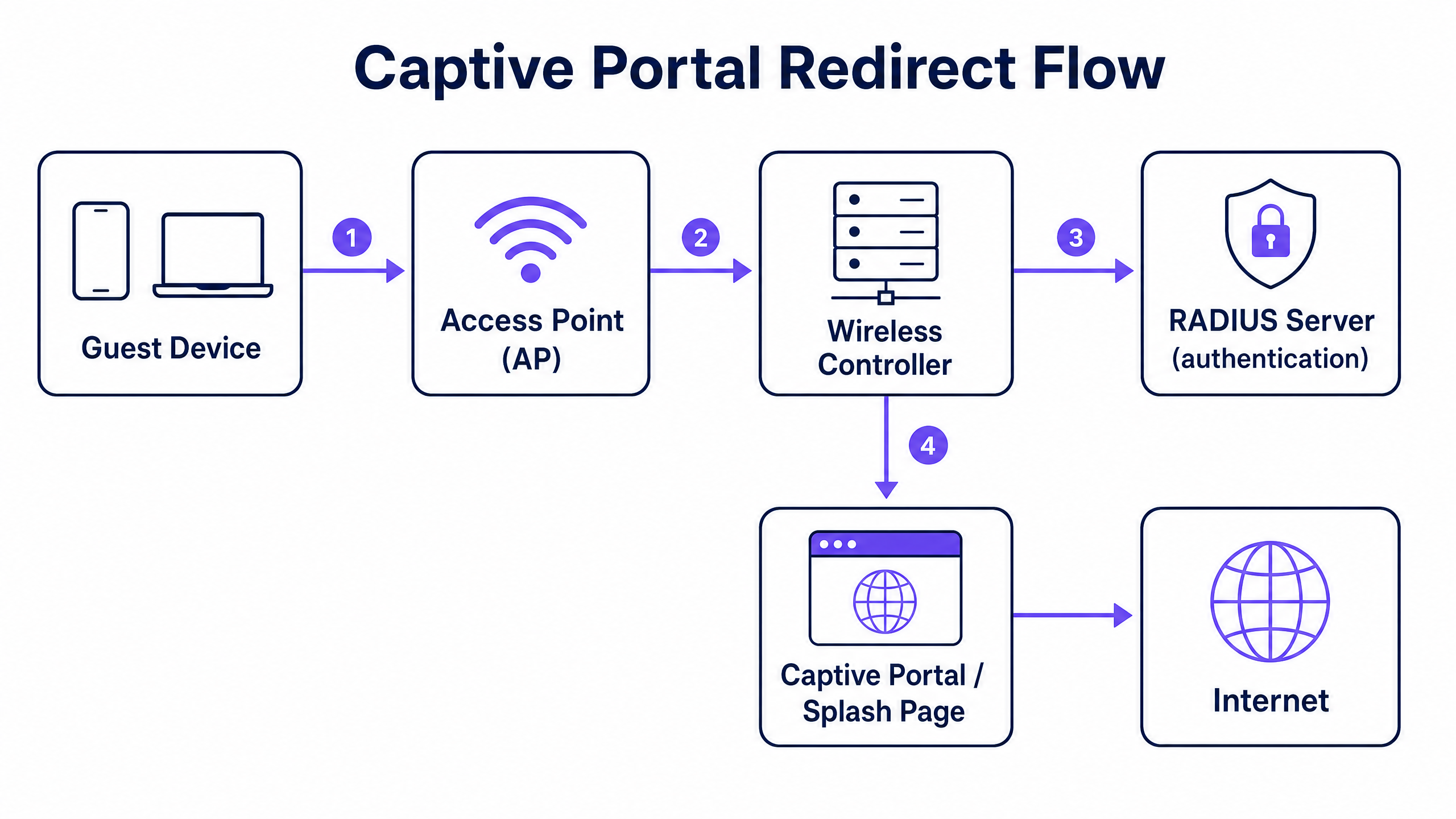
El mecanismo de redireccionamiento de Captive Portal funciona a nivel de controlador de red. Se basa en una secuencia específica de cambios de estado de la red para interceptar, autenticar y autorizar un dispositivo cliente.
El flujo de redireccionamiento
- Asociación y DHCP: un dispositivo de invitado se asocia con el SSID de invitados. El controlador asigna una dirección IP a través de DHCP, pero coloca al cliente en un estado restringido de preautenticación (a menudo asignado a una VLAN o rol de preautenticación específico).
- Aplicación de Walled Garden: en este estado de preautenticación, se descarta todo el tráfico saliente excepto el DNS (puerto 53), DHCP (puertos 67 y 68) y el tráfico destinado a direcciones IP o dominios específicos definidos en la lista de control de acceso (ACL). Esta ACL se conoce como walled garden.
- Intercepción y redireccionamiento: cuando el invitado abre un navegador e inicia una solicitud HTTP, el controlador intercepta la solicitud. En lugar de enrutar el tráfico a Internet, el controlador responde con un código de estado HTTP 302 Found, redireccionando el navegador a la URL de su Captive Portal externo. Los sistemas operativos modernos utilizan sondas HTTPS automáticas (como el Captive Network Assistant de Apple) para detectar este redireccionamiento y activar un pseudonavegador.
- Autenticación: el invitado interactúa con la página de bienvenida (splash page) alojada en el portal externo (por ejemplo, Purple). Esto puede implicar un inicio de sesión social, el envío de un formulario o un simple clic. Al finalizar, el portal se comunica con el controlador para autorizar la sesión.
- Autorización y contabilidad (Accounting): la señal de autorización se envía normalmente a través de un mensaje RADIUS Access-Accept o mediante una API específica del proveedor. El controlador recibe esta señal, mueve al cliente al estado posterior a la autenticación (a menudo una VLAN diferente), elimina la regla de redireccionamiento y concede acceso a Internet. A continuación, el controlador envía un mensaje RADIUS Accounting-Start para registrar la duración de la sesión y el uso de datos.
Guía de implementación
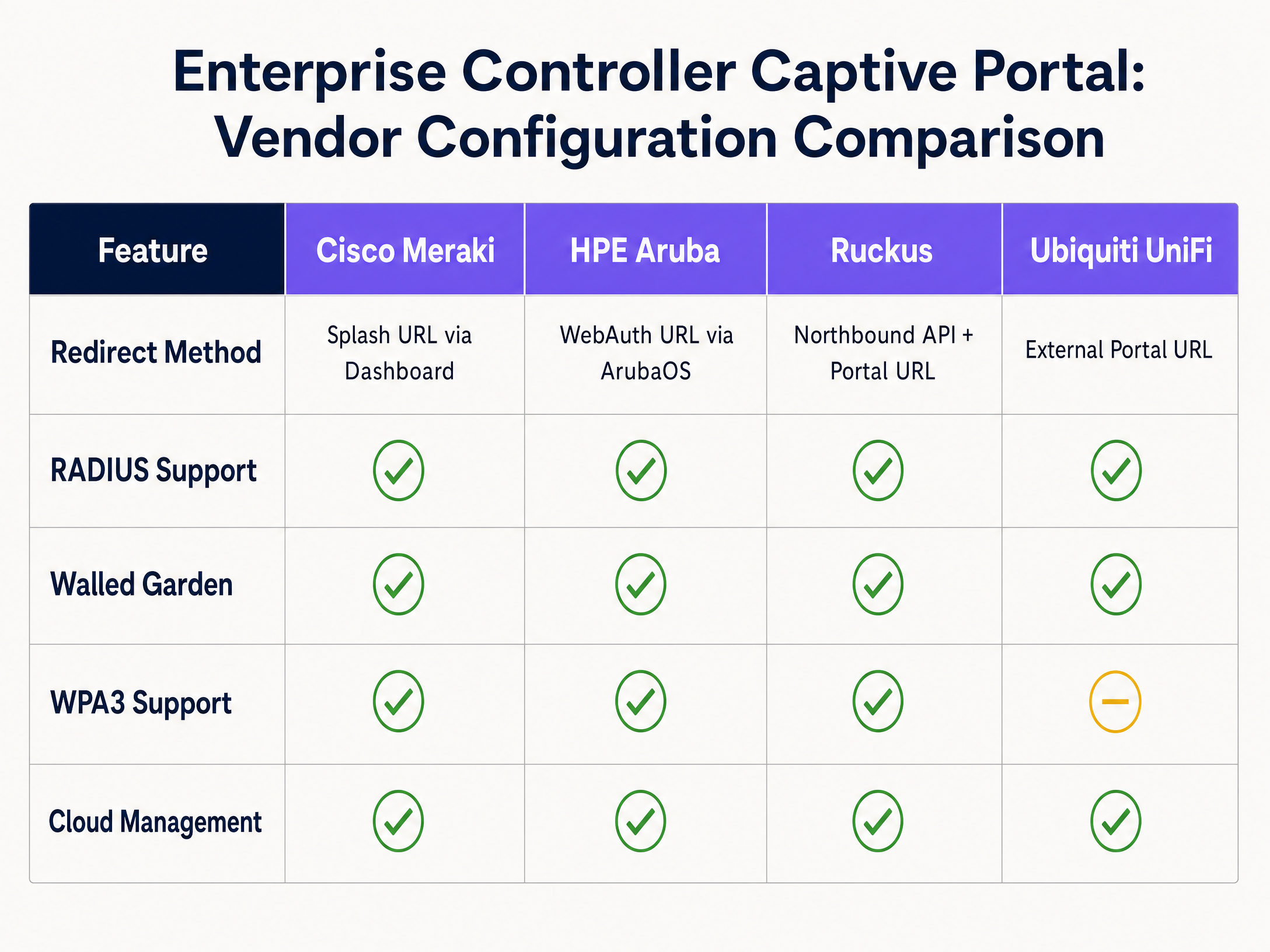
La arquitectura fundamental es coherente entre los distintos proveedores, pero la sintaxis de configuración varía significativamente. A continuación se detallan los pasos para las principales plataformas enterprise.
Cisco Meraki
Cisco Meraki configura los Captive Portals completamente a través del panel de control (Dashboard) de Meraki.
- Vaya a Wireless > Access Control y seleccione su SSID de invitados.
- En Splash page, seleccione Sign-on with my RADIUS server (para acceso basado en credenciales) o Click-through.
- En el campo Custom Splash URL, introduzca la URL de su portal externo proporcionada por Purple.
- En RADIUS, introduzca las direcciones IP de los servidores RADIUS principal y secundario tanto para la autenticación (puerto 1812) como para la contabilidad (puerto 1813), junto con la clave compartida (shared secret).
- Desplácese hasta Advanced Splash Settings para configurar el walled garden. Añada las direcciones IP o los dominios de su servidor de portal y cualquier CDN necesaria.
HPE Aruba
La configuración de Aruba implica definir un perfil de Captive Portal y aplicarlo a un rol.
- En ArubaOS, vaya a Configuration > Authentication > L3 Authentication.
- Cree un nuevo Captive Portal Authentication Profile. Introduzca la Login URL que apunta a su página de bienvenida de Purple.
- Cree un Server Group que contenga sus servidores RADIUS y asígnelo al perfil de Captive Portal.
- Vaya a Configuration > Security > Roles. Edite el rol de preautenticación (a menudo llamado
logon). Asegúrese de que la ACL permita el tráfico DHCP, DNS y HTTP/HTTPS hacia las direcciones IP de su walled garden, y aplique el perfil de Captive Portal a todo el demás tráfico HTTP. - Asigne el rol
logoncomo el rol inicial en su perfil AAA para el SSID de invitados.
Ruckus SmartZone
Ruckus utiliza un tipo de WLAN específico para implementaciones de puntos de acceso (hotspots).
- Vaya a WLANs y cree una nueva WLAN. Establezca el WLAN Type en Hotspot (WISPr).
- En Authentication Options, seleccione External RADIUS Server e introduzca los datos de su servidor tanto para la autenticación como para la contabilidad.
- En Hotspot Portal, seleSeleccione External e introduzca la URL de su portal.
- Configure el Walled Garden añadiendo las direcciones IP o dominios necesarios.
- Ruckus depende de su Northbound Portal Interface (NPI) para gestionar el flujo de autorización, lo que requiere configurar los ajustes de la NPI para permitir la comunicación desde el servidor de su portal.
Ubiquiti UniFi
UniFi ofrece una interfaz sencilla para portales externos.
- En el UniFi Network Controller, vaya a Settings > WiFi y seleccione su red de invitados.
- En Advanced Options, active la Guest Policy.
- Vaya a Settings > Guest Control. En Portal Type, seleccione External Portal Server e introduzca la URL de su portal.
- En Access Control, añada las direcciones IP requeridas a la lista Pre-Authorization Access (el Walled Garden).
- Configure los detalles del servidor RADIUS en Profiles > RADIUS y aplique el perfil a la red de invitados.
Buenas prácticas
1. Configuración del Walled Garden
El Walled Garden es el punto de fallo más crítico en las implementaciones de Captive Portal. Si el Walled Garden está incompleto, el navegador del invitado no podrá cargar la página de bienvenida, lo que dará como resultado una pantalla en blanco o un error de tiempo de espera.
Debe permitir explícitamente el acceso a:
- Las direcciones IP o dominios del servidor del portal principal.
- Las direcciones IP del servidor RADIUS.
- Cualquier red de entrega de contenido (CDN) utilizada por el portal para cargar fuentes, imágenes o JavaScript.
- Dominios de proveedores de identidad si se utiliza el inicio de sesión social (por ejemplo,
facebook.com,google.com).
2. Segmentación de red para PCI DSS
Si en su establecimiento se procesan pagos con tarjeta, el cumplimiento de la normativa PCI DSS exige un aislamiento estricto de la red de invitados respecto al entorno de datos de los titulares de las tarjetas. No confíe únicamente en la separación por SSID. Debe configurar una VLAN de invitados dedicada a nivel de controlador o switch, con reglas de firewall que denieguen explícitamente el enrutamiento entre la VLAN de invitados y cualquier red corporativa interna o de punto de venta (POS).
3. RADIUS Accounting
Configure siempre RADIUS accounting. Aunque la omisión de autorización por MAC (MAC authorisation bypass) puede conceder acceso, se requiere RADIUS accounting (mensajes Accounting-Start y Accounting-Stop) para realizar un seguimiento preciso de la duración de la sesión y el uso de datos. Sin accounting, su plataforma de analítica informará de tiempos de permanencia y recuentos de usuarios concurrentes inexactos.
Resolución de problemas y mitigación de riesgos
Fallos de intercepción HTTPS
Los sistemas operativos modernos utilizan sondas HTTPS para detectar los Captive Portals. Si el controlador intercepta una solicitud HTTPS pero presenta un certificado SSL no válido o no confiable para la redirección, el navegador mostrará una advertencia de seguridad grave (por ejemplo, "La conexión no es privada") y bloqueará la redirección. Para mitigar esto, asegúrese de que su controlador esté provisto de un certificado SSL válido y de confianza pública para su interfaz virtual, o configure el controlador para que solo intercepte el tráfico HTTP para la redirección inicial.
Filtración de DNS
Si la ACL de preautenticación permite un tráfico DNS saliente sin restricciones, los usuarios avanzados pueden utilizar el túnel DNS (DNS tunnelling) para eludir el Captive Portal y acceder a internet sin autenticarse. Mitigue esto restringiendo el tráfico DNS saliente en el rol de preautenticación únicamente a sus resolutores DNS designados, bloqueando todo el demás tráfico del puerto 53.
Discrepancias en el tiempo de espera de la sesión
Si el tiempo de espera de la sesión (session timeout) configurado en el controlador inalámbrico es más corto que el período de validez de la sesión definido en el portal externo, los invitados se desconectarán abruptamente y se verán obligados a volver a autenticarse. Asegúrese de que el tiempo de espera por inactividad (idle timeout) del controlador y el tiempo de espera absoluto de la sesión coincidan con la experiencia de usuario prevista (por ejemplo, 24 horas para entornos de hostelería, 8 horas para retail).
ROI e impacto empresarial
La implementación de un Captive Portal correctamente configurado transforma el WiFi de invitados de un coste operativo en un activo estratégico. Al integrar los controladores empresariales con una capa de inteligencia como Purple, los establecimientos pueden capturar el consentimiento explícito de GDPR y recopilar valiosos datos de primera mano (first-party data).
Purple procesa 440 millones de inicios de sesión al año en 80.000 establecimientos. Estos datos se integran directamente en las plataformas de CRM, lo que permite realizar campañas de marketing dirigidas basadas en visitas físicas reales. Por ejemplo, los operadores de Retail pueden medir la afluencia y las tasas de visitas repetidas, mientras que los establecimientos de Hostelería pueden impulsar las reservas directas interactuando con los huéspedes después de su estancia. El ROI se mide en el aumento del valor de vida del cliente, la mejora de la eficiencia operativa a través de análisis de afluencia precisos y la mitigación del riesgo normativo mediante una gestión de cumplimiento automatizada.
Definiciones clave
Captive Portal
A web page that intercepts unauthenticated network traffic and requires user interaction—such as accepting terms or providing credentials—before granting internet access.
Used in enterprise networks to enforce security policies, capture first-party data, and ensure regulatory compliance.
Walled Garden
An access control list (ACL) applied to unauthenticated clients, permitting access only to specific IP addresses or domains required to load the captive portal.
Critical for ensuring the splash page loads correctly; missing CDN domains in the walled garden will cause the portal to render improperly.
RADIUS
Remote Authentication Dial-In User Service. A networking protocol that provides centralised Authentication, Authorization, and Accounting (AAA) management.
Used by network controllers to verify guest credentials against an external database and log session metrics.
VLAN Segmentation
The practice of dividing a physical network into multiple logical networks to isolate traffic.
Mandatory for PCI DSS compliance to ensure guest WiFi traffic cannot route to payment card environments.
HTTP 302 Redirect
A standard HTTP response status code indicating that the requested resource has been temporarily moved to a different URL.
The mechanism used by network controllers to intercept a guest's initial web request and push their browser to the splash page.
IEEE 802.1X
An IEEE standard for port-based network access control, requiring devices to authenticate before gaining access to the network.
Provides enterprise-grade security by ensuring each connection is individually authenticated, often backed by a RADIUS server.
WPA3-Enterprise
The latest Wi-Fi security protocol, providing robust encryption and requiring 802.1X authentication.
Recommended for secure enterprise deployments to protect against offline dictionary attacks and ensure data confidentiality.
MAC Authorisation Bypass (MAB)
A method of granting network access based on the client device's MAC address rather than requiring explicit user credentials.
Often used in click-through captive portals where the portal registers the MAC address after the user accepts the terms of service.
Ejemplos prácticos
A 350-room hotel needs to deploy a branded guest WiFi portal that captures email addresses for their loyalty programme, ensuring compliance with GDPR and isolating guest traffic from the corporate network.
The IT team deploys Cisco Meraki APs and configures a dedicated guest SSID on VLAN 100. In the Meraki Dashboard, they set the splash page to 'Sign-on with my RADIUS server' and enter Purple's portal URL. They configure the walled garden to include Purple's IP ranges and CDN domains. Firewall rules are applied to VLAN 100, denying routing to the corporate VLAN to ensure PCI DSS compliance. In the Purple platform, a branded portal is created with a data capture form and explicit GDPR consent checkboxes. The Purple CRM connector is configured to sync captured emails directly to the hotel's marketing platform.
A regional retail chain with 40 stores requires a consistent guest WiFi experience across all locations, with centralised management and store-level footfall analytics.
The retailer deploys HPE Aruba APs managed via Aruba Central. A single guest WLAN template is created with an external captive portal pointing to Purple. The pre-authentication role is configured with the necessary walled garden ACLs. This template is applied across all 40 sites using Aruba Central's group policy. In Purple, a unified portal design is deployed, with analytics dashboards configured to segment data by individual store locations.
Preguntas de práctica
Q1. A venue reports that guests connecting to the WiFi are seeing a blank screen instead of the branded splash page. The portal uses custom fonts hosted on Google Fonts. What is the most likely configuration error?
Sugerencia: Consider what traffic is permitted before a user authenticates.
Ver respuesta modelo
The walled garden is incomplete. The Google Fonts CDN domains have not been added to the pre-authentication ACL. The controller is blocking the request to load the fonts, causing the page render to fail.
Q2. To comply with PCI DSS, an IT manager creates a new SSID named 'Guest_WiFi' on the same subnet as the corporate network. Is this sufficient?
Sugerencia: PCI DSS requires isolation of the cardholder data environment.
Ver respuesta modelo
No. Creating a separate SSID on the same subnet does not provide network isolation. The guest network must be placed on a dedicated VLAN with firewall rules explicitly denying routing to the corporate or POS networks.
Q3. A retail chain notices that their analytics dashboard shows 1,000 authentications per day, but the average dwell time metric is missing or zero. What configuration step was missed?
Sugerencia: Which protocol is responsible for tracking session duration?
Ver respuesta modelo
RADIUS Accounting has not been configured on the controller. Without the Accounting-Start and Accounting-Stop messages, the analytics platform cannot calculate the duration of the sessions.
Continúe leyendo esta serie
Guía paso a paso: Configuración de controladores inalámbricos Ruijie para Captive Portals de WiFi de invitados
Esta guía ofrece un recorrido técnico completo para configurar controladores inalámbricos y gateways de Ruijie para implementar Captive Portals de WiFi de invitados de nivel empresarial. Cubre la segmentación de VLAN, la autenticación RADIUS externa a través del protocolo WISPr, la configuración de walled garden y la integración perfecta con la plataforma Identity-Based Networks de Purple para capturar datos de origen (first-party data) y generar un valor comercial medible en entornos de hostelería, retail y sector público.
Guía de configuración de WiFi para invitados empresarial: segmentación de VLAN, seguridad y Captive Portals
Esta guía proporciona un diseño técnico para la implementación de WiFi para invitados empresarial, centrándose en la segmentación de VLAN, los protocolos de seguridad y la arquitectura de captive portal. Detalla cómo aislar el tráfico, aplicar estándares de cifrado y capturar datos de origen de forma segura en entornos complejos.
Términos y condiciones de la WiFi para empleados: Aspectos legales y de cumplimiento esenciales
Esta guía aborda los aspectos legales y técnicos esenciales para redactar y aplicar los términos y condiciones de la WiFi para empleados en establecimientos corporativos. Detalla qué incluir en una Política de Uso Aceptable (AUP), cómo cumplir con los requisitos de GDPR y PCI DSS, y cómo implementar la autenticación basada en la identidad y la segmentación de red para proteger los activos corporativos. Los responsables de TI, equipos de RR. HH. y directores de operaciones de hoteles, cadenas de retail, estadios y organizaciones del sector público encontrarán pautas prácticas que podrán implementar este trimestre.