
Enterprise Guest WiFi Set-up Guide: VLAN Segmentation, Security, and Captive Portals
This guide provides a technical blueprint for enterprise guest WiFi deployment, focussing on VLAN segmentation, security protocols, and captive portal architecture. It details how to isolate traffic, enforce encryption standards, and capture first-party data securely across complex venues.
Listen to this guide
View podcast transcript
Executive Summary
Deploying enterprise guest WiFi is an infrastructure project, not an afterthought. When 80,000+ live venues trust a platform with 440 million logins annually, the data reveals a stark reality: proper architecture prevents security breaches and enables GDPR-compliant data capture. This guide details the technical requirements for setting up guest WiFi securely using VLAN segmentation, WPA3 encryption, and a compliant captive portal. You will learn how to isolate guest traffic from corporate systems, enforce identity-based access controls, and extract measurable business value through first-party data collection.
Technical Deep-Dive
VLAN Segmentation Architecture
A Virtual Local Area Network (VLAN) isolates traffic at the data link layer. Without segmentation, a guest device sits on the same network as your point-of-sale terminals and property management systems. This violates PCI DSS Requirement 1.3 and exposes internal infrastructure to lateral movement.
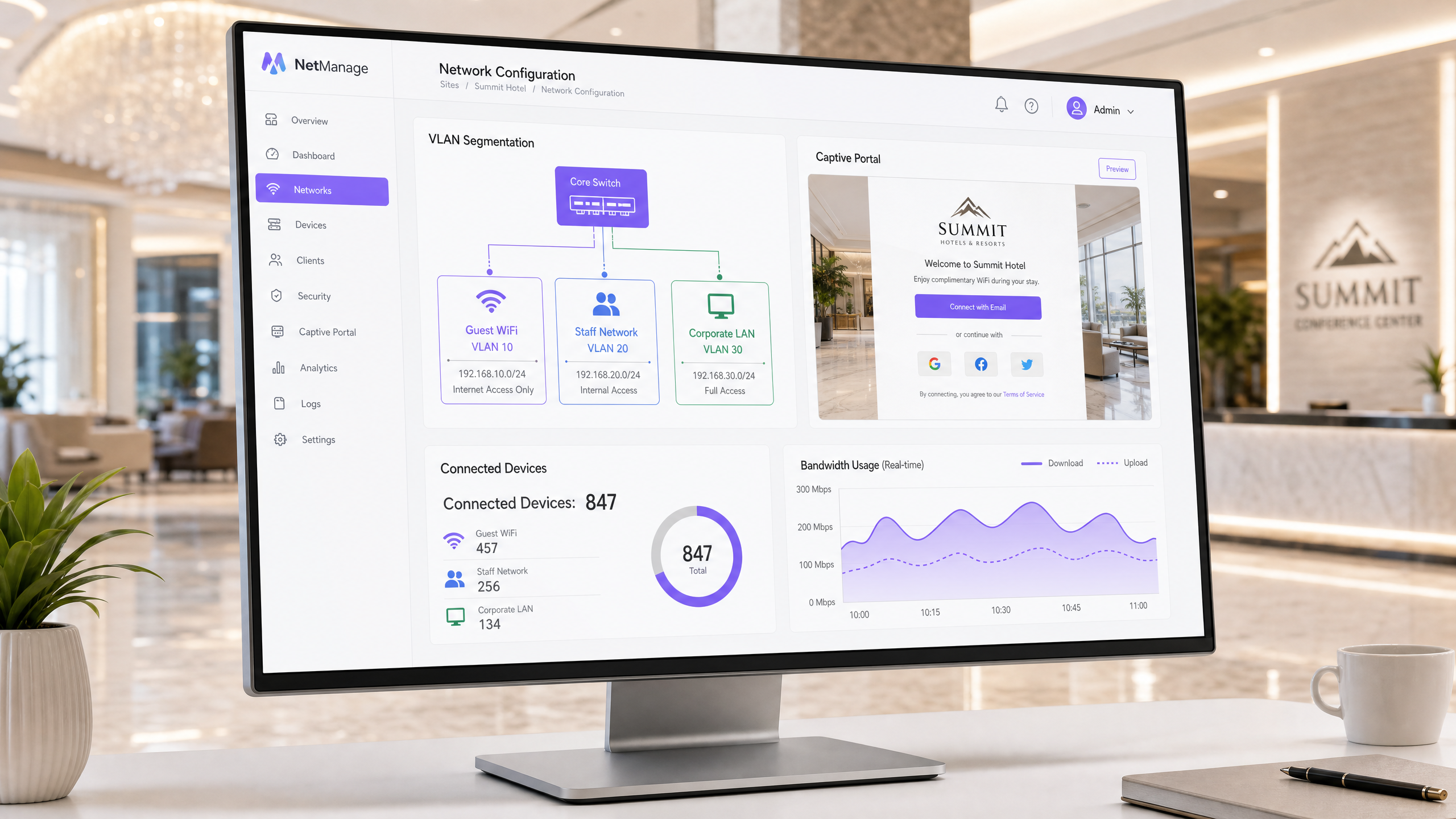
The standard enterprise architecture assigns distinct VLAN IDs to specific traffic types. For example, VLAN 10 handles guest WiFi, VLAN 20 handles staff networks, and VLAN 30 handles corporate infrastructure. Each VLAN operates within its own IP subnet and DHCP scope. Guest traffic routes directly to the internet; it never touches internal routing tables.
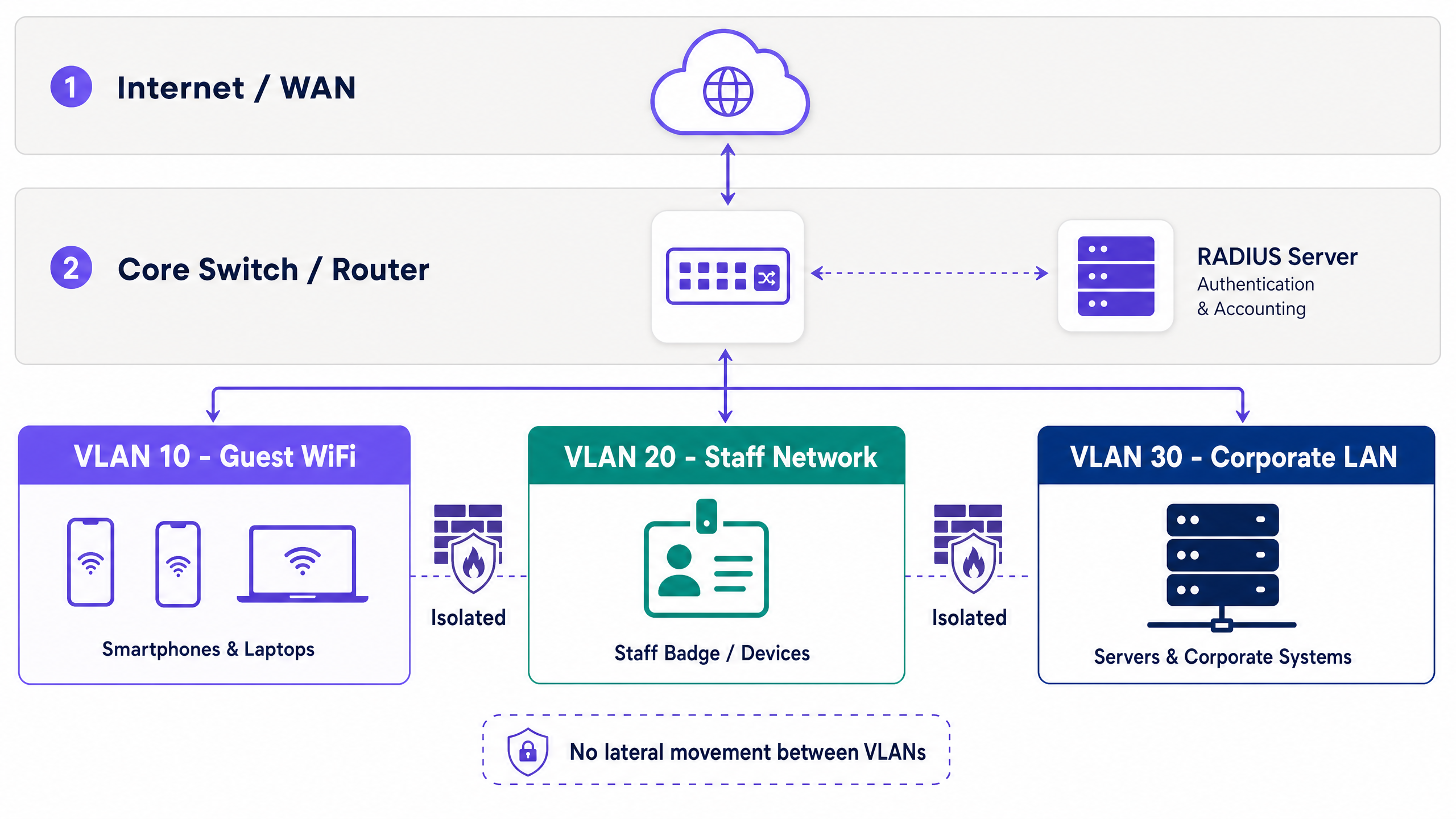
Hardware-agnostic deployment is standard practice. Access points from Cisco Meraki, HPE Aruba, Ruckus, Juniper Mist, Ubiquiti UniFi, Cambium, Extreme, and Fortinet map SSIDs to VLAN tags natively. Managed switches honour these tags, maintaining isolation through the core network.
Within the guest VLAN, client isolation is mandatory. This setting prevents guest devices from communicating with each other, eliminating peer-to-peer attack vectors.
Security and Encryption Standards
The Wi-Fi Alliance mandates WPA3 for modern deployments. For guest networks, WPA3-SAE (Simultaneous Authentication of Equals) replaces the vulnerable WPA2-PSK handshake, mitigating offline dictionary attacks.
For staff networks, 802.1X provides port-based network access control. Devices authenticate against a RADIUS server using EAP-TLS (certificate-based) or PEAP (credential-based inside a TLS tunnel). EAP-TLS requires a Public Key Infrastructure (PKI), integrating with identity providers like Microsoft Entra ID or Okta.
Guests lack corporate certificates, making 802.1X impractical for public access. The secure alternative is iPSK or PPSK (individual or private pre-shared keys). Each session receives a unique key, allowing administrators to revoke individual access without rotating a global password. Purple automates this via its captive portal integration.
Captive Portal and Data Capture
A captive portal intercepts HTTP requests from unauthenticated devices, redirecting them to a branded login page. This mechanism enforces terms of use and captures identity data.
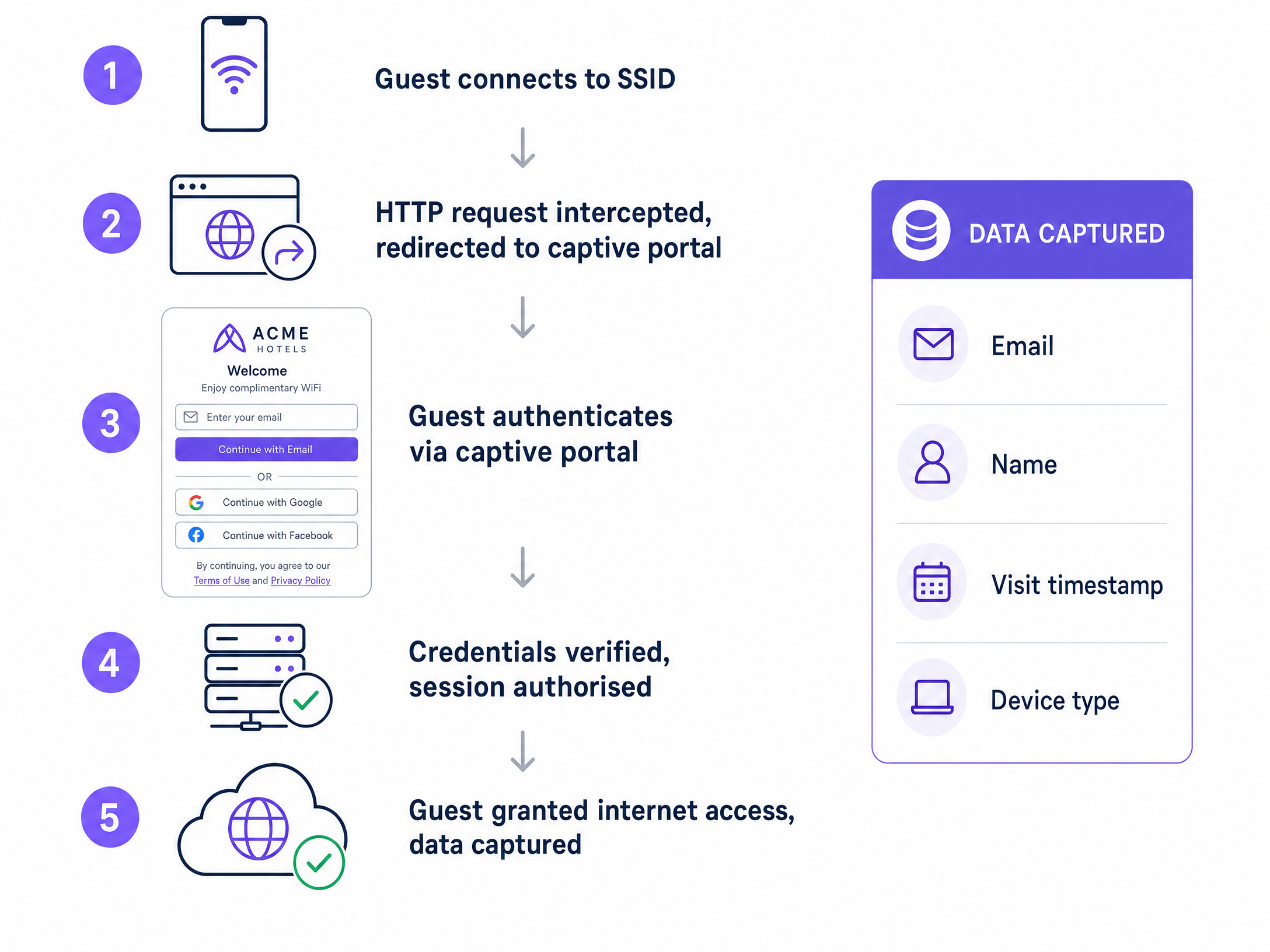
Authentication methods dictate data quality. Email registration captures direct contact details. Social login (Google Workspace, Facebook) reduces friction. SMS verification validates phone numbers. For high-security environments, Purple's Verify add-on validates government ID documents.
GDPR compliance requires explicit, conscious-choice opt-ins for marketing communications. The portal must log the timestamp, IP address, MAC address, and specific consent version. Purple processes this automatically, providing a full audit trail. Data shows portals with three fields or fewer yield significantly higher completion rates.
Implementation Guide
Follow this sequence for deployment:
- Design the Architecture: Map traffic types, assign VLAN IDs, define subnets, and document firewall rules before touching hardware.
- Configure Core Routing: Set inter-VLAN routing policies. Guest traffic requires a default route to the internet and a deny-all rule for internal subnets.
- Configure Access Points: Map the guest SSID to the designated VLAN and enable client isolation.
- Deploy the Captive Portal: Integrate the portal with your RADIUS server and configure GDPR-compliant consent fields.
- Test and Verify: Run a penetration test to confirm devices on the guest VLAN cannot ping internal IP addresses.
Best Practices
- Automate Key Rotation: Replace static pre-shared keys with automated iPSK generation.
- Limit Bandwidth: Enforce per-user bandwidth caps on the guest VLAN to prevent network degradation.
- Log Session Data: Retain DHCP and RADIUS logs for at least 90 days to support security incident response.
- Keep Portals Simple: Restrict captive portal forms to Name, Email, and a clear consent checkbox.
Troubleshooting & Risk Mitigation
Symptom: Guests receive IP addresses but cannot access the internet or the captive portal. Resolution: Verify DNS resolution on the guest VLAN. The captive portal redirect relies on DNS interception. Ensure firewall rules permit DNS (Port 53) and HTTP/HTTPS (Ports 80/443) outbound.
Symptom: Guest devices can ping each other. Resolution: Client isolation is disabled on the access point or controller. Enable it immediately to prevent peer-to-peer attacks.
ROI & Business Impact
A properly architected guest WiFi network transforms a cost centre into a revenue driver. By capturing first-party data through a compliant captive portal, venues build actionable marketing databases. Purple's platform integrates this data with CRM systems, enabling targeted campaigns based on visit frequency, dwell time, and demographic profiles.
For IT, the ROI is measured in risk reduction. VLAN segmentation and iPSK deployment eliminate the primary vectors for internal network breaches originating from public access points.
Related Resources
- Learn more about Guest WiFi and our WiFi Analytics platform.
- Read our Enterprise WiFi Security: A Complete Guide for 2026 .
- Explore hardware integrations like Grandstream GWN Access Points Integration with Purple WiFi .
- See industry-specific solutions for Retail , Hospitality , Healthcare , and Transport .
Key Definitions
VLAN (Virtual Local Area Network)
A logical partition of a physical network that isolates traffic streams.
Used to separate guest devices from corporate systems, preventing lateral movement and satisfying compliance requirements.
Captive Portal
A web page that intercepts unauthenticated users before granting network access.
The primary mechanism for capturing first-party data, enforcing terms of service, and securing GDPR consent.
Client Isolation
A wireless network setting that prevents devices on the same SSID from communicating with each other.
Essential for guest networks to block peer-to-peer attacks and protect user privacy.
RADIUS
Remote Authentication Dial-In User Service; a protocol for centralized authentication and accounting.
Validates user credentials from the captive portal or 802.1X supplicant before authorizing network access.
802.1X
An IEEE standard for port-based network access control.
Used on staff networks to require identity verification (via certificates or credentials) before granting access.
iPSK / PPSK
Individual or Private Pre-Shared Key; assigns a unique encryption key to each client session.
Replaces static global passwords on guest networks, allowing administrators to revoke single sessions securely.
WPA3-SAE
The modern encryption standard utilizing Simultaneous Authentication of Equals.
Protects guest network handshakes from offline dictionary attacks.
First-Party Data
Information collected directly from the user with their explicit consent.
The primary business value generated by the captive portal, used for CRM integration and marketing.
Worked Examples
A 200-room hotel needs to deploy guest WiFi alongside a new IP-based property management system (PMS) and staff tablets. How should the network be segmented?
Deploy three distinct VLANs. VLAN 10 (192.168.10.0/24) for Guest WiFi, routed directly to the internet with client isolation enabled. VLAN 20 (192.168.20.0/24) for Staff Tablets, secured via 802.1X PEAP authentication against Microsoft Entra ID. VLAN 30 (192.168.30.0/24) for the PMS and internal servers. Configure the core firewall to block all traffic originating from VLAN 10 to VLANs 20 and 30.
A stadium wants to collect marketing data from fans connecting to the WiFi, but previous attempts resulted in low login rates and GDPR complaints.
Deploy a captive portal with a maximum of two input fields: Name and Email. Implement a conscious-choice opt-in checkbox for marketing consent, clearly separated from the terms of service acceptance. Use Purple to automatically log the MAC address, timestamp, and consent version for the audit trail.
Practice Questions
Q1. You are auditing a retail chain's guest WiFi. The network uses a single WPA2-PSK password printed on receipts. What are the primary security and business risks, and how do you resolve them?
Hint: Consider both encryption vulnerabilities and data capture opportunities.
View model answer
The risks are twofold. Security: A static WPA2-PSK is vulnerable to dictionary attacks, and anyone with the receipt has permanent access. Business: The venue captures zero first-party data. Resolution: Deploy an open network with a captive portal for data capture, backed by iPSK to generate unique session keys, and ensure the SSID is mapped to an isolated guest VLAN.
Q2. A venue operator wants to pre-tick the marketing consent box on the captive portal to increase their database size. How do you advise them?
Hint: Refer to GDPR requirements for lawful basis of processing.
View model answer
Advise against it immediately. Under GDPR, consent must be a conscious-choice opt-in. Pre-ticked boxes are legally invalid and expose the venue to significant regulatory fines. Instead, optimize the portal design by reducing the number of fields to increase legitimate completion rates.
Q3. A guest device on VLAN 10 attempts to access a printer on VLAN 30. The core switch routes the traffic successfully. What configuration is missing?
Hint: VLANs separate broadcast domains, but what controls traffic between them?
View model answer
The inter-VLAN routing policy on the core firewall or Layer 3 switch is misconfigured. A deny-all rule must be applied to the guest VLAN interface, blocking traffic destined for any internal subnet (like VLAN 30) while permitting outbound internet traffic.
Continue reading in this series
Integrating WeChat WiFi Authentication: Captive Portal Onboarding for APAC Customers
WeChat has 1.41 billion monthly active users, making it the primary digital identity for Chinese consumers globally. This guide explains how to integrate WeChat OAuth 2.0 authentication into enterprise captive portals for APAC venues, covering platform registration, scope selection, RADIUS Change of Authorisation enforcement, and dual-framework compliance with GDPR and China's PIPL. It is aimed at IT managers, network architects, and venue operations directors who need to act this quarter.
Configuring Captive Portal Redirection on Enterprise Network Controllers
This authoritative guide details the technical architecture and vendor-specific configuration steps required to implement captive portal redirection on enterprise network controllers. It provides actionable guidance for IT teams on configuring walled gardens, integrating RADIUS authentication, and ensuring compliance with GDPR and PCI DSS.
Configurando Redireccionamiento de Portal Cautivo en Controladores de Red Enterprise
This authoritative guide details the technical architecture and vendor-specific configuration steps required to implement captive portal redirection on enterprise network controllers. It provides actionable guidance for IT teams on configuring walled gardens, integrating RADIUS authentication, and ensuring compliance with GDPR and PCI DSS.