
एंटरप्राइझ Guest WiFi सेटअप मार्गदर्शिका: VLAN सेगमेंटेशन, सुरक्षा आणि Captive Portals
हे मार्गदर्शक एंटरप्राइझ guest WiFi उपयोजनासाठी एक तांत्रिक आराखडा प्रदान करते, ज्यामध्ये VLAN सेगमेंटेशन, सुरक्षा प्रोटोकॉल आणि captive portal आर्किटेक्चरवर लक्ष केंद्रित केले आहे. हे ट्रॅफिक वेगळे कसे करावे, एन्क्रिप्शन मानके कशी लागू करावीत आणि जटिल ठिकाणी सुरक्षितपणे फर्स्ट-पार्टी डेटा कसा गोळा करावा याबद्दल तपशीलवार माहिती देते.
हे मार्गदर्शक ऐका
पॉडकास्ट ट्रान्सक्रिप्ट पहा
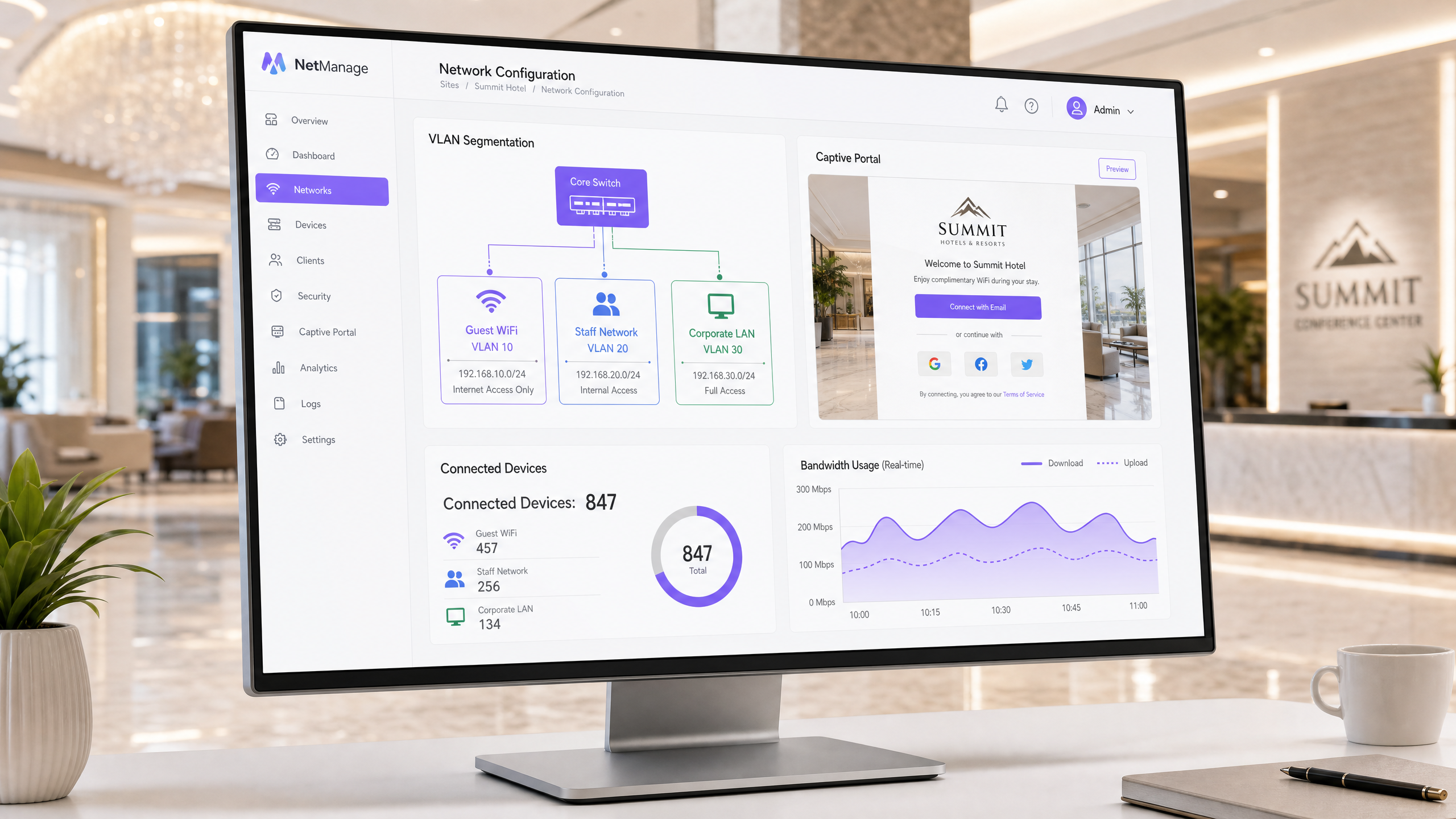
कार्यकारी सारांश
एंटरप्राइझ guest WiFi तैनात करणे हा एक इन्फ्रास्ट्रक्चर प्रकल्प आहे, कोणताही नंतरचा विचार नाही. जेव्हा ८०,०००+ पेक्षा जास्त थेट ठिकाणे दरवर्षी ४४० दशलक्ष लॉगिनसह एका प्लॅटफॉर्मवर विश्वास ठेवतात, तेव्हा डेटा एक स्पष्ट वास्तव प्रकट करतो: योग्य आर्किटेक्चर सुरक्षा उल्लंघन रोखते आणि GDPR-सुसंगत डेटा संकलनास सक्षम करते. हे मार्गदर्शक VLAN सेगमेंटेशन, WPA3 एन्क्रिप्शन आणि सुसंगत captive portal चा वापर करून सुरक्षितपणे guest WiFi सेट करण्यासाठी तांत्रिक आवश्यकता तपशीलवार सांगते. तुम्ही अतिथी ट्रॅफिकला कॉर्पोरेट सिस्टमपासून कसे वेगळे करावे, ओळख-आधारित प्रवेश नियंत्रणे कशी लागू करावीत आणि फर्स्ट-पार्टी डेटा संकलनाद्वारे मोजण्यायोग्य व्यावसायिक मूल्य कसे मिळवावे हे शिकाल.
तांत्रिक सखोल विश्लेषण
VLAN सेगमेंटेशन आर्किटेक्चर
एक व्हर्च्युअल लोकल एरिया नेटवर्क (VLAN) डेटा लिंक लेयरवर ट्रॅफिक वेगळे करते. सेगमेंटेशनशिवाय, अतिथी डिव्हाइस तुमच्या पॉइंट-ऑफ-सेल टर्मिनल्स आणि प्रॉपर्टी मॅनेजमेंट सिस्टम्स सारख्याच नेटवर्कवर असते. हे PCI DSS आवश्यकता १.३ चे उल्लंघन करते आणि अंतर्गत इन्फ्रास्ट्रक्चरला लॅटरल मुव्हमेंटसाठी उघडे पाडते.
प्रमाणित एंटरप्राइझ आर्किटेक्चर विशिष्ट ट्रॅफिक प्रकारांना स्वतंत्र VLAN ID नियुक्त करते. उदाहरणार्थ, VLAN 10 guest WiFi हाताळते, VLAN 20 कर्मचारी नेटवर्क हाताळते आणि VLAN 30 कॉर्पोरेट इन्फ्रास्ट्रक्चर हाताळते. प्रत्येक VLAN स्वतःच्या IP सबनेट आणि DHCP कक्षेमध्ये कार्य करते. अतिथी ट्रॅफिक थेट इंटरनेटवर मार्गस्थ होते; ते अंतर्गत राउटिंग टेबल्सना कधीही स्पर्श करत नाही.
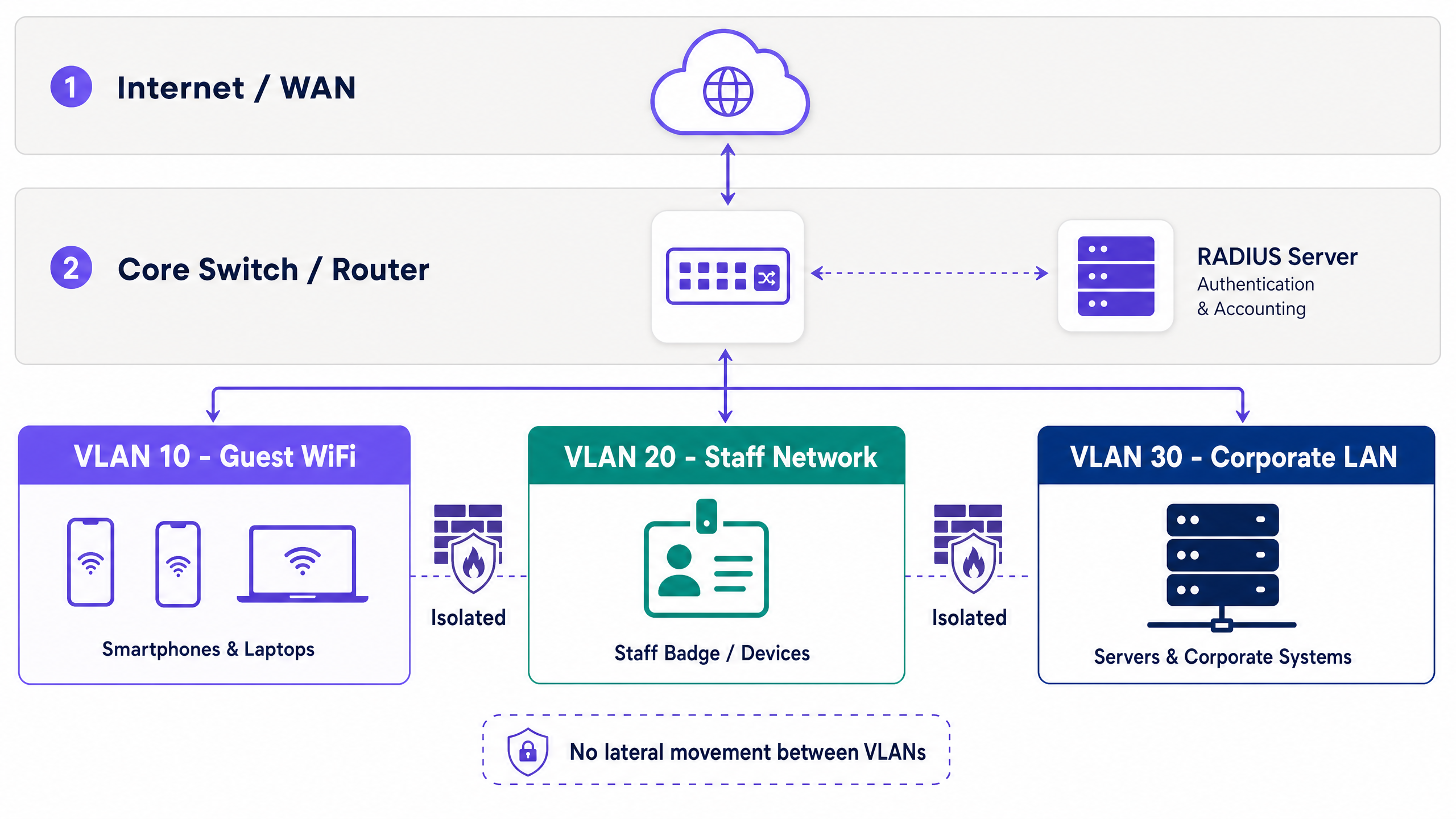
हार्डवेअर-अज्ञेयवादी उपयोजन ही एक मानक पद्धत आहे. Cisco Meraki, HPE Aruba, Ruckus, Juniper Mist, Ubiquiti UniFi, Cambium, Extreme आणि Fortinet कडील ॲक्सेस पॉइंट्स SSIDs ना मूळतः VLAN टॅगशी मॅप करतात. मॅनेज्ड स्विचेस या टॅगचा आदर करतात, ज्यामुळे कोर नेटवर्कद्वारे अलगाव राखले जाते.
अतिथी VLAN मध्ये, क्लायंट आयसोलेशन अनिवार्य आहे. ही सेटिंग अतिथी डिव्हाइसेसना एकमेकांशी संवाद साधण्यापासून रोखते, ज्यामुळे पीअर-टू-पीअर हल्ला करण्याचे मार्ग संपुष्टात येतात.
सुरक्षा आणि एन्क्रिप्शन मानके
Wi-Fi अलायन्स आधुनिक उपयोजनांसाठी WPA3 अनिवार्य करते. अतिथी नेटवर्कसाठी, WPA3-SAE (Simultaneous Authentication of Equals) असुरक्षित WPA2-PSK हँडशेकची जागा घेते, ज्यामुळे ऑफलाइन डिक्शनरी हल्ले कमी होतात.
कर्मचारी नेटवर्कसाठी, 802.1X पोर्ट-आधारित नेटवर्क प्रवेश नियंत्रण प्रदान करते. डिव्हाइसेस EAP-TLS (प्रमाणपत्र-आधारित) किंवा PEAP (TLS टनेलच्या आत क्रेडेंशियल-आधारित) वापरून RADIUS सर्व्हरवर प्रमाणीकृत होतात. EAP-TLS ला पब्लिक की इन्फ्रास्ट्रक्चर (PKI) आवश्यक असते, जे Microsoft Entra ID किंवा Okta सारख्या ओळख प्रदात्यांशी समाकलित होते.
अतिथींकडे कॉर्पोरेट प्रमाणपत्रे नसतात, ज्यामुळे सार्वजनिक प्रवेशासाठी 802.1X अव्यवहार्य बनते. सुरक्षित पर्याय म्हणजे iPSK किंवा PPSK (वैयक्तिक किंवा खाजगी प्री-शेअर्ड की). प्रत्येक सत्राला एक युनिक की मिळते, ज्यामुळे प्रशासकांना जागतिक पासवर्ड न बदलता वैयक्तिक प्रवेश रद्द करण्याची परवानगी मिळते. Purple त्याच्या captive portal एकत्रीकरणाद्वारे हे स्वयंचलित करते.
Captive Portal आणि डेटा संकलन
एक captive portal अप्रमाणित डिव्हाइसेसकडून येणारे HTTP विनंत्या अडवते आणि त्यांना ब्रँडेड लॉगिन पेजवर रिडायरेक्ट करते. ही यंत्रणा वापराच्या अटी लागू करते आणि ओळख डेटा संकलित करते.
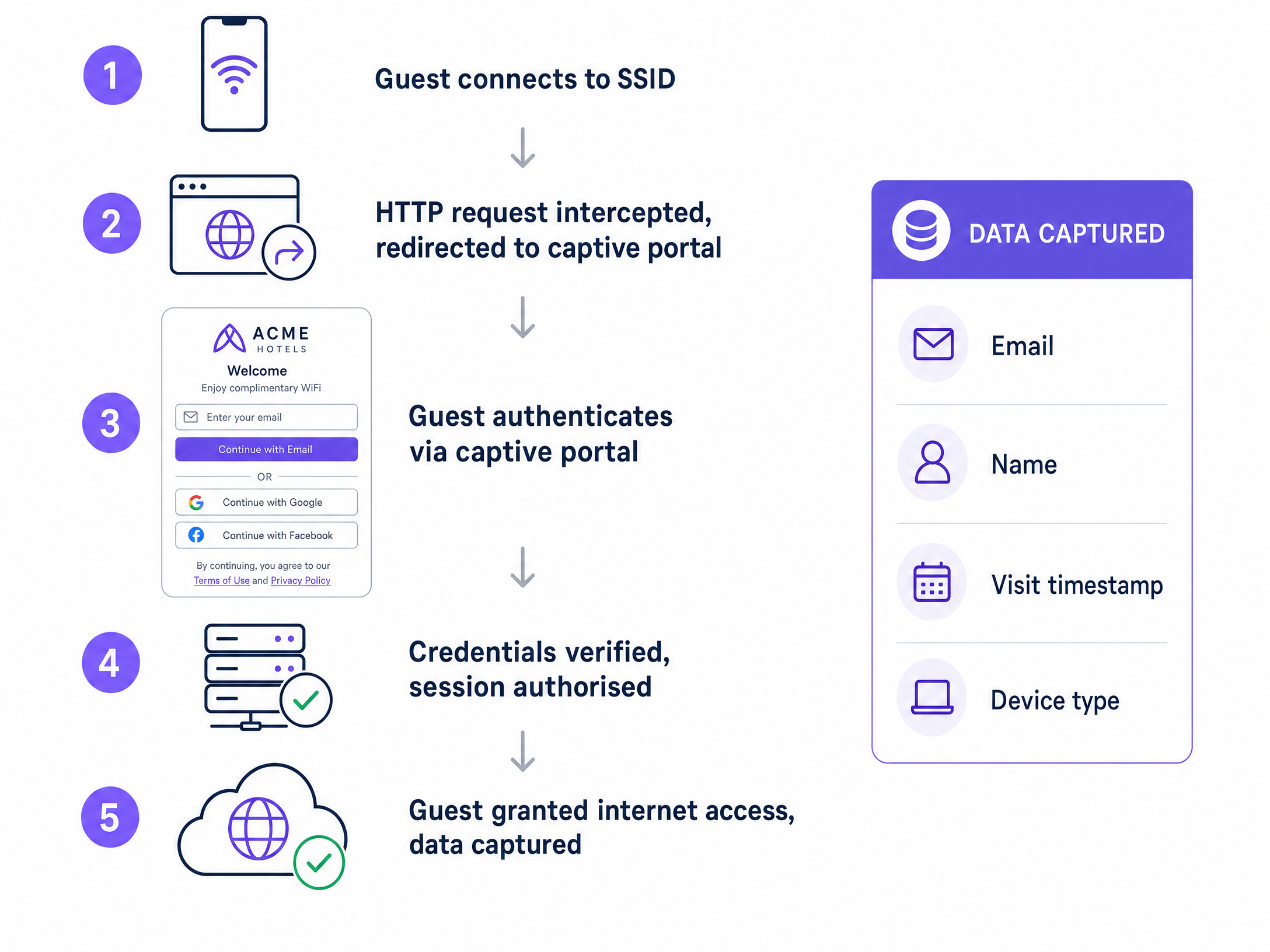
प्रमाणीकरण पद्धती डेटाची गुणवत्ता ठरवतात. ईमेल नोंदणी थेट संपर्क तपशील संकलित करते. सोशल लॉगिन (Google Workspace, Facebook) अडथळे कमी करते. SMS पडताळणी फोन नंबर वैध करते. उच्च-सुरक्षा वातावरणासाठी, Purple चे Verify ॲड-ऑन सरकारी ओळखपत्रांची पडताळणी करते.
GDPR अनुपालनासाठी विपणन संपर्कांसाठी स्पष्ट, जाणीवपूर्वक निवडलेले ऑप्ट-इन्स आवश्यक आहेत. पोर्टलने टाइमस्टॅम्प, IP पत्ता, MAC पत्ता आणि विशिष्ट संमती आवृत्ती नोंदवणे आवश्यक आहे. Purple यावर स्वयंचलितपणे प्रक्रिया करते, आणि संपूर्ण ऑडिट ट्रेल प्रदान करते. डेटा दर्शवतो की तीन किंवा त्यापेक्षा कमी फील्ड असलेली पोर्टल्स लक्षणीयरीत्या उच्च पूर्णता दर देतात.
अंमलबजावणी मार्गदर्शिका
उपयोजनासाठी या क्रमाचे अनुसरण करा:
- आर्किटेक्चर डिझाइन करा: हार्डवेअरला स्पर्श करण्यापूर्वी ट्रॅफिक प्रकारांचे मॅपिंग करा, VLAN ID नियुक्त करा, सबनेट परिभाषित करा आणि फायरवॉल नियम दस्तऐवजीकरण करा.
- कोर राउटिंग कॉन्फिगर करा: इंटर-VLAN राउटिंग धोरणे सेट करा. अतिथी ट्रॅफिकसाठी इंटरनेटचा डीफॉल्ट मार्ग आणि अंतर्गत सबनेटसाठी डेनाय-ऑल नियम आवश्यक आहे.
- ॲक्सेस पॉइंट्स कॉन्फिगर करा: अतिथी SSID ला नियुक्त केलेल्या VLAN शी मॅप करा आणि क्लायंट आयसोलेशन सक्षम करा.
- Captive Portal तैनात करा: पोर्टलला तुमच्या RADIUS सर्व्हरशी समाकलित करा आणि GDPR-सुसंगत संमती फील्ड कॉन्फिगर करा.
- चाचणी आणि पडताळणी करा: अतिथी VLAN वरील डिव्हाइसेस अंतर्गत IP पत्त्यांना पिंग करू शकत नाहीत याची खात्री करण्यासाठी पेनिट्रेशन चाचणी चालवा.
सर्वोत्तम पद्धती
- की रोटेशन स्वयंचलित करा: स्थिर प्री-शेअर्ड की ऐवजी स्वयंचलित iPSK निर्मिती वापरा.
- बँडविड्थ मर्यादित करा: नेटवर्कचा दर्जा घसरू नये म्हणून अतिथी VLAN वर प्रति-वापरकर्ता बँडविड्थ मर्यादा लागू करा.
- सत्र डेटा लॉग करा: सुरक्षा घटनेच्या प्रतिसादाला समर्थन देण्यासाठी किमान ९० दिवसांसाठी DHCP आणि RADIUS लॉग जतन करा.
- पोर्टल्स सोपे ठेवा: captive portal फॉर्म फक्त नाव, ईमेल आणि स्पष्ट संमती चेकबॉक्सपुरते मर्यादित ठेवा.
त्रुटी निवारण आणि जोखीम कमी करणे
लक्षण: अतिथींना IP पत्ते मिळतात परंतु ते इंटरनेट किंवा captive portal वर प्रवेश करू शकत नाहीत. निवारण: अतिथी VLAN वर DNS रिझोल्यूशनची पडताळणी करा. captive portal रिडायरेक्ट DNS इंटरसेप्शनवर अवलंबून असते. फायरवॉल नियम DNS (पोर्ट ५३) आणि HTTP/HTTPS (पोर्ट ८०/४४३) ला परवानगी देतात याची खात्री करा oआउटबाउंड.
लक्षण: गेस्ट डिव्हाइसेस एकमेकांना पिंग करू शकतात. निवारण: ॲक्सेस पॉइंट किंवा कंट्रोलरवर क्लायंट आयसोलेशन निष्क्रिय केले आहे. पीअर-टू-पीअर हल्ले रोखण्यासाठी ते त्वरित सक्रिय करा.
ROI आणि व्यावसायिक प्रभाव
योग्यरित्या डिझाइन केलेले गेस्ट WiFi नेटवर्क एका कॉस्ट सेंटरला महसूल निर्मितीच्या साधनामध्ये रूपांतरित करते. सुसंगत Captive Portal द्वारे फर्स्ट-पार्टी डेटा कॅप्चर करून, ठिकाणे कृतीयोग्य मार्केटिंग डेटाबेस तयार करतात. Purple चे प्लॅटफॉर्म या डेटाला CRM सिस्टम्ससह एकत्रित करते, ज्यामुळे भेटीची वारंवारता, ड्वेल टाइम आणि डेमोग्राफिक प्रोफाइलवर आधारित लक्ष्यित मोहिमा सक्षम होतात.
IT साठी, ROI चे मोजमाप जोखीम कमी करण्याच्या प्रमाणात केले जाते. VLAN सेगमेंटेशन आणि iPSK डिप्लॉयमेंट सार्वजनिक ॲक्सेस पॉइंट्समधून उद्भवणाऱ्या अंतर्गत नेटवर्क सुरक्षेतील त्रुटींचे मुख्य मार्ग नष्ट करतात.
संबंधित संसाधने
- Guest WiFi आणि आमच्या WiFi Analytics प्लॅटफॉर्मबद्दल अधिक जाणून घ्या.
- आमचे एंटरप्राइझ WiFi सुरक्षा: २०२६ साठी एक संपूर्ण मार्गदर्शिका वाचा.
- Grandstream GWN ॲक्सेस पॉइंट्सचे Purple WiFi सोबतचे इंटिग्रेशन सारख्या हार्डवेअर इंटिग्रेशन्सचा शोध घ्या.
- रिटेल , हॉस्पिटॅलिटी , हेल्थकेअर आणि ट्रान्सपोर्ट साठी उद्योग-विशिष्ट सोल्यूशन्स पहा.
महत्वाच्या व्याख्या
VLAN (Virtual Local Area Network)
A logical partition of a physical network that isolates traffic streams.
Used to separate guest devices from corporate systems, preventing lateral movement and satisfying compliance requirements.
Captive Portal
A web page that intercepts unauthenticated users before granting network access.
The primary mechanism for capturing first-party data, enforcing terms of service, and securing GDPR consent.
Client Isolation
A wireless network setting that prevents devices on the same SSID from communicating with each other.
Essential for guest networks to block peer-to-peer attacks and protect user privacy.
RADIUS
Remote Authentication Dial-In User Service; a protocol for centralized authentication and accounting.
Validates user credentials from the captive portal or 802.1X supplicant before authorizing network access.
802.1X
An IEEE standard for port-based network access control.
Used on staff networks to require identity verification (via certificates or credentials) before granting access.
iPSK / PPSK
Individual or Private Pre-Shared Key; assigns a unique encryption key to each client session.
Replaces static global passwords on guest networks, allowing administrators to revoke single sessions securely.
WPA3-SAE
The modern encryption standard utilizing Simultaneous Authentication of Equals.
Protects guest network handshakes from offline dictionary attacks.
First-Party Data
Information collected directly from the user with their explicit consent.
The primary business value generated by the captive portal, used for CRM integration and marketing.
सोडवलेली उदाहरणे
A 200-room hotel needs to deploy guest WiFi alongside a new IP-based property management system (PMS) and staff tablets. How should the network be segmented?
Deploy three distinct VLANs. VLAN 10 (192.168.10.0/24) for Guest WiFi, routed directly to the internet with client isolation enabled. VLAN 20 (192.168.20.0/24) for Staff Tablets, secured via 802.1X PEAP authentication against Microsoft Entra ID. VLAN 30 (192.168.30.0/24) for the PMS and internal servers. Configure the core firewall to block all traffic originating from VLAN 10 to VLANs 20 and 30.
A stadium wants to collect marketing data from fans connecting to the WiFi, but previous attempts resulted in low login rates and GDPR complaints.
Deploy a captive portal with a maximum of two input fields: Name and Email. Implement a conscious-choice opt-in checkbox for marketing consent, clearly separated from the terms of service acceptance. Use Purple to automatically log the MAC address, timestamp, and consent version for the audit trail.
सराव प्रश्न
Q1. You are auditing a retail chain's guest WiFi. The network uses a single WPA2-PSK password printed on receipts. What are the primary security and business risks, and how do you resolve them?
टीप: Consider both encryption vulnerabilities and data capture opportunities.
नमुना उत्तर पहा
The risks are twofold. Security: A static WPA2-PSK is vulnerable to dictionary attacks, and anyone with the receipt has permanent access. Business: The venue captures zero first-party data. Resolution: Deploy an open network with a captive portal for data capture, backed by iPSK to generate unique session keys, and ensure the SSID is mapped to an isolated guest VLAN.
Q2. A venue operator wants to pre-tick the marketing consent box on the captive portal to increase their database size. How do you advise them?
टीप: Refer to GDPR requirements for lawful basis of processing.
नमुना उत्तर पहा
Advise against it immediately. Under GDPR, consent must be a conscious-choice opt-in. Pre-ticked boxes are legally invalid and expose the venue to significant regulatory fines. Instead, optimize the portal design by reducing the number of fields to increase legitimate completion rates.
Q3. A guest device on VLAN 10 attempts to access a printer on VLAN 30. The core switch routes the traffic successfully. What configuration is missing?
टीप: VLANs separate broadcast domains, but what controls traffic between them?
नमुना उत्तर पहा
The inter-VLAN routing policy on the core firewall or Layer 3 switch is misconfigured. A deny-all rule must be applied to the guest VLAN interface, blocking traffic destined for any internal subnet (like VLAN 30) while permitting outbound internet traffic.
या मालिकेमध्ये पुढे वाचा
WeChat WiFi प्रमाणीकरण समाकलित करणे: APAC ग्राहकांसाठी Captive Portal ऑनबोर्डिंग
WeChat कडे 1.41 अब्ज मासिक सक्रिय वापरकर्ते आहेत, ज्यामुळे ती जागतिक स्तरावर चिनी ग्राहकांसाठी प्राथमिक डिजिटल ओळख बनली आहे. हे मार्गदर्शक APAC ठिकाणांसाठी एंटरप्राइझ captive portals मध्ये WeChat OAuth 2.0 प्रमाणीकरण कसे समाकलित करावे हे स्पष्ट करते, ज्यामध्ये प्लॅटफॉर्म नोंदणी, स्कोप निवड, RADIUS Change of Authorisation अंमलबजावणी आणि GDPR आणि चीनच्या PIPL सह दुहेरी-फ्रेमवर्क अनुपालनाचा समावेश आहे. हे IT व्यवस्थापक, नेटवर्क आर्किटेक्ट्स आणि या तिमाहीत कारवाई करू इच्छिणाऱ्या ठिकाण ऑपरेशन्स संचालकांसाठी उद्दिष्टित आहे.
टप्प्याटप्प्याने मार्गदर्शिका: गेस्ट WiFi Captive Portals साठी Ruijie वायरलेस कंट्रोलर्स कॉन्फिगर करणे
ही मार्गदर्शिका एंटरप्राइझ-दर्जाचे गेस्ट WiFi Captive Portals उपयोजित करण्यासाठी Ruijie वायरलेस कंट्रोलर्स आणि गेटवे कॉन्फिगर करण्यासाठी संपूर्ण तांत्रिक माहिती प्रदान करते. यामध्ये VLAN विभागणी, WISPr प्रोटोकॉलद्वारे बाह्य RADIUS प्रमाणीकरण, walled garden कॉन्फिगरेशन आणि हॉस्पिटॅलिटी, रिटेल आणि सार्वजनिक-क्षेत्रातील वातावरणात फर्स्ट-पार्टी डेटा गोळा करण्यासाठी आणि मोजण्यायोग्य व्यावसायिक मूल्य मिळवण्यासाठी Purple च्या आयडेंटिटी-बेस्ड नेटवर्क प्लॅटफॉर्मसह अखंड एकत्रीकरण समाविष्ट आहे.
सुरक्षित BYOD आणि 802.1X नेटवर्क ऑथेंटिकेशनसाठी SCEP कसे कॉन्फिगर करावे
हे मार्गदर्शक सर्टिफिकेट-आधारित 802.1X नेटवर्क ऑथेंटिकेशन उपयोजित करण्यासाठी SCEP कॉन्फिगर करण्याचा एक व्यापक तांत्रिक संदर्भ प्रदान करते. यामध्ये सामायिक केलेल्या पासवर्डवरून EAP-TLS कडे होणारा आर्किटेक्चरल बदल, मोबाईल डिव्हाइस मॅनेजमेंट इंटिग्रेशन आणि एंटरप्राइझ वातावरणात सुरक्षित BYOD ॲक्सेससाठी कठोर नेटवर्क सेगमेंटेशन समाविष्ट आहे.