
टप्प्याटप्प्याने मार्गदर्शिका: गेस्ट WiFi Captive Portals साठी Ruijie वायरलेस कंट्रोलर्स कॉन्फिगर करणे
ही मार्गदर्शिका एंटरप्राइझ-दर्जाचे गेस्ट WiFi Captive Portals उपयोजित करण्यासाठी Ruijie वायरलेस कंट्रोलर्स आणि गेटवे कॉन्फिगर करण्यासाठी संपूर्ण तांत्रिक माहिती प्रदान करते. यामध्ये VLAN विभागणी, WISPr प्रोटोकॉलद्वारे बाह्य RADIUS प्रमाणीकरण, walled garden कॉन्फिगरेशन आणि हॉस्पिटॅलिटी, रिटेल आणि सार्वजनिक-क्षेत्रातील वातावरणात फर्स्ट-पार्टी डेटा गोळा करण्यासाठी आणि मोजण्यायोग्य व्यावसायिक मूल्य मिळवण्यासाठी Purple च्या आयडेंटिटी-बेस्ड नेटवर्क प्लॅटफॉर्मसह अखंड एकत्रीकरण समाविष्ट आहे.
हे मार्गदर्शक ऐका
पॉडकास्ट ट्रान्सक्रिप्ट पहा
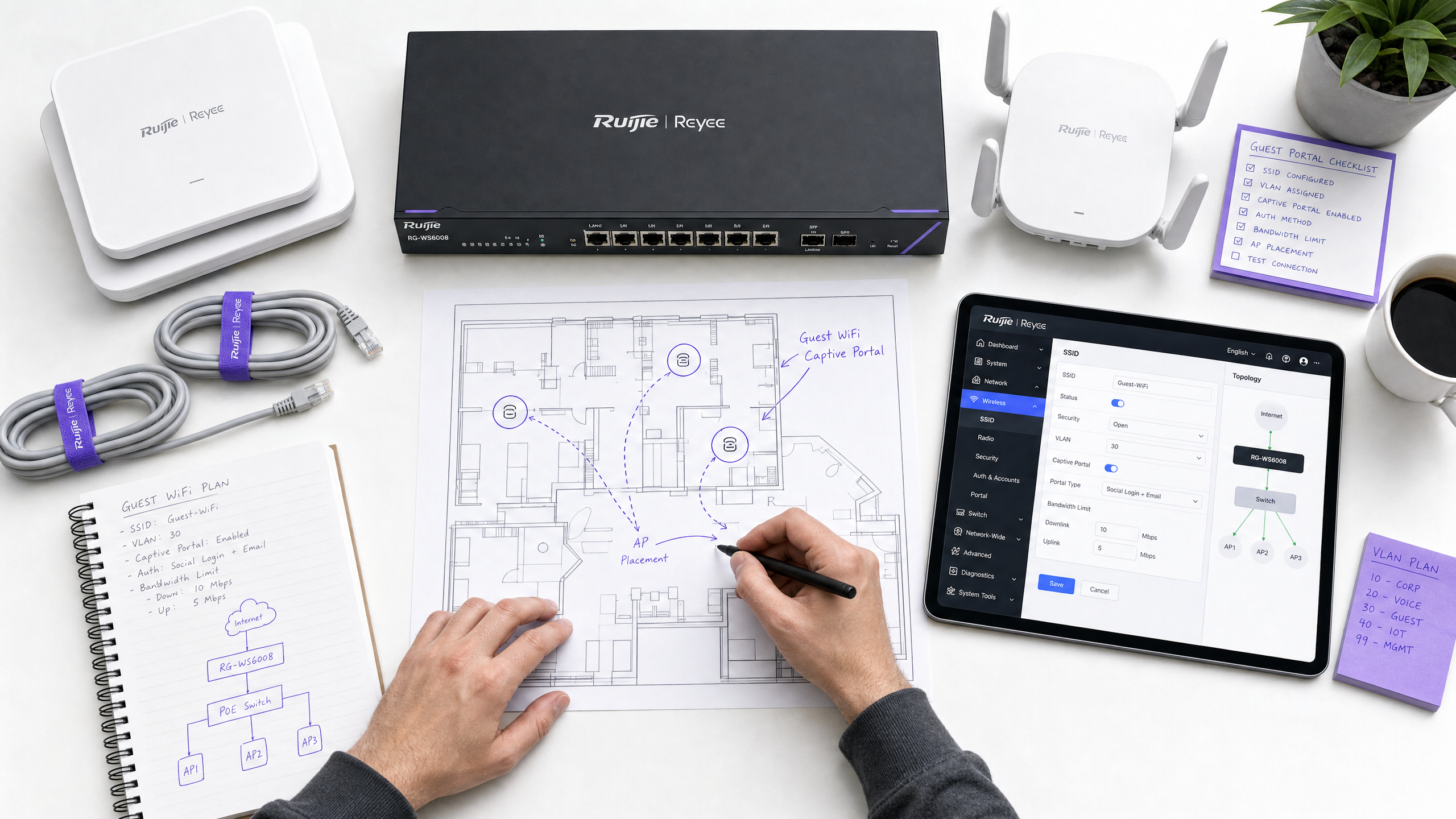
कार्यकारी सारांश
वितरित एंटरप्राइझमध्ये गेस्ट WiFi उपयोजित करण्यासाठी केवळ ओपन SSID पेक्षा अधिक गोष्टींची आवश्यकता असते. आयटी व्यवस्थापक आणि नेटवर्क आर्किटेक्ट्ससाठी, कडक सुरक्षा, GDPR अनुपालन आणि डेटा कॅप्चर आवश्यकतांसह अखंड प्रवेशाचा समतोल राखणे हे एक आव्हान आहे. ही मार्गदर्शिका Ruijie वायरलेस कंट्रोलर्स आणि गेटवे वापरून सुरक्षित, स्केलेबल Captive Portal उपयोजित करण्यासाठी अचूक कॉन्फिगरेशन टप्पे तपशीलवार सांगते - आणि हे दाखवते की त्या इन्फ्रास्ट्रक्चरला Purple च्या Guest WiFi प्लॅटफॉर्मसह एकत्रित केल्याने मूलभूत वायरलेस कनेक्शनचे रूपांतर एका सुसंगत, महसूल-उत्पादक मालमत्तेमध्ये कसे होते.
आम्ही तांत्रिक पूर्वअटी, VLAN विभागणी धोरणे, WISPr प्रोटोकॉलद्वारे बाह्य RADIUS प्रमाणीकरण, walled garden कॉन्फिगरेशन आणि प्रोडक्शन-दर्जाच्या उपयोजनासाठी आवश्यक असलेल्या विशिष्ट QoS सेटिंग्ज कव्हर करतो. तुम्ही 200 खोल्यांचे हॉटेल व्यवस्थापित करत असाल, 50-साइट्सची रिटेल साखळी किंवा 40,000 प्रेक्षक असलेले स्टेडियम व्यवस्थापित करत असाल, ही मार्गदर्शिका सुरक्षित Ruijie Captive Portal सेटअपसाठी अधिकृत ब्ल्यूप्रिंट प्रदान करते. Purple 80,000+ पेक्षा जास्त थेट ठिकाणी कार्यरत आहे आणि 2024 मध्ये 440 दशलक्ष लॉगिन प्रक्रियेत आणले आहेत (Purple अंतर्गत डेटा), त्यामुळे येथे वर्णन केलेले एकत्रीकरण पॅटर्न मोठ्या प्रमाणावर सिद्ध झाले आहेत.
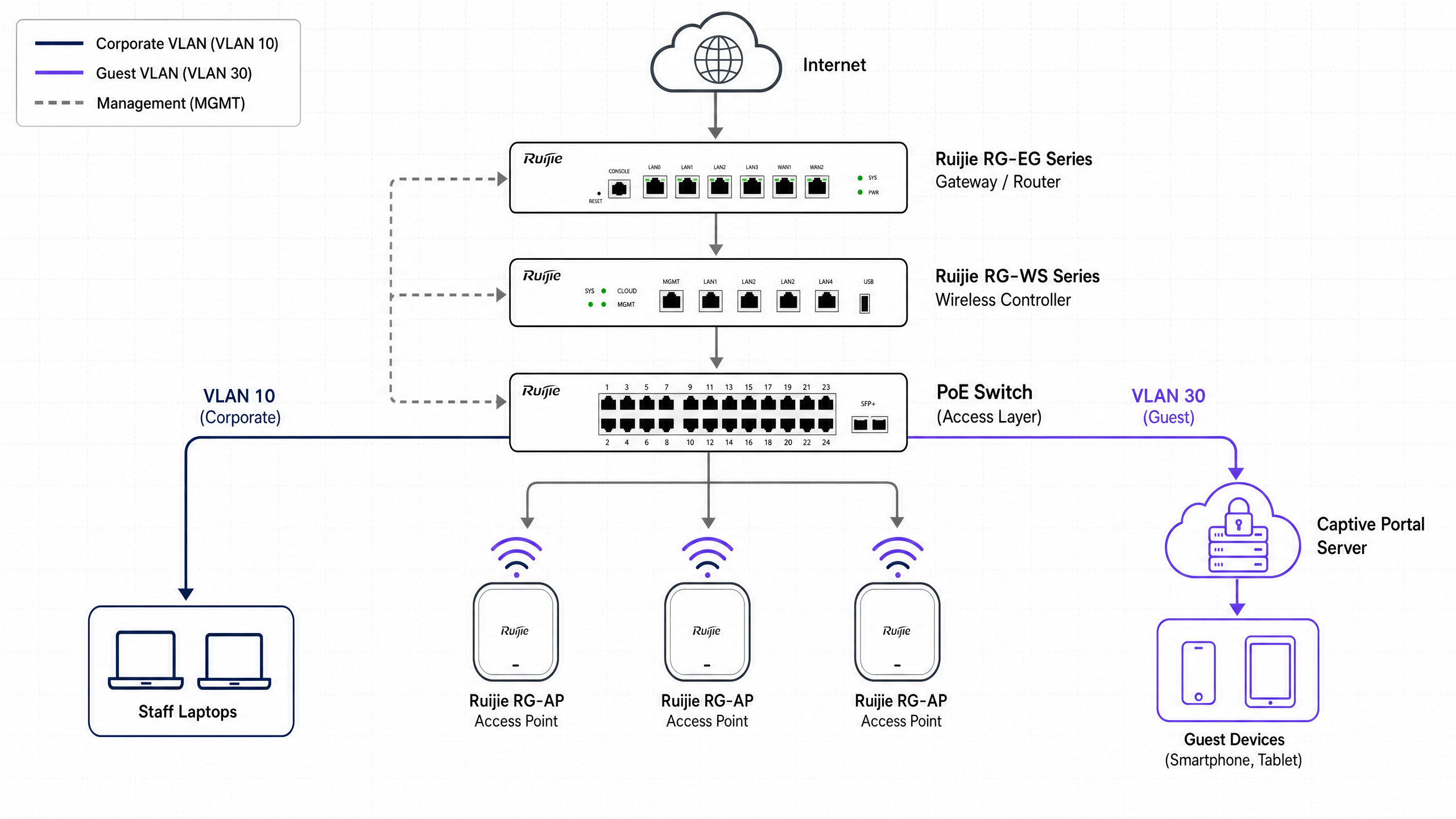
तांत्रिक आर्किटेक्चर आणि पूर्वअटी
तुमच्या Ruijie कंट्रोलरमध्ये बदल करण्यापूर्वी, योग्य नेटवर्क आर्किटेक्चर स्थापित करा. सुरक्षित गेस्ट नेटवर्कला लेयर 2 - स्विच स्तरावर कॉर्पोरेट ट्रॅफिकपासून पूर्ण अलगाव आवश्यक आहे.
नेटवर्क विभागणी
सुरक्षित गेस्ट WiFi चा पाया म्हणजे VLAN अलगाव आहे. तुम्ही तुमच्या Ruijie गेटवे किंवा कोर स्विचवर एक समर्पित गेस्ट VLAN तयार करणे आवश्यक आहे. हे सुनिश्चित करते की गेस्ट ट्रॅफिक कधीही अंतर्गत प्रणाली, पेमेंट टर्मिनल्स किंवा कर्मचारी उपकरणांशी जोडले जाणार नाही. Ruijie उपयोजनासाठी एक मानक एंटरप्राइझ VLAN योजना खालीलप्रमाणे दिसते:
| VLAN ID | उद्देश | नोट्स |
|---|---|---|
| 10 | कॉर्पोरेट | कर्मचारी उपकरणे, अंतर्गत सर्व्हर |
| 20 | व्हॉइस | VoIP हँडसेट्स |
| 30 | गेस्ट | Captive Portal, फक्त इंटरनेट |
| 40 | IoT | प्रिंटर, स्मार्ट टीव्ही, सेन्सर्स |
| 99 | व्यवस्थापन | कंट्रोलर, स्विच व्यवस्थापन |
ग्राहक-दर्जाचे WiFi गियर तुमच्या गेस्ट नेटवर्कवर का नसावे याबद्दल अधिक माहितीसाठी, ग्राहक-दर्जाचे WiFi गियर तुमच्या गेस्ट नेटवर्कवर का नसावे वाचा.
आवश्यक घटक
हे उपयोजन पूर्ण करण्यासाठी, तुम्हाला खालील गोष्टींची आवश्यकता आहे:
- एक Ruijie Cloud खाते किंवा स्थानिक Ruijie RG-WS मालिका वायरलेस कंट्रोलर (उदा., RG-WS6008 किंवा RG-WS7110).
- एक Ruijie RG-EG मालिका गेटवे - WISPr द्वारे बाह्य पोर्टल प्रमाणीकरणासाठी आवश्यक.
- Ruijie RG-AP मालिका ॲक्सेस पॉइंट्स (उदा., RG-AP820-I, RG-AP850-AR).
- एक Purple Connect, Capture, किंवा Engage परवाना.
- गेटवेपासून Purple च्या सर्व्हरपर्यंत पोर्ट्स 1812 (RADIUS प्रमाणीकरण) आणि 1813 (RADIUS अकाउंटिंग) वर आउटबाउंड UDP प्रवेश.
प्रमाणीकरण प्रोटोकॉल विहंगावलोकन
Ruijie अनेक प्रमाणीकरण पद्धतींना समर्थन देते. एंटरप्राइझ उपयोजनांनी बाह्य RADIUS प्रमाणीकरण वापरावे. हा दृष्टिकोन अप्रमाणित वापरकर्त्यांना सुरक्षितपणे Purple च्या स्प्लॅश पेजवर रीडायरेक्ट करण्यासाठी, त्यांच्या क्रेडेंशियलवर प्रक्रिया करण्यासाठी आणि Ruijie कंट्रोलरला RADIUS Accept किंवा Reject संदेश परत करण्यासाठी WISPr (वायरलेस इंटरनेट सर्व्हिस प्रोव्हाइडर रोमिंग) प्रोटोकॉल वापरतो.
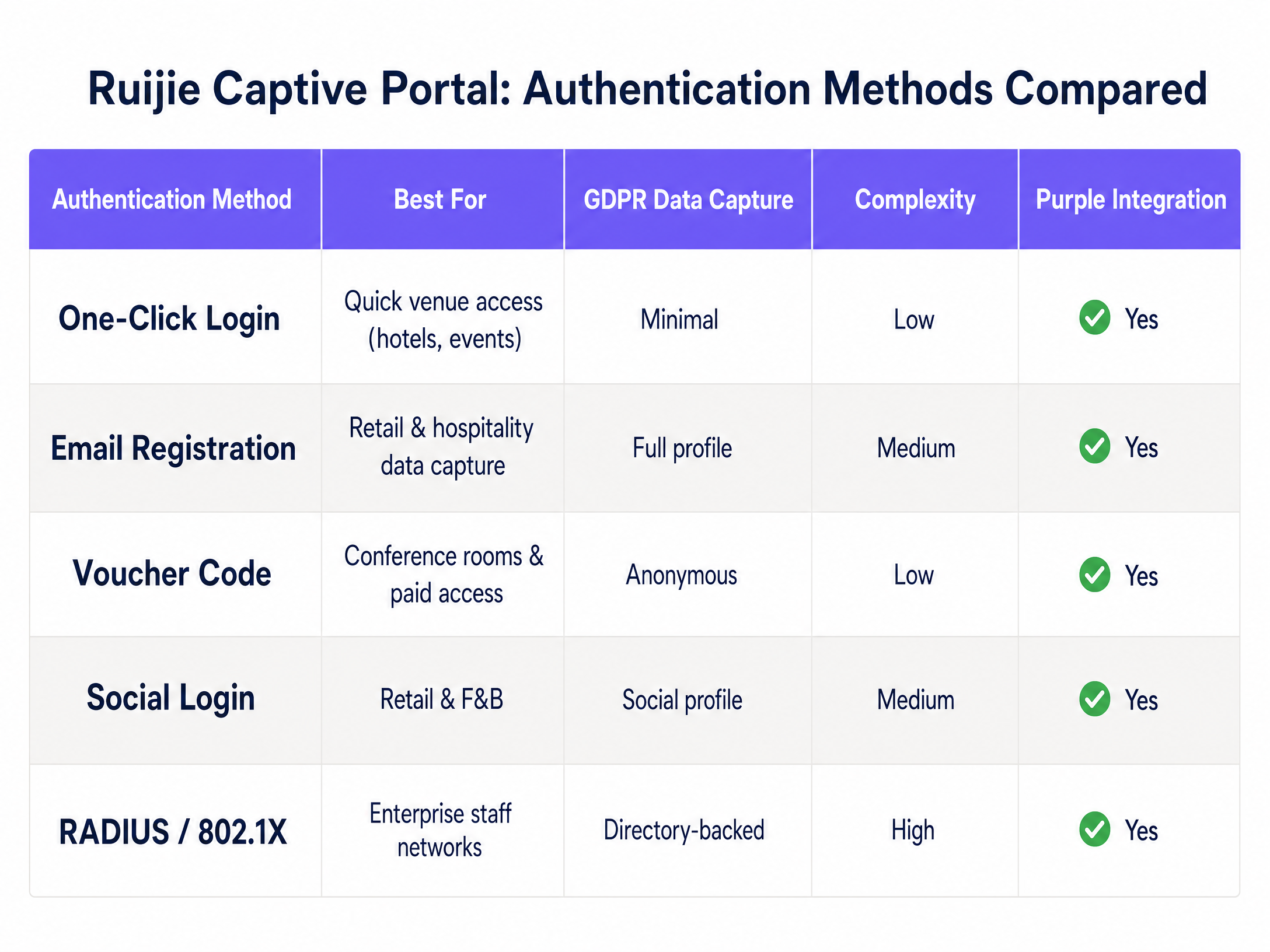
वरील तक्ता Ruijie प्लॅटफॉर्मवर उपलब्ध असलेल्या पाच प्रमाणीकरण पद्धतींचा सारांश देतो. ईमेल नोंदणी आणि सोशल लॉगिन हे हॉस्पिटॅलिटी आणि रिटेल वातावरणासाठी सर्वात सामान्य पर्याय आहेत कारण ते संरचित, GDPR-सुसंगत फर्स्ट-पार्टी डेटा कॅप्चर करतात. व्हाउचर कोड कॉन्फरन्स रूम आणि सशुल्क प्रवेश स्तरांसाठी योग्य आहेत. 802.1X सह RADIUS कर्मचारी नेटवर्कसाठी राखीव आहे जेथे डिरेक्टरी-बॅक्ड आयडेंटिटी आवश्यक आहे.
टप्प्याटप्प्याने अंमलबजावणी मार्गदर्शिका
Ruijie Cloud किंवा स्थानिक कंट्रोलर इंटरफेसमध्ये या टप्प्यांचे अनुसरण करा. खालील UI मार्ग Ruijie Cloud नवीन इंटरफेस (2024 नंतरचे) आणि Ruijie JaCS प्लॅटफॉर्मवर लागू होतात.
टप्पा 1: गेस्ट SSID कॉन्फिगर करा
वायरलेस ब्रॉडकास्ट नेटवर्क स्थापित करा.
- Ruijie Cloud किंवा स्थानिक कंट्रोलर वेब इंटरफेसवर लॉग इन करा.
- Device Config वर जा आणि वायरलेस विभागांतर्गत Wi-Fi निवडा.
- नवीन SSID तयार करण्यासाठी + वर क्लिक करा, किंवा विद्यमान संपादित करा.
- SSID Name सेट करा (उदा., "Free Guest WiFi").
- Security Mode ला Open वर सेट करा - कोणताही प्री-शेअर्ड की नाही.
- तुमच्या समर्पित गेस्ट VLAN (उदा., VLAN 30) मध्ये SSID नियुक्त करा.
- SSID कॉन्फिगरेशन जतन करा.
टप्पा 2: Captive Portal पॉलिसी परिभाषित करा
गेस्ट ट्रॅफिक अडवण्यासाठी आणि ते Purple कडे रीडायरेक्ट करण्यासाठी कंट्रोलरला निर्देश द्या.
- Auth & Account वर जा आणि प्रमाणीकरणांतर्गत Captive Portal निवडा.
- नवीन पॉलिसी तयार करा. एक वर्णनात्मक Policy Name सेट करा (उदा., "Purple-Guest-Portal").
- Policy Mode ला External वर सेट करा.
- तुमच्या Ruijie गेटवे (RG-EG मालिका) किंवा ॲक्सेस पॉइंटवर Authentication Device सेट करा.
- टप्पा 1 मध्ये तयार केलेले गेस्ट SSID निवडा.
- Portal Server URL फील्डमध्ये, तुमचे विशिष्ट Purple स्प्लॅश पेज URL प्रविष्ट करा (तुमच्या Purple डॅशबोर्डमध्ये हार्डवेअर कॉन्फिगरेशन अंतर्गत उपलब्ध).
- नियुक्त केलेल्या फील्डमध्ये Purple RADIUS सर्व्हर IP पत्ते प्रविष्ट करा.
- तुमच्या सत्र कालबाह्यता धोरणाशी जुळण्यासाठी Seamless Online कालावधी सेट करा (उदा., हॉस्पिटॅलिटीसाठी 24 तास, रिटेलसाठी एक तास).
- Portal Escape वर्तनावर निर्णय घ्या - खालील सर्वोत्तम पद्धती विभाग पहा.
टप्पा 3: walled garden (allowlist) कॉन्फिगर करा
Captive Portal वापरकर्ता प्रमाणित होईपर्यंत सर्व ट्रॅफिक अडवते. लॉगिन पेज लोड होण्यासाठी काही ट्रॅफिक पूर्व-प्रमाणीकरणाद्वारे पास होणे आवश्यक आहेआणि सोशल लॉगिनवर प्रक्रिया करा. कोणत्याही Captive Portal डिप्लॉयमेंटमध्ये हा सर्वात वारंवार चुकीच्या पद्धतीने कॉन्फिगर केला जाणारा घटक आहे.
१. Auth & Account वर जा आणि Allowlist निवडा. २. सर्व आवश्यक Purple इन्फ्रास्ट्रक्चर डोमेन जोडा. तुमचे Purple डॅशबोर्ड तुमच्या प्रदेशासाठी अचूक सूची प्रदान करते. ३. तुम्ही सोशल लॉगिन ऑफर करत असल्यास, प्रत्येक प्रदात्यासाठी OAuth डोमेन जोडा:
- Microsoft Entra ID साठी:
*.microsoft.com,*.microsoftonline.com,login.live.com - Google Workspace साठी:
*.google.com,accounts.google.com - Okta साठी: तुमचे विशिष्ट Okta टेनंट डोमेन ४. तुम्ही सशुल्क WiFi स्तर ऑफर करत असल्यास कोणतेही पेमेंट प्रोसेसर डोमेन जोडा. ५. Allowlist सेव्ह करा आणि लागू करा.
पायरी ४: RADIUS ऑथेंटिकेशन कॉन्फिगर करा
Ruijie आणि Purple मधील सुरक्षित कम्युनिकेशन चॅनेल कॉन्फिगर करा.
१. तुमच्या Ruijie कंट्रोलर किंवा गेटवेमधील RADIUS सर्व्हर सेटिंग्जवर जा. २. ऑथेंटिकेशनसाठी प्राथमिक Purple RADIUS सर्व्हर IP पत्ता आणि पोर्ट १८१२ जोडा. ३. फेलओव्हर म्हणून दुय्यम Purple RADIUS सर्व्हर IP पत्ता जोडा. ४. तुमच्या Purple डॅशबोर्डवरून Shared Secret प्रविष्ट करा. हे तंतोतंत जुळले पाहिजे. ५. पोर्ट १८१३ वर अकाउंटिंग सर्व्हर जोडा आणि RADIUS अकाउंटिंग सक्षम करा. हे सेशनचा कालावधी आणि डेटा वापरावर लक्ष ठेवते, जे थेट Purple च्या WiFi Analytics रिपोर्टमध्ये फीड होते. ६. Purple च्या ॲनालिटिक्समधील ट्रॅफिक ओळखण्यासाठी NAS Identifier एका अर्थपूर्ण स्ट्रिंगवर (उदा. तुमच्या ठिकाणाचे नाव) सेट करा.
पायरी ५: QoS पॉलिसी लागू करा
अनिर्बंध गेस्ट ॲक्सेस पीक अवर्स दरम्यान तुमच्या इंटरनेट लिंकला सॅच्युरेट करू शकतो.
१. तुमच्या Ruijie गेटवेच्या QoS किंवा बँडविड्थ व्यवस्थापन विभागावर जा. २. प्रति-वापरकर्ता डाउनलोड मर्यादा सेट करा (उदा. हॉटेलच्या पाहुण्यांसाठी १० Mbps, रिटेल खरेदीदारांसाठी ५ Mbps). ३. प्रति-वापरकर्ता अपलोड मर्यादा सेट करा (उदा. २-५ Mbps). ४. पोर्टल सर्व्हर तात्पुरता अनुपलब्ध असल्यास ऑथेंटिकेट न केलेले वापरकर्ते नेटवर्कमध्ये प्रवेश करू शकणार नाहीत याची खात्री करण्यासाठी Client Escape अक्षम करा. ५. कॉन्फिगरेशन सेव्ह करा आणि सर्व संबंधित डिव्हाइसेसवर पुश करा.
पायरी ६: डिप्लॉयमेंटची चाचणी घ्या
नेहमी कॅश केलेली क्रेडेन्शियल्स नसलेल्या नवीन डिव्हाइसवरून चाचणी घ्या.
१. गेस्ट SSID शी मोबाईल डिव्हाइस कनेक्ट करा.
२. ब्राउझर उघडा आणि नॉन-HTTPS URL वर जा (उदा. http://example.com). पोर्टलने रिडायरेक्ट केले पाहिजे.
३. Purple स्प्लॅश पेज योग्यरित्या लोड होत असल्याची खात्री करा.
४. ऑथेंटिकेशन फ्लो पूर्ण करा.
५. ऑथेंटिकेशननंतर इंटरनेट ॲक्सेस मंजूर झाल्याची पुष्टी करा.
६. सेशन तुमच्या ॲनालिटिक्समध्ये दिसत असल्याची पुष्टी करण्यासाठी Purple डॅशबोर्ड तपासा.
एंटरप्राइझ डिप्लॉयमेंटसाठी सर्वोत्तम पद्धती
सुरक्षा आणि अनुपालन
गेस्ट ॲक्सेससाठी कधीही सामायिक PSK वर अवलंबून राहू नका. सामायिक पासवर्ड कोणतीही जबाबदारी देत नाहीत आणि एका वापरकर्त्यासाठी ते रद्द करणे अशक्य असते. वैयक्तिक ऑथेंटिकेशनसह Purple चे Captive Portal वापरून, तुम्ही डेटा प्रक्रियेसाठी स्पष्ट संमती लागू करता, ज्यामुळे GDPR कलम ७ च्या आवश्यकता पूर्ण होतात. Purple कडे ISO 27001, GDPR, CCPA आणि Cyber Essentials प्रमाणपत्रे आहेत, ज्यामुळे डेटा कॅप्चर करण्याची यंत्रणा स्वतः ऑडिट करण्यायोग्य असल्याची खात्री होते.
सुरक्षा आर्किटेक्चरच्या सखोल माहितीसाठी, आमचे Enterprise WiFi Security: A Complete Guide for 2026 आणि What Is Secure WiFi: Essential Guide for Business 2026 वाचा.
Portal Escape: एक विचारपूर्वक घेतलेला निर्णय
AP आणि पोर्टल सर्व्हर अनरिचेबल झाल्यास Ruijie चे Portal Escape वैशिष्ट्य स्वयंचलितपणे वापरकर्ता ट्रॅफिक रिलीज करते. हॉस्पिटॅलिटी वातावरणात, तुम्ही ते सक्षम करणे निवडू शकता - सर्व्हरच्या किरकोळ समस्येदरम्यान WiFi मधून बाहेर पडलेल्या पाहुण्यांमुळे तक्रारी निर्माण होतात. रिटेल किंवा हेल्थकेअर वातावरणात, तुम्ही ते अक्षम करणे निवडू शकता - ऑथेंटिकेट न केलेला प्रवेश हा अनुपालन आणि सुरक्षेचा धोका दर्शवतो. तुमचा निर्णय आणि त्यामागील कारण तुमच्या नेटवर्क रनबुकमध्ये नोंदवा.
मल्टी-साइट सुसंगतता
सर्व साइट्सवर मध्यवर्ती पद्धतीने कॉन्फिगरेशन व्यवस्थापित करण्यासाठी Ruijie Cloud वापरा. प्रति-साइट कॉन्फिगरेशनमधील फरक दूर करण्यासाठी एकाच वेळी पोर्टल पॉलिसी पुश करा - वितरित मालमत्तेमध्ये विसंगत गेस्ट अनुभवांचे हे सर्वात सामान्य कारण आहे. Purple चे क्लाउड ओव्हरले त्याच तत्त्वावर कार्य करते: एक डॅशबोर्ड, सर्व ठिकाणे.
फर्मवेअर व्यवस्थापन
काही Ruijie Captive Portal वैशिष्ट्यांसाठी - विशेषतः बँडविड्थ नियंत्रणे आणि डायनॅमिक VLAN असाइनमेंट - गेटवेवर विशिष्ट फर्मवेअर आवृत्त्यांची आवश्यकता असते. Ruijie च्या रिलीज नोट्समध्ये या अवलंबनांचे दस्तऐवजीकरण केले आहे. क्लाउड-व्यवस्थापित डिप्लॉयमेंट्सवर पूर्ण QoS समर्थनासाठी तुमचे RG-EG गेटवे फर्मवेअर RGOS11.9(6)B17T1 किंवा त्यावरील आवृत्ती चालवत असल्याची खात्री करा.
ट्रबलशूटिंग आणि जोखीम कमी करणे
पोर्टल पेज लोड होण्यात अयशस्वी
डिव्हाइस कनेक्ट झाल्यावर Captive Portal दिसत नसल्यास, आधी तुमच्या walled garden सेटिंग्जची पडताळणी करा. ऑथेंटिकेशनपूर्वी डिव्हाइसने DNS रिझॉल्व्ह केले पाहिजे आणि Purple पोर्टल URL पर्यंत पोहोचले पाहिजे. तुमच्या Ruijie allowlist मध्ये सर्व आवश्यक डोमेन समाविष्ट आहेत आणि तुमचा DNS सर्व्हर गेस्ट VLAN वरून ॲक्सेस करण्यायोग्य आहे याची खात्री करा.
ऑथेंटिकेशन टाइमआउट्स
वापरकर्त्यांना पोर्टल दिसत असल्यास परंतु लॉग इन करता येत नसल्यास, ही समस्या सहसा RADIUS कॉन्फिगरेशनमध्ये असते. RADIUS सर्व्हर IP पत्ते, पोर्ट्स (ऑथेंटिकेशनसाठी १८१२, अकाउंटिंगसाठी १८१३) आणि shared secret ची पडताळणी करा. तुमचा फायरवॉल Ruijie गेटवेच्या व्यवस्थापन IP वरून या पोर्ट्सवर आउटबाउंड UDP ट्रॅफिकला अनुमती देतो याची खात्री करा.
सोशल लॉगिन हँग होणे
वापरकर्त्यांनी सोशल लॉगिन बटणावर क्लिक केल्यावर काहीच घडत नसल्यास, OAuth रिडायरेक्ट ब्लॉक केला जात आहे. तुमच्या Ruijie allowlist मध्ये आवश्यक सोशल प्रदाता डोमेन जोडा. पोर्टल कार्य करत असल्याची पुष्टी करण्यासाठी ऑथेंटिकेशनपूर्वी तात्पुरत्या स्वरूपात सर्व ट्रॅफिकला अनुमती देऊन चाचणी घ्या, त्यानंतर हळूहळू allowlist कडक करा.
डायनॅमिक VLAN असाइनमेंट अयशस्वी होणे
तुम्ही वापरकर्त्यांना डायनॅमिकरित्या VLAN नियुक्त करण्यासाठी RADIUS वापरत असल्यास, RADIUS प्रतिसादात योग्य VLAN गुणधर्म (Tunnel-Type, Tunnel-Medium-Type, Tunnel-Private-Group-ID) समाविष्ट असल्याची खात्री करा. Ruijie चे RG-EG310GH-E आणि तत्सम गेटवे डायनॅमिक VLAN असाइनमेंटला समर्थन देतात, परंतु या वैशिष्ट्यासाठी RADIUS सर्व्हर आणि गेटवे दोन्हीवर स्पष्ट कॉन्फिगरेशन आवश्यक आहे.
ROI आणि व्यावसायिक प्रभाव
सुरक्षित Captive Portal डिप्लॉय केल्याने गेस्ट WiFi चे रूपांतर एका खर्चाच्या केंद्रातून धोरणात्मक मालमत्तेत होते. Purple चे WiFi Analytics प्लॅटफॉर्म, integratतुमच्या Ruijie इन्फ्रास्ट्रक्चरसह एकत्रित होऊन, फर्स्ट-पार्टी डेटा कॅप्चर करतो, उच्च-इच्छा असलेल्या संपर्क सूची तयार करतो आणि तुमच्या संपूर्ण मालमत्तेमधील अभ्यागतांच्या वर्तनाबद्दल उपयुक्त अंतर्दृष्टी प्रदान करतो.
Harrods ने त्यांच्या लॉयल्टी प्रोग्रामचा प्रचार करण्यासाठी Purple च्या Guest WiFi चा वापर केला, ज्याद्वारे त्यांनी बाजारात आघाडीचा ऑप्ट-इन दर आणि ५७ पट ROI मिळवला (Purple ग्राहक डेटा). c2c Rail ने थेट बुकिंगला प्रोत्साहन देण्यासाठी Purple चा वापर केला, ज्याद्वारे त्यांनी १२१% रिटर्न ऑन इन्व्हेस्टमेंट मिळवली आणि £७६,००० ची परिचालन खर्चामध्ये बचत केली (Purple ग्राहक डेटा). Pizza Express ने अधिक समृद्ध ग्राहक प्रोफाइल तयार करण्यासाठी ४७०+ पेक्षा जास्त रेस्टॉरंट्समध्ये Purple तैनात केले.
For हॉस्पिटॅलिटी ऑपरेटरसाठी, लॉगिन करताना कॅप्चर केलेला डेटा - ईमेल, डेमोग्राफिक, भेटींची वारंवारता - थेट CRM सिस्टम आणि लॉयल्टी प्रोग्राममध्ये फीड केला जातो. रिटेल वातावरणासाठी, रिपीट व्हिजिट अॅनालिटिक्स तुमच्या सर्वात मौल्यवान खरेदीदारांची ओळख पटवते. वाहतूक केंद्रांसाठी, प्रवासी प्रवाह डेटा कर्मचारी नियोजन आणि व्यावसायिक जागा नियोजनाला अनुकूल करतो.
Purple हे Cisco Meraki, HPE Aruba, Ruckus, Juniper Mist, Ubiquiti UniFi, Cambium, Extreme, आणि Fortinet - तसेच Ruijie - सोबत समाकलित होते, ज्यामुळे ते एक हार्डवेअर-अग्नॉस्टिक क्लाउड ओव्हरले बनते जे तुमच्या विद्यमान मालमत्तेला बदलण्याऐवजी तिच्यासोबत काम करते.
संबंधित मार्गदर्शक: Purple WiFi सोबत Grandstream GWN अॅक्सेस पॉइंट्सचे एकत्रीकरण
महत्वाच्या व्याख्या
Captive portal
A web page that a user of a public access network must view and interact with before internet access is granted. It intercepts all HTTP traffic and redirects the user's browser to the portal page.
The core mechanism for enforcing authentication on guest WiFi networks. Used in hotels, retail, stadiums, and public-sector venues to control access and capture consent.
Walled garden
A pre-authentication allowlist that permits specific domains and IP addresses to bypass captive portal interception. Traffic to these destinations is allowed before the user authenticates.
Essential for allowing devices to load the splash page, reach social login providers, and process payment flows before the user is fully authenticated. Misconfiguration here is the leading cause of captive portal failures.
RADIUS
Remote Authentication Dial-In User Service. A networking protocol that provides centralised Authentication, Authorisation, and Accounting management for users connecting to a network service.
The secure protocol Ruijie controllers use to communicate with Purple's servers. Authentication requests go to port 1812 (UDP); accounting records go to port 1813 (UDP).
WISPr
Wireless Internet Service Provider roaming. A protocol specification that defines how a captive portal redirects unauthenticated users to a login page and how the access controller receives the authentication result.
The specific protocol framework used by Ruijie and Purple to handle the external captive portal redirection and authentication flow. Required for external portal mode on Ruijie gateways.
VLAN isolation
The practice of separating network traffic into distinct virtual local area networks at the switch level, preventing devices on different VLANs from communicating directly.
Non-negotiable for guest networks. Ensures guest devices cannot communicate with corporate servers, staff laptops, or payment terminals, even if they are connected to the same physical infrastructure.
Portal Escape
A Ruijie feature that automatically releases user traffic if the access point and portal server become unreachable, allowing unauthenticated internet access during an outage.
A deliberate trade-off between availability and security. Hospitality operators may enable it to prevent guest complaints during outages. Healthcare and retail operators typically disable it to enforce strict authentication at all times.
SSID
Service Set Identifier. The public name of a wireless network that devices display in their available networks list.
The network name guests select on their devices, which triggers the captive portal redirection. Each SSID in a Ruijie deployment is mapped to a specific VLAN and authentication policy.
QoS
Quality of Service. A set of technologies that manage data traffic to reduce packet loss, latency, and jitter, and to ensure predictable performance for specific traffic types.
Used in guest networks to cap per-user bandwidth, preventing a single device from saturating the internet link and degrading the experience for all other connected users.
802.1X
An IEEE standard for port-based network access control, providing an authentication mechanism for devices connecting to a LAN or WLAN.
Used for staff networks requiring directory-backed identity (e.g., via Microsoft Entra ID or Okta). Not typically used for guest networks, where a captive portal with RADIUS is the appropriate pattern.
सोडवलेली उदाहरणे
A 250-room hotel uses Ruijie RG-AP820-I access points and an RG-EG310GH-E gateway. They require guests to authenticate via email to build a marketing database. Management is concerned about guests bypassing the portal and about peak-hour bandwidth saturation during conference events.
The IT team creates a dedicated guest VLAN (VLAN 40) on the core switch and trunks it to the Ruijie gateway and APs. In Ruijie Cloud, they create an open SSID mapped to VLAN 40. They configure an External Captive Portal policy pointing to the Purple splash page URL, with the Portal Server URL and RADIUS credentials from the Purple dashboard. Crucially, they configure the Walled Garden to allow traffic only to Purple's domains and disable the Portal Escape feature on the Ruijie gateway, preventing unauthenticated access during any portal outage. They apply a QoS policy limiting each client to 10 Mbps down and 3 Mbps up. For conference events, they create a separate SSID on VLAN 50 with a voucher-based portal and tighter bandwidth limits of 5 Mbps per device.
A retail chain with 50 locations uses Ruijie WS6008 controllers. They implement social login (Facebook and Google Workspace) for shoppers accessing WiFi, but the portal page hangs when users click the social login buttons. The issue affects all 50 sites simultaneously.
The IT manager identifies that the Allowlist (Walled Garden) configuration on the Ruijie controllers is missing the OAuth domains required by Facebook and Google. While the Purple portal URL was correctly allowed, the social provider domains needed for the OAuth handshake were blocked by the captive portal interception. The team adds the required wildcard domains - specifically *.facebook.com, *.fbcdn.net, accounts.google.com, and *.googleapis.com - to the Ruijie Allowlist. They push the updated configuration to all 50 sites simultaneously via Ruijie Cloud, resolving the issue across the entire estate in a single operation.
सराव प्रश्न
Q1. You have configured an external captive portal on a Ruijie RG-EG gateway. Guests connect to the SSID, but their devices report 'No Internet Connection' and the portal page never loads. What is the most likely configuration error and how do you resolve it?
टीप: Consider what network operations must succeed before the user can even see the login page.
नमुना उत्तर पहा
The walled garden (Allowlist) is misconfigured. The Ruijie gateway is blocking DNS resolution or HTTP traffic required to reach the external Purple splash page URL. Before authentication, the device must be able to resolve the portal domain and make an HTTP connection to it. Add the specific Purple domains to the pre-authentication allowlist in the Ruijie Auth & Account section. Also verify that the guest VLAN has a valid DNS server assigned via DHCP.
Q2. A stadium IT director wants to deploy Ruijie APs for fan WiFi during events. They want to collect marketing data but are concerned that RADIUS authentication will cause delays when 10,000 fans connect simultaneously during the first 30 minutes of doors opening. How should they design the authentication flow to balance data capture with user experience?
टीप: Consider the trade-off between data richness and authentication friction at scale.
नमुना उत्तर पहा
They should use Purple's One-Click Login for returning fans who have previously authenticated, which bypasses the form fill and reduces RADIUS load. For new fans, a minimal email capture form is preferable to social login, which requires additional OAuth round-trips. The Ruijie gateway must be sized to handle concurrent RADIUS requests - for 10,000 simultaneous connections, a high-capacity RG-EG series gateway is required. Enabling Seamless Online with a 30-day session duration means returning fans connect automatically at subsequent events. QoS limits should be strict (5 Mbps per device) to prevent early arrivals from saturating the link before the main crowd arrives.
Q3. During a security audit, a penetration tester accesses the corporate file server while connected to the 'Guest WiFi' SSID broadcast by a Ruijie AP. The guest network uses a correctly configured captive portal. How do you resolve this critical vulnerability?
टीप: Authentication and network segmentation are separate concerns. One does not imply the other.
नमुना उत्तर पहा
The captive portal is working correctly, but VLAN isolation is missing or misconfigured. The guest SSID is dropping authenticated users onto the corporate VLAN or native VLAN, which has routing access to internal servers. You need to: (1) create a dedicated guest VLAN (e.g., VLAN 50) on the core switch; (2) assign the Guest SSID to VLAN 50 in the Ruijie controller; (3) configure the switch ports connecting the APs as 802.1Q trunks permitting VLAN 50; (4) configure the Ruijie gateway to block routing between VLAN 50 and all corporate subnets, permitting only internet-bound traffic from the guest VLAN. Authentication and network segmentation are independent controls - both must be correctly configured.
Q4. Your Ruijie deployment has Portal Escape enabled. During a planned maintenance window on the Purple RADIUS servers, you notice that guests are accessing the internet without authenticating. Is this expected behaviour, and what are the compliance implications?
टीप: Consider the purpose of Portal Escape and your GDPR obligations.
नमुना उत्तर पहा
Yes, this is the expected behaviour of Portal Escape. When the portal server is unreachable, Ruijie automatically releases traffic to maintain connectivity. However, this creates a compliance gap: users are accessing the internet without providing consent for data processing, which may violate GDPR requirements if your terms of service or data capture are tied to the authentication event. For venues where consent capture is a legal or commercial requirement, Portal Escape should be disabled. Schedule RADIUS server maintenance during periods of minimal guest activity, and communicate the maintenance window to venue management. Consider implementing a secondary Purple RADIUS server as a failover to eliminate the scenario entirely.
या मालिकेमध्ये पुढे वाचा
WeChat WiFi प्रमाणीकरण समाकलित करणे: APAC ग्राहकांसाठी Captive Portal ऑनबोर्डिंग
WeChat कडे 1.41 अब्ज मासिक सक्रिय वापरकर्ते आहेत, ज्यामुळे ती जागतिक स्तरावर चिनी ग्राहकांसाठी प्राथमिक डिजिटल ओळख बनली आहे. हे मार्गदर्शक APAC ठिकाणांसाठी एंटरप्राइझ captive portals मध्ये WeChat OAuth 2.0 प्रमाणीकरण कसे समाकलित करावे हे स्पष्ट करते, ज्यामध्ये प्लॅटफॉर्म नोंदणी, स्कोप निवड, RADIUS Change of Authorisation अंमलबजावणी आणि GDPR आणि चीनच्या PIPL सह दुहेरी-फ्रेमवर्क अनुपालनाचा समावेश आहे. हे IT व्यवस्थापक, नेटवर्क आर्किटेक्ट्स आणि या तिमाहीत कारवाई करू इच्छिणाऱ्या ठिकाण ऑपरेशन्स संचालकांसाठी उद्दिष्टित आहे.
सुरक्षित BYOD आणि 802.1X नेटवर्क ऑथेंटिकेशनसाठी SCEP कसे कॉन्फिगर करावे
हे मार्गदर्शक सर्टिफिकेट-आधारित 802.1X नेटवर्क ऑथेंटिकेशन उपयोजित करण्यासाठी SCEP कॉन्फिगर करण्याचा एक व्यापक तांत्रिक संदर्भ प्रदान करते. यामध्ये सामायिक केलेल्या पासवर्डवरून EAP-TLS कडे होणारा आर्किटेक्चरल बदल, मोबाईल डिव्हाइस मॅनेजमेंट इंटिग्रेशन आणि एंटरप्राइझ वातावरणात सुरक्षित BYOD ॲक्सेससाठी कठोर नेटवर्क सेगमेंटेशन समाविष्ट आहे.
एंटरप्राइझ Guest WiFi सेटअप मार्गदर्शिका: VLAN सेगमेंटेशन, सुरक्षा आणि Captive Portals
हे मार्गदर्शक एंटरप्राइझ guest WiFi उपयोजनासाठी एक तांत्रिक आराखडा प्रदान करते, ज्यामध्ये VLAN सेगमेंटेशन, सुरक्षा प्रोटोकॉल आणि captive portal आर्किटेक्चरवर लक्ष केंद्रित केले आहे. हे ट्रॅफिक वेगळे कसे करावे, एन्क्रिप्शन मानके कशी लागू करावीत आणि जटिल ठिकाणी सुरक्षितपणे फर्स्ट-पार्टी डेटा कसा गोळा करावा याबद्दल तपशीलवार माहिती देते.