
Configuring Captive Portal Redirection on Enterprise Network Controllers
This authoritative guide details the technical architecture and vendor-specific configuration steps required to implement captive portal redirection on enterprise network controllers. It provides actionable guidance for IT teams on configuring walled gardens, integrating RADIUS authentication, and ensuring compliance with GDPR and PCI DSS.
Listen to this guide
View podcast transcript
Executive Summary
Configuring a captive portal redirect on an enterprise network controller is a fundamental requirement for delivering secure, compliant guest WiFi. When configured correctly, the controller intercepts unauthenticated client traffic and issues an HTTP 302 redirect to an external portal, enabling authentication, consent capture, and network segmentation. When misconfigured, it results in silent connection failures, browser security warnings, and compliance exposures.
This guide provides the technical architecture and vendor-specific configuration steps required to deploy external captive portals across Cisco Meraki, HPE Aruba, Ruckus, Juniper Mist, and Ubiquiti UniFi. We detail the mechanics of the redirect flow, the precise requirements for walled garden configuration, and the integration of RADIUS for authentication and accounting. By following these steps, you ensure that your guest network meets PCI DSS segmentation requirements, captures explicit GDPR consent, and securely routes first-party data to platforms like Purple.
Technical Deep-Dive
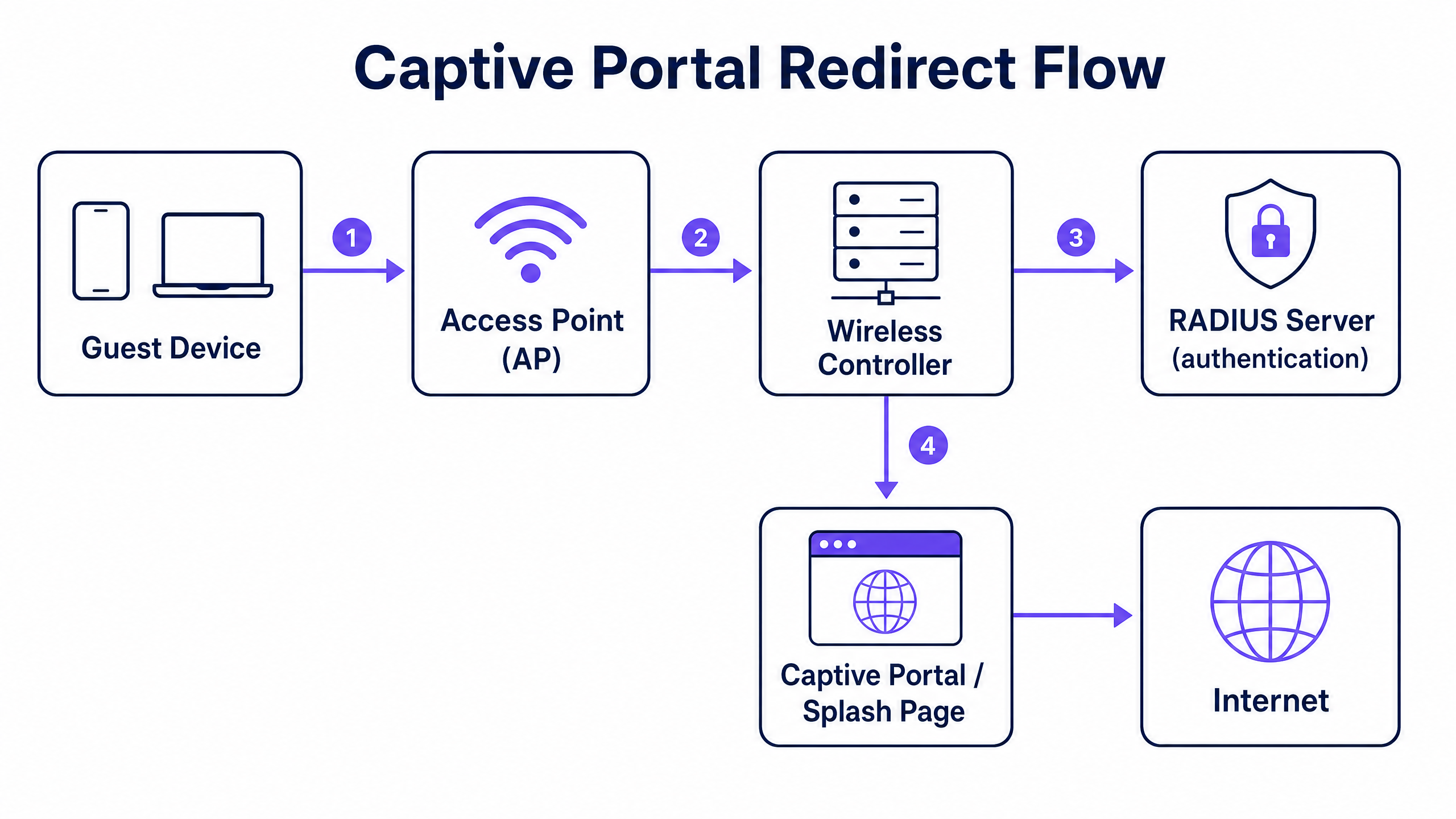
The captive portal redirect mechanism operates at the network controller level. It relies on a specific sequence of network state changes to intercept, authenticate, and authorise a client device.
The Redirect Flow
- Association and DHCP: A guest device associates with the guest SSID. The controller assigns an IP address via DHCP but places the client in a restricted pre-authentication state (often mapped to a specific pre-auth VLAN or role).
- Walled Garden Enforcement: In this pre-authentication state, all outbound traffic is dropped except for DNS (port 53), DHCP (ports 67 and 68), and traffic destined for specific IP addresses or domains defined in the access control list (ACL). This ACL is known as the walled garden.
- Interception and Redirect: When the guest opens a browser and initiates an HTTP request, the controller intercepts the request. Instead of routing the traffic to the internet, the controller responds with an HTTP 302 Found status code, redirecting the browser to your external captive portal URL. Modern operating systems use automatic HTTPS probes (like Apple's Captive Network Assistant) to detect this redirect and trigger a pseudo-browser.
- Authentication: The guest interacts with the splash page hosted on the external portal (e.g., Purple). This might involve a social login, a form submission, or a simple click-through. Upon completion, the portal communicates with the controller to authorise the session.
- Authorisation and Accounting: The authorisation signal is typically sent via a RADIUS Access-Accept message or through a vendor-specific API. The controller receives this signal, moves the client to the post-authentication state (often a different VLAN), removes the redirect rule, and grants internet access. The controller then sends a RADIUS Accounting-Start message to log the session duration and data usage.
Implementation Guide
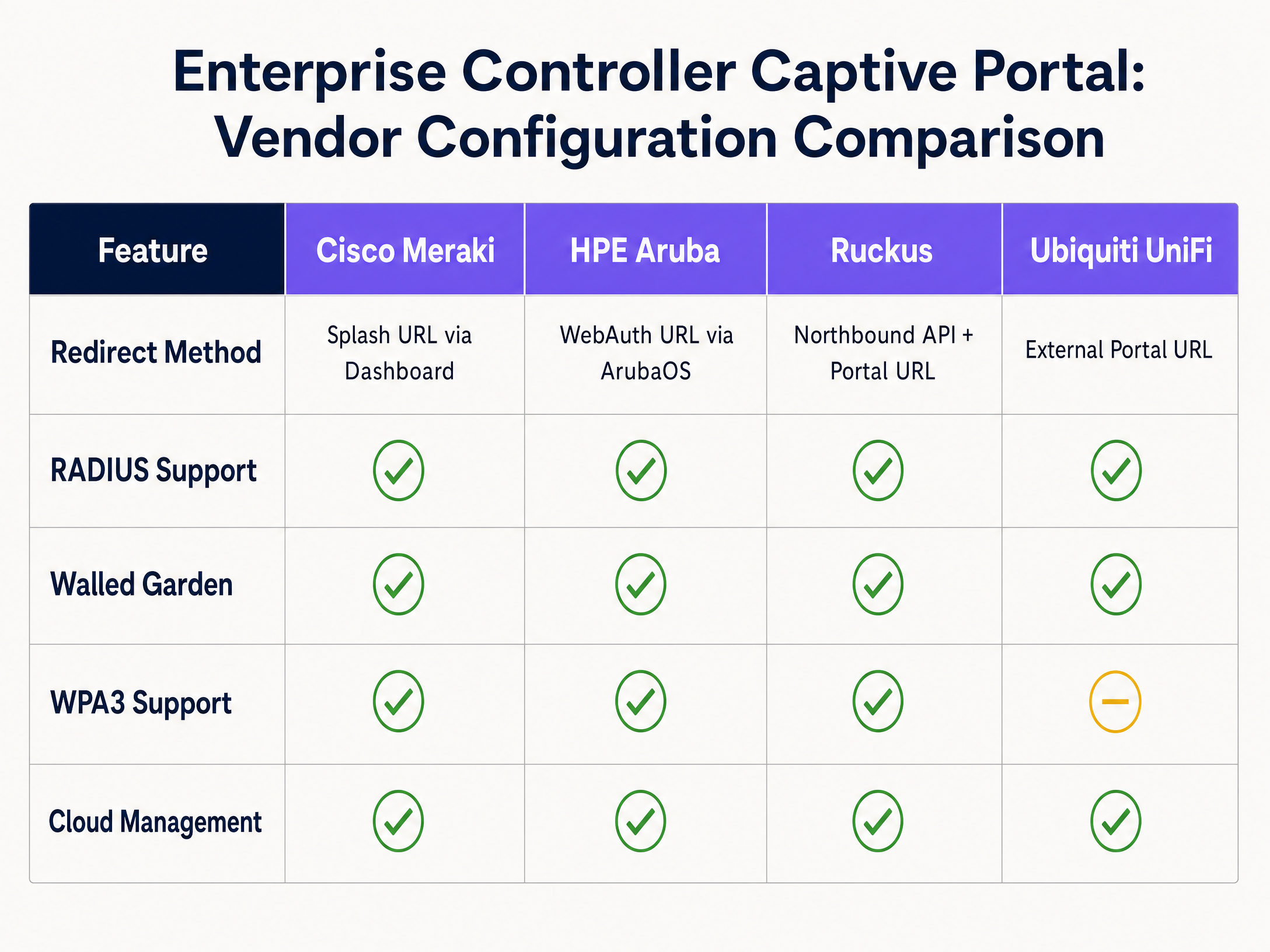
The fundamental architecture is consistent across vendors, but the configuration syntax varies significantly. Below are the steps for the leading enterprise platforms.
Cisco Meraki
Cisco Meraki configures captive portals entirely through the Meraki Dashboard.
- Navigate to Wireless > Access Control and select your guest SSID.
- Under Splash page, select Sign-on with my RADIUS server (for credential-based access) or Click-through.
- In the Custom Splash URL field, enter your external portal URL provided by Purple.
- Under RADIUS, enter the IP addresses of the primary and secondary RADIUS servers for both authentication (port 1812) and accounting (port 1813), along with the shared secret.
- Scroll to Advanced Splash Settings to configure the walled garden. Add the IP addresses or domains of your portal server and any required CDNs.
HPE Aruba
Aruba configuration involves defining a captive portal profile and applying it to a role.
- In ArubaOS, navigate to Configuration > Authentication > L3 Authentication.
- Create a new Captive Portal Authentication Profile. Enter the Login URL pointing to your Purple splash page.
- Create a Server Group containing your RADIUS servers and assign it to the captive portal profile.
- Navigate to Configuration > Security > Roles. Edit the pre-authentication role (often named
logon). Ensure the ACL permits DHCP, DNS, and HTTP/HTTPS traffic to your walled garden IP addresses, and applies the captive portal profile to all other HTTP traffic. - Assign the
logonrole as the initial role in your AAA profile for the guest SSID.
Ruckus SmartZone
Ruckus uses a specific WLAN type for hotspot deployments.
- Navigate to WLANs and create a new WLAN. Set the WLAN Type to Hotspot (WISPr).
- Under Authentication Options, select External RADIUS Server and input your server details for both authentication and accounting.
- Under Hotspot Portal, select External and enter your portal URL.
- Configure the Walled Garden by adding the necessary IP addresses or domains.
- Ruckus relies on its Northbound Portal Interface (NPI) to handle the authorisation flow, which requires configuring the NPI settings to allow communication from your portal server.
Ubiquiti UniFi
UniFi provides a straightforward interface for external portals.
- In the UniFi Network Controller, go to Settings > WiFi and select your guest network.
- Under Advanced Options, enable the Guest Policy.
- Go to Settings > Guest Control. Under Portal Type, select External Portal Server and enter your portal URL.
- Under Access Control, add the required IP addresses to the Pre-Authorisation Access list (the walled garden).
- Configure the RADIUS server details under Profiles > RADIUS and apply the profile to the guest network.
Best Practices
1. Walled Garden Configuration
The walled garden is the most critical point of failure in captive portal deployments. If the walled garden is incomplete, the guest's browser will fail to load the splash page, resulting in a blank screen or a timeout error.
You must explicitly permit access to:
- The primary portal server IP addresses or domains.
- The RADIUS server IP addresses.
- Any Content Delivery Networks (CDNs) used by the portal to load fonts, images, or JavaScript.
- Identity provider domains if using social login (e.g.,
facebook.com,google.com).
2. Network Segmentation for PCI DSS
If your venue processes card payments, PCI DSS compliance requires strict isolation of the guest network from the cardholder data environment. Do not rely solely on SSID separation. You must configure a dedicated guest VLAN at the controller or switch level, with firewall rules that explicitly deny routing between the guest VLAN and any internal corporate or Point of Sale (POS) networks.
3. RADIUS Accounting
Always configure RADIUS accounting. While MAC authorisation bypass can grant access, RADIUS accounting (Accounting-Start and Accounting-Stop messages) is required to accurately track session duration and data usage. Without accounting, your analytics platform will report inaccurate dwell times and concurrent user counts.
Troubleshooting & Risk Mitigation
HTTPS Interception Failures
Modern operating systems use HTTPS probes to detect captive portals. If the controller intercepts an HTTPS request but presents an invalid or untrusted SSL certificate for the redirect, the browser will display a severe security warning (e.g., "Your connection is not private") and block the redirect. To mitigate this, ensure your controller is provisioned with a valid, publicly trusted SSL certificate for its virtual interface, or configure the controller to only intercept HTTP traffic for the initial redirect.
DNS Leakage
If the pre-authentication ACL permits unrestricted outbound DNS traffic, sophisticated users can use DNS tunnelling to bypass the captive portal and access the internet without authenticating. Mitigate this by restricting outbound DNS traffic in the pre-authentication role to only your designated DNS resolvers, blocking all other port 53 traffic.
Session Timeout Mismatches
If the session timeout configured on the wireless controller is shorter than the session validity period defined in the external portal, guests will be abruptly disconnected and forced to re-authenticate. Ensure the controller's idle timeout and absolute session timeout align with the intended guest experience (e.g., 24 hours for hospitality environments, 8 hours for retail).
ROI & Business Impact
Deploying a properly configured captive portal transforms guest WiFi from an operational cost into a strategic asset. By integrating enterprise controllers with an intelligence layer like Purple, venues can capture explicit GDPR consent and collect valuable first-party data.
Purple processes 440 million logins annually across 80,000 venues. This data feeds directly into CRM platforms, enabling targeted marketing campaigns based on actual physical visits. For example, Retail operators can measure footfall and repeat visit rates, while Hospitality venues can drive direct bookings by engaging guests post-stay. The ROI is measured in increased customer lifetime value, improved operational efficiency through accurate footfall analytics, and the mitigation of regulatory risk through automated compliance management.
Key Definitions
Captive Portal
A web page that intercepts unauthenticated network traffic and requires user interaction—such as accepting terms or providing credentials—before granting internet access.
Used in enterprise networks to enforce security policies, capture first-party data, and ensure regulatory compliance.
Walled Garden
An access control list (ACL) applied to unauthenticated clients, permitting access only to specific IP addresses or domains required to load the captive portal.
Critical for ensuring the splash page loads correctly; missing CDN domains in the walled garden will cause the portal to render improperly.
RADIUS
Remote Authentication Dial-In User Service. A networking protocol that provides centralised Authentication, Authorization, and Accounting (AAA) management.
Used by network controllers to verify guest credentials against an external database and log session metrics.
VLAN Segmentation
The practice of dividing a physical network into multiple logical networks to isolate traffic.
Mandatory for PCI DSS compliance to ensure guest WiFi traffic cannot route to payment card environments.
HTTP 302 Redirect
A standard HTTP response status code indicating that the requested resource has been temporarily moved to a different URL.
The mechanism used by network controllers to intercept a guest's initial web request and push their browser to the splash page.
IEEE 802.1X
An IEEE standard for port-based network access control, requiring devices to authenticate before gaining access to the network.
Provides enterprise-grade security by ensuring each connection is individually authenticated, often backed by a RADIUS server.
WPA3-Enterprise
The latest Wi-Fi security protocol, providing robust encryption and requiring 802.1X authentication.
Recommended for secure enterprise deployments to protect against offline dictionary attacks and ensure data confidentiality.
MAC Authorisation Bypass (MAB)
A method of granting network access based on the client device's MAC address rather than requiring explicit user credentials.
Often used in click-through captive portals where the portal registers the MAC address after the user accepts the terms of service.
Worked Examples
A 350-room hotel needs to deploy a branded guest WiFi portal that captures email addresses for their loyalty programme, ensuring compliance with GDPR and isolating guest traffic from the corporate network.
The IT team deploys Cisco Meraki APs and configures a dedicated guest SSID on VLAN 100. In the Meraki Dashboard, they set the splash page to 'Sign-on with my RADIUS server' and enter Purple's portal URL. They configure the walled garden to include Purple's IP ranges and CDN domains. Firewall rules are applied to VLAN 100, denying routing to the corporate VLAN to ensure PCI DSS compliance. In the Purple platform, a branded portal is created with a data capture form and explicit GDPR consent checkboxes. The Purple CRM connector is configured to sync captured emails directly to the hotel's marketing platform.
A regional retail chain with 40 stores requires a consistent guest WiFi experience across all locations, with centralised management and store-level footfall analytics.
The retailer deploys HPE Aruba APs managed via Aruba Central. A single guest WLAN template is created with an external captive portal pointing to Purple. The pre-authentication role is configured with the necessary walled garden ACLs. This template is applied across all 40 sites using Aruba Central's group policy. In Purple, a unified portal design is deployed, with analytics dashboards configured to segment data by individual store locations.
Practice Questions
Q1. A venue reports that guests connecting to the WiFi are seeing a blank screen instead of the branded splash page. The portal uses custom fonts hosted on Google Fonts. What is the most likely configuration error?
Hint: Consider what traffic is permitted before a user authenticates.
View model answer
The walled garden is incomplete. The Google Fonts CDN domains have not been added to the pre-authentication ACL. The controller is blocking the request to load the fonts, causing the page render to fail.
Q2. To comply with PCI DSS, an IT manager creates a new SSID named 'Guest_WiFi' on the same subnet as the corporate network. Is this sufficient?
Hint: PCI DSS requires isolation of the cardholder data environment.
View model answer
No. Creating a separate SSID on the same subnet does not provide network isolation. The guest network must be placed on a dedicated VLAN with firewall rules explicitly denying routing to the corporate or POS networks.
Q3. A retail chain notices that their analytics dashboard shows 1,000 authentications per day, but the average dwell time metric is missing or zero. What configuration step was missed?
Hint: Which protocol is responsible for tracking session duration?
View model answer
RADIUS Accounting has not been configured on the controller. Without the Accounting-Start and Accounting-Stop messages, the analytics platform cannot calculate the duration of the sessions.
Continue reading in this series
Integrating WeChat WiFi Authentication: Captive Portal Onboarding for APAC Customers
WeChat has 1.41 billion monthly active users, making it the primary digital identity for Chinese consumers globally. This guide explains how to integrate WeChat OAuth 2.0 authentication into enterprise captive portals for APAC venues, covering platform registration, scope selection, RADIUS Change of Authorisation enforcement, and dual-framework compliance with GDPR and China's PIPL. It is aimed at IT managers, network architects, and venue operations directors who need to act this quarter.
Step-by-Step Guide: Configuring Ruijie Wireless Controllers for Guest WiFi Captive Portals
This guide provides a complete technical walkthrough for configuring Ruijie wireless controllers and gateways to deploy enterprise-grade guest WiFi captive portals. It covers VLAN segmentation, external RADIUS authentication via WISPr protocol, walled garden configuration, and seamless integration with Purple's Identity-Based Networks platform to capture first-party data and drive measurable business value across hospitality, retail, and public-sector environments.
Step-by-Step Guide: Configuring Ruijie Wireless Controllers for Guest WiFi Captive Portals
This guide provides a complete technical walkthrough for configuring Ruijie wireless controllers and gateways to deploy enterprise-grade guest WiFi captive portals. It covers VLAN segmentation, external RADIUS authentication via WISPr protocol, walled garden configuration, and seamless integration with Purple's Identity-Based Networks platform to capture first-party data and drive measurable business value across hospitality, retail, and public-sector environments.