
Guia de Configuração de Guest WiFi Empresarial: Segmentação de VLAN, Segurança e Captive Portals
Este guia fornece um plano técnico para a implementação de guest WiFi empresarial, focando-se na segmentação de VLAN, protocolos de segurança e arquitetura de Captive Portal. Detalha como isolar o tráfego, aplicar normas de encriptação e recolher dados first-party de forma segura em locais complexos.
Ouça este guia
Ver transcrição do podcast
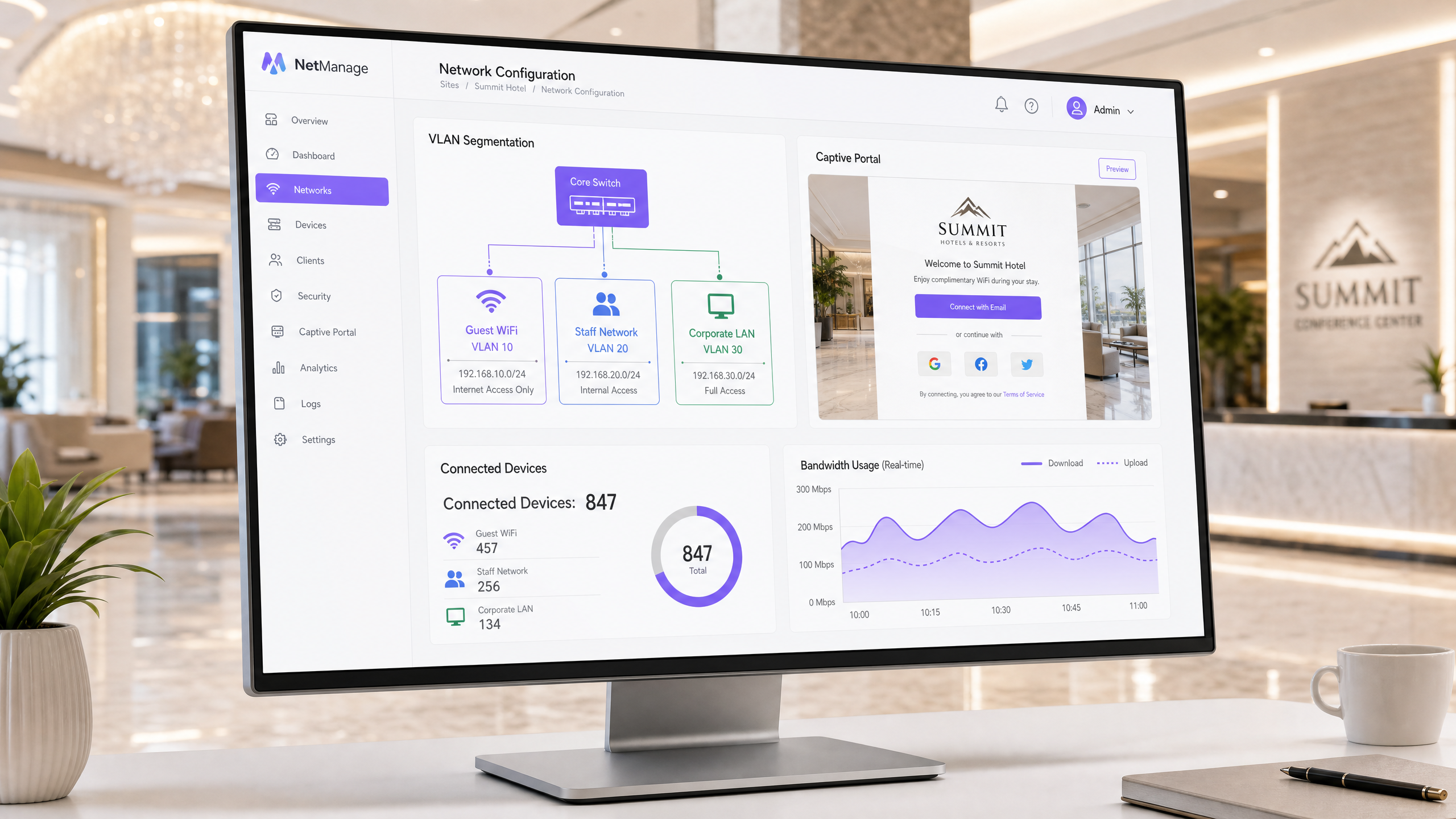
Resumo Executivo
A implementação de guest WiFi empresarial é um projeto de infraestrutura, não algo secundário. Quando mais de 80 000 locais ativos confiam numa plataforma com 440 milhões de inícios de sessão anuais, os dados revelam uma realidade clara: uma arquitetura adequada previne falhas de segurança e permite a recolha de dados em conformidade com o GDPR. Este guia detalha os requisitos técnicos para configurar o guest WiFi de forma segura utilizando segmentação de VLAN, encriptação WPA3 e um captive portal em conformidade. Aprenderá a isolar o tráfego de convidados dos sistemas corporativos, a aplicar controlos de acesso baseados na identidade e a extrair valor comercial mensurável através da recolha de dados first-party.
Análise Técnica Detalhada
Arquitetura de Segmentação de VLAN
Uma Virtual Local Area Network (VLAN) isola o tráfego na camada de ligação de dados. Sem segmentação, um dispositivo de convidado reside na mesma rede que os seus terminais de ponto de venda (POS) e sistemas de gestão de propriedade. Isto viola o Requisito 1.3 do PCI DSS e expõe a infraestrutura interna a movimentos laterais.
A arquitetura empresarial padrão atribui IDs de VLAN distintos a tipos de tráfego específicos. Por exemplo, a VLAN 10 gere o guest WiFi, a VLAN 20 gere as redes de funcionários e a VLAN 30 gere a infraestrutura corporativa. Cada VLAN opera dentro da sua própria sub-rede IP e âmbito DHCP. O tráfego de convidados é encaminhado diretamente para a internet; nunca toca nas tabelas de encaminhamento internas.
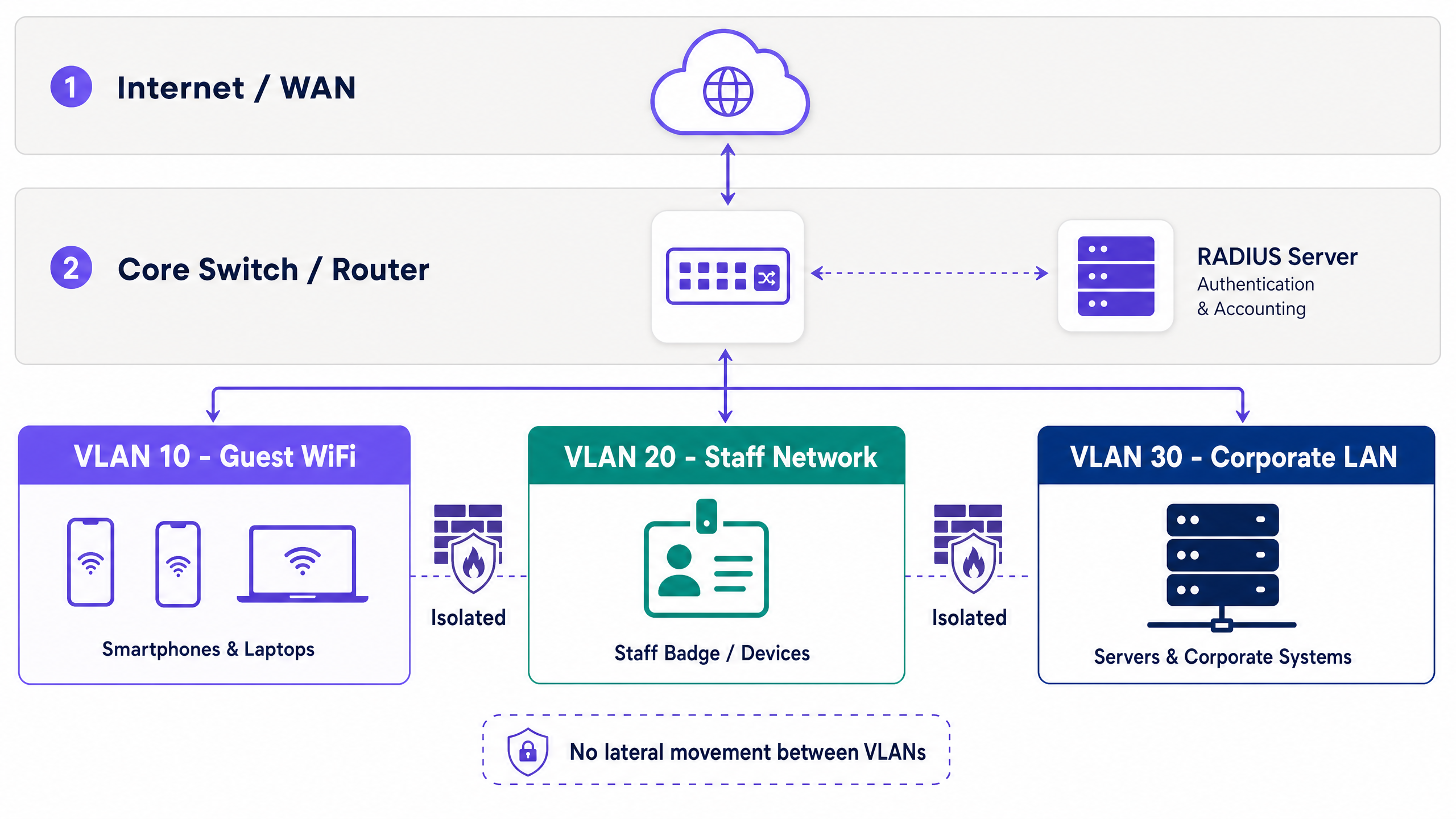
A implementação independente de hardware é uma prática padrão. Os pontos de acesso da Cisco Meraki, HPE Aruba, Ruckus, Juniper Mist, Ubiquiti UniFi, Cambium, Extreme e Fortinet mapeiam SSIDs para etiquetas VLAN de forma nativa. Os switches geridos respeitam estas etiquetas, mantendo o isolamento em toda a rede principal.
Dentro da VLAN de convidados, o isolamento de clientes é obrigatório. Esta definição impede que os dispositivos dos convidados comuniquem entre si, eliminando vetores de ataque peer-to-peer.
Normas de Segurança e Encriptação
A Wi-Fi Alliance exige o WPA3 para implementações modernas. Para redes de convidados, o WPA3-SAE (Simultaneous Authentication of Equals) substitui o handshake vulnerável do WPA2-PSK, mitigando ataques de dicionário offline.
Para redes de funcionários, o 802.1X fornece controlo de acesso à rede baseado em portas. Os dispositivos autenticam-se num servidor RADIUS utilizando EAP-TLS (baseado em certificados) ou PEAP (baseado em credenciais dentro de um túnel TLS). O EAP-TLS requer uma Infraestrutura de Chaves Públicas (PKI), integrando-se com fornecedores de identidade como o Microsoft Entra ID ou Okta.
Os convidados não possuem certificados corporativos, o que torna o 802.1X impraticável para acesso público. A alternativa segura é o iPSK ou PPSK (chaves pré-partilhadas individuais ou privadas). Cada sessão recebe uma chave única, permitindo aos administradores revogar o acesso individual sem alterar uma palavra-passe global. A Purple automatiza isto através da sua integração com o captive portal.
Captive Portal e Recolha de Dados
Um captive portal interceta pedidos HTTP de dispositivos não autenticados, redirecionando-os para uma página de início de sessão personalizada. Este mecanismo aplica os termos de utilização e recolhe dados de identidade.
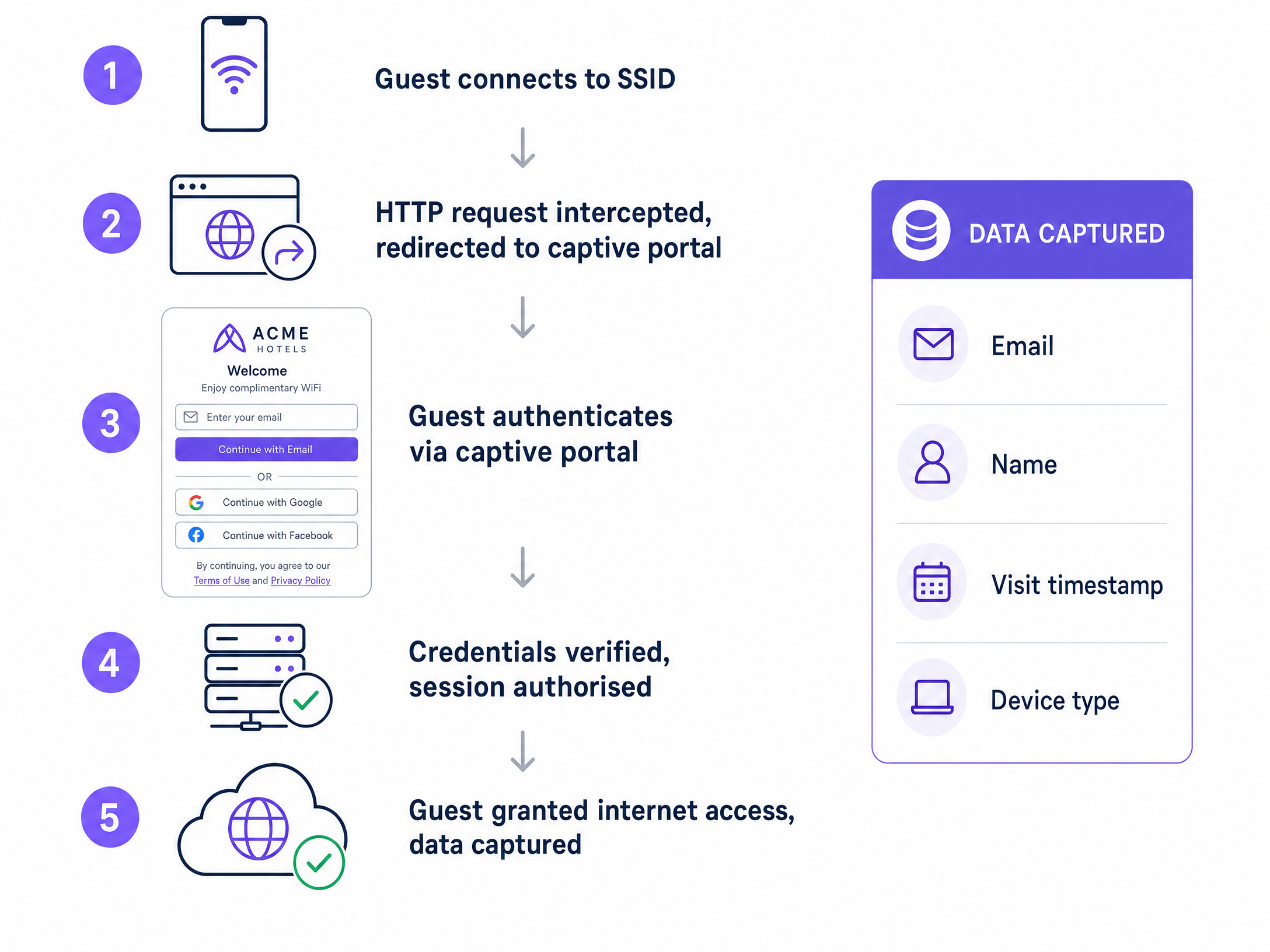
Os métodos de autenticação ditam a qualidade dos dados. O registo por e-mail recolhe dados de contacto diretos. O início de sessão social (Google Workspace, Facebook) reduz a fricção. A verificação por SMS valida números de telefone. Para ambientes de alta segurança, o suplemento Verify da Purple valida documentos de identificação governamentais.
A conformidade com o GDPR exige consentimentos (opt-ins) explícitos e de escolha consciente para comunicações de marketing. O portal deve registar o carimbo de data/hora (timestamp), o endereço IP, o endereço MAC e a versão específica do consentimento. A Purple processa isto automaticamente, fornecendo um registo de auditoria completo. Os dados mostram que portais com três campos ou menos geram taxas de conclusão significativamente mais elevadas.
Guia de Implementação
Siga esta sequência para a implementação:
- Conceber a Arquitetura: Mapeie os tipos de tráfego, atribua IDs de VLAN, defina sub-redes e documente as regras de firewall antes de mexer no hardware.
- Configurar o Encaminhamento Principal: Defina as políticas de encaminhamento inter-VLAN. O tráfego de convidados requer uma rota predefinida para a internet e uma regra de recusa total (deny-all) para sub-redes internas.
- Configurar Pontos de Acesso: Mapeie o SSID de convidados para a VLAN designada e ative o isolamento de clientes.
- Implementar o Captive Portal: Integre o portal com o seu servidor RADIUS e configure campos de consentimento em conformidade com o GDPR.
- Testar e Verificar: Execute um teste de intrusão para confirmar que os dispositivos na VLAN de convidados não conseguem efetuar ping a endereços IP internos.
Boas Práticas
- Automate Key Rotation: Substitua as chaves pré-partilhadas estáticas pela geração automatizada de iPSK.
- Limitar a Largura de Banda: Aplique limites de largura de banda por utilizador na VLAN de convidados para evitar a degradação da rede.
- Registar Dados de Sessão: Retenha os registos de DHCP e RADIUS por pelo menos 90 dias para apoiar a resposta a incidentes de segurança.
- Manter os Portais Simples: Restrinja os formulários do captive portal ao Nome, E-mail e a uma caixa de seleção de consentimento clara.
Resolução de Problemas e Mitigação de Riscos
Sintoma: Os convidados recebem endereços IP, mas não conseguem aceder à internet ou ao captive portal. Resolução: Verifique a resolução de DNS na VLAN de convidados. O redirecionamento do captive portal depende da interceção de DNS. Certifique-se de que as regras de firewall permitem DNS (Porta 53) e HTTP/HTTPS (Portas 80/443) ode saída.
Sintoma: Os dispositivos dos convidados conseguem fazer ping entre si. Resolução: O isolamento de clientes está desativado no ponto de acesso ou controlador. Ative-o imediatamente para evitar ataques peer-to-peer.
ROI e Impacto no Negócio
Uma rede WiFi de convidados devidamente estruturada transforma um centro de custos num motor de receita. Ao capturar dados primários através de um captive portal em conformidade, os espaços criam bases de dados de marketing acionáveis. A plataforma da Purple integra estes dados com sistemas de CRM, permitindo campanhas direcionadas com base na frequência de visitas, tempo de permanência e perfis demográficos.
Para as TI, o ROI é medido na redução de riscos. A segmentação de VLAN e a implementação de iPSK eliminam os principais vetores de falhas na rede interna com origem em pontos de acesso públicos.
Recursos Relacionados
- Saiba mais sobre o WiFi de Convidados e a nossa plataforma de WiFi Analytics .
- Leia o nosso Segurança de WiFi Empresarial: Um Guia Completo para 2026 .
- Explore integrações de hardware como a Integração de Pontos de Acesso Grandstream GWN com o Purple WiFi .
- Veja soluções específicas para o setor de Retalho , Hotelaria , Saúde e Transportes .
Definições Principais
VLAN (Virtual Local Area Network)
A logical partition of a physical network that isolates traffic streams.
Used to separate guest devices from corporate systems, preventing lateral movement and satisfying compliance requirements.
Captive Portal
A web page that intercepts unauthenticated users before granting network access.
The primary mechanism for capturing first-party data, enforcing terms of service, and securing GDPR consent.
Client Isolation
A wireless network setting that prevents devices on the same SSID from communicating with each other.
Essential for guest networks to block peer-to-peer attacks and protect user privacy.
RADIUS
Remote Authentication Dial-In User Service; a protocol for centralized authentication and accounting.
Validates user credentials from the captive portal or 802.1X supplicant before authorizing network access.
802.1X
An IEEE standard for port-based network access control.
Used on staff networks to require identity verification (via certificates or credentials) before granting access.
iPSK / PPSK
Individual or Private Pre-Shared Key; assigns a unique encryption key to each client session.
Replaces static global passwords on guest networks, allowing administrators to revoke single sessions securely.
WPA3-SAE
The modern encryption standard utilizing Simultaneous Authentication of Equals.
Protects guest network handshakes from offline dictionary attacks.
First-Party Data
Information collected directly from the user with their explicit consent.
The primary business value generated by the captive portal, used for CRM integration and marketing.
Exemplos Práticos
A 200-room hotel needs to deploy guest WiFi alongside a new IP-based property management system (PMS) and staff tablets. How should the network be segmented?
Deploy three distinct VLANs. VLAN 10 (192.168.10.0/24) for Guest WiFi, routed directly to the internet with client isolation enabled. VLAN 20 (192.168.20.0/24) for Staff Tablets, secured via 802.1X PEAP authentication against Microsoft Entra ID. VLAN 30 (192.168.30.0/24) for the PMS and internal servers. Configure the core firewall to block all traffic originating from VLAN 10 to VLANs 20 and 30.
A stadium wants to collect marketing data from fans connecting to the WiFi, but previous attempts resulted in low login rates and GDPR complaints.
Deploy a captive portal with a maximum of two input fields: Name and Email. Implement a conscious-choice opt-in checkbox for marketing consent, clearly separated from the terms of service acceptance. Use Purple to automatically log the MAC address, timestamp, and consent version for the audit trail.
Perguntas de Prática
Q1. You are auditing a retail chain's guest WiFi. The network uses a single WPA2-PSK password printed on receipts. What are the primary security and business risks, and how do you resolve them?
Dica: Consider both encryption vulnerabilities and data capture opportunities.
Ver resposta modelo
The risks are twofold. Security: A static WPA2-PSK is vulnerable to dictionary attacks, and anyone with the receipt has permanent access. Business: The venue captures zero first-party data. Resolution: Deploy an open network with a captive portal for data capture, backed by iPSK to generate unique session keys, and ensure the SSID is mapped to an isolated guest VLAN.
Q2. A venue operator wants to pre-tick the marketing consent box on the captive portal to increase their database size. How do you advise them?
Dica: Refer to GDPR requirements for lawful basis of processing.
Ver resposta modelo
Advise against it immediately. Under GDPR, consent must be a conscious-choice opt-in. Pre-ticked boxes are legally invalid and expose the venue to significant regulatory fines. Instead, optimize the portal design by reducing the number of fields to increase legitimate completion rates.
Q3. A guest device on VLAN 10 attempts to access a printer on VLAN 30. The core switch routes the traffic successfully. What configuration is missing?
Dica: VLANs separate broadcast domains, but what controls traffic between them?
Ver resposta modelo
The inter-VLAN routing policy on the core firewall or Layer 3 switch is misconfigured. A deny-all rule must be applied to the guest VLAN interface, blocking traffic destined for any internal subnet (like VLAN 30) while permitting outbound internet traffic.
Continue a ler esta série
Como Configurar o SCEP para BYOD Seguro e Autenticação de Rede 802.1X
Este guia fornece uma referência técnica abrangente para configurar o SCEP para implementar a autenticação de rede 802.1X baseada em certificados. Abrange a transição arquitetónica de palavras-passe partilhadas para EAP-TLS, a integração de Gestão de Dispositivos Móveis (MDM) e a segmentação de rede rigorosa para acesso BYOD seguro em ambientes empresariais.
Políticas de WiFi para Colaboradores no Retalho: Proteger as Redes Back-of-House
Este guia aborda os requisitos técnicos e de políticas críticos para proteger as redes WiFi back-of-house no retalho - desde a segmentação de VLAN e conformidade com o PCI DSS 4.0 até à gestão de BYOD de funcionários na loja. Oferece aos gestores de TI, arquitetos de rede e diretores de operações um plano prático e neutro em termos de fornecedor que podem implementar já este trimestre.
Integrar o Login de WiFi do WeChat: Captar o Envolvimento através de Captive Portals Sociais
Este guia detalha como integrar a autenticação de WiFi do WeChat em captive portals empresariais, abrangendo a arquitetura OAuth 2.0, a integração RADIUS e a implementação passo a passo em hardware Cisco Meraki, HPE Aruba e Juniper Mist. Oferece aos gestores de TI e arquitetos de rede uma estrutura prática para captar dados primários (first-party data) dos 1,3 mil milhões de utilizadores do WeChat, ao mesmo tempo que impulsiona o envolvimento através de seguidores da Official Account e redirecionamentos pós-login.