跳至主要内容

在企业级网络控制器中配置 Captive Portal 重定向

本权威指南详细介绍了在企业级网络控制器上实现 Captive Portal 重定向所需的技术架构和特定厂商的配置步骤。它为 IT 团队在配置围墙花园(walled gardens)、集成 RADIUS 身份验证以及确保符合 GDPR 和 PCI DSS 规范方面提供了可操作的指导。

📖 6 分钟阅读📝 1,397 🔧 2 应用实例3 练习题📚 8 关键定义

收听本指南

查看播客转录
Welcome to the Purple Technical Briefing. I'm your host, and over the next ten minutes we're going straight into one of the most searched-for, least well-documented topics in enterprise WiFi: configuring captive portal redirection on network controllers. If you've ever searched for "configurar controlador portal cautivo" and come back empty-handed, this is the briefing you needed. We're covering the full picture - the technical architecture, the controller-by-controller configuration steps, the compliance requirements, and the real-world pitfalls that trip up even experienced network teams. Let's get into it. A captive portal is the mechanism that intercepts a guest device's first HTTP or HTTPS request after connecting to your WiFi network, and redirects it to a branded splash page before granting internet access. That splash page might ask for a social login, a form submission, a simple click-through acceptance of terms, or a RADIUS-backed credential check. The redirection itself is handled at the controller level - not the access point, not the firewall. The controller intercepts the unauthenticated client's traffic, applies a pre-authentication access control list - what we call a walled garden - and pushes the client's browser to your portal URL. Why does this matter commercially? Three reasons. First, compliance. Under GDPR, you are required to obtain explicit, informed consent before collecting personal data from visitors. A properly configured captive portal is your consent mechanism. Without it, you are collecting data without a lawful basis - and that is a regulatory exposure. Second, security. An open SSID with no authentication is a liability. Captive portal redirection, combined with VLAN segmentation and a RADIUS server, gives you per-session accountability. You know who connected, when, and from which device. Third, business intelligence. Every authenticated session is a first-party data point. Purple processes 440 million logins annually across 80,000 venues. That data - dwell time, visit frequency, demographic signals - is only available if your captive portal is correctly configured to capture and transmit it. Now let me walk you through the redirect flow, step by step. Step one: a guest device associates with your guest SSID. The controller assigns it an IP address via DHCP but places it in a restricted pre-authentication state. All traffic is blocked except for DNS and the walled garden domains you have explicitly permitted. Step two: the guest opens a browser. Their HTTP request hits the controller. The controller intercepts it and issues a 302 redirect to your portal URL. This is the core redirect mechanism. Step three: the guest's browser loads your splash page, hosted either on the controller itself or, more commonly in enterprise deployments, on an external cloud platform like Purple. Step four: the guest authenticates - via social login, form, or credentials. The portal sends an authorisation signal back to the controller, typically via a RADIUS Access-Accept message or a MAC authorisation bypass. Step five: the controller moves the client from the pre-authentication VLAN to the post-authentication VLAN, removes the redirect rule, and grants internet access. That five-step flow is consistent across all major controller platforms. What differs is how you configure each step on Cisco Meraki, HPE Aruba, Ruckus, Juniper Mist, Ubiquiti UniFi, and the others. Let's go through the major platforms. Cisco Meraki. Meraki uses a custom splash page configured entirely through the Meraki Dashboard - there is no CLI. Navigate to Wireless, then Access Control, select your guest SSID, set the splash page to "Sign-on with my RADIUS server" or "Click-through", then enter your external portal URL in the Custom Splash URL field. The walled garden is configured in the Advanced Splash Settings section - you add the IP addresses of your portal server so the guest can reach the splash page before authentication. RADIUS server details go in the RADIUS section: authentication on port 1812, accounting on port 1813. HPE Aruba. On ArubaOS, you configure a captive portal profile under the AAA section, specifying the login URL, the server group pointing to your RADIUS server, and the redirect URL. You then apply that profile to your SSID via the virtual AP profile. The pre-authentication role - what Aruba calls the "logon" role - contains the ACL that permits DNS, DHCP, and access to your portal server's IP range. Post-authentication, the controller assigns the "authenticated" role, which permits full internet access. Ruckus SmartZone uses a Hotspot WLAN type for captive portal deployments. Under WLAN configuration, set the WLAN type to Hotspot, then configure the portal URL, the RADIUS server for authentication and accounting, and the walled garden entries. The Northbound Portal Interface handles the MAC authorisation flow between the portal and the controller. Juniper Mist uses a cloud-native approach. Under Network, then WLANs, create a guest WLAN and set the portal type to "External Captive Portal". Enter your portal URL and configure the RADIUS server details. Mist passes the client MAC, the AP MAC, and the SSID name as URL parameters to the portal. Ubiquiti UniFi. In the UniFi Network Controller, navigate to Settings, then WiFi, select your guest network, and under Advanced Options set the Guest Policy to enable the hotspot portal. Set the portal type to "External" and enter your portal URL. Configure the RADIUS server under Profiles, then RADIUS. The walled garden is the most commonly misconfigured element in captive portal deployments. Get this wrong and your guests will see a browser error instead of your splash page. The walled garden must permit, at minimum: your portal server's IP addresses or domain, your RADIUS server's IP addresses, DNS resolution on port 53, and DHCP on port 67 and 68. If your portal loads assets from a CDN - fonts, images, JavaScript - those CDN domains must also be in the walled garden. For Purple deployments, we provide the specific IP ranges and domains to whitelist during onboarding. The most common failure mode is a portal that loads the HTML frame but fails to render images or execute JavaScript because the CDN domains are missing from the walled garden. Two compliance standards dominate here: GDPR and PCI DSS. Under GDPR, your captive portal must present a clear, specific consent mechanism before collecting personal data. This means separate, unticked checkboxes for WiFi access and marketing consent. You cannot bundle them. The consent record must be stored and retrievable for audit purposes. Purple's platform handles this automatically, storing consent records against each authenticated session. Under PCI DSS, if your venue processes card payments, your guest WiFi network must be isolated from your payment card environment. This means a dedicated guest VLAN with firewall rules preventing any routing between the guest segment and your POS network. PCI DSS version 4.0, which became mandatory in March 2024, requires network segmentation testing at least every six months. Let me give you two concrete scenarios. Scenario one: a 350-room hotel running Cisco Meraki. The hotel wants to replace a basic click-through portal with a branded guest experience that captures email addresses for their loyalty programme. The configuration: create a dedicated guest SSID on a separate VLAN with internet access only. Configure the Meraki splash page to point to Purple's portal URL. Set up RADIUS authentication using Purple's RADIUS server details. Configure the walled garden with Purple's IP ranges. In the Purple dashboard, build a branded splash page with a form capturing name, email, and room number, with explicit GDPR consent checkboxes. Connect the Purple CRM connector to the hotel's marketing platform. Premier Inn implemented this model across their estate and saw measurable increases in direct booking rates from WiFi-acquired guests. Scenario two: a regional retail chain with 40 stores running HPE Aruba. The retailer needs a consistent guest WiFi experience across all sites, with footfall analytics to compare store performance. Deploy Aruba Central to manage all 40 sites from a single dashboard. Configure a guest WLAN template with external captive portal pointing to Purple. Apply the template across all sites using Aruba Central's group policy feature. In Purple, configure a single portal template that applies across all venues, with per-venue analytics dashboards. The walled garden and RADIUS configuration are defined once in the template and propagated automatically. Result: the IT team manages 40 sites from one console. The marketing team gets per-store footfall data, dwell time analysis, and repeat visit rates - all from a single Purple dashboard. Four pitfalls I see repeatedly. One: HTTPS interception failures. Modern browsers and mobile operating systems use HTTPS probes to detect captive portals. If your controller cannot intercept HTTPS traffic - which requires a valid certificate for the redirect domain - the probe fails silently and the guest sees no redirect. The fix: configure your controller's virtual interface with a trusted certificate, or use HTTP-only probes on your guest SSID. Two: DNS leakage. If your pre-authentication ACL permits unrestricted DNS, guests can use DNS tunnelling to bypass the captive portal entirely. Restrict DNS to your designated resolver only. Three: session timeout mismatches. If your controller session timeout is shorter than your portal's session token validity, guests get redirected back to the portal mid-session. Align these values - typically 24 hours for hospitality, eight hours for retail. Four: missing accounting. RADIUS accounting - the Accounting-Start and Accounting-Stop messages - is how your portal knows a session has ended. Without accounting configured, your portal's session records will be inaccurate and your analytics will be unreliable. Quick questions, quick answers. Can I use an external portal with any controller? Yes, provided the controller supports external captive portal redirect - which all the platforms we have discussed do. Do I need a RADIUS server to run a captive portal? Not always. Simple click-through portals can use MAC authorisation bypass without a full RADIUS server. But for credential-based or social login portals, RADIUS is the standard mechanism. Does captive portal work with WPA3? Yes. WPA3 handles the wireless encryption layer. Captive portal handles the authentication layer. They operate independently and are fully compatible. How does Purple integrate with my existing controller? Purple acts as the external portal server. You point your controller's splash URL to Purple's portal endpoint, configure the walled garden with Purple's IP ranges, and set up RADIUS using Purple's server details. The integration is the same process regardless of whether you're on Cisco Meraki, HPE Aruba, Ruckus, Juniper Mist, or Ubiquiti UniFi. To summarise. Captive portal redirection is configured at the controller level, not the access point. The core components are: the splash URL pointing to your portal, the walled garden permitting access to your portal server, RADIUS for authentication and accounting, and VLAN segmentation for network isolation. The configuration steps differ by vendor but the architecture is consistent. For compliance, your portal must implement GDPR-compliant consent capture and PCI DSS-compliant network segmentation. WPA3 is the current standard for wireless encryption and should be your baseline specification on any new deployment. Purple integrates natively with Cisco Meraki, HPE Aruba, Ruckus, Juniper Mist, Ubiquiti UniFi, Cambium, Extreme, and Fortinet. Across 80,000 venues and 440 million logins in 2024, the platform is hardware-agnostic by design - your controller choice does not constrain your ability to capture first-party guest data or run analytics. Your next step: review your current controller configuration against the walled garden and RADIUS accounting checklist in this guide. If you're deploying a new guest WiFi network, start with the vendor-specific configuration steps for your controller platform and connect Purple as your external portal. Thanks for listening. This has been the Purple Technical Briefing.

header_image.png

执行摘要

在企业级网络控制器上配置 Captive Portal 重定向是提供安全、合规的访客 WiFi 的基本要求。配置正确时,控制器会拦截未经验证的客户端流量,并向外部门户发出 HTTP 302 重定向,从而实现身份验证、同意书捕获和网络隔离。如果配置错误,则会导致无声连接失败、浏览器安全警告以及合规性风险。

本指南提供了在 Cisco Meraki、HPE Aruba、Ruckus、Juniper Mist 和 Ubiquiti UniFi 上部署外部 Captive Portal 所需的技术架构和特定厂商的配置步骤。我们详细介绍了重定向流程的机制、围墙花园配置的具体要求,以及用于身份验证和计费的 RADIUS 集成。通过遵循这些步骤,您可以确保您的访客网络满足 PCI DSS 隔离要求,捕获明确的 GDPR 同意,并将第一方数据安全地路由到 Purple 等平台。

技术深度解析

Captive Portal 重定向机制在网络控制器级别运行。它依赖于特定的网络状态变化序列来拦截、验证和授权客户端设备。
architecture_overview.png

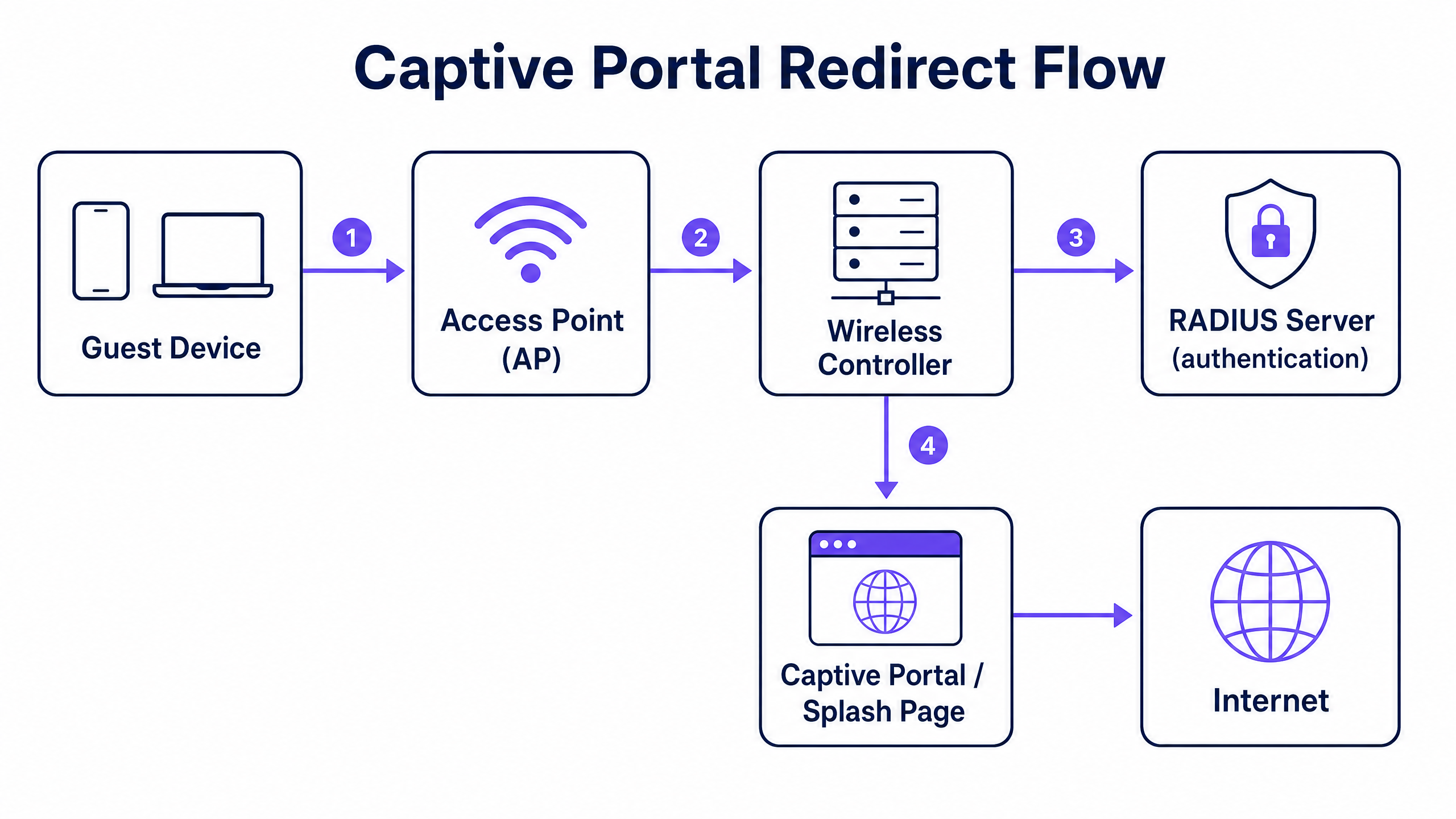
重定向流程

  1. 关联和 DHCP:访客设备与访客 SSID 关联。控制器通过 DHCP 分配 IP 地址,但将客户端置于受限的预身份验证状态(通常映射到特定的预验证 VLAN 或角色)。
  2. 围墙花园强制执行:在此预身份验证状态下,除了 DNS(端口 53)、DHCP(端口 67 和 68)以及发往访问控制列表 (ACL) 中定义的特定 IP 地址或域的流量外,所有出站流量都会被丢弃。此 ACL 被称为围墙花园(walled garden)。
  3. 拦截和重定向:当访客打开浏览器并发起 HTTP 请求时,控制器会拦截该请求。控制器不会将流量路由到互联网,而是返回 HTTP 302 Found 状态码,将浏览器重定向到您的外部 Captive Portal URL。现代操作系统使用自动 HTTPS 探测(例如 Apple 的 Captive Network Assistant)来检测此重定向并触发伪浏览器。
  4. 身份验证:访客与托管在外部门户(例如 Purple)上的展示页面(splash page)进行交互。这可能涉及社交登录、表单提交或简单的点击跳转。完成后,门户会与控制器通信以授权该会话。
  5. 授权和计费:授权信号通常通过 RADIUS Access-Accept 消息或通过特定厂商的 API 发送。控制器接收此信号,将客户端移至后身份验证状态(通常是不同的 VLAN),删除重定向规则,并授予互联网访问权限。然后,控制器发送 RADIUS Accounting-Start 消息以记录会话时长和数据使用情况。

实施指南

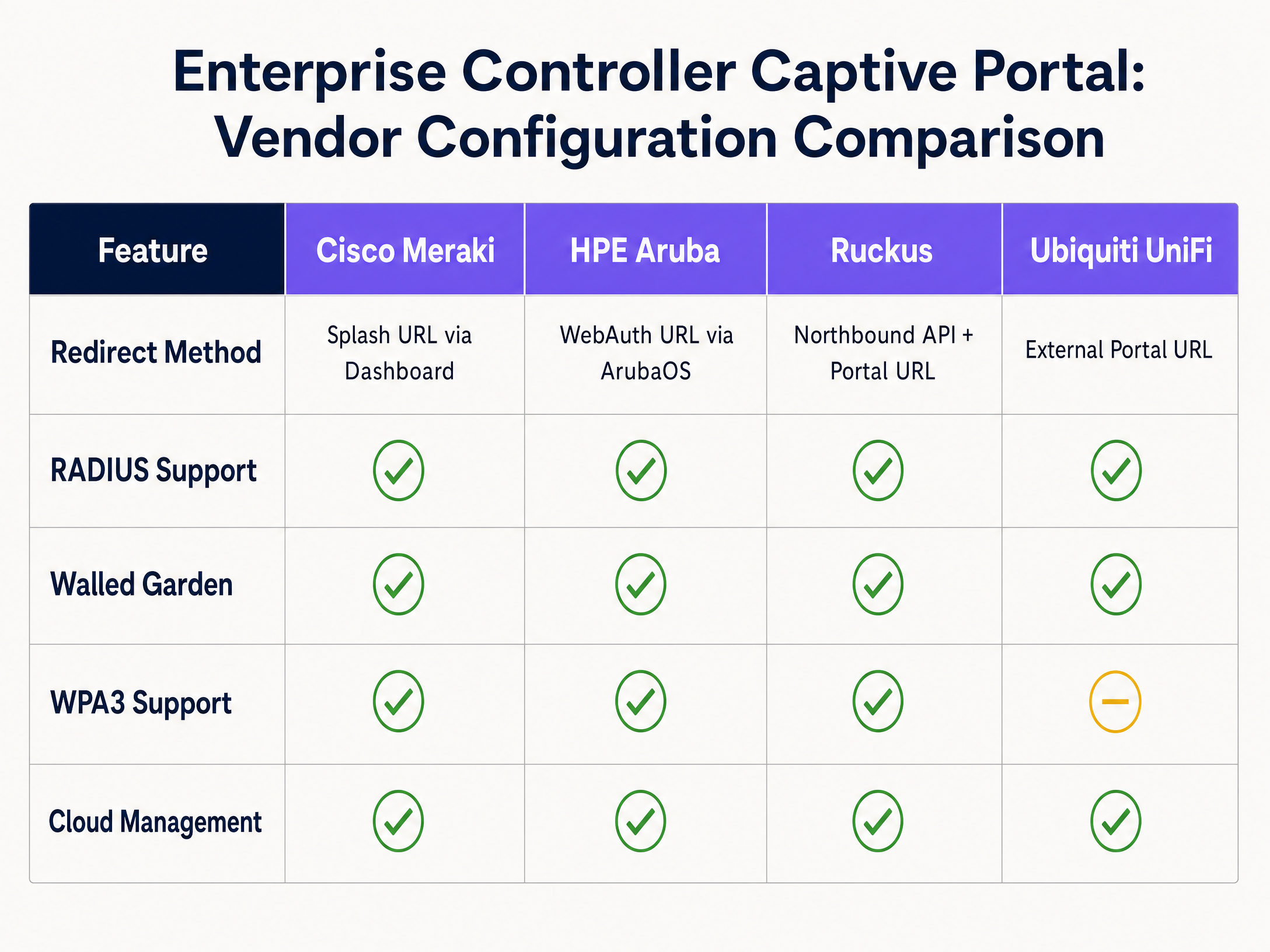
基本架构在不同厂商之间是一致的,但配置语法差异很大。以下是主流企业级平台的配置步骤。
vendor_comparison_chart.png

Cisco Meraki

Cisco Meraki 完全通过 Meraki Dashboard 配置 Captive Portal。

  1. 导航至 Wireless > Access Control(无线 > 访问控制)并选择您的访客 SSID。
  2. Splash page(展示页面)下,选择 Sign-on with my RADIUS server(使用我的 RADIUS 服务器登录)或 Click-through(点击跳转)。
  3. Custom Splash URL 字段中,输入 Purple 提供的外部门户 URL。
  4. RADIUS 下,输入用于身份验证(端口 1812)和计费(端口 1813)的主、备 RADIUS 服务器的 IP 地址,以及共享密钥。
  5. 滚动到 Advanced Splash Settings(高级展示页面设置)以配置围墙花园。添加您的门户服务器和任何所需 CDN 的 IP 地址或域名。

HPE Aruba

Aruba 的配置涉及定义 Captive Portal 配置文件并将其应用于角色。

  1. 在 ArubaOS 中,导航至 Configuration > Authentication > L3 Authentication
  2. 创建一个新的 Captive Portal Authentication Profile(Captive Portal 身份验证配置文件)。输入指向您的 Purple 展示页面的 Login URL
  3. 创建一个包含您的 RADIUS 服务器的 Server Group(服务器组),并将其分配给 Captive Portal 配置文件。
  4. 导航至 Configuration > Security > Roles。编辑预身份验证角色(通常命名为 logon)。确保 ACL 允许 DHCP、DNS 以及发往您的围墙花园 IP 地址的 HTTP/HTTPS 流量,并将 Captive Portal 配置文件应用于所有其他 HTTP 流量。
  5. logon 角色分配为访客 SSID 的 AAA 配置文件中的初始角色。

Ruckus SmartZone

Ruckus 使用特定的 WLAN 类型进行热点部署。

  1. 导航至 WLANs 并创建一个新的 WLAN。将 WLAN Type 设置为 Hotspot (WISPr)
  2. Authentication Options(身份验证选项)下,选择 External RADIUS Server(外部 RADIUS 服务器)并输入用于身份验证和计费的服务器详细信息。
  3. Hotspot Portal 下,sele选择 External 并输入您的门户 URL。
  4. 通过添加必要的 IP 地址或域名来配置 Walled Garden
  5. Ruckus 依赖其北向接口 (NPI) 来处理授权流程,这需要配置 NPI 设置以允许来自您的门户服务器的通信。

Ubiquiti UniFi

UniFi 为外部门户提供了直观的界面。

  1. 在 UniFi 网络控制器中,转到 Settings > WiFi 并选择您的访客网络。
  2. Advanced Options 下,启用 Guest Policy
  3. 转到 Settings > Guest Control。在 Portal Type 下,选择 External Portal Server 并输入您的门户 URL。
  4. Access Control 下,将所需的 IP 地址添加到 Pre-Authorization Access 列表(即 walled garden)。
  5. Profiles > RADIUS 下配置 RADIUS 服务器详细信息,并将该配置文件应用到访客网络。

最佳实践

1. Walled Garden 配置

Walled garden 是 Captive Portal 部署中最关键的故障点。如果 walled garden 配置不完整,访客的浏览器将无法加载展示页面(splash page),从而导致白屏或超时错误。

您必须明确允许访问以下内容:

  • 主门户服务器的 IP 地址或域名。
  • RADIUS 服务器的 IP 地址。
  • 门户用于加载字体、图像或 JavaScript 的任何内容分发网络 (CDN)。
  • 如果使用社交登录,则需允许身份提供商域名(例如 facebook.comgoogle.com)。

2. 针对 PCI DSS 的网络分段

如果您的场所处理刷卡支付,PCI DSS 合规性要求将访客网络与持卡人数据环境进行严格隔离。不要仅仅依赖 SSID 隔离。您必须在控制器或交换机级别配置专用的访客 VLAN,并设置防火墙规则,明确禁止在访客 VLAN 与任何内部企业或销售点 (POS) 网络之间进行路由。

3. RADIUS 计费 (Accounting)

请务必配置 RADIUS 计费。虽然 MAC 授权旁路可以授予访问权限,但需要 RADIUS 计费(Accounting-StartAccounting-Stop 消息)来准确跟踪会话时长和数据使用情况。如果没有计费,您的分析平台将报告不准确的停留时间和并发用户数。

问题排查与风险规避

HTTPS 拦截失败

现代操作系统使用 HTTPS 探测来检测 Captive Portal。如果控制器拦截了 HTTPS 请求,但在重定向时提供了无效或不可信的 SSL 证书,浏览器将显示严重的安全警告(例如“您的连接不是私密连接”)并阻止重定向。为了规避这一问题,请确保为您的控制器虚拟接口配置了有效的、公开受信任的 SSL 证书,或者将控制器配置为仅拦截 HTTP 流量以进行初始重定向。

DNS 泄漏

如果预认证 ACL 允许不受限制的出站 DNS 流量,高级用户可以使用 DNS 隧道绕过 Captive Portal,在不进行认证的情况下访问互联网。通过将预认证角色中的出站 DNS 流量限制为仅指向您指定的 DNS 解析器,并阻止所有其他 53 端口流量,来规避此问题。

会话超时不匹配

如果无线控制器上配置的会话超时时间短于外部门户中定义的会话有效期,访客将被突然断开连接并被迫重新认证。确保控制器的空闲超时和绝对会话超时与预期的访客体验相匹配(例如,酒店环境为 24 小时,零售环境为 8 小时)。

投资回报率 (ROI) 与业务影响

部署配置合理的 Captive Portal 可以将访客 WiFi 从运营成本转变为战略资产。通过将企业控制器与像 Purple 这样的智能层相结合,场所可以获取明确的 GDPR 同意并收集宝贵的第一方数据。

Purple 每年在 80,000 个场所处理 4.4 亿次登录。这些数据直接接入 CRM 平台,从而能够根据实际的线下到店情况开展针对性的营销活动。例如, 零售 运营商可以衡量客流量和回头客率,而 酒店 场所可以通过在访客离店后与其互动来促进直接预订。投资回报率 (ROI) 体现在客户终身价值的提升、通过精准客流分析实现的运营效率提高,以及通过自动化合规管理降低的监管风险。

关键定义

Captive Portal

A web page that intercepts unauthenticated network traffic and requires user interaction—such as accepting terms or providing credentials—before granting internet access.

Used in enterprise networks to enforce security policies, capture first-party data, and ensure regulatory compliance.

Walled Garden

An access control list (ACL) applied to unauthenticated clients, permitting access only to specific IP addresses or domains required to load the captive portal.

Critical for ensuring the splash page loads correctly; missing CDN domains in the walled garden will cause the portal to render improperly.

RADIUS

Remote Authentication Dial-In User Service. A networking protocol that provides centralised Authentication, Authorization, and Accounting (AAA) management.

Used by network controllers to verify guest credentials against an external database and log session metrics.

VLAN Segmentation

The practice of dividing a physical network into multiple logical networks to isolate traffic.

Mandatory for PCI DSS compliance to ensure guest WiFi traffic cannot route to payment card environments.

HTTP 302 Redirect

A standard HTTP response status code indicating that the requested resource has been temporarily moved to a different URL.

The mechanism used by network controllers to intercept a guest's initial web request and push their browser to the splash page.

IEEE 802.1X

An IEEE standard for port-based network access control, requiring devices to authenticate before gaining access to the network.

Provides enterprise-grade security by ensuring each connection is individually authenticated, often backed by a RADIUS server.

WPA3-Enterprise

The latest Wi-Fi security protocol, providing robust encryption and requiring 802.1X authentication.

Recommended for secure enterprise deployments to protect against offline dictionary attacks and ensure data confidentiality.

MAC Authorisation Bypass (MAB)

A method of granting network access based on the client device's MAC address rather than requiring explicit user credentials.

Often used in click-through captive portals where the portal registers the MAC address after the user accepts the terms of service.

应用实例

A 350-room hotel needs to deploy a branded guest WiFi portal that captures email addresses for their loyalty programme, ensuring compliance with GDPR and isolating guest traffic from the corporate network.

The IT team deploys Cisco Meraki APs and configures a dedicated guest SSID on VLAN 100. In the Meraki Dashboard, they set the splash page to 'Sign-on with my RADIUS server' and enter Purple's portal URL. They configure the walled garden to include Purple's IP ranges and CDN domains. Firewall rules are applied to VLAN 100, denying routing to the corporate VLAN to ensure PCI DSS compliance. In the Purple platform, a branded portal is created with a data capture form and explicit GDPR consent checkboxes. The Purple CRM connector is configured to sync captured emails directly to the hotel's marketing platform.

考官评语: This approach correctly addresses both the technical and commercial requirements. VLAN segmentation ensures security and compliance, while the integration with Purple provides the necessary consent capture and CRM synchronisation. The use of RADIUS ensures accurate session tracking.

A regional retail chain with 40 stores requires a consistent guest WiFi experience across all locations, with centralised management and store-level footfall analytics.

The retailer deploys HPE Aruba APs managed via Aruba Central. A single guest WLAN template is created with an external captive portal pointing to Purple. The pre-authentication role is configured with the necessary walled garden ACLs. This template is applied across all 40 sites using Aruba Central's group policy. In Purple, a unified portal design is deployed, with analytics dashboards configured to segment data by individual store locations.

考官评语: Using Aruba Central's template-driven configuration eliminates configuration drift across the 40 sites. The integration with Purple allows the marketing team to compare footfall and dwell time metrics across the entire estate from a single interface, demonstrating the value of a hardware-agnostic intelligence layer.

练习题

Q1. A venue reports that guests connecting to the WiFi are seeing a blank screen instead of the branded splash page. The portal uses custom fonts hosted on Google Fonts. What is the most likely configuration error?

提示:Consider what traffic is permitted before a user authenticates.

查看标准答案

The walled garden is incomplete. The Google Fonts CDN domains have not been added to the pre-authentication ACL. The controller is blocking the request to load the fonts, causing the page render to fail.

Q2. To comply with PCI DSS, an IT manager creates a new SSID named 'Guest_WiFi' on the same subnet as the corporate network. Is this sufficient?

提示:PCI DSS requires isolation of the cardholder data environment.

查看标准答案

No. Creating a separate SSID on the same subnet does not provide network isolation. The guest network must be placed on a dedicated VLAN with firewall rules explicitly denying routing to the corporate or POS networks.

Q3. A retail chain notices that their analytics dashboard shows 1,000 authentications per day, but the average dwell time metric is missing or zero. What configuration step was missed?

提示:Which protocol is responsible for tracking session duration?

查看标准答案

RADIUS Accounting has not been configured on the controller. Without the Accounting-Start and Accounting-Stop messages, the analytics platform cannot calculate the duration of the sessions.