跳至主要内容

企业级访客 WiFi 设置指南:VLAN 隔离、安全与 Captive Portal

本指南为企业级访客 WiFi 部署提供了技术蓝图,重点关注 VLAN 隔离、安全协议和 Captive Portal 架构。它详细介绍了如何在复杂的场所中安全地隔离流量、强制执行加密标准并捕获第一方数据。

📖 4 分钟阅读📝 854 🔧 2 应用实例3 练习题📚 8 关键定义

收听本指南

查看播客转录
Enterprise Guest WiFi Setup Guide: VLAN Segmentation, Security, and Captive Portals. A Purple technical briefing for IT managers, network architects, and venue operations directors. Introduction and Context. Welcome. If you are responsible for a hotel, a retail estate, a stadium, or any venue where members of the public connect to your WiFi, this briefing is for you. We are going to cover the three pillars of a properly architected guest WiFi deployment: VLAN segmentation, security standards, and captive portal design. Not theory - practical, actionable guidance you can take into your next infrastructure review. Let me set the context first. Guest WiFi is no longer a nice-to-have. It is an operational requirement and, when done correctly, a significant source of first-party customer data. Purple operates across more than 80,000 live venues globally, and in 2024 alone we processed 440 million logins. The patterns we see across those deployments tell a very clear story: the venues that treat guest WiFi as a serious infrastructure project, rather than an afterthought, are the ones that avoid security incidents, stay compliant with GDPR, and actually extract business value from the data they collect. So. Let us get into it. Technical Deep-Dive. Part one: VLAN segmentation. A VLAN, Virtual Local Area Network, is a logical partition of your physical network. Think of it as creating separate lanes on the same road. Guests travel in one lane. Staff travel in another. Your corporate systems travel in a third. The lanes do not cross. Why does this matter? Without VLAN segmentation, a guest device on your WiFi sits on the same network segment as your point-of-sale terminals, your back-office servers, or your property management system. That is a serious security exposure. A compromised guest device, or a malicious actor deliberately probing your network, can reach systems they have absolutely no business touching. The standard approach is to assign each traffic type its own VLAN ID. VLAN 10 for guest WiFi, VLAN 20 for staff, VLAN 30 for corporate infrastructure. The specific numbers are arbitrary, but the separation is not. Each VLAN gets its own IP subnet, its own DHCP scope, and its own firewall policy. Guest traffic routes directly to the internet. It never touches your internal network. On the hardware side, this is supported natively by all the major enterprise access point vendors: Cisco Meraki, HPE Aruba, Ruckus, Juniper Mist, Ubiquiti UniFi, Cambium, Extreme, and Fortinet. Every one of those platforms lets you map an SSID to a VLAN tag, and every managed switch in your stack will honour that tag to keep traffic separated all the way to the core. One configuration detail worth highlighting: client isolation. Within the guest VLAN itself, you want to prevent guest devices from communicating with each other. A guest's laptop should not be able to see another guest's phone. Enable client isolation on your access points. It is a single checkbox in most enterprise management consoles, and you eliminate an entire class of peer-to-peer attack. Part two: security standards. Let us talk encryption. WPA3, Wi-Fi Protected Access 3, is the current standard, ratified by the Wi-Fi Alliance. For guest networks, the relevant mode is WPA3-SAE, which replaces the older WPA2-PSK handshake with a more secure Simultaneous Authentication of Equals protocol. This eliminates offline dictionary attacks against captured handshakes. If your hardware supports it, and anything purchased in the last three years almost certainly does, deploy WPA3. For staff and corporate networks, the correct standard is 802.1X, which is the IEEE framework for port-based network access control. 802.1X requires each device to authenticate against a RADIUS server, Remote Authentication Dial-In User Service, before it is granted network access. The authentication exchange uses EAP, Extensible Authentication Protocol, with the most common enterprise variants being EAP-TLS, which uses mutual certificate-based authentication, and PEAP, which wraps a username-and-password exchange inside a TLS tunnel. EAP-TLS is the stronger option. It requires a client certificate on every device, which means you need a PKI, Public Key Infrastructure, to issue and manage those certificates. For large enterprise deployments with Microsoft Entra ID or Okta, this integrates cleanly with your existing certificate authority. PEAP is easier to deploy and still significantly more secure than a shared password. For guest networks, 802.1X is typically impractical. Guests do not have corporate certificates. The alternative is iPSK or PPSK: individual or private pre-shared keys. Each guest session gets a unique key, which means you can revoke a single session without changing the password for everyone. Purple's platform automates this entirely: when a guest authenticates through the captive portal, the system generates and assigns a unique session key automatically. Now, compliance. If your venue processes card payments anywhere near the network, PCI DSS, the Payment Card Industry Data Security Standard, applies. Requirement 1.3 mandates network segmentation between cardholder data environments and all other systems. A properly configured guest VLAN satisfies this requirement, provided you document the segmentation and include it in your annual assessment. GDPR applies to the personal data you collect at the captive portal: name, email address, marketing consent. We will come back to that in the captive portal section. Part three: captive portals. A captive portal is the web page that intercepts a guest's browser when they first connect to your WiFi, before granting internet access. It is the mechanism through which you collect consent and identity data. Here is how it works technically. When a guest connects to your SSID, their device is placed in a pre-authentication state. DNS queries resolve, but all HTTP traffic is redirected to the portal's IP address. The guest sees your branded login page. Once they authenticate, by email, social login, or SMS verification, the RADIUS server or the WiFi controller marks their MAC address as authorised and opens internet access. There are several authentication methods available. Email registration is the most common and captures a verified email address directly. Social login via Google, Facebook, or Apple is lower friction but depends on the guest having an active social account. SMS verification adds a phone number to your dataset. For higher-security environments, you can require identity verification through Purple's Verify add-on, which checks government ID documents. The GDPR dimension here is critical. Every data point you collect at the portal requires a lawful basis. For marketing communications, that basis is explicit consent: a conscious-choice opt-in, not a pre-ticked box. Your portal must present clear, plain-language consent statements, link to your privacy policy, and record the timestamp and version of the consent given. Purple's platform stores all of this automatically and provides a full audit trail, which is exactly what a data protection authority will ask for if you ever face an investigation. One design principle that significantly affects both compliance and data quality: keep the portal simple. Every additional field you add reduces completion rates. Name and email, with a clear marketing consent checkbox, is the right balance for most venues. Purple's data across 350 million unique users shows that portals with three fields or fewer convert at significantly higher rates than those with five or more. Implementation Recommendations and Pitfalls. Let me give you the practical recommendations, and then flag the most common mistakes we see. For a new deployment, work in this sequence. First, design your VLAN architecture before you touch any hardware. Map out which traffic types exist in your venue, assign VLAN IDs, define subnets, and document firewall rules between segments. Second, configure your core switch and router to enforce inter-VLAN routing policies. Guest traffic should have a default route to the internet and a deny-all rule for everything else. Third, configure your access points to map each SSID to the correct VLAN. Fourth, deploy your captive portal and test the full authentication flow end-to-end before going live. Fifth, run a penetration test or at minimum a manual verification that a device on the guest VLAN cannot reach any internal IP address. The most common mistakes. Number one: forgetting to enable client isolation. Guests can see each other's devices, which is a privacy issue and a potential attack vector. Number two: using the same pre-shared key for guest WiFi for years without rotation. If that key leaks, every device that has ever connected to your network has it. Use iPSK or PPSK and automate rotation. Number three: deploying a captive portal without proper GDPR consent mechanisms. This is not a theoretical risk. Regulators across Europe have issued fines for exactly this. Number four: not logging session data. For security incident response, you need to know which MAC address was assigned which IP address at what time. Your RADIUS server or WiFi controller should log this, and you should retain it for at least 90 days. Number five: treating guest WiFi bandwidth as unlimited. Set per-user bandwidth limits on the guest VLAN. Without them, a single guest running a torrent client can degrade the experience for everyone in the venue. Rapid-Fire Questions and Answers. Question: Do I need a separate physical network for guests, or is VLAN segmentation enough? Answer: VLAN segmentation is sufficient for the vast majority of deployments, provided your switches and access points are enterprise-grade and correctly configured. Consumer or prosumer hardware sometimes has incomplete VLAN support. That is a reason to use enterprise hardware, not to run separate physical cables. Question: Can I run guest WiFi on the same access points as staff WiFi? Answer: Yes. Enterprise access points support multiple SSIDs, each mapped to a different VLAN. A single Cisco Meraki or HPE Aruba access point can broadcast four or more SSIDs simultaneously, each with independent security policies. Question: What is the minimum viable security configuration for a small venue? Answer: VLAN separation between guest and internal traffic, WPA3 on the guest SSID, client isolation enabled, and a captive portal with GDPR-compliant consent collection. That covers the fundamentals. Question: How does Purple integrate with existing hardware? Answer: Purple is hardware-agnostic. We operate as a cloud overlay on top of Cisco Meraki, HPE Aruba, Ruckus, Juniper Mist, Ubiquiti UniFi, Cambium, Extreme, and Fortinet deployments. You keep your existing infrastructure and add Purple's captive portal, analytics, and marketing automation on top. Summary and Next Steps. To summarise. Proper guest WiFi architecture has three non-negotiable components. VLAN segmentation to isolate guest traffic from your internal network. Strong encryption and authentication standards: WPA3 for guests, 802.1X with EAP-TLS for staff. And a captive portal that collects identity data with full GDPR compliance. Get these three things right, and you have a network that is secure, compliant, and generating first-party data that your marketing team can actually use. If you want to go deeper, Purple's platform handles the captive portal, the analytics, and the marketing automation layer across all of this. We are live in more than 80,000 venues, we are ISO 27001 certified, GDPR and CCPA compliant, and we maintain 99.999% uptime. The guides linked below this episode cover specific hardware integrations and advanced configurations. Thanks for listening. If you have questions, the Purple team is at purple.ai.

header_image.png

执行摘要

部署企业级访客 WiFi 是一项基础设施工程,而非事后补救。当超过 80,000 个实体场所信任一个每年处理 4.4 亿次登录的平台时,数据揭示了一个严峻的现实:合理的架构可以防止安全漏洞,并实现符合 GDPR 的数据捕获。本指南详细介绍了使用 VLAN 隔离、WPA3 加密和合规的 Captive Portal 安全设置访客 WiFi 的技术要求。您将学习如何将访客流量与企业系统隔离、强制执行基于身份的访问控制,并通过第一方数据收集提取可衡量的商业价值。

技术深度解析

VLAN 隔离架构

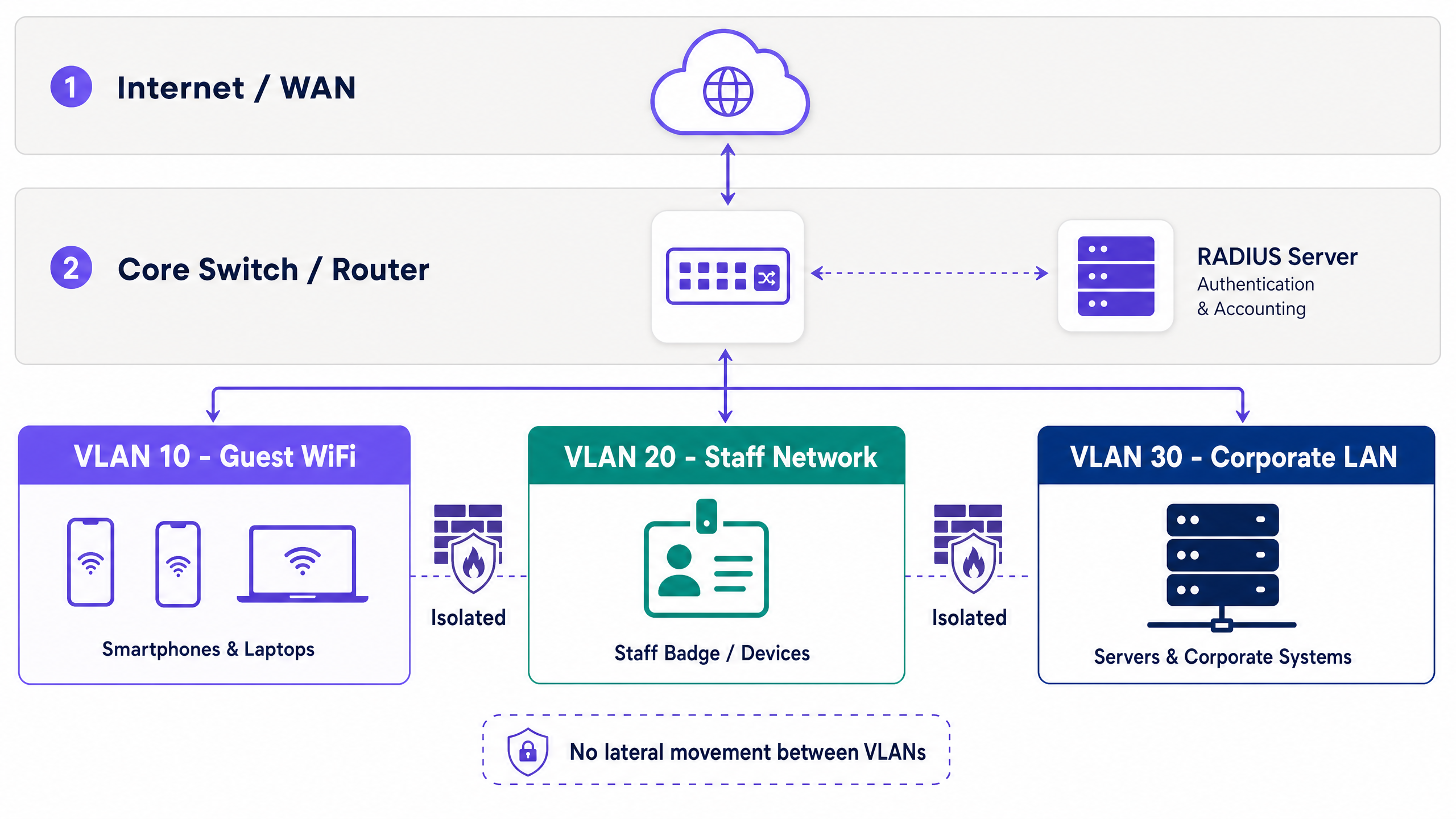
虚拟局域网 (VLAN) 在数据链路层隔离流量。如果不进行隔离,访客设备将与您的 POS 终端和物业管理系统处于同一网络中。这违反了 PCI DSS 要求 1.3,并使内部基础设施面临横向移动攻击的风险。

标准的企业架构将不同的 VLAN ID 分配给特定的流量类型。例如,VLAN 10 处理访客 WiFi,VLAN 20 处理员工网络,VLAN 30 处理企业基础设施。每个 VLAN 在其自己的 IP 子网和 DHCP 范围内运行。访客流量直接路由到互联网,绝不接触内部路由表。
vlan_architecture_overview.png

硬件无关的部署是标准做法。来自 Cisco Meraki、HPE Aruba、Ruckus、Juniper Mist、Ubiquiti UniFi、Cambium、Extreme 和 Fortinet 的接入点原生支持将 SSID 映射到 VLAN 标签。网管型交换机遵循这些标签,在整个核心网络中保持隔离。

在访客 VLAN 内,客户端隔离是强制性的。此设置可防止访客设备之间相互通信,从而消除点对点攻击媒介。

安全与加密标准

Wi-Fi 联盟强制要求在现代部署中使用 WPA3。对于访客网络,WPA3-SAE(对等同时身份验证)取代了脆弱的 WPA2-PSK 握手,从而缓解了离线字典攻击。

对于员工网络,802.1X 提供基于端口的网络访问控制。设备使用 EAP-TLS(基于证书)或 PEAP(TLS 隧道内基于凭据)向 RADIUS 服务器进行身份验证。EAP-TLS 需要公钥基础设施 (PKI),并与 Microsoft Entra ID 或 Okta 等身份提供商集成。

访客缺少企业证书,这使得 802.1X 在公共访问中不切实际。安全的替代方案是 iPSK 或 PPSK(个人或专用预共享密钥)。每个会话都会获得一个唯一的密钥,允许管理员撤销单个访问权限,而无需轮换全局密码。Purple 通过其 Captive Portal 集成自动执行此操作。

Captive Portal 与数据捕获

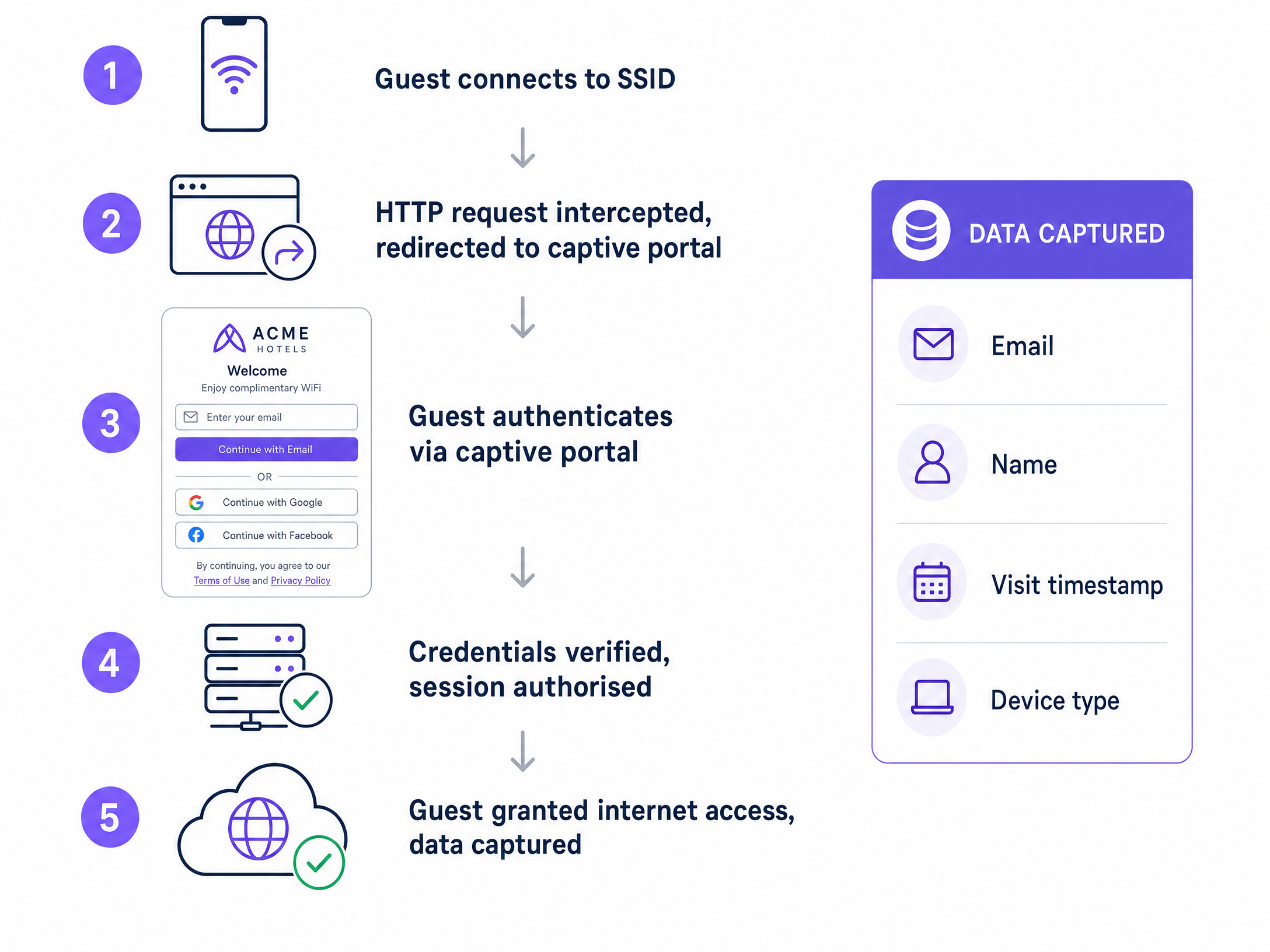
Captive Portal 会拦截来自未身份验证设备的 HTTP 请求,并将其重定向到品牌登录页面。该机制强制执行使用条款并捕获身份数据。
captive_portal_flow.png

身份验证方法决定了数据质量。电子邮件注册可捕获直接的联系信息。社交登录(Google Workspace、Facebook)可减少摩擦。短信验证可验证手机号码。对于高安全性的环境,Purple 的 Verify 插件可验证政府身份证件。

GDPR 合规性要求对营销传播进行明确、有意识选择的加入(opt-in)。门户必须记录时间戳、IP 地址、MAC 地址和特定的同意版本。Purple 会自动处理此过程,并提供完整的审计追踪。数据表明,包含三个或更少字段的门户其完成率明显更高。

实施指南

请按照以下步骤进行部署:

  1. 设计架构:在接触硬件之前,规划流量类型、分配 VLAN ID、定义子网并记录防火墙规则。
  2. 配置核心路由:设置 VLAN 间路由策略。访客流量需要一条指向互联网的默认路由,以及一条针对内部子网的拒绝所有规则。
  3. 配置接入点:将访客 SSID 映射到指定的 VLAN,并启用客户端隔离。
  4. 部署 Captive Portal:将门户与您的 RADIUS 服务器集成,并配置符合 GDPR 的同意字段。
  5. 测试与验证:运行渗透测试以确认访客 VLAN 上的设备无法 ping 通内部 IP 地址。

最佳实践

  • 自动化密钥轮换:用自动生成的 iPSK 代替静态预共享密钥。
  • 限制带宽:在访客 VLAN 上强制执行单用户带宽上限,以防止网络性能下降。
  • 记录会话数据:保留 DHCP 和 RADIUS 日志至少 90 天,以支持安全事件响应。
  • 保持门户简单:将 Captive Portal 表单限制为姓名、电子邮件和清晰的同意复选框。

故障排除与风险规避

现象:访客获取了 IP 地址,但无法访问互联网或 Captive Portal。 解决方法:验证访客 VLAN 上的 DNS 解析。Captive Portal 重定向依赖于 DNS 拦截。确保防火墙规则允许 DNS(端口 53)和 HTTP/HTTPS(端口 80/443)出出站。

症状:访客设备可以互相 ping。 解决方法:接入点或控制器上禁用了客户端隔离。请立即启用它以防止点对点攻击。

投资回报率与业务影响

一个架构合理的访客 WiFi 网络可以将成本中心转化为收入驱动力。通过合规的 captive portal 捕获第一方数据,场所可以构建起具有实际指导意义的营销数据库。Purple 的平台将这些数据与 CRM 系统集成,从而能够根据访问频率、停留时间和人口统计特征开展针对性营销活动。

对于 IT 部门而言,投资回报率是通过降低风险来衡量的。VLAN 划分和 iPSK 部署消除了源自公共接入点的内部网络入侵的主要途径。

相关资源

关键定义

VLAN (Virtual Local Area Network)

A logical partition of a physical network that isolates traffic streams.

Used to separate guest devices from corporate systems, preventing lateral movement and satisfying compliance requirements.

Captive Portal

A web page that intercepts unauthenticated users before granting network access.

The primary mechanism for capturing first-party data, enforcing terms of service, and securing GDPR consent.

Client Isolation

A wireless network setting that prevents devices on the same SSID from communicating with each other.

Essential for guest networks to block peer-to-peer attacks and protect user privacy.

RADIUS

Remote Authentication Dial-In User Service; a protocol for centralized authentication and accounting.

Validates user credentials from the captive portal or 802.1X supplicant before authorizing network access.

802.1X

An IEEE standard for port-based network access control.

Used on staff networks to require identity verification (via certificates or credentials) before granting access.

iPSK / PPSK

Individual or Private Pre-Shared Key; assigns a unique encryption key to each client session.

Replaces static global passwords on guest networks, allowing administrators to revoke single sessions securely.

WPA3-SAE

The modern encryption standard utilizing Simultaneous Authentication of Equals.

Protects guest network handshakes from offline dictionary attacks.

First-Party Data

Information collected directly from the user with their explicit consent.

The primary business value generated by the captive portal, used for CRM integration and marketing.

应用实例

A 200-room hotel needs to deploy guest WiFi alongside a new IP-based property management system (PMS) and staff tablets. How should the network be segmented?

Deploy three distinct VLANs. VLAN 10 (192.168.10.0/24) for Guest WiFi, routed directly to the internet with client isolation enabled. VLAN 20 (192.168.20.0/24) for Staff Tablets, secured via 802.1X PEAP authentication against Microsoft Entra ID. VLAN 30 (192.168.30.0/24) for the PMS and internal servers. Configure the core firewall to block all traffic originating from VLAN 10 to VLANs 20 and 30.

考官评语: This architecture satisfies PCI DSS segmentation requirements and protects the PMS from compromised guest devices. Using 802.1X for staff ensures identity-based access control for internal systems.

A stadium wants to collect marketing data from fans connecting to the WiFi, but previous attempts resulted in low login rates and GDPR complaints.

Deploy a captive portal with a maximum of two input fields: Name and Email. Implement a conscious-choice opt-in checkbox for marketing consent, clearly separated from the terms of service acceptance. Use Purple to automatically log the MAC address, timestamp, and consent version for the audit trail.

考官评语: Reducing portal friction increases data capture volume. Separating marketing consent from terms of service ensures GDPR compliance by proving the consent was freely given, not bundled as a condition of service.

练习题

Q1. You are auditing a retail chain's guest WiFi. The network uses a single WPA2-PSK password printed on receipts. What are the primary security and business risks, and how do you resolve them?

提示:Consider both encryption vulnerabilities and data capture opportunities.

查看标准答案

The risks are twofold. Security: A static WPA2-PSK is vulnerable to dictionary attacks, and anyone with the receipt has permanent access. Business: The venue captures zero first-party data. Resolution: Deploy an open network with a captive portal for data capture, backed by iPSK to generate unique session keys, and ensure the SSID is mapped to an isolated guest VLAN.

Q2. A venue operator wants to pre-tick the marketing consent box on the captive portal to increase their database size. How do you advise them?

提示:Refer to GDPR requirements for lawful basis of processing.

查看标准答案

Advise against it immediately. Under GDPR, consent must be a conscious-choice opt-in. Pre-ticked boxes are legally invalid and expose the venue to significant regulatory fines. Instead, optimize the portal design by reducing the number of fields to increase legitimate completion rates.

Q3. A guest device on VLAN 10 attempts to access a printer on VLAN 30. The core switch routes the traffic successfully. What configuration is missing?

提示:VLANs separate broadcast domains, but what controls traffic between them?

查看标准答案

The inter-VLAN routing policy on the core firewall or Layer 3 switch is misconfigured. A deny-all rule must be applied to the guest VLAN interface, blocking traffic destined for any internal subnet (like VLAN 30) while permitting outbound internet traffic.