

अतिथि WiFi प्रदाता: WiFi प्लेटफॉर्म चुनते समय क्या देखें
यह तकनीकी संदर्भ मार्गदर्शिका IT लीडर्स, नेटवर्क आर्किटेक्ट्स और वेन्यू ऑपरेशंस डायरेक्टर्स को एंटरप्राइज़ अतिथि WiFi प्लेटफॉर्म का मूल्यांकन और परिनियोजन करने के लिए एक निश्चित ढाँचा प्रदान करती है। इसमें हॉस्पिटैलिटी, रिटेल और सार्वजनिक क्षेत्र के वातावरण में महत्वपूर्ण आर्किटेक्चर मानक (IEEE 802.1X, WPA3, GDPR, PCI DSS), एकीकरण आवश्यकताएँ और परिनियोजन की सर्वोत्तम प्रथाएँ शामिल हैं। यह मार्गदर्शिका दर्शाती है कि आधुनिक अतिथि WiFi प्रदाता कनेक्टिविटी को लागत केंद्र से एक रणनीतिक डेटा अधिग्रहण और राजस्व-उत्पादक संपत्ति में कैसे बदलते हैं।
🎧 Listen to this Guide
View Transcript

कार्यकारी सारांश
हॉस्पिटैलिटी, रिटेल और बड़े सार्वजनिक स्थलों में IT प्रबंधकों, नेटवर्क आर्किटेक्ट्स और CTOs के लिए, अतिथि WiFi प्रदाता का चयन अब केवल बुनियादी इंटरनेट एक्सेस प्रदान करने तक सीमित नहीं है। आधुनिक अतिथि WiFi प्रदाता एंटरप्राइज़ डेटा रणनीति, ग्राहक अनुभव और सुरक्षा अनुपालन के लिए मूलभूत हैं। आपके द्वारा चुना गया प्लेटफॉर्म बड़े पैमाने पर फर्स्ट-पार्टी डेटा कैप्चर करने, नियामक अनुपालन लागू करने और आपके मौजूदा CRM, मार्केटिंग ऑटोमेशन और प्रॉपर्टी मैनेजमेंट सिस्टम के साथ एकीकृत करने की आपकी क्षमता को निर्धारित करेगा।
यह तकनीकी संदर्भ मार्गदर्शिका अतिथि WiFi सेवाओं का मूल्यांकन करने के लिए एक निश्चित ढाँचा प्रदान करती है। यह बुनियादी कनेक्टिविटी से आगे बढ़कर महत्वपूर्ण एकीकरण बिंदुओं, डेटा कैप्चर क्षमताओं और सुरक्षा आर्किटेक्चर की जाँच करता है। चाहे आप पुरानी इन्फ्रास्ट्रक्चर को अपग्रेड कर रहे हों या सैकड़ों स्थानों पर एक ग्रीनफ़ील्ड समाधान तैनात कर रहे हों, यह मार्गदर्शिका बताती है कि WiFi प्लेटफॉर्म चुनते समय क्या देखना चाहिए — जिसमें IEEE 802.1X और WPA3 मानकों से लेकर CRM एकीकरण और ROI माप तक सब कुछ शामिल है, यह सुनिश्चित करते हुए कि आपका परिनियोजन जोखिम को कम करते हुए मापने योग्य व्यावसायिक प्रभाव प्रदान करता है।
तकनीकी गहन-विश्लेषण: आर्किटेक्चर और मानक
अतिथि WiFi कंपनी का मूल्यांकन करते समय, अंतर्निहित आर्किटेक्चर और उद्योग मानकों का पालन प्लेटफॉर्म की स्केलेबिलिटी, सुरक्षा और एकीकरण क्षमताओं को निर्धारित करता है। एक मजबूत प्लेटफॉर्म को तीन अलग-अलग परतों में निर्बाध रूप से संचालित होना चाहिए: वेन्यू लेयर (भौतिक इन्फ्रास्ट्रक्चर), प्लेटफॉर्म लेयर (क्लाउड इंटेलिजेंस), और इंटीग्रेशन लेयर (एंटरप्राइज़ कनेक्टिविटी)।
सुरक्षा और प्रमाणीकरण मानक
किसी भी सार्वजनिक या व्यावसायिक WiFi परिनियोजन में सुरक्षा सर्वोपरि है। साझा प्री-शेयर्ड कीज़ (PSKs) वाले पुराने खुले नेटवर्क एंटरप्राइज़ वातावरण के लिए अस्वीकार्य हैं क्योंकि डेटा इंटरसेप्शन के जोखिम और व्यक्तिगत उपयोगकर्ताओं को ट्रैफ़िक का श्रेय देने में असमर्थता होती है।
एन्क्रिप्शन और एक्सेस कंट्रोल: आधुनिक अतिथि WiFi सेवाओं को मजबूत एन्क्रिप्शन का समर्थन करना चाहिए। जबकि WPA2-एंटरप्राइज़ मानक रहा है, भविष्योन्मुखी परिनियोजन को बढ़ी हुई क्रिप्टोग्राफिक शक्ति के लिए WPA3 समर्थन अनिवार्य करना चाहिए, विशेष रूप से साइमल्टेनियस ऑथेंटिकेशन ऑफ इक्वल्स (SAE) हैंडशेक, जो WPA2 में मौजूद ऑफ़लाइन डिक्शनरी अटैक भेद्यता को समाप्त करता है। इसके अलावा, पोर्ट-आधारित नेटवर्क एक्सेस कंट्रोल (NAC) के लिए IEEE 802.1X का समर्थन करने वाले प्लेटफॉर्म देखें, जो सुरक्षित, प्रोफ़ाइल-आधारित प्रमाणीकरण को सक्षम करता है जहाँ प्रत्येक उपयोगकर्ता सत्र को RADIUS सर्वर के माध्यम से व्यक्तिगत रूप से प्रमाणित किया जाता है।
प्रोफ़ाइल-आधारित प्रमाणीकरण (Passpoint/Hotspot 2.0): निर्बाध सुरक्षित WiFi का भविष्य प्रोफ़ाइल-आधारित प्रमाणीकरण पर निर्भर करता है। OpenRoaming जैसे समाधान उपयोगकर्ताओं को क्रेडेंशियल बार-बार दर्ज किए बिना स्वचालित रूप से और सुरक्षित रूप से कनेक्ट करने की अनुमति देते हैं, जो पहचान प्रदाताओं के वैश्विक नेटवर्क का लाभ उठाते हैं। Purple कनेक्ट लाइसेंस के तहत OpenRoaming जैसी सेवाओं के लिए एक मुफ्त पहचान प्रदाता के रूप में कार्य करता है, जो दुनिया भर के हजारों स्थानों पर उपयोगकर्ताओं के लिए स्वचालित, सुरक्षित प्रमाणीकरण की सुविधा प्रदान करता है — नामांकित उपयोगकर्ताओं के लिए captive portal घर्षण को पूरी तरह से समाप्त करता है।
अनुपालन ढाँचे: प्लेटफॉर्म को स्वाभाविक रूप से नियामक अनुपालन का समर्थन करना चाहिए। यूरोप में, GDPR का कड़ाई से पालन अनिवार्य है — जिसमें संग्रह के बिंदु पर डेटा सहमति, डेटा प्रतिधारण सीमाएँ, मिटाने का अधिकार और प्रसंस्करण के लिए कानूनी आधार शामिल हैं। विश्व स्तर पर, यदि नेटवर्क किसी भी भुगतान डेटा को संभालता है (यहां तक कि एकीकरण के माध्यम से अप्रत्यक्ष रूप से भी), तो नेटवर्क सेगमेंटेशन और सुरक्षा के लिए PCI DSS अनुपालन गैर-परक्राम्य है। कई न्यायालयों में संचालित होने वाले किसी भी अतिथि WiFi प्रदाता को स्थानीय विनियमों के अनुकूल होने के लिए कॉन्फ़िगर करने योग्य सहमति प्रबंधन की पेशकश करनी चाहिए।
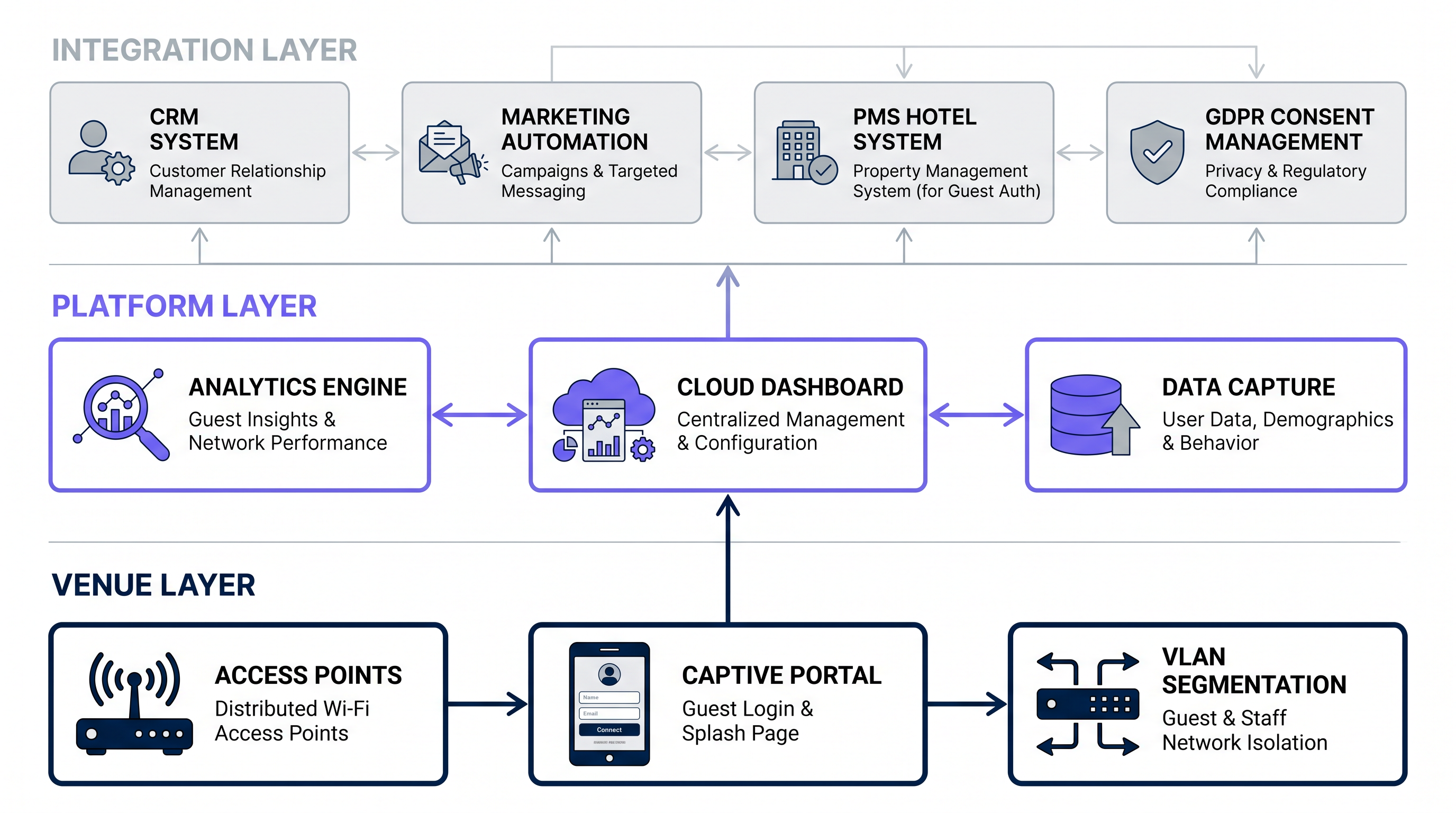
डेटा कैप्चर और एनालिटिक्स इंजन
एंटरप्राइज़-ग्रेड हॉस्पिटैलिटी WiFi प्रदाताओं या सार्वजनिक WiFi प्रदाताओं को तैनात करने का प्राथमिक व्यावसायिक चालक डेटा अधिग्रहण है। प्लेटफॉर्म लेयर में एक परिष्कृत एनालिटिक्स इंजन शामिल होना चाहिए जो संभावित रूप से हजारों समवर्ती उपयोगकर्ताओं से उच्च-मात्रा, वास्तविक समय डेटा स्ट्रीम को संसाधित करने में सक्षम हो।
फर्स्ट-पार्टी डेटा संग्रह: captive portal प्राथमिक डेटा अंतर्ग्रहण बिंदु है। ऐसे प्लेटफॉर्म देखें जो पूरी तरह से अनुकूलन योग्य, प्रतिक्रियाशील स्प्लैश पेज प्रदान करते हैं — कार्यान्वयन वॉकथ्रू के लिए Comment créer une page de connexion WiFi invité या So erstellen Sie eine Guest WiFi Login Page देखें। सिस्टम को जनसांख्यिकीय डेटा, संपर्क जानकारी और स्पष्ट मार्केटिंग सहमति को निर्बाध रूप से कैप्चर करना चाहिए, जिसमें परित्याग दरों को कम करने के लिए प्रगतिशील प्रोफाइलिंग का समर्थन हो।
स्थान एनालिटिक्स: लॉगिन डेटा से परे, प्लेटफॉर्म को स्थानिक एनालिटिक्स प्रदान करने के लिए एक्सेस पॉइंट (AP) टेलीमेट्री — विशेष रूप से कई AP से RSSI (रिसीव्ड सिग्नल स्ट्रेंथ इंडिकेटर) रीडिंग — का लाभ उठाना चाहिए। इसमें फुटफॉल काउंटिंग, ड्वेल टाइम विश्लेषण, ज़ोन-आधारित हीट मैपिंग और वास्तविक समय अधिभोग निगरानी शामिल है। ये क्षमताएँ WiFi Analytics प्लेटफॉर्म को एक परिचालन खुफिया उपकरण में बदल देती हैं।
थ्रूपुट और स्केलेबिलिटी: एनालिटिक्स इंजन को विलंबता क्षरण के बिना उच्च समवर्तीता को संभालना चाहिए। प्रदाता के क्लाउड आर्किटेक्चर का मूल्यांकन करें — क्या यह स्केलेबल माइक्रोसर्विसेज पर बना है जो चरम घटनाओं, जैसे स्टेडियम हाफ-टाइम या कॉन्फ्रेंस ब्रेक के दौरान प्रति सेकंड हजारों प्रमाणीकरण को संसाधित करने में सक्षम है? पोर्टल उपलब्धता (99.9%+) और प्रमाणीकरण प्रतिक्रिया पर SLA प्रतिबद्धताओं की तलाश करें।कई गुना।
इंटीग्रेशन और API क्षमताएं
एक गेस्ट WiFi प्लेटफॉर्म उतना ही मूल्यवान होता है जितना कि उसकी मौजूदा एंटरप्राइज़ स्टैक के साथ डेटा साझा करने की क्षमता। डेटा साइलो ROI के दुश्मन हैं।
CRM और मार्केटिंग ऑटोमेशन: CRM सिस्टम (Salesforce, HubSpot, Microsoft Dynamics) के साथ द्वि-दिशात्मक इंटीग्रेशन महत्वपूर्ण है। जब कोई यूज़र Guest WiFi से कनेक्ट होता है, तो उनकी प्रोफ़ाइल CRM में तुरंत अपडेट होनी चाहिए, जिससे लक्षित मार्केटिंग ऑटोमेशन वर्कफ़्लो ट्रिगर हों — जैसे वेलकम ईमेल, लॉयल्टी एनरोलमेंट प्रॉम्प्ट, या विज़िट हिस्ट्री के आधार पर पर्सनलाइज़्ड ऑफ़र।
प्रॉपर्टी मैनेजमेंट सिस्टम (PMS): हॉस्पिटैलिटी परिवेशों के लिए, PMS इंटीग्रेशन (Oracle OPERA, Mews, Agilysys) टियर-आधारित बैंडविड्थ आवंटन की अनुमति देता है — लॉयल्टी सदस्यों के लिए प्रीमियम स्पीड — और रूम नंबर व सरनेम सत्यापन के आधार पर ऑटोमेटेड ऑथेंटिकेशन, जिससे अलग WiFi पासवर्ड की आवश्यकता समाप्त हो जाती है।
वेबहुक और REST API: सुनिश्चित करें कि प्रोवाइडर कस्टम डेटा लेक, BI टूल्स (Power BI, Tableau), या डेटा वेयरहाउस में रीयल-टाइम इवेंट स्ट्रीमिंग के लिए व्यापक, अच्छी तरह से डॉक्यूमेंटेड RESTful API और वेबहुक प्रदान करता है। एक परिपक्व API पेशकश की अनुपस्थिति एंटरप्राइज़ डिप्लॉयमेंट के लिए एक महत्वपूर्ण रेड फ़्लैग है।
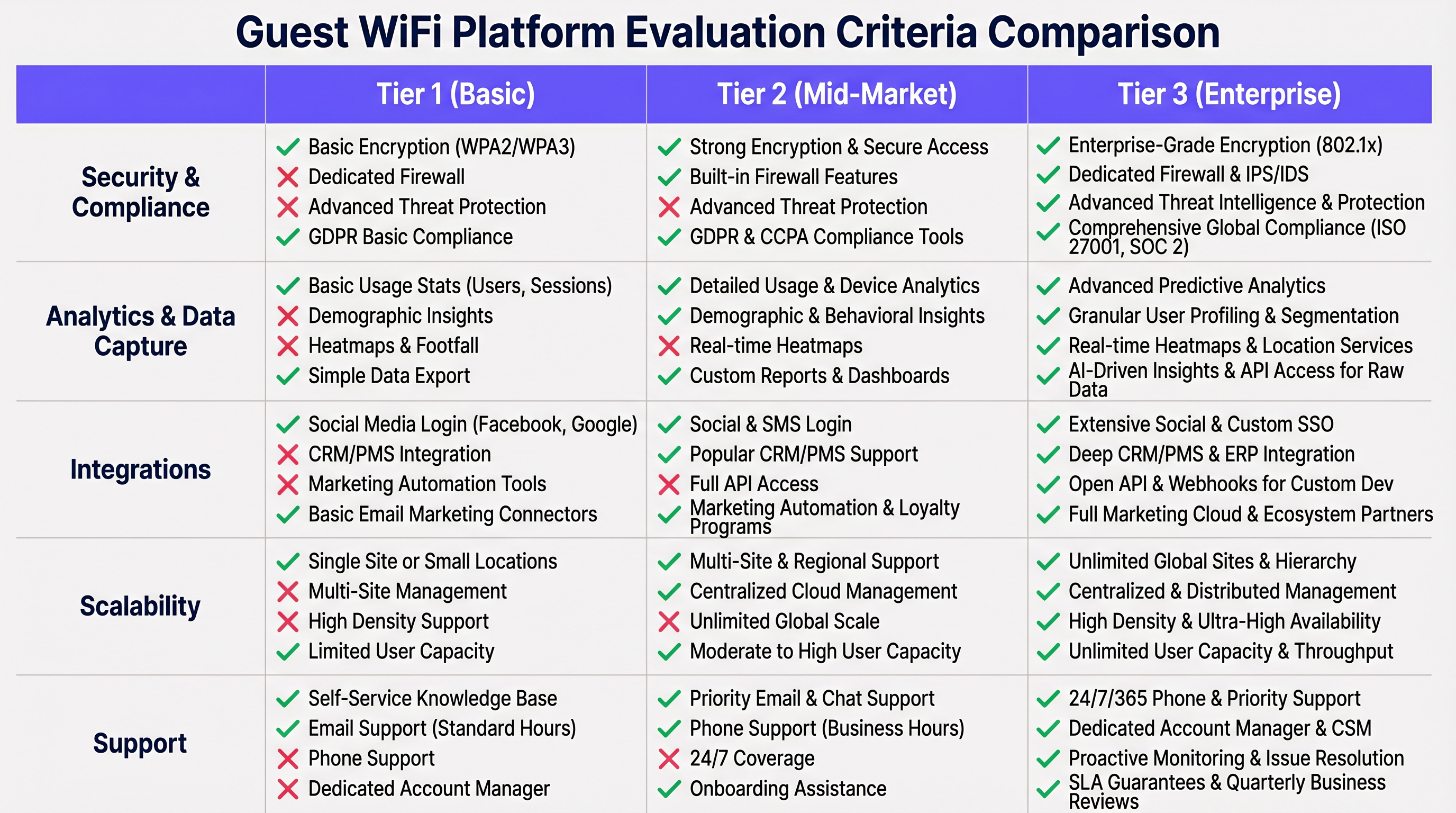
इंप्लीमेंटेशन गाइड: डिप्लॉयमेंट और कॉन्फ़िगरेशन
डिस्ट्रिब्यूटेड परिवेशों में एक एकीकृत गेस्ट WiFi सॉल्यूशन डिप्लॉय करने के लिए सावधानीपूर्वक योजना की आवश्यकता होती है। यह सेक्शन हॉस्पिटैलिटी, रिटेल और पब्लिक-सेक्टर परिवेशों पर लागू होने वाली वेंडर-न्यूट्रल डिप्लॉयमेंट मेथोडोलॉजी की रूपरेखा प्रस्तुत करता है।
चरण 1: नेटवर्क सेगमेंटेशन और VLAN डिज़ाइन
गेस्ट ट्रैफ़िक को कॉर्पोरेट या ऑपरेशनल डेटा के साथ कभी न मिलाएं। नेटवर्क एज पर सख्त VLAN सेगमेंटेशन लागू करें।
- VLAN आइसोलेशन: गेस्ट ट्रैफ़िक को एक डेडिकेटेड VLAN (जैसे, VLAN 100) को असाइन करें। कोर स्विच पर इंटर-VLAN राउटिंग नियम कॉन्फ़िगर करें ताकि गेस्ट VLAN और कॉर्पोरेट VLAN (POS, स्टाफ, मैनेजमेंट) के बीच किसी भी राउटिंग को स्पष्ट रूप से अस्वीकार किया जा सके।
- लेयर 2 क्लाइंट आइसोलेशन: AP पर क्लाइंट आइसोलेशन सक्षम करें ताकि गेस्ट डिवाइस एक-दूसरे के साथ सीधे संचार न कर सकें, जिससे लेटरल थ्रेट मूवमेंट और पीयर-टू-पीयर हमलों को कम किया जा सके।
- बैंडविड्थ थ्रॉटलिंग: प्रति-यूज़र बैंडविड्थ (जैसे, 5 Mbps डाउन / 2 Mbps अप) को सीमित करने के लिए QoS नीतियां लागू करें ताकि उचित उपयोग सुनिश्चित हो सके और कोर बिज़नेस एप्लिकेशन परफ़ॉर्मेंस सुरक्षित रहे।
चरण 2: Captive Portal कॉन्फ़िगरेशन
Captive Portal यूज़र का आपके ब्रांड के साथ पहला इंटरैक्शन और प्राथमिक डेटा कैप्चर मैकेनिज़्म है।
- ऑथेंटिकेशन मेथड्स: कन्वर्ज़न दरों को अधिकतम करने के लिए विविध लॉगिन विकल्प प्रदान करें: सोशल लॉगिन (Google, Facebook), SMS OTP ऑथेंटिकेशन, और स्टैंडर्ड ईमेल फ़ॉर्म फ़िल। प्रत्येक मेथड के अलग-अलग डेटा रिचनेस ट्रेड-ऑफ होते हैं।
- प्रोग्रेसिव प्रोफाइलिंग: यूज़र्स को उनकी पहली विज़िट पर लंबे फ़ॉर्म से अभिभूत न करें। बाद के लॉगिन पर विभिन्न डेटा पॉइंट पूछने के लिए प्रोग्रेसिव प्रोफाइलिंग का उपयोग करें — समय के साथ एक समृद्ध प्रोफ़ाइल बनाएं बिना प्रारंभिक कनेक्शन अनुभव का त्याग किए।
- वॉल्ड गार्डन कॉन्फ़िगरेशन: यूज़र के पूरी तरह से ऑथेंटिकेट होने से पहले आवश्यक CDN, सोशल लॉगिन OAuth एंडपॉइंट्स और प्रोवाइडर के क्लाउड कंट्रोलर तक पहुंच की अनुमति देने के लिए प्री-ऑथेंटिकेशन एक्सेस लिस्ट को सावधानीपूर्वक कॉन्फ़िगर करें।
- SSL सर्टिफ़िकेट्स: सुनिश्चित करें कि पोर्टल डोमेन एक वैध, विश्वसनीय SSL सर्टिफ़िकेट का उपयोग करता है। एक अमान्य सर्टिफ़िकेट iOS और Android पर Captive Network Assistant (CNA) को सुरक्षा चेतावनी प्रदर्शित करने का कारण बनेगा, जिससे परित्याग में नाटकीय वृद्धि होगी।
चरण 3: हार्डवेयर एग्नोस्टिसिज्म और ओवरले आर्किटेक्चर
हार्डवेयर लेयर पर वेंडर लॉक-इन से बचें। आदर्श गेस्ट WiFi प्लेटफॉर्म को एक क्लाउड ओवरले के रूप में काम करना चाहिए, जो प्रमुख एंटरप्राइज़ AP वेंडर्स (Cisco Meraki, Aruba Networks, Ruckus, Juniper Mist, Ubiquiti) के साथ संगत हो।
- RADIUS इंटीग्रेशन: प्लेटफॉर्म को ऑथेंटिकेशन और अकाउंटिंग के लिए स्टैंडर्ड RADIUS प्रोटोकॉल (RFC 2865/2866) के माध्यम से इंटीग्रेट करना चाहिए, जिससे किसी भी 802.1X-सक्षम एक्सेस पॉइंट के साथ संगतता सुनिश्चित हो सके।
- कंट्रोलर संगतता: सत्यापित करें कि प्लेटफॉर्म क्लाउड-मैनेज्ड और ऑन-प्रिमाइसेस कंट्रोलर आर्किटेक्चर दोनों का समर्थन करता है, क्योंकि कई एंटरप्राइज़ परिवेश हाइब्रिड डिप्लॉयमेंट चलाते हैं।
एंटरप्राइज़ परिवेशों के लिए सर्वोत्तम अभ्यास
80,000 से अधिक स्थानों और लगभग 2 मिलियन दैनिक यूज़र्स में डिप्लॉयमेंट के आधार पर, निम्नलिखित सर्वोत्तम अभ्यास बिज़नेस WiFi प्रोवाइडर्स और पब्लिक WiFi प्रोवाइडर्स दोनों में इष्टतम परफ़ॉर्मेंस और ROI सुनिश्चित करते हैं।
यूज़र अनुभव को प्राथमिकता दें: लॉगिन प्रक्रिया तेज़ होनी चाहिए। SSID एसोसिएशन से पूर्ण इंटरनेट एक्सेस तक कनेक्ट होने का समय 15 सेकंड से कम का लक्ष्य रखें। जटिल ऑथेंटिकेशन फ़्लो उच्च परित्याग दरों का कारण बनते हैं, जिससे आपकी डेटा कैप्चर यील्ड सीधे कम हो जाती है।
मल्टी-साइट डिप्लॉयमेंट के लिए SD-WAN का लाभ उठाएं: डिस्ट्रिब्यूटेड परिवेशों जैसे Retail चेन के लिए, गेस्ट WiFi को SD-WAN इंफ्रास्ट्रक्चर के साथ इंटीग्रेट करने से ट्रैफ़िक राउटिंग ऑप्टिमाइज़ होती है, सुरक्षा नीति प्रवर्तन केंद्रीकृत होता है, और सभी स्थानों पर एकीकृत विज़िबिलिटी मिलती है। SD-WAN गेस्ट WiFi आर्किटेक्चर को कैसे पूरक करता है, इसके विस्तृत तकनीकी विश्लेषण के लिए आधुनिक व्यवसायों के लिए मुख्य SD WAN लाभ देखें।
ऑटोमेटेड डेटा क्लींजिंग लागू करें: सुनिश्चित करें कि आपका प्लेटफॉर्म CRM में डेटा पुश करने से पहले ईमेल एड्रेस को स्वचालित रूप से मान्य और साफ़ करता है, फ़ोन नंबर फ़ॉर्मेट को सामान्य करता है, और रिकॉर्ड को डुप्लिकेट करता है। खराब डेटा क्वालिटी समय के साथ बढ़ती जाती है और आपके मार्केटिंग ROI को कमजोर करती है।
उद्योग वर्टिकल के अनुसार अनुभव को अनुकूलित करें: विभिन्न क्षेत्रों की अलग-अलग आवश्यकताएं होती हैं। Hospitality में, लौटने वाले मेहमानों के लिए सहज ऑनबोर्डिंग और टियर-आधारित सेवा स्तरों की पेशकश करने के लिए लॉयल्टी प्रोग्राम के साथ इंटीग्रेट करें। Healthcare में, रोगी की गोपनीयता सर्वोपरि है — PII कैप्चर पर गुमनाम स्थान एनालिटिक्स को प्राथमिकता दें, और पोर्टल के माध्यम से एकत्र किए गए किसी भी डेटा के लिए सख्त HIPAA और GDPR कंप्लायंस सुनिश्चित करें। Transport हब में, हाई-डेंसिटी AP depडिप्लॉयमेंट, फ़ास्ट रोमिंग (802.11r), और Passpoint सपोर्ट बड़े, मल्टी-ज़ोन एनवायरनमेंट में सीमलेस कनेक्टिविटी के लिए।
समस्या निवारण और जोखिम न्यूनीकरण
मज़बूत आर्किटेक्चर के बावजूद, ऑपरेशनल समस्याएँ उत्पन्न होती हैं। निम्नलिखित में एंटरप्राइज़ गेस्ट WiFi डिप्लॉयमेंट में सामने आने वाली सबसे आम विफलता मोड शामिल हैं।
Captive Portal दिखाई नहीं दे रहा (CNA विफलता): iOS और Android पर Captive Network Assistant एक Captive Portal का पता लगाने के लिए विशिष्ट HTTP प्रोब रिक्वेस्ट पर निर्भर करता है। यदि Apple या Google के डिटेक्शन URL ब्लॉक हो जाते हैं, गलत तरीके से रूट किए जाते हैं, या अप्रत्याशित रिस्पॉन्स देते हैं, तो पॉपअप दिखाई नहीं देगा, और यूज़र्स को मैन्युअल रूप से ब्राउज़र पर नेविगेट करना जाने बिना कनेक्ट करने में असमर्थ होंगे। न्यूनीकरण: सुनिश्चित करें कि आपका वॉल्ड गार्डन ज्ञात CNA प्रोब डेस्टिनेशन को स्पष्ट रूप से अनुमति देता है और आपका पोर्टल सही HTTP 302 रीडायरेक्ट रिस्पॉन्स देता है।
IP पूल की कमी: अधिक फ़ुटफॉल वाले स्थानों पर, DHCP स्कोप तेज़ी से समाप्त हो सकते हैं क्योंकि डिवाइस प्रमाणीकरण पूरा किए बिना नेटवर्क को प्रोब करते हैं। न्यूनीकरण: गेस्ट VLAN पर DHCP लीज़ टाइम को काफी कम करें — अधिकांश सार्वजनिक स्थानों के लिए 30 से 60 मिनट उपयुक्त है — ताकि उन डिवाइस से एड्रेस तेज़ी से वापस मिल सकें जो क्षेत्र छोड़ चुके हैं।
डेटा गोपनीयता उल्लंघन: PII को गलत तरीके से संभालने पर GDPR (वैश्विक वार्षिक टर्नओवर के 4% तक का जुर्माना) और समकक्ष विनियमों के तहत गंभीर कानूनी और प्रतिष्ठा संबंधी परिणाम होते हैं। न्यूनीकरण: अपने गेस्ट WiFi प्रोवाइडर के साथ सख्त डेटा प्रोसेसिंग एग्रीमेंट (DPAs) लागू करें। सुनिश्चित करें कि प्लेटफ़ॉर्म स्वचालित डेटा एनोनिमाइज़ेशन, कॉन्फ़िगरेबल रिटेंशन पीरियड और सेल्फ-सर्विस डिलीशन रिक्वेस्ट वर्कफ़्लो का समर्थन करता है।
लोड के तहत प्रमाणीकरण विलंबता: पीक कॉन्करेंसी इवेंट्स के दौरान, RADIUS प्रमाणीकरण रिक्वेस्ट कतारबद्ध हो सकती हैं, जिससे पोर्टल पर धीमी गति महसूस होती है। न्यूनीकरण: सुनिश्चित करें कि आपके प्रोवाइडर का क्लाउड इंफ्रास्ट्रक्चर RADIUS क्षमता को ऑटो-स्केल करता है, और विलंबता-संवेदनशील एनवायरनमेंट के लिए एक लोकल RADIUS प्रॉक्सी डिप्लॉय करने पर विचार करें।
ROI और व्यावसायिक प्रभाव
एक आधुनिक गेस्ट WiFi डिप्लॉयमेंट नेटवर्क को एक लागत केंद्र से राजस्व-उत्पादक और लागत-कम करने वाली रणनीतिक संपत्ति में बदल देता है। ROI को मापने के लिए एक समर्पित WiFi Analytics प्लेटफ़ॉर्म के माध्यम से विशिष्ट KPIs को ट्रैक करना आवश्यक है।
ग्राहक अधिग्रहण लागत में कमी: WiFi पोर्टल के माध्यम से फर्स्ट-पार्टी डेटा कैप्चर करके, स्थान मालिकाना, अनुमति-आधारित मार्केटिंग लिस्ट बनाते हैं। यह महंगे थर्ड-पार्टी विज्ञापन और कुकी-निर्भर री-टारगेटिंग पर निर्भरता को कम करता है, जो ब्राउज़र गोपनीयता परिवर्तनों और नियामक दबाव से तेज़ी से बाधित हो रहा है।
बढ़ा हुआ ड्वेल टाइम और प्रति विज़िट राजस्व: लक्षित इन-वेन्यू मैसेजिंग — 30 मिनट के ड्वेल टाइम के बाद यूज़र के डिवाइस पर एक डिजिटल वाउचर भेजना — सीधे रिटेल एनवायरनमेंट में बढ़ी हुई बास्केट साइज़ और हॉस्पिटैलिटी में बढ़े हुए फ़ूड और बेवरेज खर्च से संबंधित है।
रिटेल मीडिया मुद्रीकरण: बड़े स्थान लक्षित, प्रासंगिक विज्ञापन या स्पॉन्सरशिप प्रदान करके अपने WiFi स्प्लैश पेज रियल एस्टेट का मुद्रीकरण कर सकते हैं, जिससे नेटवर्क इंफ्रास्ट्रक्चर से सीधा वृद्धिशील राजस्व उत्पन्न होता है।
परिचालन दक्षता: रियल-टाइम लोकेशन एनालिटिक्स लाइव फ़ुटफॉल डेटा के आधार पर स्टाफिंग स्तरों को ऑप्टिमाइज़ कर सकता है, कतार की लंबाई कम कर सकता है, और एसेट यूटिलाइज़ेशन में सुधार कर सकता है — जिससे मापने योग्य OPEX कटौती होती है जो समय के साथ बढ़ती जाती है।
गेस्ट WiFi को एक बुनियादी यूटिलिटी के बजाय एक रणनीतिक डेटा अधिग्रहण चैनल के रूप में मानकर, IT लीडर व्यवसाय को मापने योग्य, संचयी मूल्य प्रदान कर सकते हैं — एक इंफ्रास्ट्रक्चर लागत को प्रतिस्पर्धी लाभ में बदल सकते हैं।
Key Terms & Definitions
Captive Portal
A web page that a user of a public-access network is obliged to view and interact with before full internet access is granted. Typically delivered via an HTTP redirect when a new device associates with the SSID.
The captive portal is the primary user interface for guest WiFi and the critical ingestion point for first-party marketing data and terms of service acceptance. Its design directly impacts data capture rates.
Walled Garden
A restricted pre-authentication environment that controls which web resources a user can access before they have completed the captive portal login process.
IT teams must configure the walled garden to allow access to necessary services — social login OAuth APIs, the portal CDN, and the provider's cloud controller — while blocking general internet access. Misconfiguration is a common cause of portal failures.
IEEE 802.1X
An IEEE Standard for port-based Network Access Control (PNAC), providing an authentication mechanism to devices wishing to attach to a LAN or WLAN. Requires a supplicant (client), authenticator (AP/switch), and authentication server (RADIUS).
Essential for enterprise-grade security, allowing for individual user authentication rather than a shared password. Enables per-user policy enforcement, session logging, and dynamic VLAN assignment.
Layer 2 Client Isolation
A security feature on wireless access points that prevents wireless clients on the same SSID from communicating directly with each other at the data link layer.
Critical for public WiFi deployments to prevent lateral movement of threats — for example, stopping malware on one guest laptop from scanning or attacking other devices on the same network.
Passpoint (Hotspot 2.0)
A Wi-Fi Alliance standard (based on IEEE 802.11u) designed to streamline network access by enabling devices to automatically discover and authenticate to compatible networks using pre-provisioned credentials, without requiring captive portal interaction.
The emerging standard for enterprise guest WiFi, enabling seamless, secure roaming between cellular and WiFi networks. Providers like Purple are investing heavily in OpenRoaming, a Passpoint-based global roaming framework.
RADIUS (Remote Authentication Dial-In User Service)
A networking protocol (RFC 2865) that provides centralised Authentication, Authorization, and Accounting (AAA) management for users connecting to a network service.
The standard protocol used by wireless access points to communicate with the cloud guest WiFi platform to verify user credentials, assign VLANs, and apply bandwidth policies. RADIUS compatibility is the key enabler of hardware-agnostic deployments.
RSSI (Received Signal Strength Indicator)
A measurement of the power level of a received radio signal, expressed in dBm. Used by WiFi devices and infrastructure to estimate signal quality and approximate physical distance from an access point.
Used by WiFi analytics engines to triangulate the physical location of a device within a venue, enabling footfall tracking, zone-based dwell time analysis, and real-time heat mapping without requiring GPS.
Dwell Time
The length of time a visitor's device remains associated with the WiFi network within a specific physical location or defined zone within a venue.
A key operational and marketing metric. Used by operations teams to optimise staffing and queue management, and by marketing teams to trigger time-based promotional messages — for example, sending a discount offer after 30 minutes in a specific retail zone.
Progressive Profiling
A data collection strategy where user profile information is gathered incrementally across multiple interactions or visits, rather than all at once during the initial registration.
The recommended approach for captive portal data capture. Reduces initial friction (increasing connection rates) while building rich user profiles over time. Requires MAC address recognition or cookie-based return visitor identification.
VLAN (Virtual Local Area Network)
A logical subdivision of a physical network that groups devices together regardless of their physical location, creating separate broadcast domains at Layer 2.
The fundamental mechanism for isolating guest WiFi traffic from corporate networks. Every enterprise guest WiFi deployment must assign guest traffic to a dedicated VLAN to prevent cross-contamination with operational systems.
Case Studies
A 200-room hotel needs to upgrade its legacy guest WiFi. The current system uses a shared WPA2 password distributed at check-in, resulting in poor security, bandwidth abuse by non-guests, zero data capture, and no integration with their Oracle OPERA PMS. The IT team has a mixed hardware estate of Aruba and Cisco Meraki access points.
Step 1 — Platform Selection: Choose a hardware-agnostic guest WiFi platform that integrates via RADIUS with both Aruba and Cisco Meraki controllers. This preserves the existing hardware investment.
Step 2 — Network Architecture: Transition from the shared PSK to an open SSID with a captive portal. Create a dedicated guest VLAN (VLAN 100) with Layer 2 client isolation enabled. Configure QoS to cap guest bandwidth at 10 Mbps per device, with a separate policy for loyalty members.
Step 3 — PMS Integration: Configure the captive portal with a 'Room Number + Surname' authentication method. The WiFi platform queries Oracle OPERA via API in real-time to validate the guest. Only active in-house guests can authenticate.
Step 4 — Tiered Bandwidth: Implement policy-based routing. Standard guests receive 10 Mbps. Loyalty members (identified via PMS room type or loyalty flag) receive 25 Mbps automatically.
Step 5 — Data Capture: Enable progressive profiling on the portal. On first login, capture email and marketing consent. On subsequent stays, prompt for one additional preference (e.g., room type preference, communication channel).
Step 6 — CRM Integration: Configure bi-directional sync with the hotel's CRM to append WiFi engagement data to guest profiles, enabling post-stay email campaigns.
A national retail chain with 150 locations is experiencing high abandonment rates on their guest WiFi login page (estimated at 65%). They currently require a six-field form (Name, Email, Phone, Postcode, Age, Gender) before granting access. Their IT team wants to improve data capture volume without reducing data quality.
Step 1 — Audit the Abandonment Funnel: Use the WiFi platform's analytics to identify at which field users are abandoning. Typically, Phone Number and Age are the highest-friction fields.
Step 2 — Implement Progressive Profiling: Redesign the captive portal to a two-stage flow. First visit: require only Email Address (or Social Login via Google/Facebook) and Terms acceptance. This is a single interaction — the minimum viable ask.
Step 3 — Return Visit Profiling: When the platform recognises a returning device MAC address, present a personalised 'Welcome Back' screen that asks for one additional data point before granting access. Rotate through: Postcode (visit 2), Age range (visit 3), Gender (visit 4).
Step 4 — CRM Append Logic: Configure the integration so each new data point is appended to the existing user profile in the CRM, building a complete record over four visits rather than demanding it all upfront.
Step 5 — Measure Improvement: Track connection rate (target: increase from 35% to 70%+), email capture rate, and profile completeness score over a 90-day period.
Scenario Analysis
Q1. You are the network architect for a 60,000-seat stadium deploying guest WiFi for the first time. The marketing team wants to capture email addresses and push real-time promotional offers during the event. The operations team is concerned about network congestion during the 15-minute half-time break when the majority of attendees will simultaneously attempt to connect. What is your recommended architectural approach, and what specific configurations will you implement to handle the concurrency spike?
💡 Hint:Consider the bottleneck points: DHCP scope exhaustion, RADIUS authentication queue depth, and captive portal CDN capacity. Also consider whether OAuth-based social login is appropriate in this scenario.
Show Recommended Approach
Implement a lightweight captive portal with a simple email form fill rather than OAuth social login — OAuth requires external DNS resolution and multiple API handshakes, which adds latency and failure points under load. Reduce the guest VLAN DHCP lease time to 15-30 minutes to prevent IP pool exhaustion as users move through different zones. Ensure the WiFi platform's cloud infrastructure auto-scales RADIUS capacity (verify with the vendor that they support burst scaling). Deploy the captive portal via a globally distributed CDN to minimise portal load time. Pre-segment the stadium into zones (e.g., North Stand, South Stand, Concourse) with separate SSIDs or VLANs per zone, distributing the authentication load. Set per-user bandwidth caps (2-3 Mbps) to prevent any single user from saturating AP uplinks.
Q2. A healthcare provider wants to offer guest WiFi in their outpatient waiting rooms. They want to use the WiFi platform to measure patient wait times (via dwell time analytics) to improve operational efficiency. However, their legal team has confirmed they cannot collect any PII from patients on the network due to HIPAA and GDPR obligations. How do you configure the deployment to achieve the operational analytics goal without capturing PII?
💡 Hint:The analytics goal (dwell time) does not require authentication. Consider what data the platform needs to measure dwell time, and whether that data constitutes PII.
Show Recommended Approach
Deploy the WiFi platform primarily for its passive location analytics capability, not the captive portal. Configure the network with an open SSID that provides internet access without requiring authentication — eliminating any PII capture entirely. Enable the platform's passive device detection mode, which ingests RSSI telemetry from access points to track device presence and movement without requiring authentication. Configure the platform to apply MAC address hashing or anonymisation at the edge (on the AP or controller) before data is transmitted to the cloud, ensuring the stored data cannot be linked back to an individual. This allows accurate dwell time measurement per zone while remaining fully compliant. If a portal is required for terms acceptance, configure it as a single-click 'Accept Terms' with zero data fields and no marketing consent collection.
Q3. A retail client reports that their corporate point-of-sale (POS) terminals are intermittently losing network connectivity during peak shopping hours, coinciding with high guest WiFi usage. Both the guest and corporate SSIDs are broadcast from the same access points. The IT team suspects the guest WiFi is impacting POS performance. How do you diagnose and resolve this?
💡 Hint:Consider both Layer 2 (broadcast domain) and Layer 3 (bandwidth) causes. Also consider the AP radio resource management configuration.
Show Recommended Approach
The issue is likely a combination of insufficient network segmentation and resource contention at the AP level. Diagnosis steps: (1) Verify VLAN configuration — confirm guest and POS SSIDs are mapped to separate VLANs and that inter-VLAN routing is blocked at the firewall. (2) Check AP uplink utilisation — if the AP's wired uplink is saturated by guest traffic, POS traffic will be impacted regardless of VLAN segmentation. Resolution: (1) Implement strict per-user bandwidth throttling on the guest SSID (e.g., 2 Mbps per client) to cap total guest consumption. (2) Configure QoS DSCP marking on the POS VLAN to prioritise POS traffic over guest traffic at the AP and switch level. (3) Enable Layer 2 client isolation on the guest SSID to reduce broadcast domain chatter, which can consume AP processing resources. (4) Consider deploying dedicated APs for POS in high-density areas, physically separating the radio resources.




