

HubSpot और गेस्ट WiFi: लीड एनरिचमेंट और सेगमेंटेशन
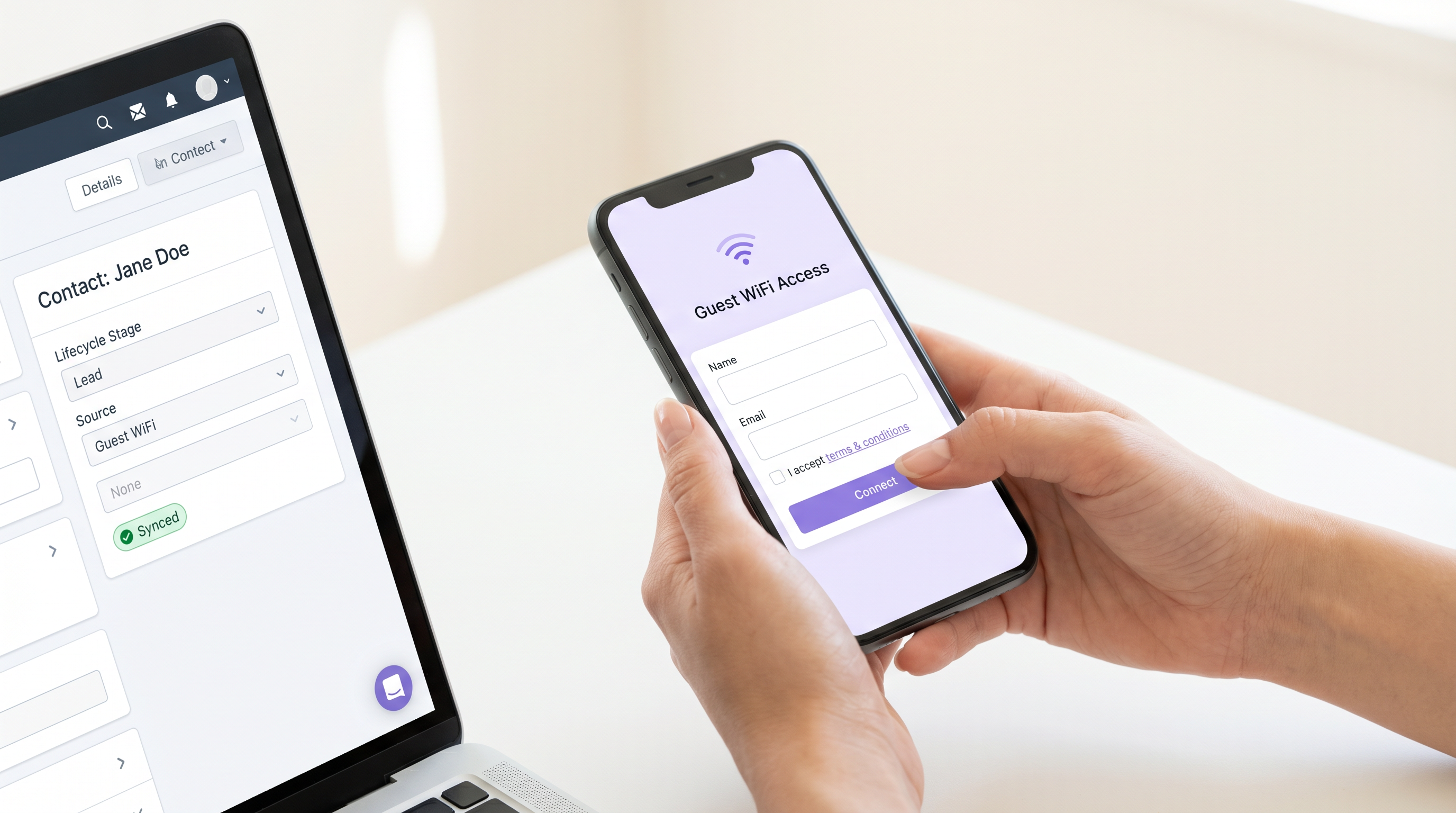
यह गाइड आईटी प्रबंधकों, HubSpot एडमिन और मार्केटिंग ऑपरेशंस टीमों को Purple गेस्ट WiFi को HubSpot से जोड़ने के लिए एक व्यावहारिक इंटीग्रेशन प्लेबुक प्रदान करती है। यह संपूर्ण तकनीकी आर्किटेक्चर को कवर करती है — कैप्टिव पोर्टल डेटा कैप्चर और प्रॉपर्टी मैपिंग से लेकर लाइफसाइकिल स्टेज ऑटोमेशन, डी-डुप्लीकेशन और लिस्ट सेगमेंटेशन तक — जिससे वेन्यू ऑपरेटर गुमनाम WiFi कनेक्शन को समृद्ध, कार्रवाई योग्य CRM संपर्कों में बदल सकें।
🎧 Listen to this Guide
View Transcript
कार्यकारी सारांश
एंटरप्राइज़ वेन्यू के लिए — विशाल रिटेल चेन से लेकर उच्च क्षमता वाले स्टेडियम तक — गेस्ट WiFi नेटवर्क टेक्नोलॉजी स्टैक में सबसे कम उपयोग की जाने वाली डेटा अधिग्रहण परतों में से एक है। प्रत्येक प्रमाणित सत्र एक सत्यापित पहचान संकेत का प्रतिनिधित्व करता है: एक नाम, एक ईमेल पता और स्पष्ट मार्केटिंग सहमति। फिर भी, अधिकांश संगठन इस डेटा को अपने WiFi प्रबंधन प्लेटफॉर्म के भीतर अलग-थलग रहने देते हैं, जो CRM से पूरी तरह से डिस्कनेक्टेड होता है। Purple HubSpot इंटीग्रेशन कैप्टिव पोर्टल और HubSpot के बीच एक वास्तविक समय, इवेंट-ड्रिवन डेटा पाइपलाइन स्थापित करके इस अंतर को भरता है।
यह गाइड संपूर्ण डिप्लॉयमेंट आर्किटेक्चर को कवर करती है: गेस्ट WiFi पोर्टल फ़ील्ड को HubSpot मानक और कस्टम प्रॉपर्टीज़ में कैसे मैप करें, डी-डुप्लीकेशन लॉजिक को कैसे कॉन्फ़िगर करें, WiFi सत्र इवेंट्स द्वारा ट्रिगर किए गए लाइफसाइकिल स्टेज वर्कफ़्लो कैसे बनाएं, और संपर्कों को कार्रवाई योग्य सूचियों में कैसे सेगमेंट करें। यह HubSpot एडमिन, मार्केटिंग ऑपरेशंस मैनेजर और आईटी आर्किटेक्ट्स के लिए लिखी गई है, जिन्हें इस इंटीग्रेशन को सैद्धांतिक रूप से मूल्यांकन करने के बजाय प्रोडक्शन एनवायरनमेंट में लागू करने की आवश्यकता है।
तकनीकी गहन-विश्लेषण
आर्किटेक्चर और डेटा प्रवाह
यह इंटीग्रेशन एक वेबहुक-ड्रिवन आर्किटेक्चर पर काम करता है। जब कोई उपयोगकर्ता Purple कैप्टिव पोर्टल के माध्यम से प्रमाणित होता है, तो प्लेटफ़ॉर्म पहचान प्रदाता के रूप में कार्य करता है, सत्र को मान्य करता है और उपयोगकर्ता के जनसांख्यिकीय और सत्र डेटा वाले एक संरचित JSON पेलोड उत्पन्न करता है। यह पेलोड एक सुरक्षित HTTPS REST API कॉल के माध्यम से HubSpot Contacts API एंडपॉइंट पर प्रेषित किया जाता है।
डेटा प्रवाह चार अलग-अलग चरणों का पालन करता है: पोर्टल लेयर पर प्रमाणीकरण, Purple प्लेटफॉर्म द्वारा पेलोड जनरेशन, HubSpot को API ट्रांसमिशन, और CRM के भीतर रिकॉर्ड निर्माण या अपडेट। मल्टी-वेन्यू डिप्लॉयमेंट के लिए — जो रिटेल और हॉस्पिटैलिटी वातावरण में आम हैं — वेन्यू आइडेंटिफ़ायर जनरेशन के समय पेलोड में एम्बेड किया जाता है, यह सुनिश्चित करते हुए कि प्रत्येक संपर्क रिकॉर्ड क्षेत्रीय सेगमेंटेशन के लिए आवश्यक स्थान संदर्भ रखता है।
Purple के भीतर WiFi एनालिटिक्स लेयर व्यवहार संबंधी मेट्रिक्स — सत्र गणना, ठहरने का समय, विज़िट आवृत्ति — उत्पन्न करती है जो जनसांख्यिकीय डेटा के साथ पास किए जाते हैं। ये मेट्रिक्स एक बुनियादी ईमेल कैप्चर और एक वास्तव में समृद्ध CRM संपर्क के बीच अंतर करने वाले कारक हैं।
प्रॉपर्टी मैपिंग यांत्रिकी
सटीक प्रॉपर्टी मैपिंग एक विश्वसनीय इंटीग्रेशन की नींव है। HubSpot की नेटिव संपर्क प्रॉपर्टीज़ मानक जनसांख्यिकीय फ़ील्ड को संभालती हैं, लेकिन WiFi-विशिष्ट व्यवहार संबंधी डेटा को इंटीग्रेशन सक्रिय होने से पहले कस्टम प्रॉपर्टी निर्माण की आवश्यकता होती है।
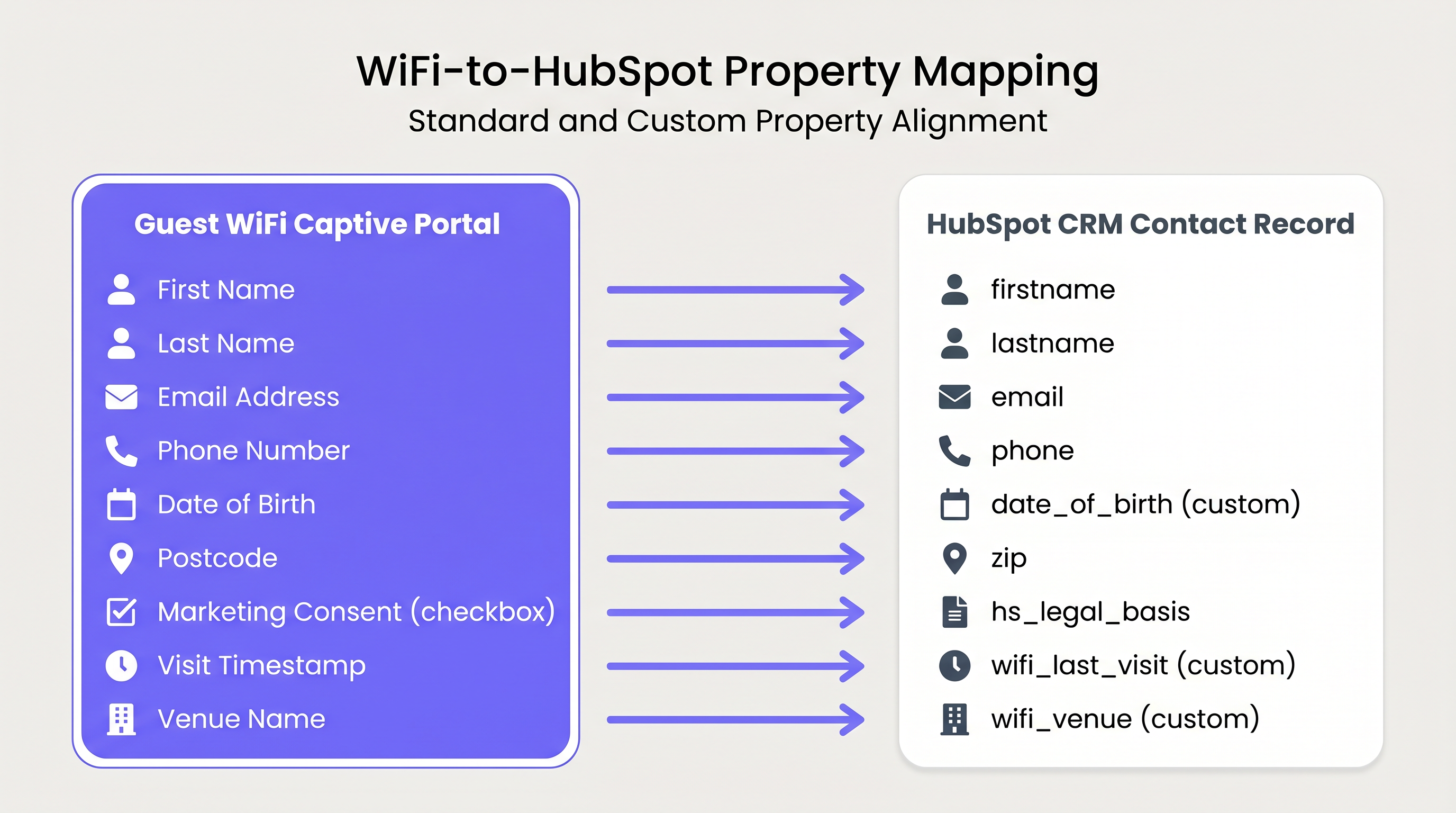
निम्नलिखित तालिका अनुशंसित प्रॉपर्टी मैपिंग कॉन्फ़िगरेशन को परिभाषित करती है:
| Portal Field | HubSpot Property | Property Type | Notes |
|---|---|---|---|
| पहला नाम | firstname |
सिंगल-लाइन टेक्स्ट | नेटिव HubSpot प्रॉपर्टी |
| अंतिम नाम | lastname |
सिंगल-लाइन टेक्स्ट | नेटिव HubSpot प्रॉपर्टी |
| ईमेल पता | email |
ईमेल | प्राथमिक डी-डुप्लीकेशन कुंजी |
| फ़ोन नंबर | phone |
फ़ोन नंबर | नेटिव HubSpot प्रॉपर्टी |
| जन्म तिथि | date_of_birth |
डेट पिकर | कस्टम प्रॉपर्टी आवश्यक |
| पोस्टकोड / ज़िप | zip |
सिंगल-लाइन टेक्स्ट | नेटिव HubSpot प्रॉपर्टी |
| मार्केटिंग सहमति | hs_legal_basis |
सिंगल-लाइन टेक्स्ट | 'स्वैच्छिक सहमति' पर सेट करें |
| विज़िट टाइमस्टैम्प | wifi_last_visit |
डेट पिकर | कस्टम प्रॉपर्टी आवश्यक |
| वेन्यू का नाम | wifi_venue |
सिंगल-लाइन टेक्स्ट | कस्टम प्रॉपर्टी आवश्यक |
| सत्र गणना | wifi_session_count |
संख्या | कस्टम प्रॉपर्टी आवश्यक |
| ठहरने का समय (मिनट) | wifi_dwell_time |
संख्या | कस्टम प्रॉपर्टी आवश्यक |
चार कस्टम प्रॉपर्टीज़ — wifi_last_visit, wifi_venue, wifi_session_count, और wifi_dwell_time — को इंटीग्रेशन सक्रिय होने से पहले HubSpot में बनाया जाना चाहिए। इन प्रॉपर्टीज़ को पहले से बनाने में विफलता के परिणामस्वरूप HubSpot API द्वारा पेलोड डेटा को चुपचाप छोड़ दिया जाएगा।
डी-डुप्लीकेशन और पहचान समाधान
HubSpot संपर्क रिकॉर्ड के लिए ईमेल पते को प्राथमिक अद्वितीय पहचानकर्ता के रूप में उपयोग करता है। जब Purple पेलोड प्राप्त होता है, तो HubSpot मौजूदा रिकॉर्ड के विरुद्ध एक लुकअप करता है। यदि मिलान वाले ईमेल पते वाला कोई संपर्क मौजूद है, तो HubSpot नए सत्र डेटा के साथ रिकॉर्ड को अपडेट करता है — wifi_session_count को बढ़ाता है और wifi_last_visit को अपडेट करता है। यदि कोई मिलान नहीं मिलता है, तो एक नया संपर्क रिकॉर्ड बनाया जाता है।
यह व्यवहार नियतात्मक और विश्वसनीय है, बशर्ते कि ईमेल पता विज़िट के दौरान सुसंगत हो। प्राथमिक जोखिम स्रोत पर गंदा डेटा है। यदि कैप्टिव पोर्टल गलत या नकली ईमेल पतों की अनुमति देता है, तो HubSpot में अनाथ रिकॉर्ड बनाए जाते हैं जिन्हें बाद की विज़िट पर मिलान नहीं किया जा सकता है और ईमेल नहीं किया जा सकता है। शमन यह है कि पोर्टल फॉर्म पर सख्त RFC 5322 ईमेल प्रारूप सत्यापन लागू किया जाए, जिससे ईमेल फ़ील्ड को सर्वर-साइड सत्यापन के साथ अनिवार्य बनाया जाए। यह Purple पोर्टल सेटिंग्स के भीतर एक कॉन्फ़िगर करने योग्य विकल्प है और इसे एक गैर-परक्राम्य आधारभूत आवश्यकता के रूप में माना जाना चाहिए।
उन संगठनों के लिए जो हेल्थकेयर या सार्वजनिक-क्षेत्र के वातावरण में काम कर रहे हैं जहाँ GDPR अनुपालन ऑडिट के अधीन है, यह भी ध्यान देने योग्य है कि डी-डुप्लीकेशन तंत्र का अर्थ है कि एक एकल संपर्क रिकॉर्ड सभी विज़िट इतिहास को समेकित करता है। यह GDPR अनुच्छेद 17 के तहत सब्जेक्ट एक्सेस रिक्वेस्ट (SAR) प्रतिक्रियाओं और डेटा विलोपन अनुरोधों को सरल बनाता है।
कार्यान्वयन गाइड
चरण 1: HubSpot कस्टम प्रॉपर्टीज़ को पहले से कॉन्फ़िगर करें
नेविगेट करेंHubSpot सेटिंग्स > प्रॉपर्टीज़ > कॉन्टैक्ट प्रॉपर्टीज़ पर जाएँ। ऊपर दी गई मैपिंग तालिका में सूचीबद्ध चार कस्टम प्रॉपर्टीज़ बनाएँ। सुनिश्चित करें कि डेटा प्रकार सही ढंग से सेट किए गए हैं — wifi_last_visit एक डेट पिकर होना चाहिए, wifi_session_count और wifi_dwell_time नंबर प्रकार के होने चाहिए। गलत डेटा प्रकारों के कारण API पेलोड मानों को अस्वीकार कर देगा।
चरण 2: कैप्टिव पोर्टल फ़ील्ड्स का ऑडिट और संरेखण करें
वर्तमान Purple कैप्टिव पोर्टल कॉन्फ़िगरेशन की समीक्षा करें। सुनिश्चित करें कि ईमेल फ़ील्ड को अनिवार्य के रूप में सेट किया गया है और फ़ॉर्मेट सत्यापन सक्षम है। मल्टी-वेन्यू डिप्लॉयमेंट के लिए, पुष्टि करें कि वेन्यू आइडेंटिफ़ायर एक्सेस पॉइंट लोकेशन के आधार पर डायनामिक रूप से पास होने के लिए कॉन्फ़िगर किया गया है। ट्रांसपोर्ट वातावरण में वेन्यू — जैसे हवाई अड्डे या रेलवे स्टेशन — में एक ही वेन्यू के भीतर कई ज़ोन हो सकते हैं, जिनमें से प्रत्येक को एक अलग वेन्यू आइडेंटिफ़ायर की आवश्यकता होती है।
चरण 3: Purple में प्रॉपर्टी मैपिंग कॉन्फ़िगर करें
Purple प्लेटफ़ॉर्म की HubSpot इंटीग्रेशन सेटिंग्स के भीतर, प्रत्येक पोर्टल फ़ील्ड को संबंधित HubSpot आंतरिक प्रॉपर्टी नाम से मैप करें। सटीक आंतरिक प्रॉपर्टी नामों का उपयोग करें (उदाहरण के लिए, wifi_session_count, न कि WiFi Session Count) ताकि यह सुनिश्चित हो सके कि API पेलोड सही ढंग से संरचित है।
चरण 4: लाइफ़साइकिल स्टेज ऑटोमेशन स्थापित करें
सभी नए WiFi कनेक्शन को 'लीड' लाइफ़साइकिल स्टेज पर डिफ़ॉल्ट न करें। HubSpot वर्कफ़्लो का उपयोग करके एक इवेंट-ड्रिवन टियर मॉडल लागू करें।
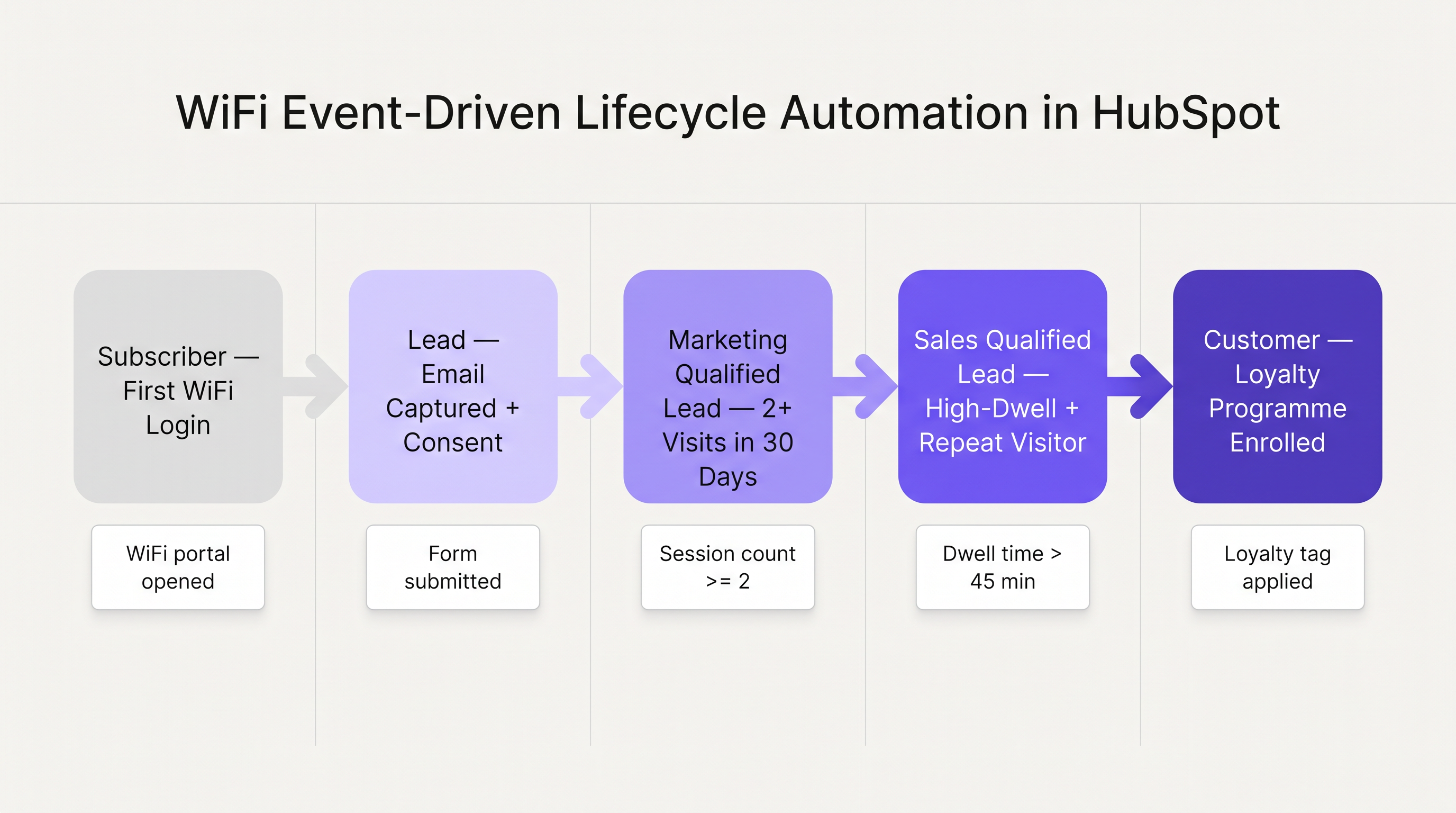
अनुशंसित लाइफ़साइकिल प्रगति इस प्रकार है। पहले WiFi लॉगिन पर, लाइफ़साइकिल स्टेज को सब्सक्राइबर पर सेट करें — यह उस कॉन्टैक्ट के लिए सही HubSpot स्टेज है जिसने अपने विवरण प्रदान किए हैं लेकिन अभी तक व्यवहारिक इरादा प्रदर्शित नहीं किया है। जब wifi_session_count 30-दिवसीय अवधि के भीतर 2 या अधिक तक पहुँच जाता है, तो कॉन्टैक्ट को मार्केटिंग क्वालिफाइड लीड (MQL) में ट्रांज़िशन करने के लिए एक वर्कफ़्लो ट्रिगर करें। जब wifi_dwell_time कई सत्रों में 45 मिनट से अधिक हो जाता है, तो सेल्स क्वालिफाइड लीड (SQL) में ट्रांज़िशन करें। जब कोई लॉयल्टी प्रोग्राम टैग लागू किया जाता है, तो कस्टमर में ट्रांज़िशन करें।
HubSpot में, प्रत्येक ट्रांज़िशन को 'कॉन्टैक्ट प्रॉपर्टी वैल्यू चेंज' पर ट्रिगर सेट के साथ एक अलग वर्कफ़्लो के रूप में बनाएँ। यह सुनिश्चित करता है कि थ्रेशोल्ड पार होने पर ट्रांज़िशन तुरंत सक्रिय हो जाता है, बजाय इसके कि एक निर्धारित बैच प्रक्रिया का इंतजार किया जाए।
चरण 5: प्रोसेसिंग के लिए कानूनी आधार मैप करें
GDPR अनुपालन के लिए यह चरण गैर-परक्राम्य है। कैप्टिव पोर्टल पर मार्केटिंग सहमति चेकबॉक्स को HubSpot की hs_legal_basis प्रॉपर्टी से मैप किया जाना चाहिए। जब कोई उपयोगकर्ता ऑप्ट-इन करता है, तो मान को Freely given consent from the contact पर सेट किया जाना चाहिए। इस मैपिंग के बिना, HubSpot के बिल्ट-इन अनुपालन नियंत्रण इन कॉन्टैक्ट्स को आउटबाउंड ईमेल भेजने से रोक देंगे, जिससे मार्केटिंग ऑटोमेशन के लिए इंटीग्रेशन व्यावसायिक रूप से बेकार हो जाएगा।
चरण 6: सेगमेंटेशन लिस्ट बनाएँ
प्रॉपर्टी डेटा सही ढंग से प्रवाहित होने के साथ, प्राथमिक सेगमेंटेशन उपयोग के मामलों के लिए HubSpot एक्टिव लिस्ट बनाएँ। उदाहरणों में शामिल हैं: सभी कॉन्टैक्ट्स जहाँ wifi_venue = एक विशिष्ट स्थान (भू-लक्षित अभियानों के लिए), सभी कॉन्टैक्ट्स जहाँ wifi_session_count >= 5 (लॉयल्टी प्रोग्राम आउटरीच के लिए), और सभी कॉन्टैक्ट्स जहाँ wifi_last_visit पिछले 30 दिनों के भीतर है (हालिया-आधारित पुनः-एंगेजमेंट के लिए)।
सर्वोत्तम अभ्यास
स्रोत पर ईमेल सत्यापन लागू करें। HubSpot में हर डेटा गुणवत्ता समस्या जो WiFi इंटीग्रेशन से उत्पन्न होती है, उसे खराब तरीके से सत्यापित ईमेल पते से जोड़ा जा सकता है। पोर्टल फ़ॉर्म को CRM डेटा गुणवत्ता के लिए रक्षा की पहली पंक्ति मानें।
पहले दिन से वेन्यू द्वारा सेगमेंट करें। कई स्थानों पर फैले किसी भी डिप्लॉयमेंट के लिए — चाहे वह एक रिटेल एस्टेट हो, एक अस्पताल ट्रस्ट हो, या एक स्टेडियम कॉम्प्लेक्स हो — wifi_venue प्रॉपर्टी सबसे महत्वपूर्ण सेगमेंटेशन आयाम है। इसे शुरुआत से ही सही ढंग से कॉन्फ़िगर करें। हज़ारों कॉन्टैक्ट्स के प्रॉपर्टी के बिना बनाए जाने के बाद वेन्यू सेगमेंटेशन को रेट्रोफ़िट करना एक महत्वपूर्ण सुधार प्रयास है।
सहमति आर्किटेक्चर का सम्मान करें। उद्देश्य सीमा का GDPR सिद्धांत का अर्थ है कि नेटवर्क एक्सेस के उद्देश्य से WiFi पोर्टल के माध्यम से एकत्र किए गए डेटा को स्पष्ट सहमति के बिना सीधे मार्केटिंग के लिए स्वचालित रूप से पुन: उपयोग नहीं किया जा सकता है। hs_legal_basis मैपिंग कोई तकनीकी बात नहीं है — यह वह कानूनी तंत्र है जो मार्केटिंग उपयोग के मामले को अधिकृत करता है।
API थ्रूपुट की निगरानी करें। स्टेडियम या कॉन्फ्रेंस सेंटर जैसे उच्च-घनत्व वाले वातावरण के लिए, पीक अवधि के दौरान समवर्ती प्रमाणीकरण वॉल्यूम HubSpot API पर दबाव डाल सकता है। Purple पेलोड को कतारबद्ध करता है और विफल अनुरोधों को पुनः प्रयास करता है, लेकिन प्रमुख आयोजनों के दौरान HubSpot डेवलपर डैशबोर्ड में API कॉल वॉल्यूम की निगरानी करना और यह सुनिश्चित करना उचित है कि HubSpot अकाउंट टियर आवश्यक थ्रूपुट का समर्थन करता है।
इंक्रीमेंटल अपडेट का उपयोग करें, पूर्ण ओवरराइट का नहीं। जब कोई लौटने वाला विज़िटर कनेक्ट होता है, तो पेलोड को सभी फ़ील्ड्स को ओवरराइट करने के बजाय केवल बदली हुई प्रॉपर्टीज़ (wifi_last_visit, wifi_session_count) को अपडेट करना चाहिए। यह आकस्मिक डेटा हानि को रोकता है यदि, उदाहरण के लिए, किसी कॉन्टैक्ट ने HubSpot में सीधे अपना नाम अपडेट किया है।
समस्या निवारण और जोखिम न्यूनीकरण
समस्या: कॉन्टैक्ट्स बनाए जा रहे हैं लेकिन मार्केटिंग ईमेल प्राप्त नहीं कर सकते हैं।
मूल कारण: hs_legal_basis प्रॉपर्टी मैप नहीं की गई थी या गलत मान स्ट्रिंग के साथ मैप की गई थी।
समाधान: पास किए जा रहे सटीक स्ट्रिंग मान को सत्यापित करें। HubSpot को Freely given consent from the contact की आवश्यकता है — कोई भी भिन्नता अनुपालन जांच को चुपचाप विफल कर देगी।
समस्या: HubSpot में डुप्लिकेट कॉन्टैक्ट रिकॉर्ड दिखाई दे रहे हैं। मूल कारण: एक ही उपयोगकर्ता द्वारा कई ईमेल पते सबमिट किए जा रहे हैं (उदाहरण के लिए, व्यक्तिगत और कॉर्पोरेट), या पोर्टल पर ईमेल फ़ील्ड अनिवार्य नहीं है। समाधान: पोर्टल पर अनिवार्य ईमेल सत्यापन सक्षम करें। HubSpot में एक मर्ज वर्कफ़्लो लागू करने पर विचार करें ताकि उन रिकॉर्ड्स को समेकित किया जा सके जहाँ एक ही नाम अलग-अलग ईमेल पतों के साथ दिखाई देता है।
समस्या: इंटीग्रेशन सक्रिय होने के बावजूद कस्टम प्रॉपर्टीज़ पॉपुलेट नहीं हो रही हैं। मूल कारण: कस्टम प्रॉपर्टीज़ Hub में नहीं बनाई गई थींएकीकरण सक्रिय होने से पहले पहचानें, या Purple मैपिंग कॉन्फ़िगरेशन में आंतरिक प्रॉपर्टी नाम HubSpot प्रॉपर्टी के आंतरिक नामों से ठीक से मेल नहीं खाते हैं। समाधान: HubSpot सेटिंग्स > प्रॉपर्टीज़ में आंतरिक प्रॉपर्टी नामों को Purple में मैपिंग कॉन्फ़िगरेशन के साथ क्रॉस-रेफरेंस करें। आंतरिक नाम केस-सेंसिटिव होते हैं और स्पेस के बजाय अंडरस्कोर का उपयोग करते हैं।
समस्या: सेशन काउंट थ्रेशोल्ड पूरा होने के बावजूद लाइफसाइकिल स्टेज आगे नहीं बढ़ रहा है। मूल कारण: HubSpot वर्कफ़्लो ट्रिगर 'Contact is enrolled' पर सेट है, न कि 'Contact property value changes' पर। समाधान: सही ट्रिगर प्रकार के साथ वर्कफ़्लो को फिर से बनाएं। 'Contact property value changes' हर बार प्रॉपर्टी अपडेट होने पर ट्रिगर होता है, जो थ्रेशोल्ड-आधारित प्रगति के लिए सही तंत्र है।
जोखिम: डेटा प्रतिधारण के कारण GDPR गैर-अनुपालन।
शमन: एक HubSpot वर्कफ़्लो लागू करें जो 24 महीने तक कोई WiFi गतिविधि न होने के बाद संपर्कों को निष्क्रिय के रूप में फ़्लैग करता है (यानी, wifi_last_visit 24 महीने से अधिक पुराना है)। पुनः-सहमति ईमेल ट्रिगर करें। यदि 30 दिनों के भीतर कोई प्रतिक्रिया प्राप्त नहीं होती है, तो संपर्क को सभी मार्केटिंग संचारों से रोक दें। यह भंडारण सीमा के GDPR सिद्धांत के अनुरूप है।
ROI और व्यावसायिक प्रभाव
Purple HubSpot एकीकरण के लिए व्यावसायिक मामला सीधा है: यह एक निष्क्रिय नेटवर्क इन्फ्रास्ट्रक्चर लागत को एक सक्रिय राजस्व-सक्षम डेटा पाइपलाइन में परिवर्तित करता है। परिनियोजन की सफलता को मापने के लिए प्रमुख प्रदर्शन संकेतक हैं:
| KPI | मापन विधि | बेंचमार्क लक्ष्य |
|---|---|---|
| नए संपर्क उत्पन्न हुए | HubSpot संपर्क स्रोत रिपोर्ट | मासिक WiFi सेशन का 15–25% |
| डेटा सिंक सटीकता | सभी 4 कस्टम प्रॉपर्टीज़ से भरे संपर्कों का % | > 95% |
| ईमेल डिलीवरेबिलिटी दर | HubSpot ईमेल हेल्थ डैशबोर्ड | > 90% |
| WiFi संपर्कों से MQL रूपांतरण दर | लाइफसाइकिल स्टेज प्रगति रिपोर्ट | 90 दिनों के भीतर > 8% |
| अभियान ओपन रेट (WiFi-स्रोत वाले संपर्क) | HubSpot ईमेल एनालिटिक्स | > 25% (बनाम 18% उद्योग औसत) |
हॉस्पिटैलिटी परिनियोजन में, एक 300 कमरों वाला होटल जो प्रति माह 2,000 अद्वितीय WiFi कनेक्शन उत्पन्न करता है, वह मासिक रूप से HubSpot में लगभग 400–500 नए समृद्ध संपर्क जोड़ने की उम्मीद कर सकता है, कनेक्शन से फ़ॉर्म पूरा करने तक 20–25% रूपांतरण दर मानते हुए। 10% की रूढ़िवादी MQL रूपांतरण दर पर, यह प्रति माह 40–50 नए मार्केटिंग-योग्य लीड का प्रतिनिधित्व करता है, जो एक ऐसे डेटा स्रोत से आते हैं जिसने पहले शून्य CRM मूल्य उत्पन्न किया था।
50 स्थानों पर संचालित होने वाली एक खुदरा श्रृंखला के लिए, कुल डेटा वॉल्यूम काफी अधिक है, और सेगमेंटेशन मूल्य — विशेष रूप से विशिष्ट स्टोर स्थान के आधार पर संपर्कों को लक्षित करने की क्षमता — अति-स्थानीयकृत प्रचार अभियानों को सक्षम बनाता है जो ओपन रेट और रूपांतरण दोनों पर सामान्य ब्रॉडकास्ट ईमेल से लगातार बेहतर प्रदर्शन करते हैं।
Key Terms & Definitions
Captive Portal
The web-based authentication page presented to users before they are granted access to a guest WiFi network. It serves as the primary data capture interface where demographic information and marketing consent are collected.
IT teams encounter this as the front-end of the WiFi authentication flow. The fields configured on the captive portal directly determine what data is available for CRM enrichment.
JSON Payload
The structured data packet transmitted from the Purple platform to the HubSpot API, containing the contact's demographic and session data in JavaScript Object Notation format.
Understanding the payload structure is essential for troubleshooting failed data syncs. The HubSpot API will silently reject properties that do not exist or have mismatched data types.
Deduplication
The process by which the CRM identifies and merges or prevents the creation of redundant duplicate contact records. HubSpot performs deduplication automatically using the email address as the primary key.
Critical for maintaining a clean database. Deduplication failures — typically caused by inconsistent or invalid email addresses — result in inflated contact counts and fragmented visit history.
Lifecycle Stage
A native HubSpot contact property that indicates where a contact sits within the marketing and sales funnel. Standard stages include Subscriber, Lead, Marketing Qualified Lead (MQL), Sales Qualified Lead (SQL), and Customer.
WiFi session events should drive automated lifecycle stage progressions. Manually managing these stages at scale is not operationally viable.
Active List
A dynamic contact list in HubSpot that automatically updates in real time based on defined property criteria. Contacts are added or removed as their properties change.
The primary segmentation mechanism for WiFi-sourced contacts. Active Lists ensure that campaign audiences always reflect the most current visit data without manual intervention.
Custom Property
A user-defined field created in HubSpot to store data that is not covered by the platform's native properties. Custom properties must be created before the integration is activated.
Required for all WiFi-specific behavioural data. The four critical custom properties for this integration are wifi_venue, wifi_session_count, wifi_last_visit, and wifi_dwell_time.
hs_legal_basis
A native HubSpot contact property that records the legal basis under which the contact's data is being processed for marketing purposes, in compliance with GDPR.
Must be mapped to the marketing consent checkbox on the captive portal. Without a valid value in this property, HubSpot will block outbound email sends to the contact.
API Rate Limiting
A restriction imposed by the HubSpot API on the number of requests that can be processed within a defined time window. Exceeding the rate limit results in HTTP 429 errors and queued or failed payload transmissions.
A deployment risk in high-density environments such as stadiums or conference centres during peak authentication periods. Purple queues and retries failed payloads, but sustained rate limit breaches can cause significant data sync delays.
Dwell Time
The duration in minutes that a user's device remains connected to the WiFi network during a single session. A proxy metric for engagement depth and purchase intent in retail and hospitality environments.
Stored in the wifi_dwell_time custom property and used as a trigger for SQL lifecycle stage progression. High dwell time correlates with higher conversion probability in venue-based marketing.
Case Studies
A 300-room hotel wants to segment its HubSpot marketing lists to distinguish between first-time guests, repeat leisure visitors, and frequent corporate travellers, and trigger different email sequences for each segment.
- Ensure
wifi_session_countandwifi_venueare mapped and populating correctly for all new connections. 2. Create three HubSpot Active Lists: 'First-Time Guests' wherewifi_session_count= 1; 'Repeat Leisure Visitors' wherewifi_session_count>= 2 ANDwifi_last_visitis within the last 90 days AND the contact'sjobtitleproperty is blank (indicating a non-corporate profile); 'Corporate Travellers' wherewifi_session_count>= 3 ANDjobtitleis known orcompanyis populated. 3. Build three separate HubSpot email sequences enrolled from each list. The 'First-Time Guest' sequence focuses on amenity awareness and a return-visit incentive. The 'Repeat Leisure Visitor' sequence promotes the loyalty programme. The 'Corporate Traveller' sequence highlights meeting room facilities and corporate rate enquiries. 4. Set the lifecycle stage to MQL whenwifi_session_countreaches 3, triggering the corporate sequence enrolment automatically.
A retail chain with 50 locations needs to ensure that marketing emails are only sent to customers who explicitly opted in at the specific store they visited, and that each regional marketing manager can access only the contacts from their territory.
- Map the Purple 'Venue Name' field to the custom
wifi_venueproperty in HubSpot. Ensure the venue names are standardised (e.g., 'Manchester Arndale', 'Birmingham Bullring') — inconsistent naming will fragment the segmentation. 2. Map the marketing consent checkbox tohs_legal_basis= 'Freely given consent from the contact'. 3. Create HubSpot Active Lists for each store, filtered bywifi_venue= [Store Name] ANDhs_legal_basis= 'Freely given consent from the contact'. 4. In HubSpot, use Teams to restrict each regional marketing manager's access to only the lists and contacts associated with their territory. Assign the relevant lists to each team. 5. Build a standard email template for each region, enrolled from the corresponding store list.
Scenario Analysis
Q1. A stadium expects 50,000 attendees for a match day event. The venue operator wants to capture emails via the WiFi portal and trigger a personalised welcome email through HubSpot within five minutes of each guest connecting. What is the primary technical risk and how should it be mitigated?
💡 Hint:Consider the volume of concurrent connections at kick-off and how the API handles burst traffic.
Show Recommended Approach
The primary risk is hitting the HubSpot API rate limit due to the concentrated spike in concurrent authentications at kick-off. Even with Purple's payload queuing and retry mechanism, a burst of 10,000–15,000 simultaneous connections within a short window can cause significant processing delays, meaning the 'welcome within 5 minutes' SLA is unachievable for the first wave of connections. Mitigation strategies include: (1) upgrading to a HubSpot Enterprise tier with higher API rate limits; (2) accepting that the welcome email SLA is realistic for staggered arrivals but not for the kick-off burst, and adjusting the SLA to 'within 30 minutes'; (3) configuring the HubSpot workflow to send the welcome email as a batch at a fixed time (e.g., 15 minutes after gates open) rather than individually triggered, reducing the workflow execution load.
Q2. The marketing team reports that 8,000 contacts generated from the WiFi network over the past three months cannot receive marketing emails. The contacts exist in HubSpot with valid email addresses and are not marked as unsubscribed. What is the most likely root cause and what is the remediation path?
💡 Hint:Focus on the GDPR compliance layer within HubSpot, not the email addresses themselves.
Show Recommended Approach
The most likely root cause is that the hs_legal_basis property was not mapped during the integration configuration, or was mapped with an incorrect string value. HubSpot requires the exact string 'Freely given consent from the contact' for GDPR-compliant outbound email. Any variation — including a blank value — causes HubSpot to suppress the contact from email sends. The remediation path is: (1) verify the current hs_legal_basis value on a sample of affected contacts; (2) if blank or incorrect, identify whether the portal consent checkbox was being captured by Purple during the period; (3) if consent was captured but not mapped, update the integration mapping and use a HubSpot bulk update workflow to retroactively set hs_legal_basis for contacts where the consent timestamp is populated; (4) if consent was not captured at the portal, those contacts cannot be emailed and should be suppressed permanently — do not attempt to retroactively assign consent that was not given.
Q3. A venue operator wants to identify 'high-value' visitors — defined as guests who have visited at least four times in the last 60 days and whose average dwell time exceeds 90 minutes — and automatically enrol them in a VIP loyalty programme outreach sequence in HubSpot. How should this be architected?
💡 Hint:Consider which properties need to exist, how the threshold logic is built in HubSpot, and what triggers the sequence enrolment.
Show Recommended Approach
- Confirm that
wifi_session_count,wifi_dwell_time, andwifi_last_visitcustom properties are correctly mapped and populating. 2. Create a HubSpot Active List with the criteria:wifi_session_count>= 4 ANDwifi_dwell_time>= 90 ANDwifi_last_visitis within the last 60 days. This list will automatically update as contacts meet or fall out of the criteria. 3. Build a HubSpot workflow triggered by 'Contact added to list' for the above Active List. Set the action to enrol the contact in the VIP loyalty outreach email sequence. 4. Add a suppression condition to the workflow: if the contact's lifecycle stage is already 'Customer' (i.e., already enrolled in the loyalty programme), do not re-enrol. 5. Optionally, trigger an internal CRM notification to the venue's guest relations team when a contact enters the VIP list, enabling a personalised in-venue interaction on the next visit.
Key Takeaways
- ✓Purple Guest WiFi acts as a real-time data acquisition layer for HubSpot, converting anonymous network connections into enriched CRM contacts with verified identity and behavioural data.
- ✓Four custom HubSpot properties must be created before activation: wifi_venue, wifi_session_count, wifi_last_visit, and wifi_dwell_time — these are the foundation of all WiFi-based segmentation.
- ✓HubSpot uses the email address as the primary deduplication key; enforce strict email format validation on the captive portal to prevent dirty data from entering the CRM.
- ✓Never default all WiFi connections to 'Lead' — use an event-driven lifecycle model: Subscriber on first login, MQL at 2+ visits in 30 days, SQL at high dwell time.
- ✓The hs_legal_basis property mapping is non-negotiable; without it, HubSpot will block all outbound email sends to WiFi-sourced contacts regardless of email validity.
- ✓For multi-venue deployments, standardise venue name values before go-live — inconsistent naming silently fragments Active Lists and breaks geo-targeted campaign segmentation.
- ✓Monitor HubSpot API rate limits during high-density events; Purple queues and retries payloads, but sustained burst traffic can delay data sync and impact time-sensitive workflow triggers.




