

High-Density WiFi Design: Stadium and Arena Best Practices
This technical reference guide provides senior IT leaders and network architects with actionable, vendor-neutral architecture strategies for deploying high-density WiFi in stadiums and arenas serving 50,000 or more concurrent users. It covers the RF physics of dense environments, access point density calculations, channel planning, backhaul requirements, and the specific advantages of WiFi 6 and 6E. Real-world case studies from major sports venues demonstrate measurable outcomes, and the guide directly addresses the operational and commercial ROI that a well-designed stadium network delivers.
🎧 Listen to this Guide
View Transcript
Executive Summary
Designing wireless networks for large public venues like stadiums and arenas is fundamentally different from enterprise office deployments. When 50,000 to 100,000 fans condense into a seating bowl, the RF physics and client-to-access point relationships shift dramatically. The challenge is no longer about coverage; it is exclusively about capacity, airtime fairness, and mitigating co-channel interference.
For IT directors and network architects, a failed stadium deployment results in immediate, public frustration and lost revenue opportunities. A successful deployment, conversely, unlocks new operational efficiencies, drives fan engagement, and enables location-based services through platforms like WiFi Analytics . This reference guide provides actionable architecture strategies for high-density WiFi design, covering access point (AP) placement, channel planning, backhaul requirements, and the specific advantages of WiFi 6 and 6E in crowded environments.
By applying these vendor-neutral best practices, venue operators can deliver near-gigabit speeds, maintain zero major outages during peak events, and ensure seamless connectivity for both guest networks and critical back-of-house operations. The guide also addresses the commercial ROI of stadium WiFi, from mobile ticketing and in-seat ordering to the fan data capture that powers long-term engagement strategies.
Technical Deep-Dive
The Physics of High-Density RF
In a standard enterprise environment, an access point mounted on the ceiling has clear line-of-sight to clients spread across a floor plan. In a stadium seating bowl, clients are packed tightly together, often with less than a metre of separation. This density creates a fundamentally challenging RF environment. Human bodies act as significant attenuators, absorbing RF energy and reducing signal strength by 3 to 5 dB per person. Furthermore, modern smartphones, which constitute the vast majority of client devices in these venues, have lower transmit power and varying receiver sensitivities compared to laptops or enterprise equipment.
Because Wi-Fi operates on a contention-based "listen-before-talk" mechanism, every device must wait for clear airtime before transmitting. In a crowded stadium, devices struggle to hear each other due to body attenuation, leading to hidden node problems and increased collisions in the free space above the crowd. This raises the noise floor, lowers the Signal-to-Noise Ratio (SNR), and ultimately degrades throughput for all users. The GSMA Mobile World Congress at Fira Barcelona — with over 1,200 APs — recorded average occupancy rates of 50 to 60 clients per radio interface, with peaks of 100 to 150 clients per interface at popular locations. This illustrates the scale of the challenge even in a well-provisioned deployment.
Cell Sizing and Minimum Mandatory Data Rates
To combat these issues, the primary objective in stadium design is to create the smallest possible RF cells. Smaller cells mean fewer clients per AP, which increases the available airtime per client.
Network architects control cell size through two primary mechanisms: transmit power and minimum mandatory data rates. While it is intuitive to simply lower the AP transmit power to reduce the cell radius, this approach can inadvertently lower the SNR at the client level to unacceptable margins. Instead, adjusting the minimum mandatory data rate is the most effective method for shrinking the effective cell size.
By raising the minimum mandatory data rate to 12 Mbps or 18 Mbps, the AP forces clients to maintain a higher SNR to remain associated. Clients that move too far away and drop below this SNR threshold are forced to roam to a closer AP. Furthermore, any RF energy heard from adjacent APs that falls below this demodulation threshold is treated as noise rather than valid Wi-Fi traffic, which prevents it from triggering the Clear Channel Assessment (CCA) wait times. This significantly improves channel utilisation and overall network efficiency.
| Data Rate Setting | Effective Cell Radius | CCA Behaviour | Recommended Use Case |
|---|---|---|---|
| 1 Mbps (default) | Very large | All Wi-Fi signals trigger CCA | Legacy enterprise, low density |
| 6 Mbps | Large | Most nearby APs trigger CCA | Low-density venues |
| 12 Mbps | Medium | Moderate CCA reduction | Convention centres, concourses |
| 18 Mbps | Small | Significant CCA reduction | Dense seating bowls |
| 24 Mbps | Very small | Maximum CCA reduction | Ultra-high-density zones |
Antenna Selection and AP Placement
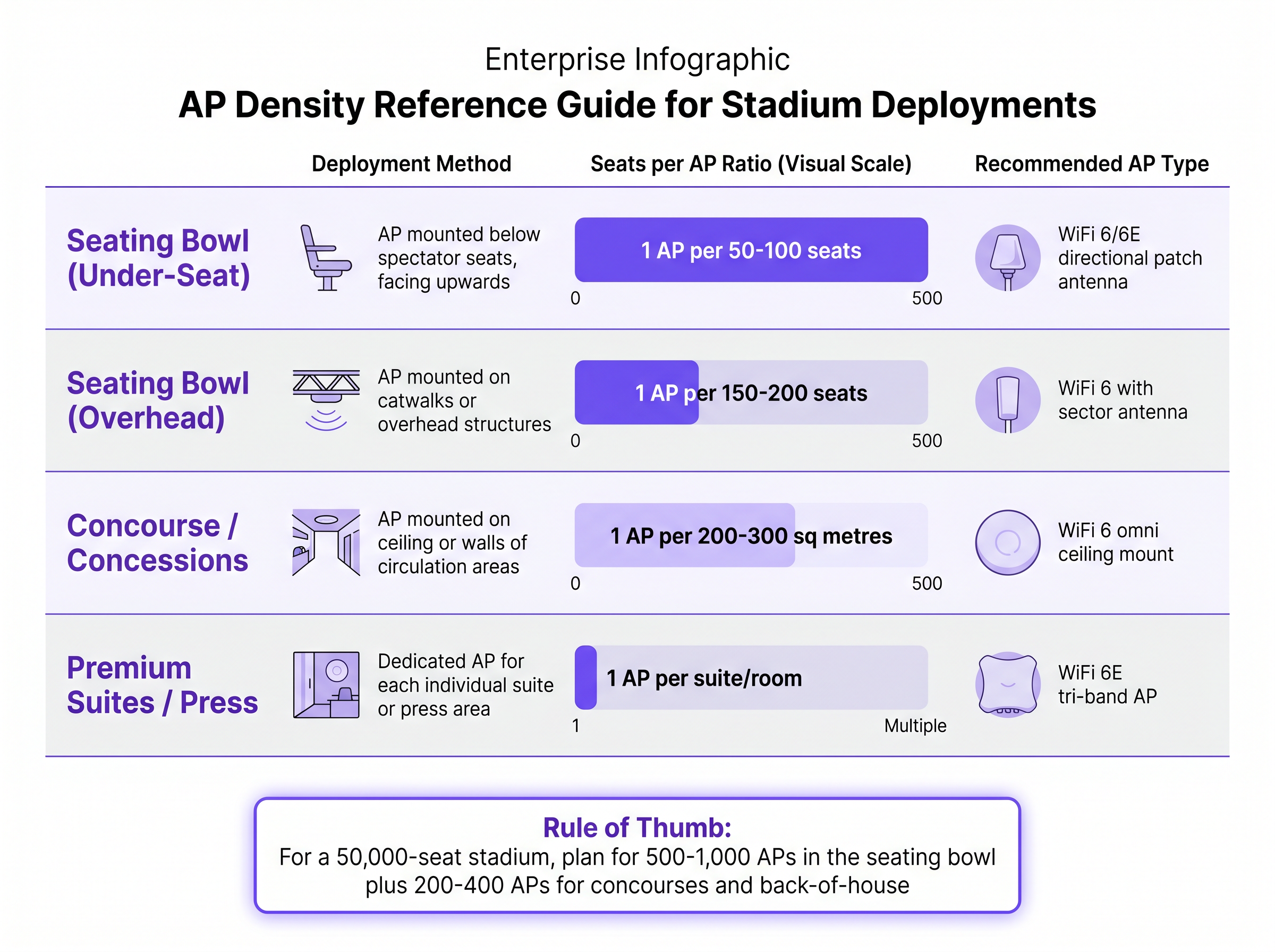
The choice of antenna and its physical placement dictate the success of the microcell architecture required for stadiums. There are two dominant strategies for the seating bowl.
Under-Seat Deployment involves placing APs in specialised enclosures beneath the spectator seats, pointing upwards. This approach intentionally uses the dense human bodies as attenuators to block signal propagation beyond the immediate seating area, naturally creating very small, isolated RF cells. A typical ratio for under-seat deployment is one AP for every 50 to 100 seats. While effective, it requires careful consideration of the seat construction materials — metal seats create a waveguide effect beneath them, allowing signals to travel further than in plastic-seat configurations — and necessitates extensive cabling through the concrete tiers.
Overhead/Catwalk Deployment involves mounting APs equipped with highly directional patch or sector antennas on existing overhead structures, pointing down at the seating sections. These antennas focus the RF energy into tight, defined areas, minimising overlap. Overhead deployments typically serve 150 to 200 seats per AP. This method is often preferred for its easier installation and maintenance, provided the venue architecture supports it.
The Impact of WiFi 6 (802.11ax) and WiFi 6E
The introduction of WiFi 6 (802.11ax) brought critical enhancements specifically engineered for high-density environments.
Orthogonal Frequency-Division Multiple Access (OFDMA) allows an AP to divide a standard channel into smaller Resource Units (RUs). Instead of transmitting to one client at a time across the entire channel width, the AP can simultaneously transmit small payloads to multiple clients. This is exceptionally beneficial in stadiums where thousands of devices are concurrently sending small background updates or social media posts.
Multi-User MIMO (MU-MIMO) and Beamforming work together to increase spatial reuse. WiFi 6 introduces uplink MU-MIMO, allowing multiple clients to transmit to the AP simultaneously — a significant improvement over the downlink-only MU-MIMO of earlier standards. Coupled with explicit beamforming, which focuses the RF energy directly toward associated clients rather than radiating it omnidirectionally, these technologies significantly increase the number of concurrent spatial streams an AP can support.
BSS Colouring adds a spatial reuse tag to the PHY header of Wi-Fi frames. When an AP hears a frame on its channel, it checks the colour. If the colour is different — indicating the frame is from a neighbouring AP on the same channel — the AP can choose to ignore it and transmit anyway, provided the signal is below a specific threshold. This directly addresses the co-channel interference challenges inherent in stadium deployments.
WiFi 6E extends these capabilities into the 6 GHz band, providing 59 additional non-overlapping 20 MHz channels. Because this band is restricted to WiFi 6E-capable devices only, it is entirely free from the legacy device contention that plagues the 2.4 GHz and 5 GHz bands. For venues deploying in 2025 and beyond, the 6 GHz band represents the single most impactful capacity upgrade available.
Implementation Guide
Step 1: Conduct a Pre-Deployment Site Survey
Before any hardware is specified, conduct a comprehensive passive and active site survey. Map the physical structure, identify existing cabling pathways, note building materials (pre-1970s concrete is significantly more RF-absorbent than modern concrete), and document any existing RF interference sources. Critically, plan for a post-deployment validation survey under event load conditions, as an empty stadium behaves entirely differently from a full one. Refer to our Heatmap Analysis for Venue Traffic: A Practical Guide for methodologies on understanding user movement and density patterns.
Step 2: Channel Planning and Frequency Allocation
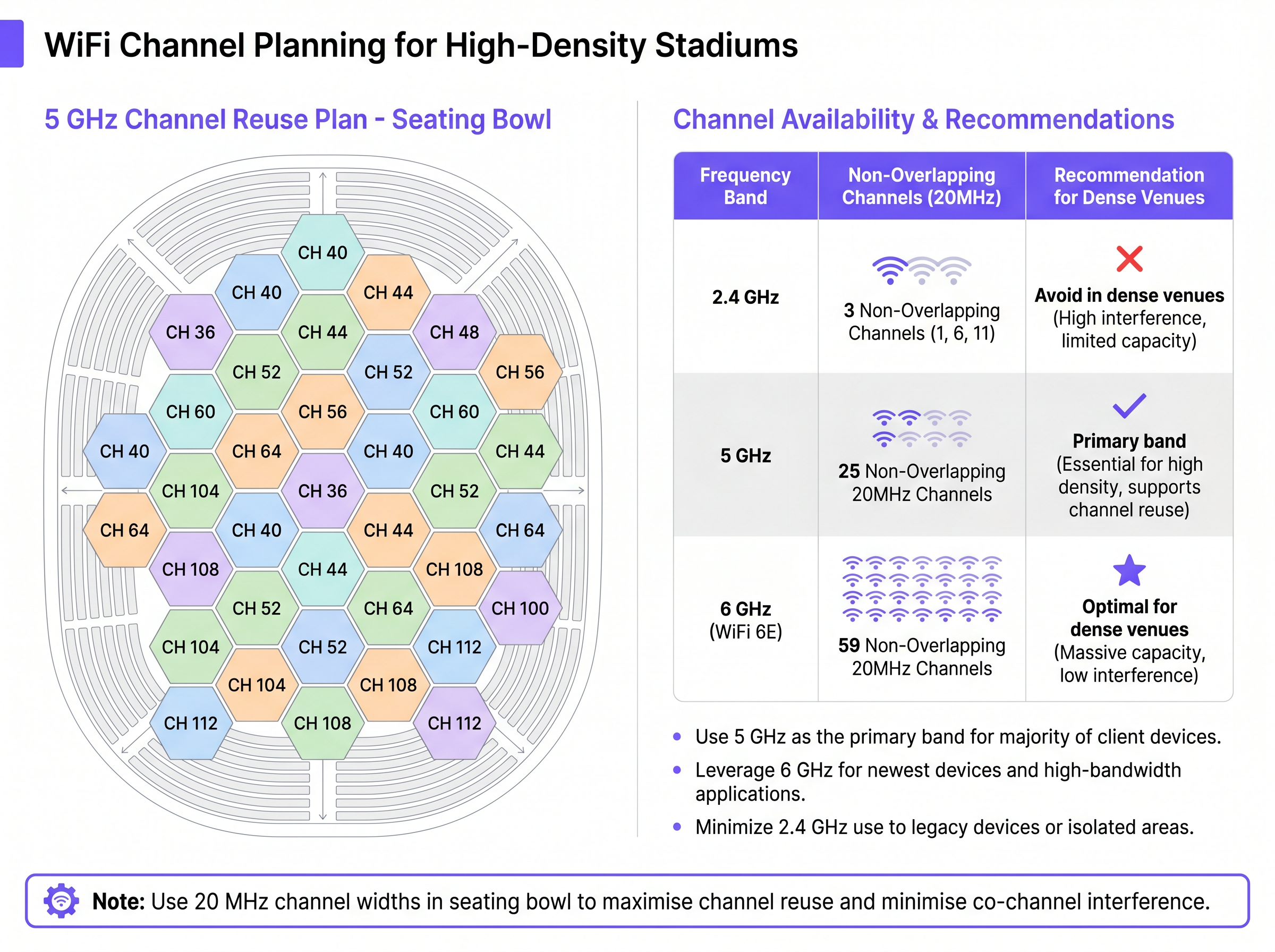
Effective channel planning is the cornerstone of high-density design. The 2.4 GHz band, with only three non-overlapping channels, is fundamentally unsuitable for the dense seating bowl and should be disabled entirely in those areas, reserved only for legacy IoT devices in isolated back-of-house zones.
The 5 GHz band is the primary workhorse, offering 25 non-overlapping 20 MHz channels (including DFS channels, which must be carefully evaluated against local radar activity). In the seating bowl, strictly adhere to 20 MHz channel widths. Attempting to use 40 MHz or 80 MHz channels will halve or quarter the available channel pool, leading to catastrophic co-channel interference.
For modern deployments, integrating the 6 GHz band (WiFi 6E) is highly recommended. It provides an additional 59 non-overlapping 20 MHz channels, offering massive capacity expansion free from legacy device contention.
Step 3: Backhaul and Wired Infrastructure
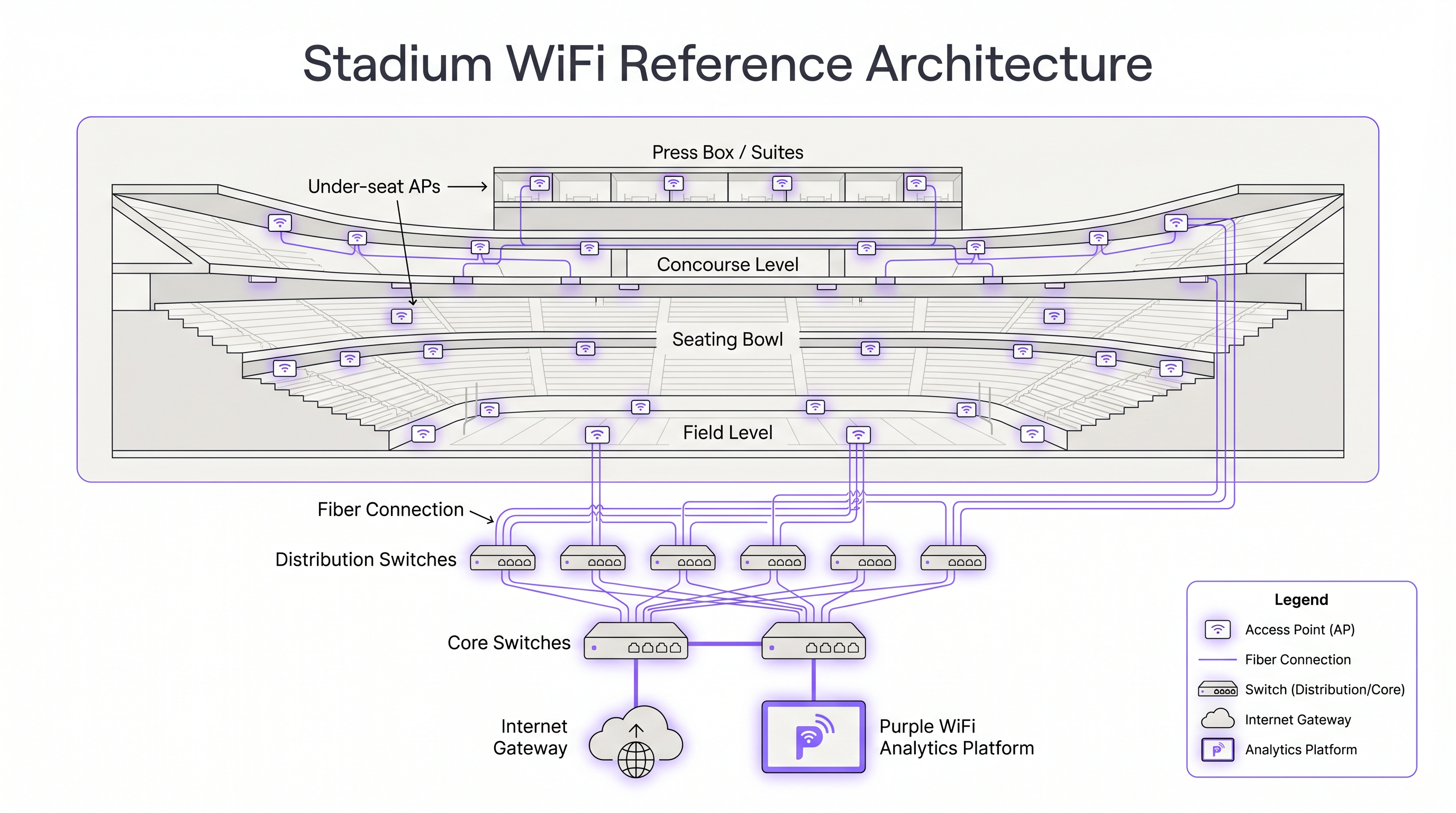
The wireless network is only as capable as the wired infrastructure supporting it. A modern stadium requires a robust spine-leaf topology with fibre optic cabling connecting every distribution switch to the core. Minimum 10 Gbps fibre connections are now considered the industry standard for large venue backhaul.
Access Layer: Do not rely on wireless mesh backhaul for any primary stadium infrastructure. Every AP must have a dedicated wired connection. For WiFi 6 and 6E APs, ensure the edge switches support Multi-Gigabit Ethernet (2.5 Gbps or 5 Gbps) and can deliver sufficient Power over Ethernet (802.3bt PoE++) to fully power the radios.
Distribution and Core Layer: The uplinks from the access switches to the distribution layer should be redundant 10 Gbps or 25 Gbps fibre connections. The core network must be capable of handling immense traffic spikes. For context, the SoFi Stadium network handles approximately 12 Gbps of bandwidth just for uncompressed 4K video broadcasts, and this is before accounting for the 70,000+ fans on the guest network.
Step 4: Network Segmentation and Security
A stadium network serves multiple distinct user groups, each requiring different security postures and service level agreements. Implement strict VLAN segmentation and Quality of Service (QoS) policies.
| Network Segment | Authentication Method | Bandwidth Policy | Compliance Requirement |
|---|---|---|---|
| Guest / Fan WiFi | Captive portal (WPA3-SAE or open) | Throttled upload/download, P2P blocked | GDPR (data capture consent) |
| Operations / Staff | 802.1X / WPA3-Enterprise | Full access, QoS priority | Internal policy |
| Point of Sale (POS) | 802.1X, certificate-based | Dedicated VLAN, isolated | PCI DSS |
| Broadcast / Media | 802.1X or pre-shared key | Guaranteed bandwidth, QoS highest | Contractual SLA |
| Building Management | 802.1X | Isolated VLAN, no internet | Internal policy |
For the guest network, utilise a captive portal for Guest WiFi access. Implement client isolation to prevent device-to-device communication and throttle peer-to-peer traffic to preserve bandwidth. For staff and operations networks, utilise 802.1X authentication with WPA3-Enterprise. Refer to our guide on WPA3-Personal vs WPA3-Enterprise: Choosing the Right WiFi Security Mode for detailed implementation steps.
Best Practices
Survey Relentlessly. Conduct comprehensive active site surveys before, during, and after deployment. An empty stadium behaves entirely differently from a full one. The human body attenuation effect is only measurable under real event conditions.
Standardise Deployment Methods. Avoid mixing under-seat and overhead deployment methods within the same physical zone. Inconsistent AP placement leads to unpredictable roaming behaviour and sticky clients that refuse to hand off to better APs.
Leverage External Antennas. Do not use standard omnidirectional enterprise APs in the seating bowl. Invest in specialised APs with high-gain directional patch or sector antennas to tightly control RF propagation. The antenna is the analog interface with the air; a poor antenna choice cannot be compensated by software.
Plan for Asymmetric Traffic. Unlike enterprise environments where download traffic dominates, stadium events generate massive amounts of upload traffic as fans share videos and photos to social media. Ensure your uplink capacity and internet gateways are sized for a minimum 1:1 upload-to-download ratio during events.
Enable 802.11r, 802.11k, and 802.11v. These standards enable fast BSS transition (fast roaming), radio resource measurement (neighbour reports), and BSS transition management (active client guidance), respectively. Together, they form the foundation of seamless roaming in a multi-AP environment.
Implement Proactive Monitoring. Deploy a real-time network monitoring and analytics platform. Correlating WiFi Analytics data with event schedules allows the operations team to anticipate capacity demands and respond to issues before fans notice them.
Troubleshooting & Risk Mitigation
The Sticky Client Problem
Clients often "stick" to the first AP they associate with as they walk through the concourse and into the seating bowl, even when a much closer AP is available. This degrades performance for the client and consumes excessive airtime on the distant AP.
Mitigation: Enforce strict minimum mandatory data rates (18 Mbps or 24 Mbps) to force clients to drop the connection when the SNR degrades. Enable 802.11k and 802.11v to provide clients with neighbour reports and actively guide them to better APs. Some vendors also offer proprietary client steering mechanisms that can be enabled alongside the standards-based protocols.
Co-Channel Interference (CCI)
If APs on the same channel can hear each other above the CCA threshold, they must take turns transmitting, effectively sharing the bandwidth of a single AP across multiple cells.
Mitigation: Physically isolate APs using directional antennas or under-seat placement. Reduce transmit power strategically, but prioritise raising the minimum mandatory data rate. Ensure BSS Colouring is enabled on all WiFi 6 APs. Conduct a post-deployment spectrum analysis to identify any unexpected interference sources.
Rogue APs and Personal Hotspots
In convention centres and luxury suites, visitors often deploy personal hotspots or rogue APs, introducing unpredictable interference on the venue's channels.
Mitigation: Deploy a robust Wireless Intrusion Prevention System (WIPS). Configure the infrastructure to automatically contain rogue APs that are broadcasting on the venue's channels or spoofing the venue's SSIDs. Educate premium suite holders about the impact of personal hotspots on the shared RF environment.
DFS Event Disruption
Dynamic Frequency Selection (DFS) channels in the 5 GHz band are required to detect and avoid radar signals. A false DFS trigger during an event can cause an AP to vacate its channel for up to 30 minutes, causing a significant service disruption.
Mitigation: Conduct thorough pre-event spectrum analysis to identify any radar sources near the venue. Consider avoiding DFS channels in the seating bowl where possible, relying on non-DFS UNII-1 and UNII-3 channels for the most critical coverage areas. Use DFS channels in less critical areas such as car parks and external concourses.
ROI & Business Impact
The capital expenditure for a stadium-grade WiFi network is substantial, often running into millions of dollars for a 50,000-seat venue. However, the return on investment is driven by both operational savings and new revenue streams.
Fan Engagement and Data Capture. A high-performance network encourages fans to log in via captive portals, providing the venue with valuable demographic and contact data. This data fuels targeted marketing campaigns and loyalty programmes. Venues using WiFi Analytics platforms report significant improvements in email list growth and post-event engagement rates.
Operational Efficiency. Reliable connectivity enables mobile ticketing, reducing queue times and staffing requirements at the gates. It supports mobile Point of Sale (mPOS) systems, allowing vendors to sell merchandise directly in the aisles, significantly increasing per-capita spend. Venues report per-capita spend increases of 15 to 25 percent following the deployment of reliable in-seat ordering systems.
Location-Based Services. By integrating the network with Wayfinding applications, venues can guide fans to their seats, the nearest restrooms, or the shortest concession lines, improving the guest experience while distributing crowd density. Sensors technology further enables occupancy monitoring and crowd flow analysis, optimising staffing and security deployments in real time.
Broadcast and Media Revenue. A high-capacity network enables the venue to offer premium connectivity packages to broadcast media and sponsors, generating direct revenue from the infrastructure investment. The ability to support uncompressed 4K HDR broadcast production on the same network as the fan WiFi represents a significant operational consolidation.
The stadium WiFi network is no longer a utility cost; it is a revenue-generating platform. Venues that treat it as such — investing in the right architecture, analytics, and guest experience tools — consistently outperform those that treat it as a commodity IT expense.
Key Terms & Definitions
Co-Channel Interference (CCI)
Interference that occurs when two or more access points operating on the same frequency channel can hear each other above the Clear Channel Assessment (CCA) threshold. When this happens, each AP must wait for the other to finish transmitting before it can use the channel, effectively sharing the bandwidth of a single channel across multiple APs.
CCI is the primary performance killer in high-density deployments. It is caused by using too few channels (e.g., wide channel widths) or by APs with overlapping coverage areas on the same channel. IT teams encounter it when the network performs well at low attendance but degrades rapidly as the venue fills up.
OFDMA (Orthogonal Frequency-Division Multiple Access)
A multi-user access method introduced in WiFi 6 (802.11ax) that divides a Wi-Fi channel into smaller frequency sub-channels called Resource Units (RUs). An AP can simultaneously assign different RUs to different clients, allowing it to serve multiple devices at the same time rather than sequentially.
OFDMA is particularly valuable in stadiums where thousands of devices are sending small, bursty traffic (social media updates, messaging). Without OFDMA, the AP must serve each device sequentially, wasting significant airtime on overhead. With OFDMA, the AP can pack multiple small transmissions into a single channel access, dramatically improving efficiency.
BSS Colouring
A WiFi 6 (802.11ax) feature that adds a numerical tag (a 'colour', 1 to 63) to the PHY header of Wi-Fi frames. When an AP receives a frame on its channel, it checks the colour. If the colour differs from its own BSS colour, it may choose to transmit anyway (spatial reuse) rather than deferring, provided the interfering signal is below a defined threshold.
BSS Colouring directly addresses co-channel interference in dense deployments. IT teams should verify that BSS Colouring is enabled on all WiFi 6 APs and that adjacent APs are assigned different colours. Most enterprise WiFi management platforms handle colour assignment automatically.
MU-MIMO (Multi-User Multiple-Input Multiple-Output)
A radio technology that uses multiple antennas to create independent spatial data streams, allowing an AP to communicate with multiple client devices simultaneously rather than sequentially. WiFi 6 supports both downlink and uplink MU-MIMO (up to 8 simultaneous spatial streams), a significant improvement over the downlink-only MU-MIMO of 802.11ac.
In a stadium, uplink MU-MIMO is particularly valuable because fan behaviour generates massive upload traffic (video sharing, social media). Without uplink MU-MIMO, clients must take turns uploading, creating significant airtime contention. With uplink MU-MIMO, multiple clients can upload simultaneously to the same AP.
Minimum Mandatory Data Rate
A configuration parameter that sets the lowest data rate at which a client device is permitted to associate with an access point. Any client that cannot maintain the required SNR to support this data rate will be refused association or forced to roam to a closer AP. It also defines the rate at which management frames (beacons, probe responses) are transmitted.
This is the most powerful cell-sizing tool available to network architects. Raising the minimum mandatory data rate from the default 1 Mbps to 12 or 18 Mbps can reduce the effective cell radius by 50 to 70 percent, dramatically reducing co-channel interference and improving roaming behaviour. IT teams should test incrementally, starting at 12 Mbps and increasing to 18 Mbps if performance improves.
DFS (Dynamic Frequency Selection)
A regulatory requirement that mandates Wi-Fi devices operating on certain 5 GHz channels (UNII-2 and UNII-2e, channels 52 to 144) to detect and avoid radar signals. When a radar signal is detected, the AP must vacate the channel within 10 seconds and avoid it for a minimum of 30 minutes.
DFS channels significantly expand the available 5 GHz channel pool (adding 15 additional 20 MHz channels), but introduce operational risk in venues near airports, military installations, or weather radar stations. A DFS event during a sold-out game can cause a sudden loss of coverage in affected areas. IT teams should conduct pre-event spectrum analysis and consider avoiding DFS channels in the most critical seating areas.
Under-Seat Deployment
A stadium-specific AP installation method in which access points are mounted in protective enclosures beneath spectator seats, with directional antennas pointing upward toward the fans. This method uses the human bodies in the seating rows above as natural RF attenuators, creating very small, isolated microcells.
Under-seat deployment is the gold standard for high-density seating bowl coverage, used in major NFL, NBA, and Premier League stadiums. It requires significant civil works (core drilling, conduit installation) and careful planning around seat construction materials. Metal seats create a waveguide effect that can extend signal propagation beyond the intended cell boundary.
802.3bt PoE++ (Power over Ethernet)
An IEEE standard for delivering electrical power over Ethernet cabling. 802.3bt (Type 3) supports up to 60 watts per port, and Type 4 supports up to 90 watts. This is required to fully power WiFi 6 and 6E APs, which have higher power consumption than previous generations due to additional radios and processing requirements.
Many existing stadium switch deployments use 802.3at (PoE+, 30W) or even 802.3af (PoE, 15W) switches. When upgrading to WiFi 6 or 6E APs, IT teams must verify that the edge switches can deliver sufficient power. Underpowered APs will disable one or more radios to stay within the power budget, negating the capacity benefits of the upgrade.
Captive Portal
A web page that is presented to new users connecting to a public WiFi network before they are granted full internet access. It typically requires users to accept terms of service, authenticate via social login, or provide contact details. Captive portals are the primary mechanism for GDPR-compliant data capture on guest networks.
For stadium operators, the captive portal is the commercial front door of the WiFi network. A well-designed portal, integrated with a platform like [Guest WiFi](/products/guest-wifi), captures fan data that drives post-event marketing, loyalty programmes, and personalised communications. GDPR requires explicit, informed consent for data collection, which the captive portal must clearly communicate.
Case Studies
A 65,000-seat NFL stadium is planning a full WiFi refresh ahead of a major international sporting event. The venue currently has 800 overhead APs running 802.11ac Wave 2, and the network is struggling to deliver consistent performance in the seating bowl during sold-out games. The IT director needs to determine whether to add more APs, replace the existing hardware, or redesign the architecture entirely.
The root cause is almost certainly the combination of omnidirectional antennas and 80 MHz channel widths, rather than insufficient AP count. The recommended approach is a phased redesign rather than a simple hardware refresh.
Phase 1 — Immediate Configuration Changes (no hardware cost): Reduce channel widths in the seating bowl from 80 MHz to 20 MHz. This quadruples the available channel pool from approximately 6 to 25 non-overlapping channels. Raise the minimum mandatory data rate from 1 Mbps to 12 Mbps, then validate performance before increasing to 18 Mbps. Disable the 2.4 GHz radio on all APs in the seating bowl. Enable BSS Colouring if the existing hardware supports it. These changes alone should deliver a 30 to 50 percent improvement in throughput.
Phase 2 — Targeted Under-Seat Deployment: Identify the highest-density seating sections (typically the lower bowl) and deploy under-seat APs with directional patch antennas at a ratio of 1 AP per 75 seats. This requires running fibre or Cat6A to each seat row, which is the most significant cost component. Ensure edge switches support 2.5G or 5G Multi-Gigabit Ethernet and 802.3bt PoE++.
Phase 3 — WiFi 6E Upgrade: Replace the overhead APs in the concourses, suites, and press areas with WiFi 6E tri-band APs. This offloads newer devices to the 6 GHz band, freeing up 5 GHz capacity for legacy devices. Integrate with a WiFi Analytics platform to monitor per-AP client counts and throughput in real time during events.
A 20,000-seat indoor arena is deploying WiFi for the first time ahead of a new NBA franchise tenancy. The venue hosts basketball games, concerts, and corporate events. The IT director needs to design a network that serves both the general admission seating bowl and the premium courtside suites, while also supporting the broadcast media requirements and the venue's POS systems.
This deployment requires a multi-zone architecture with distinct design approaches for each area.
Seating Bowl: Deploy under-seat APs at a ratio of 1 AP per 60 seats, targeting approximately 330 APs for the bowl. Use WiFi 6 APs with external directional patch antennas (60-degree beamwidth, 8 dBi gain) pointing upward. Configure all bowl APs on 20 MHz channels across the 5 GHz band, with minimum mandatory data rate set to 18 Mbps. Disable 2.4 GHz entirely in this zone.
Concourses and Concessions: Deploy WiFi 6 ceiling-mount APs with omnidirectional antennas at a ratio of 1 AP per 250 square metres. Use 40 MHz channels on 5 GHz in this zone, as the client density is lower and wider channels improve throughput for mobile ordering and ticketing applications.
Premium Suites: Deploy one WiFi 6E tri-band AP per suite. Configure a dedicated SSID with WPA3-Enterprise authentication for suite holders. Guarantee a minimum 100 Mbps per suite via QoS policies.
Broadcast Media: Allocate a dedicated VLAN and a minimum of 4 dedicated APs in the press area with guaranteed bandwidth of 500 Mbps. Consider a separate SSID with pre-shared key authentication for media credentialed personnel.
POS Systems: All payment terminals must reside on a dedicated, isolated VLAN with 802.1X authentication. Ensure PCI DSS compliance through network segmentation, encryption (WPA3-Enterprise), and regular penetration testing.
Backhaul: Deploy a spine-leaf topology with redundant 10G fibre uplinks from each distribution switch to the core. Provision a minimum 10 Gbps internet uplink with a secondary 10 Gbps failover circuit.
Scenario Analysis
Q1. A 45,000-seat football stadium has deployed 600 WiFi 6 APs in an overhead configuration, but during sold-out matches, fans in the lower bowl report speeds below 2 Mbps while fans in the upper tier report acceptable performance. The network team has confirmed that all APs are operational and the backhaul is not saturated. What is the most likely root cause, and what are the first three configuration changes you would make?
💡 Hint:Consider the relationship between AP height, antenna pattern, and client density in the lower bowl versus the upper tier. Also consider what channel widths are currently configured.
Show Recommended Approach
The most likely root cause is a combination of two factors: (1) the overhead APs in the lower bowl are serving too many clients per AP due to the higher density of the lower tier, and (2) the channel widths are likely set to 40 or 80 MHz, reducing the available channel pool and causing significant co-channel interference in the densely packed lower bowl. The upper tier has lower density per AP, so the same configuration performs acceptably there.
First three configuration changes: (1) Reduce channel widths in the lower bowl APs from 40/80 MHz to 20 MHz — this immediately quadruples the available channel pool and reduces co-channel interference. (2) Raise the minimum mandatory data rate from its current setting to 12 Mbps, then monitor and increase to 18 Mbps if performance improves — this shrinks the effective cell size and reduces the number of clients per AP. (3) Disable the 2.4 GHz radio on all lower bowl APs — this removes the most congested and interference-prone band from the densest area. If these changes are insufficient, the long-term solution is to supplement the overhead APs with under-seat APs in the lower bowl sections.
Q2. You are designing the WiFi network for a new 30,000-seat indoor arena. The venue will host basketball, ice hockey, concerts, and corporate conferences. The operator wants to offer premium WiFi to courtside suite holders at a guaranteed 500 Mbps per suite, while also providing free fan WiFi to all general admission seats. The venue also needs to support 150 POS terminals. How would you segment the network, and what authentication method would you specify for each segment?
💡 Hint:Consider the different security, performance, and compliance requirements of each user group. PCI DSS compliance for POS is non-negotiable. GDPR applies to guest data collection.
Show Recommended Approach
The network requires a minimum of four distinct segments, each with its own VLAN, SSID, and authentication method.
Segment 1 — General Admission Fan WiFi: Open SSID with a captive portal (WPA3-SAE or open with OWE for opportunistic encryption). GDPR-compliant data capture with explicit consent. Client isolation enabled. Upload and download throttled to a fair-use policy (e.g., 10 Mbps per client). P2P traffic blocked.
Segment 2 — Premium Suites: Dedicated SSID per suite or suite level with WPA3-Enterprise (802.1X) authentication using certificate-based or RADIUS-backed credentials. QoS policy guaranteeing a minimum 500 Mbps per suite. Dedicated WiFi 6E tri-band APs per suite.
Segment 3 — POS Terminals: Dedicated SSID with WPA3-Enterprise (802.1X) and certificate-based authentication. Isolated VLAN with no internet access except to the payment processor. PCI DSS compliant configuration including encryption in transit, network segmentation, and regular penetration testing. No client isolation (terminals may need to communicate with local print servers).
Segment 4 — Operations and Staff: WPA3-Enterprise (802.1X) with RADIUS authentication tied to Active Directory. Full network access with QoS priority over guest traffic. Separate VLAN for building management systems.
Q3. During a major concert at a 55,000-capacity stadium, the network team receives reports that WiFi performance has degraded significantly in sections 112 to 118. A spectrum analysis reveals that multiple personal hotspots are broadcasting on channels 36 and 40 in that area, and a rogue AP is broadcasting an SSID that closely resembles the venue's official SSID. What immediate actions should the team take, and what long-term controls should be implemented?
💡 Hint:Consider both the immediate operational response (during the event) and the long-term architectural controls. The rogue SSID is a security concern as well as a performance concern.
Show Recommended Approach
Immediate Actions (during the event): (1) Activate the WIPS containment function for the rogue AP that is spoofing the venue SSID. This is both a security threat (potential credential harvesting or man-in-the-middle attack) and a performance issue. Document the MAC address and SSID for post-event investigation. (2) Identify the personal hotspots broadcasting on channels 36 and 40. If the WIPS supports it, activate containment for hotspots operating on the venue's primary channels. Note that containment of personal devices may have legal implications in some jurisdictions — consult your legal team before activating. (3) Temporarily shift the affected APs in sections 112-118 to alternative channels (e.g., channels 44, 48, 52) to avoid the interference from the personal hotspots. This can be done via the WiFi controller without physical intervention.
Long-Term Controls: (1) Implement automated WIPS with rogue AP detection and alerting. Configure alerts for any SSID that matches or closely resembles the venue's official SSIDs. (2) Publish a clear policy for premium suite holders and media personnel prohibiting personal hotspots. Include this in the event access agreement. (3) Consider deploying the 6 GHz band (WiFi 6E) as the primary band for the seating bowl. Personal hotspots cannot operate on 6 GHz, making it inherently immune to this class of interference. (4) Conduct pre-event spectrum sweeps to identify and address interference sources before the event begins.
Key Takeaways
- ✓Design for capacity, not coverage: in a stadium, every seat already has signal from multiple APs. The challenge is ensuring each AP serves only 50 to 100 clients to guarantee adequate airtime per user.
- ✓Use 20 MHz channel widths exclusively in the seating bowl. Wider channels (40/80 MHz) reduce the available channel pool and cause catastrophic co-channel interference in dense environments.
- ✓Raise the minimum mandatory data rate to 12 to 18 Mbps to shrink the effective cell size, improve roaming behaviour, and reduce co-channel interference — this is more effective than simply reducing transmit power.
- ✓Every AP must have a dedicated wired connection. Wireless mesh backhaul is not acceptable for primary stadium infrastructure. Edge switches must support Multi-Gigabit Ethernet (2.5G/5G) and 802.3bt PoE++ for WiFi 6/6E APs.
- ✓WiFi 6E's 6 GHz band provides 59 non-overlapping 20 MHz channels, free from legacy device contention and personal hotspot interference — it is the single most impactful capacity upgrade for new stadium deployments.
- ✓Segment the network into at minimum four VLANs: guest WiFi (captive portal, GDPR-compliant), operations/staff (802.1X), POS (PCI DSS compliant, isolated), and broadcast/media (guaranteed bandwidth).
- ✓The stadium WiFi network is a revenue platform, not a utility cost. Captive portal data capture, mobile POS, in-seat ordering, and location-based wayfinding can deliver a 15 to 25 percent increase in per-capita spend and significant improvements in fan engagement metrics.




