

PoE Budget Planning for Multi-Site WiFi Deployments
This guide provides a practical framework for calculating Power over Ethernet (PoE) budgets across multi-site WiFi deployments. It covers the transition to PoE++ for WiFi 6E and 7, switch sizing strategies, and methods to future-proof infrastructure while mitigating the risks of power oversubscription.
🎧 Listen to this Guide
View Transcript

Executive Summary
For CTOs and IT directors managing multi-site venues—from retail chains to hospitality portfolios—the transition to next-generation wireless is no longer just an RF challenge; it is a fundamental power challenge. The advent of WiFi 6E and the impending rollout of WiFi 7 have dramatically altered the power requirements of enterprise access points. While legacy 802.3af and 802.3at standards were sufficient for previous generations, modern high-density APs increasingly demand 802.3bt (PoE++).
Failing to accurately calculate PoE budgets across hundreds of switches can lead to catastrophic deployment failures, where APs silently negotiate down to lower power states, disabling radios and crippling network throughput. This guide provides a vendor-neutral, actionable framework for calculating total PoE budgets, sizing distribution switches, and future-proofing the switching infrastructure to support advanced Guest WiFi and WiFi Analytics without risking brownouts or forced hardware replacements mid-lifecycle.
Technical Deep-Dive: The Evolution of PoE Standards
The IEEE has continually ratified new Power over Ethernet standards to keep pace with endpoint demands. Understanding the delta between power delivered by the Power Sourcing Equipment (PSE) and power received by the Powered Device (PD) is critical due to cable loss.
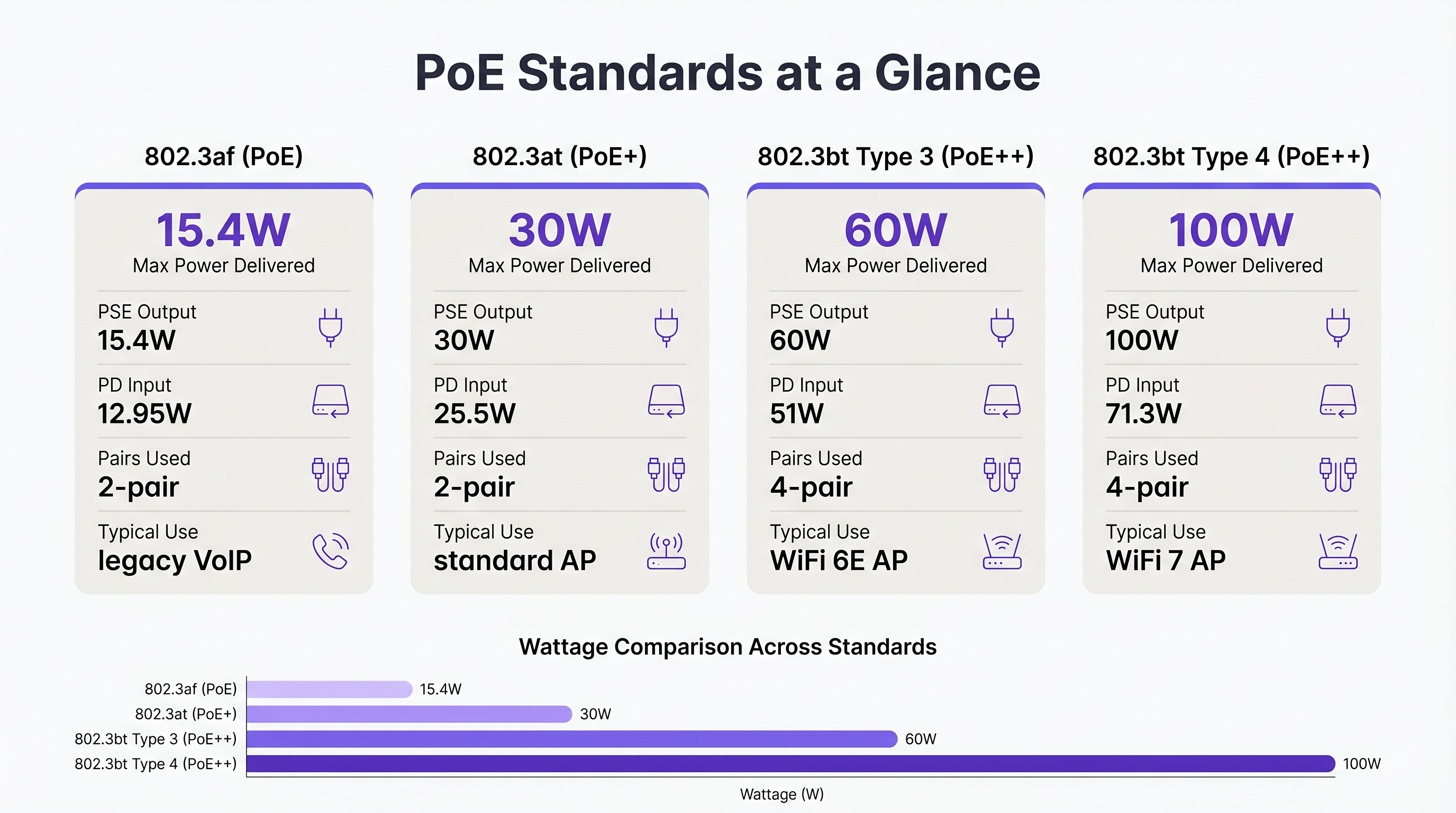
- 802.3af (PoE): Delivers up to 15.4W at the switch port, providing 12.95W to the device. Historically used for legacy VoIP phones and basic sensors.
- 802.3at (PoE+): Delivers up to 30W at the port, providing 25.5W to the device. This has been the standard for standard WiFi 5 and WiFi 6 access points.
- 802.3bt Type 3 (PoE++): Delivers up to 60W at the port, providing 51W to the device. This is the new baseline for high-performance WiFi 6E APs, which feature multiple radios and dedicated scanning arrays for Wayfinding and security.
- 802.3bt Type 4 (PoE++): Delivers up to 100W at the port, providing 71.3W to the device. This standard is necessary for ultra-high-density WiFi 7 APs and complex IoT aggregators.
Why WiFi 6E and 7 Demand PoE++
Modern access points are essentially edge compute devices. A typical WiFi 6E AP operates radios on the 2.4 GHz, 5 GHz, and 6 GHz bands simultaneously. Furthermore, many enterprise APs include a fourth radio for BLE/Zigbee (used for Sensors and asset tracking) and a fifth dedicated scanning radio for continuous WIPS/WIDS (Wireless Intrusion Prevention/Detection Systems). Driving these components, along with multi-gigabit Ethernet interfaces (2.5GbE or 5GbE), pushes the power draw well beyond the 25.5W limit of PoE+.
If a WiFi 6E AP is connected to a PoE+ switch, it will typically use LLDP (Link Layer Discovery Protocol) to negotiate power. If insufficient power is available, the AP will enter a degraded state—often disabling the 6 GHz radio or reducing the transmit power of all radios. This results in a network that looks functional on a dashboard but performs poorly for the end-user.
Implementation Guide: Calculating the Multi-Site Budget
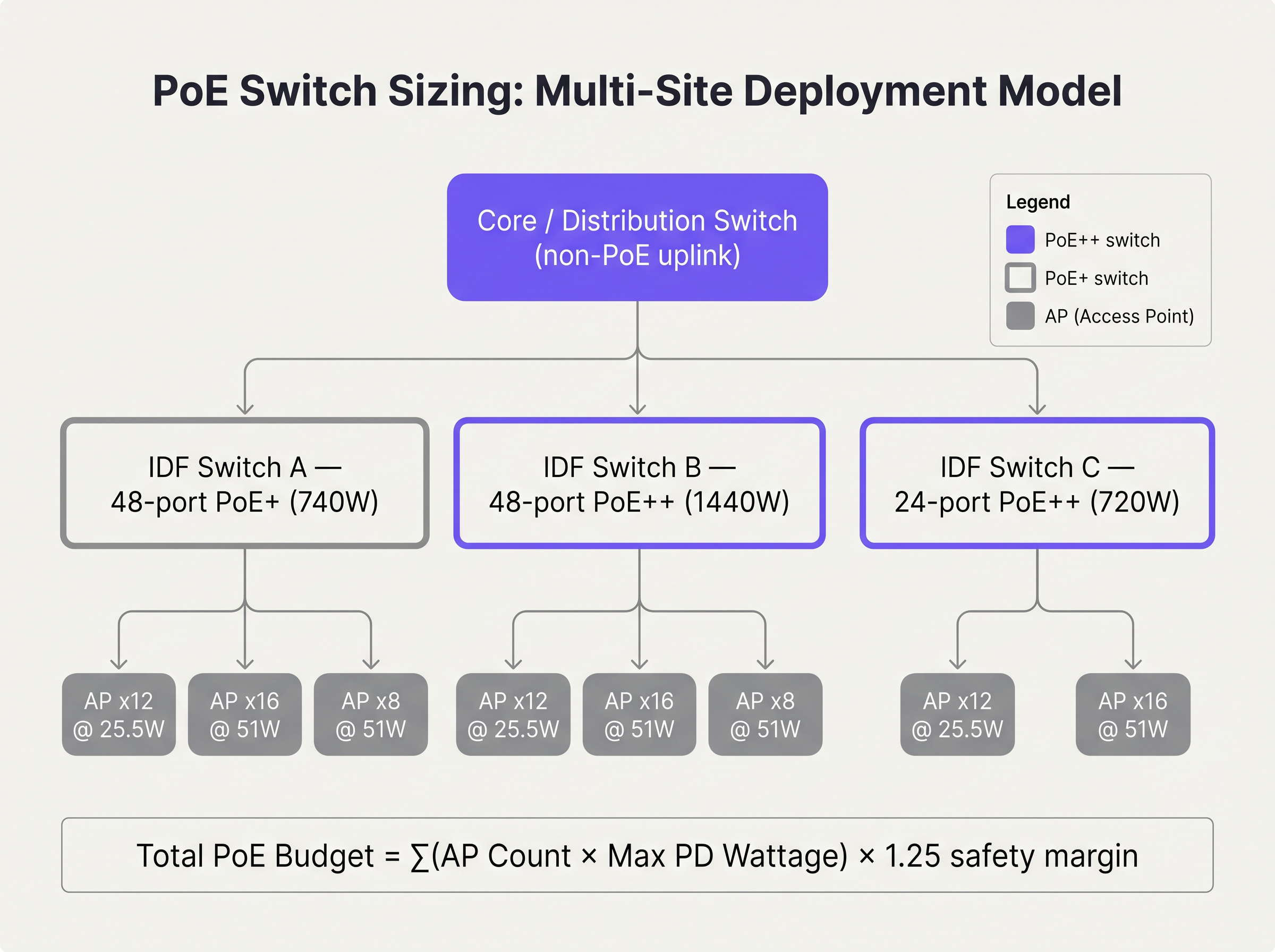
When planning a multi-site deployment, such as upgrading a national Retail chain, you must calculate the total PoE budget for each IDF (Intermediate Distribution Frame) switch.
Step 1: Audit Endpoint Power Requirements
Compile a comprehensive list of all PDs that will connect to the switch. Do not rely on typical power consumption; use the maximum power draw specified by the vendor. For example, if deploying 24 WiFi 6E APs with a maximum draw of 45W each, the baseline requirement is 1,080W.
Step 2: Apply the Safety Margin
Never design a switch to run at 100% of its PoE capacity. You must account for cable degradation, thermal loss, and future expansion. A standard industry practice is to apply a 20% to 25% safety margin.
Total Budget = (Sum of Max PD Draw) × 1.25
In our example: 1,080W × 1.25 = 1,350W.
Step 3: Select the Switch Power Supply
A standard 48-port PoE+ switch typically features a 740W power supply. This is grossly insufficient for our 1,350W requirement. The architect must specify a switch with a 1440W or higher power supply, or split the APs across two stacked switches to distribute the load.
Best Practices for Enterprise Environments
- Cable Infrastructure Upgrades: PoE++ pushes power over all four pairs of the twisted-pair cable. In environments like Hospitality where cables are often tightly bundled in ceiling trays, this generates significant heat. Increased heat raises cable resistance, leading to voltage drop. Always specify Category 6A (Cat6A) cabling for new PoE++ deployments to handle the thermal load and support multi-gigabit throughput.
- LLDP Configuration: Ensure LLDP-MED is enabled globally and on all AP-facing interfaces. This allows the switch and the AP to dynamically negotiate power requirements with granular precision, rather than relying on static class-based allocations which often waste budget.
- Port Priority Configuration: In the event of a power supply failure in a stacked configuration, the switch will begin shedding PoE load. Configure port priorities (Critical, High, Low) so that essential infrastructure (e.g., APs covering the lobby or payment terminals) remains powered while secondary devices (e.g., digital signage) are dropped.
Troubleshooting & Risk Mitigation
The Oversubscription Trap
Oversubscription occurs when the total potential draw of all connected devices exceeds the switch's power supply, even if the current draw is within limits. For example, a switch with a 740W budget might successfully power 30 APs drawing 20W each (600W total). However, during a firmware update or a boot cycle, those APs might temporarily spike to their maximum draw of 30W (900W total). This spike will cause the switch to trip its power protection, resulting in a rolling reboot of the entire network segment.
Mitigation: Always calculate based on maximum draw, not typical draw. Implement strict change control to prevent technicians from plugging unauthorized PoE devices into edge switches.
ROI & Business Impact
Future-proofing your switching infrastructure requires a higher initial CapEx. A 48-port multi-gigabit PoE++ switch is significantly more expensive than a standard gigabit PoE+ switch. However, the ROI is realised in the avoidance of a 'rip-and-replace' cycle.
Consider a Healthcare provider deploying WiFi 6 today. If they deploy PoE+ switches, they save money initially. But when they inevitably upgrade to WiFi 7 in four years to support high-density medical telemetry, those switches will be obsolete. By investing in PoE++ infrastructure today, the next wireless upgrade cycle requires only swapping the edge APs, drastically reducing hardware costs and deployment downtime.
Furthermore, adequate power ensures that advanced features like Guest WiFi Session Timeouts: Balancing UX and Security and continuous security scanning function correctly, protecting the business from compliance breaches and poor user experiences.
Audio Briefing
Listen to our senior solutions architect discuss the realities of PoE planning in this 10-minute briefing:
Key Terms & Definitions
Power Sourcing Equipment (PSE)
The device that provides power onto the Ethernet cable, typically a PoE switch or midspan injector.
When sizing switches, you are evaluating the total power capacity of the PSE.
Powered Device (PD)
The endpoint device receiving power from the Ethernet cable, such as an access point or IP camera.
The PD determines the power demand. Its maximum draw dictates the budget requirements.
802.3at (PoE+)
The IEEE standard delivering up to 30W at the switch port.
The legacy standard that is increasingly insufficient for modern WiFi 6E and WiFi 7 deployments.
802.3bt (PoE++)
The IEEE standard delivering up to 60W (Type 3) or 100W (Type 4) at the switch port.
The necessary standard for powering multi-radio, high-density access points.
LLDP-MED
Link Layer Discovery Protocol - Media Endpoint Discovery. An extension of LLDP that allows PSE and PD to negotiate exact power requirements.
Crucial for optimising the power budget dynamically rather than relying on static class allocations.
Oversubscription
A state where the potential maximum power draw of all connected devices exceeds the switch's power supply capacity.
A dangerous design flaw that leads to unpredictable network outages during load spikes.
Port Priority
A switch configuration that determines which ports lose power first if the total budget is exceeded.
Essential for ensuring critical infrastructure remains online during a partial power failure.
Voltage Drop
The loss of electrical potential along the length of a cable due to resistance.
The reason why a switch delivering 60W at the port only guarantees 51W at the device.
Case Studies
A 200-room hotel is upgrading its wireless infrastructure. The design calls for 80 WiFi 6E APs (Max draw: 41W) and 20 IP Security Cameras (Max draw: 12W). The IT director plans to use three 48-port switches, each with a 740W power supply. Will this design succeed?
No, this design will fail due to power oversubscription.
Total AP power: 80 APs × 41W = 3,280W. Total Camera power: 20 Cameras × 12W = 240W. Total required power (without margin): 3,520W.
Total available power: 3 switches × 740W = 2,220W.
The design is short by at least 1,300W. The switches will shed load, causing APs to drop offline or negotiate down to disabled radios.
A stadium concourse deployment features long cable runs (up to 90 metres) from the IDF to the APs. The APs require 802.3bt Type 3 (60W). What physical layer considerations must be addressed?
The deployment must utilise Cat6A cabling, and cable bundles must be kept small. PoE++ over long distances generates significant heat, especially in the centre of large cable bundles. Heat increases resistance, which leads to voltage drop. If voltage drops too low over the 90m run, the AP will not receive the required 51W.
Scenario Analysis
Q1. You are deploying 15 WiFi 6E APs (Max draw: 45W) in a new retail branch. You have an existing 24-port switch with a 370W power supply. What is your recommendation?
💡 Hint:Calculate the total maximum draw and compare it to the existing supply.
Show Recommended Approach
The total maximum draw is 675W (15 × 45W). The existing 370W switch is entirely insufficient and will fail. Recommendation: Replace the switch with a 24-port PoE++ switch featuring at least a 1000W power supply to accommodate the load and a safety margin.
Q2. During a network audit, you notice that several WiFi 6E APs are operating with their 6 GHz radios disabled, despite being configured correctly in the controller. What is the most likely physical layer cause?
💡 Hint:Consider what happens when an AP does not receive enough power via LLDP negotiation.
Show Recommended Approach
The APs are likely connected to an older 802.3at (PoE+) switch. Because they are not receiving the required 802.3bt (PoE++) power, they have negotiated down to a lower power state, which typically involves disabling advanced radios like 6 GHz to remain operational.
Q3. You are designing a high-density stadium deployment. To save costs, the procurement team suggests using existing Cat5e cabling for the new 802.3bt Type 4 (100W) APs. How do you respond?
💡 Hint:Consider the thermal implications of pushing 100W over four pairs in large cable bundles.
Show Recommended Approach
Reject the suggestion. Pushing 100W over Cat5e, especially in bundled cable trays common in stadiums, generates excessive heat. This increases resistance, causing severe voltage drop and potential fire hazards. Cat6A must be specified to handle the thermal load and ensure full power delivery to the APs.
Key Takeaways
- ✓WiFi 6E and WiFi 7 APs require 802.3bt (PoE++) to operate all radios at full capacity.
- ✓Always calculate PoE budgets using the maximum power draw of the endpoint, never the typical draw.
- ✓Apply a 20-25% safety margin to your total budget to account for cable loss and future expansion.
- ✓Oversubscribing a switch's power supply will lead to unpredictable rolling reboots during load spikes.
- ✓Upgrade cabling to Cat6A for new deployments to handle the thermal load of PoE++.
- ✓Configure LLDP-MED and port priorities to ensure critical infrastructure remains online during power constraints.
- ✓Investing in PoE++ switches now prevents costly rip-and-replace cycles when upgrading to future WiFi standards.




