

University Campus WiFi: eduroam, Residence Halls, and BYOD at Scale
This reference architecture provides advanced deployment strategies for university campus WiFi, covering eduroam federation mechanics, per-room VLAN micro-segmentation in residence halls, and automated BYOD certificate onboarding at scale. It equips IT leaders and network architects with vendor-neutral, immediately actionable guidance to enhance security, reduce helpdesk overhead, and deliver a seamless connectivity experience across academic and residential environments.
🎧 Listen to this Guide
View Transcript
Executive Summary
For modern universities, the campus WiFi network is no longer a mere amenity — it is critical infrastructure that underpins academic delivery, student life, and operational efficiency. As higher education institutions scale, IT teams face a triad of complex networking challenges: managing the seamless, secure federation of eduroam, engineering high-density micro-segmented environments in residence halls, and automating Bring Your Own Device (BYOD) onboarding for tens of thousands of concurrent users.
This reference guide provides senior IT leaders, network architects, and venue operations directors with a practical, vendor-neutral blueprint for campus connectivity. We examine the hierarchical RADIUS proxy model that powers eduroam, detail the implementation of per-room VLANs to secure student devices, and outline a robust device registration lifecycle. By adopting these architectural standards, institutions can significantly reduce helpdesk overhead, ensure compliance with data protection regulations, and deliver a seamless digital experience across academic and residential spaces. The principles explored here are equally transferable to Hospitality and Healthcare environments where high-density, multi-tenant connectivity is a daily operational challenge.
Technical Deep-Dive
The eduroam Federation Architecture
eduroam (education roaming) is the secure, worldwide roaming access service developed for the international research and education community. It allows students, researchers, and staff from participating institutions to obtain internet connectivity across campus and when visiting other participating institutions, simply by opening their laptop or connecting their mobile device — no manual configuration required at the visited site.
Behind the scenes, eduroam relies on an IEEE 802.1X authentication framework coupled with a hierarchical RADIUS (Remote Authentication Dial-In User Service) proxy architecture. When a user attempts to connect to the eduroam SSID at a visited institution (the Service Provider, or SP), the local access point acts as the Network Access Server (NAS). It forwards the authentication request via the Extensible Authentication Protocol (EAP) to the campus RADIUS server.
If the user's realm (e.g., @university.edu) does not match the local domain, the campus RADIUS server proxies the request to a National RADIUS Proxy — JANET in the UK, GÉANT at the pan-European level. The national proxy routes the request to the user's Home Institution (the Identity Provider, or IdP), which validates the credentials against its identity store (Active Directory or LDAP) and returns an Access-Accept or Access-Reject message through the proxy chain.
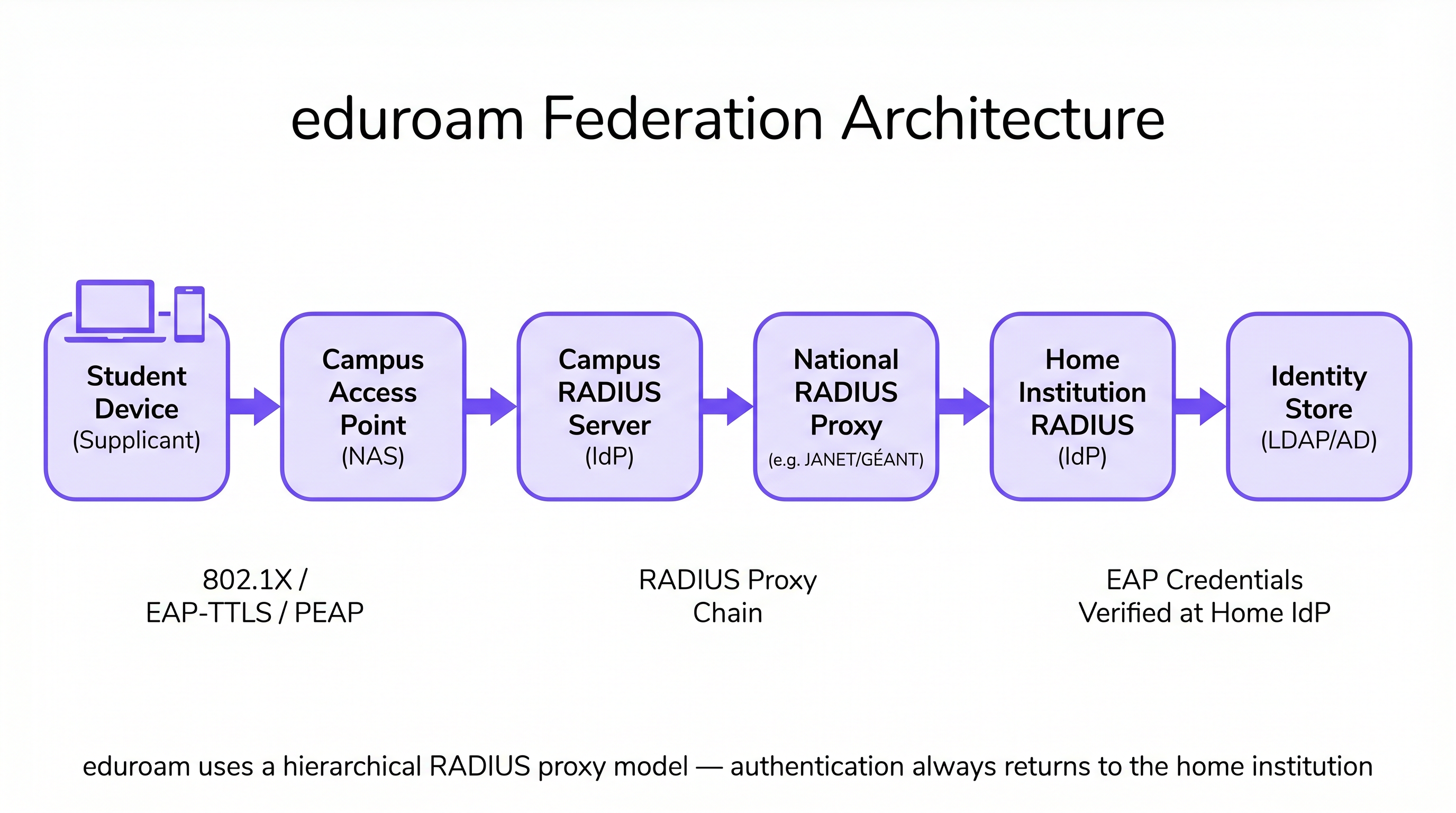
This architecture ensures that user credentials are never exposed to the visited institution, maintaining strict security and privacy standards consistent with GDPR requirements. The visited campus never holds or processes the user's password — it is only ever transmitted to and verified at the home institution.
Residence Hall Micro-Segmentation: Per-Room VLANs
Residence halls present one of the most challenging RF environments in enterprise networking. The density of devices — often three to five per student — combined with the proliferation of consumer IoT (smart speakers, gaming consoles, streaming sticks, wireless printers), creates an environment that quickly overwhelms flat network architectures. Traditional single-subnet dormitory networks generate excessive broadcast traffic, create significant security vulnerabilities, and produce a degraded user experience as devices discover each other across the entire building.
The industry standard approach is Per-Room VLAN mapping. In this architecture, the Network Access Control (NAC) system dynamically assigns a unique VLAN to every individual dorm room or suite. When a student connects their smartphone, laptop, or registered IoT device, the RADIUS server evaluates the user's identity and location attributes, assigning them to their specific micro-segment. This creates a Personal Area Network (PAN) experience: the student's devices can communicate with each other (e.g., casting from a phone to an Apple TV), but are completely isolated from devices in the adjacent room.
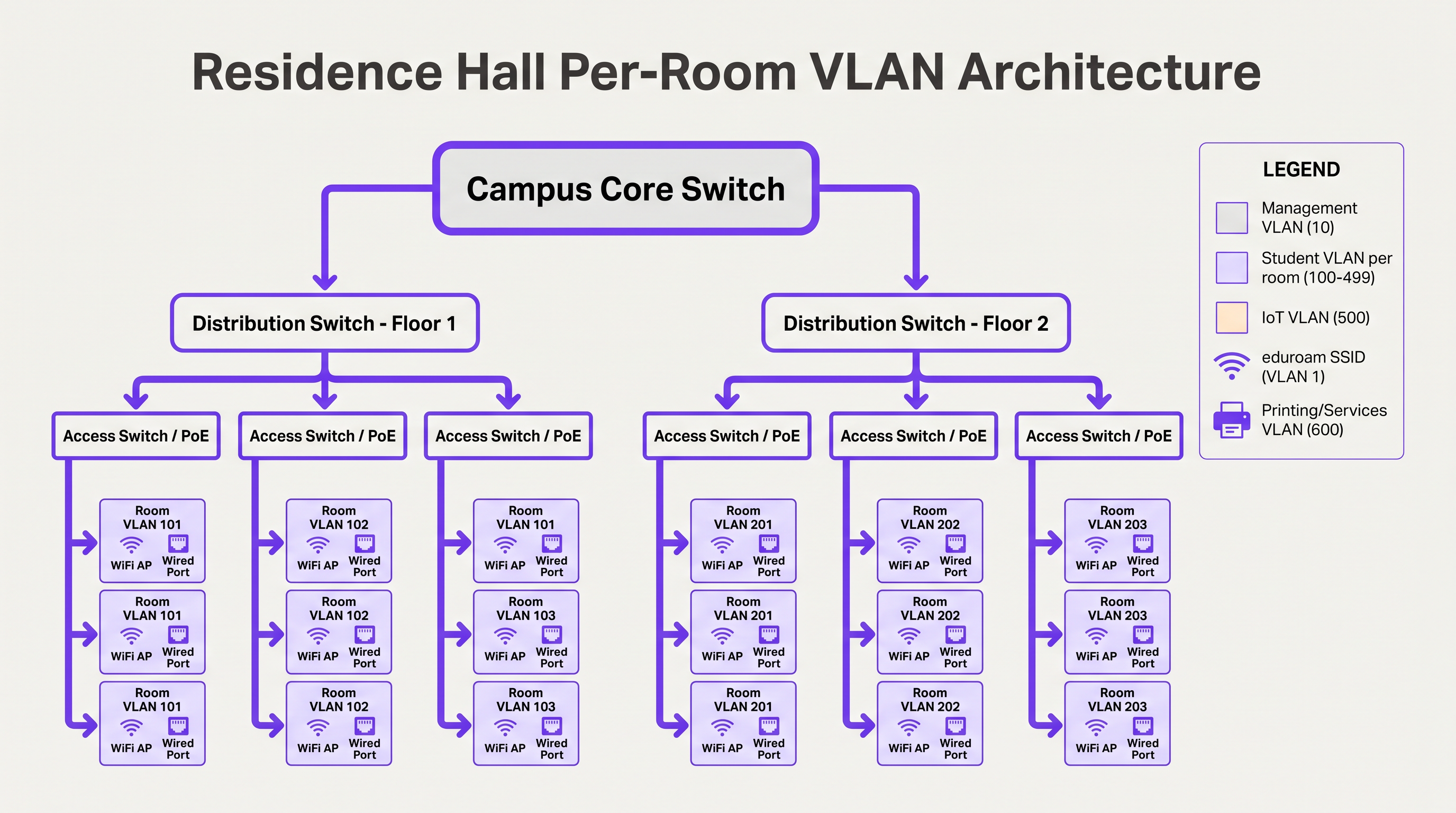
To manage this at scale, IT teams must implement dynamic VLAN assignment using 802.1X for capable devices (laptops, smartphones), and MAC Authentication Bypass (MAB) coupled with a device registration portal for headless IoT devices that do not support enterprise authentication. The VLAN assignment is returned by the RADIUS server as a standard attribute in the Access-Accept message (Tunnel-Type, Tunnel-Medium-Type, Tunnel-Private-Group-ID).
BYOD Onboarding at Scale
At the start of the academic year, universities experience massive onboarding spikes. A manual or poorly designed BYOD process will overwhelm the IT helpdesk within hours. A scalable architecture relies on automated certificate provisioning rather than requiring users to manually configure complex EAP settings or remember to update their WiFi configuration every time their directory password changes.
The optimal flow utilises an open onboarding SSID that restricts access to a captive portal and necessary provisioning servers. Users authenticate via Single Sign-On (SSO), after which a native OS profile payload is downloaded. This payload uses SCEP (Simple Certificate Enrollment Protocol) or EST (Enrollment over Secure Transport) to request a unique client certificate from the campus Certificate Authority.
Once the certificate is installed, the device automatically drops the onboarding connection and associates with the secure 802.1X network (such as eduroam) using EAP-TLS. This eliminates password-related connection issues — the leading cause of WiFi helpdesk tickets — and provides the network team with granular visibility into every connected device.
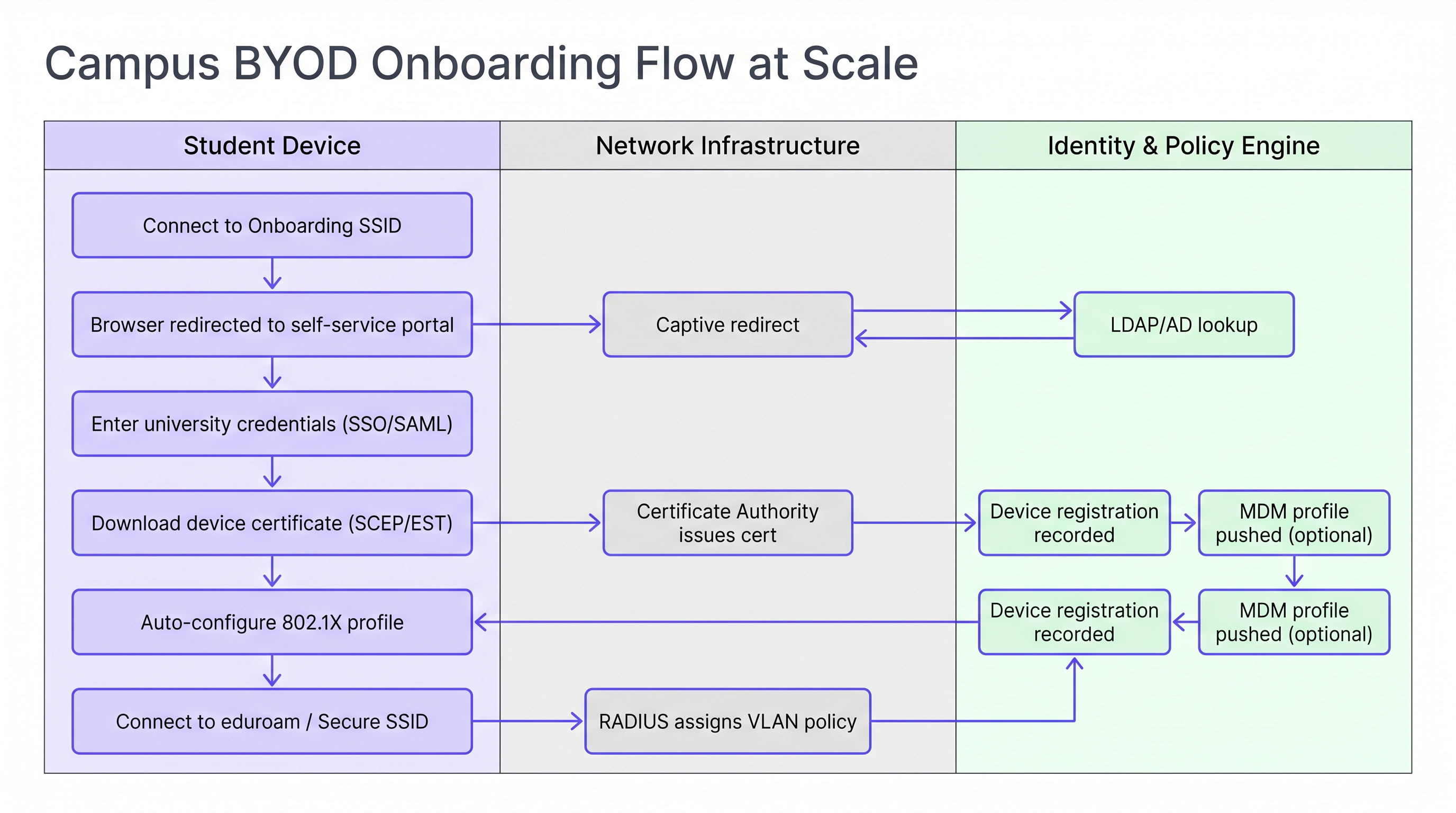
For institutions managing a mix of personal and university-owned devices, integrating the onboarding flow with an MDM (Mobile Device Management) solution allows policy profiles to be pushed automatically during the certificate provisioning step, enabling per-device policy enforcement without additional user interaction.
Implementation Guide
Deploying this architecture requires careful coordination between network engineering, identity management, and security teams. The following sequence represents a proven deployment order for a greenfield or major refresh project.
Step 1 — Standardise the Identity Store. Ensure your Active Directory or LDAP directory is clean, with well-defined groups for students, faculty, staff, and guests. Confirm that group membership is accurate and that automated provisioning and de-provisioning processes are in place. This is foundational for policy enforcement: garbage in, garbage out.
Step 2 — Deploy a Robust NAC Solution. Implement a Network Access Control system capable of handling high-volume RADIUS requests, dynamic VLAN assignment, and device profiling. Ensure redundancy across multiple nodes in separate data centres. Load test the infrastructure before term starts, not during it.
Step 3 — Configure eduroam RADIUS Proxies. Establish secure tunnels to your national roaming operator. Implement strict realm routing rules to prevent loops and ensure only valid, registered realms are proxied outward. Configure monitoring alerts for proxy latency and failure rates.
Step 4 — Implement Device Registration for IoT. Deploy a self-service portal where students can register the MAC addresses of their gaming consoles, smart TVs, and other headless devices. The portal must be simple enough to use without IT assistance. Tie it directly to your NAC for automatic VLAN assignment via MAB.
Step 5 — Optimise RF for High Density. Commission a proper RF survey before deployment. In residence halls, plan for in-room AP coverage. Disable legacy data rates below 12 Mbps to force clients to roam to the optimal AP. Configure transmit power to create clean RF boundaries between rooms.
For public areas across the campus — libraries, student unions, outdoor spaces — consider leveraging Guest WiFi solutions with social login or SMS authentication for visitors who do not have eduroam credentials. Monitoring these environments with WiFi Analytics enables real-time capacity management and proactive identification of coverage gaps.
Best Practices
Mandate EAP-TLS for Managed Devices. For university-owned assets, use certificate-based authentication exclusively. It provides the highest level of security and prevents credential theft. EAP-TTLS or PEAP should be reserved as a fallback for unmanaged personal devices during a transition period only.
Enforce DHCP Snooping and BPDU Guard. A student plugging a consumer router into a dorm room Ethernet port can take down the entire subnet. These controls must be applied to all access switch ports without exception.
Monitor and Analyse Continuously. Utilise WiFi Analytics to monitor AP utilisation, client counts, and roaming patterns. This data is invaluable for capacity planning and identifying RF dead zones in lecture theatres and libraries. Correlating WiFi presence data with space utilisation metrics enables data-driven facilities management decisions.
Leverage Location Services for Campus Operations. Implement Wayfinding integration in the campus app to help new students navigate complex buildings and locate available study spaces based on real-time AP association data. This reduces pressure on physical signage and improves the student experience during high-traffic periods.
Align with WPA3 Transition Planning. While WPA2-Enterprise remains the dominant standard, plan your AP refresh cycle to support WPA3-Enterprise (192-bit mode for high-security environments) and Enhanced Open (OWE) for guest SSIDs. WPA3 eliminates the KRACK vulnerability class and provides forward secrecy, which is increasingly relevant for GDPR compliance.
Troubleshooting & Risk Mitigation
RADIUS Timeout Failures During Peak Onboarding. During the first 48 hours of term, RADIUS servers can become overwhelmed, leading to authentication timeouts and a flood of helpdesk calls. Mitigation: Pre-emptive load testing, load balancing across multiple RADIUS nodes, and tuning EAP timers on the wireless LAN controller to accommodate slight proxy delays.
IoT Device Discovery Failures. Students frequently report that they cannot cast to their smart TVs or connect to wireless printers. Mitigation: If devices reside on separate VLANs, configure an mDNS Gateway or Bonjour Proxy to forward specific discovery protocols across the VLAN boundary for the relevant Per-Room VLAN pairs. Ensure the gateway is scoped to individual room VLANs, not the entire building.
eduroam Proxy Routing Loops. Misconfigured realm routing rules can cause authentication requests to loop between proxy servers, resulting in timeouts. Mitigation: Implement strict realm whitelisting and configure loop detection on your RADIUS proxy. Regularly audit routing tables against the national operator's published realm registry.
Certificate Revocation at Scale. When a student leaves the institution, their certificate must be revoked promptly to prevent continued network access. Mitigation: Implement OCSP (Online Certificate Status Protocol) stapling and ensure your CA's CRL (Certificate Revocation List) is published and accessible to your RADIUS servers. Automate revocation as part of the student de-provisioning workflow.
ROI & Business Impact
Investing in a robust, automated campus WiFi architecture delivers significant, measurable returns across multiple dimensions.
| Metric | Baseline (Legacy Architecture) | Target (Modern Architecture) | Improvement |
|---|---|---|---|
| Helpdesk WiFi tickets (Week 1) | 2,000–3,000 | 600–900 | ~70% reduction |
| Mean time to onboard a new device | 15–30 minutes (manual) | 3–5 minutes (automated) | ~80% reduction |
| Security incident blast radius | Entire building subnet | Single room VLAN | Contained |
| AP deployment cost per room | High (hallway model) | Moderate (in-room, lower power) | Comparable with better outcomes |
Reduced Helpdesk Volume. Automated certificate-based BYOD onboarding can reduce WiFi-related support tickets by up to 70% during the critical start-of-term period, freeing IT staff to focus on higher-value work.
Enhanced Security Posture. Micro-segmentation and 802.1X authentication dramatically reduce the blast radius of a compromised device, mitigating the risk of lateral movement by ransomware — a growing threat in higher education environments.
Data-Driven Campus Management. By integrating network data with Sensors and analytics platforms, universities can optimise space utilisation, adjust HVAC schedules based on occupancy, and improve overall campus operations. The same WiFi Analytics infrastructure used for network management becomes a strategic asset for facilities and estate planning.
The architectural patterns described in this guide — micro-segmentation, automated onboarding, and federated identity — are directly applicable beyond higher education. Retail environments benefit from the same BYOD segmentation principles for staff devices, and Healthcare networks require equivalent rigour for medical IoT isolation. The SD-WAN principles that underpin campus WAN connectivity are explored further in The Core SD-WAN Benefits for Modern Businesses .
For organisations looking to extend WiFi-driven intelligence into marketing automation and engagement workflows, the principles of presence-based triggering are detailed in Event-Driven Marketing Automation Triggered by WiFi Presence .
Listen to the Audio Briefing:
Key Terms & Definitions
RADIUS Proxy
A server that forwards authentication requests between a Network Access Server (NAS) and the final authentication server (IdP), routing based on the user's realm.
Crucial for eduroam federation. When a visiting user's realm does not match the local domain, the campus RADIUS server proxies the request outward through the national hierarchy to the home institution.
EAP-TLS (Extensible Authentication Protocol — Transport Layer Security)
An 802.1X authentication method requiring both a server-side certificate (on the RADIUS server) and a client-side certificate (on the endpoint device). No passwords are transmitted.
The gold standard for BYOD security in higher education. Eliminates password-related WiFi helpdesk tickets and provides mutual authentication, preventing rogue AP attacks.
Micro-segmentation
The practice of dividing a network into small, isolated segments — typically at the VLAN level — to limit lateral movement and reduce the attack surface.
Applied in residence halls via Per-Room VLANs to isolate student devices from one another, preventing ransomware propagation and enforcing privacy between residents.
MAC Authentication Bypass (MAB)
A fallback authentication method that uses a device's MAC address as its identity when the device does not support 802.1X.
Essential for connecting IoT devices (gaming consoles, smart TVs, printers) in dormitories to the secure network. The MAC must be pre-registered in the NAC to receive a valid VLAN assignment.
Realm
The domain portion of a user's Network Access Identifier (NAI), typically the part after the '@' symbol (e.g., 'university.edu' in 'student@university.edu').
RADIUS proxy servers use the realm to route eduroam authentication requests to the correct home institution. Misconfigured realm routing is a common cause of eduroam failures for visiting users.
SCEP (Simple Certificate Enrollment Protocol)
A protocol that enables network devices to automatically request and receive digital certificates from a Certificate Authority.
Used in BYOD onboarding flows to automatically provision client certificates to student devices without manual IT intervention, enabling EAP-TLS authentication at scale.
mDNS Gateway (Bonjour Proxy)
A service that forwards Multicast DNS packets across different subnets or VLANs, enabling device discovery protocols to function in segmented networks.
Required in Per-Room VLAN architectures when a student's phone (on the wireless VLAN) needs to discover their smart TV (on the wired VLAN) within the same room's micro-segment.
Network Access Control (NAC)
A security solution that enforces policy on devices seeking to access a network, controlling admission based on identity, device health, and context.
The central orchestration layer in a campus WiFi architecture. NAC handles 802.1X authentication, dynamic VLAN assignment, device profiling, and MAB for IoT devices.
Supplicant
The software component on an endpoint device that handles the 802.1X authentication exchange with the network.
Built into modern operating systems (Windows, macOS, iOS, Android). When troubleshooting eduroam connection failures, the supplicant configuration — specifically the EAP method and server certificate validation settings — is the first place to investigate.
WPA3-Enterprise
The latest generation of the Wi-Fi Protected Access enterprise security standard, introducing 192-bit cryptographic strength and eliminating vulnerabilities present in WPA2.
Relevant for campus network refresh planning. WPA3-Enterprise provides forward secrecy via ECDHE key exchange, meaning captured traffic cannot be decrypted retroactively even if a certificate is later compromised.
Case Studies
A university is upgrading a 500-bed residence hall built in the 1970s. Students are complaining that they cannot see their wireless printers or cast to their smart TVs, while the IT security team is concerned about the flat /22 subnet currently serving the entire building. How should the network be redesigned?
Phase 1 — Network Redesign: Replace the flat /22 subnet with a Per-Room VLAN architecture. Assign a unique VLAN ID (e.g., VLANs 1000–1499) to each room. Configure the NAC to dynamically assign the correct VLAN based on the student's authenticated identity and their room assignment in the student records system.
Phase 2 — Device Registration Portal: Deploy a self-service portal where students register the MAC addresses of headless devices (printers, smart TVs, gaming consoles). The portal authenticates the student via SSO and records the MAC-to-room mapping in the NAC database.
Phase 3 — MAB Configuration: Configure switch ports and the residential SSID to use MAC Authentication Bypass for registered devices. When a registered MAC connects, RADIUS returns the student's Per-Room VLAN assignment, placing the device in the correct micro-segment.
Phase 4 — mDNS Gateway: Configure the wireless controller's mDNS gateway to proxy Bonjour and SSDP discovery traffic within each Per-Room VLAN boundary, enabling casting and printing without cross-room exposure.
Phase 5 — AP Refresh: Replace hallway APs with in-room units. Reduce transmit power to 8–12 dBm to create clean RF cells and reduce co-channel interference.
During the first week of term, a 15,000-student university's IT helpdesk receives over 2,500 WiFi tickets in 48 hours. The majority are from students who changed their university portal password and are now unable to connect to eduroam. The current authentication method is PEAP-MSCHAPv2. What is the architectural change required, and how should it be rolled out?
Root Cause: PEAP-MSCHAPv2 authenticates using the user's AD password. When the password changes, the stored WiFi profile credential becomes invalid, breaking the connection.
Architectural Change: Transition from PEAP-MSCHAPv2 to EAP-TLS (certificate-based authentication).
Rollout Plan:
- Deploy a Campus Certificate Authority (or integrate with an existing PKI) and configure SCEP/EST endpoints.
- Stand up a BYOD onboarding tool (vendor-neutral options include FreeRADIUS with a custom portal, or commercial solutions). Configure it to authenticate via SSO and provision client certificates.
- Create an 'Onboarding' SSID (open, captive-portal restricted) alongside the existing eduroam SSID.
- Communicate to students: 'Connect to Onboarding-WiFi, follow the steps, and your WiFi will never break when you change your password again.'
- Once certificate adoption reaches >80%, disable PEAP-MSCHAPv2 on the RADIUS server and enforce EAP-TLS only.
- Set certificate lifetime to 2 years with automated renewal 30 days before expiry.
Scenario Analysis
Q1. A visiting researcher from the University of Amsterdam arrives at your campus in London. They connect to the eduroam SSID but receive an 'Authentication Failed' error. Your local RADIUS logs confirm the Access-Request is being forwarded to the national proxy, but no response is received within the timeout window. Where is the most likely point of failure, and what is your escalation path?
💡 Hint:Apply the 'Home Always Knows' principle. Your local infrastructure is functioning correctly if the request is leaving your campus.
Show Recommended Approach
Since the local RADIUS server is successfully proxying the request outward, the local campus infrastructure is functioning correctly. The most likely failure points are: (1) the national proxy (JANET) is unable to route to the Dutch national proxy (SURFnet), or (2) the researcher's home institution RADIUS server is offline or misconfigured. The escalation path is: first, contact your national roaming operator (JANET) with the timestamp and realm (@uva.nl) to check proxy routing logs. Second, advise the researcher to contact their home institution's IT helpdesk, as the issue is almost certainly on their side. Do not spend time troubleshooting your own RADIUS infrastructure.
Q2. You are designing the WiFi for a new 1,000-bed residence hall. The facilities team wants to install APs in the hallways to save on cabling and installation costs. Provide a technical argument against this approach and specify the recommended alternative.
💡 Hint:Consider RF attenuation through fire doors and masonry, co-channel interference in long corridors, and the implications for Per-Room VLAN architecture.
Show Recommended Approach
Hallway deployments are an anti-pattern for modern high-density residential environments for three reasons. First, RF signals must penetrate thick fire-rated doors and masonry walls to reach devices inside rooms, resulting in poor signal quality and low throughput precisely where users are located. Second, APs deployed in a long corridor have clear line-of-sight to each other, causing severe co-channel interference that degrades performance for all clients. Third, the hallway model makes Per-Room VLAN micro-segmentation architecturally ambiguous — a hallway AP serves multiple rooms simultaneously, complicating dynamic VLAN assignment. The recommended approach is in-room AP deployment: one AP per room for new builds, or one AP per two rooms in modern construction with thin partition walls. Transmit power should be set to 8–12 dBm to create clean RF cells. While the upfront cabling cost is higher, the operational savings from reduced helpdesk volume and improved user experience deliver a positive ROI within the first academic year.
Q3. A student registers their PlayStation 5 MAC address in the device registration portal. The console is connected via the residential SSID but cannot discover the student's phone for Remote Play. Both devices are confirmed to be on the same Per-Room VLAN. What is the most likely configuration issue?
💡 Hint:Consider the wireless controller's client isolation settings and the protocols used by device discovery.
Show Recommended Approach
The most likely cause is that client isolation (also called AP isolation or wireless isolation) is enabled on the residential SSID. Client isolation prevents wireless clients on the same SSID from communicating directly with each other, even if they are on the same VLAN. This is a common security default that is appropriate for guest networks but counterproductive in a Per-Room VLAN environment where device-to-device communication is intentional. The fix is to disable client isolation specifically on the residential SSID (or create a policy exception for the Per-Room VLAN range). If the console is on the wired network and the phone is on wireless, the issue may instead be an mDNS gateway not forwarding Sony's device discovery protocol (SSDP/UPnP) across the wired-to-wireless boundary within the same VLAN.
Key Takeaways
- ✓eduroam uses a hierarchical RADIUS proxy model — authentication always resolves at the user's home institution, never at the visited campus. The 'Home Always Knows' principle defines your troubleshooting escalation path.
- ✓Per-Room VLANs create micro-segmented Personal Area Networks in residence halls, simultaneously improving security and enabling IoT device discovery within each room's boundary.
- ✓Automated EAP-TLS certificate onboarding — not PEAP-MSCHAPv2 — is the only scalable solution for BYOD at university scale. It decouples WiFi authentication from the AD password lifecycle.
- ✓IoT devices require MAC Authentication Bypass (MAB) and a self-service registration portal, as they lack 802.1X supplicants. They must be placed in the student's Per-Room VLAN, not a separate building-wide IoT VLAN.
- ✓In-room AP deployments are mandatory for modern residence halls. Hallway APs cause co-channel interference and poor in-room coverage, and are architecturally incompatible with Per-Room VLAN micro-segmentation.
- ✓DHCP Snooping and BPDU Guard must be enforced on all access switch ports to prevent rogue DHCP servers from consumer routers taking down dormitory subnets.
- ✓WiFi analytics and sensor integration transform the network from a connectivity utility into a strategic data asset for space utilisation, facilities management, and operational efficiency.




