

Connecting WiFi Events to 1,500+ Apps with Zapier and Purple
This guide details the technical architecture and practical implementation of integrating Purple WiFi with Zapier. It provides venue operators and IT teams with actionable recipes to automate CRM synchronisation, guest communications, and operational alerts without writing custom code.
🎧 Listen to this Guide
View Transcript
Executive Summary
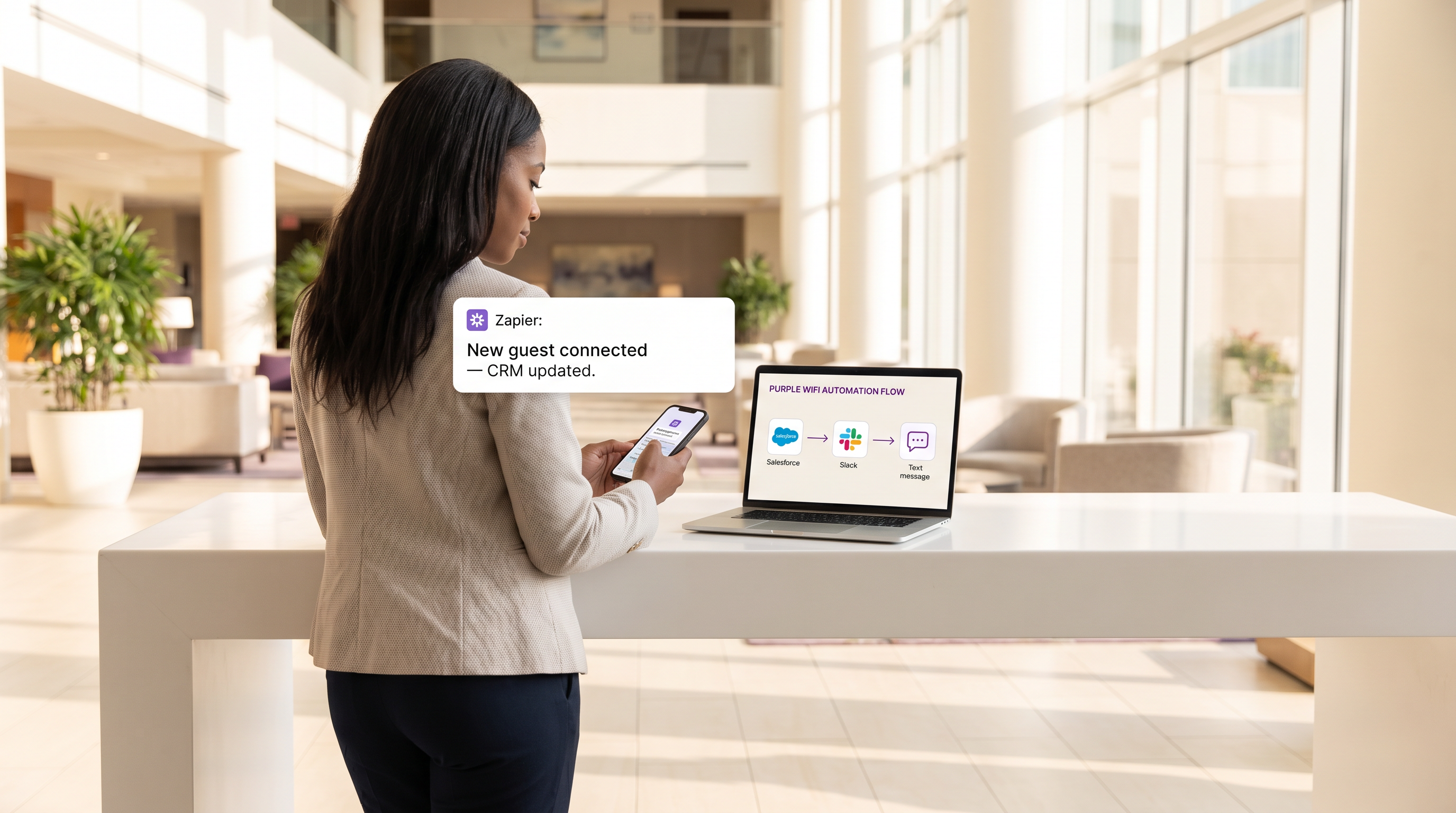
For modern venues, the guest WiFi network is no longer merely a connectivity amenity; it is a critical sensor layer for customer engagement and operational intelligence. However, the value of this data is fundamentally limited if it remains siloed within a proprietary dashboard. This technical reference guide explores the integration between Guest WiFi provided by Purple and the Zapier automation platform, enabling IT and marketing operations teams to route real-time connection events to over 1,500 downstream applications.
By leveraging Zapier as middleware, organisations in Retail , Hospitality , and other high-footfall environments can automate complex workflows—from real-time CRM synchronisation and targeted SMS marketing to operational alerting via Slack. This guide details the available trigger events, core architectural considerations, and six production-ready automation recipes designed to deliver immediate ROI while maintaining strict compliance with data privacy standards such as GDPR and PCI DSS.
Technical Deep-Dive
Integration Architecture
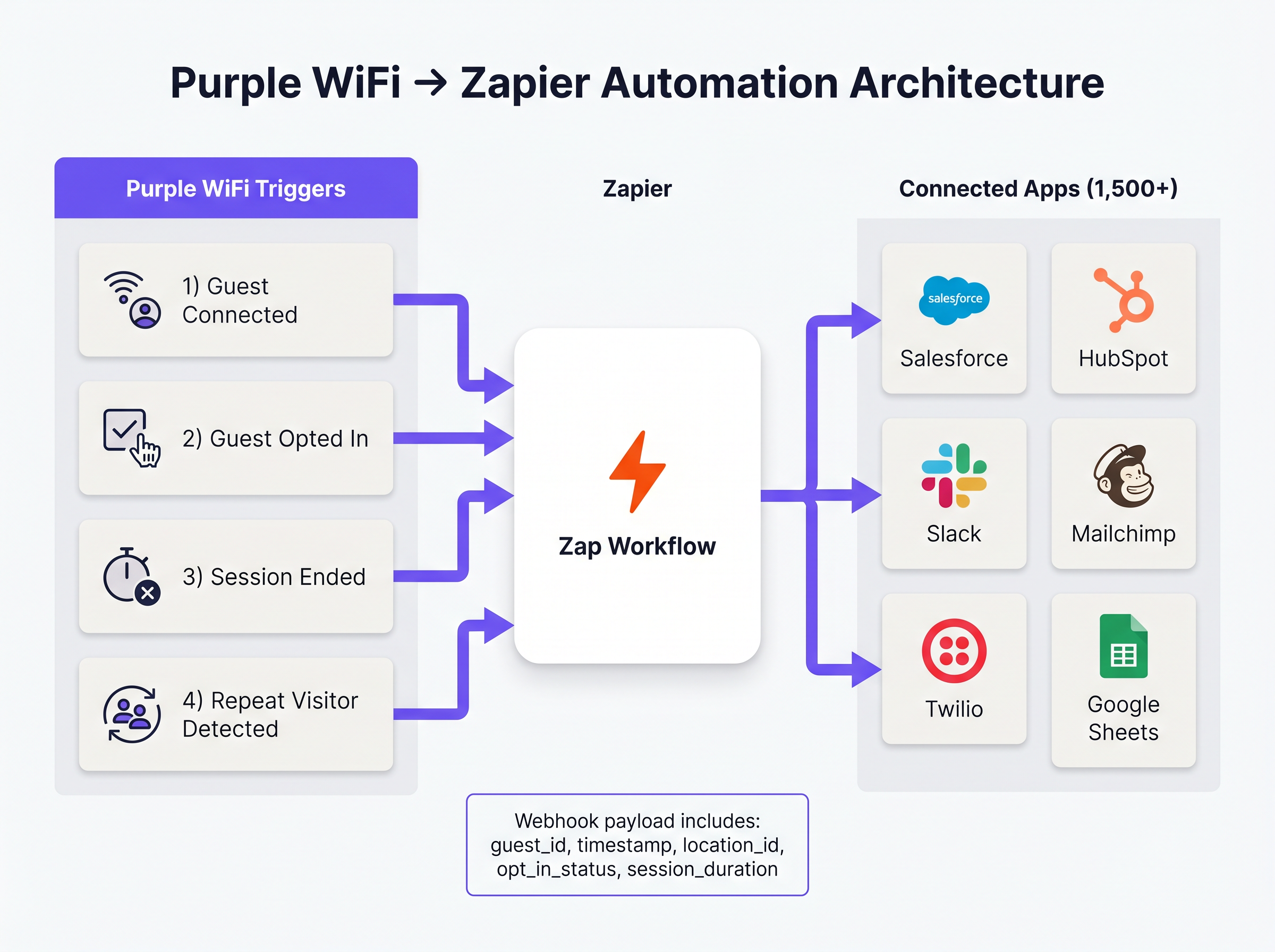
The integration between Purple and Zapier operates on a webhook-driven event model. Purple acts as the event source, pushing structured JSON payloads to Zapier whenever a predefined network event occurs. Zapier, functioning as the integration platform as a service (iPaaS), receives this payload, processes it according to user-defined logic (the 'Zap'), and executes API calls to target applications.
This architecture abstracts the complexity of managing API authentication, rate limiting, and error handling for hundreds of different SaaS platforms, allowing network architects to focus on business logic rather than integration maintenance.
Core Trigger Events
Purple exposes several distinct event types to Zapier. Selecting the correct trigger is paramount for both operational efficiency and regulatory compliance.
- Guest Connected: Fires immediately upon successful network authentication. The payload includes
guest_id,timestamp,location_id, and access point details. This is the primary trigger for footfall logging and operational alerting. - Guest Opted In: Fires only when a guest explicitly accepts marketing terms on the captive portal. This is the mandatory trigger for any workflow involving WiFi Analytics data that feeds CRM or marketing automation platforms, ensuring GDPR compliance.
- Session Ended: Fires when a client device disconnects or times out. The payload includes
session_duration, providing critical dwell-time metrics. - Repeat Visitor Detected: Triggered when the Purple analytics engine identifies a returning MAC address, enabling VIP recognition and loyalty program workflows.
Implementation Guide
Deploying Purple-Zapier automation requires a structured approach to ensure data hygiene and avoid rate-limit exhaustion. The following recipes represent the highest-value workflows for typical enterprise deployments.
Foundational Recipes
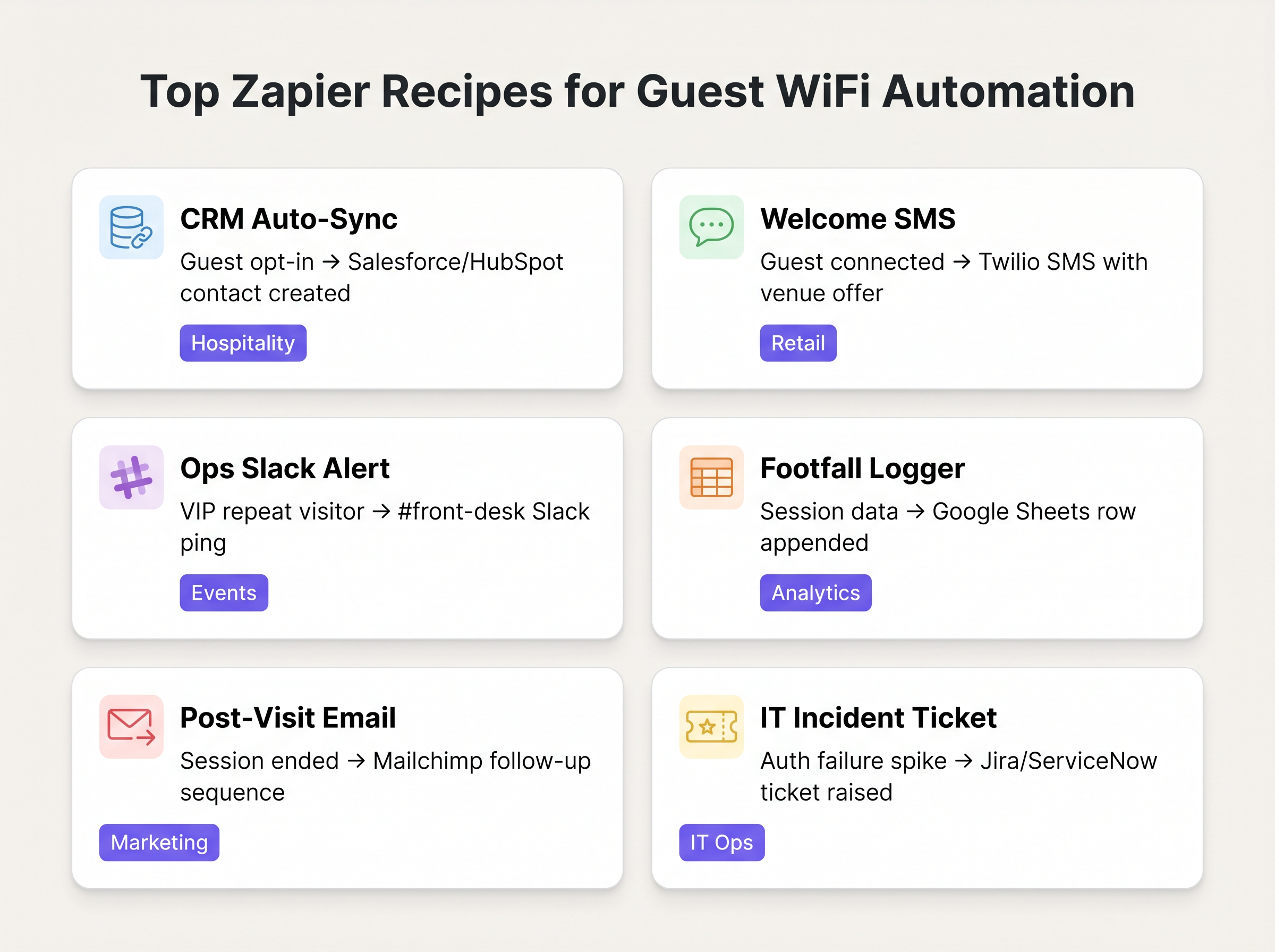
1. CRM Auto-Sync (The Baseline)
- Trigger: Purple
Guest Opted In - Action: Create/Update Contact in Salesforce or HubSpot.
- Rationale: Eliminates manual CSV exports. Ensures the marketing database is continuously updated with verified, opted-in guest data.
2. Real-Time Welcome SMS
- Trigger: Purple
Guest Connected - Filter: Zapier Filter (Only proceed if
guest_idhas not been seen in the last 30 days). - Action: Send SMS via Twilio.
- Rationale: Drives immediate engagement in Retail environments. The filter step is critical to prevent spamming returning visitors.
3. Operational Alerting
- Trigger: Purple
Repeat Visitor Detected - Action: Post Message in Slack.
- Rationale: Alerts the front desk or concierge in Hospitality settings when a VIP or known high-value guest connects to the network.
Best Practices
When architecting these workflows, senior IT professionals must adhere to several key principles to ensure stability and compliance:
- Prioritise 'Opted In' Over 'Connected' for Marketing: Always use the
Guest Opted Intrigger for any Zap that creates a CRM record or sends marketing communications. Relying on the rawGuest Connectedevent for these purposes violates GDPR consent requirements and degrades data quality. - Implement Deduplication Logic: A single user may connect with multiple devices (smartphone, laptop, tablet). Unless handled correctly, this will create duplicate CRM records. Use the hashed email address (if available) as the primary deduplication key in your Zapier actions, rather than the device-bound MAC address.
- Monitor Task Consumption: Zapier pricing is based on task volume. A busy venue can easily exhaust a standard tier allowance if every single connection triggers a multi-step Zap. Use Zapier's built-in filtering to drop irrelevant events early in the workflow, and consider batching data (e.g., hourly roll-ups to Google Sheets) for high-volume footfall logging.
Troubleshooting & Risk Mitigation
The most common failure mode in this architecture is downstream API token expiration. While Purple's webhook delivery is highly reliable, the connection between Zapier and the target application (e.g., Salesforce) can fail if authentication tokens expire or API rate limits are exceeded.
Mitigation Strategy: Configure Zapier's built-in error handling to alert the IT operations team via Slack or email if a Zap fails consecutively. Regularly audit Zap History to identify and resolve recurring data mapping errors.
Furthermore, when integrating with systems handling sensitive data (such as in Healthcare ), ensure that the data payload transmitted via Zapier does not violate HIPAA or local privacy regulations. Restrict the payload to the minimum necessary fields required for the workflow.
ROI & Business Impact
The return on investment for Zapier integration is typically measured in hours saved and data accuracy improved. By automating CRM ingestion, marketing teams recover the hours previously spent on manual data wrangling. More importantly, real-time integration enables 'in-moment' marketing—engaging the customer while they are physically present in the venue—which consistently demonstrates higher conversion rates than post-visit email campaigns.
Key Terms & Definitions
Webhook
A method for one application to provide real-time information to another application using HTTP POST requests.
This is the underlying mechanism Purple uses to send event data to Zapier the moment a guest connects.
iPaaS (Integration Platform as a Service)
A suite of cloud services enabling the development, execution and governance of integration flows connecting any combination of on premises and cloud-based processes, services, applications and data within individual or across multiple organizations.
Zapier acts as the iPaaS in this architecture, sitting between Purple and the 1,500+ downstream applications.
Captive Portal
A web page that the user of a public-access network is obliged to view and interact with before access is granted.
The point of interaction where Purple captures guest data and marketing consent, triggering the 'Guest Opted In' event.
Payload
The actual data pack that is sent in a webhook or API request, excluding the headers and metadata.
The Purple webhook payload contains the guest ID, location data, and timestamps needed to populate downstream CRM fields.
Dwell Time
The length of time a visitor spends in a specific physical area or connected to the network.
Calculated using the 'Session Ended' trigger, this metric is crucial for retail analytics and operational planning.
Rate Limiting
A strategy for limiting network traffic, restricting how often someone can repeat an action within a certain timeframe.
A critical consideration when designing Zaps; high-volume WiFi events can easily exhaust API rate limits on downstream applications like Salesforce.
Deduplication
The process of identifying and removing duplicate copies of repeating data.
Essential when building CRM Zaps to ensure that a guest connecting with both a phone and a laptop doesn't create two separate contact records.
MAC Address Correlation
The process of identifying returning devices by matching their unique hardware identifier across multiple sessions.
The mechanism Purple uses to fire the 'Repeat Visitor Detected' trigger, enabling loyalty workflows.
Case Studies
A 200-room boutique hotel wants to automatically add new guests to their Mailchimp welcome sequence, but only if the guest has explicitly agreed to receive marketing emails. They also want to ensure that returning guests do not receive the welcome sequence again.
- Set the Zapier Trigger to Purple's 'Guest Opted In' event (not 'Guest Connected'). 2. Add a Zapier Filter step to check a Google Sheet 'Log' to see if the guest's email already exists. 3. If it does not exist, proceed to Action 1: Add Subscriber to Mailchimp Audience. 4. Action 2: Append the new guest's email and timestamp to the Google Sheet 'Log' to prevent future duplicates.
A large retail chain needs to log hourly footfall data from their Purple WiFi network into a central data warehouse for the BI team, but they are concerned about exceeding their Zapier task limits due to the high volume of connections.
Instead of triggering a Zap for every individual 'Guest Connected' event, the IT team configures a Zapier 'Schedule' trigger to run every hour. The Zap then uses a Webhook action to query the Purple API for the aggregated connection count over the last 60 minutes, and writes that single aggregated value to the data warehouse.
Scenario Analysis
Q1. Your marketing team wants to automatically send a 10% discount SMS to every guest who connects to the stadium WiFi. What is the primary compliance risk, and how should the Zap be architected to mitigate it?
💡 Hint:Consider the difference between simply joining a network and agreeing to receive marketing communications.
Show Recommended Approach
The primary risk is violating GDPR/TCPA by sending marketing messages without explicit consent. The Zap must use the 'Guest Opted In' trigger, not the 'Guest Connected' trigger. Furthermore, a Zapier Filter should be implemented to ensure the SMS is only sent once per guest, rather than every time they reconnect during the event.
Q2. A retail client is complaining that their Zapier task usage has spiked, costing them thousands of dollars, after implementing a 'Log every connection to Google Sheets' Zap. How would you redesign this workflow?
💡 Hint:Does the BI team need real-time row-by-row data, or do they just need hourly aggregates?
Show Recommended Approach
Shift from an event-driven architecture to a scheduled polling architecture. Instead of triggering a Zap on every connection, configure a Zapier Schedule to run hourly. The Zap should make an API call to Purple to retrieve the aggregated connection count for the previous hour, and write that single row to Google Sheets. This reduces task consumption from potentially thousands per hour to just one per hour.
Q3. The operations team wants a Slack alert every time a specific VIP connects to the network. How do you isolate this specific user from the thousands of other daily connections?
💡 Hint:You need to evaluate the payload data before executing the action.
Show Recommended Approach
Use the 'Guest Connected' or 'Repeat Visitor Detected' trigger. Immediately follow this with a Zapier Filter step. Configure the filter to only allow the Zap to continue if the guest_id or mac_address field in the payload exactly matches the known identifier of the VIP. If it doesn't match, the Zap halts without consuming further tasks or posting to Slack.
Key Takeaways
- ✓Purple's Zapier integration turns guest WiFi from a passive utility into an active operational data pipeline.
- ✓Use the 'Guest Opted In' trigger for all CRM and marketing workflows to ensure GDPR compliance.
- ✓Use the 'Guest Connected' trigger for anonymous footfall logging and internal IT alerting.
- ✓Implement Zapier Filters to prevent duplicate CRM records and stop repetitive SMS/email messages to returning guests.
- ✓For high-volume analytics logging, use Zapier's Schedule trigger to pull aggregated data hourly, rather than firing a Zap for every single connection, to avoid exhausting task limits.
- ✓The integration requires no custom code and can route WiFi event data to over 1,500 applications including Salesforce, Slack, and Twilio.




