

Microsoft Dynamics 365 and Guest WiFi Data Enrichment
This technical reference guide details the architecture, data modeling, and field mapping required to integrate guest WiFi data with Microsoft Dynamics 365. It provides actionable implementation strategies for IT managers and network architects to enrich unified customer profiles and drive measurable ROI in physical venues.
Executive Summary
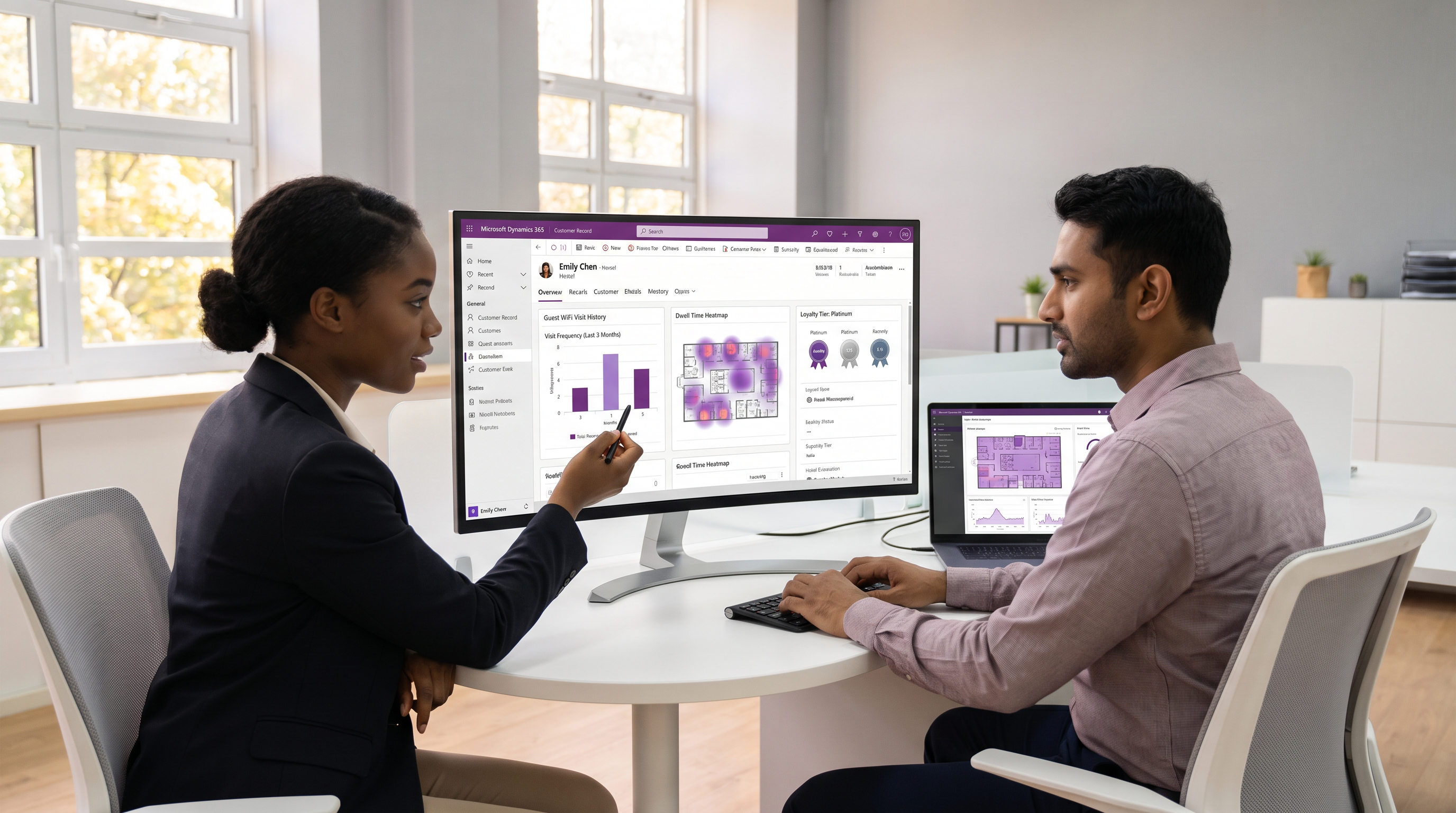
For modern physical venues—from retail chains to large-scale stadiums—understanding guest behaviour is no longer optional. However, while e-commerce platforms offer rich behavioural analytics, physical venues often struggle with a blind spot: they know what a customer bought, but not how long they lingered, how often they visit without purchasing, or which zones they frequent. By integrating Guest WiFi authentication data with Microsoft Dynamics 365, IT leaders can close this gap.
This guide outlines the definitive architecture for Dynamics 365 WiFi integration. It details how to push verified contact details, GDPR consent timestamps, and visit metrics from the WiFi analytics platform into Dynamics 365. Crucially, it advocates for a two-tier data model—separating core contact updates from high-volume transactional visit logs—to ensure CRM performance and enable advanced segmentation within Customer Insights. For organisations in Retail and Hospitality , this integration transforms anonymous footfall into a unified, actionable customer profile.
Technical Deep-Dive: Architecture and Data Flow
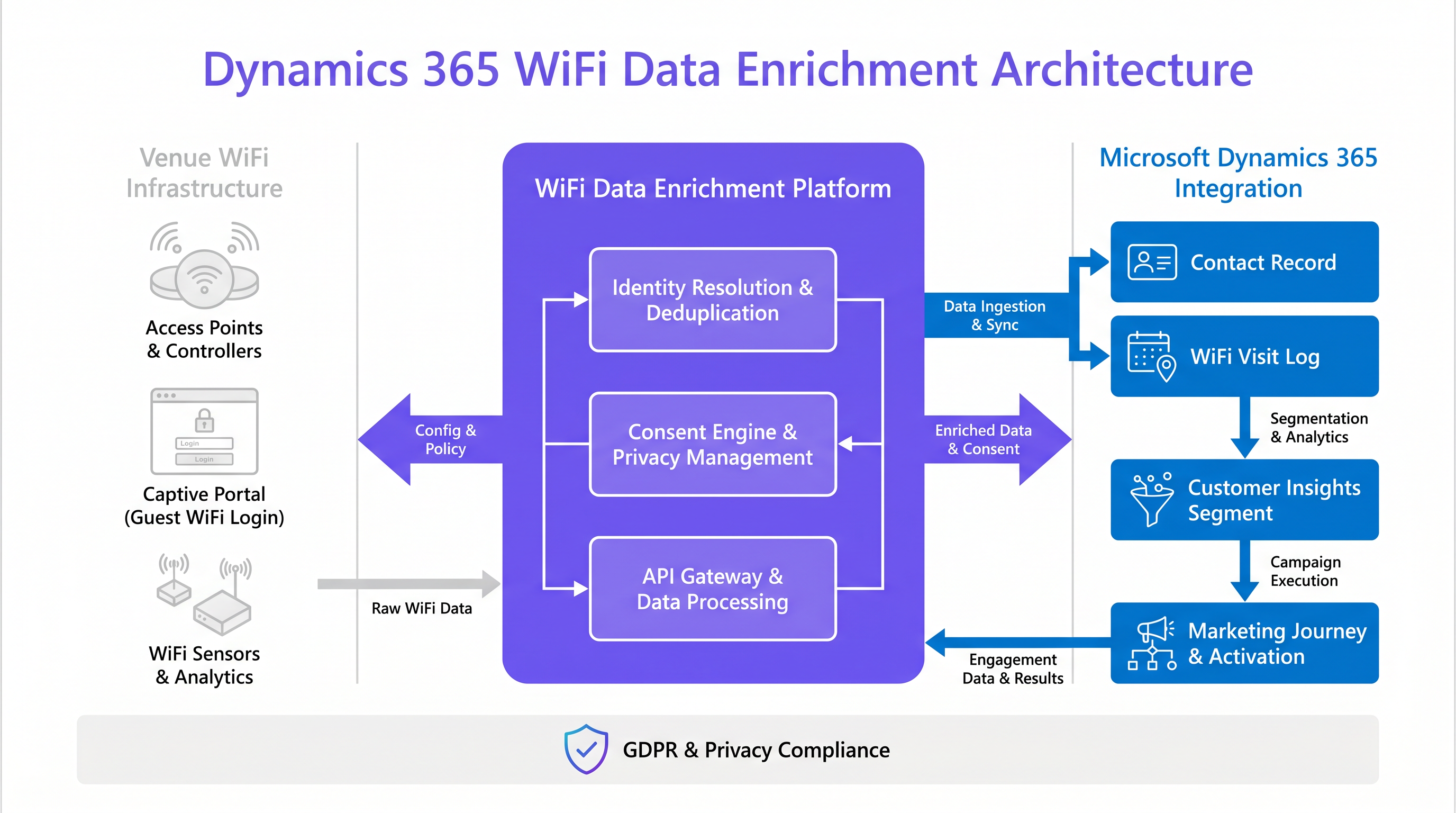
Integrating guest WiFi with Dynamics 365 requires a robust middleware layer to handle identity resolution, deduplication, and payload transformation. The raw data originates at the network edge—from access points and captive portals—and must be processed before it enters the CRM.
The Ingestion Pipeline
When a guest authenticates via the captive portal, the WiFi platform captures their MAC address, the authentication method (e.g., social login, email form), and their explicit consent for marketing. This event triggers a webhook or a REST API call containing a JSON payload.
The critical step here is Identity Resolution. Modern mobile operating systems employ MAC address randomisation to enhance user privacy. Relying solely on the MAC address as a primary key will result in fragmented profiles and inaccurate visit counts. Therefore, the integration must use the authenticated identifier—typically the email address or mobile phone number—as the primary key for matching records in Dynamics 365. The hashed MAC address should only be used as a secondary identifier for session tracking within a single visit.
Two-Tier Entity Structure
A common architectural anti-pattern is attempting to write every single WiFi session directly to the core Contact entity. This approach rapidly bloats the database, degrades CRM performance, and complicates reporting. Instead, a two-tier entity structure is the industry standard for Dynamics CRM WiFi integration:
- The Contact Entity (Master Record): This entity should only be updated when there is a material change to the guest's profile, such as a new email address, an updated phone number, or a change in their GDPR consent status. It can also store aggregated metrics, such as
cr_wifi_visit_countorcr_wifi_avg_dwell, which are useful for rapid segmentation. - The Custom Visit Entity (
cr_wifiVisit): This is a transactional table where each completed WiFi session is recorded as a distinct row. It captures the session start time, end time, duration, and the specific venue or zone (e.g., "Lobby", "Sports Bar"). This entity is linked to theContactentity via a one-to-many (1:N) relationship.
This separation of concerns is vital for leveraging Microsoft Dynamics 365 Customer Insights. By treating the cr_wifiVisit entity as a distinct behavioural data stream, Customer Insights can ingest the logs and build dynamic segments based on physical venue interactions, merging them seamlessly with online purchase history.
Implementation Guide: Field Mapping and Synchronisation
Successful implementation hinges on precise field mapping and a clear understanding of the system of record.
Field Mapping Best Practices
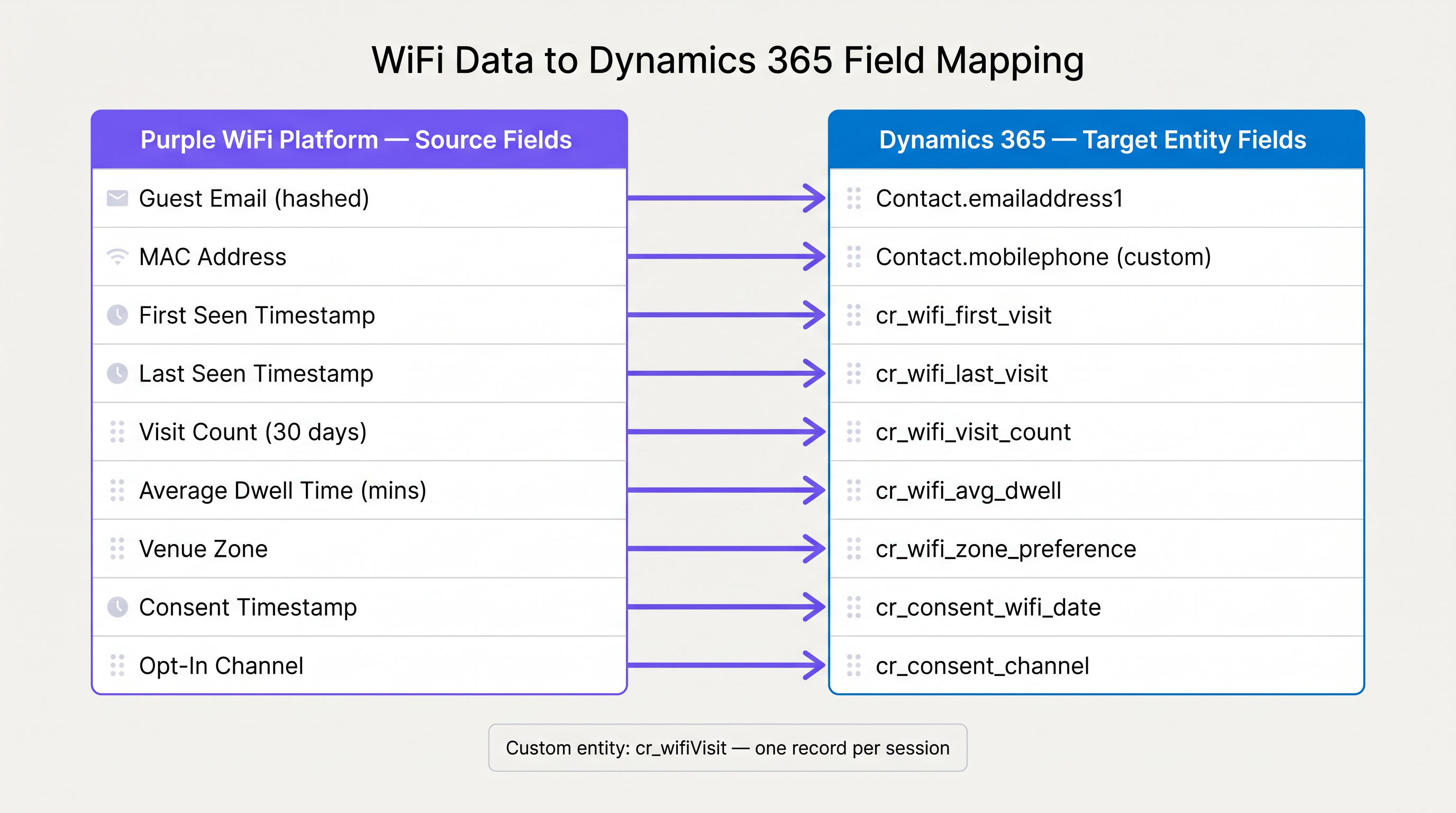
When mapping fields from the Purple platform to Dynamics 365, ensure that data types align and that custom fields are created where necessary.
| Purple WiFi Source Field | Dynamics 365 Target Field | Data Type | Notes |
|---|---|---|---|
| Guest Email | emailaddress1 |
String | Primary key for deduplication. |
| MAC Address (Hashed) | cr_device_mac_hash |
String | Store on the custom visit entity, not the contact. |
| First Seen Timestamp | cr_wifi_first_visit |
DateTime | Update only on the initial creation of the contact. |
| Last Seen Timestamp | cr_wifi_last_visit |
DateTime | Update on every subsequent visit. |
| Consent Timestamp | cr_consent_wifi_date |
DateTime | Crucial for compliance audits. |
| Venue Zone | cr_wifi_zone_preference |
String | Can be aggregated on the contact or logged per visit. |
Synchronisation Strategies: Real-Time vs. Batch
The choice between real-time and batch synchronisation depends entirely on the business use case.
- Real-Time (Webhooks): Essential for in-venue activation. If the marketing team wants to trigger an automated "Welcome back" email or an SMS offer for a free coffee within five minutes of the guest connecting to the network, real-time webhooks are mandatory. This requires robust API gateway management to handle traffic spikes during peak venue hours.
- Batch (OData / Scheduled API Pulls): If the primary goal is long-term WiFi Analytics and weekly segment building, a nightly batch sync is far more efficient. It reduces the API load on Dynamics 365 and allows for data aggregation before insertion.
Best Practices for Compliance and Security
When handling guest data, compliance with frameworks like GDPR and PCI DSS is non-negotiable. For a deeper understanding of compliance, refer to our ISO 27001 Guest WiFi: A Compliance Primer .
- Consent is the System of Record: The captive portal is the point of data capture and the primary system of record for consent. When pushing data to Dynamics 365, the consent timestamp and the specific opt-in channel must be mapped accurately. If a guest later revokes consent via a Dynamics 365 marketing email, that revocation must sync back to the WiFi platform to prevent future tracking.
- Data Minimisation: Only push the data necessary for the defined marketing or operational use cases. Do not push raw, unauthenticated probe requests into the CRM.
- Secure Transit: All data in transit between the WiFi platform and Dynamics 365 must be encrypted using TLS 1.2 or higher. Avoid exposing API keys in client-side code; use secure server-to-server communication. For network-level security considerations, see our guide on DNS Filtering for Guest WiFi .
Troubleshooting & Risk Mitigation
Even with a solid architecture, integrations can fail. Here are the most common failure modes and how to mitigate them.
API Rate Limiting
Dynamics 365 enforces API rate limits to ensure service stability. During a major event at a stadium, thousands of guests might log onto the WiFi simultaneously, triggering a flood of webhooks.
- Mitigation: Implement a message queue (e.g., Azure Service Bus) between the WiFi platform and Dynamics 365. The queue absorbs the spike in traffic and feeds the payloads into Dynamics at a controlled rate that respects the API limits.
Duplicate Contact Creation
If the deduplication logic is flawed, the CRM will quickly fill with duplicate records, destroying the unified customer profile.
- Mitigation: Do not rely solely on Dynamics 365's asynchronous duplicate detection rules for high-volume API inserts. The integration middleware must perform an explicit search (e.g., querying by email address) before executing a create operation. If a match is found, execute an update instead.
MAC Randomisation Skew
As mentioned, MAC randomisation will artificially inflate visit counts if not handled correctly.
- Mitigation: Always prioritise the authenticated identity (email/phone) over the device MAC address. Use MAC addresses only for session continuity within a single 24-hour period, discarding them for long-term identity resolution.
ROI & Business Impact
Integrating Dynamics 365 with guest WiFi data transforms the network from a cost centre into a revenue-generating intelligence asset.
- Marketing Automation Efficiency: By triggering campaigns based on actual physical presence rather than just email opens, conversion rates improve significantly. A retail chain can automatically send a promotional offer to a loyalty member the moment they enter the store.
- Unified Customer Profiles: The integration provides a 360-degree view of the customer, blending e-commerce data with physical world behaviour. This enables Customer Insights to generate highly accurate predictive models for churn and lifetime value.
- Operational Intelligence: Beyond marketing, Wayfinding and dwell time data can inform operational decisions, such as optimising staff schedules based on peak footfall times or redesigning store layouts based on zone popularity.
By implementing the two-tier architecture and adhering to the best practices outlined in this guide, IT leaders can deliver a robust, compliant, and highly valuable data pipeline that empowers the entire organisation.
Key Terms & Definitions
Identity Resolution
The process of matching an anonymous device identifier (like a MAC address) to a known customer profile (like an email address) across multiple systems.
Critical for ensuring that WiFi data enriches the correct Contact record in Dynamics 365 rather than creating duplicates.
MAC Address Randomisation
A privacy feature in modern operating systems (iOS, Android) where the device generates a temporary, random MAC address when probing or connecting to networks.
Forces integrators to rely on authenticated data (captive portal logins) rather than passive network probing for accurate customer tracking.
Two-Tier Entity Architecture
A data modelling approach in Dynamics 365 where master data (Contact) is separated from high-volume transactional data (WiFi Visits) using a 1:N relationship.
Essential for maintaining CRM database performance and enabling clean segmentation in Customer Insights.
OData (Open Data Protocol)
An ISO/IEC approved, OASIS standard that defines a set of best practices for building and consuming RESTful APIs.
The recommended protocol for executing efficient, large-scale batch synchronisation of WiFi visit logs into Dynamics 365.
Webhook
A method of augmenting or altering the behaviour of a web page or web application with custom callbacks, delivering data to other applications as it happens.
Used to push real-time WiFi authentication events to Dynamics 365 for immediate in-venue marketing activation.
Customer Insights
Microsoft's customer data platform (CDP) that unifies data from multiple sources to create a single view of customers and discover insights.
The primary destination for aggregated WiFi visit data to build complex behavioural segments combining online and offline activity.
Captive Portal
A web page that the user of a public-access network is obliged to view and interact with before access is granted.
The primary point of data capture and GDPR consent collection for the Dynamics 365 integration.
Dwell Time
The duration of time a guest spends connected to the network or within a specific physical zone.
A key metric pushed to Dynamics 365 to measure venue engagement and trigger duration-based marketing campaigns.
Case Studies
A 200-room hotel needs to trigger a personalised 'Welcome to the Spa' SMS via Dynamics 365 Marketing when a VIP guest connects to the WiFi in the wellness zone.
- Configure the Purple platform to tag the access points in the wellness area with the zone 'Spa'.
- Set up a real-time webhook in Purple that fires on the 'Authentication Success' event, filtering for the 'Spa' zone.
- The webhook payload is sent to an Azure Logic App. The Logic App parses the payload, extracts the guest's email and MAC address.
- The Logic App queries Dynamics 365 by email to verify the guest's VIP status and check their marketing consent flag.
- If the guest is a VIP and has consented, the Logic App creates a new record in the
cr_wifiVisitcustom entity and triggers a specific Dynamics 365 Marketing Journey that sends the SMS.
A retail chain with 50 locations wants to build a segment in Dynamics 365 Customer Insights of 'Lapsed In-Store Shoppers' (customers who bought online recently but haven't visited a physical store in 90 days).
- Implement a nightly batch sync (via OData) from the WiFi platform to Dynamics 365.
- The sync updates the
cr_wifi_last_visitfield on the coreContactentity for all guests who connected that day. - In Dynamics 365 Customer Insights, ingest the
Contactentity as a data source. - Create a segment rule:
Condition 1: Last_Online_Purchase_Date < 30 days agoANDCondition 2: cr_wifi_last_visit > 90 days ago. - Export this segment to Dynamics 365 Marketing for a targeted re-engagement email campaign.
Scenario Analysis
Q1. Your marketing team wants to send an email to any customer who has visited the flagship store more than 5 times this month but hasn't purchased anything online. How should you architect the data flow to support this without overloading the CRM?
💡 Hint:Consider the Two-Tier Entity Architecture and the role of Customer Insights.
Show Recommended Approach
Do not write every visit to the Contact entity. Instead, use a nightly batch sync to push visit logs to a custom cr_wifiVisit entity linked to the Contact. Then, use Dynamics 365 Customer Insights to ingest both the custom visit entity and the e-commerce purchase history. Build a segment in Customer Insights combining the two criteria (cr_wifiVisit count > 5 AND online purchases = 0) and export that segment to Dynamics 365 Marketing.
Q2. During a load-testing exercise, your middleware (Azure Logic Apps) starts receiving HTTP 429 (Too Many Requests) errors from the Dynamics 365 API. What is the most appropriate architectural fix?
💡 Hint:Think about how to decouple the real-time network events from the API insertion process.
Show Recommended Approach
Implement a message queue, such as Azure Service Bus, between the webhook receiver and the Dynamics 365 API connector. The webhook writes the payload to the queue immediately, and a separate process reads from the queue and inserts the records into Dynamics 365 at a controlled rate that respects the API limits.
Q3. A guest logs into the WiFi using their email address and accepts the marketing consent. Three weeks later, they click 'Unsubscribe' on a marketing email sent from Dynamics 365. What must happen at the integration layer?
💡 Hint:Consider the system of record and compliance requirements.
Show Recommended Approach
The integration must be bidirectional for consent. When the 'Unsubscribe' event occurs in Dynamics 365, a webhook or automated flow must trigger an API call back to the Purple WiFi platform to update the guest's profile and revoke their marketing consent flag. This ensures that future WiFi logins do not inadvertently re-subscribe the user or trigger non-compliant marketing actions.
Key Takeaways
- ✓Guest WiFi integration bridges the gap between physical venue behaviour and digital CRM profiles.
- ✓Implement a two-tier entity structure: use the core Contact entity for master data and a custom entity for high-volume visit logs.
- ✓Always use the authenticated identifier (email/phone) for deduplication, not the MAC address, due to device randomisation.
- ✓Use real-time webhooks for immediate in-venue marketing activation, and batch OData syncs for long-term analytics.
- ✓Ensure bidirectional synchronisation of GDPR consent flags between the WiFi platform and Dynamics 365.
- ✓Utilise a message queue (e.g., Azure Service Bus) to protect the Dynamics 365 API from rate-limiting during peak venue hours.
- ✓Feed custom visit entities into Dynamics 365 Customer Insights to build advanced, omnichannel behavioural segments.




