

802.11ac (WiFi 5): विशेषताओं, प्रदर्शन और परिनियोजन रणनीतियों का एक तकनीकी गहन विश्लेषण
यह व्यापक तकनीकी मार्गदर्शिका 802.11ac (WiFi 5) मानक का गहन विश्लेषण प्रदान करती है, जिसमें इसकी वास्तुकला, प्रदर्शन विशेषताओं और व्यावहारिक परिनियोजन रणनीतियों का विवरण दिया गया है। यह IT प्रबंधकों और नेटवर्क आर्किटेक्ट्स को मौजूदा बुनियादी ढांचे को अनुकूलित करने, उच्च-घनत्व वाले वातावरण को प्रबंधित करने और भविष्य के अपग्रेड के संबंध में साक्ष्य-आधारित निर्णय लेने के लिए आवश्यक ज्ञान से लैस करती है।
🎧 Listen to this Guide
View Transcript
कार्यकारी सारांश
जबकि नए वायरलेस मानक उद्योग चर्चा पर हावी हैं, 802.11ac (WiFi 5) विश्व स्तर पर अधिकांश उद्यम वातावरणों के लिए मूलभूत बुनियादी ढांचा बना हुआ है। विशाल खुदरा श्रृंखलाओं से लेकर उच्च-घनत्व वाले आतिथ्य स्थलों तक, यह मानक मिशन-महत्वपूर्ण कार्यभार को संभालना जारी रखता है। हालांकि, विक्रेता डेटाशीट्स में अक्सर उद्धृत सैद्धांतिक प्रदर्शन मेट्रिक्स को प्राप्त करने के लिए मानक की अंतर्निहित वास्तुकला की गहन समझ की आवश्यकता होती है, विशेष रूप से 5 GHz बैंड, मल्टी-यूज़र MIMO (MU-MIMO), और जटिल मॉड्यूलेशन योजनाओं पर इसकी निर्भरता।
यह मार्गदर्शिका 802.11ac का एक निश्चित तकनीकी विश्लेषण प्रदान करती है, जिसे विशेष रूप से IT नेताओं, नेटवर्क आर्किटेक्ट्स और स्थल संचालन निदेशकों के लिए डिज़ाइन किया गया है। यह अकादमिक सिद्धांत से परे जाकर कार्रवाई योग्य परिनियोजन रणनीतियाँ, जोखिम शमन ढाँचे और स्पष्ट ROI विचार प्रदान करती है। चैनल नियोजन, स्थानिक धाराओं और क्लाइंट घनत्व प्रबंधन की बारीकियों में महारत हासिल करके, संगठन महंगे बुनियादी ढांचे के नवीनीकरण के लिए प्रतिबद्ध होने से पहले अपने मौजूदा WiFi 5 निवेशों के जीवनकाल और प्रदर्शन को अधिकतम कर सकते हैं।
तकनीकी गहन विश्लेषण
वास्तुशिल्प नींव
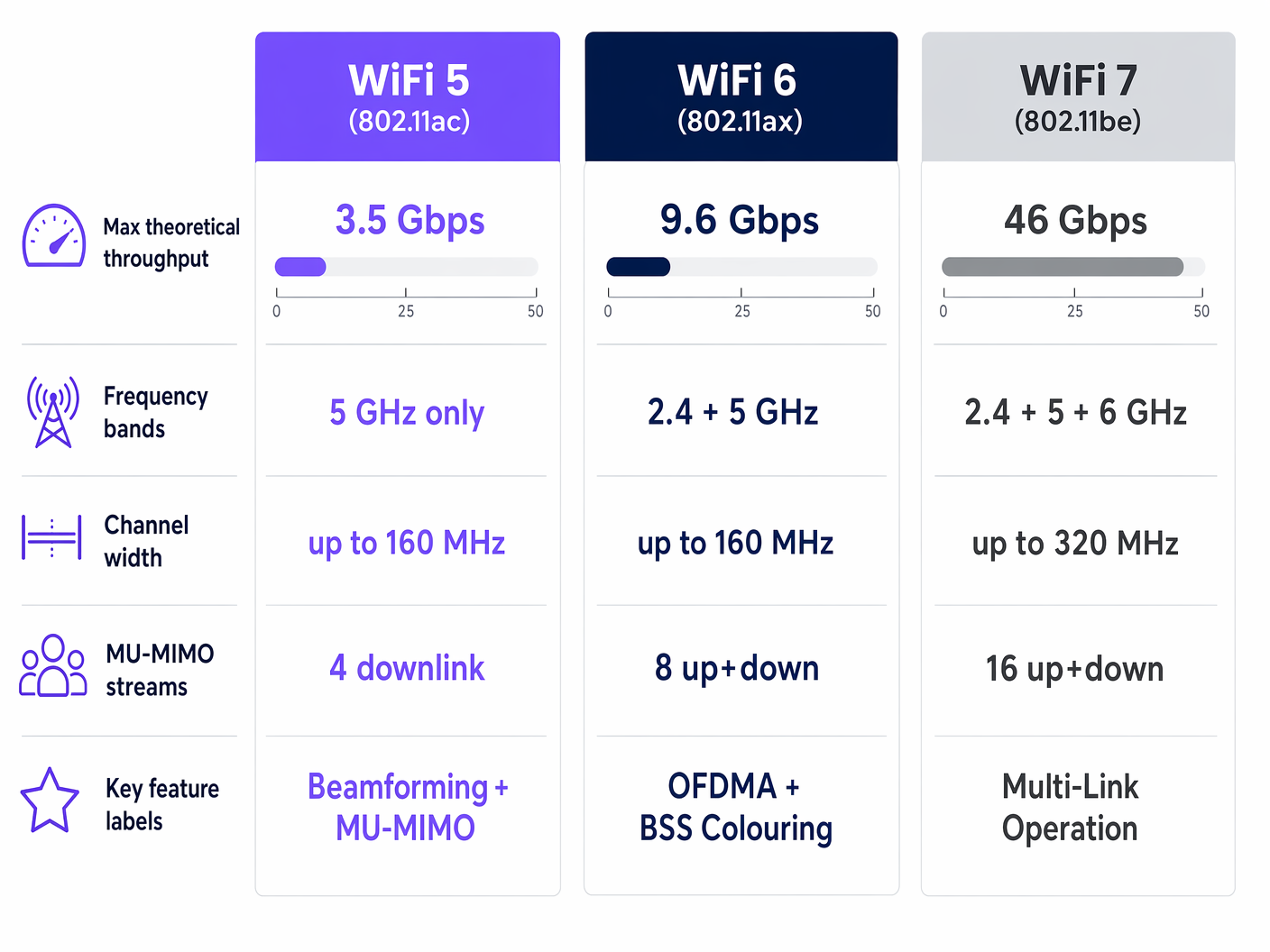
दिसंबर 2013 में IEEE द्वारा अनुमोदित, 802.11ac ने वायरलेस नेटवर्किंग में एक प्रतिमान बदलाव का प्रतिनिधित्व किया, जो 802.11n के दोहरे-बैंड दृष्टिकोण से हटकर विशेष रूप से 5 GHz आवृत्ति बैंड के भीतर संचालित होने लगा। यह मौलिक डिज़ाइन विकल्प काफी उच्च डेटा दरों का समर्थन करने के लिए व्यापक, सन्निहित चैनलों की आवश्यकता से प्रेरित था। 5 GHz स्पेक्ट्रम गैर-अतिव्यापी चैनलों की एक बड़ी संख्या प्रदान करता है, जो भीड़भाड़ वाले 2.4 GHz बैंड को प्रभावित करने वाले गंभीर सह-चैनल हस्तक्षेप को कम करता है।
मानक को मोटे तौर पर दो हार्डवेयर पीढ़ियों में वर्गीकृत किया गया है: वेव 1 और वेव 2। वेव 1 एक्सेस पॉइंट (APs), जो शुरू में पेश किए गए थे, आमतौर पर तीन स्थानिक धाराओं और 80 MHz तक की चैनल चौड़ाई का समर्थन करते हैं, जो 1.3 Gbps की अधिकतम सैद्धांतिक थ्रूपुट प्रदान करते हैं। वेव 2, जिसे लगभग 2015 में पेश किया गया था, पूरी तरह से साकार मानक का प्रतिनिधित्व करता है, जिसमें चौथी स्थानिक धारा, 160 MHz चैनलों और महत्वपूर्ण रूप से, MU-MIMO तकनीक के लिए समर्थन जोड़ा गया है, जिससे सैद्धांतिक अधिकतम 3.5 Gbps तक पहुंच गया है।
मल्टी-यूज़र MIMO (MU-MIMO)
802.11ac वेव 2 से पहले, एक्सेस पॉइंट सिंगल-यूज़र MIMO (SU-MIMO) का उपयोग करके संचालित होते थे। इस मोड में, AP किसी भी दिए गए माइक्रोसेकंड में केवल एक क्लाइंट डिवाइस के साथ संचार करता है। उच्च-घनत्व वाले वातावरणों में—जैसे कि एक स्टेडियम का गलियारा या एक व्यस्त खुदरा तल—यह अनुक्रमिक प्रसंस्करण एक बाधा उत्पन्न करता है, जिससे उपकरणों के एयरटाइम के लिए कतार में लगने पर विलंबता बढ़ जाती है।
MU-MIMO AP को विभिन्न स्थानिक धाराओं में एक साथ कई क्लाइंट डिवाइसों को डेटा प्रसारित करने की अनुमति देकर इसे हल करता है। एक 802.11ac वेव 2 AP एक साथ चार क्लाइंट तक प्रसारित कर सकता है। यह परिष्कृत ट्रांसमिट बीमफॉर्मिंग के माध्यम से प्राप्त किया जाता है, जहाँ AP प्रत्येक क्लाइंट के लिए RF पथ की गणना करता है और उनके बीच हस्तक्षेप को कम करने के लिए स्थानिक धाराओं को सटीक रूप से निर्देशित करता है।
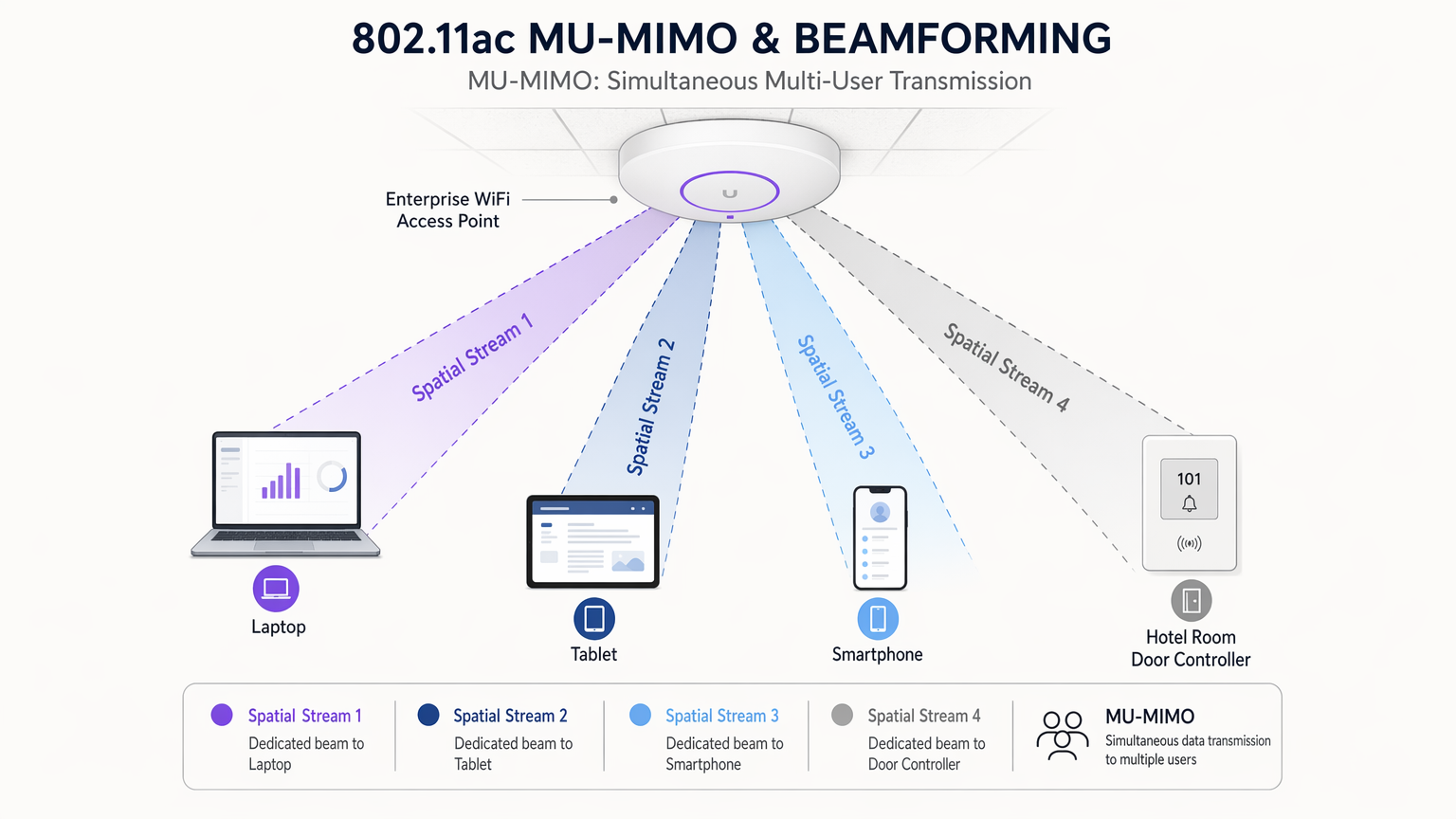
यह ध्यान रखना महत्वपूर्ण है कि 802.11ac MU-MIMO केवल डाउनलिंक है। AP एक साथ कई क्लाइंट को डेटा भेज सकता है, लेकिन क्लाइंट को अभी भी AP को क्रमिक रूप से वापस प्रसारित करना होगा। इस सीमा का मतलब है कि जबकि डाउनस्ट्रीम-भारी एप्लिकेशन (जैसे वीडियो स्ट्रीमिंग) में भारी सुधार होता है, अपस्ट्रीम-भारी कार्यभार (जैसे सैकड़ों उपयोगकर्ता क्लाउड सर्वर पर फ़ाइलें अपलोड करना) अभी भी प्रतिस्पर्धा का अनुभव करेंगे।
चैनल चौड़ाई और मॉड्यूलेशन
802.11ac आंशिक रूप से चैनलों को एक साथ जोड़कर अपनी उच्च थ्रूपुट प्राप्त करता है। यह 20, 40, 80 और वैकल्पिक रूप से 160 MHz की चैनल चौड़ाई का समर्थन करता है। एक 80 MHz चैनल डेटा ट्रांसमिशन के लिए एक व्यापक 'पाइप' प्रदान करके 40 MHz चैनल के थ्रूपुट को प्रभावी ढंग से दोगुना कर देता है। हालांकि, व्यापक चैनल उपलब्ध 5 GHz स्पेक्ट्रम का अधिक उपभोग करते हैं, जिससे परिनियोजन के लिए उपलब्ध स्वतंत्र चैनलों की कुल संख्या कम हो जाती है। घने उद्यम वातावरणों में, 160 MHz चैनलों को तैनात करने से अक्सर अपरिहार्य सह-चैनल हस्तक्षेप (CCI) होता है, जो समग्र नेटवर्क प्रदर्शन को गंभीर रूप से खराब करता है।
इसके अलावा, 802.11ac ने 256-QAM (क्वाड्रैचर एम्प्लीट्यूड मॉड्यूलेशन) पेश किया। 802.11n में उपयोग किए गए 64-QAM की तुलना में, 256-QAM प्रति प्रतीक 6 के बजाय 8 बिट्स को एन्कोड करता है, जिससे वर्णक्रमीय दक्षता में 33% की वृद्धि होती है। समझौता संवेदनशीलता है: 256-QAM को एक असाधारण रूप से स्वच्छ RF वातावरण और एक उच्च सिग्नल-टू-नॉइज़ अनुपात (SNR) की आवश्यकता होती है। व्यवहार में, क्लाइंट केवल तभी 256-QAM मॉड्यूलेशन दर प्राप्त करेंगे जब वे AP के अपेक्षाकृत करीब हों और महत्वपूर्ण हस्तक्षेप से मुक्त हों।
कार्यान्वयन मार्गदर्शिका
कवरेज पर क्षमता नियोजन
802.11ac परिनियोजन में सबसे आम वास्तुशिल्प त्रुटि क्लाइंट क्षमता के बजाय RF कवरेज के लिए डिज़ाइन करना है। जबकि एक एकल AP एक बड़े सम्मेलन हॉल में एक उपयोगी सिग्नल प्रोजेक्ट कर सकता है, यह गंभीर प्रदर्शन गिरावट के बिना 200 उपकरणों के एक साथ कनेक्शन का समर्थन नहीं कर सकता है।
कार्यवाही योग्य रणनीति: सक्रिय क्लाइंट गणना के आधार पर अपने नेटवर्क को डिज़ाइन करें। विशिष्ट उद्यम कार्यभार के लिए, प्रति रेडियो अधिकतम 30-40 सक्रिय क्लाइंट को लक्षित करें। उच्च-घनत्व वाले परिदृश्यों में (उदाहरण के लिए, एक विश्वविद्यालय व्याख्यान थिएटर), इस संख्या को 20-25 तक कम किया जाना चाहिए। इसके लिए छोटे, सघन माइक्रो-सेल बनाने के लिए कम ट्रांसमिट पावर स्तरों पर अधिक APs तैनात करने की आवश्यकता होती है।
रणनीतिक चैनल आवंटन
प्रभावी चैनल नियोजन एक स्थिर 802.11ac नेटवर्क। क्योंकि यह मानक अधिकतम प्रदर्शन के लिए 80 MHz चैनलों पर बहुत अधिक निर्भर करता है, उपलब्ध स्पेक्ट्रम तेज़ी से उपयोग हो जाता है।
कार्रवाई योग्य रणनीति:
- मौजूदा हस्तक्षेप स्रोतों की पहचान करने के लिए एक कठोर RF साइट सर्वेक्षण करें।
- DFS (डायनामिक फ़्रीक्वेंसी सिलेक्शन) चैनलों का लाभ उठाएं। ये चैनल (आमतौर पर UNII-2 और UNII-2 एक्सटेंडेड) काफी अधिक स्पेक्ट्रम प्रदान करते हैं, लेकिन AP को रडार सिग्नेचर की निगरानी करने और रडार का पता चलने पर चैनल बदलने की आवश्यकता होती है। यदि आपका स्थान किसी हवाई अड्डे या मौसम स्टेशन के पास नहीं है, तो भीड़भाड़ से बचने के लिए DFS चैनल अमूल्य हैं।
- 40 MHz या 80 MHz चैनलों पर मानकीकरण करें। मल्टी-AP डिप्लॉयमेंट में 160 MHz चैनलों से बचें, जब तक कि आप पूर्ण RF आइसोलेशन में काम न कर रहे हों।
सुरक्षा आर्किटेक्चर और अनुपालन
एंटरप्राइज़ डिप्लॉयमेंट के लिए, AES-CCMP एन्क्रिप्शन का उपयोग करने वाला WPA2-Enterprise (802.1X/EAP) मानक आधारशिला बना हुआ है। हालांकि, RADIUS इंफ्रास्ट्रक्चर के खिलाफ परिष्कृत हमलों में वृद्धि के लिए एक मजबूत दृष्टिकोण की आवश्यकता है।
कार्रवाई योग्य रणनीति: सुनिश्चित करें कि आपके RADIUS सर्वर पैच किए गए हैं और लेगेसी प्रमाणीकरण प्रोटोकॉल (जैसे MS-CHAPv1 या LEAP) को अस्वीकार करने के लिए कॉन्फ़िगर किए गए हैं। प्रमाणीकरण इंफ्रास्ट्रक्चर को सुरक्षित करने के व्यापक विवरण के लिए, RADIUS कमजोरियों को कम करना: एक सुरक्षा सुदृढ़ीकरण गाइड पर हमारी गाइड देखें।
सार्वजनिक एक्सेस नेटवर्क डिप्लॉय करते समय, जैसे Guest WiFi Retail या Hospitality वातावरण में, ट्रैफ़िक को समर्पित VLANs पर सेगमेंट करें। गेस्ट डिवाइसों के बीच पार्श्व गति को रोकने के लिए क्लाइंट आइसोलेशन लागू करें, और सुनिश्चित करें कि आपका Captive Portal स्थानीय डेटा गोपनीयता नियमों (जैसे GDPR) का अनुपालन करता है।
सर्वोत्तम अभ्यास
- डुअल-बैंड डिप्लॉयमेंट अनिवार्य है: क्योंकि 802.11ac केवल 5 GHz है, आपको लेगेसी डिवाइस और IoT सेंसर को समायोजित करने के लिए डुअल-बैंड APs (2.4 GHz पर 802.11n का समर्थन करने वाले) को डिप्लॉय करना होगा। सक्षम क्लाइंट्स को 5 GHz स्पेक्ट्रम पर धकेलने के लिए बैंड-स्टीयरिंग सक्षम करना सुनिश्चित करें।
- 802.11r, 802.11k, और 802.11v सक्षम करें: ये रोमिंग प्रोटोकॉल मोबाइल क्लाइंट्स (जैसे VoIP फ़ोन या बारकोड स्कैनर) के लिए महत्वपूर्ण हैं। वे तेज़ BSS ट्रांज़िशन की सुविधा प्रदान करते हैं और क्लाइंट्स को पड़ोसी रिपोर्ट प्रदान करते हैं, जिससे सेशन ड्रॉप के बिना APs के बीच निर्बाध हैंडऑफ़ सुनिश्चित होते हैं।
- ट्रांसमिट पावर का ऑडिट करें: APs को कभी भी 'अधिकतम' ट्रांसमिट पावर पर न छोड़ें। इससे असममित रूटिंग समस्याएँ उत्पन्न होती हैं जहाँ एक क्लाइंट AP को 'सुन' सकता है, लेकिन AP क्लाइंट के छोटे एंटीना से कमजोर ट्रांसमिशन को नहीं सुन सकता। AP की ट्रांसमिट पावर को आपके क्लाइंट डिवाइसों की औसत क्षमता (आमतौर पर 12-15 dBm) से मिलाएं।
समस्या निवारण और जोखिम न्यूनीकरण
'स्टिकी क्लाइंट' समस्या
लक्षण: एक डिवाइस कमजोर सिग्नल के साथ एक दूरस्थ AP से जुड़ा रहता है, भले ही एक नज़दीकी AP उपलब्ध हो, जिसके परिणामस्वरूप उस उपयोगकर्ता के लिए खराब प्रदर्शन होता है और AP कम डेटा दरों पर संचार करने में अत्यधिक एयरटाइम खर्च करने के कारण समग्र सेल प्रदर्शन को कम करता है।
शमन: न्यूनतम अनिवार्य डेटा दरें लागू करें। सबसे कम डेटा दरों (जैसे 2.4 GHz पर 1, 2, 5.5, और 11 Mbps; 5 GHz पर 6 और 9 Mbps) को अक्षम करके, आप क्लाइंट्स को सिग्नल खराब होने पर कनेक्शन छोड़ने के लिए मजबूर करते हैं, जिससे वे एक नज़दीकी AP पर रोम करने के लिए प्रेरित होते हैं।
को-चैनल इंटरफेरेंस (CCI)
लक्षण: मजबूत सिग्नल शक्ति के बावजूद उच्च चैनल उपयोग और खराब थ्रूपुट। यह तब होता है जब एक ही चैनल पर कई AP एक-दूसरे को सुन सकते हैं, जिससे वे टकराव से बचने के लिए ट्रांसमिशन को स्थगित कर देते हैं।
शमन: उपलब्ध गैर-ओवरलैपिंग चैनलों की संख्या बढ़ाने के लिए चैनल की चौड़ाई कम करें (जैसे 80 MHz से 40 MHz)। सेल के आकार को कम करने और आसन्न APs के बीच ओवरलैप को कम करने के लिए AP ट्रांसमिट पावर कम करें।
ROI और व्यावसायिक प्रभाव
अपने इंफ्रास्ट्रक्चर का मूल्यांकन करने वाले IT निदेशकों के लिए, 802.11ac नेटवर्क को बनाए रखने या WiFi 6 (802.11ax) या WiFi 7 में अपग्रेड करने का निर्णय केवल तकनीकी विशिष्टताओं के बजाय मापने योग्य व्यावसायिक परिणामों पर आधारित होना चाहिए।
यदि आपकी वर्तमान डिप्लॉयमेंट में वेव 2 हार्डवेयर शामिल है और आपके प्राथमिक उपयोग के मामलों में मानक एंटरप्राइज़ एप्लिकेशन और गेस्ट इंटरनेट एक्सेस शामिल हैं, तो एक अच्छी तरह से अनुकूलित 802.11ac नेटवर्क अगले 2-3 वर्षों तक संचालन को आराम से समर्थन दे सकता है। इस परिदृश्य में ROI पूंजीगत व्यय को स्थगित करने से आता है, जबकि मौजूदा इंफ्रास्ट्रक्चर से अधिक मूल्य निकालने के लिए WiFi Analytics जैसे उन्नत एनालिटिक्स प्लेटफॉर्म का उपयोग किया जाता है।
इसके विपरीत, यदि आपका स्थान—जैसे एक बड़ा Transport हब या स्टेडियम—उच्च क्लाइंट घनत्व के कारण लगातार बाधाओं का सामना कर रहा है या महत्वपूर्ण अपलिंक क्षमता की आवश्यकता है, तो समस्या निवारण और खराब उपयोगकर्ता अनुभव की परिचालन लागत अपग्रेड की लागत से तेज़ी से अधिक हो जाएगी। इन विशिष्ट उच्च-घनत्व वाले वातावरणों में, WiFi 6 की OFDMA क्षमताएं एक आकर्षक और तत्काल निवेश पर रिटर्न प्रदान करती हैं।
Key Terms & Definitions
MU-MIMO (Multi-User Multiple Input Multiple Output)
A technology that allows an access point to transmit data to multiple client devices simultaneously using separate spatial streams.
Critical for improving efficiency in high-density environments like conference centres, though in 802.11ac, this is limited to downlink traffic only.
QAM (Quadrature Amplitude Modulation)
A method of encoding data onto a radio wave. 802.11ac uses 256-QAM, which packs more data into each transmission compared to older standards.
Higher QAM rates require excellent signal quality. If the environment is noisy, devices will fall back to lower modulation rates, reducing throughput.
Spatial Streams
Independent data signals transmitted simultaneously from multiple antennas on the same frequency channel.
More spatial streams mean higher potential throughput. Wave 2 APs typically support four spatial streams (4x4:4).
Beamforming
A signal processing technique used to direct the RF energy toward a specific client device rather than broadcasting it omnidirectionally.
Improves signal strength and range for devices at the edge of the AP's coverage cell, enabling higher data rates.
Co-Channel Interference (CCI)
Interference caused when two or more access points operate on the same frequency channel and can 'hear' each other.
The primary cause of poor performance in dense deployments. Mitigated by careful channel planning and reducing transmit power.
DFS (Dynamic Frequency Selection)
A mechanism that allows WiFi devices to use 5 GHz channels that are shared with radar systems, provided the WiFi device vacates the channel if radar is detected.
Essential for unlocking additional spectrum in the 5 GHz band to support multiple 40 MHz or 80 MHz channels.
Band Steering
A feature that encourages dual-band client devices to connect to the less congested 5 GHz band rather than the crowded 2.4 GHz band.
Crucial for maximising the performance benefits of 802.11ac, as the standard operates exclusively on 5 GHz.
802.11r (Fast BSS Transition)
An IEEE standard that allows a client device to roam quickly and securely from one AP to another without needing to re-authenticate with the RADIUS server.
Vital for environments using WPA2-Enterprise where mobile devices (like VoIP phones) require uninterrupted connectivity while moving.
Case Studies
A 300-room corporate hotel is experiencing widespread complaints regarding WiFi speeds during the evening peak hours (7 PM - 10 PM). The current infrastructure utilises 802.11ac Wave 1 APs deployed in the corridors, configured with 80 MHz channels and maximum transmit power. How should the IT team remediate this?
- Redesign AP Placement: Move APs from the corridors into the guest rooms to overcome the attenuation caused by fire doors and en-suite bathrooms.
- Adjust Channel Widths: Reduce channel width from 80 MHz to 40 MHz. This doubles the available non-overlapping channels, drastically reducing Co-Channel Interference (CCI) between adjacent rooms.
- Optimise Transmit Power: Reduce the AP transmit power from maximum to approximately 12-14 dBm to match typical smartphone transmission capabilities and contain the RF cell within the intended coverage area.
- Enable Band Steering: Force 5 GHz-capable devices off the congested 2.4 GHz band.
A large retail chain is deploying a new fleet of handheld inventory scanners that rely on continuous connection to a central database. Staff report that the scanners frequently disconnect and lose data when moving between aisles. The network is running 802.11ac Wave 2.
- Enable Roaming Protocols: Activate 802.11r (Fast BSS Transition) and 802.11k (Radio Resource Measurement) on the WLAN controller.
- Implement Minimum Data Rates: Disable legacy data rates (1, 2, 5.5, 11 Mbps) to prevent 'sticky clients' from holding onto distant APs.
- Verify Coverage Overlap: Conduct an active survey to ensure a minimum of -67 dBm primary coverage and -70 dBm secondary coverage in all aisles, providing clients with viable roaming targets.
Scenario Analysis
Q1. You are designing the WiFi infrastructure for a new university lecture hall that seats 400 students. The university standardises on 802.11ac Wave 2 hardware. Assuming each student brings two devices (a laptop and a smartphone), how should you approach AP placement and channel configuration?
💡 Hint:Consider the maximum client capacity per radio and the availability of non-overlapping channels in the 5 GHz band.
Show Recommended Approach
With 800 potential devices, capacity is the primary constraint. Targeting 30 devices per radio, you require approximately 27 AP radios. To achieve this density without catastrophic Co-Channel Interference (CCI), you must use narrow 20 MHz channels to maximise the number of available non-overlapping channels (including DFS channels). APs should be deployed using directional patch antennas mounted overhead or under-seat to create tightly focused micro-cells, and transmit power must be set to minimum levels.
Q2. A network monitoring dashboard shows that an 802.11ac AP in a busy hospital waiting area is experiencing 80% channel utilisation, yet average throughput per client is less than 2 Mbps. The AP is configured for 80 MHz channels. What is the most likely cause, and what is the immediate remediation?
💡 Hint:High utilisation with low throughput often indicates that the AP is spending excessive time waiting or transmitting at very low data rates.
Show Recommended Approach
The most likely cause is Co-Channel Interference (CCI) combined with clients connecting at the cell edge. The wide 80 MHz channel is likely overlapping with adjacent APs, causing devices to defer transmissions. The immediate remediation is to reduce the channel width to 40 MHz (or even 20 MHz) to find clean spectrum, and to implement Minimum Mandatory Data Rates (disabling rates below 12 Mbps) to force distant 'sticky' clients to roam to closer APs.
Q3. During a security audit, a penetration tester successfully captures a WPA2-Enterprise handshake from your 802.11ac network. What specific configuration on the RADIUS server would prevent this captured handshake from being cracked offline?
💡 Hint:Consider the authentication protocols used within the EAP tunnel.
Show Recommended Approach
The RADIUS server must be configured to enforce EAP-TLS or PEAP-MSCHAPv2, ensuring that legacy, vulnerable protocols like LEAP or unprotected MS-CHAPv1 are explicitly disabled. Furthermore, ensuring that client devices are strictly configured to validate the RADIUS server's digital certificate prevents rogue APs from capturing the handshake in the first place.




