

Mitigating RADIUS Vulnerabilities: A Security Hardening Guide
This guide provides a comprehensive, actionable reference for IT managers, network architects, and CTOs responsible for enterprise WiFi infrastructure across hospitality, retail, events, and public-sector environments. It covers the full attack surface of RADIUS server deployments — from MD5 collision vulnerabilities and weak shared secrets to unencrypted UDP transport and misconfigured EAP methods — and delivers a prioritised hardening roadmap aligned with IEEE 802.1X, PCI DSS, and GDPR requirements. Organisations that implement these recommendations will materially reduce their exposure to credential-based network attacks, meet compliance obligations, and build a defensible security posture for their guest and corporate WiFi infrastructure.
🎧 Listen to this Guide
View Transcript

Executive Summary
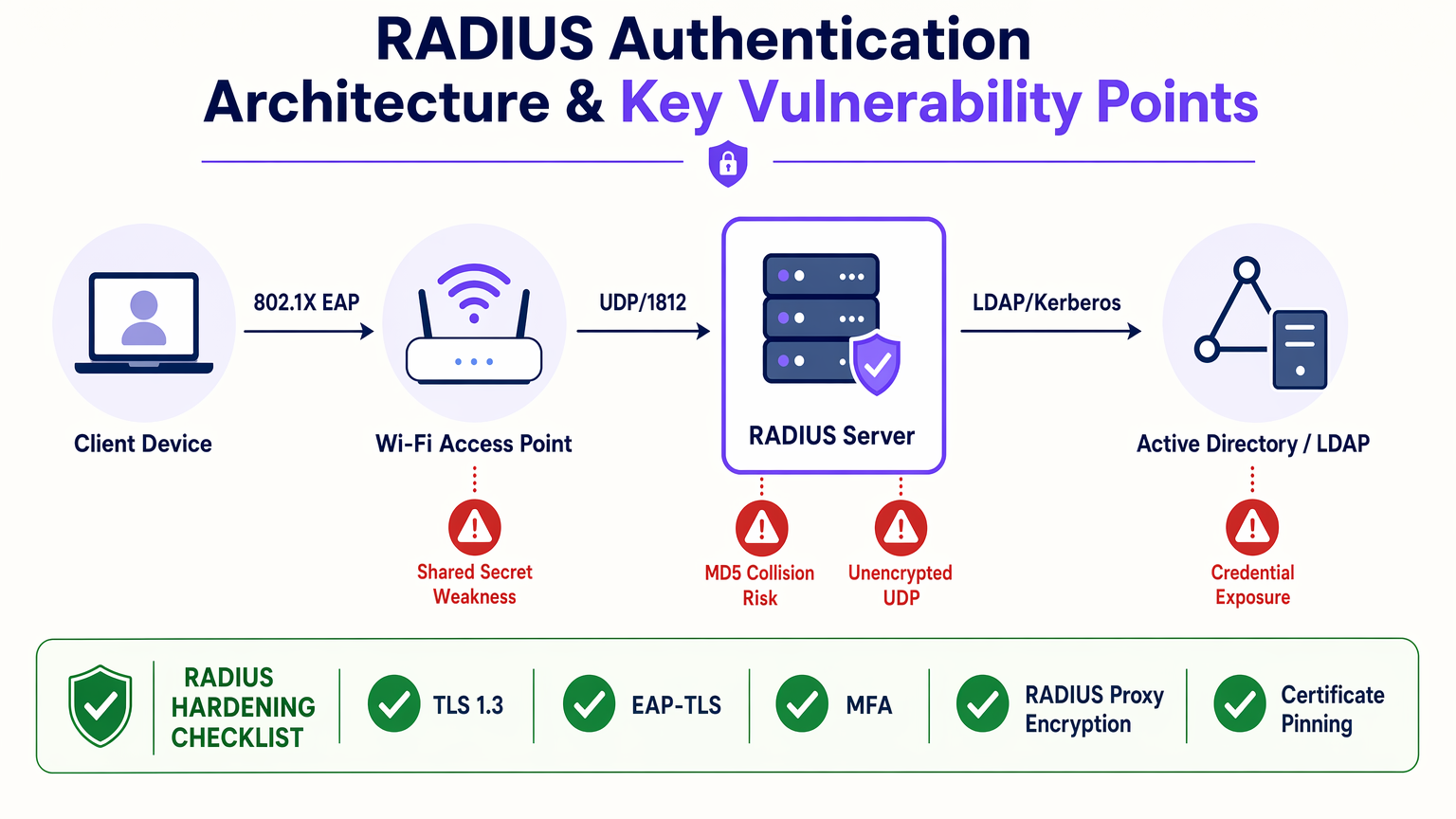
RADIUS (Remote Authentication Dial-In User Service) remains the dominant protocol for network access control across enterprise WiFi deployments, underpinning IEEE 802.1X authentication in hotels, retail estates, stadiums, conference centres, and public-sector buildings. However, RADIUS was architected in the 1990s, and several of its foundational design decisions — reliance on MD5 hashing, UDP transport without native encryption, and static shared secrets — have become material liabilities in the current threat environment.
In July 2024, the BlastRADIUS vulnerability (CVE-2024-3596) demonstrated that a man-in-the-middle attacker can forge RADIUS Access-Accept responses by exploiting the MD5 integrity weakness in Access-Request packets. This affects all major RADIUS implementations including FreeRADIUS, Cisco ISE, and Microsoft NPS. Unpatched deployments remain exposed.
This guide provides a prioritised hardening roadmap covering patch management, shared secret hygiene, EAP method selection, RadSec deployment, multi-factor authentication for administrative access, and SIEM integration for anomaly detection. It is written for the IT professional who needs to make a defensible decision this quarter, not next year.
Technical Deep-Dive
How RADIUS Works and Where It Breaks
RADIUS operates as a client-server protocol between a Network Access Server (NAS) — typically a WiFi access point, switch, or VPN concentrator — and a RADIUS server that validates credentials against a backend identity store such as Active Directory or LDAP. The authentication exchange follows a request-challenge-response model defined in RFC 2865, with accounting handled separately under RFC 2866.
The protocol transmits authentication packets over UDP, port 1812 for authentication and port 1813 for accounting. The shared secret — a pre-shared key configured on both the NAS and the RADIUS server — is used to generate the Response Authenticator field and to obfuscate the User-Password attribute via an MD5-based XOR cipher. This is not encryption in any modern sense; it is obfuscation, and it depends entirely on the secrecy and strength of the shared secret.
The five primary vulnerability classes in a typical RADIUS deployment are as follows.
MD5 Collision and Integrity Vulnerabilities. The BlastRADIUS attack (CVE-2024-3596) exploits the absence of integrity protection on Access-Request packets. Because the NAS does not include a Message-Authenticator attribute by default in many configurations, an attacker with a man-in-the-middle position can inject a crafted attribute into the packet before it reaches the RADIUS server. By exploiting MD5 chosen-prefix collision techniques, the attacker can manipulate the packet such that the RADIUS server computes a valid Response Authenticator for the modified packet, returning an Access-Accept for a request that should have been rejected. The remediation is to enforce the Message-Authenticator attribute on all Access-Request packets, which provides HMAC-MD5 integrity protection over the full packet. This is a configuration change on both the NAS and the RADIUS server, not just a server patch.
Weak or Static Shared Secrets. The shared secret is the cryptographic anchor of the RADIUS exchange. If it is short, guessable, or has not been rotated, an attacker who captures RADIUS traffic — feasible via ARP spoofing or a compromised network device — can conduct an offline brute-force attack against the User-Password attribute. NIST SP 800-63B guidance on memorised secrets applies here: secrets should be a minimum of 20 characters, randomly generated, and stored in a secrets management system. For large estates with dozens or hundreds of NAS devices, manual rotation is operationally infeasible; automation via HashiCorp Vault or a comparable secrets manager is the correct approach.
Unencrypted UDP Transport. Standard RADIUS over UDP provides no transport-layer confidentiality. The User-Password attribute is obfuscated but not encrypted. All other attributes — including username, NAS IP, and session metadata — are transmitted in cleartext. RadSec (RADIUS over TLS), defined in RFC 6614 and updated in RFC 7360, addresses this by wrapping the RADIUS protocol in a TLS 1.2 or TLS 1.3 session over TCP port 2083. RadSec provides mutual certificate authentication between the NAS and the RADIUS server, full payload encryption, and replay protection. It is the correct transport for any RADIUS traffic that crosses an untrusted network boundary.
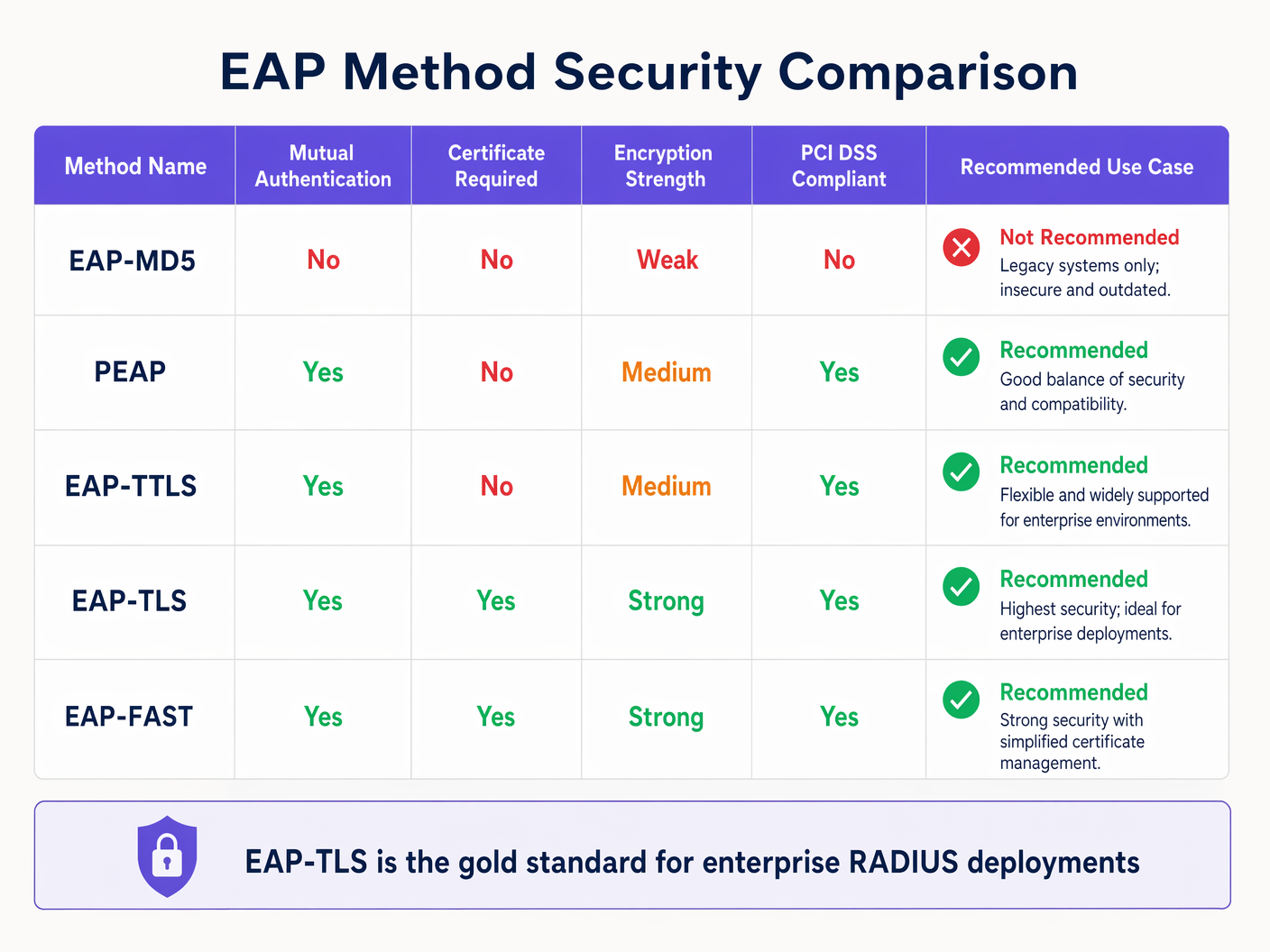
EAP Method Selection. The Extensible Authentication Protocol (EAP) defines the inner authentication method used within the 802.1X framework. EAP-MD5 is deprecated and should be removed from all deployments immediately — it provides no mutual authentication and no protection against credential harvesting. PEAP (Protected EAP) and EAP-TTLS establish a TLS tunnel using a server certificate before transmitting credentials, providing mutual authentication and protecting the inner method from eavesdropping. EAP-TLS eliminates passwords entirely, requiring both server and client to present X.509 certificates. It is immune to phishing and brute-force attacks and is the recommended method for high-security environments.
Insufficient Logging and Monitoring. RADIUS accounting records every authentication event — success, failure, session start, session stop. This data is operationally valuable for capacity planning and commercially valuable for WiFi Analytics , but it is also a critical security telemetry source. Failed authentication storms, authentications from unexpected MAC addresses, and out-of-hours access patterns are all detectable from RADIUS accounting logs. Most organisations are not ingesting this data into a SIEM, and those that are often have no alert thresholds configured.
The BlastRADIUS Attack in Detail
BlastRADIUS was disclosed in July 2024 by researchers at Boston University and the University of California San Diego. The attack requires a man-in-the-middle position between the NAS and the RADIUS server — achievable via ARP poisoning on a shared network segment, a compromised router, or a malicious insider with network access.
The attack proceeds as follows: the attacker intercepts an Access-Request packet from the NAS. Because the packet lacks a Message-Authenticator attribute (the default in many configurations), the attacker has freedom to modify the packet's attribute list. Using an MD5 chosen-prefix collision, the attacker crafts a modified packet that, when processed by the RADIUS server, produces the same Response Authenticator as the original packet would have. The server therefore returns an Access-Accept for a request that contains attacker-controlled attributes — including a Service-Type of Administrative, which grants full network access.
The attack is practical against PEAP and EAP-TTLS deployments where the inner method uses MSCHAPv2. It does not affect EAP-TLS deployments, because the certificate-based mutual authentication provides integrity protection that MD5 cannot undermine.
For organisations running Guest WiFi alongside corporate 802.1X, the guest network's RADIUS instance must also be patched, even if it uses MAC Authentication Bypass rather than EAP. The shared secret hygiene and Message-Authenticator requirements apply equally.
Implementation Guide
Phase 1: Immediate Remediation (Week 1–2)
The first priority is patching. FreeRADIUS 3.2.5 and 3.0.27 include the BlastRADIUS fix and enforce Message-Authenticator by default. Cisco ISE 3.1 Patch 8, 3.2 Patch 4, and 3.3 Patch 1 address the vulnerability. Microsoft released KB5040434 for Windows Server 2022 NPS in July 2024. Verify your current versions and apply patches within your next scheduled change window.
Simultaneously, audit your NAS device firmware. The Message-Authenticator enforcement is only effective if the NAS also sends the attribute. Check your access point and switch vendor advisories — Aruba, Ruckus, Cisco, and Juniper all released firmware updates addressing BlastRADIUS. If you're running Ruckus hardware, the wireless access point Ruckus guide provides relevant firmware management context.
For Troubleshooting Windows 11 802.1X Authentication Issues that may arise post-patch, the most common cause is the NPS server rejecting connections from clients that do not include Message-Authenticator — a correct security behaviour that may require supplicant reconfiguration on older Windows clients.
Phase 2: Shared Secret Hygiene (Week 2–4)
Export the full list of NAS clients registered on your RADIUS server. For each entry, record the shared secret length and the date it was last changed. Any secret under 20 characters or unchanged for more than 24 months should be rotated immediately.
For new secrets, use a cryptographically random generator — openssl rand -base64 32 produces a 44-character base64 string suitable for use as a RADIUS shared secret. Store all secrets in a secrets management system. Implement a rotation schedule: annually for low-risk NAS devices, every six months for NAS devices in PCI DSS scope.
Phase 3: EAP Method Rationalisation (Month 1–2)
Audit your RADIUS server's permitted EAP methods. Disable EAP-MD5. If you are running PEAP-MSCHAPv2, verify that server certificate validation is enforced on all supplicants — a misconfigured supplicant that accepts any server certificate is vulnerable to rogue RADIUS server attacks. For environments in PCI DSS scope, EAP-TLS is the recommended path. Begin PKI planning if you do not have an existing certificate infrastructure.
For Securing Guest WiFi Networks , note that guest networks typically use captive portal authentication rather than 802.1X, so EAP method hardening applies primarily to corporate and staff SSIDs.
Phase 4: RadSec Deployment (Month 2–3)
Identify all RADIUS traffic paths that cross untrusted network boundaries. Common scenarios include: a central RADIUS server serving remote hotel properties over the internet; a cloud-hosted RADIUS service accessed by on-premises NAS devices; and RADIUS proxy chains where traffic passes through multiple network domains.
For each identified path, configure RadSec. On FreeRADIUS, this requires enabling the tls listener on port 2083 and configuring mutual TLS with certificates from your PKI. On Cisco ISE, RadSec is configured under Administration > Network Devices. Ensure TLS 1.2 is the minimum version; disable TLS 1.0 and 1.1 explicitly.
Phase 5: MFA for Administrative Access (Month 2–3)
The RADIUS server's management interface is a high-value target. An attacker who compromises the RADIUS server can modify authentication policies, extract shared secrets, and redirect authentication traffic. Enforce MFA for all administrative logins to the RADIUS server and its underlying operating system. Restrict management access to a dedicated out-of-band management VLAN. Implement role-based access control: network engineers should not have the same privileges as security administrators.
Phase 6: SIEM Integration and Alerting (Month 3–4)
Configure your RADIUS server to forward accounting logs to your SIEM in real time. Define the following alert thresholds as a baseline:
| Alert | Threshold | Severity |
|---|---|---|
| Failed authentications from single MAC | >5 in 60 seconds | High |
| Access-Reject rate spike | >200% of 7-day baseline | Medium |
| Authentication from new MAC on corporate SSID | First occurrence | Medium |
| RADIUS server certificate expiry | 90 / 30 / 7 days | High / Critical / Critical |
| Shared secret mismatch errors | Any occurrence | High |
Best Practices
The following recommendations represent the consensus of IEEE 802.1X, NIST SP 800-63B, PCI DSS v4.0, and vendor security advisories.
Certificate Management. Any deployment using EAP-TLS or RadSec has X.509 certificates in the authentication path. Certificate expiry is the single most common cause of sudden, total authentication failure in enterprise WiFi deployments. Implement automated certificate lifecycle management. Set monitoring alerts at 90, 30, and 7 days before expiry. For RADIUS server certificates, use a minimum key size of 2048-bit RSA or 256-bit ECDSA, with SHA-256 or stronger signature algorithms. Do not use SHA-1.
Network Segmentation. The RADIUS server should reside on a dedicated management network segment, isolated from both the guest network and the general corporate network. Access to RADIUS ports (UDP 1812, 1813, TCP 2083 for RadSec) should be restricted by firewall ACL to the specific IP addresses of registered NAS devices. No direct internet access to RADIUS ports.
Redundancy and High Availability. A single RADIUS server is a single point of failure for your entire network access control infrastructure. Deploy a minimum of two RADIUS servers in an active-passive or active-active configuration. For Hospitality deployments with 24/7 guest connectivity requirements, RADIUS server downtime is directly equivalent to guest WiFi downtime — a reputational and commercial risk.
WPA3 and 802.1X. WPA3-Enterprise mandates the use of 192-bit security mode for government and high-security deployments, requiring AES-256-GCMP for data encryption and HMAC-SHA-384 for authentication. For most enterprise deployments, WPA3-Enterprise with standard 128-bit security is a significant improvement over WPA2-Enterprise, particularly in combination with EAP-TLS. Retail environments processing card payments should treat WPA3-Enterprise adoption as a PCI DSS risk reduction measure.
Vendor Patch Cadence. Subscribe to security advisories from your RADIUS server vendor and your NAS device vendors. FreeRADIUS, Cisco, Microsoft, Aruba, and Ruckus all publish CVE notifications. Integrate these into your vulnerability management programme with a defined SLA: critical vulnerabilities (CVSS ≥ 9.0) patched within 72 hours; high vulnerabilities (CVSS 7.0–8.9) within 14 days.
Troubleshooting and Risk Mitigation
Common Failure Modes
Post-Patch Authentication Failures. After applying BlastRADIUS patches, some NAS devices may fail to authenticate if their firmware does not support Message-Authenticator. Symptoms: sudden increase in Access-Reject responses with no change in user credentials. Diagnosis: enable RADIUS debug logging and check for "Message-Authenticator required but not present" errors. Resolution: update NAS firmware or, as a temporary measure, configure the RADIUS server to accept requests without Message-Authenticator from specific NAS IPs while firmware updates are scheduled.
Certificate Validation Failures in EAP-TLS. Symptoms: clients receive "Authentication Failed" with no corresponding Access-Reject in RADIUS logs. Diagnosis: check the RADIUS server's certificate chain — is the issuing CA trusted by the client's supplicant? Is the server certificate within its validity period? Resolution: ensure the full certificate chain (leaf + intermediate + root) is configured on the RADIUS server. Push the root CA certificate to client devices via MDM or Group Policy.
RadSec TLS Handshake Failures. Symptoms: NAS devices fail to establish RadSec connections after configuration change. Diagnosis: check TLS version compatibility — older NAS firmware may not support TLS 1.2. Check mutual certificate authentication — both ends must trust each other's CA. Resolution: verify TLS version support in NAS firmware release notes; ensure NAS device certificates are issued by the same CA trusted by the RADIUS server.
Shared Secret Mismatch. Symptoms: all authentications from a specific NAS fail with "Invalid authenticator" errors. Diagnosis: shared secret mismatch between NAS configuration and RADIUS server client entry. Resolution: re-enter the shared secret on both sides, ensuring no trailing spaces or character encoding issues. Use copy-paste from a secrets manager to avoid transcription errors.
Risk Register
| Risk | Likelihood | Impact | Mitigating Control |
|---|---|---|---|
| BlastRADIUS exploitation | High (unpatched) | Critical | Patch + Message-Authenticator enforcement |
| Shared secret brute-force | Medium | High | 32-char random secrets, annual rotation |
| Rogue RADIUS server | Medium | High | EAP-TLS mutual auth, certificate pinning |
| RADIUS server certificate expiry | High | Critical | Automated monitoring, 90-day alerts |
| Credential stuffing via 802.1X | Medium | High | Account lockout policies, SIEM alerting |
| RADIUS server compromise | Low | Critical | MFA for admin access, network segmentation |
ROI and Business Impact
Quantifying the Risk
The financial case for RADIUS hardening is straightforward when framed against breach costs. The average cost of a data breach in the UK in 2024 was £3.58 million, including regulatory fines, remediation, legal costs, and reputational damage. For organisations in PCI DSS scope — which includes virtually every Retail and Hospitality operator processing card payments over WiFi — a network access control breach that exposes cardholder data triggers mandatory forensic investigation, potential card scheme fines, and possible suspension of card processing privileges.
For Healthcare organisations, a GDPR breach involving patient data accessed via a compromised RADIUS server carries fines of up to 4% of global annual turnover under Article 83(5). The ICO's enforcement record demonstrates that network security failures are treated as negligence, not technical accidents.
Implementation Cost Benchmarks
The following cost estimates are indicative for a 500-device enterprise estate:
| Hardening Activity | Estimated Cost | Timeline |
|---|---|---|
| Patching (FreeRADIUS / NPS / ISE) | Internal labour only | 1–2 weeks |
| Shared secret audit and rotation | Internal labour + secrets manager licence (~£2,000/yr) | 2–4 weeks |
| EAP-TLS PKI deployment | £15,000–£30,000 (tooling + professional services) | 2–3 months |
| RadSec implementation | Internal labour + certificate costs (~£1,500) | 4–6 weeks |
| SIEM integration and alerting | Dependent on existing SIEM; £0–£10,000 | 4–8 weeks |
Total hardening investment for a mid-size estate: approximately £20,000–£45,000. Against a breach cost baseline of £3.58 million, the risk-adjusted ROI is compelling even at low breach probability estimates.
Operational Benefits Beyond Security
A hardened RADIUS infrastructure also delivers operational benefits. Reliable, well-monitored authentication reduces helpdesk tickets related to WiFi connectivity. RADIUS accounting data, when integrated with WiFi Analytics , provides session-level visibility into network usage patterns, dwell times, and device types — data that has direct commercial value for venue operators in Hospitality and Transport environments.
For public-sector and Healthcare organisations, a documented RADIUS hardening programme provides evidence of technical controls for Cyber Essentials Plus, ISO 27001, and NHS DSPT assessments — reducing audit overhead and demonstrating due diligence to regulators.
Key Terms & Definitions
RADIUS (Remote Authentication Dial-In User Service)
A client-server protocol defined in RFC 2865 that provides centralised authentication, authorisation, and accounting (AAA) for network access. RADIUS servers validate credentials submitted by network devices (NAS) against a backend identity store such as Active Directory or LDAP.
IT teams encounter RADIUS as the authentication backend for 802.1X WiFi, wired port authentication, VPN access, and network device management. It is the protocol that decides who gets on the network.
IEEE 802.1X
An IEEE standard for port-based network access control that defines the encapsulation of EAP over LAN (EAPOL). It provides an authentication framework for both wired and wireless networks, requiring devices to authenticate before being granted network access.
802.1X is the standard that makes enterprise WiFi authentication work. When a staff member connects to a corporate SSID and is prompted for credentials, 802.1X is the framework orchestrating that exchange, with RADIUS as the backend.
EAP-TLS (Extensible Authentication Protocol - Transport Layer Security)
An EAP method that uses X.509 certificates for mutual authentication between the client and the RADIUS server. Both parties must present valid certificates, eliminating passwords from the authentication exchange entirely.
EAP-TLS is the gold standard for enterprise WiFi authentication. It is immune to credential phishing and brute-force attacks. The operational requirement is a PKI infrastructure to issue and manage client certificates.
RadSec (RADIUS over TLS)
A protocol defined in RFC 6614 that encapsulates RADIUS packets within a TLS session over TCP port 2083. It provides transport-layer encryption, mutual certificate authentication, and replay protection for RADIUS traffic.
RadSec is required for any RADIUS traffic that crosses an untrusted network boundary — WAN links, internet connections, or shared network infrastructure. It is the correct replacement for standard RADIUS over UDP in multi-site deployments.
BlastRADIUS (CVE-2024-3596)
A man-in-the-middle attack disclosed in July 2024 that exploits the absence of integrity protection on RADIUS Access-Request packets. Using MD5 chosen-prefix collision techniques, an attacker can forge an Access-Accept response, granting network access to an unauthenticated user.
BlastRADIUS affects all major RADIUS implementations including FreeRADIUS, Cisco ISE, and Microsoft NPS. Organisations that have not applied patches released in July 2024 remain exposed to this attack.
Message-Authenticator
A RADIUS attribute (Attribute 80) that provides HMAC-MD5 integrity protection over the entire RADIUS packet. When present in an Access-Request, it prevents the packet modification attack used in BlastRADIUS.
Enforcing Message-Authenticator on all Access-Request packets is the primary remediation for BlastRADIUS. It must be configured on both the RADIUS server (to require the attribute) and the NAS device (to include the attribute in requests).
NAS (Network Access Server)
In RADIUS terminology, the NAS is the network device — typically a WiFi access point, switch, or VPN concentrator — that acts as the RADIUS client. It intercepts connection requests from end devices and forwards authentication requests to the RADIUS server.
NAS devices are the RADIUS clients in a deployment. Shared secrets are configured per-NAS. BlastRADIUS remediation requires firmware updates on NAS devices as well as patches on the RADIUS server.
PEAP (Protected Extensible Authentication Protocol)
An EAP method that establishes a TLS tunnel using a server-side certificate before transmitting the inner authentication method (typically MSCHAPv2). It provides mutual authentication and protects credentials from eavesdropping.
PEAP-MSCHAPv2 is the most widely deployed enterprise WiFi authentication method. It is PCI DSS compliant and operationally simpler than EAP-TLS because it does not require client certificates. However, it is vulnerable to rogue RADIUS server attacks if client-side certificate validation is not enforced.
Shared Secret
A pre-shared key configured on both the RADIUS server and each NAS device. It is used to generate the Response Authenticator field and to obfuscate the User-Password attribute. It is not a password for end users — it is a server-to-server authentication credential.
Weak or static shared secrets are one of the most common RADIUS vulnerabilities. An attacker who captures RADIUS traffic can conduct an offline brute-force attack against a weak shared secret. Minimum recommended length is 32 characters, randomly generated.
PCI DSS (Payment Card Industry Data Security Standard)
A set of security standards mandated by the major card schemes (Visa, Mastercard, Amex) for organisations that process, store, or transmit cardholder data. Version 4.0, effective from March 2024, includes specific requirements for network access control and strong authentication.
Retail and hospitality organisations with WiFi-connected POS terminals are in PCI DSS scope. RADIUS server vulnerabilities that could allow unauthorised network access to cardholder data environments are a direct compliance risk.
Case Studies
A 350-room hotel group with 12 properties uses a centralised RADIUS server hosted in their head office data centre. Each property connects over a shared MPLS WAN. A security audit has flagged that RADIUS traffic is unencrypted over the WAN, shared secrets are 8-character strings set during initial deployment five years ago, and the RADIUS server is running FreeRADIUS 3.0.21. The group processes card payments via WiFi-connected POS terminals at their restaurant and spa facilities. What is the remediation priority and implementation sequence?
The remediation sequence should be ordered by risk severity and implementation speed. Step 1 (immediate, within 72 hours): Patch FreeRADIUS to 3.2.5 or 3.0.27. This addresses BlastRADIUS and enforces Message-Authenticator by default. Simultaneously, check access point firmware versions across all 12 properties and schedule firmware updates for any NAS devices that do not support Message-Authenticator. Step 2 (week 1–2): Rotate all shared secrets. Generate 32-character random secrets using openssl rand -base64 32 for each of the 12 property NAS registrations. Store in HashiCorp Vault or equivalent. Document the rotation date. Step 3 (month 1–2): Implement RadSec on the WAN path. Configure the FreeRADIUS server to accept RadSec connections on TCP 2083. Issue TLS certificates from an internal CA to each property's NAS devices. Update firewall rules to permit TCP 2083 from property NAS IP ranges to the RADIUS server. Disable UDP 1812/1813 from WAN-facing interfaces once RadSec is confirmed operational. Step 4 (month 2–3): For the PCI DSS-scoped POS WiFi SSID, migrate from PEAP-MSCHAPv2 to EAP-TLS. Deploy an internal PKI (Microsoft ADCS or HashiCorp Vault PKI engine). Issue client certificates to POS terminals via MDM. Update RADIUS policy to require EAP-TLS for the POS SSID. Step 5 (month 3): Integrate RADIUS accounting logs into the SIEM. Configure alerts for failed authentication spikes and certificate expiry.
A regional retail chain with 45 stores uses WPA2-Personal (pre-shared key) for staff WiFi and an open network for customer WiFi. The IT director wants to migrate staff WiFi to 802.1X authentication using Microsoft NPS as the RADIUS server, integrated with Active Directory. The stores have a mix of Aruba and Cisco access points. The chain is in PCI DSS scope. What architecture should they deploy, and what are the key configuration decisions?
The recommended architecture is 802.1X with PEAP-MSCHAPv2 as the initial EAP method, with a documented roadmap to EAP-TLS. The NPS server should be deployed in a redundant pair (primary + secondary) in the central data centre, with RADIUS proxy configuration on the access points to fail over automatically. Configuration decisions: (1) NPS Network Policy: create a policy matching the staff SSID with PEAP-MSCHAPv2, requiring group membership in an AD security group (e.g., 'WiFi-Staff-Access'). Set session timeout to 8 hours to force re-authentication. (2) Certificate: deploy an NPS server certificate from an internal Microsoft ADCS CA. Push the root CA certificate to all staff devices via Group Policy (Windows) and MDM (iOS/Android). (3) Supplicant configuration: configure Windows devices via Group Policy (Computer Configuration > Windows Settings > Security Settings > Wireless Network Policies). For iOS and Android devices, use an MDM profile. Enforce server certificate validation — do not allow users to accept arbitrary certificates. (4) Access point configuration: on Aruba, configure the RADIUS server under Authentication > Servers. Set the shared secret to a 32-character random string. Enable RadSec if the Aruba firmware supports it (AOS 8.9+). On Cisco, configure under Security > AAA > RADIUS. (5) NPS logging: enable NPS accounting logging to a SQL Server database. Configure a log retention period of 90 days minimum for PCI DSS compliance. (6) Post-migration: disable WPA2-Personal on the staff SSID. Retain it only as a break-glass SSID with a complex PSK stored in the secrets manager, for use only when NPS is unavailable.
Scenario Analysis
Q1. Your organisation runs a FreeRADIUS 3.0.21 server supporting 802.1X authentication for 800 staff devices across a single-site campus. The RADIUS server is on the same management VLAN as all access points. A penetration test has identified that access points are sending Access-Request packets without the Message-Authenticator attribute. The security team wants to enforce Message-Authenticator immediately, but the network operations team is concerned about breaking authentication for 800 users. How do you sequence the remediation to minimise service disruption?
💡 Hint:Consider the difference between the RADIUS server requiring Message-Authenticator versus the NAS devices sending it. These are two separate configuration changes with different risk profiles.
Show Recommended Approach
The correct sequence is: (1) First, patch FreeRADIUS to 3.2.5. This version enforces Message-Authenticator by default but includes a compatibility mode that logs a warning rather than rejecting packets that lack the attribute. This gives you the patch without immediately breaking authentication. (2) Audit access point firmware versions. Identify which models and firmware versions support Message-Authenticator in Access-Request packets. (3) Update access point firmware in batches, starting with a pilot group of 50 devices. Verify authentication continues to work after each batch. (4) Once all access points are confirmed to be sending Message-Authenticator, enable strict enforcement on the FreeRADIUS server (require_message_authenticator = yes in clients.conf). (5) Monitor RADIUS logs for any remaining 'Message-Authenticator missing' warnings, which would indicate NAS devices that missed the firmware update. The key principle is that you can patch the server first without breaking anything, because the compatibility mode allows a transition period. Enforcing strict rejection on the server should be the last step, after all NAS devices have been updated.
Q2. A conference centre operator runs a single RADIUS server supporting both the corporate staff SSID (802.1X with PEAP-MSCHAPv2) and the event guest WiFi (captive portal with MAC Authentication Bypass). The IT manager asks whether the guest WiFi RADIUS instance needs to be hardened to the same standard as the corporate RADIUS instance, given that guests are not authenticating with corporate credentials. What is your recommendation?
💡 Hint:Consider the attack vectors that apply to MAC Authentication Bypass versus EAP-based authentication, and the risk of lateral movement between the guest and corporate RADIUS instances.
Show Recommended Approach
The guest WiFi RADIUS instance requires hardening, but the specific controls differ from the corporate instance. The BlastRADIUS patch applies equally — the vulnerability affects the RADIUS server regardless of the authentication method used by clients. Shared secret hygiene applies equally — a weak shared secret between the guest captive portal controller and the RADIUS server is exploitable regardless of whether EAP is in use. The key additional risk is the shared RADIUS server: if the guest and corporate SSID authentication requests are handled by the same RADIUS server process, a vulnerability in the guest RADIUS path could be used to pivot to the corporate authentication policy. The recommended architecture is to run separate RADIUS instances (or at minimum separate virtual servers within FreeRADIUS) for guest and corporate authentication, with separate shared secrets and separate policy sets. This provides isolation such that a compromise of the guest RADIUS path does not expose corporate credentials. For the guest instance specifically: patch for BlastRADIUS, rotate shared secrets, and ensure the guest RADIUS instance has no access to the corporate Active Directory. The EAP-TLS and RadSec requirements are less relevant for a captive portal deployment, but RadSec should still be considered if the captive portal controller is in a different network segment from the RADIUS server.
Q3. A healthcare trust is planning to migrate its clinical WiFi from WPA2-Personal to 802.1X authentication. The trust has 1,200 clinical devices including Windows laptops, iOS tablets, and Android handhelds. The CISO wants EAP-TLS as the target state. The IT director is concerned about the PKI deployment complexity and proposes PEAP-MSCHAPv2 as a permanent solution. How do you advise the CISO and IT director, and what is the recommended implementation path?
💡 Hint:Consider the specific threat model for a healthcare environment — what are the consequences of a credential compromise, and how does EAP-TLS address risks that PEAP-MSCHAPv2 does not?
Show Recommended Approach
The CISO's instinct is correct, but the IT director's concern is valid. The recommended advice is: implement PEAP-MSCHAPv2 now as an interim position, with a committed 12-month roadmap to EAP-TLS. The rationale for not accepting PEAP-MSCHAPv2 as a permanent solution in healthcare is: (1) PEAP-MSCHAPv2 is vulnerable to rogue RADIUS server attacks if client-side certificate validation is not enforced. In a healthcare environment where clinical staff may connect personal devices, enforcing supplicant configuration consistently across 1,200 devices is operationally challenging. (2) MSCHAPv2 credentials, if captured via a rogue RADIUS attack, can be cracked offline using tools like hashcat. In a healthcare context, those credentials likely also provide access to clinical systems. (3) NHS DSPT and CQC assessments increasingly expect strong authentication controls for clinical network access. EAP-TLS provides a stronger audit evidence position. The implementation path: Month 1-2: Deploy PEAP-MSCHAPv2 with enforced server certificate validation via MDM profiles on all 1,200 devices. Month 3-6: Deploy Microsoft ADCS as the PKI infrastructure. Enrol Windows devices via Group Policy auto-enrolment. Month 6-9: Enrol iOS and Android devices via MDM certificate profiles. Month 9-12: Migrate the clinical SSID policy from PEAP to EAP-TLS. Retain PEAP as a fallback for any devices that fail certificate enrolment, with enhanced monitoring. For more on clinical network security architecture, the WiFi in Hospitals guide provides relevant deployment context.




