

Securing Guest WiFi Networks: Best Practices and Implementation
This authoritative technical reference guide outlines the architecture, authentication, and operational controls required to deploy secure enterprise guest WiFi. It provides actionable best practices for IT leaders to enforce network segmentation, manage bandwidth, and ensure compliance while maximising data capture.
🎧 Listen to this Guide
View Transcript
Executive Summary
Deploying a secure guest WiFi network requires balancing frictionless user access with robust network segmentation and compliance. For CTOs and network architects across retail, hospitality, and public sectors, the challenge is isolating untrusted guest devices from corporate infrastructure whilst extracting maximum value from first-party data capture. This guide details the technical architecture, authentication frameworks, and operational controls necessary to implement enterprise-grade guest WiFi. We cover essential practices including Layer 3 VLAN segmentation, captive portal security, bandwidth rate-limiting, and modern encryption standards like WPA3. By implementing these vendor-neutral best practices, organisations can mitigate lateral movement risks, ensure regulatory compliance (including GDPR and PCI DSS), and transform a potential security liability into a secure, value-generating asset.
Technical Deep-Dive
The foundation of any secure guest WiFi network is absolute isolation from corporate resources. This requires a defence-in-depth approach spanning multiple layers of the OSI model.
Network Segmentation and Isolation
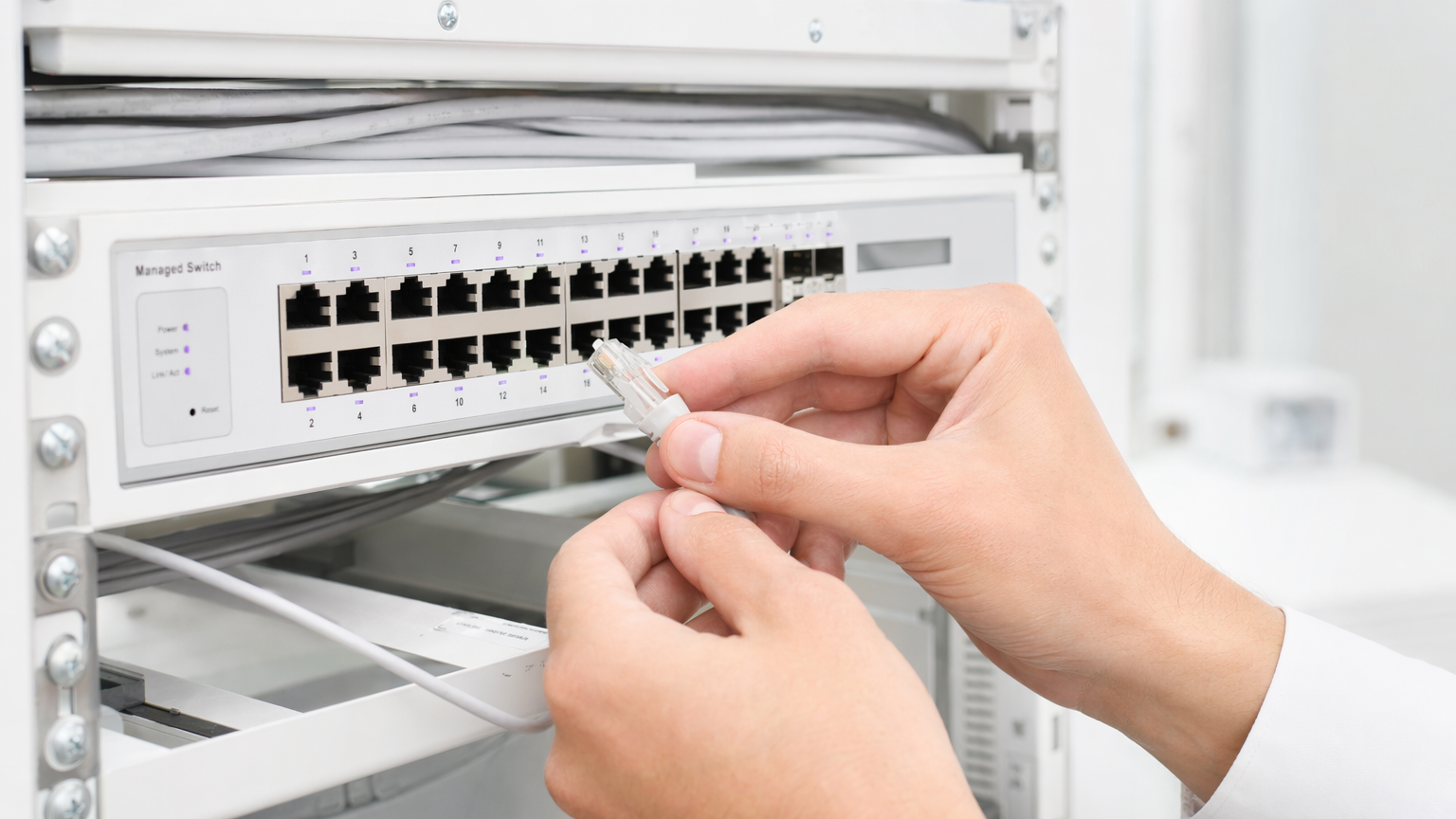
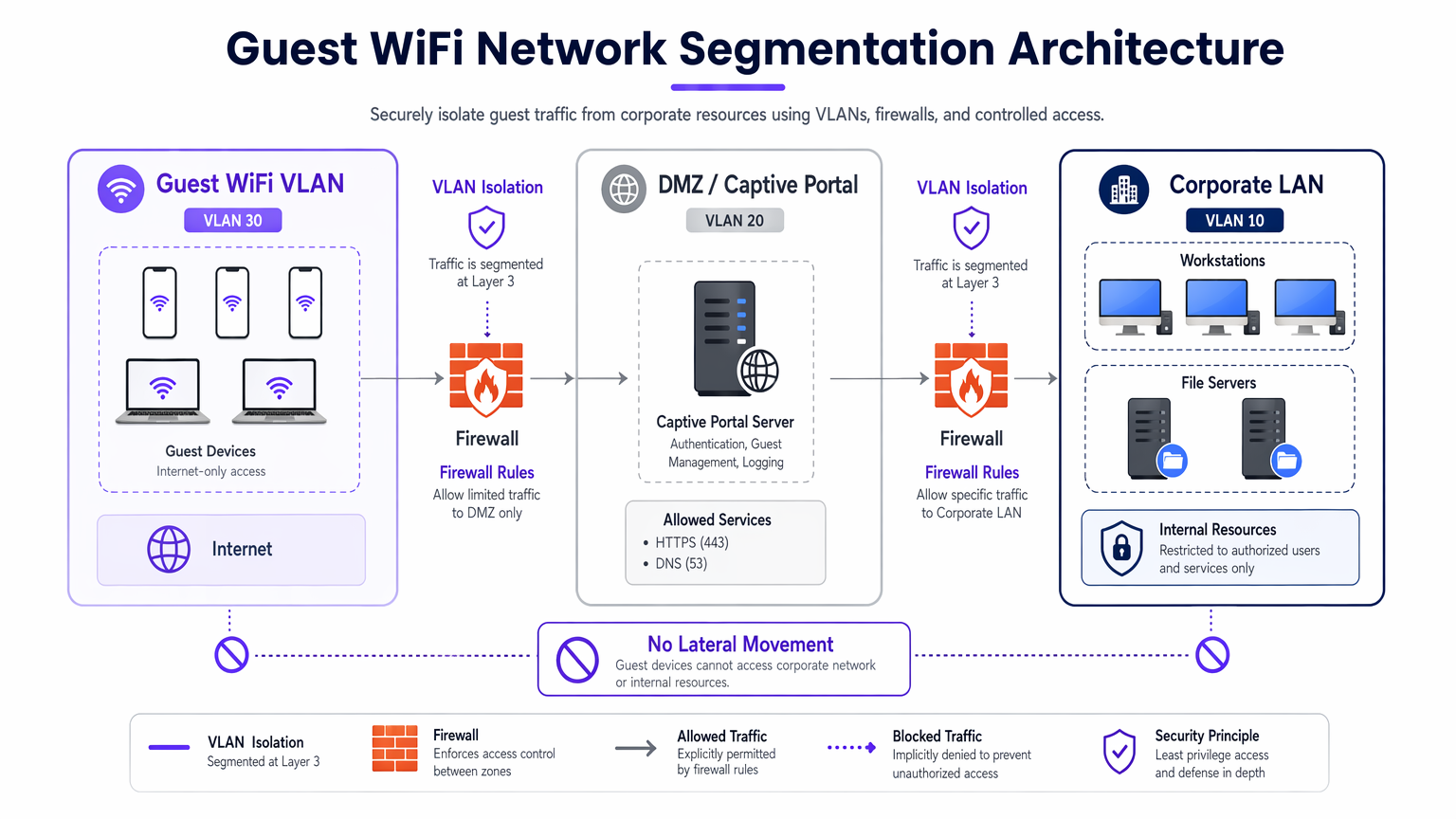
A robust deployment mandates dedicated VLANs for guest traffic, completely separated from internal operational networks. For instance, guest traffic might be assigned to VLAN 30, whilst corporate devices reside on VLAN 10. This segmentation must be enforced at the managed switch layer, not just the wireless controller, to prevent VLAN hopping attacks.
Furthermore, client isolation (or Layer 2 isolation) is critical. This prevents devices connected to the same Guest WiFi SSID from communicating with one another. Without client isolation, a single compromised device can scan the local subnet, execute ARP spoofing, and launch lateral attacks against other guests.
Captive Portal Architecture
The captive portal serves as the gateway for authentication and policy enforcement. To prevent credential interception, the portal must be served exclusively over HTTPS using a valid TLS certificate. The portal server should reside in a DMZ, isolated from internal databases. This ensures that even if the portal is compromised, attackers cannot pivot into the corporate LAN.
Encryption Standards: WPA3
Legacy open networks transmit data in plaintext, exposing users to passive eavesdropping. Modern deployments should mandate WPA3. For public networks, WPA3-Enhanced Open (Opportunistic Wireless Encryption) provides individualised data encryption without requiring a password. For hybrid environments, deploying Implementing WPA3-Enterprise for Enhanced Wireless Security ensures robust 192-bit encryption and integrates with RADIUS/802.1X for identity-based access control.
Implementation Guide
Implementing a secure guest network requires a systematic approach to ensure both security and usability.
1. Define the Topology
Map the entire data path from the access point to the internet gateway. Ensure that firewall ACLs explicitly deny traffic from the guest subnet to any RFC 1918 private IP ranges.
2. Select the Authentication Method
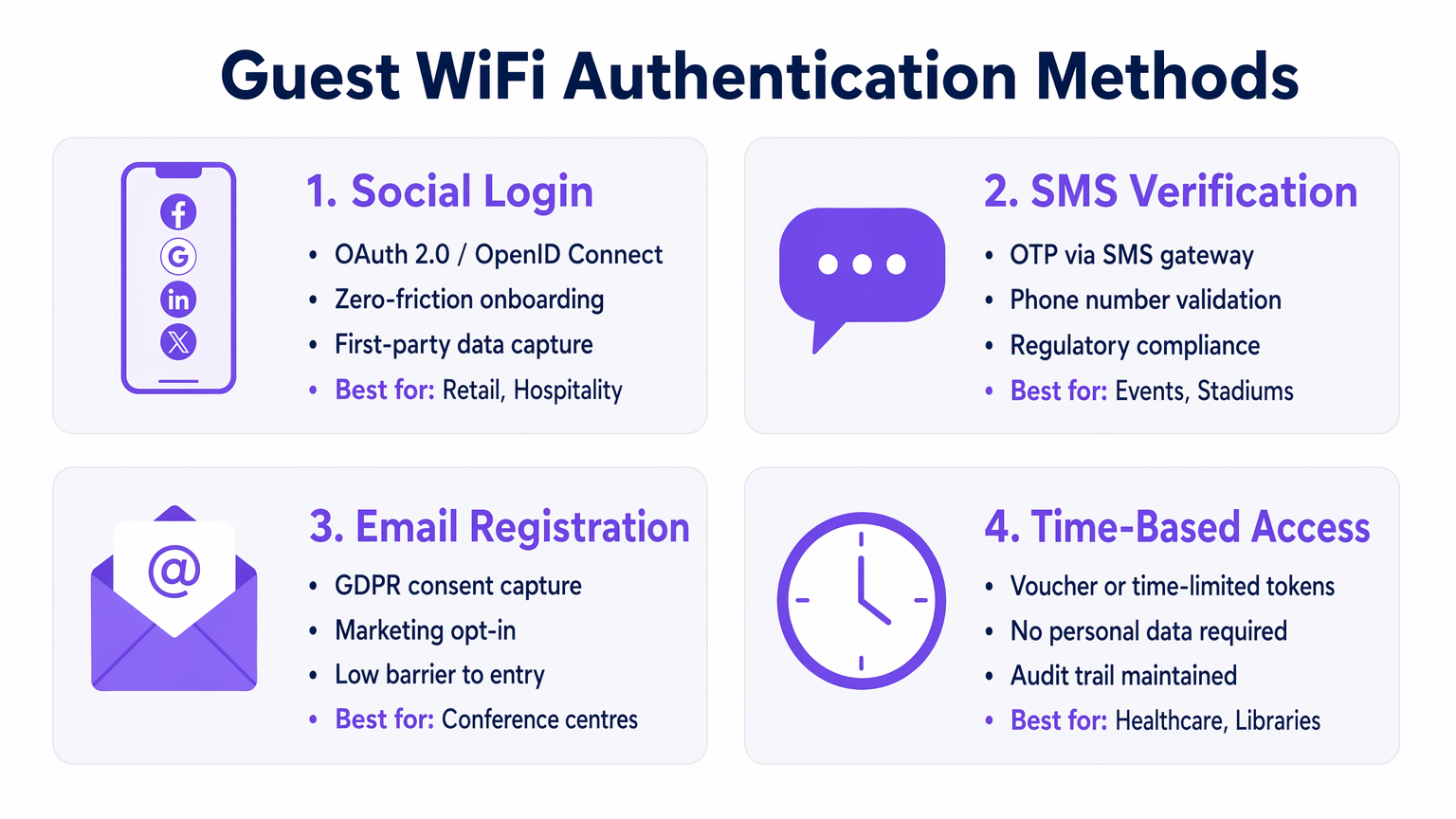
Choose an authentication mechanism aligned with your business objectives and risk profile:
- Social Login: Ideal for Retail and Hospitality environments where reducing friction and capturing first-party data for the WiFi Analytics platform is paramount.
- SMS Verification: Provides a stronger identity signal and audit trail, suited for stadiums or public venues requiring accountability.
- Email Registration: Balances data capture with low deployment cost, common in conference centres.
- Time-Based Access: Generates ephemeral tokens without collecting PII, optimal for Healthcare waiting rooms or libraries.
3. Configure Bandwidth Management
To prevent bandwidth exhaustion and ensure availability, implement QoS policies. Apply per-user rate limits (e.g., 10 Mbps down / 2 Mbps up) at the wireless controller, and restrict bulk file transfers whilst prioritising DNS and HTTPS traffic.
4. Deploy and Test
Before production rollout, conduct a segmentation test. Connect a device to the guest SSID and attempt to ping internal servers or access the corporate DNS. Any successful connection indicates a critical segmentation failure.
Best Practices
- Enforce Strict Firewall ACLs: Default-deny all traffic from the guest VLAN to internal subnets. Only allow outbound traffic on essential ports (e.g., 80, 443, 53).
- Implement Content Filtering: Use DNS-based filtering to block malicious domains, malware command-and-control servers, and inappropriate content, protecting both users and the venue's IP reputation.
- Regularly Audit Configurations: Conduct quarterly reviews of switch port configurations, firewall rules, and wireless controller policies to detect configuration drift.
- Maintain Comprehensive Logging: Log all DHCP leases, NAT translations, and authentication events. Retain these logs for a minimum of 12 months to support forensic investigations and comply with local regulations.
Troubleshooting & Risk Mitigation
Even well-designed networks encounter issues. Understanding common failure modes accelerates resolution.
- Rogue Access Points: Employees or attackers may plug unauthorised APs into corporate ports. Mitigate this by enabling 802.1X port-based authentication on all wired switch ports and utilising Wireless Intrusion Prevention Systems (WIPS) to detect and contain rogue signals.
- Captive Portal Bypasses: Advanced users may attempt to bypass portals using MAC spoofing or DNS tunneling. Mitigate this by implementing MAC address randomization detection and restricting outbound DNS queries to approved resolvers only.
- IP Exhaustion: High-turnover environments like Transport hubs can rapidly exhaust DHCP pools. Reduce DHCP lease times to 30-60 minutes and ensure the subnet mask (e.g., /22 or /21) provides sufficient IP addresses for peak capacity.
ROI & Business Impact
A secure guest WiFi network guide is not merely an IT cost centre; it is a strategic asset.
- Risk Reduction: Proper segmentation prevents costly data breaches. The average cost of a data breach runs into the millions; isolating guest traffic mitigates the risk of a compromised visitor device pivoting to PoS systems or internal databases.
- Data Monetisation: Secure, frictionless authentication (like Social Login) feeds high-quality, verified data into marketing platforms, enabling targeted campaigns and increasing customer lifetime value.
- Operational Efficiency: Automated onboarding and robust bandwidth management drastically reduce IT support tickets related to connectivity issues, freeing engineering resources for strategic projects.
Podcast Briefing
Listen to our comprehensive 10-minute technical briefing on securing guest networks:
Key Terms & Definitions
VLAN Segmentation
The logical separation of a physical network into multiple distinct broadcast domains to isolate traffic types.
Essential for keeping untrusted guest devices completely separated from sensitive corporate servers and data.
Client Isolation
A wireless controller feature that prevents devices connected to the same SSID from communicating directly with each other.
Crucial in public venues to stop a malicious guest from scanning or attacking other guests' laptops or phones.
Captive Portal
A web page that users are forced to view and interact with before access to the broader network is granted.
Used to enforce terms of service, capture marketing data, and authenticate users securely over HTTPS.
WPA3-Enhanced Open
A security certification that provides unauthenticated data encryption for open WiFi networks using Opportunistic Wireless Encryption (OWE).
Protects users from passive eavesdropping in coffee shops and airports without the friction of a shared password.
Bandwidth Rate Limiting
The intentional restriction of the maximum speed (throughput) a user or application can consume on the network.
Prevents network congestion and ensures fair access for all guests during high-footfall events.
Rogue Access Point
An unauthorised wireless access point connected to a secure enterprise network, often bypassing security controls.
A major security risk that IT teams must actively monitor for using Wireless Intrusion Prevention Systems (WIPS).
DMZ (Demilitarised Zone)
A perimeter network that protects an organisation's internal local-area network from untrusted traffic.
The correct architectural location to host a captive portal server to minimize risk if the server is compromised.
MAC Spoofing
The technique of altering the Media Access Control address of a network interface to masquerade as another device.
A common method attackers use to bypass captive portals or time-based access restrictions.
Case Studies
A 400-room luxury hotel needs to provide seamless guest WiFi while ensuring PCI DSS compliance for its separate PoS terminals in the restaurants and bars.
Deploy a dedicated Guest VLAN (e.g., VLAN 40) across all switches and APs. Enable Client Isolation on the wireless controller to prevent guest-to-guest attacks. Configure firewall ACLs to explicitly block all routing between VLAN 40 and the PoS VLAN (e.g., VLAN 20). Implement WPA3-Enhanced Open for the guest SSID to encrypt over-the-air traffic without requiring a password.
A large retail chain wants to offer free WiFi to capture customer data but is experiencing network slowdowns during peak weekend hours due to users streaming HD video.
Implement per-user bandwidth rate limiting (e.g., 5 Mbps) on the wireless controller. Configure Application Visibility and Control (AVC) to throttle streaming media categories (Netflix, YouTube) while prioritising web browsing and social media apps used for the captive portal login.
Scenario Analysis
Q1. You are deploying guest WiFi at a major stadium. The legal team requires a verifiable audit trail of who connected to the network in case of illegal activity. Which authentication method should you implement?
💡 Hint:Consider which method ties the user to a verifiable real-world identity.
Show Recommended Approach
SMS Verification. This requires the user to possess a physical SIM card and receive a One-Time Passcode (OTP), providing a strong identity signal and a reliable audit trail for law enforcement if required.
Q2. During a penetration test, the assessor connects to the guest WiFi and successfully accesses the management interface of a corporate printer. What is the most likely configuration failure?
💡 Hint:Think about how traffic is routed between different network segments.
Show Recommended Approach
A failure in Layer 3 segmentation or Firewall ACLs. The guest VLAN is likely able to route traffic to the corporate VLAN where the printer resides. The firewall should be configured with an explicit 'deny' rule blocking traffic from the guest subnet to all internal RFC 1918 IP addresses.
Q3. A public library wants to offer free WiFi but absolutely cannot store any Personally Identifiable Information (PII) due to local privacy ordinances. How should they configure access?
💡 Hint:Which method grants access without asking for a name, email, or phone number?
Show Recommended Approach
Time-Based Access using ephemeral tokens or vouchers. The system can generate a temporary access code that expires after a set duration (e.g., 2 hours). This maintains a technical log of connection events without tying them to an individual's PII.




