
Sécuriser les réseaux WiFi invités : meilleures pratiques et mise en œuvre
Ce guide de référence technique présente l'architecture, l'authentification et les contrôles opérationnels requis pour déployer un réseau WiFi invité d'entreprise sécurisé. Il fournit des meilleures pratiques concrètes pour aider les responsables informatiques à appliquer la segmentation du réseau, gérer la bande passante et garantir la conformité tout en optimisant la capture de données.
Video overview
Écouter ce guide
Voir la transcription du podcast
Fait partie de notre série principale : Guide du WiFi invité →

Résumé exécutif
Le déploiement d'un réseau WiFi invité sécurisé exige un équilibre entre un accès utilisateur fluide et une segmentation et conformité rigoureuses du réseau. Pour les CTO et les architectes réseau des secteurs du commerce de détail, de l'hôtellerie et du secteur public, le défi consiste à isoler les appareils invités non fiables de l'infrastructure de l'entreprise tout en tirant un maximum de valeur de la capture de données de première partie. Ce guide détaille l'architecture technique, les frameworks d'authentification et les contrôles opérationnels requis pour mettre en œuvre un WiFi invité de classe entreprise. Nous couvrons les pratiques essentielles, notamment la segmentation VLAN de couche 3, la sécurité du Captive Portal, la limitation de la bande passante et les normes de chiffrement modernes telles que WPA3. En mettant en œuvre ces meilleures pratiques indépendantes des fournisseurs, les organisations peuvent atténuer les risques de mouvement latéral, garantir la conformité réglementaire (notamment le GDPR et le PCI DSS) et transformer une faille de sécurité potentielle en un actif sécurisé et générateur de valeur.
Analyse technique approfondie
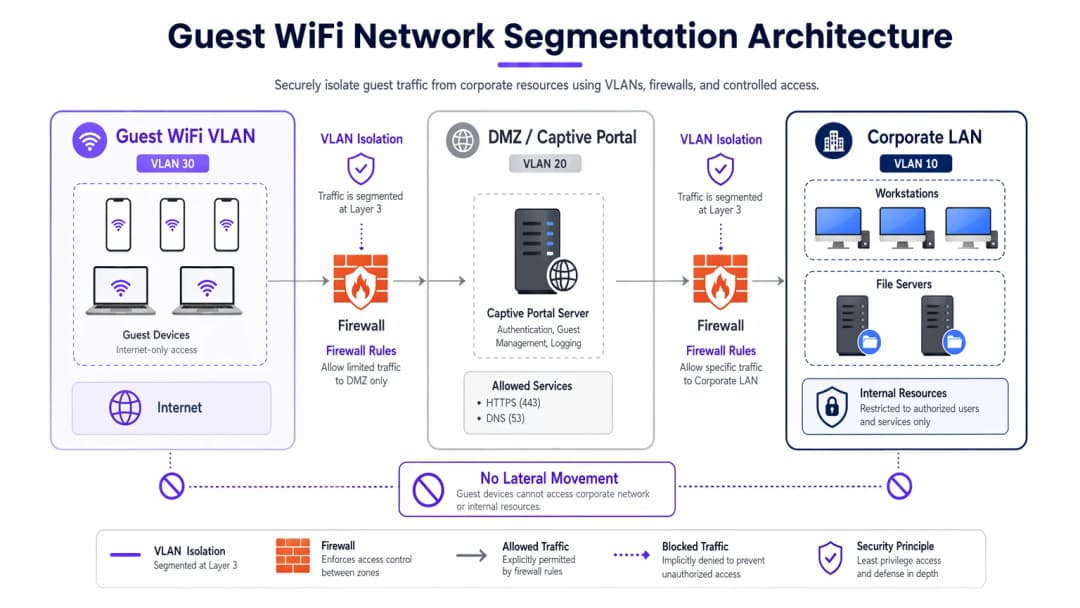
La base de tout réseau WiFi invité sécurisé est l'isolation complète des ressources de l'entreprise. Cela nécessite une approche de défense en profondeur englobant plusieurs couches du modèle OSI.
Segmentation et isolation du réseau
Des VLANs dédiés au trafic invité sont obligatoires pour un déploiement robuste, complètement séparés du réseau opérationnel interne. Par exemple, le trafic invité peut être attribué au VLAN 30, tandis que les appareils de l'entreprise restent sur le VLAN 10. Cette segmentation doit être appliquée non seulement sur le contrôleur sans fil, mais également au niveau de la couche de commutateur managé pour empêcher les attaques de type VLAN hopping.
De plus, l'isolation des clients (ou isolation de couche 2) est essentielle. Cela empêche les appareils connectés au même SSID de Guest WiFi de communiquer entre eux. Sans isolation des clients, un seul appareil compromis peut scanner le sous-réseau local, effectuer une usurpation ARP et lancer des attaques latérales contre d'autres invités.
Architecture de Captive Portal
Le Captive Portal sert de passerelle pour l'authentification et l'application des politiques. Pour empêcher l'interception des identifiants, le portail doit être servi exclusivement via HTTPS à l'aide d'un certificat TLS valide. Le serveur du portail doit être hébergé dans une DMZ, isolé des bases de données internes. Cela garantit que même si le portail est compromis, les attaquants ne peuvent pas basculer vers le réseau local de l'entreprise.
Normes de chiffrement : WPA333
Les réseaux ouverts existants transmettent les données en clair, laissant les utilisateurs vulnérables à l'écoute passive. Le WPA3 devrait être obligatoire dans les déploiements modernes. Pour les réseaux publics, WPA3-Enhanced Open (Opportunistic Wireless Encryption) fournit un chiffrement individuel des données sans mot de passe. Pour les environnements hybrides, la lecture de Implementing WPA3-Enterprise for Enhanced Wireless Security garantit un chiffrement robuste de 192 bits et s'intègre à RADIUS/802.1X pour un contrôle d'accès basé sur l'identité.
Vous avez des questions sur votre configuration spécifique ?
Notre équipe collabore avec des exploitants de sites, des responsables informatiques et des ingénieurs réseau au sein de 80 000 sites. Réservez un appel de 20 minutes et nous vous montrerons comment d'autres professionnels comme vous ont résolu ce problème.
Guide de mise en œuvre
La mise en œuvre d'un réseau invités sécurisé nécessite une approche systématique pour garantir à la fois la sécurité et la facilité d'utilisation.
1. Définir la topologie
Cartographiez l'ensemble du cheminement des données, du point d'accès à la passerelle internet. Assurez-vous que les ACL du pare-feu refusent explicitement le trafic du sous-réseau invités vers toutes les plages d'adresses IP privées RFC 1918.
2. Choisir la méthode d'authentification
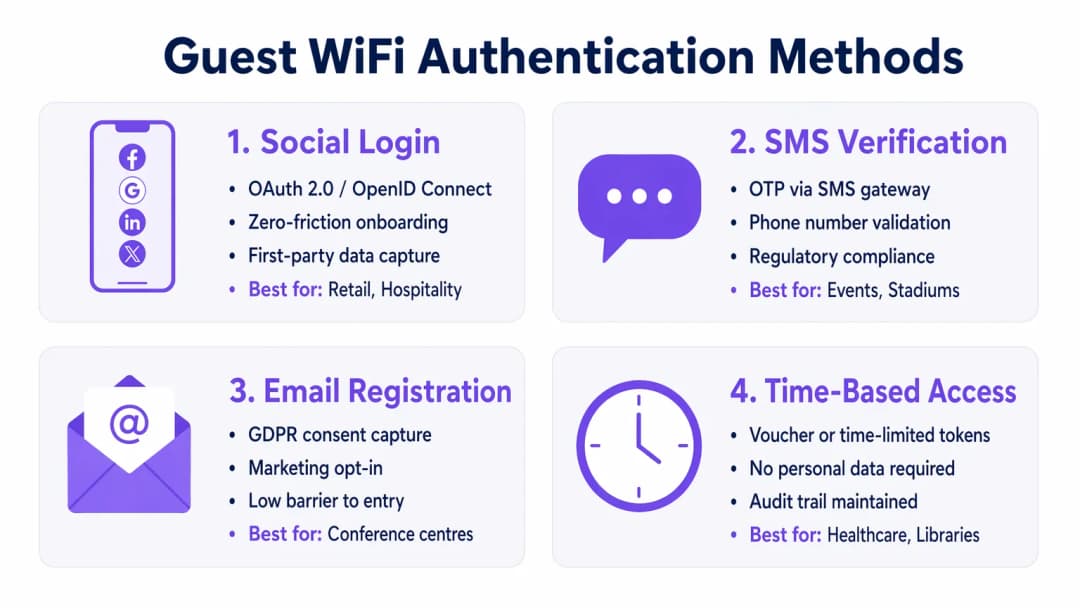
Sélectionnez un mécanisme d'authentification aligné sur vos objectifs commerciaux et votre profil de risque :
- Connexion via les réseaux sociaux : Idéal pour les environnements de Retail et d' Hospitality où la réduction des frictions et la capture de données de première partie pour les plateformes de WiFi Analytics sont primordiales.
- Vérification par SMS : Fournit un signal d'identité fort et une piste d'audit, adapté aux stades ou aux lieux publics où la responsabilité est requise.
- Inscription par e-mail : Équilibre la capture de données avec des coûts de déploiement faibles, courant dans les centres de conférence.
- Accès temporaire : Génère des jetons à court terme sans collecter de données personnelles, optimal pour les salles d'attente de Healthcare ou les bibliothèques.
3. Configurer la gestion de la bande passante
Pour éviter la saturation de la bande passante et garantir la disponibilité, mettez en œuvre des politiques de QoS. Imposez des limites de débit par utilisateur (par exemple, 10 Mbps en descente / 2 Mbps en montée) sur le contrôleur sans fil, et limitez les transferts de fichiers volumineux tout en priorisant le trafic DNS et HTTPS.
4. Déployer et tester
Avant le déploiement en production, effectuez un test de segmentation. Connectez un appareil au SSID invités et tentez de pinguer des serveurs internes ou d'accéder au DNS de l'entreprise. Toute connexion réussie indique une défaillance critique de la segmentation.
Bonnes pratiques
- Appliquer des ACL de pare-feu strictes : Interdisez par défaut tout le trafic du VLAN invités vers les sous-réseaux internes. Autorisez uniquement le trafic sortant sur les ports essentiels (par exemple, 80, 443, 53).
- Mettre en œuvre le filtrage de contenu : Utilisez un filtrage basé sur le DNS pour bloquer les domaines malveillants, les serveurs de commande et de contrôle de logiciels malveillants et les contenus inappropriés, protégeant ainsi à la fois les utilisateurs et la réputation de l'adresse IP du lieu.
- Auditer régulièrement les configurations : Réalisez des revues trimestrielles des configurations de ports de commutateurs, des règles de pare-feu et des politiques de contrôleur sans fil pour détecter toute dérive de configuration.
- Maintenir une journalisation complète : Enregistrez tous les baux DHCP, les traductions NAT et les événements d'authentification. Conservez ces journaux pendant au moins 12 mois pour soutenir les enquêtes médico-légales et vous conformer aux réglementations locales.
Dépannage et atténuation des risques
Même les réseaux bien conçus rencontrent des problèmes. Comprendre les modes de défaillance courants accélère la résolution.
- Points d'accès non autorisés : Des employés ou des attaquants peuvent brancher des AP non autorisés sur des ports d'entreprise. Atténuez ce risque en activant l'authentification basée sur le port 802.1X sur tous les ports de commutateurs câblés et en utilisant un système de prévention des intrusions sans fil (WIPS) pour détecter et contenir les signaux indésirables.
- Contournement du Captive Portal : Les utilisateurs avancés peuvent tenter de contourner les portails en utilisant l'usurpation d'adresse MAC ou le tunnel DNS. Atténuez ce risque en implémentant la détection de randomisation d'adresse MAC et en limitant les requêtes DNS sortantes uniquement aux résolveurs approuvés.
- Épuisement des adresses IP : Les environnements à forte rotation de personnes comme les hubs de Transport peuvent rapidement épuiser les pools DHCP. Réduisez les durées de bail DHCP à 30-60 minutes et assurez-vous que le masque de sous-réseau (par exemple, /22 ou /21) fournit suffisamment d'adresses IP pour la capacité de pointe.
ROI et impact commercial
Un réseau WiFi invité sécurisé n'est pas seulement un centre de coûts informatiques ; c'est un actif stratégique.
- Réduction des risques : Une segmentation appropriée empêche les violations de données coûteuses. Le coût moyen d'une violation de données se chiffrant en millions, l'isolement du trafic invité atténue le risque qu'un appareil de visiteur compromis ne pivote vers les systèmes de point de vente ou les bases de données internes.
- Monétisation des données : Une authentification sécurisée et fluide (telle que la connexion via les réseaux sociaux) alimente les plateformes marketing en données vérifiées de haute qualité, permettant des campagnes ciblées et augmentant la valeur à vie du client.
- Efficacité opérationnelle : Un accueil automatisé et une gestion robuste de la bande passante réduisent considérablement les tickets de support informatique liés aux problèmes de connectivité, libérant ainsi des ressources d'ingénierie pour des projets stratégiques.
Briefing sous forme de podcast
Écoutez notre briefing technique complet de 10 minutes sur la sécurisation des réseaux d'invités :
Définitions clés
Segmentation VLAN
Séparation logique d'un réseau physique en plusieurs domaines de diffusion distincts afin d'isoler les différents types de trafic.
Essentielle pour maintenir les appareils invités non approuvés totalement séparés des serveurs et des données sensibles de l'entreprise.
Client Isolation
Fonctionnalité d'un contrôleur sans fil qui empêche les appareils connectés au même SSID de communiquer directement entre eux.
Cruciale dans les lieux publics pour empêcher un invité malveillant de scanner ou d'attaquer les ordinateurs portables ou les téléphones d'autres invités.
Captive Portal
Page web que les utilisateurs sont obligés de consulter et avec laquelle ils doivent interagir avant de pouvoir accéder au réseau plus large.
Utilisé pour appliquer les conditions d'utilisation, capturer des données marketing et authentifier les utilisateurs de manière sécurisée via HTTPS.
WPA3-Enhanced Open
Certification de sécurité qui fournit un chiffrement de données non authentifié pour les réseaux WiFi ouverts à l'aide d'Opportunistic Wireless Encryption (OWE).
Protège les utilisateurs contre l'écoute passive dans les cafés et les aéroports, sans la contrainte d'un mot de passe partagé.
Limitation du débit de bande passante
La restriction intentionnelle de la vitesse maximale (débit) qu'un utilisateur ou une application peut consommer sur le réseau.
Prévient la congestion du réseau et garantit un accès équitable pour tous les invités lors des événements à forte affluence.
Point d'accès non autorisé (Rogue AP)
Un point d'accès sans fil non autorisé connecté à un réseau d'entreprise sécurisé, contournant souvent les contrôles de sécurité.
Un risque de sécurité majeur que les équipes informatiques doivent surveiller activement à l'aide de systèmes de prévention des intrusions sans fil (WIPS).
DMZ (Zone démilitarisée)
Un réseau périphérique qui protège le réseau local interne d'une organisation contre le trafic non approuvé.
L'emplacement architectural correct pour héberger un serveur de Captive Portal afin de minimiser les risques en cas de compromission du serveur.
Usurpation d'adresse MAC
La technique consistant à modifier l'adresse Media Access Control d'une interface réseau pour se faire passer pour un autre appareil.
Une méthode courante utilisée par les attaquants pour contourner les ports captifs ou les restrictions d'accès basées sur le temps.
Exemples concrets
Un hôtel de luxe de 400 chambres doit fournir un accès WiFi invité fluide tout en garantissant la conformité PCI DSS pour ses terminaux de point de vente (PoS) distincts situés dans les restaurants et les bars.
Déployez un VLAN invité dédié (par exemple, le VLAN 40) sur l'ensemble des commutateurs et des AP. Activez la fonctionnalité Client Isolation sur le contrôleur sans fil afin d'empêcher les attaques entre invités. Configurez les ACL du pare-feu pour bloquer explicitement tout routage entre le VLAN 40 et le VLAN PoS (par exemple, le VLAN 20). Implémentez WPA3-Enhanced Open pour le SSID invité afin de chiffrer le trafic aérien sans nécessiter de mot de passe.
Une grande chaîne de vente au détail souhaite proposer un WiFi gratuit pour capturer les données clients, mais subit des ralentissements de réseau pendant les heures de pointe du week-end en raison du streaming vidéo HD des utilisateurs.
Mettez en œuvre une limitation du débit de bande passante par utilisateur (par exemple, 5 Mbps) sur le contrôleur sans fil. Configurez la fonctionnalité d'identification et de contrôle des applications (AVC) pour brider les catégories de streaming multimédia (Netflix, YouTube) tout en priorisant la navigation web et les applications de réseaux sociaux utilisées pour la connexion via le Captive Portal.
Questions d'entraînement
Q1. Vous déployez un réseau WiFi invité dans un grand stade. L'équipe juridique exige une piste d'audit vérifiable des personnes connectées au réseau en cas d'activité illégale. Quelle méthode d'authentification devez-vous mettre en œuvre ?
Conseil : Réfléchissez à la méthode qui permet de lier l'utilisateur à une identité réelle et vérifiable.
Voir la réponse type
Vérification par SMS. Cela exige que l'utilisateur possède une carte SIM physique et reçoive un code d'accès à usage unique (OTP), fournissant un signal d'identité fort et une piste d'audit fiable pour les forces de l'ordre si nécessaire.
Q2. Lors d'un test d'intrusion, l'évaluateur se connecte au WiFi invité et accède avec succès à l'interface de gestion d'une imprimante d'entreprise. Quelle est la défaillance de configuration la plus probable ?
Conseil : Pensez à la manière dont le trafic est acheminé entre les différents segments du réseau.
Voir la réponse type
Une défaillance de la segmentation de niveau Layer 3 ou des ACLs du pare-feu. Le VLAN invité est probablement capable d'acheminer le trafic vers le VLAN de l'entreprise où se trouve l'imprimante. Le pare-feu devrait être configuré avec une règle de refus explicite bloquant le trafic du sous-réseau invité vers toutes les adresses IP internes RFC 1918.
Q3. Une bibliothèque publique souhaite proposer un WiFi gratuit mais ne peut absolument pas stocker d'informations personnelles identifiables (PII) en raison des réglementations locales sur la protection de la vie privée. Comment doit-elle configurer l'accès ?
Conseil : Quelle méthode permet d'accorder l'accès sans demander de nom, d'e-mail ou de numéro de téléphone ?
Voir la réponse type
Un accès basé sur le temps à l'aide de jetons ou de coupons éphémères. Le système peut générer un code d'accès temporaire qui expire après une durée définie (par exemple, 2 heures). Cela permet de conserver un journal technique des événements de connexion sans les lier aux PII d'un individu.
Continuer la lecture de cette série
Comment configurer des restrictions de temps et de bande passante sur un WiFi invité
Un guide technique de référence pour mettre en œuvre des restrictions de temps et de bande passante sur les réseaux WiFi invités d'entreprise. Ce guide fournit des modèles d'architecture exploitables, des configurations universelles et des études de cas réels pour aider les responsables informatiques à équilibrer performances réseau, conformité de sécurité et expérience visiteur.
WiFi familial : meilleures pratiques pour les centres commerciaux
Ce guide de référence technique fournit des méthodologies exploitables pour mettre en œuvre le filtrage d'URL par catégorie sur les réseaux WiFi invités dans les environnements de vente au détail. Il détaille l'architecture réseau, la définition des politiques et les stratégies d'atténuation des risques pour garantir la conformité et protéger la réputation de la marque.
Accès invité sécurisé : Implémenter le NAC pour les terminaux non gérés
Ce guide de référence technique approfondi détaille l'architecture, le déploiement et les exigences de conformité pour la mise en œuvre du contrôle d'accès au réseau (NAC) afin de sécuriser les terminaux invités non gérés. Il fournit des recommandations exploitables pour les responsables informatiques afin de garantir un accès invité sécurisé sans compromettre l'infrastructure de l'entreprise.
Vous avez des questions sur votre configuration spécifique ?
Notre équipe collabore avec des exploitants de sites, des responsables informatiques et des ingénieurs réseau au sein de 80 000 sites. Réservez un appel de 20 minutes et nous vous montrerons comment d'autres professionnels comme vous ont résolu ce problème.