
Sicherung von Gast-WiFi-Netzwerken: Best Practices und Implementierung
Dieser maßgebliche technische Leitfaden beschreibt die Architektur, Authentifizierung und die betrieblichen Kontrollen, die für die Bereitstellung eines sicheren Enterprise-Gast-WiFi erforderlich sind. Er bietet praxisnahe Best Practices für IT-Verantwortliche zur Durchsetzung von Netzwerksegmentierung, zur Verwaltung der Bandbreite und zur Gewährleistung der Compliance bei gleichzeitiger Maximierung der Datenerfassung.
Video overview
Diesen Leitfaden anhören
Podcast-Transkript ansehen
Teil unserer Kernserie: Gast-WiFi-Leitfaden →

Executive Summary
Die Bereitstellung eines sicheren Gast-WiFi-Netzwerks erfordert ein ausgewogenes Verhältnis zwischen reibungslosem Benutzerzugriff und robuster Netzwerksegmentierung sowie Compliance. Für CTOs und Netzwerkarchitekten im Einzelhandel, im Gastgewerbe und im öffentlichen Sektor besteht die Herausforderung darin, nicht vertrauenswürdige Gastgeräte von der Unternehmensinfrastruktur zu isolieren und gleichzeitig den maximalen Nutzen aus der Erfassung von First-Party-Daten zu ziehen. Dieser Leitfaden beschreibt die technische Architektur, die Authentifizierungs-Frameworks und die betrieblichen Kontrollen, die für die Implementierung eines Gast-WiFi auf Enterprise-Niveau erforderlich sind. Wir behandeln wesentliche Praktiken wie Layer 3 VLAN-Segmentierung, Captive Portal-Sicherheit, Bandbreitenbegrenzung und moderne Verschlüsselungsstandards wie WPA3. Durch die Implementierung dieser herstellerneutralen Best Practices können Unternehmen die Risiken von lateralen Bewegungen mindern, die Einhaltung gesetzlicher Vorschriften (einschließlich GDPR und PCI-DSS) gewährleisten und ein potenzielles Sicherheitsrisiko in ein sicheres, wertschöpfendes Asset verwandeln.
Technischer Deep-Dive
Die Grundlage eines jeden sicheren Gast-WiFi-Netzwerks ist die vollständige Isolation von den Unternehmensressourcen. Dies erfordert einen Defense-in-Depth-Ansatz, der sich über mehrere Schichten des OSI-Modells erstreckt.
Netzwerksegmentierung und Isolation
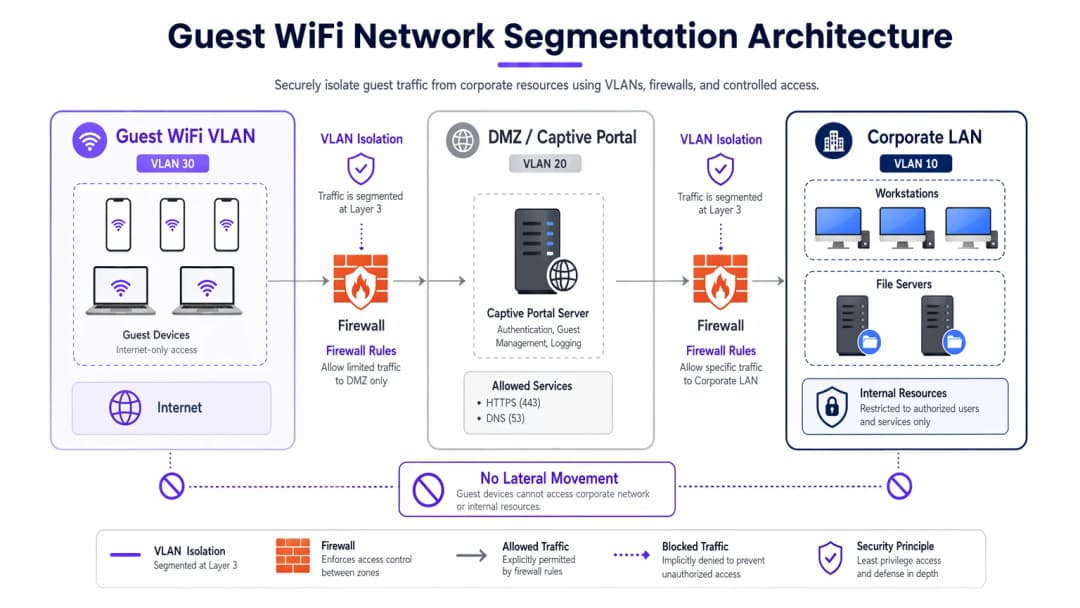
Dedizierte VLANs für den Gastdatenverkehr sind für eine robuste Bereitstellung zwingend erforderlich und müssen vollständig vom internen Betriebsnetzwerk getrennt sein. Beispielsweise kann der Gastdatenverkehr dem VLAN 30 zugewiesen werden, während Unternehmensgeräte im VLAN 10 verbleiben. Diese Segmentierung muss nicht nur auf dem Wireless-Controller, sondern auch auf der Ebene der Managed Switches erzwungen werden, um VLAN-Hopping-Angriffe zu verhindern.
Darüber hinaus ist die Client-Isolation (oder Layer 2-Isolation) von entscheidender Bedeutung. Dies verhindert, dass Geräte, die mit derselben Guest WiFi SSID verbunden sind, miteinander kommunizieren. Ohne Client-Isolation kann ein einzelnes kompromittiertes Gerät das lokale Subnetz scannen, ein ARP-Spoofing durchführen und laterale Angriffe auf andere Gäste starten.
Captive Portal-Architektur
Das Captive Portal fungiert als Gateway für die Authentifizierung und Richtliniendurchsetzung. Um das Abfangen von Anmeldedaten zu verhindern, muss das Portal ausschließlich über HTTPS unter Verwendung eines gültigen TLS-Zertifikats bereitgestellt werden. Der Portal-Server sollte in einer DMZ gehostet werden, isoliert von internen Datenbanken. Dadurch wird sichergestellt, dass Angreifer selbst bei einer Kompromittierung des Portals nicht in das Unternehmens-LAN vordringen können.
Verschlüsselungsstandards: WPA3
Herkömmliche offene Netzwerke übertragen Daten im Klartext, sodass Benutzer anfällig für passives Abhören sind. WPA3 sollte in modernen Bereitstellungen obligatorisch sein. Für öffentliche Netzwerke bietet WPA3-Enhanced Open (Opportunistic Wireless Encryption) eine individuelle Datenverschlüsselung ohne Passwort. Für Hybridumgebungen gewährleistet Implementing WPA3-Enterprise for Enhanced Wireless Security eine robuste 192-Bit-Verschlüsselung und lässt sich mit RADIUS/802.1X für eine identitätsbasierte Zugriffskontrolle integrieren.
Haben Sie Fragen zu Ihrem spezifischen Setup?
Unser Team arbeitet mit Standortbetreibern, IT-Managern und Netzwerktechnikern an über 80.000 Standorten zusammen. Buchen Sie ein 20-minütiges Gespräch und wir zeigen Ihnen, wie andere diese Herausforderungen gelöst haben.
Implementierungsleitfaden
Die Implementierung eines sicheren Gastnetzwerks erfordert einen systematischen Ansatz, um sowohl die Sicherheit als auch die Benutzerfreundlichkeit zu gewährleisten.
1. Definition der Topologie
Erfassen Sie den gesamten Datenpfad vom Access Point bis zum Internet-Gateway. Stellen Sie sicher, dass Firewall-ACLs den Datenverkehr vom Gast-Subnetz zu allen privaten RFC 1918-IP-Bereichen explizit blockieren.
2. Wahl der Authentifizierungsmethode
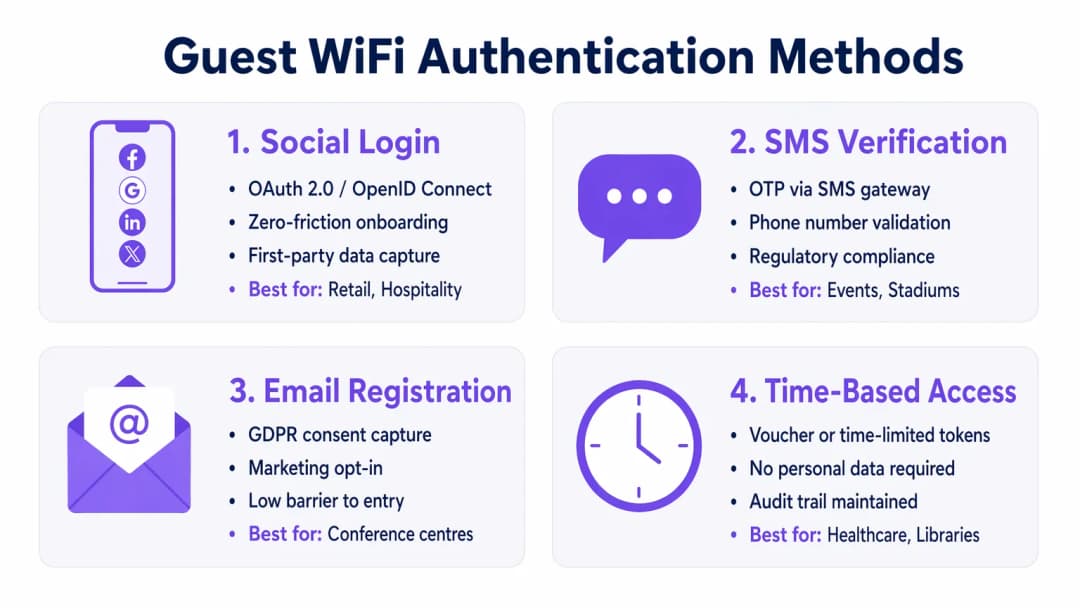
Wählen Sie einen Authentifizierungsmechanismus, der auf Ihre Geschäftsziele und Ihr Risikoprofil abgestimmt ist:
- Social Login: Ideal für Umgebungen im Bereich Retail und Hospitality, in denen die Minimierung von Reibungsverlusten und die Erfassung von Erstanbieterdaten für WiFi Analytics-Plattformen von zentraler Bedeutung sind.
- SMS-Verifizierung: Bietet ein starkes Identitätssignal und einen Audit-Trail, geeignet für Stadien oder öffentliche Veranstaltungsorte, bei denen Rechenschaftspflicht erforderlich ist.
- E-Mail-Registrierung: Bietet ein ausgewogenes Verhältnis zwischen Datenerfassung und geringen Bereitstellungskosten, wie es in Konferenzzentren üblich ist.
- Zeitgesteuerter Zugriff: Generiert kurzfristige Token ohne Erfassung von personenbezogenen Daten (PII) - optimal für Wartezimmer im Healthcare-Bereich oder Bibliotheken.
3. Konfiguration des Bandbreitenmanagements
Um Bandbreitenengpässe zu vermeiden und die Verfügbarkeit sicherzustellen, sollten Sie QoS-Richtlinien implementieren. Setzen Sie auf dem Wireless Controller Ratenbegrenzungen pro Benutzer durch (z. B. 10 Mbps Downstream / 2 Mbps Upstream) und schränken Sie Massenübertragungen von Dateien ein, während DNS- und HTTPS-Verkehr priorisiert werden.
4. Bereitstellung und Testen
Führen Sie vor dem produktiven Rollout einen Segmentierungstest durch. Verbinden Sie ein Gerät mit der Gast-SSID und versuchen Sie, interne Server anzupingen oder auf das Unternehmens-DNS zuzugreifen. Jede erfolgreiche Verbindung weist auf einen kritischen Segmentierungsfehler hin.
Best Practices
- Strikte Firewall-ACLs durchsetzen: Blockieren Sie standardmäßig den gesamten Datenverkehr vom Gast-VLAN zu internen Subnetzen. Erlauben Sie ausgehenden Datenverkehr nur auf absolut notwendigen Ports (z. B. 80, 443, 53).
- Inhaltsfilterung implementieren: Nutzen Sie DNS-basierte Filterung, um schädliche Domains, Command-and-Control-Server für Malware sowie unangemessene Inhalte zu blockieren. Dies schützt sowohl die Benutzer als auch die IP-Reputation des Standorts.
- Konfigurationen regelmä%ig prüfen: Führen Sie vierteljährliche Überprüfungen der Switch-Port-Konfigurationen, Firewall-Regeln und Richtlinien für Wireless-Controller durch, um Konfigurationsabweichungen zu erkennen.
- Umfassende Protokollierung pflegen: Protokollieren Sie alle DHCP-Leases, NAT-Übersetzungen und Authentifizierungsereignisse. Bewahren Sie diese Protokolle mindestens 12 Monate lang auf, um forensische Untersuchungen zu unterstützen und lokale Vorschriften einzuhalten.
Fehlerbehebung und Risikominderung
Selbst gut konzipierte Netzwerke stoßen auf Probleme. Das Verständnis häufiger Fehlerquellen beschleunigt die Behebung.
- Nicht autorisierte Access Points: Mitarbeiter oder Angreifer können nicht autorisierte APs an Unternehmens-Ports anschlie%en. Verhindern Sie dies, indem Sie die portbasierte 802.1X-Authentifizierung an allen kabelgebundenen Switch-Ports aktivieren und ein Wireless Intrusion Prevention System (WIPS) zur Erkennung und Eindämmung unerlaubter Signale nutzen.
- Umgehung des Captive Portals: Fortgeschrittene Benutzer versuchen möglicherweise, Portale mittels MAC-Spoofing oder DNS-Tunneling zu umgehen. Steuern Sie dem entgegen, indem Sie eine Erkennung zur MAC-Adressen-Randomisierung implementieren und ausgehende DNS-Abfragen nur an genehmigte Resolver zulassen.
- IP-Erschöpfung: Umgebungen mit hoher Fluktuation, wie z. B. Knotenpunkte im Transportbereich, können DHCP-Pools schnell ausschöpfen. Verkürzen Sie die DHCP-Lease-Zeiten auf 30 - 60 Minuten und stellen Sie sicher, dass die Subnetzmaske (z. B. /22 oder /21) ausreichend IP-Adressen für Spitzenzeiten bereitstellt.
ROI und geschäftlicher Nutzen
Ein sicheres Gäste-WiFi ist nicht nur ein IT-Kostenfaktor - es ist ein strategischer Vorteil.
- Risikominderung: Eine ordnungsgemä%e Segmentierung verhindert kostspielige Datenpannen. Da die durchschnittlichen Kosten einer Datenpanne in die Millionen gehen, mindert die Isolierung des Gästedatenverkehrs das Risiko, dass ein kompromittiertes Besuchergerät auf POS-Systeme oder interne Datenbanken zugreift.
- Datenmonetarisierung: Eine sichere, reibungslose Authentifizierung (wie Social Login) speist hochwertige, verifizierte Daten in Marketingplattformen ein, was zielgerichtete Kampagnen ermöglicht und den Customer Lifetime Value erhöht.
- Operative Effizienz: Automatisiertes Onboarding und ein robustes Bandbreitenmanagement reduzieren IT-Support-Tickets im Zusammenhang mit Verbindungsproblemen erheblich und setzen Entwicklungsressourcen für strategische Projekte frei.
Podcast-Briefing
Hören Sie sich unser umfassendes, 10-minütiges technisches Briefing zur Sicherung von Gästenetzwerken an:
Schlüsseldefinitionen
VLAN-Segmentierung
Die logische Aufteilung eines physischen Netzwerks in mehrere separate Broadcast-Domänen, um Verkehrsarten zu isolieren.
Unerlässlich, um nicht vertrauenswürdige Gastgeräte vollständig von sensiblen Unternehmensservern und -daten getrennt zu halten.
Client Isolation
Eine Funktion des Wireless-Controllers, die verhindert, dass Geräte, die mit derselben SSID verbunden sind, direkt miteinander kommunizieren.
In öffentlichen Bereichen von entscheidender Bedeutung, um zu verhindern, dass böswillige Gäste die Laptops oder Telefone anderer Gäste scannen oder angreifen.
Captive Portal
Eine Webseite, die Benutzer aufrufen und mit der sie interagieren müssen, bevor ihnen der Zugriff auf das breitere Netzwerk gewährt wird.
Wird verwendet, um Nutzungsbedingungen durchzusetzen, Marketingdaten zu erfassen und Benutzer sicher über HTTPS zu authentifizieren.
WPA3-Enhanced Open
Eine Sicherheitszertifizierung, die eine unverschlüsselte Datenverschlüsselung für offene WiFi-Netzwerke mittels Opportunistic Wireless Encryption (OWE) bietet.
Schützt Benutzer in Cafés und Flughäfen vor passivem Abhören, ohne den Aufwand eines gemeinsamen Passworts.
Bandbreitenbegrenzung
Die gezielte Einschränkung der maximalen Geschwindigkeit (Durchsatz), die ein Benutzer oder eine Anwendung im Netzwerk verbrauchen kann.
Verhindert Netzwerküberlastungen und sorgt für einen fairen Zugriff für alle Gäste bei Veranstaltungen mit hoher Besucherzahl.
Rogue Access Point
Ein nicht autorisierter drahtloser Access Point, der an ein sicheres Unternehmensnetzwerk angeschlossen ist und häufig die Sicherheitskontrollen umgeht.
Ein erhebliches Sicherheitsrisiko, das IT-Teams mithilfe von Wireless Intrusion Prevention Systems (WIPS) aktiv überwachen müssen.
DMZ (Demilitarisierte Zone)
Ein Umkreisnetzwerk, das das interne lokale Netzwerk einer Organisation vor nicht vertrauenswürdigem Datenverkehr schützt.
Der korrekte architektonische Ort für das Hosting eines Captive-Portal-Servers, um das Risiko bei einer Kompromittierung des Servers zu minimieren.
MAC-Spoofing
Die Technik zur Änderung der Media-Access-Control-Adresse einer Netzwerkschnittstelle, um sich als ein anderes Gerät auszugeben.
Eine gängige Methode, mit der Angreifer Captive Portals oder zeitbasierte Zugriffsbeschränkungen umgehen.
Ausgearbeitete Beispiele
Ein Luxushotel mit 400 Zimmern muss ein nahtloses Gast-WiFi bereitstellen und gleichzeitig die PCI-DSS-Compliance für seine separaten PoS-Terminals in den Restaurants und Bars gewährleisten.
Richten Sie ein dediziertes Gast-VLAN (z. B. VLAN 40) auf allen Switches und APs ein. Aktivieren Sie die Client Isolation auf dem Wireless-Controller, um Angriffe von Gast zu Gast zu verhindern. Konfigurieren Sie Firewall-ACLs so, dass jegliches Routing zwischen VLAN 40 und dem PoS-VLAN (z. B. VLAN 20) explizit blockiert wird. Implementieren Sie WPA3-Enhanced Open für die Gast-SSID, um den Datenverkehr über die Luft ohne Passworteingabe zu verschlüsseln.
Eine große Einzelhandelskette möchte kostenloses WiFi anbieten, um Kundendaten zu erfassen, verzeichnet jedoch an Wochenenden zu Spitzenzeiten Netzwerkverlangsamungen, da Nutzer HD-Videos streamen.
Implementieren Sie eine Bandbreitenbegrenzung pro Benutzer (z. B. 5 Mbps) auf dem Wireless-Controller. Konfigurieren Sie Application Visibility and Control (AVC), um Streaming-Medienkategorien (Netflix, YouTube) zu drosseln, während das Surfen im Web und Social-Media-Apps, die für die Anmeldung im Captive Portal genutzt werden, priorisiert werden.
Übungsfragen
Q1. Sie stellen ein Gast-WiFi in einem großen Stadion bereit. Die Rechtsabteilung fordert einen überprüfbaren Audit-Trail darüber, wer sich im Falle illegaler Aktivitäten mit dem Netzwerk verbunden hat. Welche Authentifizierungsmethode sollten Sie implementieren?
Hinweis: Überlegen Sie, welche Methode den Benutzer mit einer überprüfbaren realen Identität verknüpft.
Musterlösung anzeigen
SMS-Verifizierung. Dies erfordert, dass der Benutzer eine physische SIM-Karte besitzt und ein One-Time Passcode (OTP) empfängt, was ein starkes Identitätssignal und einen zuverlässigen Prüfpfad für Strafverfolgungsbehörden im Bedarfsfall liefert.
Q2. Während eines Penetrationstests verbindet sich der Prüfer mit dem Gäste-WiFi und greift erfolgreich auf die Verwaltungsoberfläche eines Unternehmensdruckers zu. Was ist die wahrscheinlichste Fehlkonfiguration?
Hinweis: Denken Sie darüber nach, wie der Datenverkehr zwischen verschiedenen Netzwerksegmenten geroutet wird.
Musterlösung anzeigen
Ein Fehler bei der Layer-3-Segmentierung oder den Firewall-ACLs. Das Gäste-VLAN ist wahrscheinlich in der Lage, Datenverkehr in das Unternehmens-VLAN zu routen, in dem sich der Drucker befindet. Die Firewall sollte mit einer expliziten "Deny"-Regel konfiguriert werden, die den Datenverkehr vom Gäste-Subnetz zu allen internen RFC 1918-IP-Adressen blockiert.
Q3. Eine öffentliche Bibliothek möchte kostenloses WiFi anbieten, darf aber aufgrund lokaler Datenschutzbestimmungen absolut keine personenbezogenen Daten (PII) speichern. Wie sollten sie den Zugriff konfigurieren?
Hinweis: Welche Methode gewährt Zugriff, ohne nach Name, E-Mail oder Telefonnummer zu fragen?
Musterlösung anzeigen
Zeitbasierter Zugriff über flüchtige Token oder Voucher. Das System kann einen temporären Zugangscode generieren, der nach einer festgelegten Dauer (z. B. 2 Stunden) abläuft. Dies führt ein technisches Protokoll der Verbindungsereignisse, ohne diese mit personenbezogenen Daten einer Person zu verknüpfen.
Weiterlesen in dieser Reihe
So implementieren Sie Zeit- und Bandbreitenbeschränkungen für Gäste WiFi
Ein maßgeblicher technischer Leitfaden zur Implementierung von Zeit- und Bandbreitenbeschränkungen in Enterprise-Gäste-WiFi-Netzwerken. Dieser Leitfaden bietet praxisnahe Architektur-Blaupausen, herstellerneutrale Konfigurationen und reale Fallstudien, die IT-Verantwortlichen helfen, Netzwerkleistung, Sicherheits-Compliance und das Besuchererlebnis in Einklang zu bringen.
Familienfreundliches WiFi: Best Practices für Einkaufszentren
Dieser technische Leitfaden bietet praxiserprobte Methoden für die Implementierung einer kategoriebasierten URL-Filterung in WiFi-Gästevarianten für den Einzelhandel. Er beschreibt die Netzwerkarchitektur, Richtliniendefinitionen und Strategien zur Risikominimierung, um Compliance sicherzustellen und den Markenruf zu schützen.
Sicherer Gastzugang: Implementierung von NAC für unverwaltete Geräte
Dieser fundierte technische Leitfaden beschreibt die Architektur, Bereitstellung und Compliance-Überlegungen für die Implementierung von Network Access Control (NAC) zur Absicherung unverwalteter Gastgeräte. Er bietet IT-Entscheidern praxisnahe Anleitungen für einen sicheren Gastzugang, ohne die Unternehmensinfrastruktur zu gefährden.
Haben Sie Fragen zu Ihrem spezifischen Setup?
Unser Team arbeitet mit Standortbetreibern, IT-Managern und Netzwerktechnikern an über 80.000 Standorten zusammen. Buchen Sie ein 20-minütiges Gespräch und wir zeigen Ihnen, wie andere diese Herausforderungen gelöst haben.