
Proteger Redes WiFi de Convidados: Melhores Práticas e Implementação
Este guia de referência técnica autoritário descreve a arquitetura, autenticação e controlos operacionais necessários para implementar WiFi de convidados empresarial seguro. Fornece melhores práticas acionáveis para líderes de TI imporem a segmentação de rede, gerirem a largura de banda e garantirem a conformidade enquanto maximizam a recolha de dados.
Video overview
Ouça este guia
Ver transcrição do podcast
Parte da nossa série principal: Guia de WiFi de Convidados →

Resumo Executivo
Implementar uma rede WiFi de convidados segura exige um equilíbrio entre o acesso simples do utilizador e uma segmentação de rede e conformidade robustas. Para CTOs e arquitetos de rede nos setores de retalho, hotelaria e público, o desafio consiste em isolar dispositivos de convidados não fidedignos da infraestrutura corporativa, extraindo simultaneamente o máximo valor da recolha de dados primários. Este guia detalha a arquitetura técnica, os frameworks de autenticação e os controlos operacionais necessários para implementar um WiFi de convidados de nível empresarial. Abordamos práticas essenciais, incluindo segmentação VLAN de Camada 3, segurança de Captive Portal, limitação de largura de banda e normas modernas de encriptação, como o WPA3. Ao implementar estas boas práticas independentes de fabricante, as organizações podem mitigar os riscos de movimento lateral, garantir a conformidade regulatória (incluindo GDPR e PCI-DSS) e transformar uma potencial vulnerabilidade de segurança num ativo seguro e gerador de valor.
Análise Técnica Detalhada
A base de qualquer rede WiFi de convidados segura é o isolamento total dos recursos corporativos. Isto requer uma abordagem de defesa em profundidade que abrange várias camadas do modelo OSI.
Segmentação e Isolamento de Rede
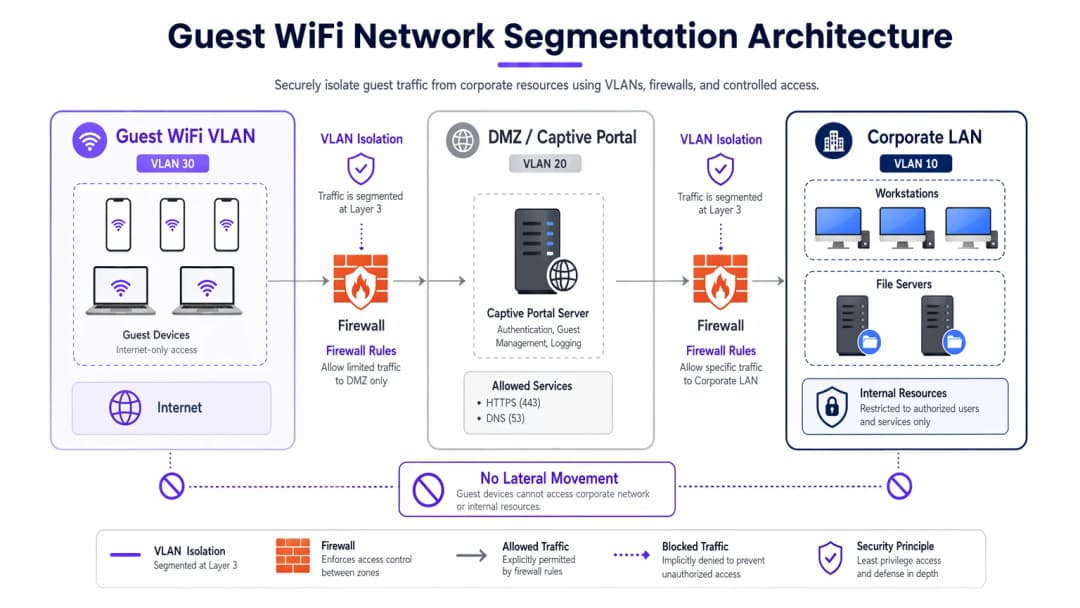
As VLANs dedicadas para o tráfego de convidados são obrigatórias para uma implementação robusta, completamente separadas da rede operacional interna. Por exemplo, o tráfego de convidados pode ser atribuído à VLAN 30, enquanto os dispositivos corporativos permanecem na VLAN 10. Esta segmentação deve ser imposta não apenas no controlador sem fios, mas também na camada do switch gerido para evitar ataques de VLAN hopping.
Além disso, o isolamento de clientes (ou isolamento de Camada 2) é fundamental. Isto impede que os dispositivos ligados ao mesmo SSID de Guest WiFi comuniquem entre si. Sem o isolamento de clientes, um único dispositivo comprometido pode fazer a varredura da sub-rede local, realizar falsificação de ARP (ARP spoofing) e lançar ataques bilaterais contra outros convidados.
Arquitetura de Captive Portal
O Captive Portal funciona como o gateway para autenticação e aplicação de políticas. Para evitar a interceção de credenciais, o portal deve ser disponibilizado exclusivamente via HTTPS utilizando um certificado TLS válido. O servidor do portal deve ser alojado numa DMZ, isolado das bases de dados internas. Isto garante que, mesmo que o portal seja comprometido, os atacantes não consigam infiltrar-se na LAN corporativa.
Normas de Encriptação: WPA3
As redes abertas antigas transmitem dados em texto simples, deixando os utilizadores vulneráveis a escutas passivas. O WPA3 deve ser obrigatório nas implementações modernas. Para redes públicas, o WPA3-Enhanced Open (Opportunistic Wireless Encryption) fornece encriptação de dados individual sem palavra-passe. Para ambientes híbridos, a Implementing WPA3-Enterprise for Enhanced Wireless Security garante uma encriptação robusta de 192 bits e integra-se com RADIUS/802.1X para controlo de acesso baseado na identidade.
Tem dúvidas sobre a sua configuração específica?
A nossa equipa trabalha com operadores de espaços, gestores de TI e engenheiros de rede em 80.000 espaços. Agende uma chamada de 20 minutos e mostraremos como outros profissionais na sua área o resolveram.
Guia de Implementação
A implementação de uma rede de convidados segura requer uma abordagem sistemática para garantir tanto a segurança como a usabilidade.
1. Definir a Topologia
Mapeie todo o caminho dos dados desde o ponto de acesso até ao gateway de internet. Certifique-se de que as ACLs do firewall negam explicitamente o tráfego da sub-rede de convidados para quaisquer gamas de IP privado RFC 1918.
2. Escolher o Método de Autenticação
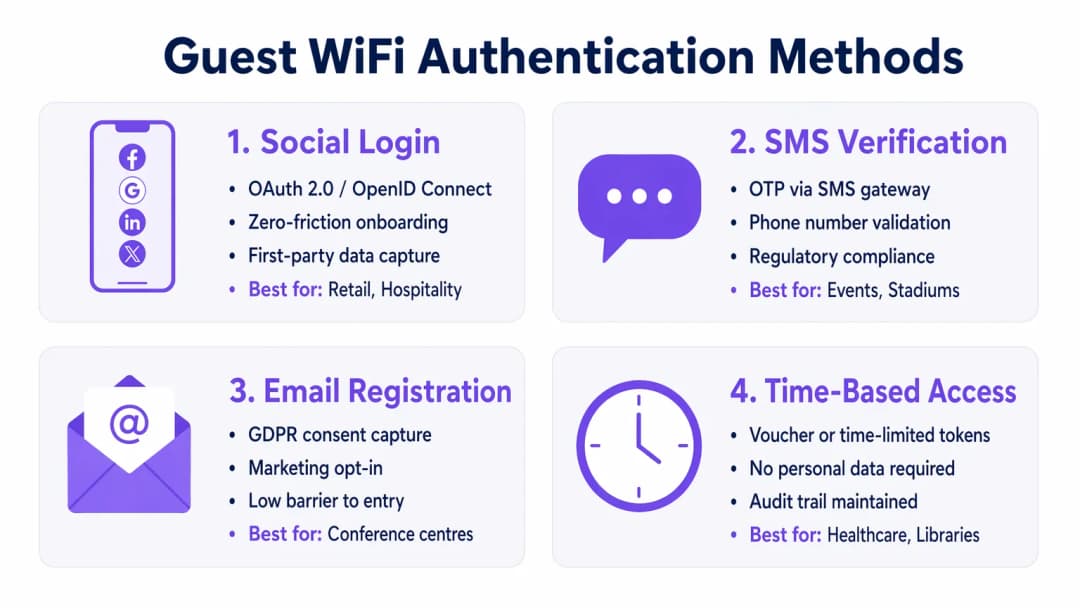
Selecione um mecanismo de autenticação alinhado com os seus objetivos de negócio e perfil de risco:
- Login Social: Ideal para ambientes de Retail e Hospitality onde a minimização do atrito e a recolha de dados primários para plataformas de WiFi Analytics é primordial.
- Verificação por SMS: Fornece um forte sinal de identidade e pista de auditoria, adequado para estádios ou locais públicos onde a responsabilização é necessária.
- Registo por E-mail: Equilibra a recolha de dados com baixos custos de implementação, comum em centros de conferências.
- Acesso Baseado no Tempo: Gera tokens de curta duração sem recolher PII, ideal para salas de espera de Healthcare ou bibliotecas.
3. Configurar a Gestão de Largura de Banda
Para evitar a saturação da largura de banda e garantir a disponibilidade, implemente políticas de QoS. Aplique limites de taxa por utilizador (por exemplo, 10 Mbps de download / 2 Mbps de upload) no controlador sem fios, e restrinja as transferências de ficheiros em massa ao mesmo tempo que prioriza o tráfego DNS e HTTPS.
4. Implementar e Testar
Antes do lançamento em produção, realize um teste de segmentação. Ligue um dispositivo ao SSID de convidados e tente efetuar um ping a servidores internos ou aceder ao DNS corporativo. Qualquer ligação bem-sucedida indica uma falha de segmentação crítica.
Boas Práticas
- Aplicar ACLs de firewall estritas: Negar por predefinição todo o tráfego da VLAN de convidados para as sub-redes internas. Permita apenas o tráfego de saída em portas essenciais (por exemplo, 80, 443, 53).
- Implementar filtragem de conteúdos: Utilize filtragem baseada em DNS para bloquear domínios maliciosos, servidores de comando e controlo de malware e conteúdos inadequados, protegendo tanto os utilizadores como a reputação do IP do local.
- Auditar as configurações regularmente: Realize revisões trimestrais das configurações das portas do switch, das regras de firewall e das políticas dos controladores wireless para detetar desvios de configuração.
- Manter registos (logs) detalhados: Registe todas as atribuições DHCP, traduções NAT e eventos de autenticação. Conserve estes registos durante pelo menos 12 meses para apoiar investigações forenses e cumprir com os regulamentos locais.
Resolução de Problemas e Mitigação de Riscos
Mesmo as redes bem concebidas encontram problemas. Compreender os modos de falha comuns acelera a resolução.
- Access Points Não Autorizados (Rogues): Funcionários ou atacantes podem ligar APs não autorizados a portas corporativas. Mitigue esta situação ativando a autenticação baseada em porta 802.1X em todas as portas de switch cabeadas e utilizando um Sistema de Prevenção de Intrusões Sem Fios (WIPS) para detetar e conter sinais não autorizados.
- Bypass do Captive Portal: Utilizadores avançados podem tentar contornar os portais utilizando MAC spoofing ou túneis DNS. Mitigue esta situação implementando a deteção de aleatorização de endereços MAC e restringindo as consultas DNS de saída apenas a servidores de resolução aprovados.
- Esgotamento de IPs: Ambientes de elevada rotatividade, tais como hubs de Transportes, podem esgotar rapidamente os pools de DHCP. Reduza os tempos de concessão (lease) de DHCP para 30 a 60 minutos e garanta que a máscara de sub-rede (por exemplo, /22 ou /21) fornece endereços IP suficientes para a capacidade máxima.
Retorno do Investimento (ROI) e Impacto Comercial
Uma rede WiFi de convidados segura não é apenas um centro de custos de TI; é um ativo estratégico.
- Redução de Riscos: A segmentação adequada evita violações de dados dispendiosas. Com o custo médio de uma violação de dados a atingir os milhões, o isolamento do tráfego de convidados mitiga o risco de um dispositivo de visitante comprometido aceder a sistemas de POS ou a bases de dados internas.
- Monetização de Dados: A autenticação segura e sem fricção (como o login social) fornece dados verificados de alta qualidade a plataformas de marketing, permitindo campanhas direcionadas e aumentando o ciclo de vida do cliente (LTV).
- Eficiência Operacional: O onboarding automatizado e a gestão robusta de largura de banda reduzem significativamente os pedidos de suporte de TI relacionados com problemas de conectividade, libertando recursos de engenharia para projetos estratégicos.
Resumo em Podcast
Ouça o nosso resumo técnico detalhado de 10 minutos sobre como proteger redes de convidados:
Definições Principais
Segmentação de VLAN
A separação lógica de uma rede física em múltiplos domínios de difusão distintos para isolar tipos de tráfego.
Essencial para manter os dispositivos não confiáveis de convidados completamente separados de servidores e dados corporativos sensíveis.
Client Isolation
Uma funcionalidade do controlador sem fios que impede dispositivos ligados ao mesmo SSID de comunicar diretamente entre si.
Crucial em locais públicos para impedir que um convidado malicioso examine ou ataque computadores portáteis ou telemóveis de outros convidados.
Captive Portal
Uma página web que os utilizadores são forçados a visualizar e com a qual devem interagir antes de lhes ser concedido acesso à rede mais ampla.
Utilizado para aplicar os termos de serviço, recolher dados de marketing e autenticar utilizadores de forma segura através de HTTPS.
WPA3-Enhanced Open
Uma certificação de segurança que fornece encriptação de dados não autenticada para redes WiFi abertas utilizando Opportunistic Wireless Encryption (OWE).
Protege os utilizadores de escutas passivas em cafés e aeroportos sem o atrito de uma palavra-passe partilhada.
Limitação da Taxa de Largura de Banda
A restrição intencional da velocidade máxima (débito) que um utilizador ou aplicação pode consumir na rede.
Previne o congestionamento da rede e garante um acesso equitativo para todos os convidados durante eventos de grande afluência.
Ponto de Acesso Falso (Rogue)
Um ponto de acesso sem fios não autorizado ligado a uma rede empresarial segura, contornando frequentemente os controlos de segurança.
Um risco de segurança importante que as equipas de TI devem monitorizar ativamente utilizando Sistemas de Prevenção de Intrusões Sem Fios (WIPS).
DMZ (Zona Desmilitarizada)
Uma rede de perímetro que protege a rede local interna de uma organização contra tráfego não confiável.
A localização arquitetónica correta para alojar um servidor de Captive Portal para minimizar o risco caso o servidor seja comprometido.
Falsificação de MAC (Spoofing)
A técnica de alterar o endereço de Media Access Control de uma interface de rede para se fazer passar por outro dispositivo.
Um método comum que os atacantes utilizam para contornar Captive Portals ou restrições de acesso baseadas no tempo.
Exemplos Práticos
Um hotel de luxo com 400 quartos precisa de fornecer WiFi de convidados contínuo, garantindo ao mesmo tempo a conformidade com PCI-DSS para os seus terminais de pagamento (PoS) independentes nos restaurantes e bares.
Implemente uma VLAN de convidados dedicada (ex. VLAN 40) em todos os switches e APs. Ative a funcionalidade Client Isolation no controlador sem fios para evitar ataques de convidado para convidado. Configure ACLs na firewall para bloquear explicitamente todo o encaminhamento entre a VLAN 40 e a VLAN de PoS (ex. VLAN 20). Implemente WPA3-Enhanced Open para o SSID de convidados para encriptar o tráfego de rádio sem exigir uma palavra-passe.
Uma grande cadeia de retalho pretende oferecer WiFi gratuito para recolher dados de clientes, mas está a registar lentidão na rede durante as horas de ponta ao fim de semana devido a utilizadores que transmitem vídeo em HD.
Implemente a limitação da taxa de largura de banda por utilizador (ex. 5 Mbps) no controlador sem fios. Configure a Visibilidade e Controlo de Aplicações (AVC) para limitar as categorias de transmissão multimédia (Netflix, YouTube), priorizando a navegação na web e as aplicações de redes sociais utilizadas para o início de sessão no Captive Portal.
Perguntas de Prática
Q1. Está a implementar WiFi de convidados num grande estádio. A equipa jurídica exige um registo de auditoria verificável de quem se ligou à rede em caso de atividade ilegal. Que método de autenticação deve implementar?
Dica: Considere qual o método que associa o utilizador a uma identidade real verificável.
Ver resposta modelo
Verificação por SMS. Isto exige que o utilizador possua um cartão SIM físico e receba um código de utilização única (OTP), fornecendo um forte sinal de identidade e um registo de auditoria fiável para as autoridades policiais, se necessário.
Q2. Durante um teste de intrusão, o avaliador liga-se ao WiFi de convidados e acede com sucesso à interface de gestão de uma impressora corporativa. Qual é a falha de configuração mais provável?
Dica: Pense em como o tráfego é encaminhado entre diferentes segmentos de rede.
Ver resposta modelo
Uma falha na segmentação de Camada 3 ou nas ACLs do Firewall. A VLAN de convidados é provavelmente capaz de encaminhar tráfego para a VLAN corporativa onde a impressora reside. O firewall deve ser configurado com uma regra explícita de "bloqueio" que impeça o tráfego da sub-rede de convidados para todos os endereços IP RFC 1918 internos.
Q3. Uma biblioteca pública pretende oferecer WiFi gratuito mas não pode, de todo, armazenar quaisquer Informações de Identificação Pessoal (PII) devido a regulamentos de privacidade locais. Como devem configurar o acesso?
Dica: Qual o método que concede acesso sem solicitar um nome, e-mail ou número de telefone?
Ver resposta modelo
Acesso Baseado em Tempo utilizando tokens efémeros ou vouchers. O sistema pode gerar um código de acesso temporário que expira após um período definido (por exemplo, 2 horas). Isto mantém um registo técnico dos eventos de ligação sem os associar às PII de um indivíduo.
Continue a ler esta série
Como Implementar Restrições de Tempo e de Largura de Banda em WiFi de Convidados
Um guia de referência técnica de autoridade sobre a implementação de restrições de tempo e de largura de banda em redes WiFi de convidados empresariais. Este guia fornece esquemas de arquitetura práticos, configurações neutras de fornecedor e casos de estudo reais para ajudar os líderes de TI a equilibrar o desempenho da rede, a conformidade de segurança e a experiência do visitante.
WiFi Familiar: Boas Práticas para Centros Comerciais
Este guia de referência técnica fornece metodologias acionáveis para implementar a filtragem de URL baseada em categorias em redes WiFi de convidados em ambientes de retalho. Detalha a arquitetura de rede, a definição de políticas e as estratégias de mitigação de riscos para garantir a conformidade e proteger a reputação da marca.
Acesso Seguro de Convidados: Implementar NAC para Dispositivos Não Geridos
Este guia de referência técnica autoritário detalha a arquitetura, a implementação e as considerações de conformidade para a implementação de Network Access Control (NAC) para proteger dispositivos de convidados não geridos. Fornece orientações práticas para que os líderes de TI consigam um acesso de convidados seguro sem comprometer a infraestrutura corporativa.
Tem dúvidas sobre a sua configuração específica?
A nossa equipa trabalha com operadores de espaços, gestores de TI e engenheiros de rede em 80.000 espaços. Agende uma chamada de 20 minutos e mostraremos como outros profissionais na sua área o resolveram.