
Mettere in sicurezza le reti WiFi ospiti: best practice e implementazione
Questa guida tecnica di riferimento autorevole delinea l'architettura, l'autenticazione e i controlli operativi necessari per implementare reti WiFi ospiti aziendali sicure. Offre best practice pratiche per i leader IT per applicare la segmentazione della rete, gestire la larghezza di banda e garantire la conformità massimizzando al contempo l'acquisizione dei dati.
Video overview
Ascolta questa guida
Visualizza trascrizione del podcast
Parte della nostra serie principale: Guida al WiFi ospiti →

Executive Summary
L'implementazione di una rete WiFi per ospiti sicura richiede un equilibrio tra un accesso utente fluido e una segmentazione della rete e conformità robuste. Per i CTO e gli architetti di rete nei settori retail, hospitality e pubblico, la sfida consiste nell'isolare i dispositivi guest non attendibili dall'infrastruttura aziendale, estraendo al contempo il massimo valore dall'acquisizione di dati di prima parte. Questa guida illustra in dettaglio l'architettura tecnica, i framework di autenticazione e i controlli operativi necessari per implementare un WiFi per ospiti di livello enterprise. Copriamo le pratiche essenziali, tra cui la segmentazione VLAN a livello Layer 3, la sicurezza del Captive Portal, la limitazione della larghezza di banda e i moderni standard di crittografia come il WPA3. Implementando queste best practice indipendenti dai singoli vendor, le organizzazioni possono mitigare i rischi di movimento laterale, garantire la conformità normativa (inclusi GDPR e PCI-DSS) e trasformare una potenziale vulnerabilità di sicurezza in una risorsa sicura e in grado di generare valore.
Technical Deep-Dive
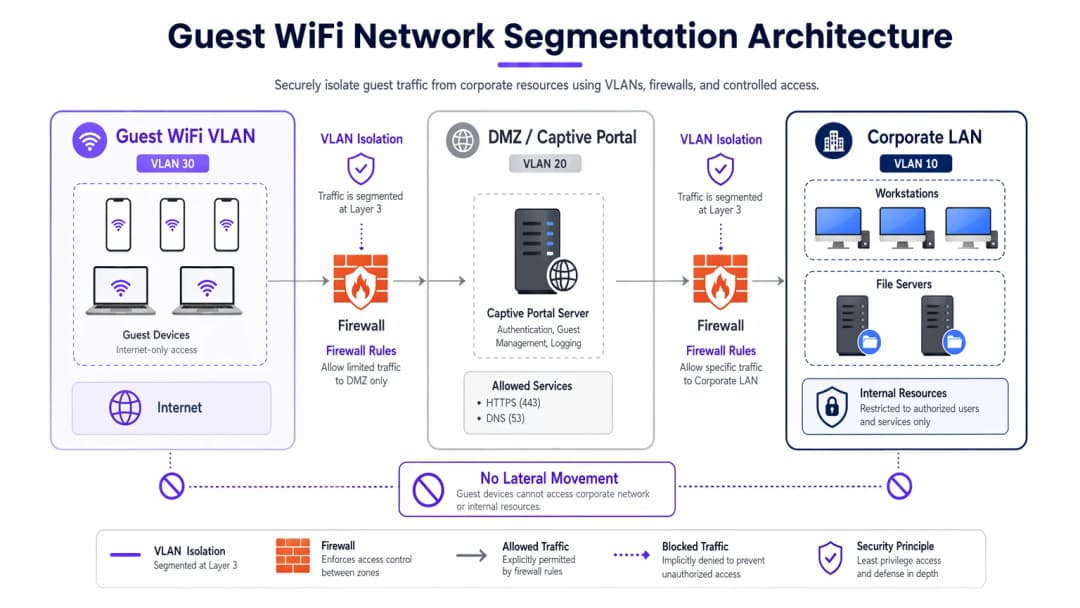
La base di qualsiasi rete WiFi per ospiti sicura è il completo isolamento dalle risorse aziendali. Ciò richiede un approccio di difesa approfondito che si estende su più livelli del modello OSI.
Segmentazione e Isolamento della Rete
Le VLAN dedicate per il traffico ospiti sono obbligatorie per un'implementazione robusta, completamente separate dalla rete operativa interna. Ad esempio, il traffico ospiti può essere assegnato alla VLAN 30, mentre i dispositivi aziendali rimangono sulla VLAN 10. Questa segmentazione deve essere applicata non solo sul controller wireless, ma anche a livello di switch gestito per prevenire attacchi di VLAN hopping.
Inoltre, l'isolamento dei client (o isolamento Layer 2) è fondamentale. Questo impedisce ai dispositivi connessi allo stesso SSID del WiFi per ospiti di comunicare tra loro. Senza l'isolamento dei client, un singolo dispositivo compromesso può scansionare la sottorete locale, eseguire lo spoofing ARP e sferrare attacchi laterali contro altri ospiti.
Architettura del Captive Portal
Il Captive Portal funge da gateway per l'autenticazione e l'applicazione delle policy. Per prevenire l'intercettazione delle credenziali, il portale deve essere erogato esclusivamente tramite HTTPS utilizzando un certificato TLS valido. Il server del portale deve essere ospitato in una DMZ, isolato dai database interni. Ciò garantisce che, anche se il portale viene compromesso, gli aggressori non possano fare pivot nella LAN aziendale.
Standard di Crittografia: WPA3
Le reti aperte legacy trasmettono i dati in chiaro, lasciando gli utenti vulnerabili all'intercettazione passiva. WPA3 dovrebbe essere obbligatorio nelle distribuzioni moderne. Per le reti pubbliche, WPA3-Enhanced Open (Opportunistic Wireless Encryption) fornisce la crittografia dei dati individuali senza password. Per gli ambienti ibridi, la guida Implementing WPA3-Enterprise for Enhanced Wireless Security garantisce una crittografia robusta a 192 bit e si integra con RADIUS/802.1X per il controllo degli accessi basato sull'identità.
Hai domande sulla tua configurazione specifica?
Il nostro team collabora con gestori di sedi, responsabili IT e ingegneri di rete in 80.000 sedi. Prenota una chiamata di 20 minuti e ti mostreremo come altri professionisti come te hanno risolto il problema.
Guida all'implementazione
L'implementazione di una rete guest sicura richiede un approccio sistematico per garantire sia la sicurezza che l'usabilità.
1. Definire la topologia
Mappare l'intero percorso dei dati dall'access point al gateway Internet. Assicurarsi che le ACL del firewall neghino esplicitamente il traffico dalla subnet guest a qualsiasi intervallo di IP privati RFC 1918.
2. Scegliere il metodo di autenticazione
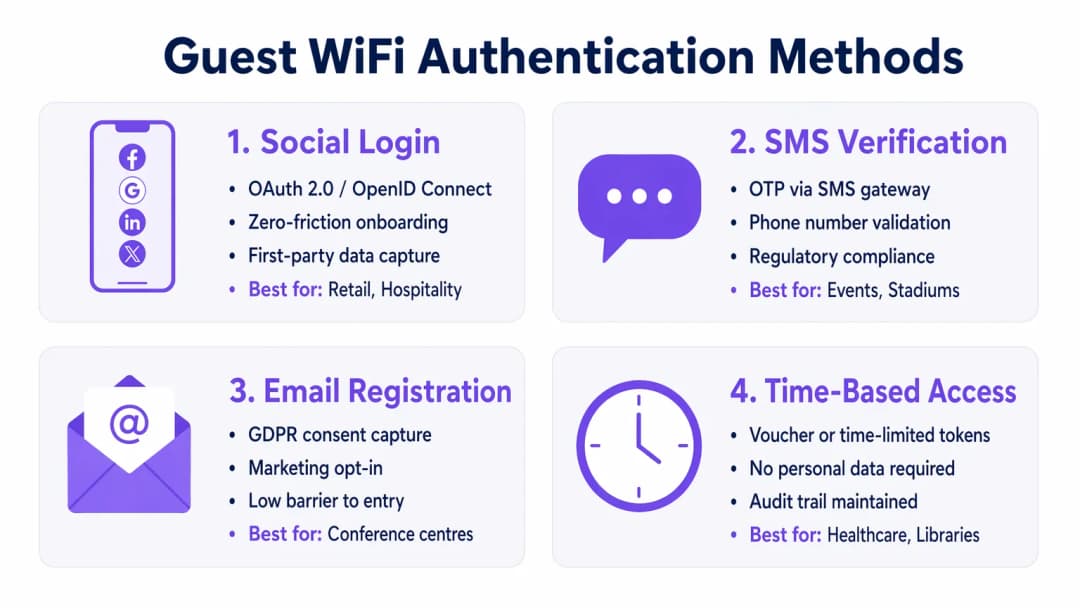
Selezionare un meccanismo di autenticazione in linea con gli obiettivi aziendali e il profilo di rischio:
- Social Login: ideale per gli ambienti Retail e Hospitality dove ridurre al minimo l'attrito e acquisire dati di prima parte per le piattaforme di WiFi Analytics è fondamentale.
- Verifica tramite SMS: fornisce un forte segnale di identità e un audit trail, adatto per stadi o luoghi pubblici in cui è richiesta la tracciabilità.
- Registrazione via e-mail: bilancia l'acquisizione dei dati con bassi costi di implementazione, comune nei centri congressi.
- Accesso a tempo: genera token a breve termine senza raccogliere PII, ottimale per le sale d'attesa nel settore Healthcare o per le biblioteche.
3. Configurare la gestione della larghezza di banda
Per evitare la saturazione della larghezza di banda e garantire la disponibilità, implementare policy di QoS. Applicare limiti di velocità per singolo utente (ad esempio, 10 Mbps in download / 2 Mbps in upload) sul controller wireless e limitare i trasferimenti di file di grandi dimensioni dando priorità al traffico DNS e HTTPS.
4. Distribuzione e test
Prima del rilascio in produzione, eseguire un test di segmentazione. Connettere un dispositivo all'SSID guest e tentare di effettuare un ping verso i server interni o di accedere al DNS aziendale. Qualsiasi connessione riuscita indica una falla critica nella segmentazione.
Best Practice
- Applicare ACL del firewall restrittive: impostare un blocco predefinito per tutto il traffico dalla VLAN guest alle subnet interne. Consentire solo il traffico in uscita sulle porte essenziali (ad esempio, 80, 443, 53).
- Implementare il filtraggio dei contenuti: utilizzare il filtraggio basato su DNS per bloccare domini dannosi, server di comando e controllo di malware e contenuti inappropriati, proteggendo sia gli utenti sia la reputazione IP della struttura.
- Controllare regolarmente le configurazioni: eseguire verifiche trimestrali delle configurazioni delle porte degli switch, delle regole del firewall e dei criteri dei controller wireless per rilevare eventuali discrepanze di configurazione.
- Mantenere una registrazione completa: registrare tutti i lease DHCP, le traduzioni NAT e gli eventi di autenticazione. Conservare questi registri per almeno 12 mesi per supportare le indagini informatiche forensi e conformarsi alle normative locali.
Risoluzione dei problemi e mitigazione dei rischi
Anche le reti ben progettate riscontrano problemi. Comprendere le modalità di guasto più comuni accelera la risoluzione.
- Access Point non autorizzati: i dipendenti o i malintenzionati potrebbero collegare AP non autorizzati alle porte aziendali. È possibile mitigare questo rischio abilitando l'autenticazione basata su porta 802.1X su tutte le porte degli switch cablati e utilizzando un sistema di prevenzione delle intrusioni wireless (WIPS) per rilevare e contenere i segnali non autorizzati.
- Aggiramento del Captive Portal: gli utenti avanzati potrebbero tentare di aggirare i portali utilizzando lo spoofing MAC o il tunneling DNS. Mitiga questo rischio implementando il rilevamento della randomizzazione degli indirizzi MAC e limitando le query DNS in uscita solo ai resolver approvati.
- Esaurimento degli IP: gli ambienti ad alto ricambio, come gli hub di trasporto, possono esaurire rapidamente i pool DHCP. Riduci i tempi di lease DHCP a 30 - 60 minuti e assicurati che la maschera di sottorete (ad esempio, /22 o /21) fornisca indirizzi IP sufficienti per la capacità di picco.
ROI e impatto aziendale
Una rete WiFi per ospiti sicura non è semplicemente un centro di costo IT; è una risorsa strategica.
- Riduzione del rischio: una corretta segmentazione previene costose violazioni dei dati. Con il costo medio di una violazione dei dati che ammonta a milioni, l'isolamento del traffico degli ospiti mitiga il rischio che un dispositivo di un visitatore compromesso si sposti nei sistemi POS o nei database interni.
- Monetizzazione dei dati: un'autenticazione sicura e senza intoppi (come il social login) alimenta i dati verificati e di alta qualità nelle piattaforme di marketing, consentendo campagne mirate e aumentando il valore del ciclo di vita del cliente.
- Efficienza operativa: l'onboarding automatizzato e una solida gestione della larghezza di banda riducono significativamente i ticket di supporto IT relativi a problemi di connettività, liberando risorse ingegneristiche per progetti strategici.
Briefing Podcast
Ascolta il nostro briefing tecnico completo di 10 minuti sulla sicurezza delle reti ospiti:
Definizioni chiave
Segmentazione VLAN
La separazione logica di una rete fisica in più domini di trasmissione distinti per isolare i diversi tipi di traffico.
Essenziale per mantenere i dispositivi ospiti non attendibili completamente separati dai server e dai dati aziendali sensibili.
Client Isolation
Una funzionalità del controller wireless che impedisce ai dispositivi connessi allo stesso SSID di comunicare direttamente tra loro.
Cruciale nei luoghi pubblici per impedire a un ospite malintenzionato di scansionare o attaccare i laptop o i telefoni di altri ospiti.
Captive Portal
Una pagina web che gli utenti sono obbligati a visualizzare e con cui devono interagire prima di ottenere l'accesso alla rete più ampia.
Utilizzato per far rispettare i termini di servizio, acquisire dati di marketing e autenticare gli utenti in modo sicuro tramite HTTPS.
WPA3-Enhanced Open
Una certificazione di sicurezza che fornisce la crittografia dei dati non autenticata per reti WiFi aperte utilizzando Opportunistic Wireless Encryption (OWE).
Protegge gli utenti dalle intercettazioni passive in caffetterie e aeroporti senza la complicazione di una password condivisa.
Limitazione della larghezza di banda
La limitazione intenzionale della velocità massima (throughput) che un utente o un'applicazione può consumare sulla rete.
Previene la congestione della rete e garantisce un accesso equo a tutti gli ospiti durante gli eventi ad alta affluenza.
Rogue Access Point
Un punto di accesso wireless non autorizzato connesso a una rete aziendale sicura, che spesso aggira i controlli di sicurezza.
Un grave rischio per la sicurezza che i team IT devono monitorare attivamente utilizzando sistemi di prevenzione delle intrusioni wireless (WIPS).
DMZ (Zona Demilitarizzata)
Una rete perimetrale che protegge la rete locale interna di un'organizzazione dal traffico non attendibile.
La corretta collocazione architetturale per ospitare un server Captive Portal al fine di ridurre al minimo i rischi in caso di compromissione del server.
Spoofing MAC
La tecnica di alterazione dell'indirizzo Media Access Control di un'interfaccia di rete per mascherarsi da un altro dispositivo.
Un metodo comune utilizzato dagli aggressori per aggirare i Captive Portal o le restrizioni di accesso basate sul tempo.
Esempi pratici
Un hotel di lusso con 400 camere deve fornire un accesso WiFi ospiti fluido e garantire al contempo la conformità PCI-DSS per i suoi terminali PoS separati nei ristoranti e nei bar.
Implementare una VLAN ospiti dedicata (ad es. VLAN 40) su tutti gli switch e AP. Abilitare Client Isolation sul controller wireless per prevenire attacchi da ospite a ospite. Configurare le ACL del firewall per bloccare esplicitamente tutto il routing tra la VLAN 40 e la VLAN dei PoS (ad es. VLAN 20). Implementare WPA3-Enhanced Open per l'SSID ospite per crittografare il traffico via etere senza richiedere una password.
Una grande catena di vendita al dettaglio desidera offrire il WiFi gratuito per acquisire i dati dei clienti, ma riscontra rallentamenti della rete durante le ore di punta del fine settimana a causa degli utenti che guardano video in streaming HD.
Implementare la limitazione della larghezza di banda per singolo utente (ad es. 5 Mbps) sul controller wireless. Configurare Application Visibility and Control (AVC) per limitare le categorie di streaming multimediale (Netflix, YouTube) dando la priorità alla navigazione web e alle app di social media utilizzate per l'accesso tramite Captive Portal.
Domande di esercitazione
Q1. Si sta implementando il WiFi ospiti in un importante stadio. Il team legale richiede un registro di controllo verificabile di chi si è connesso alla rete in caso di attività illegali. Quale metodo di autenticazione si dovrebbe implementare?
Suggerimento: Considerare quale metodo colleghi l'utente a un'identità reale verificabile.
Visualizza risposta modello
Verifica tramite SMS. Questo richiede che l'utente possieda una scheda SIM fisica e riceva un codice OTP (One-Time Passcode), fornendo un forte segnale di identità e una traccia di audit affidabile per le forze dell'ordine, se necessario.
Q2. Durante un penetration test, l'esaminatore si connette al WiFi per gli ospiti e accede con successo all'interfaccia di gestione di una stampante aziendale. Qual è il fallimento di configurazione più probabile?
Suggerimento: Pensa a come il traffico viene instradato tra i diversi segmenti di rete.
Visualizza risposta modello
Un fallimento nella segmentazione Layer 3 o nelle ACL del firewall. Il VLAN degli ospiti è probabilmente in grado di instradare il traffico verso la VLAN aziendale in cui si trova la stampante. Il firewall dovrebbe essere configurato con una regola di 'deny' esplicita che blocchi il traffico dalla sottorete degli ospiti a tutti gli indirizzi IP interni RFC 1918.
Q3. Una biblioteca pubblica desidera offrire WiFi gratuito ma non può assolutamente memorizzare alcuna Informazione Personale Identificabile (PII) a causa delle ordinanze locali sulla privacy. Come dovrebbe configurare l'accesso?
Suggerimento: Quale metodo concede l'accesso senza richiedere nome, email o numero di telefono?
Visualizza risposta modello
Accesso a tempo utilizzando token o voucher temporanei. Il sistema può generare un codice di accesso temporaneo che scade dopo una durata prestabilita (ad es. 2 ore). In questo modo si mantiene un registro tecnico degli eventi di connessione senza collegarli ai dati PII di un individuo.
Continua a leggere questa serie
Come implementare restrizioni di tempo e larghezza di banda sul WiFi per gli ospiti
Una guida tecnica di riferimento autorevole sull'implementazione di restrizioni di tempo e larghezza di banda sulle reti WiFi per gli ospiti di livello enterprise. Questa guida fornisce progetti architetturali pratici, configurazioni indipendenti dal fornitore e casi di studio reali per aiutare i responsabili IT a bilanciare prestazioni di rete, conformità di sicurezza ed esperienza dei visitatori.
WiFi a misura di famiglia: Best Practice per i Centri Commerciali
Questa guida di riferimento tecnica fornisce metodologie pratiche per implementare il filtraggio URL basato su categorie sulle reti WiFi per gli ospiti in ambienti retail. Dettaglia l'architettura di rete, la definizione delle policy e le strategie di mitigazione del rischio per garantire la conformità e proteggere la reputazione del brand.
Secure Guest Access: Implementazione del NAC per i Dispositivi Non Gestiti
Questa guida di riferimento tecnico autorevole descrive in dettaglio l'architettura, l'implementazione e le considerazioni di conformità per l'adozione del Network Access Control (NAC) al fine di proteggere i dispositivi guest non gestiti. Fornisce indicazioni pratiche ai leader IT per ottenere un accesso guest sicuro senza compromettere l'infrastruttura aziendale.
Hai domande sulla tua configurazione specifica?
Il nostro team collabora con gestori di sedi, responsabili IT e ingegneri di rete in 80.000 sedi. Prenota una chiamata di 20 minuti e ti mostreremo come altri professionisti come te hanno risolto il problema.