
Garantizar la seguridad de las redes de WiFi para invitados: mejores prácticas e implementación
Esta guía técnica de referencia autorizada describe la arquitectura, la autenticación y los controles operativos necesarios para implementar redes de WiFi para invitados empresariales seguras. Proporciona mejores prácticas prácticas para que los líderes de TI apliquen la segmentación de red, gestionen el ancho de banda y garanticen el cumplimiento al tiempo que maximizan la captura de datos.
Video overview
Escuchar esta guía
Ver transcripción del podcast
Parte de nuestra serie principal: Guía de WiFi para invitados →

Resumen Ejecutivo
El despliegue de una red WiFi de invitados segura requiere un equilibrio entre un acceso de usuario sin fricciones y una segmentación y cumplimiento de red sólidos. Para los CTO y arquitectos de red en los sectores de retail, hostelería y sector público, el desafío consiste en aislar los dispositivos de invitados no fiables de la infraestructura corporativa, al tiempo que se extrae el máximo valor de la captura de datos de primera mano. Esta guía detalla la arquitectura técnica, los marcos de autenticación y los controles operativos necesarios para implementar un WiFi de invitados de nivel empresarial. Cubrimos prácticas esenciales que incluyen la segmentación de VLAN de Capa 3, la seguridad del Captive Portal, la limitación del ancho de banda y los estándares de cifrado modernos como WPA3. Al implementar estas mejores prácticas independientes del proveedor, las organizaciones pueden mitigar los riesgos de movimiento lateral, garantizar el cumplimiento normativo (incluidos GDPR y PCI-DSS) y transformar una vulnerabilidad potencial de seguridad en un activo seguro y generador de valor.
Análisis Técnico Detallado
La base de cualquier red WiFi de invitados segura es el aislamiento completo de los recursos corporativos. Esto requiere un enfoque de defensa en profundidad que abarque múltiples capas del modelo OSI.
Segmentación y Aislamiento de Red
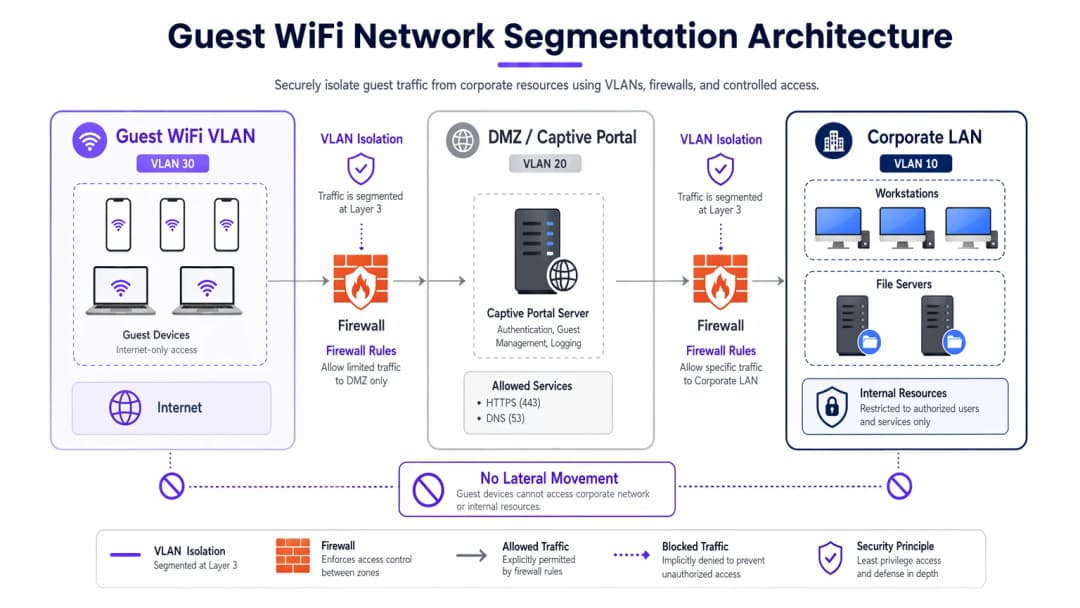
Las VLAN dedicadas para el tráfico de invitados son obligatorias para un despliegue robusto, completamente separadas de la red operativa interna. Por ejemplo, el tráfico de invitados se puede asignar a la VLAN 30, mientras que los dispositivos corporativos permanecen en la VLAN 10. Esta segmentación debe aplicarse no solo en el controlador inalámbrico sino también en la capa del switch gestionado para evitar ataques de salto de VLAN.
Además, el aislamiento de clientes (o aislamiento de Capa 2) es fundamental. Esto evita que los dispositivos conectados al mismo SSID de Guest WiFi se comuniquen entre sí. Sin el aislamiento de clientes, un solo dispositivo comprometido puede escanear la subred local, realizar falsificación de ARP (ARP spoofing) y lanzar ataques laterales contra otros invitados.
Arquitectura de Captive Portal
El Captive Portal actúa como la pasarela para la autenticación y la aplicación de políticas. Para evitar la interceptación de credenciales, el portal debe servirse exclusivamente a través de HTTPS utilizando un certificado TLS válido. El servidor del portal debe estar alojado en una DMZ, aislado de las bases de datos internas. Esto garantiza que incluso si el portal se ve comprometido, los atacantes no puedan pivotar hacia la LAN corporativa.
Estándares de Cifrado: WPA3
Las redes abiertas heredadas transmiten datos en texto plano, lo que deja a los usuarios vulnerables a la escucha pasiva. WPA3 debería ser obligatorio en los despliegues modernos. Para redes públicas, WPA3-Enhanced Open (Opportunistic Wireless Encryption) proporciona cifrado de datos individual sin necesidad de contraseña. Para entornos híbridos, Implementing WPA3-Enterprise for Enhanced Wireless Security garantiza un cifrado robusto de 192 bits y se integra con RADIUS/802.1X para el control de acceso basado en la identidad.
¿Tiene preguntas sobre su configuración específica?
Nuestro equipo trabaja con operadores de recintos, responsables de TI e ingenieros de redes en 80 000 espacios. Reserve una llamada de 20 minutos y le mostraremos cómo lo han solucionado otros profesionales como usted.
Guía de implementación
La implementación de una red de invitados segura requiere un enfoque sistemático para garantizar tanto la seguridad como la usabilidad.
1. Definir la topología
Mapee toda la ruta de datos desde el punto de acceso hasta la puerta de enlace a Internet. Asegúrese de que las ACL del firewall denieguen explícitamente el tráfico desde la subred de invitados a cualquier rango de IP privadas RFC 1918.
2. Elegir el método de autenticación
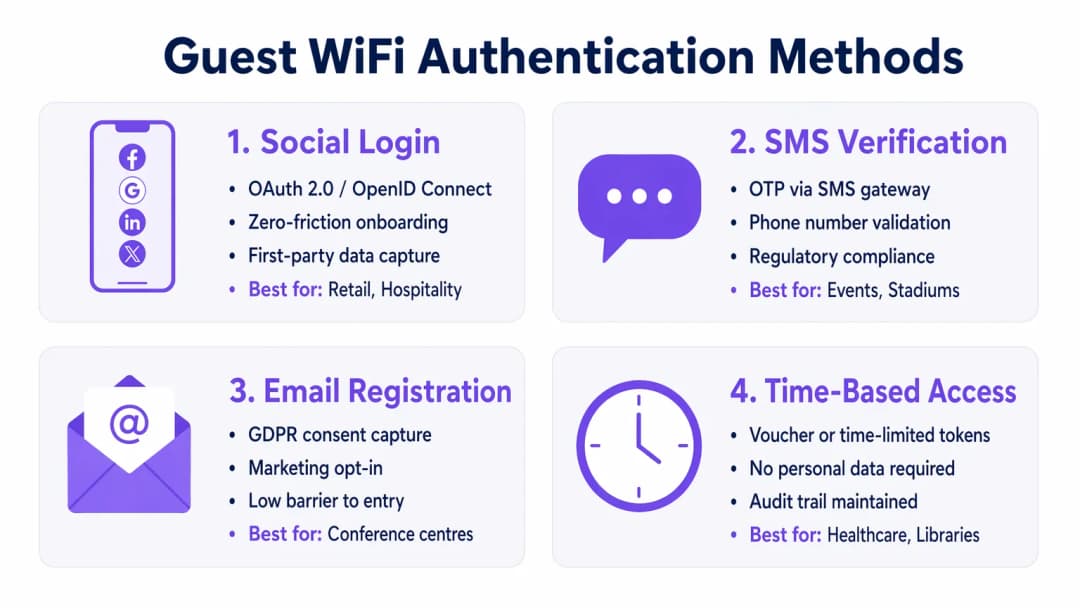
Seleccione un mecanismo de autenticación alineado con sus objetivos de negocio y perfil de riesgo:
- Inicio de sesión social: Ideal para entornos de Retail y Hospitality donde minimizar la fricción y capturar datos de primera mano para plataformas de WiFi Analytics es primordial.
- Verificación por SMS: Proporciona una señal de identidad fuerte y un registro de auditoría, adecuado para estadios o recintos públicos donde se requiere trazabilidad.
- Registro por correo electrónico: Equilibra la captura de datos con bajos costes de despliegue, común en centros de conferencias.
- Acceso basado en tiempo: Genera tokens a corto plazo sin recopilar PII, óptimo para salas de espera de Healthcare o bibliotecas.
3. Configurar la gestión del ancho de banda
Para evitar la saturación del ancho de banda y garantizar la disponibilidad, implemente políticas de QoS. Aplique límites de velocidad por usuario (por ejemplo, 10 Mbps de bajada / 2 Mbps de subida) en el controlador inalámbrico, y restrinja las transferencias de archivos de gran tamaño mientras prioriza el tráfico DNS y HTTPS.
4. Desplegar y probar
Antes del lanzamiento a producción, realice una prueba de segmentación. Conecte un dispositivo al SSID de invitados e intente hacer ping a servidores internos o acceder al DNS corporativo. Cualquier conexión exitosa indica un fallo crítico de segmentación.
Buenas prácticas
- Aplicar ACL de firewall estrictas: Denegar por defecto todo el tráfico desde la VLAN de invitados hacia las subredes internas. Permitir únicamente el tráfico saliente en puertos esenciales (por ejemplo, 80, 443, 53).
- Implementar filtrado de contenidos: Utilice el filtrado basado en DNS para bloquear dominios maliciosos, servidores de comando y control de malware y contenidos inapropiados, protegiendo tanto a los usuarios como la reputación de la IP del establecimiento.
- Auditar las configuraciones periódicamente: realice revisiones trimestrales de las configuraciones de los puertos de los conmutadores, las reglas de firewall y las políticas de los controladores inalámbricos para detectar desviaciones en la configuración.
- Mantener un registro detallado: registre todas las concesiones DHCP, traducciones NAT y eventos de autenticación. Conserve estos registros durante al menos 12 meses para facilitar las investigaciones forenses y cumplir con las normativas locales.
Resolución de problemas y mitigación de riesgos
Incluso las redes mejor diseñadas experimentan problemas. Comprender los fallos más comunes agiliza su resolución.
- Puntos de acceso no autorizados: los empleados o los atacantes pueden conectar AP no autorizados a los puertos corporativos. Mitigue este riesgo habilitando la autenticación basada en puertos 802.1X en todos los puertos cableados del conmutador y utilizando un Sistema de Prevención de Intrusiones Inalámbricas (WIPS) para detectar y contener señales no autorizadas.
- Evasión de Captive Portal: los usuarios avanzados pueden intentar eludir los portales mediante el fraude de dirección MAC o el túnel DNS. Mitigue esto implementando la detección de aleatorización de direcciones MAC y restringiendo las consultas DNS salientes únicamente a los resolvedores aprobados.
- Agotamiento de IP: los entornos de alta rotación, como los centros de Transporte, pueden agotar rápidamente los grupos DHCP. Reduzca los tiempos de concesión DHCP a 30-60 minutos y asegúrese de que la máscara de subred (por ejemplo, /22 o /21) proporcione suficientes direcciones IP para la capacidad máxima.
ROI e impacto empresarial
Una red WiFi de invitados segura no es un simple centro de costes de TI; es un activo estratégico.
- Reducción de riesgos: una segmentación adecuada evita costosas brechas de datos. Dado que el coste medio de una filtración de datos asciende a millones, aislar el tráfico de invitados mitiga el riesgo de que un dispositivo de visitante comprometido acceda a los sistemas POS o a las bases de datos internas.
- Monetización de datos: la autenticación segura y sin fricciones (como el inicio de sesión a través de redes sociales) introduce datos verificados de alta calidad en las plataformas de marketing, lo que permite realizar campañas personalizadas y aumentar el valor de vida del cliente.
- Eficiencia operativa: la incorporación automatizada y la gestión sólida del ancho de banda reducen significativamente los tickets de soporte de TI relacionados con problemas de conectividad, lo que libera recursos de ingeniería para proyectos estratégicos.
Resumen en pódcast
Escuche nuestro completo resumen técnico de 10 minutos sobre cómo proteger las redes de invitados:
Definiciones clave
Segmentación VLAN
La separación lógica de una red física en múltiples dominios de difusión distintos para aislar los tipos de tráfico.
Esencial para mantener los dispositivos de invitados no confiables completamente separados de los servidores y datos corporativos confidenciales.
Client Isolation
Una función de controlador inalámbrico que evita que los dispositivos conectados al mismo SSID se comuniquen directamente entre sí.
Crucial en lugares públicos para evitar que un invitado malicioso escanee o ataque ordenadores portátiles o teléfonos de otros invitados.
Captive Portal
Una página web que los usuarios están obligados a ver e interactuar con ella antes de que se les conceda acceso a la red general.
Se utiliza para hacer cumplir las condiciones de servicio, capturar datos de marketing y autenticar a los usuarios de forma segura a través de HTTPS.
WPA3-Enhanced Open
Una certificación de seguridad que proporciona cifrado de datos no autenticado para redes WiFi abiertas mediante el cifrado inalámbrico oportunista (OWE).
Protege a los usuarios de las escuchas pasivas en cafeterías y aeropuertos sin la fricción de una contraseña compartida.
Limitación de ancho de banda
La restricción intencionada de la velocidad máxima (rendimiento) que un usuario o una aplicación puede consumir en la red.
Evita la congestión de la red y garantiza un acceso equitativo para todos los invitados durante eventos de gran afluencia.
Punto de acceso no autorizado
Un punto de acceso inalámbrico no autorizado conectado a una red corporativa segura, que a menudo elude los controles de seguridad.
Un riesgo de seguridad importante que los equipos de TI deben supervisar activamente mediante sistemas de prevención de intrusiones inalámbricas (WIPS).
DMZ (Zona desmilitarizada)
Una red perimetral que protege la red de área local interna de una organización del tráfico no confiable.
La ubicación arquitectónica correcta para alojar un servidor de Captive Portal para minimizar el riesgo si el servidor se ve comprometido.
Suplantación de MAC
La técnica de alterar la dirección de control de acceso a medios (MAC) de una interfaz de red para hacerse pasar por otro dispositivo.
Un método común que utilizan los atacantes para eludir los portales cautivos o las restricciones de acceso basadas en el tiempo.
Ejemplos prácticos
Un hotel de lujo de 400 habitaciones necesita proporcionar WiFi para invitados sin interrupciones y, al mismo tiempo, garantizar el cumplimiento de PCI-DSS para sus terminales de punto de venta independientes en los restaurantes y bares.
Implemente una VLAN para invitados dedicada (por ejemplo, VLAN 40) en todos los switches y puntos de acceso. Habilite Client Isolation en el controlador inalámbrico para evitar ataques entre invitados. Configure las ACL del firewall para bloquear explícitamente todo el enrutamiento entre la VLAN 40 y la VLAN de los puntos de venta (por ejemplo, VLAN 20). Implemente WPA3-Enhanced Open para el SSID de invitados para cifrar el tráfico inalámbrico sin necesidad de una contraseña.
Una gran cadena de tiendas quiere ofrecer WiFi gratuito para capturar datos de los clientes, pero experimenta ralentizaciones en la red durante las horas puntas de los fines de semana debido a que los usuarios transmiten vídeo en alta definición.
Implemente un límite de velocidad de ancho de banda por usuario (por ejemplo, 5 Mbps) en el controlador inalámbrico. Configure la visibilidad y el control de aplicaciones (AVC) para restringir las categorías de contenido multimedia en streaming (Netflix, YouTube) mientras se prioriza la navegación web y las aplicaciones de redes sociales utilizadas para el inicio de sesión en el Captive Portal.
Preguntas de práctica
Q1. Está implementando WiFi para invitados en un gran estadio. El equipo legal requiere un registro de auditoría verificable de quién se conectó a la red en caso de actividad ilegal. ¿Qué método de autenticación debería implementar?
Sugerencia: Considere qué método vincula al usuario con una identidad del mundo real verificable.
Ver respuesta modelo
Verificación por SMS. Esto requiere que el usuario posea una tarjeta SIM física y reciba una contraseña de un solo uso (OTP), lo que proporciona una señal de identidad sólida y un registro de auditoría fiable para las fuerzas del orden si fuera necesario.
Q2. Durante una prueba de penetración, el evaluador se conecta al WiFi de invitados y accede con éxito a la interfaz de gestión de una impresora corporativa. ¿Cuál es el fallo de configuración más probable?
Sugerencia: Piense en cómo se enruta el tráfico entre los diferentes segmentos de la red.
Ver respuesta modelo
Un fallo en la segmentación de Capa 3 o en las ACL del firewall. Es probable que la VLAN de invitados pueda enrutar tráfico hacia la VLAN corporativa donde se encuentra la impresora. El firewall debería estar configurado con una regla de denegación explícita ("deny") que bloquee el tráfico desde la subred de invitados hacia todas las direcciones IP internas RFC 1918.
Q3. Una biblioteca pública quiere ofrecer WiFi gratuito pero no puede almacenar bajo ningún concepto Información de Identificación Personal (PII) debido a las ordenanzas locales de privacidad. ¿Cómo debería configurar el acceso?
Sugerencia: ¿Qué método concede acceso sin solicitar un nombre, correo electrónico o número de teléfono?
Ver respuesta modelo
Acceso basado en tiempo utilizando tokens efímeros o vales. El sistema puede generar un código de acceso temporal que caduca después de una duración establecida (por ejemplo, 2 horas). Esto mantiene un registro técnico de los eventos de conexión sin asociarlos a la PII de un individuo.
Continúe leyendo esta serie
Cómo implementar restricciones de tiempo y ancho de banda en redes WiFi de invitados
Una guía de referencia técnica autorizada sobre la implementación de restricciones de tiempo y ancho de banda en redes WiFi de invitados empresariales. Esta guía proporciona planes arquitectónicos prácticos, configuraciones independientes del proveedor y casos de estudio reales para ayudar a los líderes de TI a equilibrar el rendimiento de la red, el cumplimiento de la seguridad y la experiencia del visitante.
WiFi familiar: mejores prácticas para centros comerciales
Esta guía de referencia técnica ofrece metodologías prácticas para implementar el filtrado de URL basado en categorías en redes de WiFi de invitados en entornos de retail. Detalla la arquitectura de red, la definición de políticas y las estrategias de mitigación de riesgos para garantizar el cumplimiento normativo y proteger la reputación de la marca.
Secure Guest Access: Implementación de NAC para dispositivos no gestionados
Esta guía de referencia técnica detallada describe la arquitectura, el despliegue y las consideraciones de cumplimiento para implementar el Control de Acceso a la Red (NAC) con el fin de proteger los dispositivos de invitados no gestionados. Ofrece orientación práctica para que los líderes de TI logren un acceso de invitados seguro sin comprometer la infraestructura corporativa.
¿Tiene preguntas sobre su configuración específica?
Nuestro equipo trabaja con operadores de recintos, responsables de TI e ingenieros de redes en 80 000 espacios. Reserve una llamada de 20 minutos y le mostraremos cómo lo han solucionado otros profesionales como usted.