

Implementing WPA3-Enterprise for Enhanced Wireless Security
This technical reference guide provides a comprehensive, actionable roadmap for IT leaders transitioning from WPA2 to WPA3-Enterprise. It covers the architectural shifts, mandatory security enhancements like EAP-TLS and PMF, and practical deployment strategies to secure corporate networks across complex enterprise environments.
🎧 Listen to this Guide
View Transcript
Executive Summary
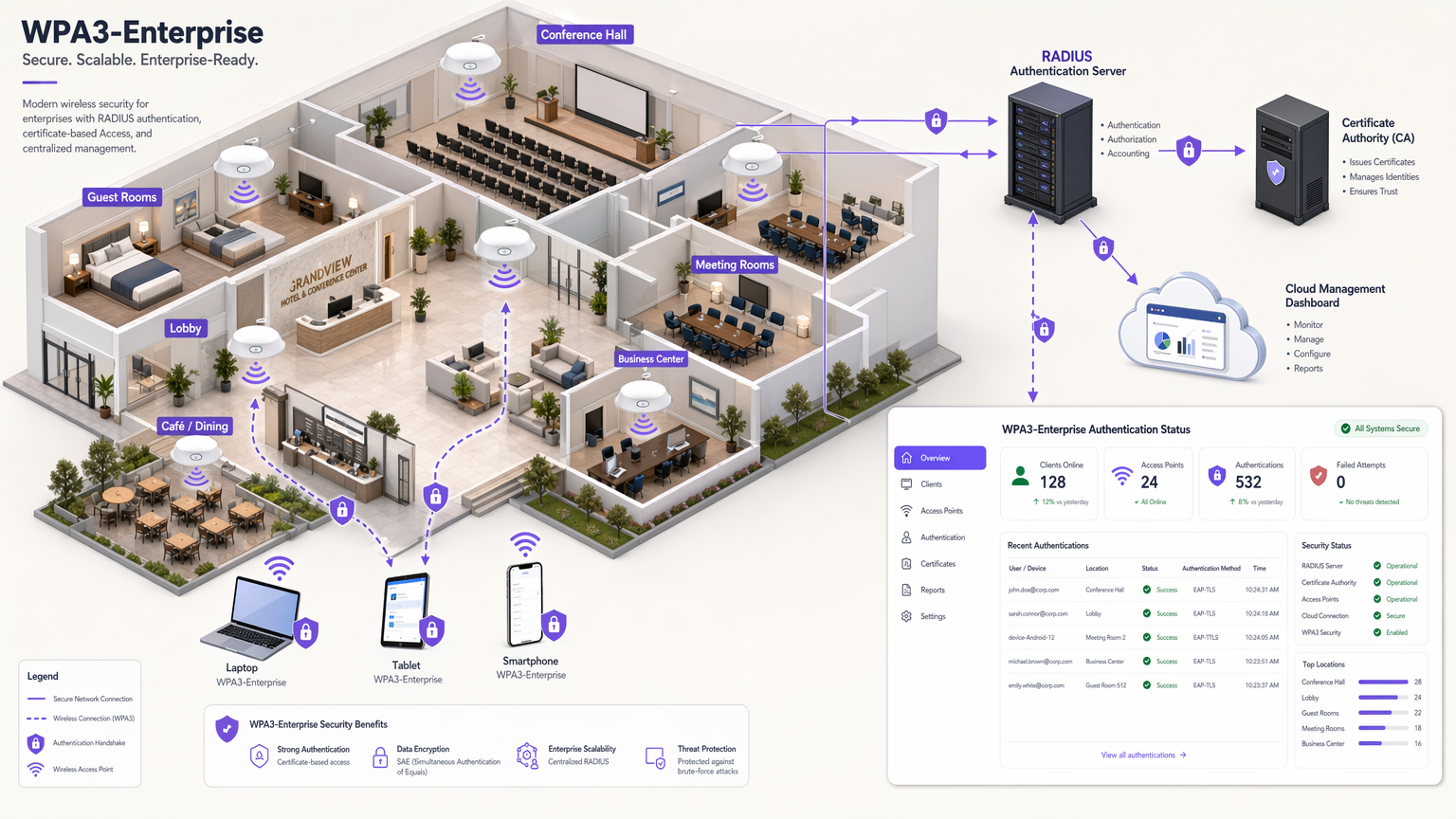
For enterprise IT leaders, the transition to WPA3-Enterprise is no longer a future roadmap item; it is a present operational requirement. Since 2020, WPA3 has been mandatory for all Wi-Fi CERTIFIED devices, yet many enterprise networks—spanning hospitality, retail, and public sector venues—remain anchored to WPA2. This gap represents a significant risk exposure, particularly as compliance frameworks like PCI DSS 4.0 and GDPR increasingly mandate robust, state-of-the-art network security controls.
This guide provides a comprehensive technical breakdown of WPA3-Enterprise, focusing on its fundamental architectural improvements over WPA2. We detail the mandatory shift towards stronger encryption (GCMP-256), the necessity of Protected Management Frames (PMF), and the critical implementation of certificate-based mutual authentication via EAP-TLS. Designed for network architects and CTOs, this document bypasses academic theory in favour of actionable deployment strategies, troubleshooting methodologies, and real-world case studies to ensure a secure, scalable, and compliant wireless infrastructure.
Listen to the companion technical briefing podcast for an executive overview:
Technical Deep-Dive: WPA3-Enterprise Architecture
The fundamental difference between WPA2 and WPA3-Enterprise lies not in the underlying 802.1X framework, which remains the standard for port-based network access control, but in the cryptographic protocols and management frame protections built around it. WPA3 addresses the systemic vulnerabilities of its predecessor, specifically targeting offline dictionary attacks and management frame manipulation.
Authentication and Key Exchange
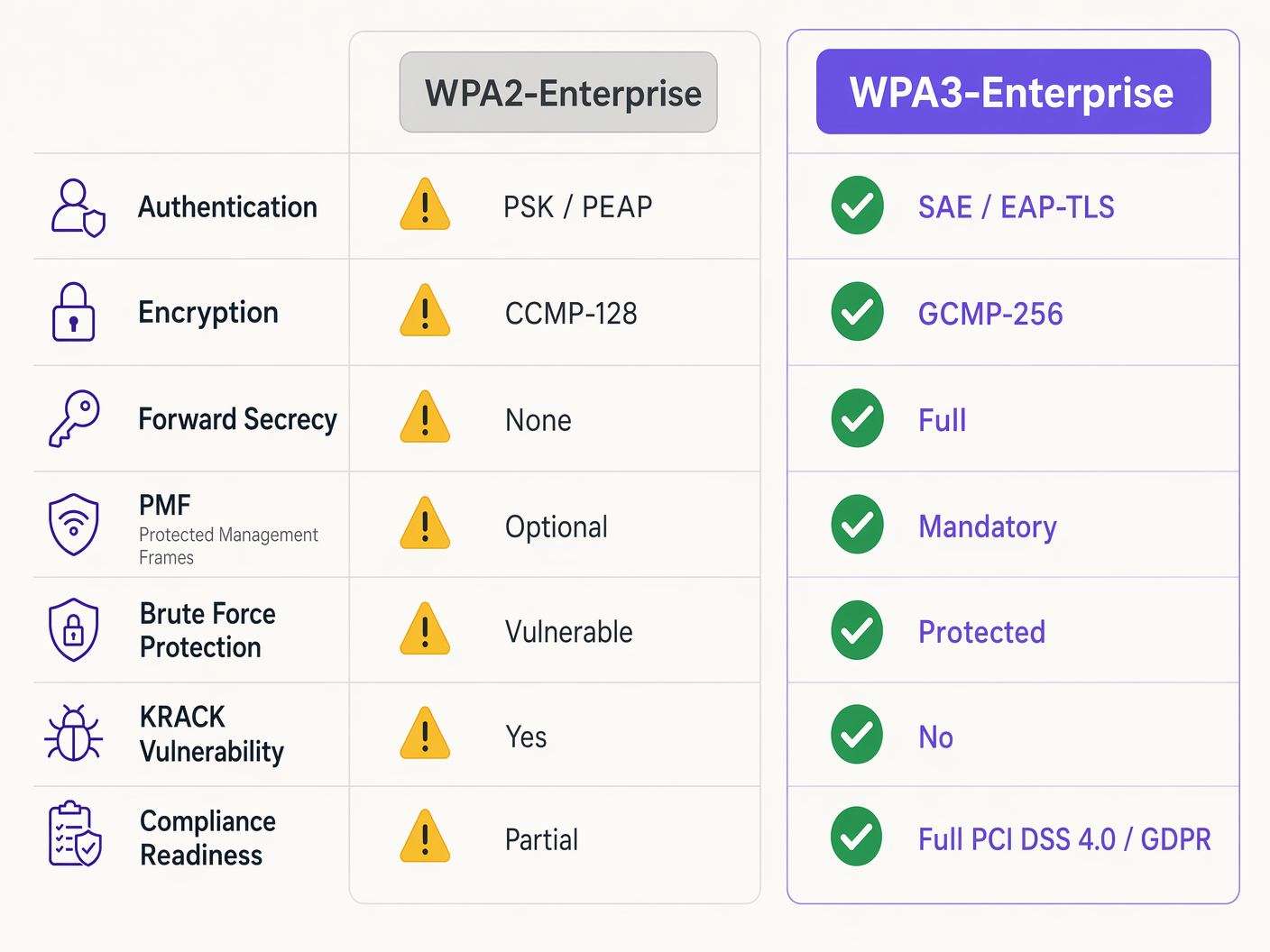
WPA2-Enterprise relies on the 4-way handshake to derive session keys, a process proven vulnerable to Key Reinstallation Attacks (KRACK) and offline dictionary brute-forcing if weak credentials are used. WPA3 mitigates this by implementing Simultaneous Authentication of Equals (SAE), a Diffie-Hellman-based key exchange protocol. SAE ensures forward secrecy; even if an attacker compromises a long-term key, they cannot retroactively decrypt captured traffic, as each session utilises ephemeral, unique keys.
For enterprise environments, the core authentication mechanism shifts decisively towards EAP-TLS (Extensible Authentication Protocol-Transport Layer Security). While WPA2 permitted weaker credential-based methods like PEAP or EAP-TTLS, WPA3-Enterprise strongly encourages, and in high-security 192-bit mode mandates, EAP-TLS. This requires mutual certificate-based authentication, eliminating passwords entirely and neutralising credential theft vectors.
Cryptographic Enhancements
WPA2 utilises CCMP-128 (Counter Mode with Cipher Block Chaining Message Authentication Code Protocol) based on AES-128. WPA3-Enterprise introduces an optional but highly recommended 192-bit security suite, aligned with the Commercial National Security Algorithm (CNSA) Suite. This mode mandates GCMP-256 (Galois/Counter Mode Protocol with 256-bit keys) for robust encryption, alongside 384-bit elliptic curve cryptography for key establishment and management.
Protected Management Frames (PMF)
Under IEEE 802.11w, Protected Management Frames secure the control signals that manage client association, disassociation, and authentication. In WPA2, PMF was optional, leaving networks vulnerable to forged deauthentication frames—a common precursor to denial-of-service or man-in-the-middle attacks. WPA3 makes PMF mandatory for all connections, fundamentally closing this attack vector.
Implementation Guide: Deploying WPA3-Enterprise
Transitioning an enterprise network across hundreds of retail locations or a sprawling hotel complex requires a phased, methodical approach. The following steps outline a vendor-neutral deployment strategy.
Phase 1: Infrastructure Audit and PKI Readiness
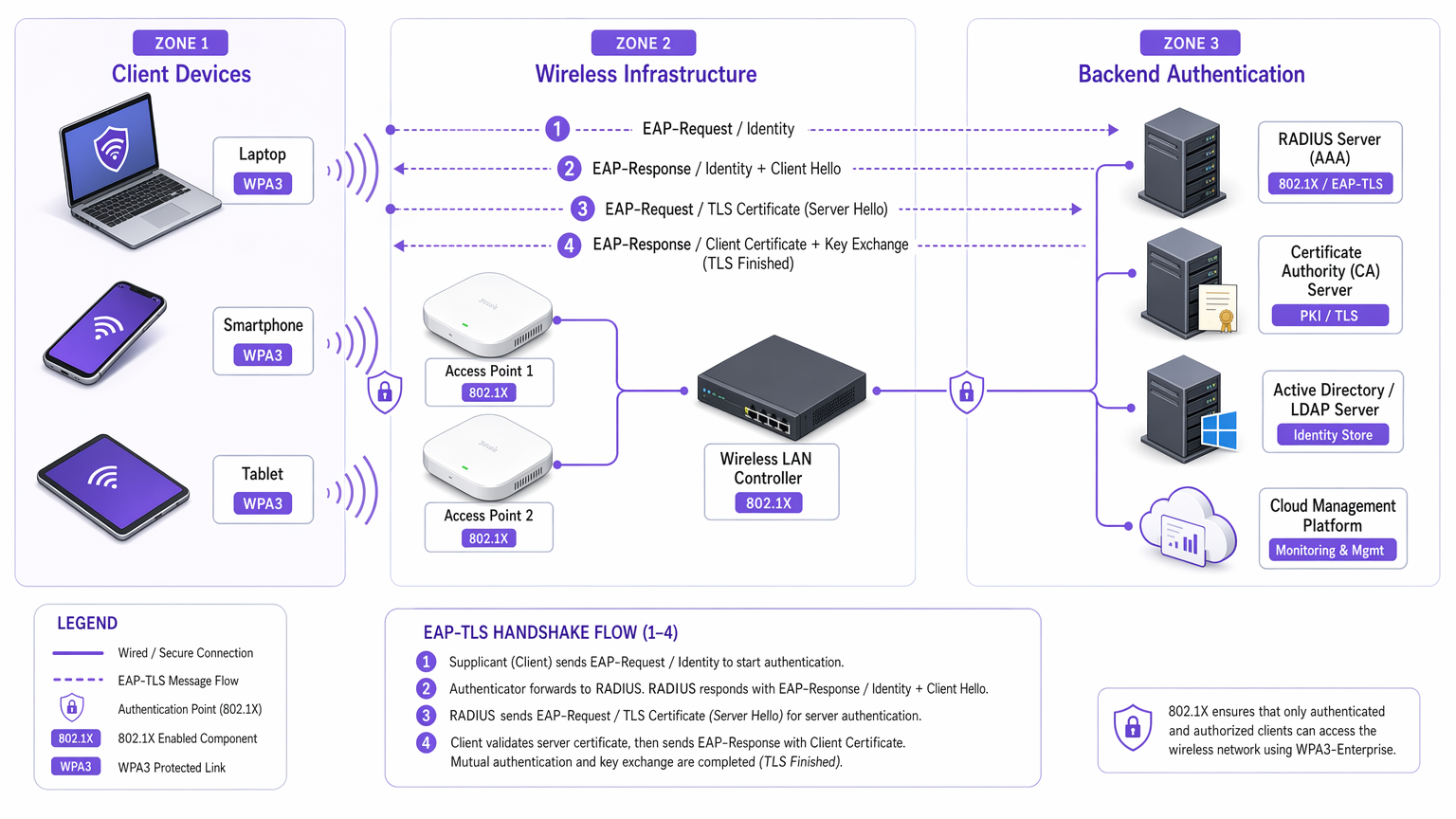
The prerequisite for WPA3-Enterprise, specifically utilising EAP-TLS, is a robust Public Key Infrastructure (PKI).
- Assess RADIUS Capabilities: Ensure your RADIUS servers (e.g., Cisco ISE, Aruba ClearPass, FreeRADIUS) support WPA3 parameters and are configured for EAP-TLS.
- Establish Certificate Authority (CA): Deploy an internal CA (like Microsoft AD CS) or leverage a cloud-based PKI service.
- MDM Integration: Utilise Mobile Device Management (MDM) platforms (Intune, Jamf) to automate the deployment of client certificates to managed devices. This is critical for scalability.
For further reading on certificate deployment, refer to WiFi Certificate Authentication: How Digital Certificates Secure Wireless Networks .
Phase 2: Enabling WPA3 Transition Mode
A hard cutover is rarely feasible in diverse enterprise environments. Most enterprise wireless LAN controllers support WPA3 Transition Mode, allowing a single SSID to accept both WPA2 and WPA3 clients simultaneously.
- Configure Transition SSID: Enable WPA3 Transition Mode on the corporate SSID.
- Monitor Client Association: Utilise your wireless management dasdashboard to monitor client connections. Ensure modern devices successfully negotiate WPA3, whilst legacy devices fall back to WPA2.
- Address Compatibility Issues: Identify devices failing to associate. Often, legacy wireless drivers struggle with the mandatory PMF requirement of WPA3, even in transition mode. Update drivers where possible.
Phase 3: Network Segmentation and Legacy Isolation
Not all devices will support WPA3. Legacy IoT devices, older point-of-sale systems, or specialised medical equipment in Healthcare environments often lack the necessary hardware or firmware updates.
- Isolate Legacy Devices: Create a dedicated, isolated VLAN and a separate WPA2-only SSID specifically for these devices.
- Implement Strict Access Controls: Apply stringent firewall rules to this legacy VLAN, preventing lateral movement into the secure WPA3 corporate network.
Phase 4: Full WPA3 Enforcement
Once the vast majority of the corporate fleet is successfully utilising WPA3, and legacy devices are segmented, transition the primary corporate SSID to WPA3-Enterprise only.
Best Practices for Enterprise Environments
Implementing the technology is only half the battle; maintaining its integrity requires ongoing operational discipline.
- Automate Certificate Lifecycle Management: The most common cause of EAP-TLS failure is expired certificates. Implement automated renewal processes and alerting mechanisms at 90, 60, and 30 days prior to RADIUS server certificate expiration.
- Ensure RADIUS Redundancy: A single RADIUS server is a single point of failure. Deploy primary and secondary RADIUS servers across geographically diverse locations, configuring seamless failover on the wireless controllers.
- Separate Guest and Corporate Networks: Never conflate corporate security policies with guest access. Corporate networks require WPA3-Enterprise with EAP-TLS. Guest networks should utilise isolated VLANs, typically managed via captive portals. Purple's Guest WiFi solutions provide secure, compliant guest access whilst capturing valuable WiFi Analytics .
- Leverage OpenRoaming: For seamless, secure connectivity across different venues, consider implementing Passpoint/Hotspot 2.0. Purple acts as a free identity provider for services like OpenRoaming under the Connect licence, facilitating frictionless, secure access without compromising enterprise security standards.
Troubleshooting & Risk Mitigation
Even with meticulous planning, deployments encounter friction. Here are common failure modes and mitigation strategies.
Symptom: Clients fail to connect when Transition Mode is enabled.
Root Cause: Legacy client drivers often fail when they encounter the mandatory PMF (Protected Management Frames) broadcast by the access point in Transition Mode, even if they are attempting a WPA2 connection. Mitigation: Update client wireless network interface (NIC) drivers. If updates are unavailable, the device must be moved to the isolated legacy WPA2-only SSID.
Symptom: Widespread authentication failures across all devices.
Root Cause: The RADIUS server certificate has expired, or the Root CA certificate has been revoked or removed from the client trust stores. Mitigation: Immediately renew and deploy the RADIUS server certificate. Review automated lifecycle management alerts to prevent recurrence.
Symptom: High latency during roaming between access points.
Root Cause: 802.11r (Fast BSS Transition) is either misconfigured or incompatible with the specific EAP method in use. Mitigation: Ensure 802.11r is explicitly enabled and supported by both the WLAN controller and the client devices for the WPA3 SSID. Test roaming performance during maintenance windows.
ROI & Business Impact
The transition to WPA3-Enterprise requires investment in professional services, potential hardware refreshes, and PKI infrastructure. However, the return on investment is measured in risk mitigation and compliance adherence.
For a large Retail chain, the cost of a data breach involving payment card information far exceeds the deployment costs of WPA3. PCI DSS 4.0 compliance requires robust encryption and authentication; WPA3-Enterprise directly satisfies these requirements, streamlining compliance audits and avoiding potential fines.
Furthermore, modernising the wireless infrastructure provides a stable, high-performance foundation for future digital initiatives, whether that's deploying advanced IoT sensors in Hospitality or enabling secure mobile point-of-sale systems. The business impact is a resilient, compliant, and future-proof network architecture.
Key Terms & Definitions
WPA3-Enterprise
The current standard for enterprise wireless security, mandating stronger encryption, protected management frames, and forward secrecy, typically deployed with 802.1X and RADIUS.
Required for compliance (PCI DSS, GDPR) and securing corporate data against modern cryptographic attacks.
EAP-TLS (Extensible Authentication Protocol-Transport Layer Security)
An authentication framework requiring both the client and the RADIUS server to present digital certificates to verify each other's identity.
The gold standard for WPA3-Enterprise authentication, eliminating the reliance on vulnerable user passwords.
PMF (Protected Management Frames)
A security standard (802.11w) that encrypts the control frames used for client association and disassociation.
Mandatory in WPA3, PMF prevents attackers from forging deauthentication packets to knock users off the network or execute man-in-the-middle attacks.
SAE (Simultaneous Authentication of Equals)
A secure key establishment protocol used in WPA3 that replaces the vulnerable 4-way handshake of WPA2.
SAE provides forward secrecy and protects against offline dictionary attacks, ensuring that even if a password is weak, the handshake cannot be brute-forced.
GCMP-256 (Galois/Counter Mode Protocol)
A highly secure, efficient encryption protocol utilizing 256-bit keys.
Mandated for the WPA3-Enterprise 192-bit security suite, required for environments handling highly sensitive data like government or financial records.
RADIUS (Remote Authentication Dial-In User Service)
A centralized networking protocol that provides Authentication, Authorization, and Accounting (AAA) management for users connecting to a network service.
The core backend server in a WPA3-Enterprise deployment that validates client certificates or credentials before granting network access.
Forward Secrecy
A cryptographic feature ensuring that session keys are ephemeral; compromising a long-term key in the future will not allow an attacker to decrypt past recorded sessions.
A critical enhancement in WPA3 provided by the SAE handshake, protecting historical data.
PKI (Public Key Infrastructure)
The framework of roles, policies, hardware, software, and procedures needed to create, manage, distribute, use, store, and revoke digital certificates.
The necessary prerequisite infrastructure for deploying EAP-TLS authentication in a WPA3-Enterprise environment.
Case Studies
A 200-room luxury hotel is upgrading its corporate network to WPA3-Enterprise. They have a mix of modern corporate laptops, iPads used by concierge staff, and legacy Wi-Fi-enabled door locks that only support WPA2. How should the network architect design the SSIDs and VLANs to ensure maximum security without breaking operational functionality?
The architect must employ network segmentation.
- Create a primary corporate SSID ('HotelCorp_Secure') configured for WPA3-Enterprise only, utilizing EAP-TLS. Deploy certificates to all corporate laptops and iPads via the hotel's MDM solution. Assign this SSID to the primary corporate VLAN.
- Create a secondary, hidden SSID ('Hotel_IoT_Legacy') configured for WPA2-Personal (PSK) or WPA2-Enterprise (if supported by the locks), utilizing a complex, rotated passphrase or MAC authentication bypass (MAB).
- Assign the legacy SSID to a heavily restricted, isolated VLAN. Configure firewall rules to allow the door locks to communicate ONLY with the specific on-premise or cloud-based door management server, blocking all lateral movement to the corporate VLAN or the internet.
A public sector organization has deployed WPA3-Enterprise with EAP-TLS. On a Monday morning, no staff can connect to the wireless network. The wireless controller shows clients associating, but failing RADIUS authentication. What is the most likely cause, and what is the immediate remediation step?
The most likely cause is an expired RADIUS server certificate. Because EAP-TLS relies on mutual authentication, if the server presents an expired certificate, the clients will immediately reject the connection and terminate the handshake.
Immediate remediation: The IT team must generate a new Certificate Signing Request (CSR) from the RADIUS server, have it signed by the internal CA, and bind the new certificate to the EAP-TLS authentication policy on the RADIUS server. Services must then be restarted.
Scenario Analysis
Q1. You are the network architect for a large retail chain rolling out WPA3-Enterprise. During the pilot phase at three stores using WPA3 Transition Mode, several older barcode scanners frequently drop off the network and require manual reboots to reconnect. Modern tablets connect without issue. What is the most appropriate architectural response?
💡 Hint:Consider how legacy wireless drivers handle unfamiliar management frames broadcast in Transition Mode.
Show Recommended Approach
The barcode scanners are likely crashing due to the mandatory Protected Management Frames (PMF) broadcast by the APs in Transition Mode. The appropriate response is to abandon Transition Mode for these devices. Create a dedicated, hidden WPA2-only SSID mapped to an isolated VLAN specifically for the scanners, and configure the primary corporate SSID to WPA3-Enterprise only for the modern tablets.
Q2. A CTO mandates the deployment of WPA3-Enterprise across all corporate offices within 60 days to meet new compliance requirements. The current environment uses WPA2-Enterprise with PEAP-MSCHAPv2 (username/password). The organization does not currently have an internal Certificate Authority (CA) or a Mobile Device Management (MDM) solution. Is this timeline realistic, and what is the critical path?
💡 Hint:Evaluate the prerequisites for the recommended WPA3 authentication method (EAP-TLS).
Show Recommended Approach
The 60-day timeline is highly unrealistic. To properly implement WPA3-Enterprise, the organization should migrate to EAP-TLS to eliminate credential vulnerabilities. The critical path requires designing and deploying a PKI (Certificate Authority) and implementing an MDM solution to distribute client certificates. Building this infrastructure from scratch, testing it, and enrolling all corporate devices will almost certainly exceed 60 days. The architect must communicate this dependency to the CTO.
Q3. During a security audit, an examiner notes that your RADIUS servers are configured for EAP-TLS, but the 'Certificate Revocation List (CRL) checking' feature is disabled on the wireless controllers and RADIUS servers. Why is this a significant security finding in a WPA3 environment?
💡 Hint:What happens if a corporate laptop is stolen, but its certificate has not yet expired?
Show Recommended Approach
Without CRL or OCSP checking enabled, the RADIUS server has no way of knowing if a presented certificate has been revoked by the CA prior to its natural expiration date. If a device is lost or an employee is terminated, their certificate must be revoked. If revocation checking is disabled, that compromised certificate can still be used to successfully authenticate and access the WPA3-Enterprise network, entirely defeating the purpose of mutual authentication.




