
Implementación de WPA3-Enterprise para una seguridad inalámbrica mejorada
Esta guía de referencia técnica proporciona una hoja de ruta completa y práctica para los líderes de TI en su transición de WPA2 a WPA3-Enterprise. Cubre los cambios de arquitectura, las mejoras de seguridad obligatorias como EAP-TLS y PMF, y las estrategias de despliegue práctico para proteger las redes corporativas en entornos empresariales complejos.
Video overview
Escucha esta guía
Ver transcripción del podcast
Parte de nuestra serie principal: Guía de seguridad de WiFi empresarial →

Resumen ejecutivo
Para los líderes de TI empresariales, la transición a WPA3-Enterprise ya no es un elemento de la hoja de ruta futura; es un requisito operativo actual. WPA3 ha sido obligatorio para todos los dispositivos Wi-Fi CERTIFIED desde 2020, sin embargo, muchas redes corporativas - que abarcan hoteles, tiendas minoristas y lugares del sector público - siguen utilizando WPA2. Esa brecha representa una exposición al riesgo significativa, particularmente a medida que los marcos de cumplimiento como PCI DSS 4.0 y GDPR exigen cada vez más controles de seguridad de red sólidos y de última generación.
Esta guía proporciona un desglose técnico completo de WPA3-Enterprise, centrándose en sus mejoras arquitectónicas fundamentales sobre WPA2. Detallamos el cambio obligatorio hacia un cifrado más fuerte (GCMP-256), la necesidad de las Tramas de Gestión Protegidas (PMF) y la implementación crítica de la autenticación mutua basada en certificados a través de EAP-TLS. Escrito para arquitectos de redes y directores de tecnología, este documento evita la teoría académica en favor de estrategias de implementación viables, metodologías de resolución de problemas y casos de estudio del mundo real para garantizar una infraestructura inalámbrica segura, escalable y en cumplimiento.
Escuche el podcast informativo técnico complementario para obtener una descripción ejecutiva:
Technical deep-dive: arquitectura de WPA3-Enterprise
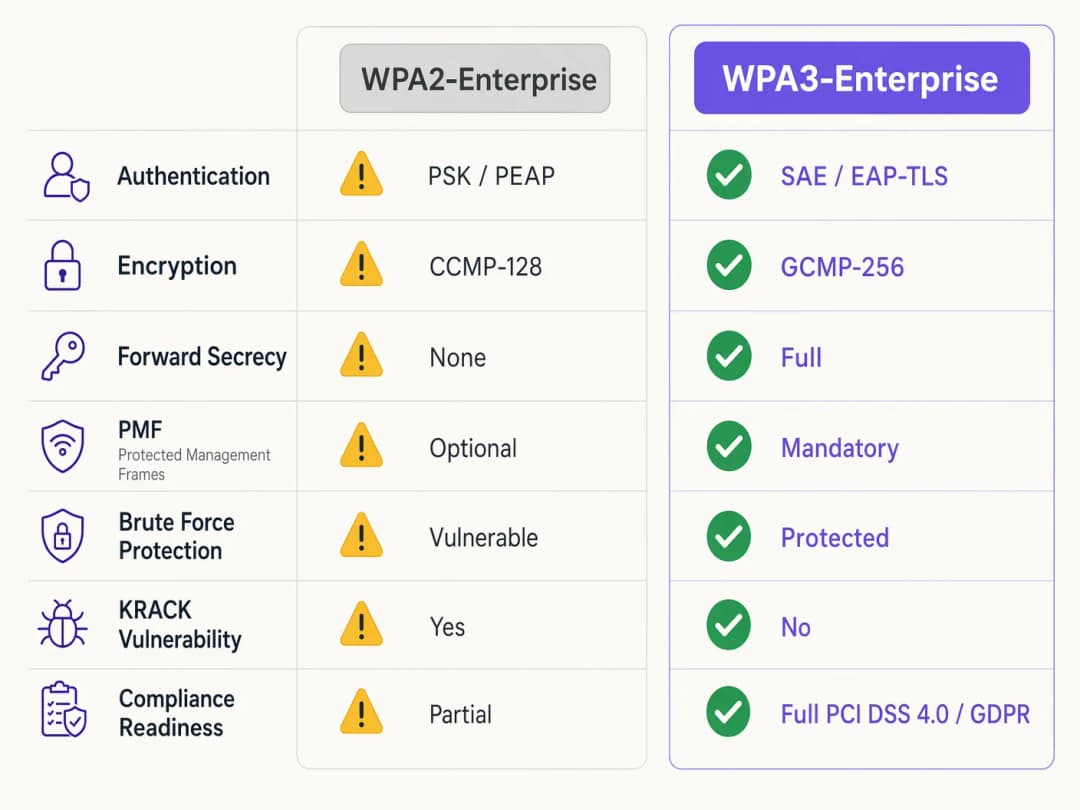
La diferencia fundamental entre WPA2 y WPA3-Enterprise no radica en el marco subyacente de 802.1X, el cual sigue siendo el estándar para el control de acceso a redes basado en puertos, sino en los protocolos criptográficos y las protecciones de tramas de gestión integradas a su alrededor. WPA3 aborda vulnerabilidades sistémicas de su predecesor, enfocándose específicamente en los ataques de diccionario offline y en la manipulación de las tramas de gestión.
Autenticación e intercambio de claves
WPA2-Enterprise depende de un saludo de 4 vías (4-way handshake) para derivar las claves de sesión, un proceso que ha demostrado ser vulnerable a los ataques de reinstalación de claves (KRACK) y a la fuerza bruta en ataques de diccionario offline cuando se utilizan credenciales débiles. WPA3 mitiga esto al implementar el protocolo SAE (Simultaneous Authentication of Equals), un protocolo de intercambio de claves basado en Diffie-Hellman. SAE garantiza el secreto hacia adelante (forward secrecy); incluso si un atacante obtiene la clave a largo plazo, no puede descifrar de manera retroactiva el tráfico capturado, debido a que cada sesión utiliza claves efímeras y únicas.
Para entornos empresariales, el mecanismo central de autenticación se desplaza de manera decisiva hacia EAP-TLS (Extensible Authentication Protocol-Transport Layer Security). Mientras que WPA2 permitía métodos basados en credenciales más débiles como PEAP o EAP-TTLS, WPA3-Enterprise recomienda encarecidamente - y en su modo de alta seguridad de 192 bits exige - EAP-TLS. Esto requiere una autenticación mutua basada en certificados, eliminando por completo las contraseñas y neutralizando el robo de credenciales como vector de ataque.
Mejoras de cifrado
WPA2 utiliza CCMP-128 (Counter Mode with Cipher Block Chaining Message Authentication Code Protocol) basado en AES-128. WPA3-Enterprise introduce una suite de seguridad opcional pero muy recomendada de 192 bits, alineada con la suite del Algoritmo de Seguridad Nacional Comercial (CNSA). Este modo exige GCMP-256 (Galois/Counter Mode Protocol con claves de 256 bits) para un cifrado robusto, junto con criptografía de curva elíptica de 384 bits para el establecimiento y la gestión de claves.
Tramas de gestión protegidas (PMF)
Bajo la norma IEEE 802.11w, las Tramas de gestión protegidas aseguran la señalización de control que gobierna la asociación, desasociación y autenticación de los clientes. En WPA2, PMF era opcional, lo que dejaba a las redes expuestas a tramas de desautenticación falsificadas - un precursor común para ataques de denegación de servicio o de intermediario (man-in-the-middle). WPA3 exige PMF para todas las conexiones, cerrando de raíz este vector de ataque.
¿Tiene preguntas sobre su configuración específica?
Nuestro equipo trabaja con gestores de espacios, responsables de TI e ingenieros de redes en 80 000 establecimientos. Reserve una llamada de 20 minutos y le mostraremos cómo lo resolvieron otros profesionales como usted.
Guía de implementación: despliegue de WPA3-Enterprise
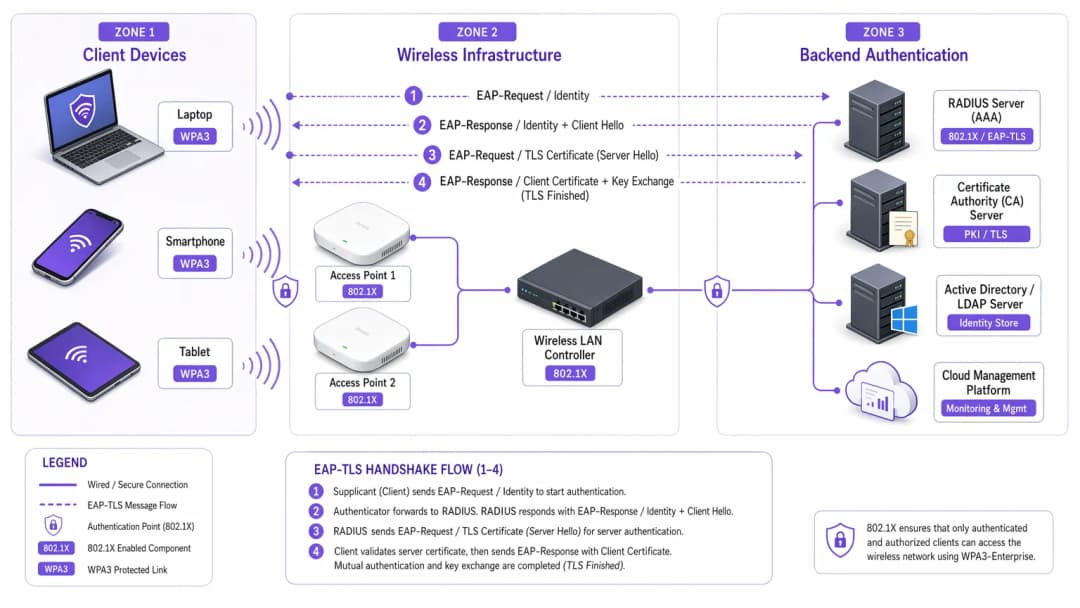
La transición de una red empresarial a través de cientos de tiendas minoristas o un complejo hotelero en expansión exige un enfoque metódico y por fases. Los siguientes pasos describen una estrategia de despliegue independiente del proveedor.
Fase 1: auditoría de infraestructura y preparación de PKI
El prerrequisito para implementar WPA3-Enterprise - particularmente con EAP-TLS - es una infraestructura de clave pública (PKI) robusta.
- Evaluar la capacidad de RADIUS: Asegúrese de que sus servidores RADIUS (por ejemplo, Cisco ISE, Aruba ClearPass, FreeRADIUS) sean compatibles con los parámetros WPA3 y estén configurados para EAP-TLS.
- Establecer una Autoridad de Certificación (CA): Implemente una CA interna (como Microsoft AD CS) o aproveche un servicio de PKI basado en la nube.
- Integración con MDM: Utilice una plataforma de gestión de dispositivos móviles (MDM) (Intune, Jamf) para automatizar la distribución de certificados de cliente a los dispositivos gestionados. Esto es fundamental para la escalabilidad.
Para obtener más información sobre la distribución de certificados, consulte Autenticación mediante certificados de WiFi: cómo los certificados digitales protegen las redes inalámbricas.
Fase 2: habilitar el modo de transición WPA3
En entornos empresariales diversos, una transición directa y drástica rara vez es viable. La mayoría de los controladores de LAN inalámbricos empresariales admiten el modo de transición WPA3, lo que permite que un único SSID acepte clientes WPA2 y WPA3 de forma simultánea.
- Configurar el SSID de transición: Habilite el modo de transición WPA3 en el SSID corporativo.
- Monitorear las conexiones de los clientes: Utilice su panel de administración inalámbrica para supervisar las conexiones de los clientes. Verifique que los dispositivos modernos negocien con éxito WPA3 mientras que los dispositivos más antiguos se mantengan en WPA2.
- Abordar problemas de compatibilidad: Identifique los dispositivos que no logren conectarse. Con frecuencia, los controladores inalámbricos más antiguos presentan dificultades con el requisito obligatorio de PMF de WPA3, incluso en el modo de transición. Actualice los controladores siempre que sea posible.
Fase 3: segmentación de red e aislamiento de dispositivos heredados
No todos los dispositivos serán compatibles con WPA3. Los dispositivos IoT heredados, los sistemas de punto de venta antiguos o los equipos médicos especializados en entornos de salud a menudo carecen de las actualizaciones de hardware o firmware necesarias.
- Aislar dispositivos heredados: Cree una VLAN dedicada y aislada, junto con un SSID exclusivo para WPA2 para estos dispositivos.
- Implementar controles de acceso estrictos: Aplique reglas de firewall rigurosas a esta VLAN heredada para evitar el movimiento lateral hacia la red corporativa segura con WPA3.
Fase 4: aplicación total de WPA3
Una vez que la gran mayoría de los dispositivos corporativos utilicen WPA3 con éxito y los dispositivos heredados hayan sido segmentados, configure el SSID corporativo principal de modo que sea exclusivo para WPA3-Enterprise.
Mejores prácticas para entornos empresariales
Implementar la tecnología es solo la mitad de la batalla; mantener su integridad requiere una disciplina operativa continua.
- Automatice la gestión del ciclo de vida de los certificados: La causa más común de falla en EAP-TLS es la expiración de los certificados. Implemente procesos de renovación automatizados y alertas que señalen los certificados del servidor RADIUS 90, 60 y 30 días antes de que expiren.
- Garantice la redundancia de RADIUS: Un solo servidor RADIUS es un punto único de falla. Despliegue servidores RADIUS primarios y secundarios en ubicaciones geográficamente distintas, con un failover transparente configurado en los controladores inalámbricos.
- Separe las redes de invitados de las corporativas: Nunca combine la política de seguridad corporativa con el acceso de invitados. La red corporativa exige WPA3-Enterprise con EAP-TLS. Las redes de invitados deben utilizar una VLAN aislada, administrada normalmente a través de un captive portal. La solución de Guest WiFi de Purple ofrece un acceso de invitados seguro y en cumplimiento, al tiempo que captura valiosos WiFi Analytics.
- Aproveche OpenRoaming: Para una conectividad transparente y segura en diferentes instalaciones, considere implementar Passpoint/Hotspot 2.0. Purple actúa como un proveedor de identidad gratuito para servicios como OpenRoaming bajo su licencia Connect, lo que facilita un acceso seguro y sin fricciones sin comprometer los estándares de seguridad de la empresa.
Solución de problemas y mitigación de riesgos
Incluso con una planeación minuciosa, los despliegues enfrentan fricciones. A continuación se presentan los modos de falla comunes y las estrategias de mitigación.
Síntoma: los clientes no logran conectarse cuando el Modo de Transición está activado.
Causa raíz: Los controladores de clientes más antiguos suelen fallar cuando encuentran las PMF (Protected Management Frames) obligatorias que los puntos de acceso transmiten en modo de transición, incluso al intentar una conexión WPA2. Mitigación: Actualice los controladores de la tarjeta de interfaz de red (NIC) inalámbrica del cliente. Si no hay actualizaciones disponibles, el dispositivo debe trasladarse al SSID aislado de solo WPA2.
Síntoma: fallas de autenticación generalizadas en todos los dispositivos.
Causa raíz: El certificado del servidor RADIUS ha expirado, o el certificado de la CA raíz ha sido revocado o eliminado de los almacenes de confianza del cliente. Mitigación: Renueve y despliegue el certificado del servidor RADIUS de inmediato. Revise sus alertas automatizadas de gestión de ciclo de vida para evitar que vuelva a ocurrir.
Síntoma: alta latencia al realizar roaming entre puntos de acceso.
Causa raíz: 802.11r (Fast BSS Transition) está mal configurado o es incompatible con el método EAP específico en uso. Mitigación: Asegúrese de que 802.11r esté explícitamente activado y sea compatible con el SSID WPA3 tanto por el controlador WLAN como por los dispositivos cliente. Pruebe el rendimiento del roaming durante una ventana de mantenimiento.
ROI e impacto empresarial
La transición a WPA3-Enterprise exige una inversión en servicios profesionales, posibles actualizaciones de hardware e infraestructura de PKI. El retorno, sin embargo, se mide en la mitigación de riesgos y el cumplimiento de las normativas.
Para una gran cadena de comercio minorista, el costo de una filtración de datos que involucre información de tarjetas de pago supera con creces el costo de una implementación de WPA3. El cumplimiento de PCI DSS 4.0 requiere un cifrado y una autenticación robustos; WPA3-Enterprise satisface directamente estos requisitos, lo que simplifica las auditorías de cumplimiento y evita posibles multas.
Además, una infraestructura inalámbrica modernizada proporciona una base estable y de alto rendimiento para futuras iniciativas digitales, ya sea el despliegue de sensores IoT avanzados en el sector de la hospitalidad o la habilitación de sistemas de punto de venta móviles seguros. El impacto comercial es una arquitectura de red resistente, en cumplimiento y preparada para el futuro.
Definiciones clave
WPA3-Enterprise
El estándar actual para la seguridad inalámbrica empresarial, que exige un cifrado más sólido, tramas de gestión protegidas y secreto hacia adelante (forward secrecy), normalmente desplegado con 802.1X y RADIUS.
Obligatorio para el cumplimiento normativo (PCI DSS, GDPR) y para proteger los datos corporativos contra ataques criptográficos modernos.
EAP-TLS (Extensible Authentication Protocol-Transport Layer Security)
Un marco de autenticación que requiere que tanto el cliente como el servidor RADIUS presenten certificados digitales para verificar la identidad del otro.
El estándar de oro para la autenticación WPA3-Enterprise, que elimina la dependencia de contraseñas de usuario vulnerables.
PMF (Protected Management Frames)
Un estándar de seguridad (802.11w) que cifra las tramas de control utilizadas para la asociación y desasociación de clientes.
Obligatorio en WPA3, PMF evita que los atacantes falsifiquen paquetes de desautenticación para desconectar a los usuarios de la red o ejecutar ataques de intermediario (man-in-the-middle).
SAE (Simultaneous Authentication of Equals)
Un protocolo de establecimiento de clave seguro utilizado en WPA3 que reemplaza el saludo de 4 vías vulnerable de WPA2.
SAE proporciona seguridad hacia adelante y protege contra ataques de diccionario sin conexión, lo que garantiza que incluso si una contraseña es débil, el saludo no se pueda forzar por fuerza bruta.
GCMP-256 (Galois/Counter Mode Protocol)
Un protocolo de cifrado altamente seguro y eficiente que utiliza claves de 256 bits.
Obligatorio para la suite de seguridad de 192 bits de WPA3-Enterprise, requerido para entornos que manejan datos altamente confidenciales como registros gubernamentales o financieros.
RADIUS (Remote Authentication Dial-In User Service)
Un protocolo de red centralizado que proporciona gestión de autenticación, autorización y contabilidad (AAA) para los usuarios que se conectan a un servicio de red.
El servidor backend central en una implementación de WPA3-Enterprise que valida los certificados o credenciales de los clientes antes de otorgar acceso a la red.
Forward Secrecy
Una característica criptográfica que garantiza que las claves de sesión sean efímeras; comprometer una clave a largo plazo en el futuro no permitirá a un atacante descifrar sesiones pasadas registradas.
Una mejora crítica en WPA3 proporcionada por el saludo SAE, que protege los datos históricos.
PKI (Public Key Infrastructure)
El marco de funciones, políticas, hardware, software y procedimientos necesarios para crear, gestionar, distribuir, utilizar, almacenar y revocar certificados digitales.
La infraestructura de prerrequisito necesaria para implementar la autenticación EAP-TLS en un entorno WPA3-Enterprise.
Ejemplos resueltos
Un hotel de lujo de 200 habitaciones está actualizando su red corporativa a WPA3-Enterprise. Cuenta con una combinación de laptops corporativas modernas, iPads utilizados por el personal de consejería y cerraduras de puertas con WiFi de legado que solo admiten WPA2. ¿Cómo debe diseñar el arquitecto de redes los SSID y las VLAN para garantizar la máxima seguridad sin afectar la funcionalidad operativa?
El arquitecto debe emplear la segmentación de red.
- Crear un SSID corporativo principal ('HotelCorp_Secure') configurado únicamente para WPA3-Enterprise, utilizando EAP-TLS. Desplegar certificados en todas las laptops corporativas e iPads a través de la solución MDM del hotel. Asignar este SSID a la VLAN corporativa principal.
- Crear un SSID secundario y oculto ('Hotel_IoT_Legacy') configurado para WPA2-Personal (PSK) o WPA2-Enterprise (si lo admiten las cerraduras), utilizando una frase de contraseña compleja y rotativa o la omisión de autenticación MAC (MAB).
- Asignar el SSID de legado a una VLAN aislada y fuertemente restringida. Configurar reglas de firewall para permitir que las cerraduras de las puertas se comuniquen ÚNICAMENTE con el servidor de gestión de puertas específico en las instalaciones o basado en la nube, bloqueando todo movimiento lateral hacia la VLAN corporativa o internet.
Una organización del sector público ha desplegado WPA3-Enterprise con EAP-TLS. Un lunes por la mañana, ningún miembro del personal puede conectarse a la red inalámbrica. El controlador inalámbrico muestra que los clientes se están asociando, pero fallan en la autenticación RADIUS. ¿Cuál es la causa más probable y cuál es el paso de remediación inmediato?
La causa más probable es un certificado de servidor RADIUS vencido. Dado que EAP-TLS se basa en la autenticación mutua, si el servidor presenta un certificado vencido, los clientes rechazarán inmediatamente la conexión y finalizarán el saludo de conexión (handshake).
Remediación inmediata: El equipo de TI debe generar una nueva Solicitud de Firma de Certificado (CSR) desde el servidor RADIUS, hacer que la firme la CA interna y vincular el nuevo certificado a la política de autenticación EAP-TLS en el servidor RADIUS. Luego se deben reiniciar los servicios.
Preguntas de práctica
Q1. Usted es el arquitecto de red de una gran cadena de tiendas que está implementando WPA3-Enterprise. Durante la fase piloto en tres tiendas que utilizan el modo de transición de WPA3, varios escáneres de códigos de barras más antiguos se desconectan con frecuencia de la red y requieren reinicios manuales para volver a conectarse. Las tabletas modernas se conectan sin problemas. ¿Cuál es la respuesta arquitectónica más adecuada?
Sugerencia: Considere cómo los controladores inalámbricos heredados manejan las tramas de gestión no familiares transmitidas en modo de transición.
Ver respuesta modelo
Es probable que los escáneres de códigos de barras estén fallando debido a las Tramas de Gestión Protegidas (PMF) obligatorias transmitidas por los AP en modo de transición. La respuesta adecuada es abandonar el modo de transición para estos dispositivos. Cree un SSID dedicado y oculto exclusivo para WPA2 asignado a una VLAN aislada específicamente para los escáneres, y configure el SSID corporativo principal en WPA3-Enterprise únicamente para las tabletas modernas.
Q2. Un CTO ordena la implementación de WPA3-Enterprise en todas las oficinas corporativas dentro de 60 días para cumplir con los nuevos requisitos de cumplimiento. El entorno actual utiliza WPA2-Enterprise con PEAP-MSCHAPv2 (usuario/contraseña). La organización no cuenta actualmente con una Autoridad de Certificación (CA) interna ni con una solución de gestión de dispositivos móviles (MDM). ¿Es realista este plazo y cuál es la ruta crítica?
Sugerencia: Evalúe los requisitos previos para el método de autenticación recomendado de WPA3 (EAP-TLS).
Ver respuesta modelo
El plazo de 60 días es sumamente poco realista. Para implementar correctamente WPA3-Enterprise, la organización debería migrar a EAP-TLS para eliminar las vulnerabilidades de las credenciales. La ruta crítica requiere diseñar e implementar una PKI (Autoridad de Certificación) e implementar una solución de MDM para distribuir los certificados de cliente. Construir esta infraestructura desde cero, probarla y registrar todos los dispositivos corporativos casi seguro superará los 60 días. El arquitecto debe comunicar esta dependencia al CTO.
Q3. Durante una auditoría de seguridad, un examinador observa que sus servidores RADIUS están configurados para EAP-TLS, pero la función de 'verificación de Lista de Revocación de Certificados (CRL)' está desactivada en los controladores inalámbricos y servidores RADIUS. ¿Por qué es este un hallazgo de seguridad significativo en un entorno WPA3?
Sugerencia: ¿Qué sucede si roban una laptop corporativa, pero su certificado aún no ha expirado?
Ver respuesta modelo
Sin la verificación de CRL u OCSP habilitada, el servidor RADIUS no tiene forma de saber si un certificado presentado ha sido revocado por la CA antes de su fecha de vencimiento natural. Si un dispositivo se pierde o un empleado es despedido, su certificado debe ser revocado. Si la verificación de revocación está deshabilitada, ese certificado comprometido aún se puede utilizar para autenticarse con éxito y acceder a la red WPA3-Enterprise, lo que anula por completo el propósito de la autenticación mutua.
Continúe leyendo esta serie
Cyber Essentials y WiFi para empleados: Cómo cumplir los cinco controles en su red inalámbrica
Podrá mapear cada uno de los cinco controles de Cyber Essentials a su WiFi para empleados y resolver las brechas que identifican los evaluadores. Luego podrá elegir entre 802.1X, iPSK y una red WPA2-PSK segregada para cada clase de dispositivo. Finalmente, sabrá cómo preparar los puntos de acceso, controladores y BYOD para una auditoría de Cyber Essentials Plus.
Analíticas de presencia de HPE Aruba Central: configuración, exportaciones y límites
Podrá habilitar las analíticas de presencia de Aruba Central por sitio, calibrar el umbral de RSSI y los límites de permanencia frente a un conteo real, y exportar agregados a nivel de sitio a través de la REST API de Central. También sabrá dónde se detienen las analíticas de presencia nativas y cuándo una capa de plataforma independiente del hardware como Purple se gana su lugar en sus puntos de acceso Aruba existentes.
Cumplimiento de CIPA: lista de verificación de cumplimiento para operadores de establecimientos
Podrá decidir si CIPA vincula su WiFi, luego segmentar redes, enrutar el DNS a través de Purple Shield y cerrar rutas de bypass. También sabrá qué evidencia conservar para la certificación del Form 486 o Form 479. La lista de verificación asigna un responsable a cada requisito, para que no falte nada en la certificación de su próximo año de financiamiento.
¿Tiene preguntas sobre su configuración específica?
Nuestro equipo trabaja con gestores de espacios, responsables de TI e ingenieros de redes en 80 000 establecimientos. Reserve una llamada de 20 minutos y le mostraremos cómo lo resolvieron otros profesionales como usted.