
উন্নত ওয়্যারলেস সুরক্ষার জন্য WPA3-Enterprise বাস্তবায়ন করা
এই টেকনিক্যাল রেফারেন্স নির্দেশিকাটি IT লিডারদের WPA2 থেকে WPA3-Enterprise-এ স্থানান্তরিত হওয়ার জন্য একটি সামগ্রিক এবং কার্যকর রোডম্যাপ প্রদান করে। এটি জটিল এন্টারপ্রাইজ পরিবেশে কর্পোরেট নেটওয়ার্কগুলিকে সুরক্ষিত করতে আর্কিটেকচারাল পরিবর্তন, EAP-TLS এবং PMF-এর মতো বাধ্যতামূলক নিরাপত্তা বর্ধন এবং ব্যবহারিক ডেপ্লয়মেন্ট কৌশলগুলি কভার করে।
Video overview
এই গাইডটি শুনুন
পডকাস্ট ট্রান্সক্রিপ্ট দেখুন
আমাদের মূল সিরিজের অংশ: Enterprise WiFi সিকিউরিটি গাইড →
WPA3-Enterprise architecture and security calculator
Model enterprise 802.1X parameters, evaluate 128-bit versus 192-bit CNSA cryptographic suites, audit Protected Management Frames (PMF) resilience, and generate verified RADIUS and WLC directives.
Standard WPA3-Enterprise 128-bit architecture
Protected Management Frames cryptographically sign deauthentication and disassociation frames with BIP. Rogue AP deauth injection attacks are blocked at layer 2.
Mutual X.509 certificate verification ensures both client and RADIUS server validate cryptographic trust anchors. Rogue APs cannot solicit or harvest passwords.
Private keys never leave the endpoint hardware keystore / TPM. Eliminates password spraying and offline hash cracking.
Pure WPA3-Enterprise rejects legacy WPA2 association frames, mitigating cipher downgrade and KRACK-style key reinstallation.
Transition to WPA3-Enterprise without legacy client disruption
Purple Cloud RADIUS automates SCEP certificate issuance, integrates natively with Microsoft Entra ID and Okta, and enables zero-trust 802.1X segmentation across global multi-site enterprise networks.

এক্সিকিউটিভ সারাংশ
এন্টারপ্রাইজ আইটি লিডারদের জন্য, WPA3-Enterprise-এ রূপান্তরটি এখন আর কোনো ভবিষ্যতের রোডম্যাপের বিষয় নয়; এটি একটি বর্তমান অপারেশনাল প্রয়োজনীয়তা। ২০২০ সাল থেকে সমস্ত Wi-Fi CERTIFIED ডিভাইসের জন্য WPA3 বাধ্যতামূলক করা হয়েছে, তবুও অনেক কর্পোরেট নেটওয়ার্ক - যা হোটেল, রিটেইল এবং পাবলিক সেক্টরের ভেন্যু জুড়ে বিস্তৃত - এখনও WPA2-তে রয়ে গেছে। এই ব্যবধানটি উল্লেখযোগ্য ঝুঁকির সৃষ্টি করে, বিশেষ করে যেহেতু PCI DSS 4.0 এবং GDPR-এর মতো কমপ্লায়েন্স ফ্রেমওয়ার্কগুলি ক্রমশ শক্তিশালী, আধুনিক নেটওয়ার্ক সিকিউরিটি নিয়ন্ত্রণের দাবি জানাচ্ছে।
এই নির্দেশিকাটি WPA3-Enterprise-এর একটি ব্যাপক প্রযুক্তিগত বিশ্লেষণ প্রদান করে, যা WPA2-এর তুলনায় এর মৌলিক আর্কিটেকচারাল উন্নতির উপর আলোকপাত করে। আমরা আরও শক্তিশালী এনক্রিপশন (GCMP-256)-এ বাধ্যতামূলক পরিবর্তন, Protected Management Frames (PMF)-এর প্রয়োজনীয়তা এবং EAP-TLS-এর মাধ্যমে সার্টিফিকেট-ভিত্তিক পারস্পরিক অথেন্টিকেশনের গুরুত্বপূর্ণ বাস্তবায়নের বিস্তারিত বিবরণ দিয়েছি। নেটওয়ার্ক আর্কিটেক্ট এবং CTO-দের জন্য লিখিত, এই ডকুমেন্টটি তাত্ত্বিক আলোচনার পরিবর্তে সরাসরি কার্যকরী ডিপ্লয়মেন্ট কৌশল, ট্রাবলশুটিং পদ্ধতি এবং বাস্তব-ক্ষেত্রের কেস স্টাডি সরবরাহ করে যাতে একটি সুরক্ষিত, স্কেলযোগ্য এবং কমপ্লায়েন্ট ওয়্যারলেস পরিকাঠামো নিশ্চিত করা যায়।
একটি এক্সিকিউটিভ ওভারভিউয়ের জন্য সংশ্লিষ্ট টেকনিক্যাল ব্রিফিং পডকাস্টটি শুনুন:
Technical deep-dive: WPA3-Enterprise আর্কিটেকচার
WPA2 এবং WPA3-Enterprise-এর মধ্যে মৌলিক পার্থক্যটি অন্তর্নিহিত 802.1X ফ্রেমওয়ার্কের মধ্যে নয়, যা পোর্ট-ভিত্তিক নেটওয়ার্ক অ্যাক্সেস কন্ট্রোলের স্ট্যান্ডার্ড হিসেবে বজায় রয়েছে, বরং এর চারপাশে তৈরি ক্রিপ্টোগ্রাফিক প্রোটোকল এবং ম্যানেজমেন্ট ফ্রেম সুরক্ষার মধ্যে নিহিত। WPA3 তার পূর্বসূরীর সিস্টেমেটিক দুর্বলতাগুলি সমাধান করে, বিশেষ করে অফলাইন ডিকশনারি অ্যাটাক এবং ম্যানেজমেন্ট ফ্রেম ম্যানিপুলেশনকে লক্ষ্য করে।
Authentication এবং কী (key) এক্সচেঞ্জ
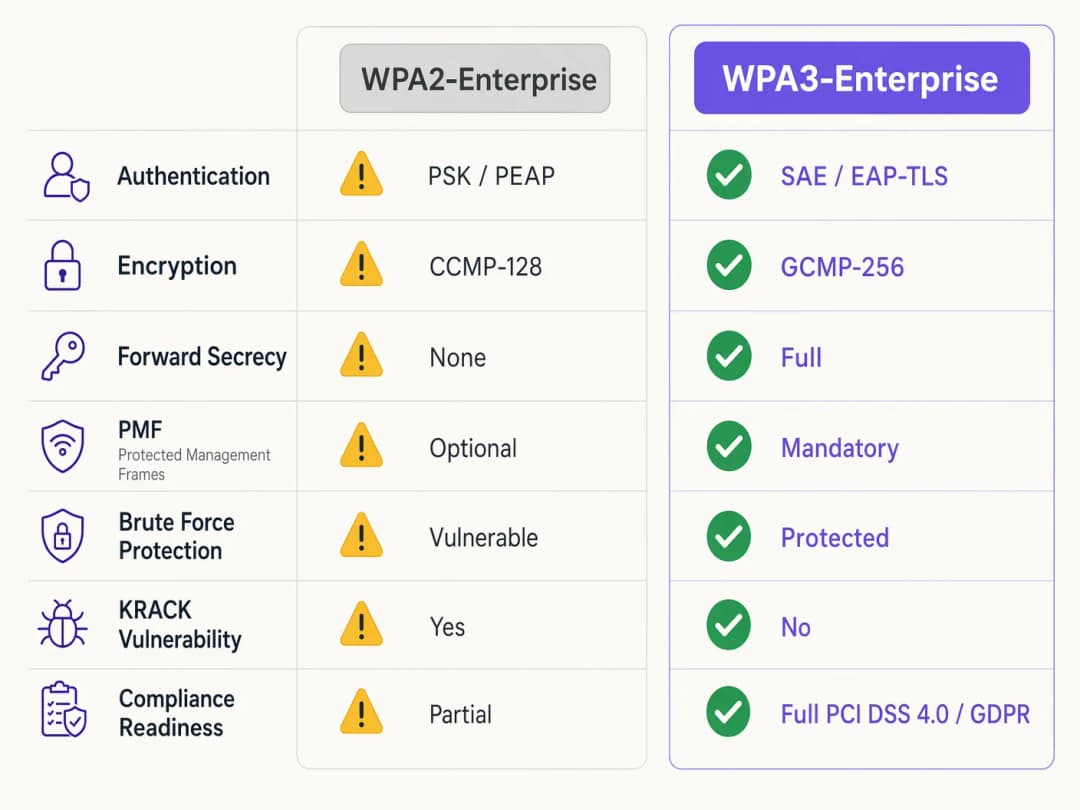
WPA2-Enterprise সেশন কী তৈরি করতে একটি 4-way হ্যান্ডশেক-এর ওপর নির্ভর করে, যা Key Reinstallation Attacks (KRACK) এবং দুর্বল ক্রেডেনশিয়াল ব্যবহার করা ক্ষেত্রে অফলাইন ডিকশনারি ব্রুট-ফোর্সিংয়ের প্রতি সংবেদনশীল প্রমাণিত হয়েছে। WPA3 এটি প্রতিরোধ করতে Simultaneous Authentication of Equals (SAE) প্রয়োগ করে, যা একটি Diffie-Hellman-ভিত্তিক কী এক্সচেঞ্জ প্রোটোকল। SAE ফরওয়ার্ড সিক্রেসি নিশ্চিত করে; কোনো আক্রমণকারী দীর্ঘমেয়াদী কী পেলেও তারা পূর্ববর্তী ক্যাপচার করা ট্রাফিক ডিক্রিপ্ট করতে পারে না, কারণ প্রতিটি সেশনে ক্ষণস্থায়ী, অনন্য কী ব্যবহার করা হয়।
এন্টারপ্রাইজ পরিবেশের জন্য, মূল অথেনটিকেশন প্রক্রিয়াটি চূড়ান্তভাবে EAP-TLS (Extensible Authentication Protocol-Transport Layer Security)-এর দিকে ধাবিত হয়। যেখানে WPA2 দুর্বল ক্রেডেনশিয়াল-ভিত্তিক পদ্ধতি যেমন PEAP বা EAP-TTLS অনুমোদন করত, সেখানে WPA3-Enterprise জোরালোভাবে সুপারিশ করে - এবং এর উচ্চ-নিরাপত্তা বিশিষ্ট 192-বিট মোডে বাধ্যতামূলক করে - EAP-TLS। এর জন্য সার্টিফিকেট-ভিত্তিক পারস্পরিক অথেনটিকেশন প্রয়োজন হয়, যা পাসওয়ার্ডের প্রয়োজনীয়তা সম্পূর্ণরূপে দূর করে এবং ক্রেডেনশিয়াল চুরিকে আক্রমণকারী মাধ্যম হিসেবে নিষ্ক্রিয় করে।
এনক্রিপশন উন্নতকরণ
WPA2 মূলত AES-128 ভিত্তিক CCMP-128 (Counter Mode with Cipher Block Chaining Message Authentication Code Protocol) ব্যবহার করে। WPA3-Enterprise একটি ঐচ্ছিক কিন্তু জোরালোভাবে প্রস্তাবিত 192-বিট নিরাপত্তা স্যুট প্রবর্তন করে যা Commercial National Security Algorithm (CNSA) স্যুটের সাথে সামঞ্জস্যপূর্ণ। এই মোডটি শক্তিশালী এনক্রিপশনের জন্য GCMP-256 (Galois/Counter Mode Protocol with 256-bit keys) বাধ্যতামূলক করে, এর সাথে কী প্রতিষ্ঠা ও পরিচালনার জন্য 384-বিট উপবৃত্তাকার কার্ভ ক্রিপ্টোগ্রাফি ব্যবহার করে।
Protected Management Frames (PMF)
IEEE 802.11w-এর অধীনে, Protected Management Frames কন্ট্রোল সিগন্যালিংকে সুরক্ষিত করে যা ক্লায়েন্ট অ্যাসোসিয়েশন, ডিসঅ্যাসোসিয়েশন এবং অথেনটিকেশন নিয়ন্ত্রণ করে। WPA2-তে PMF ঐচ্ছিক ছিল, যার ফলে নেটওয়ার্কগুলি নকল ডিঅথেনটিকেশন ফ্রেমের মুখোমুখি হতো - যা প্রায়শই ডিনায়াল-অফ-সার্ভিস বা ম্যান-ইন-দ্য-মিডল অ্যাটাকের পূর্বসূরী হিসেবে কাজ করে। WPA3 সমস্ত কানেকশনের জন্য PMF বাধ্যতামূলক করে, যা মূলত এই আক্রমণের সুযোগ বন্ধ করে দেয়।
আপনার নির্দিষ্ট সেটআপ নিয়ে কোনো প্রশ্ন আছে?
আমাদের টিম ৮০,০০০ ভেন্যুতে ভেন্যু অপারেটর, IT ম্যানেজার এবং নেটওয়ার্ক ইঞ্জিনিয়ারদের সাথে কাজ করে। একটি ২০ মিনিটের কল বুক করুন এবং আপনার মতো অন্যরা কীভাবে এর সমাধান করেছেন তা আমরা আপনাকে দেখাব।
ইমপ্লিমেন্টেশন গাইড: WPA3-Enterprise স্থাপন করা
শত শত রিটেল আউটলেট বা একটি বিস্তীর্ণ হোটেল কমপ্লেক্স জুড়ে একটি এন্টারপ্রাইজ নেটওয়ার্ক পরিবর্তন করার জন্য ধাপে ধাপে, পদ্ধতিগত পদক্ষেপ গ্রহণ করা প্রয়োজন। নিচের ধাপগুলি একটি ভেন্ডর-নিরপেক্ষ স্থাপনার কৌশল তুলে ধরে।
ধাপ ১: পরিকাঠামো অডিট এবং PKI প্রস্তুতি
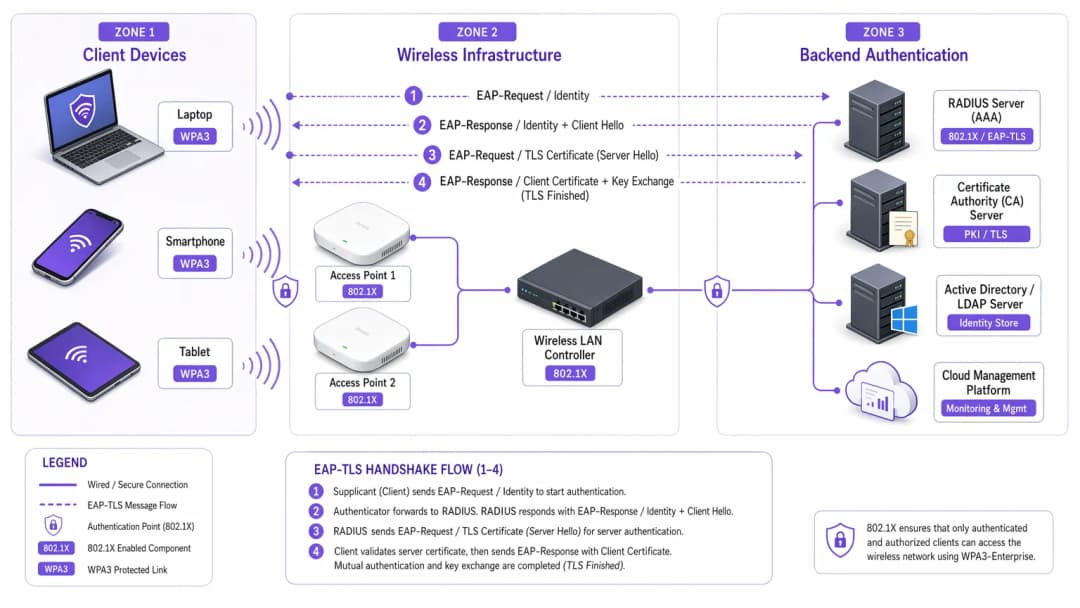
WPA3-Enterprise প্রয়োগ করার জন্য - বিশেষ করে EAP-TLS এর সাথে - একটি শক্তিশালী Public Key Infrastructure (PKI) থাকা আবশ্যক।
১. RADIUS সক্ষমতা মূল্যায়ন করুন: আপনার RADIUS সার্ভারগুলো (যেমন, Cisco ISE, Aruba ClearPass, FreeRADIUS) যাতে WPA3 প্যারামিটার সমর্থন করে এবং EAP-TLS এর জন্য কনফিগার করা থাকে তা নিশ্চিত করুন। ২. একটি Certificate Authority (CA) প্রতিষ্ঠা করুন: একটি অভ্যন্তরীণ CA (যেমন Microsoft AD CS) স্থাপন করুন বা একটি ক্লাউড-ভিত্তিক PKI পরিষেবা ব্যবহার করুন। ৩. MDM ইন্টিগ্রেশন: ম্যানেজড ডিভাইসগুলোতে ক্লায়েন্ট সার্টিফিকেট স্বয়ংক্রিয়ভাবে সরবরাহ করতে একটি Mobile Device Management (MDM) প্ল্যাটফর্ম (Intune, Jamf) ব্যবহার করুন। এটি স্কেলেবিলিটির জন্য অত্যন্ত গুরুত্বপূর্ণ।
সার্টিফিকেট স্থাপন সম্পর্কে আরও জানতে, WiFi Certificate Authentication: How Digital Certificates Secure Wireless Networks দেখুন।
ধাপ ২: WPA3 Transition Mode চালু করা
বহুমাত্রিক এন্টারপ্রাইজ পরিবেশে একবারে সম্পূর্ণ পরিবর্তন করা সাধারণত সম্ভব হয় না। বেশিরভাগ এন্টারপ্রাইজ ওয়্যারলেস LAN কন্ট্রোলার WPA3 Transition Mode সমর্থন করে, যা একটি একক SSID-কে একই সাথে WPA2 এবং WPA3 উভয় ক্লায়েন্টকে গ্রহণ করার অনুমতি দেয়।
১. ট্রানজিশন SSID কনফিগার করুন: কর্পোরেট SSID-এ WPA3 Transition Mode চালু করুন। ২. ক্লায়েন্ট অ্যাসোসিয়েশন মনিটর করুন: ক্লায়েন্ট কানেকশনগুলো পর্যবেক্ষণ করতে আপনার ওয়্যারলেস ম্যানেজমেন্ট ড্যাশবোর্ড ব্যবহার করুন। নিশ্চিত করুন যে আধুনিক ডিভাইসগুলো সফলভাবে WPA3 ব্যবহার করছে এবং পুরনো ডিভাইসগুলো WPA2-তে ফিরে যাচ্ছে। ৩. সামঞ্জস্যতা সংক্রান্ত সমস্যা সমাধান করুন: যে ডিভাইসগুলো সংযুক্ত হতে পারছে না সেগুলো চিহ্নিত করুন। প্রায়শই, পুরনো ওয়্যারলেস ড্রাইভারগুলো WPA3-এর বাধ্যতামূলক PMF প্রয়োজনীয়তার সাথে তাল মেলাতে পারে না, এমনকি ট্রানজিশন মোডেও। যেখানে সম্ভব ড্রাইভারগুলো আপডেট করুন।
ধাপ ৩: নেটওয়ার্ক সেগমেন্টেশন এবং লেগাসি ডিভাইস আইসোলেশন
সব ডিভাইস WPA3 সমর্থন করবে না। লেগাসি IoT ডিভাইস, পুরনো পয়েন্ট-অফ-সেল সিস্টেম বা healthcare পরিবেশের বিশেষায়িত চিকিৎসা সরঞ্জামগুলোতে প্রায়শই প্রয়োজনীয় হার্ডওয়্যার বা ফার্মওয়্যার আপডেট থাকে না।
১. লেগাসি ডিভাইসগুলো আলাদা করুন: এই ডিভাইসগুলোর জন্য একটি ডেডিকেটেড, আইসোলেটেড VLAN এবং একটি পৃথক WPA2-only SSID তৈরি করুন। ২. কঠোর অ্যাক্সেস কন্ট্রোল প্রয়োগ করুন: এই লেগাসি VLAN-এ কঠোর ফায়ারওয়াল নিয়ম প্রয়োগ করুন, যাতে নিরাপদ WPA3 কর্পোরেট নেটওয়ার্কে কোনো রকম অননুমোদিত প্রবেশাধিকার না থাকে।
ধাপ ৪: সম্পূর্ণ WPA3 প্রয়োগ করা
যখন কর্পোরেট ডিভাইসগুলোর সিংহভাগ সফলভাবে WPA3 ব্যবহার করছে এবং লেগাসি ডিভাইসগুলোকে আলাদা করা হয়েছে, তখন প্রাথমিক কর্পোরেট SSID-টিকে কেবল WPA3-Enterprise-এ রূপান্তর করুন।
এন্টারপ্রাইজ পরিবেশের জন্য সেরা অনুশীলনসমূহ
প্রযুক্তি প্রয়োগ করা কেবল অর্ধেক যুদ্ধ জয়ের মতো; এর অখণ্ডতা বজায় রাখার জন্য চলমান অপারেশনাল শৃঙ্খলার প্রয়োজন।* সার্টিফিকেট লাইফসাইকেল ম্যানেজমেন্ট স্বয়ংক্রিয় করুন: EAP-TLS ব্যর্থতার সবচেয়ে সাধারণ কারণ হলো সার্টিফিকেটের মেয়াদ শেষ হয়ে যাওয়া। স্বয়ংক্রিয় রিনিউয়াল প্রক্রিয়া এবং অ্যালার্ট সিস্টেম প্রয়োগ করুন যা RADIUS সার্ভার সার্টিফিকেটের মেয়াদ শেষ হওয়ার ৯০, ৬০ এবং ৩০ দিন আগে সতর্ক করে।
- RADIUS রিডানডেন্সি নিশ্চিত করুন: একটি একক RADIUS সার্ভার হলো সিঙ্গেল পয়েন্ট অফ ফেইলিওর। ভৌগোলিকভাবে পৃথক স্থানে প্রাইমারি এবং সেকেন্ডারি RADIUS সার্ভার স্থাপন করুন, ওয়্যারলেস কন্ট্রোলারে নিরবচ্ছিন্ন ফেইলওভার কনফিগার করে।
- গেস্ট এবং কর্পোরেট নেটওয়ার্ক আলাদা করুন: কর্পোরেট সিকিউরিটি পলিসির সাথে গেস্ট অ্যাক্সেসকে কখনো মেলাবেন না। কর্পোরেট নেটওয়ার্কের জন্য EAP-TLS সহ WPA3-Enterprise প্রয়োজন। গেস্ট নেটওয়ার্কের একটি আইসোলেটেড VLAN ব্যবহার করা উচিত, যা সাধারণত একটি captive portal এর মাধ্যমে পরিচালিত হয়। Purple-এর Guest WiFi সলিউশন নিরাপদ, কমপ্লায়েন্ট গেস্ট অ্যাক্সেস প্রদান করে এবং একই সাথে মূল্যবান WiFi Analytics সংগ্রহ করে।
- OpenRoaming-এর সুবিধা নিন: বিভিন্ন ভেন্যু জুড়ে নিরবচ্ছিন্ন ও নিরাপদ কানেক্টিভিটির জন্য, Passpoint/Hotspot 2.0 বাস্তবায়ন করার কথা বিবেচনা করুন। Purple তার Connect লাইসেন্সের অধীনে OpenRoaming-এর মতো পরিষেবাগুলোর জন্য একটি ফ্রি আইডেন্টিটি প্রোভাইডার হিসেবে কাজ করে, যা এন্টারপ্রাইজ সিকিউরিটি স্ট্যান্ডার্ডের সাথে আপস না করেই সহজ ও নিরাপদ অ্যাক্সেস সহজতর করে।
ট্রাবলশুটিং এবং ঝুঁকি হ্রাস
অত্যন্ত সতর্ক পরিকল্পনার পরেও, ডেপ্লয়মেন্টের সময় সমস্যার সম্মুখীন হতে হতে পারে। নিচে সাধারণ ব্যর্থতার ধরণ এবং তা দূর করার কৌশলগুলো দেওয়া হলো।
লক্ষণ: ট্রানজিশন মোড সক্রিয় থাকলে ক্লায়েন্টরা কানেক্ট করতে ব্যর্থ হয়।
মূল কারণ: ট্রানজিশন মোডে অ্যাক্সেস পয়েন্টগুলো যে বাধ্যতামূলক PMF (প্রটেক্টেড ম্যানেজমেন্ট ফ্রেম) ব্রডকাস্ট করে, তার সম্মুখীন হলে পুরোনো ক্লায়েন্ট ড্রাইভারগুলো প্রায়শই ব্যর্থ হয়, এমনকি WPA2 কানেকশনের চেষ্টা করার সময়ও। সমাধান: ক্লায়েন্ট ওয়্যারলেস নেটওয়ার্ক ইন্টারফেস (NIC) ড্রাইভার আপডেট করুন। কোনো আপডেট উপলব্ধ না থাকলে, ডিভাইসটিকে আলাদা করে শুধুমাত্র WPA2-অনলি SSID-তে স্থানান্তর করতে হবে।
লক্ষণ: সমস্ত ডিভাইস জুড়ে ব্যাপক অথেন্টিকেশন ব্যর্থতা।
মূল কারণ: RADIUS সার্ভার সার্টিফিকেটের মেয়াদ শেষ হয়ে গেছে, অথবা রুট CA সার্টিফিকেট প্রত্যাহার করা হয়েছে বা ক্লায়েন্ট ট্রাস্ট স্টোর থেকে সরিয়ে দেওয়া হয়েছে। সমাধান: অবিলম্বে RADIUS সার্ভার সার্টিফিকেট রিনিউ এবং ডেপ্লয় করুন। পুনরাবৃত্তি রোধ করতে আপনার স্বয়ংক্রিয় লাইফসাইকেল ম্যানেজমেন্ট অ্যালার্টগুলো পর্যালোচনা করুন।
লক্ষণ: অ্যাক্সেস পয়েন্টগুলোর মধ্যে রোমিং করার সময় উচ্চ লেটেন্সি।
মূল কারণ: 802.11r (ফাস্ট BSS ট্রানজিশন) ভুল কনফিগার করা হয়েছে অথবা ব্যবহৃত নির্দিষ্ট EAP মেথডের সাথে অসামঞ্জস্যপূর্ণ। সমাধান: WLAN কন্ট্রোলার এবং ক্লায়েন্ট ডিভাইস উভয় ক্ষেত্রেই WPA3 SSID-এর জন্য 802.11r স্পষ্টভাবে সক্রিয় এবং সমর্থিত কিনা তা নিশ্চিত করুন। একটি মেইনটেইন্যান্স উইন্ডোর সময় রোমিং পারফরম্যান্স পরীক্ষা করুন।
ROI এবং ব্যবসায়িক প্রভাব
WPA3-Enterprise-এ স্থানান্তরের জন্য প্রফেশনাল সার্ভিস, সম্ভাব্য হার্ডওয়্যার রিফ্রেশ এবং PKI অবকাঠামোতে বিনিয়োগের প্রয়োজন হয়। তবে, এই বিনিয়োগের রিটার্ন পরিমাপ করা হয় ঝুঁকি হ্রাস এবং কমপ্লায়েন্স মেনে চলার মাধ্যমে।একটি বৃহৎ retail চেইনের জন্য, পেমেন্ট কার্ডের তথ্য সহ ডেটা ব্রিচ বা তথ্য চুরির খরচ WPA3 ডিপ্লয়মেন্টের খরচের চেয়ে অনেক বেশি। PCI DSS 4.0 কমপ্লায়েন্সের জন্য শক্তিশালী এনক্রিপশন এবং অথেন্টিকেশন প্রয়োজন; WPA3-Enterprise সরাসরি এই প্রয়োজনীয়তাগুলি পূরণ করে, যা কমপ্লায়েন্স অডিটগুলিকে সহজ করে তোলে এবং সম্ভাব্য জরিমানা এড়ায়।
তাছাড়া, একটি আধুনিক ওয়্যারলেস পরিকাঠামো ভবিষ্যতের ডিজিটাল উদ্যোগগুলির জন্য একটি স্থিতিশীল, উচ্চ-পারফরম্যান্স ভিত্তি প্রদান করে, তা hospitality-তে উন্নত IoT সেন্সর স্থাপন করা হোক বা সুরক্ষিত মোবাইল পয়েন্ট-অফ-সেল সিস্টেম চালু করাই হোক না কেন। ব্যবসায়িক প্রভাব হিসেবে এটি একটি স্থিতিস্থাপক, কমপ্লায়েন্ট এবং ভবিষ্যত-উপযোগী নেটওয়ার্ক আর্কিটেকচার প্রদান করে।
মূল সংজ্ঞাসমূহ
WPA3-Enterprise
এন্টারপ্রাইজ ওয়্যারলেস সুরক্ষার জন্য বর্তমান স্ট্যান্ডার্ড, যা আরও শক্তিশালী এনক্রিপশন, প্রোটেক্টেড ম্যানেজমেন্ট ফ্রেম এবং ফরোয়ার্ড সিক্রেসি বাধ্যতামূলক করে, সাধারণত 802.1X এবং RADIUS-এর সাথে ডেপ্লয় করা হয়।
কমপ্লায়েন্স (PCI DSS, GDPR) এবং আধুনিক ক্রিপ্টোগ্রাফিক আক্রমণ থেকে কর্পোরেট ডেটা সুরক্ষিত করার জন্য প্রয়োজন।
EAP-TLS (Extensible Authentication Protocol-Transport Layer Security)
একটি অথেন্টিকেশন ফ্রেমওয়ার্ক যার জন্য ক্লায়েন্ট এবং RADIUS সার্ভার উভয়কেই একে অপরের পরিচয় যাচাই করতে ডিজিটাল সার্টিফিকেট প্রদর্শন করতে হয়।
WPA3-Enterprise অথেন্টিকেশনের জন্য গোল্ড স্ট্যান্ডার্ড, যা দুর্বল ইউজার পাসওয়ার্ডের ওপর নির্ভরতা দূর করে।
PMF (Protected Management Frames)
একটি সিকিউরিটি স্ট্যান্ডার্ড (802.11w) যা ক্লায়েন্ট অ্যাসোসিয়েশন এবং ডিসঅ্যাসোসিয়েশনের জন্য ব্যবহৃত কন্ট্রোল ফ্রেমগুলিকে এনক্রিপ্ট করে।
WPA3-এ বাধ্যতামূলক, PMF আক্রমণকারীদের ডি-অথেন্টিকেশন প্যাকেট জাল করে নেটওয়ার্ক থেকে ব্যবহারকারীদের বিচ্ছিন্ন করা বা ম্যান-ইন-দ্য-মিডল আক্রমণ চালানো প্রতিরোধ করে।
SAE (Simultaneous Authentication of Equals)
WPA3 এ ব্যবহৃত একটি নিরাপদ কী স্থাপন প্রোটোকল যা WPA2 এর দুর্বল ৪-ওয়ে হ্যান্ডশেককে প্রতিস্থাপন করে।
SAE ফরওয়ার্ড সিক্রেসি প্রদান করে এবং অফলাইন ডিকশনারি অ্যাটাক থেকে রক্ষা করে, যা নিশ্চিত করে যে পাসওয়ার্ড দুর্বল হলেও হ্যান্ডশেকটি ব্রুট-ফোর্স করা যাবে না।
GCMP-256 (Galois/Counter Mode Protocol)
একটি অত্যন্ত নিরাপদ এবং কার্যকর এনক্রিপশন প্রোটোকল যা ২৫৬-বিট কী ব্যবহার করে।
WPA3-Enterprise ১৯২-বিট সিকিউরিটি সুইটের জন্য বাধ্যতামূলক, যা সরকারি বা আর্থিক রেকর্ডের মতো অত্যন্ত সংবেদনশীল ডেটা হ্যান্ডেল করা পরিবেশের জন্য প্রয়োজনীয়।
RADIUS (Remote Authentication Dial-In User Service)
একটি কেন্দ্রীভূত নেটওয়ার্কিং প্রোটোকল যা একটি নেটওয়ার্ক সার্ভিসের সাথে সংযোগকারী ব্যবহারকারীদের জন্য Authentication, Authorization, এবং Accounting (AAA) ম্যানেজমেন্ট প্রদান করে।
একটি WPA3-Enterprise ডেপ্লয়মেন্টের মূল ব্যাকএন্ড সার্ভার যা নেটওয়ার্ক অ্যাক্সেস দেওয়ার আগে ক্লায়েন্ট সার্টিফিকেট বা ক্রেডেনশিয়াল যাচাই করে।
Forward Secrecy
একটি ক্রিপ্টোগ্রাফিক বৈশিষ্ট্য যা নিশ্চিত করে যে সেশন কীগুলো ক্ষণস্থায়ী (ephemeral); ভবিষ্যতে দীর্ঘমেয়াদী কোনো কী আপোস বা কম্প্রোমাইজড হলেও তা আক্রমণকারীকে অতীতের রেকর্ড করা সেশনগুলো ডিক্রিপ্ট করতে দেবে না।
SAE হ্যান্ডশেক দ্বারা প্রদত্ত WPA3 এর একটি অত্যন্ত গুরুত্বপূর্ণ উন্নতি, যা ঐতিহাসিক ডেটা রক্ষা করে।
PKI (Public Key Infrastructure)
ডিজিটাল সার্টিফিকেট তৈরি, পরিচালনা, বিতরণ, ব্যবহার, সংরক্ষণ এবং বাতিল করার জন্য প্রয়োজনীয় ভূমিকা, নীতি, হার্ডওয়্যার, সফটওয়্যার এবং পদ্ধতির কাঠামো।
একটি WPA3-Enterprise পরিবেশে EAP-TLS অথেন্টিকেশন ডেপ্লয় করার জন্য প্রয়োজনীয় পূর্বশর্ত অবকাঠামো।
সমাধানকৃত উদাহরণসমূহ
একটি ২০০ কক্ষের বিলাসবহুল হোটেল তার কর্পোরেট নেটওয়ার্ককে WPA3-Enterprise-এ আপগ্রেড করছে। তাদের কাছে আধুনিক কর্পোরেট ল্যাপটপ, কনসিয়ার্জ কর্মীদের ব্যবহৃত iPad এবং লিগ্যাসি WiFi-সক্ষম দরজার লক রয়েছে যা শুধুমাত্র WPA2 সমর্থন করে। কোনো কার্যকারিতা ব্যাহত না করে সর্বোচ্চ নিরাপত্তা নিশ্চিত করতে নেটওয়ার্ক আর্কিটেক্টের কীভাবে SSID এবং VLAN-গুলি ডিজাইন করা উচিত?
আর্কিটেক্টকে অবশ্যই নেটওয়ার্ক সেগমেন্টেশন ব্যবহার করতে হবে। ১. EAP-TLS ব্যবহার করে শুধুমাত্র WPA3-Enterprise-এর জন্য কনফিগার করা একটি প্রাথমিক কর্পোরেট SSID ('HotelCorp_Secure') তৈরি করুন। হোটেলের MDM সলিউশনের মাধ্যমে সমস্ত কর্পোরেট ল্যাপটপ এবং iPad-এ সার্টিফিকেট ডেপ্লয় করুন। এই SSID-টিকে প্রাথমিক কর্পোরেট VLAN-এ অ্যাসাইন করুন। ২. একটি জটিল, রোটেটেড পাসফ্রেজ বা MAC অথেন্টিকেশন বাইপাস (MAB) ব্যবহার করে WPA2-Personal (PSK) বা WPA2-Enterprise (যদি লক দ্বারা সমর্থিত হয়)-এর জন্য কনফিগার করা একটি সেকেন্ডারি, হাইড করা SSID ('Hotel_IoT_Legacy') তৈরি করুন। ৩. লিগ্যাসি SSID-টিকে একটি অত্যন্ত সীমাবদ্ধ, আইসোলেটেড VLAN-এ অ্যাসাইন করুন। দরজার লকগুলি যাতে শুধুমাত্র নির্দিষ্ট অন-প্রিমিসেস বা ক্লাউড-ভিত্তিক ডোর ম্যানেজমেন্ট সার্ভারের সাথে যোগাযোগ করতে পারে তা নিশ্চিত করতে ফায়ারওয়াল রুল কনফিগার করুন, যা কর্পোরেট VLAN বা ইন্টারনেটে সমস্ত ল্যাটারাল মুভমেন্ট ব্লক করবে।
একটি পাবলিক সেক্টর অর্গানাইজেশন EAP-TLS সহ WPA3-Enterprise ডেপ্লয় করেছে। সোমবার সকালে, কোনো কর্মী ওয়্যারলেস নেটওয়ার্কে কানেক্ট করতে পারছেন না। ওয়্যারলেস কন্ট্রোলার দেখাচ্ছে যে ক্লায়েন্টরা অ্যাসোসিয়েট করছে, কিন্তু RADIUS অথেন্টিকেশন ব্যর্থ হচ্ছে। এর সম্ভাব্য কারণ কী, এবং তাৎক্ষণিক প্রতিকারের পদক্ষেপ কী?
সবচেয়ে সম্ভাব্য কারণ হলো একটি মেয়াদোত্তীর্ণ RADIUS সার্ভার সার্টিফিকেট। যেহেতু EAP-TLS মিউচুয়াল অথেন্টিকেশনের ওপর নির্ভর করে, তাই সার্ভার যদি একটি মেয়াদোত্তীর্ণ সার্টিফিকেট প্রদর্শন করে, তাহলে ক্লায়েন্টরা অবিলম্বে কানেকশন প্রত্যাখ্যান করবে এবং হ্যান্ডশেক বাতিল করবে।
তাৎক্ষণিক প্রতিকার: IT টিমকে অবশ্যই RADIUS সার্ভার থেকে একটি নতুন সার্টিফিকেট সাইনিং রিকোয়েস্ট (CSR) তৈরি করতে হবে, এটি অভ্যন্তরীণ CA দ্বারা সাইন করাতে হবে এবং নতুন সার্টিফিকেটটি RADIUS সার্ভারের EAP-TLS অথেন্টিকেশন পলিসির সাথে বাইন্ড করতে হবে। এরপর সার্ভিসগুলি পুনরায় চালু করতে হবে।
অনুশীলনী প্রশ্নসমূহ
Q1. আপনি WPA3-Enterprise রোল আউট করার জন্য একটি বড় রিটেল চেইনের নেটওয়ার্ক আর্কিটেক্ট। WPA3 ট্রানজিশন মোড ব্যবহার করে তিনটি স্টোরে পাইলট পর্ব চলাকালীন, বেশ কয়েকটি পুরোনো বারকোড স্ক্যানার ঘন ঘন নেটওয়ার্ক থেকে বিচ্ছিন্ন হয়ে যায় এবং পুনরায় সংযোগ করতে ম্যানুয়াল রিবুটের প্রয়োজন হয়। আধুনিক ট্যাবলেটগুলো কোনো সমস্যা ছাড়াই সংযুক্ত হচ্ছে। সবচেয়ে উপযুক্ত আর্কিটেকচারাল সমাধান কী?
ইঙ্গিত: ট্রানজিশন মোডে ব্রডকাস্ট করা অপরিচিত ম্যানেজমেন্ট ফ্রেমগুলো লেগ্যাসি ওয়্যারলেস ড্রাইভার কীভাবে হ্যান্ডেল করে তা বিবেচনা করুন।
মডেল উত্তর দেখুন
ট্রানজিশন মোডে AP গুলো দ্বারা ব্রডকাস্ট করা বাধ্যতামূলক Protected Management Frames (PMF) এর কারণে সম্ভবত বারকোড স্ক্যানারগুলো ক্র্যাশ করছে। এর উপযুক্ত সমাধান হলো এই ডিভাইসগুলোর জন্য ট্রানজিশন মোড বাদ দেওয়া। স্ক্যানারগুলোর জন্য বিশেষভাবে একটি আইসোলেটেড VLAN এ ম্যাপ করা একটি ডেডিকেটেড, হিডেন WPA2-only SSID তৈরি করুন এবং আধুনিক ট্যাবলেটগুলোর জন্য প্রাথমিক কর্পোরেট SSID টি শুধুমাত্র WPA3-Enterprise এ কনফিগার করুন।
Q2. নতুন কমপ্লায়েন্স প্রয়োজনীয়তা পূরণের জন্য একজন CTO ৬০ দিনের মধ্যে সমস্ত কর্পোরেট অফিসে WPA3-Enterprise ডেপ্লয় করার নির্দেশ দিয়েছেন। বর্তমান পরিবেশে PEAP-MSCHAPv2 (ইউজারনেম/পাসওয়ার্ড) সহ WPA2-Enterprise ব্যবহৃত হচ্ছে। বর্তমানে সংস্থার কোনো অভ্যন্তরীণ সার্টিফিকেট অথরিটি (CA) বা মোবাইল ডিভাইস ম্যানেজমেন্ট (MDM) সমাধান নেই। এই সময়সীমা কি বাস্তবসম্মত, এবং এর ক্রিটিক্যাল পাথ বা মূল জটিল ধাপটি কী?
ইঙ্গিত: প্রস্তাবিত WPA3 অথেন্টিকেশন পদ্ধতি (EAP-TLS) এর পূর্বশর্তগুলো মূল্যায়ন করুন।
মডেল উত্তর দেখুন
৬০ দিনের এই সময়সীমা অত্যন্ত অবাস্তব। সঠিকভাবে WPA3-Enterprise বাস্তবায়ন করতে, ক্রেডেনশিয়াল সংক্রান্ত দুর্বলতা দূর করার জন্য সংস্থার EAP-TLS এ স্থানান্তরিত হওয়া উচিত। এর ক্রিটিক্যাল পাথের জন্য একটি PKI (সার্টিফিকেট অথরিটি) ডিজাইন ও ডেপ্লয় করা এবং ক্লায়েন্ট সার্টিফিকেট বিতরণের জন্য একটি MDM সমাধান বাস্তবায়ন করা প্রয়োজন। একেবারে শূন্য থেকে এই অবকাঠামো তৈরি করা, এটি পরীক্ষা করা এবং সমস্ত কর্পোরেট ডিভাইস নথিভুক্ত করা নিশ্চিতভাবেই ৬০ দিন অতিক্রম করবে। আর্কিটেক্টকে অবশ্যই এই নির্ভরতার কথা CTO-কে জানাতে হবে।
Q3. একটি সিকিউরিটি অডিটের সময়, একজন পরীক্ষক লক্ষ্য করলেন যে আপনার RADIUS সার্ভারগুলো EAP-TLS এর জন্য কনফিগার করা হয়েছে, কিন্তু ওয়্যারলেস কন্ট্রোলার এবং RADIUS সার্ভারগুলোতে 'Certificate Revocation List (CRL) checking' ফিচারটি নিষ্ক্রিয় করা আছে। একটি WPA3 পরিবেশে এটি কেন একটি গুরুত্বপূর্ণ সিকিউরিটি ফাইন্ডিং বা নিরাপত্তা ত্রুটি?
ইঙ্গিত: যদি একটি কর্পোরেট ল্যাপটপ চুরি হয়ে যায়, কিন্তু সেটির সার্টিফিকেটের মেয়াদ এখনও শেষ না হয়, তাহলে কী ঘটবে?
মডেল উত্তর দেখুন
CRL বা OCSP চেকিং সক্রিয় না থাকলে, উপস্থাপিত সার্টিফিকেটটি স্বাভাবিক মেয়াদ শেষ হওয়ার আগে CA দ্বারা বাতিল করা হয়েছে কিনা তা RADIUS সার্ভারের জানার কোনো উপায় থাকে না। কোনো ডিভাইস হারিয়ে গেলে বা কোনো কর্মচারীর চাকরি শেষ হলে, তাদের সার্টিফিকেট অবশ্যই বাতিল করতে হবে। বাতিলকরণ পরীক্ষা নিষ্ক্রিয় থাকলে, সেই আপসকৃত সার্টিফিকেটটি এখনও WPA3-Enterprise নেটওয়ার্কে সফলভাবে প্রমাণীকরণ এবং অ্যাক্সেস করতে ব্যবহৃত হতে পারে, যা পারস্পরিক প্রমাণীকরণের উদ্দেশ্যটিকে সম্পূর্ণরূপে ব্যর্থ করে দেয়।
প্রায়শই জিজ্ঞাসিত প্রশ্নাবলী
Which EAP authentication methods are recommended for WPA3-Enterprise?
EAP-TLS (RFC 5216) is the recommended authentication method for WPA3-Enterprise deployments. While WPA3-Enterprise supports tunneled credential protocols like PEAP-MSCHAPv2 and EAP-TTLS in standard 128-bit enterprise mode, EAP-TLS enforces mutual cryptographic certificate verification using client and server X.509 digital certificates. This completely eliminates password spray, dictionary attacks, and credential harvesting via rogue access points.
What is the difference between WPA3-Enterprise 128-bit mode and 192-bit mode?
WPA3-Enterprise 128-bit mode uses AES-CCMP-128 or AES-GCMP-128 encryption with standard 802.1X authentication, providing backward compatibility with WPA2-Enterprise clients via transition mode. In contrast, WPA3-Enterprise 192-bit mode (aligned with the NSA Commercial National Security Algorithm Suite, CNSA) mandates GCMP-256 for data encryption, HMAC-SHA-384 for key derivation, and ECDSA with the NIST P-384 curve (or RSA-3072) with EAP-TLS. 192-bit mode disables transition mode and requires hardware cryptographic support across all access points and client supplicants.
Why are Protected Management Frames (PMF) mandatory in WPA3-Enterprise?
In WPA2, management frames (such as deauthentication, disassociation, and action frames) were transmitted in plaintext without cryptographic integrity, enabling malicious actors to launch trivial denial-of-service deauthentication attacks. WPA3-Enterprise strictly mandates IEEE 802.11w Protected Management Frames (PMF). PMF signs unicast and broadcast management frames with a cryptographic Message Integrity Check (BIP), preventing spoofed disconnections and rogue AP impersonation.
Can enterprise networks run WPA2 and WPA3-Enterprise on the same SSID?
While WPA3-Enterprise supports a mixed or transition mode on the same SSID to accommodate legacy WPA2 clients, enterprise network architects generally advise against it for production corporate networks. Transition mode allows legacy clients to negotiate WPA2 without mandatory PMF, leaving the RF cell vulnerable to downgrade attacks and deauthentication spoofing. The recommended best practice is deploying a dedicated WPA3-Enterprise SSID for modern corporate fleets alongside a segmented WPA2/PPSK SSID for legacy IoT or industrial devices.
How does Cloud RADIUS simplify WPA3-Enterprise certificate lifecycle management?
Deploying WPA3-Enterprise with EAP-TLS traditionally required complex on-premises Active Directory Certificate Services (AD CS) and Network Policy Server (NPS) infrastructure. Modern Cloud RADIUS solutions integrate directly with cloud identity providers (Microsoft Entra ID, Okta, Google Workspace) and mobile device managers (Intune, Jamf, Kandji) using SCEP or ACME. This automates the silent generation, distribution, renewal, and revocation of client digital certificates directly on endpoint hardware without user interaction or password prompts.
How does Purple help organisations implement WPA3-Enterprise?
Purple provides enterprise-grade Cloud RADIUS and 802.1X onboarding that enables seamless migration to WPA3-Enterprise. Purple integrates with cloud identity providers, automates certificate enrollment across Windows, macOS, iOS, and Android devices, enforces granular role-based dynamic VLAN segmentation, and provides real-time visibility into wireless authentication health and security compliance across distributed enterprise venues.
এই সিরিজে পড়া চালিয়ে যান
Cyber Essentials এবং স্টাফ WiFi: আপনার ওয়্যারলেস নেটওয়ার্কে পাঁচটি কন্ট্রোল পাস করা
আপনি Cyber Essentials-এর পাঁচটি কন্ট্রোলের প্রত্যেকটি আপনার স্টাফ WiFi-এর সাথে ম্যাপ করতে এবং অ্যাসেসরদের খুঁজে পাওয়া ত্রুটিগুলো সমাধান করতে সক্ষম হবেন। এরপর আপনি প্রতিটি ডিভাইস ক্লাসের জন্য 802.1X, iPSK এবং একটি পৃথকীকৃত WPA2-PSK নেটওয়ার্কের মধ্যে থেকে বেছে নিতে পারেন। সবশেষে, একটি Cyber Essentials Plus অডিটের জন্য কীভাবে অ্যাক্সেস পয়েন্ট, কন্ট্রোলার এবং BYOD প্রস্তুত করতে হয় তা আপনি জানতে পারবেন।
HPE Aruba Central presence analytics: সেটআপ, এক্সপোর্ট এবং সীমাবদ্ধতা
আপনি প্রতি সাইটে Aruba Central presence analytics সক্ষম করতে, একটি গ্রাউন্ড-ট্রুথ গণনার বিপরীতে RSSI threshold এবং dwell boundaries ক্যালিব্রেট করতে এবং Central REST API-এর মাধ্যমে সাইট-স্তরের সমষ্টি রপ্তানি করতে সক্ষম হবেন। আপনার বিদ্যমান Aruba অ্যাক্সেস পয়েন্টগুলিতে কখন নেটিভ presence analytics বন্ধ হয় এবং কখন Purple-এর মতো একটি হার্ডওয়্যার-অ্যাগনস্টিক প্ল্যাটফর্ম লেয়ার তার স্থান করে নেয় তাও আপনি জানতে পারবেন।
CIPA compliance: ভেন্যু অপারেটরদের জন্য একটি কমপ্লায়েন্স চেকলিস্ট
আপনি সিদ্ধান্ত নিতে পারবেন CIPA আপনার WiFi-কে বাধ্য করে কিনা, তারপর নেটওয়ার্ক সেগমেন্ট করতে পারবেন, Purple Shield-এর মাধ্যমে DNS রাউট করতে পারবেন এবং বাইপাস রুট বন্ধ করতে পারবেন। Form 486 বা Form 479 সার্টিফিকেশনের জন্য কী প্রমাণ রাখতে হবে তাও আপনি জানতে পারবেন। এই চেকলিস্টটি প্রতিটি প্রয়োজনীয়তার জন্য একজন দায়িত্বশীল ব্যক্তি নির্ধারণ করে, যাতে আপনার পরবর্তী ফান্ডিং বছরের সার্টিফিকেশনে কোনো কিছুই বাদ না পড়ে।
আপনার নির্দিষ্ট সেটআপ নিয়ে কোনো প্রশ্ন আছে?
আমাদের টিম ৮০,০০০ ভেন্যুতে ভেন্যু অপারেটর, IT ম্যানেজার এবং নেটওয়ার্ক ইঞ্জিনিয়ারদের সাথে কাজ করে। একটি ২০ মিনিটের কল বুক করুন এবং আপনার মতো অন্যরা কীভাবে এর সমাধান করেছেন তা আমরা আপনাকে দেখাব।