
Implementierung von WPA3-Enterprise für verbesserte WLAN-Sicherheit
Dieser technische Leitfaden bietet eine umfassende, direkt umsetzbare Roadmap für IT-Verantwortliche, die von WPA2 auf WPA3-Enterprise umstellen. Er behandelt die architektonischen Veränderungen, obligatorische Sicherheitsverbesserungen wie EAP-TLS und PMF sowie praktische Bereitstellungsstrategien zur Absicherung von Unternehmensnetzwerken in komplexen Enterprise-Umgebungen.
Video overview
Diesen Leitfaden anhören
Podcast-Transkript ansehen
Teil unserer Kernserie: Enterprise WiFi Sicherheitsleitfaden →

Management-Zusammenfassung
Für IT-Führungskräfte in Unternehmen ist der Übergang zu WPA3-Enterprise kein zukünftiger Meilenstein mehr, sondern eine aktuelle betriebliche Notwendigkeit. WPA3 ist seit 2020 für alle Wi-Fi CERTIFIED-Geräte obligatorisch, doch viele Unternehmensnetzwerke - in Hotels, im Einzelhandel und im öffentlichen Sektor - nutzen weiterhin WPA2. Diese Lücke stellt ein erhebliches Sicherheitsrisiko dar, insbesondere da Compliance-Frameworks wie PCI-DSS 4.0 und GDPR zunehmend starke, hochmoderne Netzwerksicherheitskontrollen fordern.
Dieser Leitfaden bietet eine umfassende technische Analyse von WPA3-Enterprise und konzentriert sich auf die grundlegenden architektonischen Verbesserungen gegenüber WPA2. Wir beschreiben den obligatorischen Übergang zu einer stärkeren Verschlüsselung (GCMP-256), die Notwendigkeit von Protected Management Frames (PMF) und die kritische Implementierung der zertifikatsbasierten gegenseitigen Authentifizierung über EAP-TLS. Dieses Dokument wurde für Netzwerkarchitekten und CTOs verfasst und verzichtet zugunsten von praxistauglichen Bereitstellungsstrategien, Fehlerbehebungsmethoden und realen Fallbeispielen auf akademische Theorie, um eine sichere, skalierbare und konforme drahtlose Infrastruktur zu gewährleisten.
Hören Sie sich den begleitenden Podcast zum technischen Briefing an, um einen Überblick für Führungskräfte zu erhalten:
Technischer Deep-Dive: WPA3-Enterprise Architektur
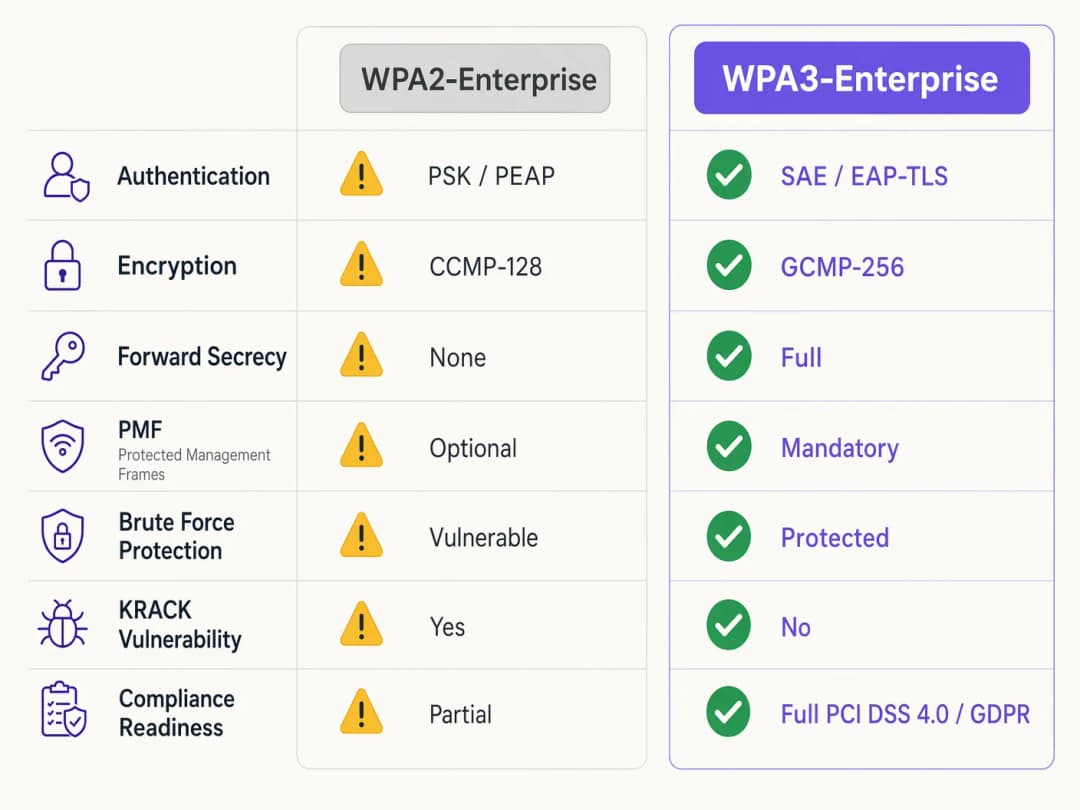
Der grundlegende Unterschied zwischen WPA2 und WPA3-Enterprise liegt nicht im zugrundeliegenden 802.1X Framework, das weiterhin der Standard für die portbasierte Netzwerkzugriffskontrolle bleibt, sondern in den kryptografischen Protokollen und dem Schutz von Management-Frames, die darum herum aufgebaut sind. WPA3 adressiert systemische Schwachstellen seines Vorgängers, insbesondere im Hinblick auf Offline-Wörterbuchangriffe und die Manipulation von Management-Frames.
Authentifizierung und Schlüsselaustausch
WPA2-Enterprise verlässt sich auf einen 4-Wege-Handshake, um Sitzungsschlüssel abzuleiten - ein Prozess, der sich als anfällig für Key Reinstallation Attacks (KRACK) und Offline-Wörterbuch-Brute-Force-Angriffe erwiesen hat, wenn schwache Anmeldedaten verwendet werden. WPA3 entschärft dies durch die Implementierung von Simultaneous Authentication of Equals (SAE), einem auf Diffie-Hellman basierenden Schlüsselaustauschprotokoll. SAE gewährleistet Forward Secrecy; selbst wenn ein Angreifer den langfristigen Schlüssel erlangt, kann er aufgezeichneten Datenverkehr nicht nachträglich entschlüsseln, da jede Sitzung flüchtige, einzigartige Schlüssel verwendet.
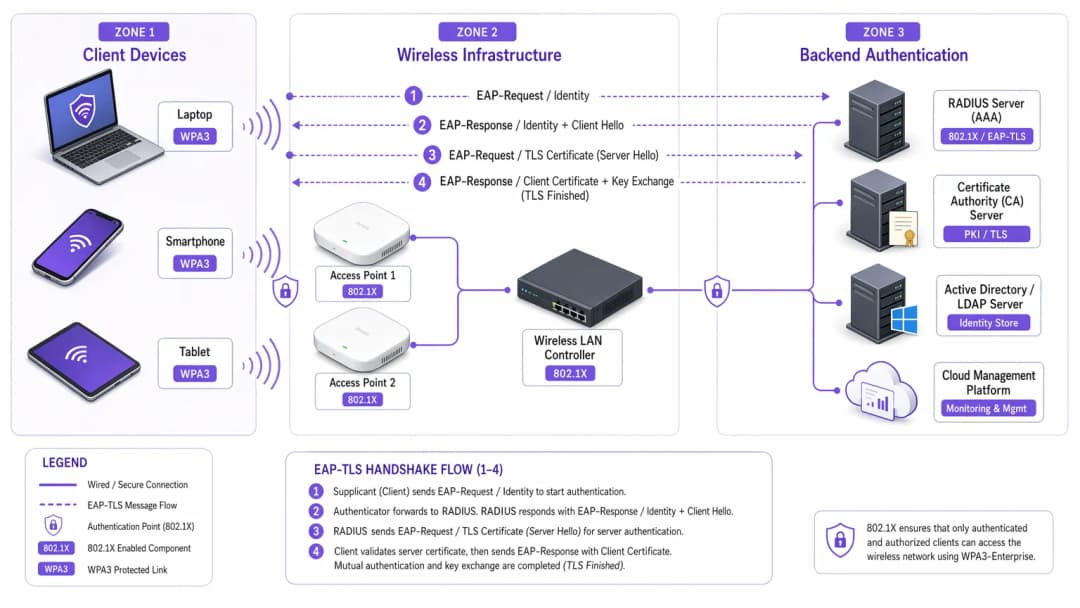
Für Enterprise-Umgebungen verschiebt sich der zentrale Authentifizierungsmechanismus entscheidend in Richtung EAP-TLS (Extensible Authentication Protocol-Transport Layer Security). Während WPA2 schwächere, auf Anmeldedaten basierende Methoden wie PEAP oder EAP-TTLS erlaubte, empfiehlt WPA3-Enterprise dringend - und schreibt dies im hochsicheren 192-Bit-Modus vor - EAP-TLS. Dies erfordert eine zertifikatsbasierte gegenseitige Authentifizierung, wodurch Passwörter vollständig überflüssig werden und der Diebstahl von Anmeldedaten als Angriffsvektor neutralisiert wird.
Verschlüsselungsverbesserungen
WPA2 verwendet CCMP-128 (Counter Mode with Cipher Block Chaining Message Authentication Code Protocol) basierend auf AES-128. WPA3-Enterprise führt eine optionale, aber dringend empfohlene 192-Bit-Sicherheitssuite ein, die an der Commercial National Security Algorithm (CNSA) Suite ausgerichtet ist. Dieser Modus schreibt GCMP-256 (Galois/Counter Mode Protocol mit 256-Bit-Schlüsseln) für eine robuste Verschlüsselung vor, zusammen mit 384-Bit-Elliptic-Curve-Kryptografie für den Schlüsselaufbau und die Schlüsselverwaltung.
Protected Management Frames (PMF)
Unter IEEE 802.11w sichern Protected Management Frames die Steuerungssignale, die die Client-Assoziierung, -Disassoziierung und -Authentifizierung regeln. Bei WPA2 war PMF optional, wodurch Netzwerke gefälschten Deauthentifizierungs-Frames ausgesetzt waren - ein häufiger Vorläufer von Denial-of-Service- oder Man-in-the-Middle-Angriffen. WPA3 schreibt PMF für alle Verbindungen zwingend vor und schließt diesen Angriffsvektor damit grundlegend.
Haben Sie Fragen zu Ihrem spezifischen Setup?
Unser Team arbeitet mit Standortbetreibern, IT-Managern und Netzwerktechnikern an über 80.000 Standorten zusammen. Buchen Sie ein 20-minütiges Gespräch und wir zeigen Ihnen, wie andere diese Herausforderungen gelöst haben.
Implementierungsleitfaden: Bereitstellung von WPA3-Enterprise
Der Übergang eines Enterprise-Netzwerks über Hunderte von Einzelhandelsstandorten oder einen weitläufigen Hotelkomplex erfordert einen schrittweisen, methodischen Ansatz. Die folgenden Schritte skizzieren eine herstellerunabhängige Bereitstellungsstrategie.
Phase 1: Infrastruktur-Audit und PKI-Vorbereitung
Die Voraussetzung für die Implementierung von WPA3-Enterprise - insbesondere mit EAP-TLS - ist eine robuste Public Key Infrastructure (PKI).
- RADIUS-Kompatibilität prüfen: Stellen Sie sicher, dass Ihre RADIUS-Server (z. B. Cisco ISE, Aruba ClearPass, FreeRADIUS) WPA3-Parameter unterstützen und für EAP-TLS konfiguriert sind.
- Zertifizierungsstelle (CA) einrichten: Stellen Sie eine interne CA (wie Microsoft AD CS) bereit oder nutzen Sie einen cloudbasierten PKI-Dienst.
- MDM-Integration: Nutzen Sie eine Mobile Device Management (MDM) Plattform (Intune, Jamf), um die Bereitstellung von Client-Zertifikaten auf verwalteten Geräten zu automatisieren. Dies ist entscheidend für die Skalierbarkeit.
Weitere Informationen zur Zertifikatsbereitstellung finden Sie unter WiFi Certificate Authentication: How Digital Certificates Secure Wireless Networks.
Phase 2: Aktivierung des WPA3-Übergangsmodus
In heterogenen Unternehmensumgebungen ist eine harte Umstellung selten machbar. Die meisten Wireless LAN Controller für Unternehmen unterstützen den WPA3-Übergangsmodus, sodass eine einzige SSID gleichzeitig WPA2- und WPA3-Clients akzeptieren kann.
- Übergangs-SSID konfigurieren: Aktivieren Sie den WPA3-Übergangsmodus auf der Unternehmens-SSID.
- Client-Verbindungen überwachen: Nutzen Sie Ihr Wireless-Management-Dashboard, um die Client-Verbindungen zu überwachen. Überprüfen Sie, ob moderne Geräte erfolgreich WPA3 aushandeln, während ältere Geräte auf WPA2 zurückfallen.
- Kompatibilitätsprobleme beheben: Identifizieren Sie Geräte, bei denen die Verbindung fehlschlägt. Häufig haben ältere Wireless-Treiber Probleme mit der für WPA3 obligatorischen PMF-Anforderung, selbst im Übergangsmodus. Aktualisieren Sie die Treiber, wo immer dies möglich ist.
Phase 3: Netzwerkerkennung und Isolierung von Altgeräten
Nicht jedes Gerät unterstützt WPA3. Ältere IoT-Geräte, ältere Point-of-Sale-Systeme oder spezialisierte medizinische Geräte im Gesundheitswesen verfügen oft nicht über die erforderliche Hardware oder Firmware-Updates.
- Altgeräte isolieren: Erstellen Sie ein dediziertes, isoliertes VLAN und eine separate SSID nur für WPA2 für diese Geräte.
- Strikte Zugriffskontrollen implementieren: Wenden Sie strenge Firewall-Regeln auf dieses Altgeräte-VLAN an, um laterale Bewegungen in das sichere WPA3-Unternehmensnetzwerk zu verhindern.
Phase 4: Vollständige WPA3-Erzwingung
Sobald die überwiegende Mehrheit der Unternehmensgeräte erfolgreich WPA3 nutzt und Altgeräte segmentiert wurden, stellen Sie die primäre Unternehmens-SSID auf reine WPA3-Enterprise-Nutzung um.
Best Practices für Unternehmensumgebungen
Die Implementierung der Technologie ist nur die halbe Miete; die Aufrechterhaltung ihrer Integrität erfordert eine kontinuierliche betriebliche Disziplin.
- Zertifikats-Lebenszyklusmanagement automatisieren: Die häufigste Ursache für EAP-TLS-Fehler ist das Ablaufen von Zertifikaten. Implementieren Sie automatisierte Erneuerungsprozesse und Benachrichtigungen, die RADIUS-Serverzertifikate 90, 60 und 30 Tage vor ihrem Ablauf markieren.
- RADIUS-Redundanz sicherstellen: Ein einzelner RADIUS-Server stellt einen Single Point of Failure dar. Stellen Sie primäre und sekundäre RADIUS-Server an geografisch unterschiedlichen Standorten bereit, mit nahtlosem Failover auf den Wireless-Controllern.
- Gast- und Unternehmensnetzwerke trennen: Vermischen Sie niemals Unternehmenssicherheitsrichtlinien mit dem Gastzugang. Das Unternehmensnetzwerk erfordert WPA3-Enterprise mit EAP-TLS. Gastnetzwerke sollten ein isoliertes VLAN nutzen, das in der Regel über ein Captive Portal verwaltet wird. Die Guest WiFi-Lösung von Purple bietet sicheren, richtlinienkonformen Gastzugang und erfasst gleichzeitig wertvolle WiFi Analytics.
- OpenRoaming nutzen: Für nahtlose, sichere Konnektivität an verschiedenen Standorten sollten Sie die Implementierung von Passpoint/Hotspot 2.0 in Betracht ziehen. Purple fungiert im Rahmen seiner Connect-Lizenz als kostenloser Identitätsanbieter für Dienste wie OpenRoaming und ermöglicht so einen reibungslosen, sicheren Zugang, ohne die Sicherheitsstandards des Unternehmens zu gefährden.
Fehlerbehebung und Risikominderung
Selbst bei sorgfältiger Planung kann es bei Bereitstellungen zu Problemen kommen. Im Folgenden sind die häufigsten Fehlerszenarien und Strategien zur Schadensbegrenzung aufgeführt.
Symptom: Clients können keine Verbindung herstellen, wenn der Transition Mode aktiviert ist.
Ursache: Ältere Client-Treiber schlagen häufig fehl, wenn sie auf die obligatorischen PMF (Protected Management Frames) stoßen, die Access Points im Transition Mode senden, selbst wenn sie eine WPA2-Verbindung versuchen. Behebung: Aktualisieren Sie die Treiber der drahtlosen Netzwerkschnittstelle (NIC) des Clients. Wenn kein Update verfügbar ist, muss das Gerät in die isolierte WPA2-only-SSID verschoben werden.
Symptom: Weit verbreitete Authentifizierungsfehler auf allen Geräten.
Ursache: Das Zertifikat des RADIUS-Servers ist abgelaufen, oder das Root-CA-Zertifikat wurde widerrufen oder aus den Vertrauensspeichern der Clients entfernt. Behebung: Erneuern und installieren Sie das RADIUS-Serverzertifikat unverzüglich. Überprüfen Sie Ihre automatisierten Warnmeldungen zum Lebenszyklusmanagement, um ein erneutes Auftreten zu verhindern.
Symptom: Hohe Latenz beim Roaming zwischen Access Points.
Ursache: 802.11r (Fast BSS Transition) ist falsch konfiguriert oder inkompatibel mit der spezifisch verwendeten EAP-Methode. Behebung: Stellen Sie sicher, dass 802.11r sowohl vom WLAN-Controller als auch von den Client-Geräten für die WPA3-SSID explizit aktiviert und unterstützt wird. Testen Sie die Roaming-Leistung während eines Wartungsfensters.
ROI und geschäftliche Auswirkungen
Der Übergang zu WPA3-Enterprise erfordert Investitionen in professionelle Dienstleistungen, potenzielle Hardware-Upgrades und eine PKI-Infrastruktur. Die Rendite bemisst sich jedoch an der Risikominderung und der Einhaltung von Compliance-Vorgaben. Für eine große Einzelhandelskette übersteigen die Kosten einer Datenpanne mit Zahlungskarteninformationen die Kosten einer WPA3-Bereitstellung bei Weitem. Die Einhaltung von PCI-DSS 4.0 erfordert eine robuste Verschlüsselung und Authentifizierung; WPA3-Enterprise erfüllt diese Anforderungen direkt, was Compliance-Audits vereinfacht und potenzielle Strafen abwendet.
Darüber hinaus bietet eine modernisierte drahtlose Infrastruktur ein stabiles, leistungsstarkes Fundament für zukünftige digitale Initiativen, sei es der Einsatz fortschrittlicher IoT-Sensoren im Gastgewerbe oder die Ermöglichung sicherer mobiler Point-of-Sale-Systeme. Der geschäftliche Nutzen ist eine widerstandsfähige, konforme und zukunftssichere Netzwerkarchitektur.
Schlüsseldefinitionen
WPA3-Enterprise
Der aktuelle Standard für drahtlose Sicherheit in Unternehmen, der eine stärkere Verschlüsselung, geschützte Management-Frames und Forward Secrecy vorschreibt und in der Regel mit 802.1X und RADIUS bereitgestellt wird.
Erforderlich für die Einhaltung von Compliance-Richtlinien (PCI-DSS, GDPR) und zur Sicherung von Unternehmensdaten gegen moderne kryptografische Angriffe.
EAP-TLS (Extensible Authentication Protocol-Transport Layer Security)
Ein Authentifizierungs-Framework, bei dem sowohl der Client als auch der RADIUS-Server digitale Zertifikate vorlegen müssen, um die Identität des jeweils anderen zu überprüfen.
Der Goldstandard für die WPA3-Enterprise-Authentifizierung, der die Abhängigkeit von anfälligen Benutzerpasswörtern eliminiert.
PMF (Protected Management Frames)
Ein Sicherheitsstandard (802.11w), der die Kontroll-Frames verschlüsselt, die für die Client-Assoziierung und -Disassoziierung verwendet werden.
In WPA3 obligatorisch. PMF verhindert, dass Angreifer gefälschte Deauthentifizierungspakete senden, um Benutzer aus dem Netzwerk zu werfen oder Man-in-the-Middle-Angriffe durchzuführen.
SAE (Simultaneous Authentication of Equals)
Ein sicheres Protokoll zur Schlüsselvereinbarung, das in WPA3 verwendet wird und den anfälligen 4-Wege-Handshake von WPA2 ersetzt.
SAE bietet Forward Secrecy und schützt vor Offline-Wörterbuchangriffen, wodurch sichergestellt wird, dass der Handshake selbst bei einem schwachen Passwort nicht per Bruteforce geknackt werden kann.
GCMP-256 (Galois/Counter Mode Protocol)
Ein hochsicheres, effizientes Verschlüsselungsprotokoll, das 256-Bit-Schlüssel verwendet.
Vorgeschrieben für die WPA3-Enterprise 192-Bit-Sicherheitssuite, erforderlich für Umgebungen, in denen hochsensible Daten wie Regierungs- oder Finanzdaten verarbeitet werden.
RADIUS (Remote Authentication Dial-In User Service)
Ein zentralisiertes Netzwerkprotokoll, das Authentifizierungs-, Autorisierungs- und Abrechnungsmanagement (AAA) für Benutzer bereitstellt, die sich mit einem Netzwerkdienst verbinden.
Der zentrale Backend-Server in einer WPA3-Enterprise-Bereitstellung, der Client-Zertifikate oder Anmeldedaten validiert, bevor er den Netzwerkzugriff gewährt.
Forward Secrecy
Eine kryptografische Eigenschaft, die sicherstellt, dass Sitzungsschlüssel ephemeral sind; die zukünftige Kompromittierung eines langfristigen Schlüssels ermöglicht es einem Angreifer nicht, vergangene aufgezeichnete Sitzungen zu entschlüsseln.
Eine entscheidende Verbesserung in WPA3, die durch den SAE-Handshake bereitgestellt wird und historische Daten schützt.
PKI (Public Key Infrastructure)
Das System aus Rollen, Richtlinien, Hardware, Software und Verfahren, das zum Erstellen, Verwalten, Verteilen, Verwenden, Speichern und Widerrufen digitaler Zertifikate benötigt wird.
Die erforderliche vorausgesetzte Infrastruktur für die Bereitstellung der EAP-TLS-Authentifizierung in einer WPA3-Enterprise-Umgebung.
Ausgearbeitete Beispiele
Ein Luxushotel mit 200 Zimmern rüstet sein Unternehmensnetzwerk auf WPA3-Enterprise auf. Es gibt eine Mischung aus modernen Firmen-Laptops, iPads, die vom Concierge-Personal genutzt werden, und älteren WiFi-fähigen Türschlössern, die nur WPA2 unterstützen. Wie sollte der Netzwerkarchitekt die SSIDs und VLANs gestalten, um maximale Sicherheit zu gewährleisten, ohne den Betrieb zu beeinträchtigen?
Der Architekt muss eine Netzwerksegmentierung anwenden.
- Erstellen Sie eine primäre Unternehmens-SSID ('HotelCorp_Secure'), die ausschließlich für WPA3-Enterprise konfiguriert ist und EAP-TLS nutzt. Verteilen Sie Zertifikate an alle Firmen-Laptops und iPads über die MDM-Lösung des Hotels. Weisen Sie diese SSID dem primären Unternehmens-VLAN zu.
- Erstellen Sie eine sekundäre, versteckte SSID ('Hotel_IoT_Legacy'), die für WPA2-Personal (PSK) oder WPA2-Enterprise (falls von den Schlössern unterstützt) konfiguriert ist und ein komplexes, regelmäßig gewechseltes Passwort oder eine MAC-Authentifizierungs-Bypass (MAB) nutzt.
- Weisen Sie die Legacy-SSID einem stark eingeschränkten, isolierten VLAN zu. Konfigurieren Sie Firewall-Regeln so, dass die Türschlösser AUSSCHLIESSLICH mit dem spezifischen lokalen oder cloudbasierten Türverwaltungsserver kommunizieren können, und blockieren Sie jegliche laterale Bewegung in das Unternehmens-VLAN oder das Internet.
Eine Organisation des öffentlichen Sektors hat WPA3-Enterprise mit EAP-TLS bereitgestellt. An einem Montagmorgen kann sich kein Mitarbeiter mit dem drahtlosen Netzwerk verbinden. Der Wireless Controller zeigt an, dass sich die Clients assoziieren, aber die RADIUS-Authentifizierung fehlschlägt. Was ist die wahrscheinlichste Ursache und was ist der sofortige Behebungsschritt?
Die wahrscheinlichste Ursache ist ein abgelaufenes RADIUS-Serverzertifikat. Da EAP-TLS auf gegenseitiger Authentifizierung basiert, lehnen die Clients die Verbindung sofort ab und brechen den Handshake ab, wenn der Server ein abgelaufenes Zertifikat präsentiert.
Sofortige Behebung: Das IT-Team muss einen neuen Certificate Signing Request (CSR) auf dem RADIUS-Server generieren, diesen von der internen CA signieren lassen und das neue Zertifikat an die EAP-TLS-Authentifizierungsrichtlinie auf dem RADIUS-Server binden. Anschließend müssen die Dienste neu gestartet werden.
Übungsfragen
Q1. Sie sind der Netzwerkarchitekt für eine große Einzelhandelskette, die WPA3-Enterprise einführt. Während der Pilotphase in drei Filialen unter Verwendung des WPA3 Transition Mode verlieren mehrere ältere Barcodescanner häufig die Verbindung zum Netzwerk und erfordern manuelle Neustarts, um sich wieder zu verbinden. Moderne Tablets verbinden sich problemlos. Was ist die am besten geeignete architektonische Reaktion?
Hinweis: Überlegen Sie, wie ältere WLAN-Treiber mit unbekannten Management-Frames umgehen, die im Transition Mode übertragen werden.
Musterlösung anzeigen
Die Barcodescanner stürzen wahrscheinlich aufgrund der obligatorischen Protected Management Frames (PMF) ab, die von den APs im Transition Mode übertragen werden. Die richtige Reaktion besteht darin, den Transition Mode für diese Geräte zu verwerfen. Erstellen Sie eine dedizierte, ausgeblendete WPA2-only SSID, die einem isolierten VLAN speziell für die Scanner zugewiesen ist, und konfigurieren Sie die primäre Unternehmens-SSID auf WPA3-Enterprise-only für die modernen Tablets.
Q2. Ein CTO ordnet die Bereitstellung von WPA3-Enterprise in allen Unternehmensniederlassungen innerhalb von 60 Tagen an, um neue Compliance-Anforderungen zu erfüllen. Die aktuelle Umgebung verwendet WPA2-Enterprise mit PEAP-MSCHAPv2 (Benutzername/Passwort). Das Unternehmen verfügt derzeit weder über eine interne Zertifizierungsstelle (CA) noch über eine Mobile Device Management (MDM) Lösung. Ist dieser Zeitplan realistisch, und was ist der kritische Pfad?
Hinweis: Bewerten Sie die Voraussetzungen für die empfohlene WPA3-Authentifizierungsmethode (EAP-TLS).
Musterlösung anzeigen
Der Zeitplan von 60 Tagen ist äußerst unrealistisch. Um WPA3-Enterprise ordnungsgemäß zu implementieren, sollte das Unternehmen auf EAP-TLS migrieren, um Schwachstellen bei Anmeldedaten zu eliminieren. Der kritische Pfad erfordert den Entwurf und die Bereitstellung einer PKI (Zertifizierungsstelle) sowie die Implementierung einer MDM-Lösung zur Verteilung von Client-Zertifikaten. Der Aufbau dieser Infrastruktur von Grund auf, das Testen und die Registrierung aller Unternehmensgeräte werden mit Sicherheit mehr als 60 Tage in Anspruch nehmen. Der Architekt muss diese Abhängigkeit an den CTO kommunizieren.
Q3. Während eines Sicherheitsaudits stellt ein Prüfer fest, dass Ihre RADIUS-Server für EAP-TLS konfiguriert sind, die Funktion zur Überprüfung der Zertifikatssperrliste (CRL-Prüfung) jedoch auf den Wireless-Controllern und RADIUS-Servern deaktiviert ist. Warum ist dies ein erhebliches Sicherheitsrisiko in einer WPA3-Umgebung?
Hinweis: Was passiert, wenn ein Unternehmens-Laptop gestohlen wird, sein Zertifikat jedoch noch nicht abgelaufen ist?
Musterlösung anzeigen
Ohne aktivierte CRL- oder OCSP-Prüfung hat der RADIUS-Server keine Möglichkeit zu wissen, ob ein vorgelegtes Zertifikat von der CA vor seinem natürlichen Ablaufdatum gesperrt wurde. Wenn ein Gerät verloren geht oder ein Mitarbeiter das Unternehmen verlässt, muss dessen Zertifikat gesperrt werden. Wenn die Sperrprüfung deaktiviert ist, kann dieses kompromittierte Zertifikat weiterhin verwendet werden, um sich erfolgreich zu authentifizieren und auf das WPA3-Enterprise-Netzwerk zuzugreifen, wodurch der Zweck der gegenseitigen Authentifizierung völlig ausgehebelt wird.
Weiterlesen in dieser Reihe
Cyber Essentials und Mitarbeiter-WiFi: Die fünf Kontrollen in Ihrem Wireless-Netzwerk bestehen
Sie werden in der Lage sein, jede der fünf Cyber Essentials-Kontrollen auf Ihr Mitarbeiter-WiFi zu übertragen und die Lücken zu schließen, die Auditoren finden. Sie können dann für jede Geräteklasse zwischen 802.1X, iPSK und einem segmentierten WPA2-PSK-Netzwerk wählen. Schließlich erfahren Sie, wie Sie Access Points, Controller und BYOD auf ein Cyber Essentials Plus-Audit vorbereiten.
HPE Aruba Central Präsenzanalyse: Einrichtung, Exporte und Grenzwerte
Sie können die Aruba Central Präsenzanalyse pro Standort aktivieren, den RSSI-Schwellenwert und die Verweildauer-Grenzwerte anhand einer realen Zählung kalibrieren und Standort-Aggregate über die Central REST API exportieren. Sie erfahren außerdem, wo die native Präsenzanalyse an ihre Grenzen stößt und wann eine hardwareunabhängige Plattform-Ebene wie Purple auf Ihren vorhandenen Aruba Access Points sinnvoll ist.
CIPA-Compliance: Checkliste für Betreiber von Veranstaltungsorten
Sie können entscheiden, ob CIPA für Ihr WiFi bindend ist, dann Netzwerke segmentieren, den DNS-Verkehr über Purple Shield leiten und Umgehungswege schließen. Sie wissen zudem, welche Nachweise Sie für die Zertifizierung nach Form 486 oder Form 479 aufbewahren müssen. Die Checkliste weist jeder Anforderung einen Verantwortlichen zu, damit bei Ihrer nächsten Zertifizierung für das Förderjahr nichts fehlt.
Haben Sie Fragen zu Ihrem spezifischen Setup?
Unser Team arbeitet mit Standortbetreibern, IT-Managern und Netzwerktechnikern an über 80.000 Standorten zusammen. Buchen Sie ein 20-minütiges Gespräch und wir zeigen Ihnen, wie andere diese Herausforderungen gelöst haben.