

WiFi Certificate Authentication: How Digital Certificates Secure Wireless Networks
This authoritative guide details how X.509 digital certificates and EAP-TLS replace vulnerable passwords in enterprise WiFi. It provides network architects and IT managers with practical implementation steps, PKI architecture design, and business ROI analysis.
🎧 Listen to this Guide
View Transcript
Executive Summary
The era of the pre-shared key (PSK) in enterprise wireless networks is functionally over. For IT managers, network architects, and CTOs overseeing corporate environments, hospitality venues, and retail chains, relying on shared passwords introduces unacceptable risk, operational overhead, and compliance failures. WiFi certificate authentication—specifically via IEEE 802.1X and EAP-TLS—replaces guessable passwords with cryptographically secure X.509 digital certificates.
By binding an identity mathematically to a specific device, certificate authentication enables mutual authentication, zero-trust network access (ZTNA), and instantaneous revocation. This guide provides a definitive technical reference on how digital certificates secure wireless networks, detailing the underlying Public Key Infrastructure (PKI), deployment architecture, and the concrete business impact of transitioning to a certificate-backed model. For organisations leveraging Guest WiFi alongside corporate networks, properly segmenting these environments while maintaining robust identity management is a critical compliance mandate.
Technical Deep Dive: The Architecture of Trust
X.509 Certificates and PKI Hierarchy
At the core of WiFi certificate authentication is the X.509 digital certificate. Unlike a password, a certificate is not a shared secret. It relies on asymmetric cryptography: a public key embedded in the certificate and a private key securely stored in the device's hardware (such as a TPM or Secure Enclave).
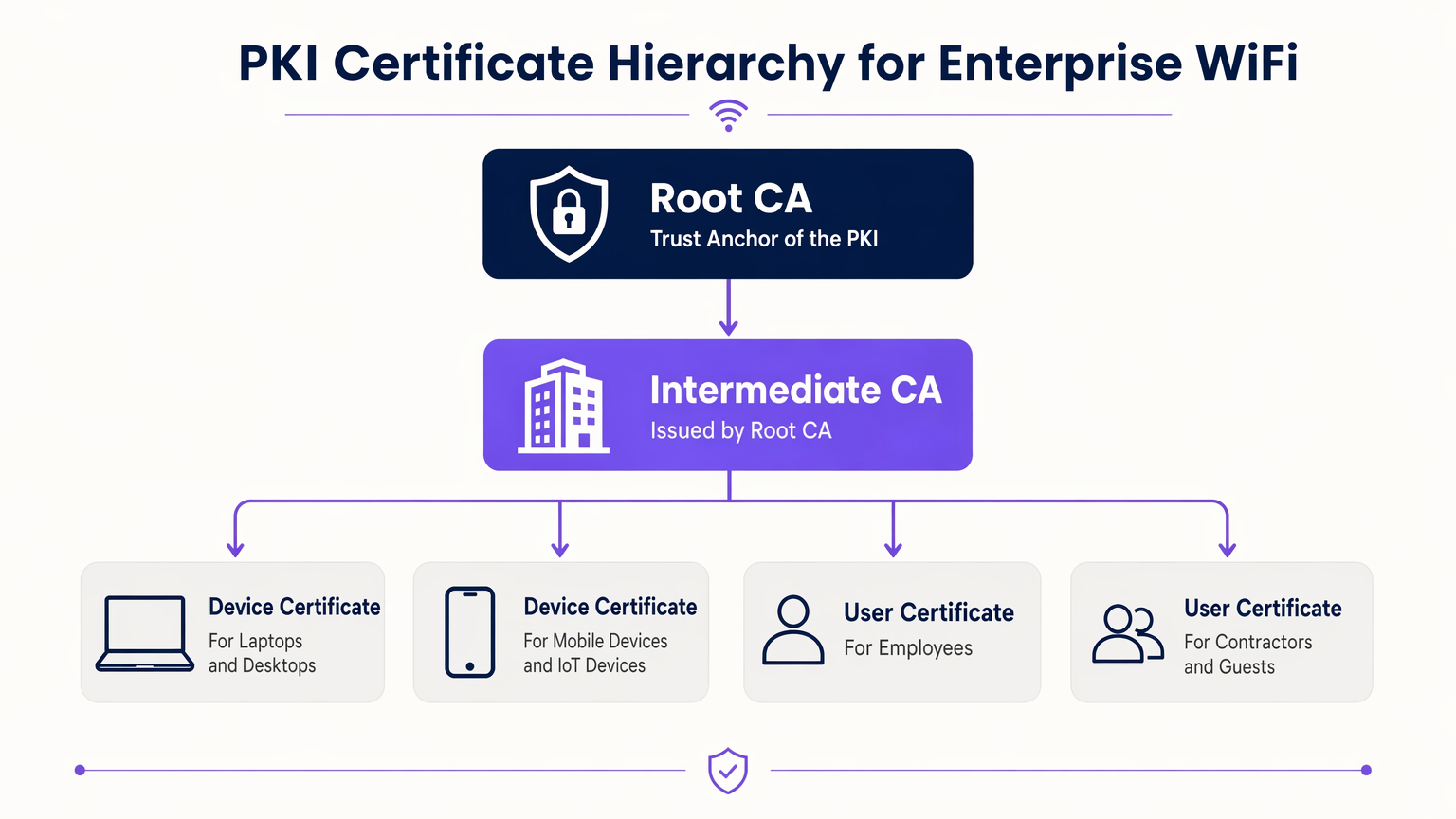
The trust model governing these certificates is the Public Key Infrastructure (PKI). In an enterprise environment, a multi-tier PKI hierarchy is best practice:
- Root Certificate Authority (CA): The ultimate trust anchor, kept offline to prevent compromise.
- Intermediate CA: Issued by the Root CA, this server remains online to actively issue and revoke certificates for end entities.
- End-Entity Certificates: Deployed to client devices (laptops, phones, IoT sensors) and infrastructure (RADIUS servers, Access Points).
802.1X and EAP-TLS Authentication Flow
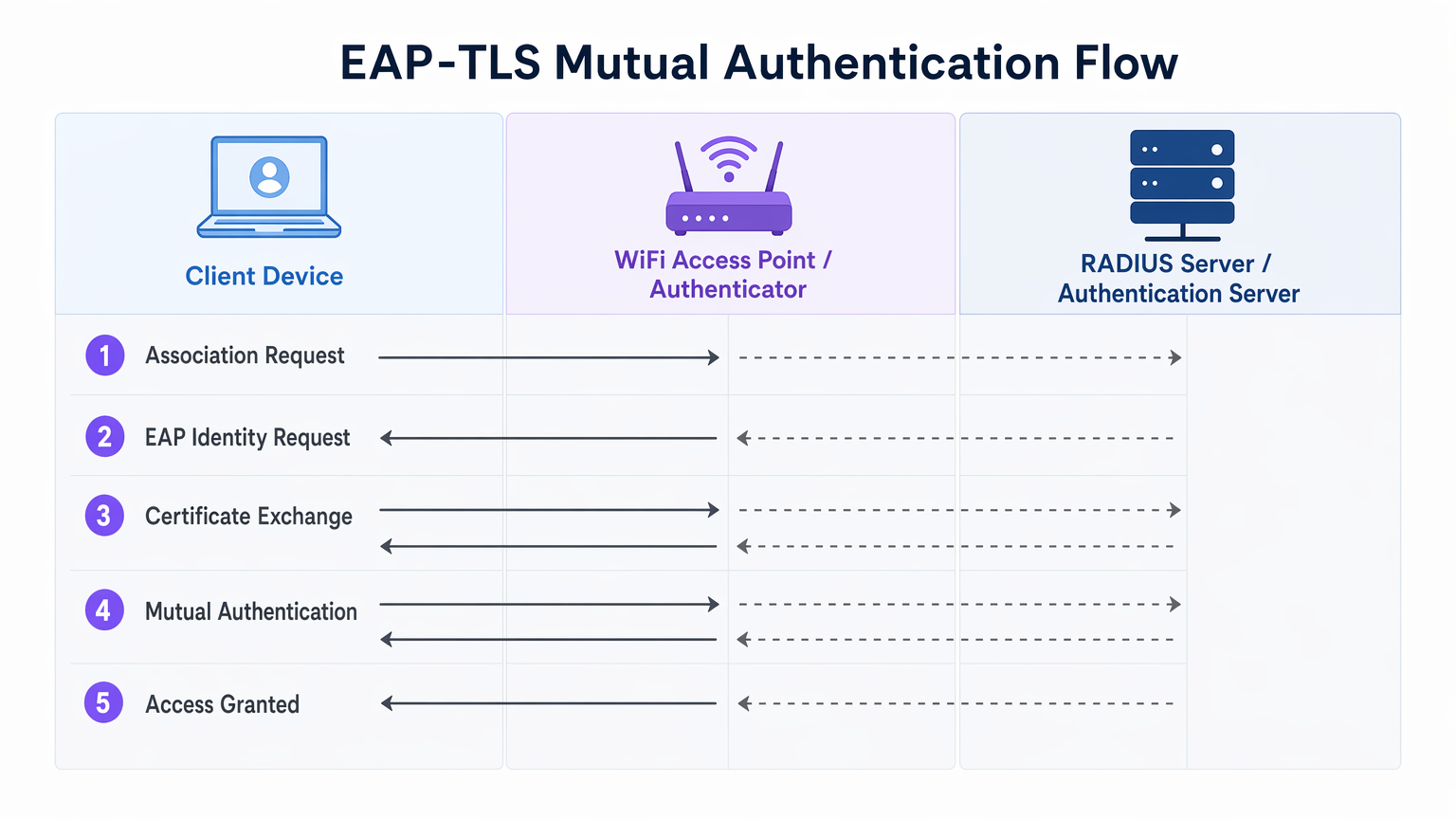
Enterprise WiFi security relies on the IEEE 802.1X standard for port-based network access control. When paired with EAP-TLS (Extensible Authentication Protocol - Transport Layer Security), it delivers mutual authentication.
- Association: The client device connects to the Access Point (Authenticator). Network access is blocked at the port level.
- Identity Request: The AP requests the client's identity and proxies the EAP traffic to the RADIUS server (Authentication Server).
- Server Authentication: The RADIUS server presents its certificate to the client. The client verifies the server's certificate against its trusted Root CAs, preventing rogue AP (Evil Twin) attacks.
- Client Authentication: The client presents its certificate to the RADIUS server. The server validates the certificate's signature, validity period, and revocation status.
- Access Granted: Upon successful mutual authentication, the RADIUS server sends an
Access-Acceptmessage, often including vendor-specific attributes (VSAs) to dynamically assign the client to a specific VLAN.
The Role of Purple in the Identity Ecosystem
While corporate devices use enterprise PKI and EAP-TLS, guest and BYOD (Bring Your Own Device) users require a different approach. This is where Guest WiFi platforms like Purple integrate into the architecture. Purple acts as a robust identity provider for public-facing SSIDs, capturing first-party data and enabling services like OpenRoaming under the Connect licence. This ensures seamless, secure onboarding for guests without compromising the certificate-secured corporate SSID.
Implementation Guide
Deploying certificate authentication requires careful orchestration across your network, identity, and device management silos.
1. Design the PKI and RADIUS Infrastructure
- Deploy a Two-Tier PKI: Never use a flat PKI. Keep the Root CA offline.
- Implement Redundant RADIUS: Deploy at least two RADIUS servers (e.g., FreeRADIUS, Cisco ISE, Aruba ISE) in an active-active or active-passive cluster.
- Configure Revocation Checking: Decide between CRL (Certificate Revocation List) and OCSP (Online Certificate Status Protocol). For high-security and low-latency requirements, OCSP is mandatory.
2. Automate Certificate Enrolment
Manual certificate provisioning is unscalable. Integrate your PKI with your Mobile Device Management (MDM) or Unified Endpoint Management (UEM) solution (e.g., Microsoft Intune, Jamf).
- Use SCEP (Simple Certificate Enrolment Protocol) or the modern EST (Enrolment over Secure Transport) to push certificates to domain-joined and managed devices automatically.
- Ensure the MDM payload includes both the client certificate and the trusted Root CA certificate for the RADIUS server.
3. Network Configuration and Segmentation
- Configure your WLAN controllers and Access Points to use WPA3-Enterprise (or WPA2-Enterprise as a fallback).
- Map RADIUS responses to dynamic VLAN assignments to enforce micro-segmentation.
- Ensure strict firewall separation between the corporate 802.1X SSID and the captive portal SSID managed by your WiFi Analytics platform.
Best Practices
- Align Validity Periods: Set client certificate lifespans (e.g., 1 year) to align with your MDM check-in and device refresh cycles.
- Cache OCSP Responses: Configure your RADIUS server to cache OCSP responses (OCSP Stapling) to prevent authentication timeouts if the external OCSP responder is unreachable.
- Monitor the Edge: Use your network management system to monitor 802.1X timeout and rejection rates. A sudden spike often indicates an expired Intermediate CA or a misconfigured MDM payload.
- Embrace OpenRoaming: For guest networks, leverage Passpoint/OpenRoaming technologies where Purple acts as the identity provider, extending certificate-like seamless roaming to public users.
Troubleshooting & Risk Mitigation
| Failure Mode | Root Cause | Mitigation Strategy |
|---|---|---|
| Client rejects server certificate | The RADIUS server's Root CA is not in the client's trust store. | Push the Root CA via MDM payload before enforcing 802.1X. |
| Authentication times out | The RADIUS server cannot reach the OCSP responder or the CRL is too large. | Implement OCSP caching on the RADIUS server; ensure the OCSP responder is highly available. |
| Rogue AP attacks | Clients are configured to bypass server certificate validation. | Enforce strict server validation in the MDM supplicant profile. Never allow users to click "Trust" on unknown certificates. |
| VLAN assignment fails | RADIUS VSAs do not match the switch/AP configuration. | Standardise VSA naming conventions across your network hardware vendors. |
ROI & Business Impact
Transitioning to WiFi certificate authentication delivers measurable business outcomes for enterprise operators:
- Reduced Helpdesk Overhead: Password resets account for up to 30% of IT helpdesk tickets. Certificate auto-enrolment eliminates WiFi password-related support calls.
- Compliance Acceleration: PCI DSS Requirement 8 mandates unique IDs for all users. EAP-TLS provides a cryptographic audit trail of exactly which device accessed the network, simplifying compliance audits in Retail and Hospitality environments.
- Breach Containment: In the event of a lost or stolen device, revoking a single certificate instantly terminates network access, whereas a compromised PSK requires a global password rotation.
Key Terms & Definitions
EAP-TLS
Extensible Authentication Protocol with Transport Layer Security. The most secure WiFi authentication method, requiring digital certificates on both the client and the server.
Used when an organisation mandates zero-trust network access and wants to eliminate password-based vulnerabilities.
PKI (Public Key Infrastructure)
The framework of hardware, software, policies, and procedures needed to create, manage, distribute, and revoke digital certificates.
The foundational architecture IT teams must build or procure before deploying certificate-based WiFi.
RADIUS
Remote Authentication Dial-In User Service. A networking protocol that provides centralized Authentication, Authorization, and Accounting (AAA) management.
The server that sits between your WiFi Access Points and your Active Directory/PKI to make the actual 'allow or deny' decision.
802.1X
An IEEE standard for port-based Network Access Control (PNAC). It provides an authentication mechanism to devices wishing to attach to a LAN or WLAN.
The protocol configured on the Access Point that blocks network traffic until the RADIUS server confirms the device is authenticated.
OCSP (Online Certificate Status Protocol)
An internet protocol used for obtaining the revocation status of an X.509 digital certificate in real-time.
Preferred over CRLs in enterprise environments to ensure a stolen device's certificate is rejected instantly.
MDM / UEM
Mobile Device Management / Unified Endpoint Management. Software used to manage, secure, and deploy policies to corporate devices.
The delivery mechanism used to push digital certificates to laptops and phones without manual IT intervention.
Supplicant
The software client on the end-user device that handles the 802.1X authentication process.
Configured via MDM to ensure the device knows which certificates to present and which RADIUS servers to trust.
VSA (Vendor-Specific Attribute)
Custom attributes passed in RADIUS messages to provide specific instructions to network hardware, such as assigning a specific VLAN.
Used to dynamically segment users (e.g., putting an IoT sensor on a restricted VLAN and a CEO's laptop on the corporate VLAN) based on their certificate.
Case Studies
A 400-room luxury hotel needs to secure its back-of-house corporate WiFi for staff tablets and POS terminals, while maintaining a separate guest network. They currently use a single WPA2-PSK for staff.
- Deploy a two-tier PKI and redundant RADIUS servers.\n2. Use the hotel's MDM to push device certificates via SCEP to all staff tablets and POS terminals.\n3. Configure the corporate SSID for WPA3-Enterprise with EAP-TLS.\n4. Segment the network: Corporate traffic routes internally; guest traffic routes to a separate VLAN managed by Purple's captive portal for analytics.
A large public-sector organisation is experiencing high helpdesk volume due to 90-day WiFi password rotation policies on their corporate network.
Transition from PEAP-MSCHAPv2 (username/password) to EAP-TLS (certificates). Issue 1-year device certificates via Active Directory Certificate Services (AD CS) and Group Policy to all Windows laptops. Configure RADIUS to validate the certificates against AD.
Scenario Analysis
Q1. Your network monitoring tool alerts you to a sudden 100% failure rate for all 802.1X authentications across your [Retail](/industries/retail) stores. The RADIUS server logs show 'Unknown CA'. What is the most likely cause?
💡 Hint:Consider the lifecycle of the certificates in your PKI hierarchy.
Show Recommended Approach
The Intermediate CA certificate installed on the RADIUS server has expired. When the Intermediate CA expires, the RADIUS server can no longer validate the chain of trust for the client certificates, causing all authentications to fail. The mitigation is to renew the Intermediate CA and update the RADIUS server.
Q2. You are designing the WiFi architecture for a new corporate headquarters. You need to support corporate laptops, BYOD smartphones, and guest users. How should you structure the SSIDs and authentication?
💡 Hint:Remember the rule: Segment the Guests from the Certs.
Show Recommended Approach
Deploy two distinct SSIDs. 1) 'Corp-WiFi': Uses WPA3-Enterprise with EAP-TLS for corporate laptops, authenticated via certificates pushed by MDM. 2) 'Guest-WiFi': Uses an open network with a captive portal managed by Purple for BYOD and guests, providing client isolation and routing directly to the internet.
Q3. During an audit of your [Healthcare](/industries/healthcare) network, the auditor notes that users are occasionally prompted to 'Accept' a new certificate when connecting to the corporate WiFi. Why is this a security risk?
💡 Hint:Think about what mutual authentication is designed to prevent.
Show Recommended Approach
This indicates that the client supplicant is not configured to strictly validate the server certificate. If users can manually accept unknown certificates, an attacker can set up a rogue Access Point (Evil Twin) and trick devices into connecting, potentially intercepting traffic or harvesting credentials. The fix is to push a strict MDM profile that hardcodes the trusted Root CA and prevents user overrides.




