
Implementar WPA3-Enterprise para Segurança Sem Fios Avançada
Este guia de referência técnica fornece um roteiro abrangente e prático para líderes de TI na transição do WPA2 para o WPA3-Enterprise. Abrange as mudanças de arquitetura, melhorias de segurança obrigatórias como EAP-TLS e PMF, e estratégias de implementação práticas para proteger redes corporativas em ambientes empresariais complexos.
Video overview
Ouça este guia
Ver transcrição do podcast
Parte da nossa série principal: Guia de Segurança WiFi Empresarial →

Resumo executivo
Para os líderes de TI das empresas, a transição para o WPA3-Enterprise já não é um item de planeamento futuro; é um requisito operacional atual. O WPA3 é obrigatório para todos os dispositivos Wi-Fi CERTIFIED desde 2020, mas muitas redes corporativas - que abrangem hotéis, retalho e locais do setor público - continuam a utilizar o WPA2. Essa lacuna representa uma exposição a riscos significativa, especialmente à medida que os quadros de conformidade, como o PCI-DSS 4.0 e o GDPR, exigem cada vez mais controlos de segurança de rede robustos e topo de gama.
Este guia fornece uma análise técnica detalhada do WPA3-Enterprise, focando-se nas suas melhorias estruturais fundamentais em relação ao WPA2. Detalhamos a transição obrigatória para uma encriptação mais forte (GCMP-256), a necessidade de Protected Management Frames (PMF) e a implementação crítica de autenticação mútua baseada em certificados através de EAP-TLS. Escrito para arquitetos de rede e CTOs, este documento ignora a teoria académica em favor de estratégias de implementação práticas, metodologias de resolução de problemas e casos de estudo reais para garantir uma infraestrutura wireless segura, escalável e em conformidade.
Oiça o podcast de briefing técnico que acompanha este documento para obter uma perspetiva executiva:
Análise técnica aprofundada: arquitetura WPA3-Enterprise
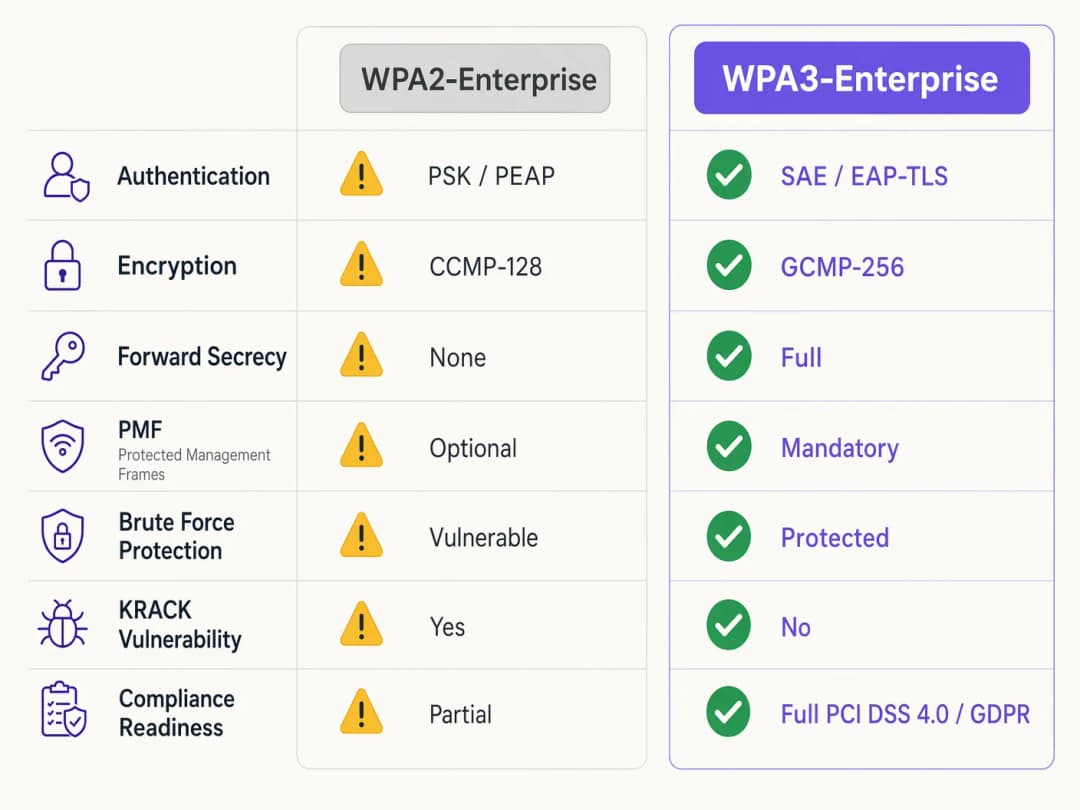
A diferença fundamental entre o WPA2 e o WPA3-Enterprise não reside na estrutura 802.1X subjacente, que continua a ser o padrão para controlo de acesso à rede baseado em portas, mas sim nos protocolos criptográficos e nas proteções de tramas de gestão integradas. O WPA3 aborda vulnerabilidades sistémicas do seu antecessor, visando especificamente ataques de dicionário offline e a manipulação de tramas de gestão.
Autenticação e troca de chaves
O WPA2-Enterprise baseia-se num handshake de 4 vias para derivar chaves de sessão, um processo que se provou vulnerável a ataques de reinstalação de chave (KRACK) e a ataques de força bruta de dicionário offline quando são utilizadas credenciais fracas. O WPA3 mitiga esta situação através da implementação do Simultaneous Authentication of Equals (SAE), um protocolo de troca de chaves baseado em Diffie-Hellman. O SAE garante a confidencialidade de encaminhamento (forward secrecy) - mesmo que um atacante obtenha a chave de longo prazo, não conseguirá decifrar retroativamente o tráfego capturado, porque cada sessão utiliza chaves efémeras e exclusivas.
Para ambientes empresariais, o mecanismo central de autenticação muda decisivamente para EAP-TLS (Extensible Authentication Protocol-Transport Layer Security). Enquanto o WPA2 permitia métodos mais fracos baseados em credenciais, como PEAP ou EAP-TTLS, o WPA3-Enterprise recomenda vivamente - e no seu modo de alta segurança de 192 bits exige - o EAP-TLS. Isto requer uma autenticação mútua baseada em certificados, eliminando por completo as palavras-passe e neutralizando o roubo de credenciais como vetor de ataque.
Melhorias de encriptação
O WPA2 utiliza CCMP-128 (Counter Mode with Cipher Block Chaining Message Authentication Code Protocol) baseado em AES-128. O WPA3-Enterprise introduz um conjunto de segurança opcional, mas fortemente recomendado, de 192 bits, alinhado com o conjunto Commercial National Security Algorithm (CNSA). Este modo exige o GCMP-256 (Galois/Counter Mode Protocol com chaves de 256 bits) para uma encriptação robusta, a par de criptografia de curva elíptica de 384 bits para estabelecimento e gestão de chaves.
Protected Management Frames (PMF)
Ao abrigo da norma IEEE 802.11w, as Protected Management Frames protegem a sinalização de controlo que rege a associação, desassociação e autenticação do cliente. No WPA2, o PMF era opcional, deixando as redes expostas a tramas de desautenticação forjadas - um precursor comum para ataques de negação de serviço ou de personificação (man-in-the-middle). O WPA3 exige PMF para todas as ligações, fechando fundamentalmente este vetor de ataque.
Tem dúvidas sobre a sua configuração específica?
A nossa equipa trabalha com operadores de espaços, gestores de TI e engenheiros de rede em 80.000 espaços. Agende uma chamada de 20 minutos e mostraremos como outros profissionais na sua área o resolveram.
Guia de implementação: implementar o WPA3-Enterprise
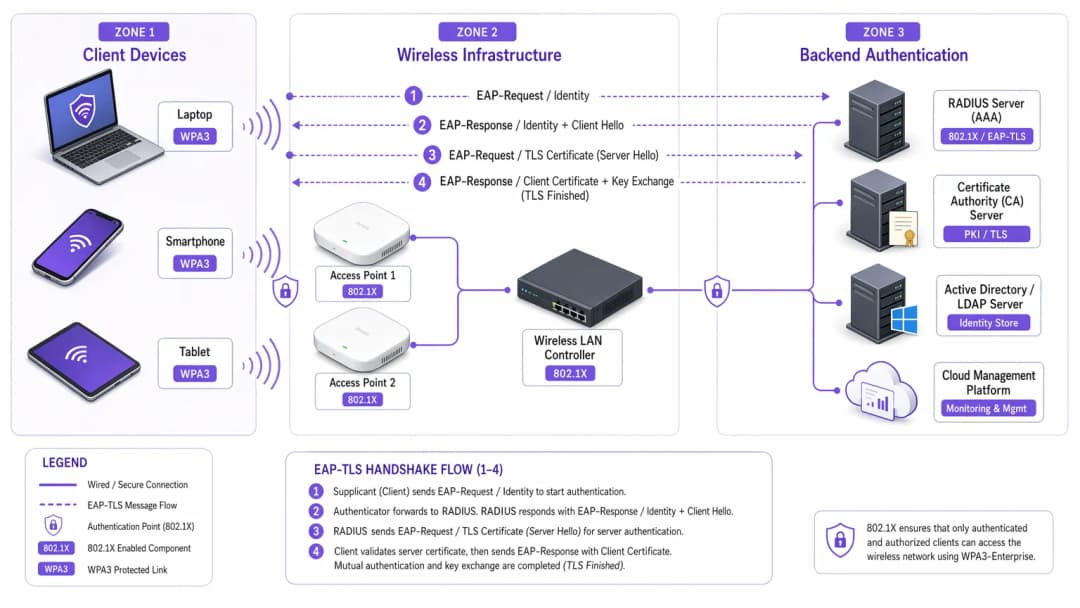
A transição de uma rede empresarial em centenas de estabelecimentos comerciais ou num complexo hoteleiro de grande dimensão exige uma abordagem faseada e metódica. Os passos seguintes descrevem uma estratégia de implementação agnóstica em termos de fabricante.
Fase 1: auditoria de infraestrutura e preparação de PKI
O pré-requisito para implementar o WPA3-Enterprise - particularmente com EAP-TLS - é uma Public Key Infrastructure (PKI) robusta.
- Avaliar a capacidade RADIUS: Certifique-se de que os seus servidores RADIUS (por exemplo, Cisco ISE, Aruba ClearPass, FreeRADIUS) suportam parâmetros WPA3 e estão configurados para EAP-TLS.
- Estabelecer uma Certificate Authority (CA): Implante uma CA interna (como o Microsoft AD CS) ou aproveite um serviço PKI baseado na cloud.
- Integração MDM: Utilize uma plataforma de Mobile Device Management (MDM) (Intune, Jamf) para automatizar a implementação de certificados de cliente em dispositivos geridos. Isto é crítico para a escalabilidade.
Para mais informações sobre a implementação de certificados, consulte o guia WiFi Certificate Authentication: How Digital Certificates Secure Wireless Networks.
Fase 2: ativar o WPA3 Transition Mode
Em ambientes empresariais diversos, uma transição abrupta raramente é viável. A maioria dos controladores LAN sem fios empresariais suporta o WPA3 Transition Mode, permitindo que um único SSID aceite clientes WPA2 e WPA3 em simultâneo.
- Configurar o SSID de transição: Ative o WPA3 Transition Mode no SSID corporativo.
- Monitorizar as associações de clientes: Utilize o seu painel de gestão sem fios para monitorizar as ligações dos clientes. Verifique se os dispositivos modernos negociam com sucesso o WPA3, enquanto os dispositivos mais antigos recorrem ao WPA2.
- Resolver problemas de compatibilidade: Identifique os dispositivos que não conseguem associar-se. Frequentemente, os controladores sem fios mais antigos têm dificuldades com o requisito PMF obrigatório do WPA3, mesmo no modo de transição. Atualize os controladores sempre que possível.
Fase 3: segmentação de rede e isolamento de dispositivos legados
Nem todos os dispositivos irão suportar o WPA3. Dispositivos IoT legados, sistemas de ponto de venda mais antigos ou equipamentos médicos especializados em ambientes de saúde carecem frequentemente de hardware necessário ou de atualizações de firmware.
- Isolar dispositivos legados: Crie uma VLAN dedicada e isolada e um SSID exclusivo para WPA2 para estes dispositivos.
- Implementar controlos de acesso rigorosos: Aplique regras de firewall rigorosas a esta VLAN legada, impedindo o movimento lateral para a rede corporativa segura com WPA3.
Fase 4: aplicação total do WPA3
Assim que a grande maioria dos dispositivos corporativos estiver a utilizar o WPA3 com sucesso e os dispositivos legados tiverem sido segmentados, converta o SSID corporativo principal apenas para WPA3-Enterprise.
Boas práticas para ambientes empresariais
Implementar a tecnologia é apenas metade da batalha; manter a sua integridade exige uma disciplina operacional contínua.
- Automatize a gestão do ciclo de vida dos certificados: A causa mais comum de falha no EAP-TLS é a expiração do certificado. Implemente processos de renovação automatizados e alertas que sinalizem os certificados do servidor RADIUS 90, 60 e 30 dias antes de expirarem.
- Garanta a redundância do RADIUS: Um único servidor RADIUS é um ponto único de falha. Implante servidores RADIUS primários e secundários em localizações geograficamente distintas, com failover contínuo configurado nos controladores sem fios.
- Separe as redes de convidados e corporativas: Nunca misture a política de segurança corporativa com o acesso de convidados. A rede corporativa exige WPA3-Enterprise com EAP-TLS. As redes de convidados devem utilizar uma VLAN isolada, normalmente gerida através de um captive portal. A solução de Guest WiFi da Purple oferece um acesso de convidados seguro e em conformidade, ao mesmo tempo que recolhe dados valiosos de WiFi Analytics.
- Aproveite o OpenRoaming: Para uma conectividade contínua e segura entre locais, considere a implementação do Passpoint/Hotspot 2.0. A Purple atua como um fornecedor de identidade gratuito para serviços como o OpenRoaming ao abrigo da sua licença Connect, facilitando um acesso seguro e sem fricção, sem comprometer os padrões de segurança empresariais.
Resolução de problemas e mitigação de riscos
Mesmo com um planeamento minucioso, as implantações encontram fricção. Abaixo estão os modos de falha comuns e as estratégias de mitigação.
Sintoma: os clientes não se conseguem ligar quando o Transition Mode está ativado.
Causa raiz: Os controladores de dispositivos clientes mais antigos falham frequentemente quando encontram os PMF (Protected Management Frames) obrigatórios que os pontos de acesso transmitem no modo de transição, mesmo quando tentam uma ligação WPA2. Mitigação: Atualize os controladores da placa de rede sem fios (NIC) do cliente. Se não houver nenhuma atualização disponível, o dispositivo deve ser movido para o SSID isolado apenas com WPA2.
Sintoma: falhas de autenticação generalizadas em todos os dispositivos.
Causa raiz: O certificado do servidor RADIUS expirou, ou o certificado da CA raiz foi revogado ou removido dos repositórios de confiança dos clientes. Mitigação: Renove e implante o certificado do servidor RADIUS imediatamente. Reveja os seus alertas de gestão de ciclo de vida automatizados para evitar que a situação se repita.
Sintoma: latência elevada ao fazer roaming entre pontos de acesso.
Causa raiz: O 802.11r (Fast BSS Transition) está mal configurado ou é incompatível com o método EAP específico em utilização. Mitigação: Certifique-se de que o 802.11r está explicitamente ativado e é suportado para o SSID WPA3 tanto pelo controlador WLAN como pelos dispositivos clientes. Teste o desempenho de roaming durante uma janela de manutenção.
ROI e impacto empresarial
A transição para o WPA3-Enterprise exige investimento em serviços profissionais, potenciais atualizações de hardware e infraestrutura PKI. O retorno, no entanto, é medido na mitigação de riscos e na conformidade regulamentar.
Para uma grande cadeia de retalho, o custo de uma violação de dados envolvendo informações de cartões de pagamento excede largamente o custo de uma implementação de WPA3. A conformidade com o PCI-DSS 4.0 exige encriptação e autenticação robustas; o WPA3-Enterprise satisfaz diretamente estes requisitos, simplificando as auditorias de conformidade e evitando potenciais multas.
Além disso, uma infraestrutura wireless modernizada fornece uma base estável e de elevado desempenho para futuras iniciativas digitais, quer se trate de implementar sensores IoT avançados na hotelaria ou de permitir sistemas móveis de ponto de venda seguros. O impacto comercial é uma arquitetura de rede resiliente, em conformidade e preparada para o futuro.
Definições Principais
WPA3-Enterprise
O padrão atual para segurança sem fios empresarial, que exige uma encriptação mais forte, tramas de gestão protegidas e segredo de transmissão perfeito, normalmente implementado com 802.1X e RADIUS.
Necessário para conformidade (PCI-DSS, GDPR) e para proteger dados corporativos contra ataques criptográficos modernos.
EAP-TLS (Extensible Authentication Protocol-Transport Layer Security)
Uma estrutura de autenticação que exige que tanto o cliente como o servidor RADIUS apresentem certificados digitais para verificar a identidade um do outro.
O padrão de excelência para autenticação WPA3-Enterprise, eliminando a dependência de palavras-passe de utilizador vulneráveis.
PMF (Protected Management Frames)
Um padrão de segurança (802.11w) que encripta as tramas de controlo utilizadas para a associação e desassociação de clientes.
Obrigatório no WPA3, o PMF impede que atacantes forjem pacotes de desautenticação para desligar utilizadores da rede ou executar ataques man-in-the-middle.
SAE (Simultaneous Authentication of Equals)
Um protocolo seguro de estabelecimento de chaves usado no WPA3 que substitui o vulnerável handshake de 4 vias do WPA2.
O SAE fornece confidencialidade futura (forward secrecy) e protege contra ataques de dicionário offline, garantindo que, mesmo que uma palavra-passe seja fraca, o handshake não possa ser quebrado por força bruta.
GCMP-256 (Galois/Counter Mode Protocol)
Um protocolo de encriptação altamente seguro e eficiente que utiliza chaves de 256 bits.
Obrigatório para o conjunto de segurança WPA3-Enterprise de 192 bits, necessário para ambientes que gerem dados altamente sensíveis, como registos governamentais ou financeiros.
RADIUS (Remote Authentication Dial-In User Service)
Um protocolo de rede centralizado que fornece gestão de Autenticação, Autorização e Monitorização (AAA) para utilizadores que se ligam a um serviço de rede.
O servidor central de backend numa implementação WPA3-Enterprise que valida os certificados ou credenciais dos clientes antes de conceder acesso à rede.
Forward Secrecy
Uma funcionalidade criptográfica que garante que as chaves de sessão são efêmeras; comprometer uma chave de longo prazo no futuro não permitirá que um atacante decifre sessões gravadas no passado.
Uma melhoria crítica no WPA3 fornecida pelo handshake SAE, protegendo dados históricos.
PKI (Public Key Infrastructure)
A estrutura de funções, políticas, hardware, software e procedimentos necessários para criar, gerir, distribuir, utilizar, armazenar e revogar certificados digitais.
A infraestrutura de pré-requisito necessária para implementar a autenticação EAP-TLS num ambiente WPA3-Enterprise.
Exemplos Práticos
Um hotel de luxo com 200 quartos está a atualizar a sua rede corporativa para WPA3-Enterprise. Possui uma mistura de portáteis corporativos modernos, iPads utilizados pelo pessoal da receção e fechaduras de portas antigas com ligação WiFi que apenas suportam WPA2. Como deve o arquiteto de rede desenhar os SSIDs e as VLANs para garantir a máxima segurança sem comprometer a funcionalidade operacional?
O arquiteto deve utilizar a segmentação de rede.
- Criar um SSID corporativo principal ('HotelCorp_Secure') configurado apenas para WPA3-Enterprise, utilizando EAP-TLS. Implementar certificados em todos os portáteis corporativos e iPads através da solução MDM do hotel. Atribuir este SSID à VLAN corporativa principal.
- Criar um SSID secundário e oculto ('Hotel_IoT_Legacy') configurado para WPA2-Personal (PSK) ou WPA2-Enterprise (se suportado pelas fechaduras), utilizando uma frase de acesso complexa e rotativa ou desvio de autenticação MAC (MAB).
- Atribuir o SSID antigo a uma VLAN isolada e fortemente restrita. Configurar regras de firewall para permitir que as fechaduras das portas comuniquem APENAS com o servidor de gestão de portas específico, local ou baseado na nuvem, bloqueando qualquer movimento lateral para a VLAN corporativa ou para a internet.
Uma organização do setor público implementou WPA3-Enterprise com EAP-TLS. Numa manhã de segunda-feira, nenhum funcionário consegue ligar-se à rede sem fios. O controlador sem fios mostra a associação dos clientes, mas a autenticação RADIUS falha. Qual é a causa mais provável e qual é o passo imediato para a resolução?
A causa mais provável é a expiração de um certificado do servidor RADIUS. Como o EAP-TLS depende de autenticação mútua, se o servidor apresentar um certificado expirado, os clientes rejeitarão imediatamente a ligação e terminarão o handshake.
Resolução imediata: A equipa de TI deve gerar um novo Pedido de Assinatura de Certificado (CSR) a partir do servidor RADIUS, solicitar a sua assinatura pela CA interna e associar o novo certificado à política de autenticação EAP-TLS no servidor RADIUS. Os serviços devem então ser reiniciados.
Perguntas de Prática
Q1. É o arquiteto de rede de uma grande cadeia de retalho que está a implementar o WPA3-Enterprise. Durante a fase piloto em três lojas que utilizam o Modo de Transição WPA3, vários leitores de códigos de barras mais antigos desligam-se frequentemente da rede e requerem reinicializações manuais para se voltarem a ligar. Os tablets modernos ligam-se sem problemas. Qual é a resposta arquitetural mais adequada?
Dica: Considere como as drivers de rede sem fios antigas lidam com tramas de gestão desconhecidas transmitidas em Modo de Transição.
Ver resposta modelo
Os leitores de códigos de barras estão provavelmente a falhar devido às Protected Management Frames (PMF) obrigatórias transmitidas pelos APs em Modo de Transição. A resposta adequada é abandonar o Modo de Transição para estes dispositivos. Crie um SSID dedicado e oculto, apenas WPA2, mapeado para uma VLAN isolada especificamente para os leitores de códigos de barras, e configure o SSID corporativo principal apenas para WPA3-Enterprise para os tablets modernos.
Q2. Um CTO exige a implementação de WPA3-Enterprise em todos os escritórios corporativos no prazo de 60 dias para cumprir novos requisitos de conformidade. O ambiente atual utiliza WPA2-Enterprise com PEAP-MSCHAPv2 (utilizador/palavra-passe). A organização não dispõe atualmente de uma Autoridade de Certificação (CA) interna ou de uma solução de Gestão de Dispositivos Móveis (MDM). Este prazo é realista e qual é o caminho crítico?
Dica: Avalie os pré-requisitos para o método de autenticação WPA3 recomendado (EAP-TLS).
Ver resposta modelo
O prazo de 60 dias é altamente irrealista. Para implementar corretamente o WPA3-Enterprise, a organização deve migrar para o EAP-TLS para eliminar vulnerabilidades de credenciais. O caminho crítico exige a conceção e implementação de uma PKI (Autoridade de Certificação) e a implementação de uma solução de MDM para distribuir certificados de cliente. Construir esta infraestrutura do zero, testá-la e registar todos os dispositivos corporativos excederá quase de certeza os 60 dias. O arquiteto deve comunicar esta dependência ao CTO.
Q3. Durante uma auditoria de segurança, um auditor nota que os seus servidores RADIUS estão configurados para EAP-TLS, mas a funcionalidade de 'Verificação de Lista de Revogação de Certificados (CRL)' está desativada nos controladores sem fios e nos servidores RADIUS. Porque é que esta é uma descoberta de segurança significativa num ambiente WPA3?
Dica: O que acontece se um portátil corporativo for roubado, mas o seu certificado ainda não tiver expirado?
Ver resposta modelo
Sem a verificação de CRL ou OCSP ativada, o servidor RADIUS não tem forma de saber se um certificado apresentado foi revogado pela CA antes da sua data de expiração natural. Se um dispositivo for perdido ou um funcionário for demitido, o seu certificado deve ser revogado. Se a verificação de revogação estiver desativada, esse certificado comprometido ainda pode ser utilizado para autenticar com sucesso e aceder à rede WPA3-Enterprise, anulando totalmente o propósito da autenticação mútua.
Continue a ler esta série
Cyber Essentials e WiFi para Colaboradores: Superar os Cinco Controlos na Sua Rede Sem Fios
Será capaz de mapear cada um dos cinco controlos Cyber Essentials para o seu WiFi de colaboradores e colmatar as lacunas identificadas pelos avaliadores. Poderá então escolher entre 802.1X, iPSK e uma rede WPA2-PSK segregada para cada classe de dispositivo. Por fim, saberá como preparar pontos de acesso, controladores e BYOD para uma auditoria Cyber Essentials Plus.
Análise de presença HPE Aruba Central: configuração, exportações e limites
Será capaz de ativar a análise de presença do Aruba Central por local, calibrar o limite de RSSI e os limites de tempo de permanência relativamente a uma contagem real e exportar agregados ao nível do local através da API REST do Central. Também saberá onde termina a análise de presença nativa e quando uma camada de plataforma independente do hardware, como a Purple, ganha o seu lugar nos seus pontos de acesso Aruba existentes.
Conformidade com a CIPA: lista de verificação de conformidade para operadores de locais públicos
Poderá decidir se a CIPA se aplica ao seu WiFi, depois segmentar redes, encaminhar o DNS através do Purple Shield e fechar caminhos de desvio. Saberá também quais as provas a conservar para a certificação do Form 486 ou Form 479. A lista de verificação atribui um proprietário a cada requisito, para que não falte nada na certificação do seu próximo ano de financiamento.
Tem dúvidas sobre a sua configuração específica?
A nossa equipa trabalha com operadores de espaços, gestores de TI e engenheiros de rede em 80.000 espaços. Agende uma chamada de 20 minutos e mostraremos como outros profissionais na sua área o resolveram.