
Implementazione di WPA3-Enterprise per una Sicurezza Wireless Avanzata
Questa guida di riferimento tecnico fornisce una tabella di marcia completa e pratica per i leader IT che passano da WPA2 a WPA3-Enterprise. Copre i cambiamenti architetturali, i miglioramenti obbligatori della sicurezza come EAP-TLS e PMF, e le strategie di implementazione pratica per proteggere le reti aziendali in ambienti enterprise complessi.
Video overview
Ascolta questa guida
Visualizza trascrizione del podcast
Parte della nostra serie principale: Enterprise WiFi Security Guide →

Sintesi esecutiva
Per i leader IT aziendali, la transizione a WPA3-Enterprise non è più un elemento della roadmap futura; è un requisito operativo attuale. Il protocollo WPA3 è obbligatorio per tutti i dispositivi Wi-Fi CERTIFIED dal 2020, eppure molte reti aziendali - che spaziano da hotel, punti vendita retail e spazi pubblici - utilizzano ancora WPA2. Questo divario rappresenta un'esposizione al rischio significativa, in particolare in un momento in cui i framework di conformità come PCI-DSS 4.0 e GDPR richiedono sempre più controlli di sicurezza di rete solidi e all'avanguardia.
Questa guida fornisce un'analisi tecnica completa di WPA3-Enterprise, concentrandosi sui suoi miglioramenti architetturali fondamentali rispetto a WPA2. Analizziamo in dettaglio il passaggio obbligatorio a una crittografia più forte (GCMP-256), la necessità di Protected Management Frames (PMF) e l'implementazione critica dell'autenticazione reciproca basata su certificati tramite EAP-TLS. Scritto per architetti di rete e CTO, questo documento tralascia la teoria accademica a favore di strategie di implementazione pratiche, metodologie di risoluzione dei problemi e casi di studio reali per garantire un'infrastruttura wireless sicura, scalabile e conforme.
Ascolta il podcast del briefing tecnico di accompagnamento per una panoramica esecutiva:
Approfondimento tecnico: architettura WPA3-Enterprise
La differenza fondamentale tra WPA2 e WPA3-Enterprise non risiede nel framework 802.1X sottostante, che rimane lo standard per il controllo dell'accesso alla rete basato su porte, ma nei protocolli crittografici e nelle protezioni dei frame di gestione integrati al suo interno. WPA3 risolve le vulnerabilità sistemiche del suo predecessore, prendendo di mira in modo specifico gli attacchi con dizionario offline e la manipolazione dei frame di gestione.
Autenticazione e scambio di chiavi
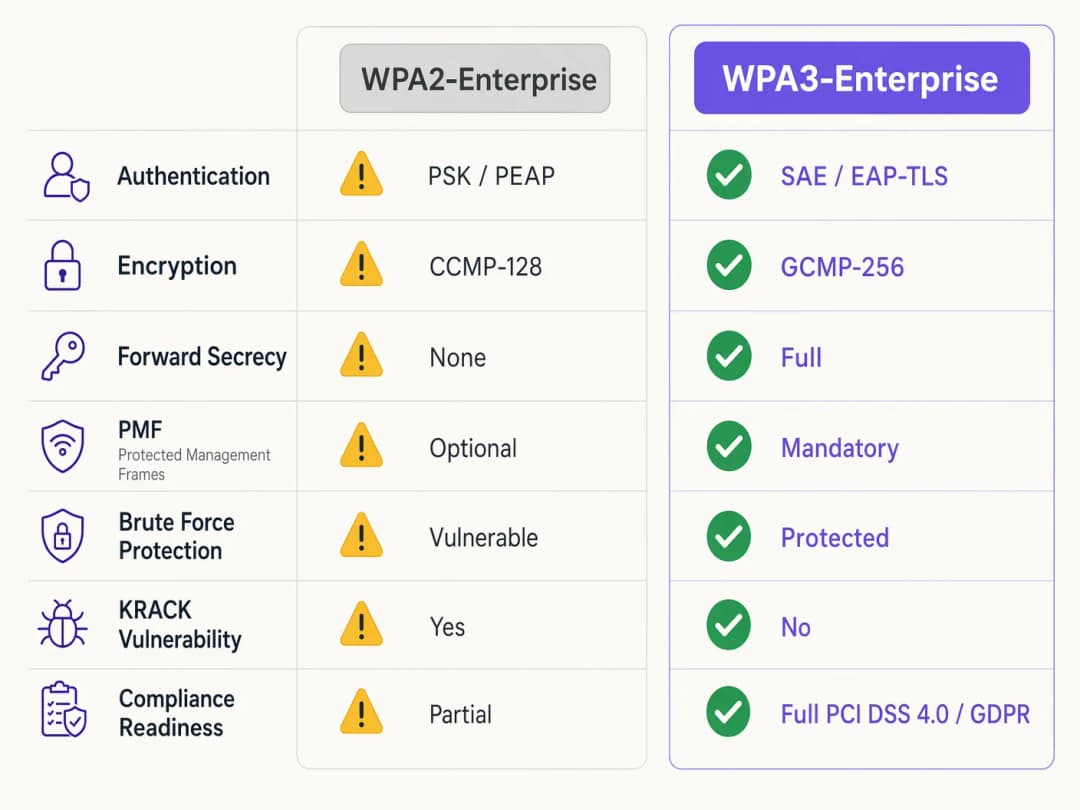
WPA2-Enterprise si affida a un handshake a 4 vie per derivare le chiavi di sessione, un processo che si è dimostrato vulnerabile agli attacchi KRACK (Key Reinstallation Attacks) e al brute-forcing con dizionario offline nei casi in cui vengono utilizzate credenziali deboli. WPA3 mitiga questo rischio implementando SAE (Simultaneous Authentication of Equals), un protocollo di scambio di chiavi basato su Diffie-Hellman. SAE garantisce la forward secrecy; anche se un utente malintenzionato ottiene la chiave a lungo termine, non può decrittografare retroattivamente il traffico catturato, poiché ogni sessione utilizza chiavi effimere e uniche.
Per gli ambienti enterprise, il meccanismo di autenticazione principale si sposta decisamente verso EAP-TLS (Extensible Authentication Protocol-Transport Layer Security). Mentre WPA2 consentiva metodi più deboli basati su credenziali come PEAP o EAP-TTLS, WPA3-Enterprise raccomanda fortemente - e nella sua modalità a 192 bit ad alta sicurezza impone - EAP-TLS. Ciò richiede un'autenticazione reciproca basata su certificati, eliminando completamente le password e neutralizzando il furto di credenziali come vettore di attacco.
Miglioramenti della crittografia
WPA2 utilizza CCMP-128 (Counter Mode con Cipher Block Chaining Message Authentication Code Protocol) basato su AES-128. WPA3-Enterprise introduce una suite di sicurezza a 192 bit opzionale ma fortemente raccomandata, allineata alla suite CNSA (Commercial National Security Algorithm). Questa modalità impone GCMP-256 (Galois/Counter Mode Protocol con chiavi a 256 bit) per una crittografia robusta, insieme alla crittografia a curva ellittica a 384 bit per lo stabilimento e la gestione delle chiavi.
Protected Management Frames (PMF)
In base allo standard IEEE 802.11w, i Protected Management Frames proteggono la segnalazione di controllo che regola l'associazione, la disassociazione e l'autenticazione dei client. In WPA2, il PMF era opzionale, lasciando le reti esposte a frame di deautenticazione contraffatti - un precursore comune degli attacchi denial-of-service o man-in-the-middle. WPA3 impone il PMF per tutte le connessioni, chiudendo fondamentalmente questo vettore di attacco.
Hai domande sulla tua configurazione specifica?
Il nostro team collabora con gestori di sedi, responsabili IT e ingegneri di rete in 80.000 sedi. Prenota una chiamata di 20 minuti e ti mostreremo come altri professionisti come te hanno risolto il problema.
Guida all'implementazione: distribuire WPA3-Enterprise
La transizione di una rete enterprise in centinaia di punti vendita o in un vasto complesso alberghiero richiede un approccio graduale e metodico. I passaggi seguenti delineano una strategia di implementazione indipendente dal fornitore.
Fase 1: audit dell'infrastruttura e preparazione della PKI
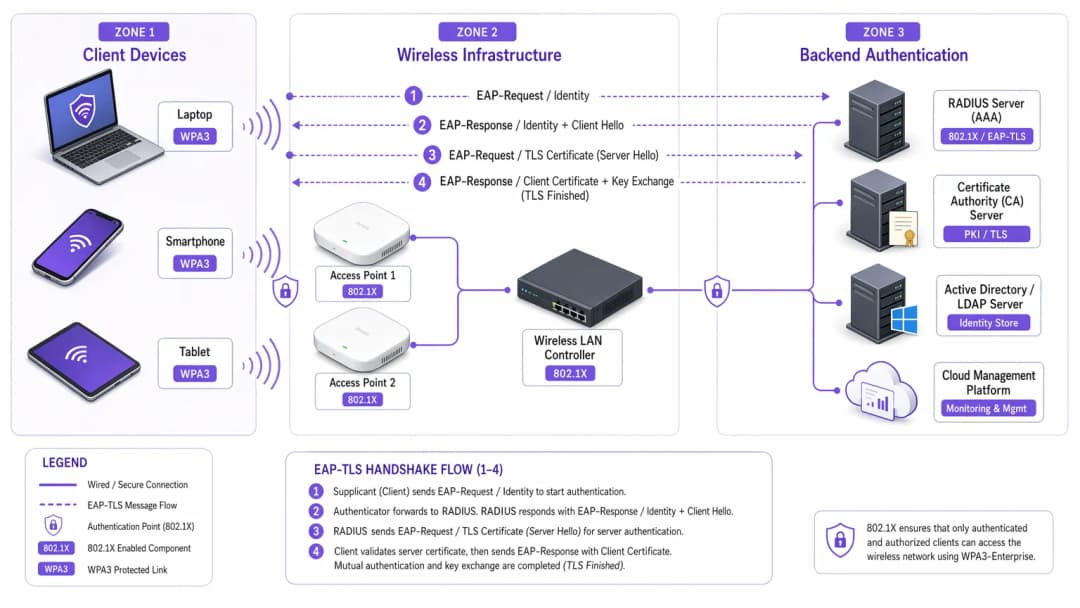
Il prerequisito per l'implementazione di WPA3-Enterprise - in particolare con EAP-TLS - è una robusta Public Key Infrastructure (PKI).
- Valutare la capacità del server RADIUS: Assicurarsi che i server RADIUS (ad esempio, Cisco ISE, Aruba ClearPass, FreeRADIUS) supportino i parametri WPA3 e siano configurati per EAP-TLS.
- Stabilire una Certificate Authority (CA): Distribuire una CA interna (come Microsoft AD CS) o sfruttare un servizio PKI basato su cloud.
- Integrazione MDM: Utilizzare una piattaforma di Mobile Device Management (MDM) (Intune, Jamf) per automatizzare la distribuzione dei certificati client sui dispositivi gestiti. Questo aspetto è fondamentale per la scalabilità.
Per ulteriori approfondimenti sulla distribuzione dei certificati, consultare WiFi Certificate Authentication: How Digital Certificates Secure Wireless Networks.
Fase 2: abilitazione della modalità di transizione WPA3
In ambienti aziendali complessi, un passaggio netto e immediato è raramente fattibile. La maggior parte dei controller LAN wireless aziendali supporta la modalità di transizione WPA3, consentendo a un singolo SSID di accettare contemporaneamente client WPA2 e WPA3.
- Configurare l'SSID di transizione: Abilitare la modalità di transizione WPA3 sull'SSID aziendale.
- Monitorare le associazioni dei client: Utilizzare la dashboard di gestione wireless per monitorare le connessioni dei client. Verificare che i dispositivi moderni negozino con successo il protocollo WPA3 mentre i dispositivi più vecchi ripieghino su WPA2.
- Risolvere i problemi di compatibilità: Identificare i dispositivi che non riescono a connettersi. Spesso, i driver wireless più datati hanno difficoltà con il requisito PMF obbligatorio di WPA3, anche in modalità di transizione. Aggiornare i driver ove possibile.
Fase 3: segmentazione della rete e isolamento dei dispositivi legacy
Non tutti i dispositivi supporteranno il protocollo WPA3. I dispositivi IoT legacy, i vecchi sistemi point-of-sale o le apparecchiature mediche specializzate negli ambienti sanitari healthcare spesso non dispongono degli aggiornamenti hardware o firmware necessari.
- Isolare i dispositivi legacy: Creare una VLAN dedicata e isolata e un SSID separato solo WPA2 per questi dispositivi.
- Implementare controlli di accesso rigorosi: Applicare regole di firewall restrittive a questa VLAN legacy, impedendo il movimento laterale verso la rete aziendale sicura WPA3.
Fase 4: applicazione completa di WPA3
Una volta che la stragrande maggioranza dei dispositivi aziendali utilizza con successo il protocollo WPA3 e i dispositivi legacy sono stati segmentati, convertire l'SSID aziendale primario in modalità esclusiva WPA3-Enterprise.
Best practice per gli ambienti aziendali
L'implementazione della tecnologia è solo metà dell'opera; mantenere la sua integrità richiede una costante disciplina operativa.
- Automatizza la gestione del ciclo di vita dei certificati: la causa più comune di errore EAP-TLS è la scadenza dei certificati. Implementa processi di rinnovo automatizzati e un sistema di alert che segnali i certificati del server RADIUS 90, 60 e 30 giorni prima della loro scadenza.
- Garantisci la ridondanza RADIUS: un singolo server RADIUS rappresenta un singolo punto di vulnerabilità (single point of failure). Distribuisci server RADIUS primari e secondari in posizioni geograficamente distinte, con failover trasparente configurato sui controller wireless.
- Separa le reti guest e aziendali: non confondere mai la policy di sicurezza aziendale con l'accesso guest. La rete aziendale richiede WPA3-Enterprise con EAP-TLS. Le reti guest dovrebbero utilizzare una VLAN isolata, gestita in genere tramite un captive portal. La soluzione Guest WiFi di Purple offre un accesso guest sicuro e conforme, acquisendo al contempo preziosi dati di WiFi Analytics.
- Sfrutta OpenRoaming: per una connettività fluida e sicura tra diverse sedi, valuta l'implementazione di Passpoint/Hotspot 2.0. Purple agisce come identity provider gratuito per servizi come OpenRoaming nell'ambito della sua licenza Connect, facilitando un accesso sicuro e senza attriti senza compromettere gli standard di sicurezza aziendali.
Risoluzione dei problemi e mitigazione dei rischi
Anche con una pianificazione meticolosa, le implementazioni possono incontrare ostacoli. Di seguito sono riportati i problemi più comuni e le relative strategie di mitigazione.
Sintomo: i client non riescono a connettersi quando la Transition Mode è abilitata.
Causa principale: i driver dei client più vecchi spesso si bloccano quando rilevano i PMF (Protected Management Frames) obbligatori che gli access point trasmettono in Transition Mode, anche quando tentano una connessione WPA2. Mitigazione: aggiorna i driver della scheda di rete wireless (NIC) del client. Se non è disponibile alcun aggiornamento, il dispositivo deve essere spostato sull'SSID isolato solo WPA2.
Sintomo: errori di autenticazione diffusi su tutti i dispositivi.
Causa principale: il certificato del server RADIUS è scaduto, oppure il certificato della CA radice è stato revocato o rimosso dall'archivio dei certificati attendibili del client. Mitigazione: rinnova e distribuisci immediatamente il certificato del server RADIUS. Rivedi gli avvisi di gestione automatizzata del ciclo di vita per prevenire il ripetersi del problema.
Sintomo: latenza elevata durante il roaming tra access point.
Causa principale: lo standard 802.11r (Fast BSS Transition) è configurato in modo errato o è incompatibile con lo specifico metodo EAP in uso. Mitigazione: assicurati che lo standard 802.11r sia esplicitamente abilitato e supportato per l'SSID WPA3 sia dal controller WLAN che dai dispositivi client. Testa le prestazioni di roaming durante una finestra di manutenzione.
ROI e impatto aziendale
Il passaggio a WPA3-Enterprise richiede investimenti in servizi professionali, potenziali aggiornamenti hardware e infrastruttura PKI. Il ritorno sull'investimento, tuttavia, si misura in termini di mitigazione del rischio e conformità alle normative.
Per una grande catena di retail, il costo di una violazione dei dati che coinvolge le informazioni sulle carte di pagamento supera di gran lunga il costo di un'implementazione WPA3. La conformità a PCI-DSS 4.0 richiede crittografia e autenticazione robuste; WPA3-Enterprise soddisfa direttamente questi requisiti, semplificando gli audit di conformità ed evitando potenziali sanzioni.
Inoltre, un'infrastruttura wireless modernizzata fornisce una base stabile e ad alte prestazioni per le future iniziative digitali, sia che si tratti di implementare sensori IoT avanzati nel settore dell' hospitality o di abilitare sistemi di pagamento mobili sicuri. L'impatto aziendale è un'architettura di rete resiliente, conforme e a prova di futuro.
Definizioni chiave
WPA3-Enterprise
L'attuale standard per la sicurezza wireless aziendale, che impone una crittografia più forte, frame di gestione protetti e forward secrecy, solitamente implementato con 802.1X e RADIUS.
Richiesto per la conformità (PCI-DSS, GDPR) e per proteggere i dati aziendali dai moderni attacchi crittografici.
EAP-TLS (Extensible Authentication Protocol-Transport Layer Security)
Un framework di autenticazione che richiede sia al client che al server RADIUS di presentare certificati digitali per verificare l'identità reciproca.
Il gold standard per l'autenticazione WPA3-Enterprise, che elimina la dipendenza da vulnerabili password utente.
PMF (Protected Management Frames)
Uno standard di sicurezza (802.11w) che crittografa i frame di controllo utilizzati per l'associazione e la disassociazione dei client.
Obbligatorio in WPA3, il PMF impedisce agli aggressori di contraffare pacchetti di deautenticazione per disconnettere gli utenti dalla rete o eseguire attacchi man-in-the-middle.
SAE (Simultaneous Authentication of Equals)
Un protocollo sicuro di stabilimento delle chiavi utilizzato in WPA3 che sostituisce il vulnerabile handshake a 4 vie di WPA2.
SAE fornisce la forward secrecy e protegge dagli attacchi con dizionario offline, garantendo che, anche in caso di password debole, l'handshake non possa essere violato tramite forza bruta.
GCMP-256 (Galois/Counter Mode Protocol)
Un protocollo di crittografia altamente sicuro ed efficiente che utilizza chiavi a 256 bit.
Obbligatorio per la suite di sicurezza a 192 bit di WPA3-Enterprise, necessario per ambienti che gestiscono dati altamente sensibili come documenti governativi o finanziari.
RADIUS (Remote Authentication Dial-In User Service)
Un protocollo di rete centralizzato che fornisce la gestione di autenticazione, autorizzazione e tracciamento (AAA) per gli utenti che si connettono a un servizio di rete.
Il server backend centrale in un'implementazione WPA3-Enterprise che convalida i certificati o le credenziali dei client prima di concedere l'accesso alla rete.
Forward Secrecy
Una funzionalità crittografica che garantisce che le chiavi di sessione siano effimere; la compromissione futura di una chiave a lungo termine non consentirà a un utratore di decifrare le sessioni passate registrate.
Un miglioramento critico in WPA3 fornito dall'handshake SAE, che protegge i dati storici.
PKI (Public Key Infrastructure)
La struttura di ruoli, criteri, hardware, software e procedure necessari per creare, gestire, distribuire, utilizzare, memorizzare e revocare certificati digitali.
L'infrastruttura prerequisito necessaria per implementare l'autenticazione EAP-TLS in un ambiente WPA3-Enterprise.
Esempi pratici
Un hotel di lusso con 200 camere sta aggiornando la propria rete aziendale a WPA3-Enterprise. Dispone di un mix di laptop aziendali moderni, iPad utilizzati dal personale della reception e serrature digitali abilitate al WiFi di vecchia generazione che supportano solo WPA2. In che modo l'architetto di rete dovrebbe progettare gli SSID e le VLAN per garantire la massima sicurezza senza interrompere la funzionalità operativa?
L'architetto deve utilizzare la segmentazione della rete.
- Creare un SSID aziendale principale ("HotelCorp_Secure") configurato solo per WPA3-Enterprise, utilizzando EAP-TLS. Distribuire i certificati a tutti i laptop e iPad aziendali tramite la soluzione MDM dell'hotel. Assegnare questo SSID alla VLAN aziendale principale.
- Creare un secondo SSID nascosto ("Hotel_IoT_Legacy") configurato per WPA2-Personal (PSK) o WPA2-Enterprise (se supportato dalle serrature), utilizzando una passphrase complessa e periodicamente modificata o il bypass dell'autenticazione basato su MAC (MAB).
- Assegnare l'SSID legacy a una VLAN isolata e fortemente limitata. Configurare le regole del firewall per consentire alle serrature di comunicare SOLO con lo specifico server di gestione delle porte locale o basato su cloud, bloccando qualsiasi movimento laterale verso la VLAN aziendale o internet.
Un'organizzazione del settore pubblico ha implementato WPA3-Enterprise con EAP-TLS. Un lunedì mattina, nessun membro del personale riesce a connettersi alla rete wireless. Il controller wireless mostra i client che si associano, ma che falliscono l'autenticazione RADIUS. Qual è la causa più probabile e quale l'intervento di ripristino immediato?
La causa più probabile è un certificato del server RADIUS scaduto. Poiché EAP-TLS si basa sulla mutua autenticazione, se il server presenta un certificato scaduto, i client rifiuteranno immediatamente la connessione e interromperanno l'handshake.
Ripristino immediato: il team IT deve generare una nuova richiesta di firma del certificato (CSR) dal server RADIUS, farla firmare dalla CA interna e associare il nuovo certificato alla policy di autenticazione EAP-TLS sul server RADIUS. Successivamente, i servizi devono essere riavviati.
Domande di esercitazione
Q1. Sei l'architetto di rete per una grande catena di vendita al dettaglio che sta implementando WPA3-Enterprise. Durante la fase pilota in tre negozi che utilizzano la WPA3 Transition Mode, diversi scanner di codici a barre più vecchi si disconnettono frequentemente dalla rete e richiedono riavvii manuali per riconnettersi. I tablet moderni si connettono senza problemi. Qual è la risposta architetturale più appropriata?
Suggerimento: Considera come i driver wireless legacy gestiscono i frame di gestione sconosciuti trasmessi in Transition Mode.
Visualizza risposta modello
Gli scanner di codici a barre si stanno probabilmente bloccando a causa dei Protected Management Frames (PMF) obbligatori trasmessi dagli AP in Transition Mode. La risposta appropriata è abbandonare la Transition Mode per questi dispositivi. Crea un SSID dedicato, nascosto e limitato a WPA2 mappato su una VLAN isolata specificamente per gli scanner, e configura l'SSID aziendale principale solo su WPA3-Enterprise per i tablet moderni.
Q2. Un CTO ordina l'implementazione di WPA3-Enterprise in tutti gli uffici aziendali entro 60 giorni per soddisfare i nuovi requisiti di conformità. L'ambiente attuale utilizza WPA2-Enterprise con PEAP-MSCHAPv2 (username/password). L'organizzazione non dispone attualmente di un'Autorità di Certificazione (CA) interna o di una soluzione di Mobile Device Management (MDM). Questa tempistica è realistica e qual è il percorso critico?
Suggerimento: Valuta i prerequisiti per il metodo di autenticazione WPA3 consigliato (EAP-TLS).
Visualizza risposta modello
La tempistica di 60 giorni è altamente irrealistica. Per implementare correttamente WPA3-Enterprise, l'organizzazione dovrebbe migrare a EAP-TLS per eliminare le vulnerabilità delle credenziali. Il percorso critico richiede la progettazione e l'implementazione di una PKI (Autorità di Certificazione) e l'adozione di una soluzione MDM per distribuire i certificati client. Costruire questa infrastruttura da zero, testarla e registrare tutti i dispositivi aziendali richiederà quasi certamente più di 60 giorni. L'architetto deve comunicare questa dipendenza al CTO.
Q3. Durante un controllo di sicurezza, un esaminatore rileva che i tuoi server RADIUS sono configurati per EAP-TLS, ma la funzione di 'controllo della lista di revoca dei certificati (CRL)' è disabilitata sui controller wireless e sui server RADIUS. Perché questo rappresenta un rilevamento di sicurezza significativo in un ambiente WPA3?
Suggerimento: Cosa succede se un laptop aziendale viene rubato, ma il suo certificato non è ancora scaduto?
Visualizza risposta modello
Senza la verifica CRL o OCSP abilitata, il server RADIUS non ha modo di sapere se un certificato presentato sia stato revocato dalla CA prima della sua naturale data di scadenza. Se un dispositivo viene smarrito o un dipendente viene licenziato, il relativo certificato deve essere revocato. Se la verifica della revoca è disabilitata, tale certificato compromesso può ancora essere utilizzato per autenticarsi con successo e accedere alla rete WPA3-Enterprise, vanificando completamente lo scopo della mutua autenticazione.
Continua a leggere questa serie
Cyber Essentials e WiFi per lo staff: superare i cinque controlli sulla rete wireless
Sarai in grado di mappare ciascuno dei cinque controlli Cyber Essentials per il tuo WiFi dedicato allo staff e di colmare le lacune individuate dai valutatori. Potrai quindi scegliere tra 802.1X, iPSK e una rete WPA2-PSK segregata per ciascuna classe di dispositivi. Infine, saprai come preparare access point, controller e dispositivi BYOD per un audit Cyber Essentials Plus.
Analisi delle presenze con HPE Aruba Central: configurazione, esportazioni e limiti
Sarà possibile abilitare l'analisi delle presenze di Aruba Central per singolo sito, calibrare la soglia RSSI e i limiti di permanenza rispetto a un conteggio reale e esportare gli aggregati a livello di sito tramite la Central REST API. Scoprirai inoltre dove si ferma l'analisi nativa delle presenze e quando un livello di piattaforma indipendente dall'hardware come Purple trova spazio sui tuoi access point Aruba esistenti.
Conformità CIPA: checklist di conformità per i gestori di sedi
Sarai in grado di decidere se la conformità CIPA vincola il tuo WiFi, quindi segmentare le reti, instradare il DNS tramite Purple Shield e chiudere i percorsi di bypass. Saprai anche quali prove conservare per la certificazione del Form 486 o del Form 479. La checklist assegna ogni requisito a un responsabile, in modo che la certificazione del prossimo anno di finanziamento non presenti lacune.
Hai domande sulla tua configurazione specifica?
Il nostro team collabora con gestori di sedi, responsabili IT e ingegneri di rete in 80.000 sedi. Prenota una chiamata di 20 minuti e ti mostreremo come altri professionisti come te hanno risolto il problema.