
নিরাপদ Guest WiFi নেটওয়ার্ক: সর্বোত্তম অনুশীলন এবং বাস্তবায়ন
এই নির্ভরযোগ্য প্রযুক্তিগত রেফারেন্স গাইডটি নিরাপদ এন্টারপ্রাইজ গেস্ট WiFi মোতায়েন করার জন্য প্রয়োজনীয় আর্কিটেকচার, প্রমাণীকরণ এবং কর্মক্ষম নিয়ন্ত্রণগুলির রূপরেখা দেয়। এটি IT লিডারদের জন্য নেটওয়ার্ক সেগমেন্টেশন প্রয়োগ করতে, ব্যান্ডউইথ পরিচালনা করতে এবং ডেটা ক্যাপচার সর্বাধিক করার পাশাপাশি সম্মতি নিশ্চিত করার জন্য কার্যকর সর্বোত্তম অনুশীলন প্রদান করে।
Video overview
এই গাইডটি শুনুন
পডকাস্ট ট্রান্সক্রিপ্ট দেখুন
আমাদের মূল সিরিজের অংশ: Guest WiFi গাইড →

এক্সিকিউটিভ সামারি
একটি সুরক্ষিত গেস্ট WiFi নেটওয়ার্ক স্থাপন করার জন্য ব্যবহারকারীর নিরবচ্ছিন্ন অ্যাক্সেস এবং শক্তিশালী নেটওয়ার্ক সেগমেন্টেশন ও কমপ্লায়েন্সের মধ্যে ভারসাম্য বজায় রাখা প্রয়োজন। রিটেইল, হসপিটালিটি এবং পাবলিক সেক্টরের CTO এবং নেটওয়ার্ক আর্কিটেক্টদের জন্য চ্যালেঞ্জ হলো ফার্স্ট-পার্টি ডেটা ক্যাপচার থেকে সর্বোচ্চ সুবিধা নেওয়ার পাশাপাশি কর্পোরেট ইনফ্ল্যাস্ট্রাকচার থেকে অননুমোদিত গেস্ট ডিভাইসগুলোকে আলাদা করা। এই গাইডে এন্টারপ্রাইজ-গ্রেড গেস্ট WiFi বাস্তবায়নের জন্য প্রয়োজনীয় টেকনিক্যাল আর্কিটেকচার, অথেন্টিকেশন ফ্রেমওয়ার্ক এবং অপারেশনাল কন্ট্রোল বিস্তারিতভাবে আলোচনা করা হয়েছে। আমরা লেয়ার ৩ VLAN সেগমেন্টেশন, Captive Portal সিকিউরিটি, ব্যান্ডউইথ রেট-লিমিটিং এবং WPA3 এর মতো আধুনিক এনক্রিপশন স্ট্যান্ডার্ড সহ প্রয়োজনীয় অনুশীলনীগুলো কভার করেছি। এই ভেন্ডর-নিরপেক্ষ সর্বোত্তম অনুশীলনগুলো প্রয়োগ করে, প্রতিষ্ঠানগুলো ল্যাটারাল মুভমেন্টের ঝুঁকি কমাতে পারে, নিয়ন্ত্রক কমপ্লায়েন্স (GDPR এবং PCI-DSS সহ) নিশ্চিত করতে পারে এবং একটি সম্ভাব্য সিকিউরিটি ঝুঁকিকে একটি নিরাপদ, ভ্যালু-জেনারেটিং অ্যাসেটে রূপান্তর করতে পারে।
টেকনিক্যাল ডিপ-ডাইভ
যেকোনো নিরাপদ গেস্ট WiFi নেটওয়ার্কের ভিত্তি হলো কর্পোরেট রিসোর্স থেকে সম্পূর্ণ বিচ্ছিন্নতা। এর জন্য OSI মডেলের একাধিক লেয়ার জুড়ে একটি ডিফেন্স-ইন-ডেপথ পদ্ধতি প্রয়োজন।
নেটওয়ার্ক সেগমেন্টেশন এবং আইসোলেশন
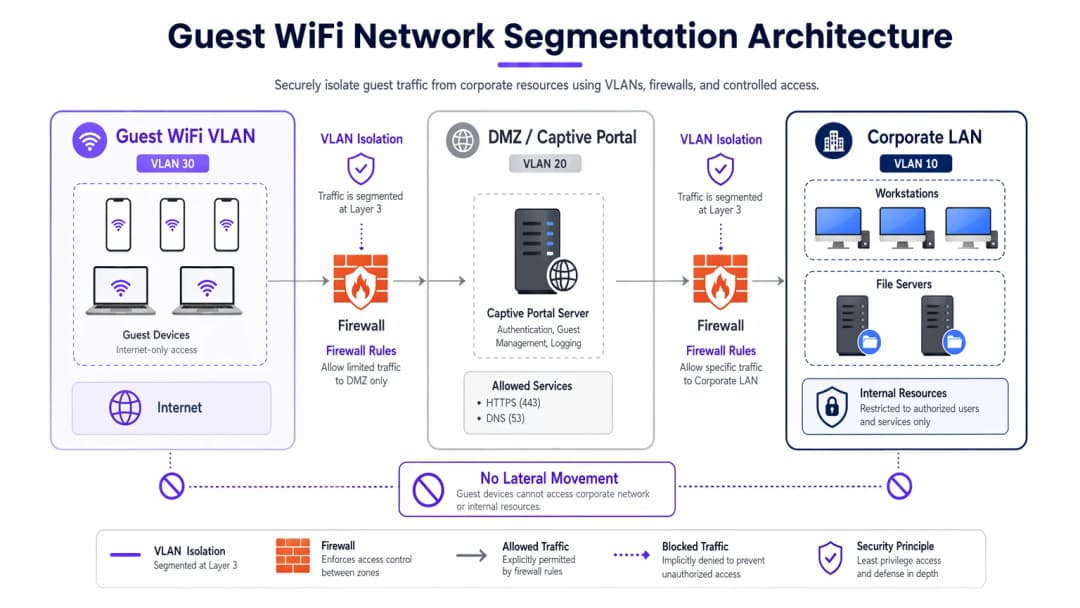
একটি শক্তিশালী ডেপ্লয়মেন্টের জন্য গেস্ট ট্রাফিকের জন্য ডেডিকেটেড VLAN বাধ্যতামূলক, যা অভ্যন্তরীণ অপারেশনাল নেটওয়ার্ক থেকে সম্পূর্ণ আলাদা। উদাহরণস্বরূপ, গেস্ট ট্রাফিকের জন্য VLAN 30 বরাদ্দ করা যেতে পারে, যখন কর্পোরেট ডিভাইসগুলো VLAN 10 এ থাকবে। এই সেগমেন্টেশনটি শুধুমাত্র ওয়্যারলেস কন্ট্রোলারে নয়, বরং ম্যানেজড সুইচ লেয়ারেও প্রয়োগ করতে হবে যাতে VLAN হপিং অ্যাটাক প্রতিরোধ করা যায়।
তাছাড়া, ক্লায়েন্ট আইসোলেশন (বা লেয়ার ২ আইসোলেশন) অত্যন্ত গুরুত্বপূর্ণ। এটি একই গেস্ট WiFi SSID এর সাথে সংযুক্ত ডিভাইসগুলোকে একে অপরের সাথে যোগাযোগ করা থেকে বিরত রাখে। ক্লায়েন্ট আইসোলেশন ছাড়া, একটি একক আপোসকৃত বা হ্যাকড ডিভাইস লোকাল সাবনেট স্ক্যান করতে পারে, ARP স্পুফিং করতে পারে এবং অন্যান্য গেস্টদের বিরুদ্ধে ল্যাটারাল অ্যাটাক চালাতে পারে।
Captive Portal আর্কিটেকচার
Captive Portal অথেন্টিকেশন এবং পলিসি প্রয়োগের গেটওয়ে হিসেবে কাজ করে। ক্রেডেনশিয়াল ইন্টারসেপশন প্রতিরোধ করতে, পোর্টালটি একটি বৈধ TLS সার্টিফিকেট ব্যবহার করে একচেটিয়াভাবে HTTPS এর মাধ্যমে পরিবেশন করা আবশ্যক। পোর্টাল সার্ভারটি একটি DMZ-এ হোস্ট করা উচিত, যা অভ্যন্তরীণ ডেটাবেস থেকে বিচ্ছিন্ন। এটি নিশ্চিত করে যে পোর্টালটি আপোসকৃত হলেও, আক্রমণকারীরা কর্পোরেট LAN-এ প্রবেশ করতে পারবে না।
এনক্রিপশন স্ট্যান্ডার্ড: WPA3
লিগ্যাসি ওপেন নেটওয়ার্কগুলো প্লেইনটেক্সটে ডেটা প্রেরণ করে, যা ব্যবহারকারীদের প্যাসিভ ইভসড্রপিংয়ের ঝুঁকিতে ফেলে। আধুনিক ডেপ্লয়মেন্টে WPA3 বাধ্যতামূলক হওয়া উচিত। পাবলিক নেটওয়ার্কের জন্য, WPA3-Enhanced Open (অপরচুনিস্টিক ওয়্যারলেস এনক্রিপশন) পাসওয়ার্ড ছাড়াই স্বতন্ত্র ডেটা এনক্রিপশন প্রদান করে। হাইব্রিড পরিবেশের জন্য, উন্নত ওয়্যারলেস সুরক্ষার জন্য WPA3-Enterprise বাস্তবায়ন করা শক্তিশালী ১৯২-বিট এনক্রিপশন নিশ্চিত করে এবং পরিচয়-ভিত্তিক অ্যাক্সেস নিয়ন্ত্রণের জন্য RADIUS/802.1X এর সাথে সংহত হয়।
আপনার নির্দিষ্ট সেটআপ নিয়ে কোনো প্রশ্ন আছে?
আমাদের টিম ৮০,০০০ ভেন্যুতে ভেন্যু অপারেটর, IT ম্যানেজার এবং নেটওয়ার্ক ইঞ্জিনিয়ারদের সাথে কাজ করে। একটি ২০ মিনিটের কল বুক করুন এবং আপনার মতো অন্যরা কীভাবে এর সমাধান করেছেন তা আমরা আপনাকে দেখাব।
বাস্তবায়ন নির্দেশিকা
একটি সুরক্ষিত গেস্ট নেটওয়ার্ক বাস্তবায়ন করার জন্য সুরক্ষা এবং ব্যবহারযোগ্যতা উভয়ই নিশ্চিত করতে একটি নিয়মতান্ত্রিক পদ্ধতির প্রয়োজন।
১. টপোলজি নির্ধারণ করুন
অ্যাক্সেস পয়েন্ট থেকে ইন্টারনেট গেটওয়ে পর্যন্ত সম্পূর্ণ ডেটা পাথ ম্যাপ করুন। নিশ্চিত করুন যে ফায়ারওয়াল ACL গেস্ট সাবনেট থেকে যেকোনো RFC 1918 প্রাইভেট IP রেঞ্জে ট্রাফিক স্পষ্টভাবে অস্বীকার (deny) করছে।
২. প্রমাণীকরণ পদ্ধতি নির্বাচন করুন
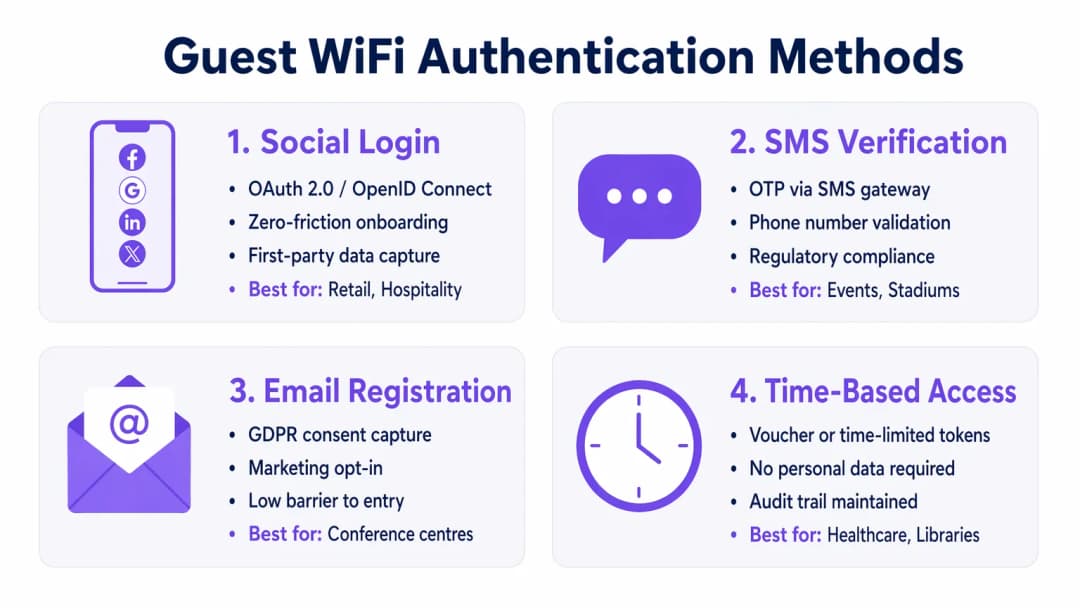
আপনার ব্যবসার লক্ষ্য এবং ঝুঁকির প্রোফাইলের সাথে সামঞ্জস্যপূর্ণ একটি প্রমাণীকরণ পদ্ধতি নির্বাচন করুন:
- সোশ্যাল লগইন: Retail এবং Hospitality পরিবেশের জন্য আদর্শ যেখানে বাধা কমানো এবং WiFi Analytics প্ল্যাটফর্মের জন্য ফার্স্ট-পার্টি ডেটা সংগ্রহ করা অত্যন্ত গুরুত্বপূর্ণ।
- SMS ভেরিফিকেশন: একটি শক্তিশালী আইডেন্টিটি সিগন্যাল এবং অডিট ট্রেইল প্রদান করে, যা স্টেডিয়াম বা পাবলিক ভেন্যুগুলোর জন্য উপযুক্ত যেখানে জবাবদিহিতা প্রয়োজন।
- ইমেল রেজিস্ট্রেশন: কম ডেপ্লয়মেন্ট খরচের সাথে ডেটা সংগ্রহের ভারসাম্য বজায় রাখে, যা কনফারেন্স সেন্টারে সাধারণ।
- সময়-ভিত্তিক অ্যাক্সেস: PII সংগ্রহ না করেই স্বল্পমেয়াদী টোকেন তৈরি করে, যা Healthcare ওয়েটিং রুম বা লাইব্রেরির জন্য সর্বোত্তম।
৩. ব্যান্ডউইথ ম্যানেজমেন্ট কনফিগার করুন
ব্যান্ডউইথ শেষ হয়ে যাওয়া প্রতিরোধ করতে এবং প্রাপ্যতা নিশ্চিত করতে QoS নীতিগুলি বাস্তবায়ন করুন। ওয়্যারলেস কন্ট্রোলারে প্রতি-ব্যবহারকারী রেট লিমিট (যেমন, ১০ Mbps ডাউন / ২ Mbps আপ) প্রয়োগ করুন এবং DNS ও HTTPS ট্রাফিককে অগ্রাধিকার দেওয়ার পাশাপাশি বাল্ক ফাইল স্থানান্তর সীমাবদ্ধ করুন।
৪. ডেপ্লয় এবং পরীক্ষা করুন
প্রোডাকশন রোলআউটের আগে, একটি সেগমেন্টেশন পরীক্ষা করুন। গেস্ট SSID-এর সাথে একটি ডিভাইস সংযুক্ত করুন এবং অভ্যন্তরীণ সার্ভারগুলিতে পিং করার বা কর্পোরেট DNS অ্যাক্সেস করার চেষ্টা করুন। যেকোনো সফল সংযোগ একটি গুরুতর সেগমেন্টেশন ব্যর্থতা নির্দেশ করে।
সর্বোত্তম অনুশীলনসমূহ
১. কঠোর ফায়ারওয়াল ACL প্রয়োগ করুন: গেস্ট VLAN থেকে অভ্যন্তরীণ সাবনেটে সমস্ত ট্রাফিক ডিফল্টরূপে অস্বীকার (deny) করুন। শুধুমাত্র প্রয়োজনীয় পোর্টে (যেমন, ৮০, ৪৪৩, ৫৩) আউটবাউন্ড ট্রাফিকের অনুমতি দিন। ২. কনটেন্ট ফিল্টারিং বাস্তবায়ন করুন: ক্ষতিকারক ডোমেন, ম্যালওয়্যার কমান্ড-অ্যান্ড-কন্ট্রোল সার্ভার এবং অনুপযুক্ত কনটেন্ট ব্লক করতে DNS-ভিত্তিক ফিল্টারিং ব্যবহার করুন, যা ব্যবহারকারী এবং ভেন্যুর IP সুনাম উভয়ই রক্ষা করে।3. নিয়মিত কনফিগারেশন অডিট করুন: কনফিগারেশনের বিচ্যুতি সনাক্ত করতে সুইচ পোর্ট কনফিগারেশন, ফায়ারওয়াল নিয়ম এবং ওয়্যারলেস কন্ট্রোলার পলিসিগুলোর ত্রৈমাসিক পর্যালোচনা করুন। 4. ব্যাপক লগিং বজায় রাখুন: সমস্ত DHCP লিজ, NAT অনুবাদ এবং প্রমাণীকরণ ইভেন্টগুলোর লগ রাখুন। ফরেনসিক তদন্তে সহায়তা করতে এবং স্থানীয় নিয়মাবলী মেনে চলতে এই লগগুলো কমপক্ষে ১২ মাসের জন্য সংরক্ষণ করুন।
ট্রাবলশুটিং এবং ঝুঁকি হ্রাসকরণ
এমনকি সুপরিকল্পিত নেটওয়ার্কেও সমস্যা দেখা দিতে পারে। সাধারণ ব্যর্থতার ধরণগুলো বোঝা দ্রুত সমাধানের পথ দেখায়।
- Rogue Access Points: কর্মচারী বা আক্রমণকারীরা কর্পোরেট পোর্টে অননুমোদিত AP প্লাগ করতে পারে। সমস্ত ওয়্যার্ড সুইচ পোর্টে 802.1X পোর্ট-ভিত্তিক প্রমাণীকরণ সক্ষম করে এবং অননুমোদিত সংকেত সনাক্ত ও নিয়ন্ত্রণ করতে Wireless Intrusion Prevention System (WIPS) ব্যবহার করে এটি প্রশমিত করুন।
- Captive Portal বাইপাস: উন্নত ব্যবহারকারীরা MAC স্পুফিং বা DNS টানেলিং ব্যবহার করে পোর্টালগুলো বাইপাস করার চেষ্টা করতে পারে। MAC অ্যাড্রেস র্যান্ডমাইজেশন সনাক্তকরণ প্রয়োগ করে এবং আউটবাউন্ড DNS কোয়েরিগুলো কেবল অনুমোদিত সমাধানকারীদের মধ্যে সীমাবদ্ধ করে এটি প্রশমিত করুন।
- IP নিঃশেষকরণ: পরিবহন হাবের মতো উচ্চ-টার্নওভারের পরিবেশগুলো দ্রুত DHCP পুলগুলো নিঃশেষ করে দিতে পারে। DHCP লিজের সময় কমিয়ে ৩০ - ৬০ মিনিট করুন এবং সাবনেট মাস্ক (যেমন, /২২ বা /২১) পিক ক্যাপাসিটির জন্য পর্যাপ্ত IP অ্যাড্রেস সরবরাহ করছে কিনা তা নিশ্চিত করুন।
ROI এবং ব্যবসায়িক প্রভাব
একটি সুরক্ষিত গেস্ট WiFi নেটওয়ার্ক কেবল একটি IT খরচ কেন্দ্র নয়; এটি একটি কৌশলগত সম্পদ।
- ঝুঁকি হ্রাস: সঠিক বিভাজন ব্যয়বহুল ডেটা লঙ্ঘন প্রতিরোধ করে। ডেটা লঙ্ঘনের গড় খরচ মিলিয়নে পৌঁছানোর কারণে, গেস্ট ট্রাফিককে আলাদা করা কোনো আপোসকৃত ভিজিটর ডিভাইস থেকে POS সিস্টেম বা অভ্যন্তরীণ ডেটাবেসে আক্রমণ করার ঝুঁকি হ্রাস করে।
- ডেটা মনিটাইজেশন: সুরক্ষিত, ঘর্ষণহীন প্রমাণীকরণ (যেমন সোশ্যাল লগইন) মার্কেটিং প্ল্যাটফর্মগুলোতে উচ্চ-মানের, যাচাইকৃত ডেটা সরবরাহ করে, যা লক্ষ্যযুক্ত ক্যাম্পেইন পরিচালনা করতে সক্ষম করে এবং কাস্টমারের লাইফটাইম ভ্যালু বৃদ্ধি করে।
- অপারেশনাল দক্ষতা: স্বয়ংক্রিয় অনবোর্ডিং এবং শক্তিশালী ব্যান্ডউইথ ম্যানেজমেন্ট কানেক্টিভিটি সংক্রান্ত সমস্যা সম্পর্কিত IT সাপোর্ট টিকিট উল্লেখযোগ্যভাবে হ্রাস করে, যা কৌশলগত প্রকল্পগুলোর জন্য ইঞ্জিনিয়ারিং রিসোর্সগুলোকে খালি করে।
পডকাস্ট ব্রিফিং
গেস্ট নেটওয়ার্ক সুরক্ষিত করার বিষয়ে আমাদের বিস্তারিত ১০ মিনিটের টেকনিক্যাল ব্রিফিংটি শুনুন:
মূল সংজ্ঞাসমূহ
VLAN সেগমেন্টেশন
ট্রাফিকের ধরন আলাদা করতে একটি ফিজিক্যাল নেটওয়ার্ককে একাধিক স্বতন্ত্র ব্রডকাস্ট ডোমেনে লজিক্যাল বিভাজন করা।
অনিরাপদ গেস্ট ডিভাইসগুলিকে সংবেদনশীল কর্পোরেট সার্ভার এবং ডেটা থেকে সম্পূর্ণ আলাদা রাখার জন্য অপরিহার্য।
Client Isolation
একটি ওয়্যারলেস কন্ট্রোলার বৈশিষ্ট্য যা একই SSID এর সাথে সংযুক্ত ডিভাইসগুলিকে একে অপরের সাথে সরাসরি যোগাযোগ করতে বাধা দেয়।
পাবলিক ভেন্যুতে ক্ষতিকারক গেস্টদের দ্বারা অন্য গেস্টদের ল্যাপটপ বা ফোনে স্ক্যান বা আক্রমণ করা বন্ধ করার জন্য অত্যন্ত গুরুত্বপূর্ণ।
Captive Portal
একটি ওয়েব পেজ যা বৃহত্তর নেটওয়ার্কে অ্যাক্সেস দেওয়ার আগে ব্যবহারকারীদের দেখতে এবং ইন্টারঅ্যাক্ট করতে বাধ্য করা হয়।
পরিষেবার শর্তাবলী প্রয়োগ করতে, মার্কেটিং ডেটা ক্যাপচার করতে এবং HTTPS এর মাধ্যমে ব্যবহারকারীদের নিরাপদে প্রমাণীকরণ করতে ব্যবহৃত হয়।
WPA3-Enhanced Open
একটি সিকিউরিটি সার্টিফিকেশন যা Opportunistic Wireless Encryption (OWE) ব্যবহার করে ওপেন WiFi নেটওয়ার্কের জন্য অপ্রমাণিত ডেটা এনক্রিপশন প্রদান করে।
শেয়ার্ড পাসওয়ার্ডের ঝামেলা ছাড়াই কফি শপ এবং এয়ারপোর্টে ব্যবহারকারীদের প্যাসিভ eavesdropping থেকে রক্ষা করে।
ব্যান্ডউইথ রেট লিমিটিং
নেটওয়ার্কে একজন ব্যবহারকারী বা অ্যাপ্লিকেশন ব্যবহার করতে পারে এমন সর্বোচ্চ গতির (থ্রুপুট) ইচ্ছাকৃত সীমাবদ্ধতা।
নেটওয়ার্কের ভিড় প্রতিরোধ করে এবং উচ্চ জনসমাগমের ইভেন্টগুলির সময় সমস্ত গেস্টদের জন্য ন্যায্য অ্যাক্সেস নিশ্চিত করে।
Rogue Access Point
একটি নিরাপদ এন্টারপ্রাইজ নেটওয়ার্কের সাথে সংযুক্ত একটি অননুমোদিত ওয়্যারলেস অ্যাক্সেস পয়েন্ট, যা প্রায়শই নিরাপত্তা নিয়ন্ত্রণগুলিকে বাইপাস করে।
একটি বড় নিরাপত্তা ঝুঁকি যা IT টিমদের অবশ্যই Wireless Intrusion Prevention Systems (WIPS) ব্যবহার করে সক্রিয়ভাবে পর্যবেক্ষণ করতে হবে।
DMZ (Demilitarised Zone)
একটি পেরিমিটার নেটওয়ার্ক যা একটি সংস্থার অভ্যন্তরীণ লোকাল-এরিয়া নেটওয়ার্ককে অনিরাপদ ট্রাফিক থেকে রক্ষা করে।
সার্ভারটি আপোস করা হলে ঝুঁকি কমাতে একটি Captive Portal সার্ভার হোস্ট করার জন্য সঠিক আর্কিটেকচারাল অবস্থান।
MAC স্পুফিং
অন্য ডিভাইসের ছদ্মবেশ ধারণ করতে একটি নেটওয়ার্ক ইন্টারফেসের Media Access Control ঠিকানা পরিবর্তন করার কৌশল।
আক্রমণকারীরা Captive Portal বা সময়-ভিত্তিক অ্যাক্সেস সীমাবদ্ধতা বাইপাস করতে যে সাধারণ পদ্ধতি ব্যবহার করে।
সমাধানকৃত উদাহরণসমূহ
একটি ৪০০ রুমের লাক্সারি হোটেলকে তাদের রেস্তোরাঁ এবং বারের আলাদা PoS টার্মিনালগুলির জন্য PCI-DSS সম্মতি নিশ্চিত করার পাশাপাশি নিরবচ্ছিন্ন গেস্ট WiFi প্রদান করতে হবে।
সমস্ত সুইচ এবং AP জুড়ে একটি ডেডিকেটেড গেস্ট VLAN (যেমন VLAN ৪০) মোতায়েন করুন। গেস্ট থেকে গেস্ট আক্রমণ প্রতিরোধ করতে ওয়্যারলেস কন্ট্রোলারে Client Isolation সক্ষম করুন। VLAN ৪০ এবং PoS VLAN (যেমন VLAN ২০) এর মধ্যে সমস্ত রাউটিং স্পষ্টভাবে ব্লক করতে ফায়ারওয়াল ACL কনফিগার করুন। পাসওয়ার্ডের প্রয়োজন ছাড়াই ওভার-দ্য-এয়ার ট্রাফিক এনক্রিপ্ট করতে গেস্ট SSID এর জন্য WPA3-Enhanced Open প্রয়োগ করুন।
একটি বড় রিটেইল চেইন গ্রাহকদের ডেটা ক্যাপচার করার জন্য বিনামূল্যে WiFi অফার করতে চায় কিন্তু পিক উইকএন্ডের সময় ব্যবহারকারীদের HD ভিডিও স্ট্রিম করার কারণে নেটওয়ার্ক স্লো হওয়ার সম্মুখীন হচ্ছে।
ওয়্যারলেস কন্ট্রোলারে ব্যবহারকারী প্রতি ব্যান্ডউইথ রেট লিমিটিং (যেমন ৫ Mbps) প্রয়োগ করুন। Captive Portal লগইনের জন্য ব্যবহৃত ওয়েব ব্রাউজিং এবং সোশ্যাল মিডিয়া অ্যাপগুলিকে অগ্রাধিকার দেওয়ার সাথে সাথে স্ট্রিমিং মিডিয়া বিভাগগুলি (Netflix, YouTube) থ্রোটল করতে Application Visibility and Control (AVC) কনফিগার করুন।
অনুশীলনী প্রশ্নসমূহ
Q1. আপনি একটি বড় স্টেডিয়ামে গেস্ট WiFi মোতায়েন করছেন। অবৈধ কার্যকলাপের ক্ষেত্রে কে নেটওয়ার্কের সাথে সংযুক্ত ছিল তার একটি যাচাইযোগ্য অডিট ট্রেইল আইনি টিমের প্রয়োজন। আপনার কোন প্রমাণীকরণ পদ্ধতি প্রয়োগ করা উচিত?
ইঙ্গিত: কোন পদ্ধতিটি ব্যবহারকারীকে একটি যাচাইযোগ্য বাস্তব-বিশ্বের পরিচয়ের সাথে যুক্ত করে তা বিবেচনা করুন।
মডেল উত্তর দেখুন
SMS Verification। এর জন্য ব্যবহারকারীর একটি ফিজিক্যাল সিম কার্ড থাকা এবং ওয়ান-টাইম পাসকোড (OTP) গ্রহণ করা প্রয়োজন, যা একটি শক্তিশালী আইডেন্টিটি সিগন্যাল এবং প্রয়োজন হলে আইন প্রয়োগকারী সংস্থার জন্য একটি নির্ভরযোগ্য অডিট ট্রেইল প্রদান করে।
Q2. একটি পেনিট্রেশন টেস্টের সময়, মূল্যায়নকারী গেস্ট WiFi-এ সংযুক্ত হন এবং সফলভাবে একটি কর্পোরেট প্রিন্টারের ম্যানেজমেন্ট ইন্টারফেসে অ্যাক্সেস পান। সবচেয়ে সম্ভাব্য কনফিগারেশন ত্রুটি কী?
ইঙ্গিত: বিভিন্ন নেটওয়ার্ক সেগমেন্টের মধ্যে ট্রাফিক কীভাবে রাউট করা হয় তা নিয়ে চিন্তা করুন।
মডেল উত্তর দেখুন
Layer 3 সেগমেন্টেশন বা Firewall ACLs-এর একটি ব্যর্থতা। গেস্ট VLAN সম্ভবত কর্পোরেট VLAN-এ ট্রাফিক রাউট করতে সক্ষম যেখানে প্রিন্টারটি অবস্থিত। গেস্ট সাবনেট থেকে সমস্ত অভ্যন্তরীণ RFC 1918 IP অ্যাড্রেসে ট্রাফিক ব্লক করার জন্য ফায়ারওয়ালে একটি স্পষ্ট 'deny' নিয়ম কনফিগার করা উচিত।
Q3. একটি পাবলিক লাইব্রেরি বিনামূল্যে WiFi অফার করতে চায় কিন্তু স্থানীয় গোপনীয়তা অধ্যাদেশের কারণে কোনো Personally Identifiable Information (PII) একেবারেই সংরক্ষণ করতে পারে না। তাদের কীভাবে অ্যাক্সেস কনফিগার করা উচিত?
ইঙ্গিত: কোন পদ্ধতিটি নাম, ইমেল বা ফোন নম্বর না চেয়েই অ্যাক্সেস প্রদান করে?
মডেল উত্তর দেখুন
ক্ষণস্থায়ী টোকেন বা ভাউচার ব্যবহার করে Time-Based Access। সিস্টেমটি একটি অস্থায়ী অ্যাক্সেস কোড তৈরি করতে পারে যা একটি নির্দিষ্ট সময়ের (যেমন, ২ ঘণ্টা) পরে শেষ হয়ে যায়। এটি কোনো ব্যক্তির PII-এর সাথে সংযুক্ত না করেই সংযোগ ইভেন্টগুলির একটি প্রযুক্তিগত লগ বজায় রাখে।
এই সিরিজে পড়া চালিয়ে যান
কীভাবে গেস্ট WiFi-এ সময় এবং ব্যান্ডউইথ সীমাবদ্ধতা প্রয়োগ করবেন
এন্টারপ্রাইজ গেস্ট WiFi নেটওয়ার্কে সময় এবং ব্যান্ডউইথ সীমাবদ্ধতা প্রয়োগ করার বিষয়ে একটি নির্ভরযোগ্য প্রযুক্তিগত নির্দেশিকা। এই নির্দেশিকাটি নেটওয়ার্কের পারফরম্যান্স, সিকিউরিটি কমপ্লায়েন্স এবং ভিজিটরদের অভিজ্ঞতার ভারসাম্য বজায় রাখতে আইটি লিডারদের সাহায্য করার জন্য কার্যকর আর্কিটেকচারাল ব্লুপ্রিন্ট, ভেন্ডর-নিরপেক্ষ কনফিগারেশন এবং বাস্তব-ক্ষেত্রের কেস স্টাডি প্রদান করে।
পারিবারিক-অনুকূল WiFi: শপিং সেন্টারের জন্য সেরা অনুশীলনসমূহ
এই টেকনিক্যাল রেফারেন্স নির্দেশিকাটি রিটেইল পরিবেশে গেস্ট WiFi নেটওয়ার্কে ক্যাটাগরি-ভিত্তিক URL ফিল্টারিং বাস্তবায়নের জন্য কার্যকরী পদ্ধতি সরবরাহ করে। এটি কমপ্লায়েন্স নিশ্চিত করতে এবং ব্র্যান্ডের সুনাম রক্ষা করতে নেটওয়ার্ক আর্কিটেকচার, পলিসি নির্ধারণ এবং ঝুঁকি প্রশমন কৌশলগুলির বিবরণ দেয়।
Secure Guest Access: Unmanaged Device-এর জন্য NAC বাস্তবায়ন করা
এই নির্ভরযোগ্য টেকনিক্যাল রেফারেন্স নির্দেশিকাটি আনম্যানেজড গেস্ট ডিভাইস সুরক্ষিত করার জন্য Network Access Control (NAC) বাস্তবায়নের আর্কিটেকচার, ডেপ্লয়মেন্ট এবং কমপ্লায়েন্স সংক্রান্ত বিবেচ্য বিষয়গুলো বিস্তারিতভাবে তুলে ধরে। এটি IT লিডারদের জন্য কর্পোরেট ইনফ্রাস্ট্রাকচারের সাথে আপস না করে কীভাবে নিরাপদ গেস্ট অ্যাক্সেস নিশ্চিত করা যায় সে সম্পর্কে কার্যকর দিকনির্দেশনা প্রদান করে।
আপনার নির্দিষ্ট সেটআপ নিয়ে কোনো প্রশ্ন আছে?
আমাদের টিম ৮০,০০০ ভেন্যুতে ভেন্যু অপারেটর, IT ম্যানেজার এবং নেটওয়ার্ক ইঞ্জিনিয়ারদের সাথে কাজ করে। একটি ২০ মিনিটের কল বুক করুন এবং আপনার মতো অন্যরা কীভাবে এর সমাধান করেছেন তা আমরা আপনাকে দেখাব।