

DNS Filtering for Guest WiFi: Blocking Malware and Inappropriate Content
This guide provides IT managers, network architects, and venue operations directors with a definitive technical reference for deploying DNS filtering on guest WiFi networks. It covers the architecture of DNS-level threat blocking, a vendor comparison of leading cloud DNS services, step-by-step implementation guidance, and real-world case studies from hospitality and retail environments. DNS filtering is the most cost-effective first line of defence against malware, phishing, and inappropriate content on public-facing networks, and this guide equips teams to deploy it confidently and in compliance with PCI DSS, GDPR, and HIPAA requirements.
🎧 Listen to this Guide
View Transcript

Executive Summary
DNS filtering for guest WiFi is no longer an optional security enhancement — it is a baseline control for any venue operating a public-facing network. When a hotel, stadium, retail chain, or conference centre offers guest WiFi, it assumes responsibility for the traffic that traverses its infrastructure. Without DNS-level filtering, that network is an open conduit for malware callbacks, phishing sessions, and inappropriate content, exposing the organisation to regulatory liability, reputational risk, and potential network compromise.
This guide explains how DNS filtering works at a technical level, compares the leading cloud DNS services available to venue operators, and provides a structured implementation roadmap. It addresses the critical enforcement requirement — intercepting hardcoded DNS queries — that most deployments overlook, and it covers false positive management, compliance alignment, and the emerging challenge of encrypted DNS protocols. Purple customers can layer DNS filtering directly on top of their Guest WiFi infrastructure, gaining both security and the visibility to correlate threat events with WiFi Analytics data.
Technical Deep-Dive
How DNS Filtering Works
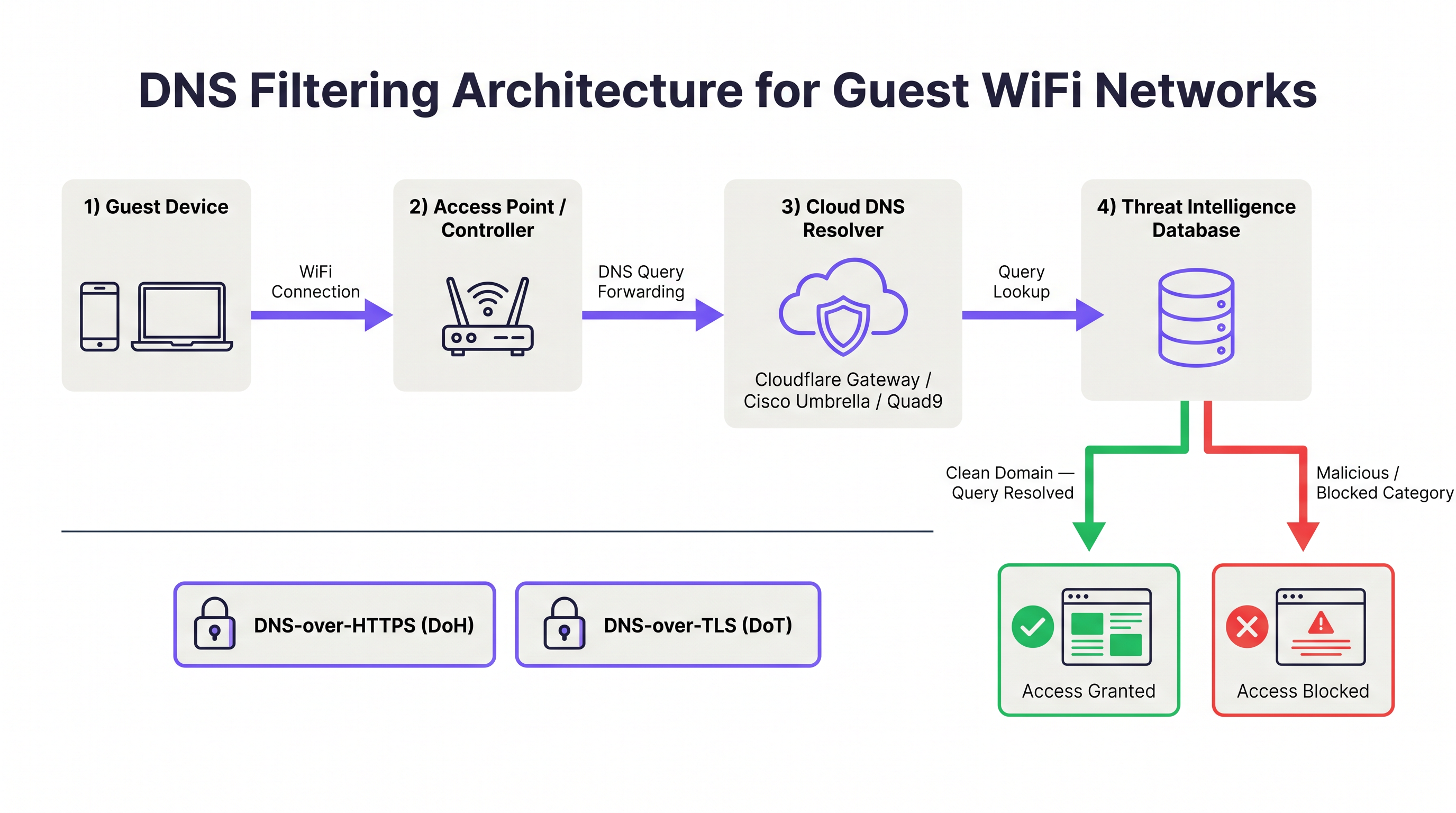
The Domain Name System (DNS) is the foundational resolution layer of the internet. Every time a device attempts to connect to a web resource, it first issues a DNS query to resolve the domain name to an IP address. DNS filtering intercepts this resolution process and evaluates the requested domain against a threat intelligence database before returning a response. If the domain is classified as malicious — hosting malware, operating as a phishing site, or serving as a botnet command-and-control (C2) endpoint — the resolver returns a non-routable address or redirects the client to a block page. The TCP/IP connection to the malicious host is never established.
This architecture provides a fundamental efficiency advantage over packet-inspection firewalls. A firewall must inspect data after a connection has been initiated; DNS filtering prevents the connection from starting at all. For guest WiFi environments where hundreds of untrusted devices may be active simultaneously, this upstream interception dramatically reduces the volume of malicious traffic that reaches the network perimeter.
What DNS Filtering Can and Cannot Block
Understanding the scope of DNS filtering is essential for setting accurate expectations with stakeholders.
| Threat Category | DNS Filtering Effectiveness | Notes |
|---|---|---|
| Malware distribution domains | High | Blocks download of malicious payloads |
| Phishing sites | High | Blocks credential harvesting pages |
| Botnet C2 communications | High | Disrupts malware already on device |
| Ransomware staging servers | High | Prevents payload retrieval and key exchange |
| Adult / inappropriate content | High | Category-based filtering |
| Cryptomining pools | High | Blocks domain-based pool connections |
| IP-based threats (no domain) | None | Requires firewall or IPS |
| Encrypted payloads in HTTPS | None | Requires TLS inspection |
| VPN-tunnelled traffic | None | Requires VPN blocking at firewall |
| Lateral movement (LAN) | None | Requires network segmentation |
DNS filtering is not a complete security solution. It is one layer in a defence-in-depth architecture. For comprehensive guest WiFi security, it should sit alongside VLAN segmentation, captive portal authentication, session timeout controls (see Guest WiFi Session Timeouts: Balancing UX and Security ), and where warranted, TLS inspection.
Cloud DNS Filtering: Architecture and Service Comparison
Cloud DNS filtering services operate global anycast networks, meaning DNS queries are routed to the nearest data centre, minimising latency. The four primary services relevant to venue operators are Cloudflare Gateway, Cisco Umbrella, Quad9, and NextDNS.
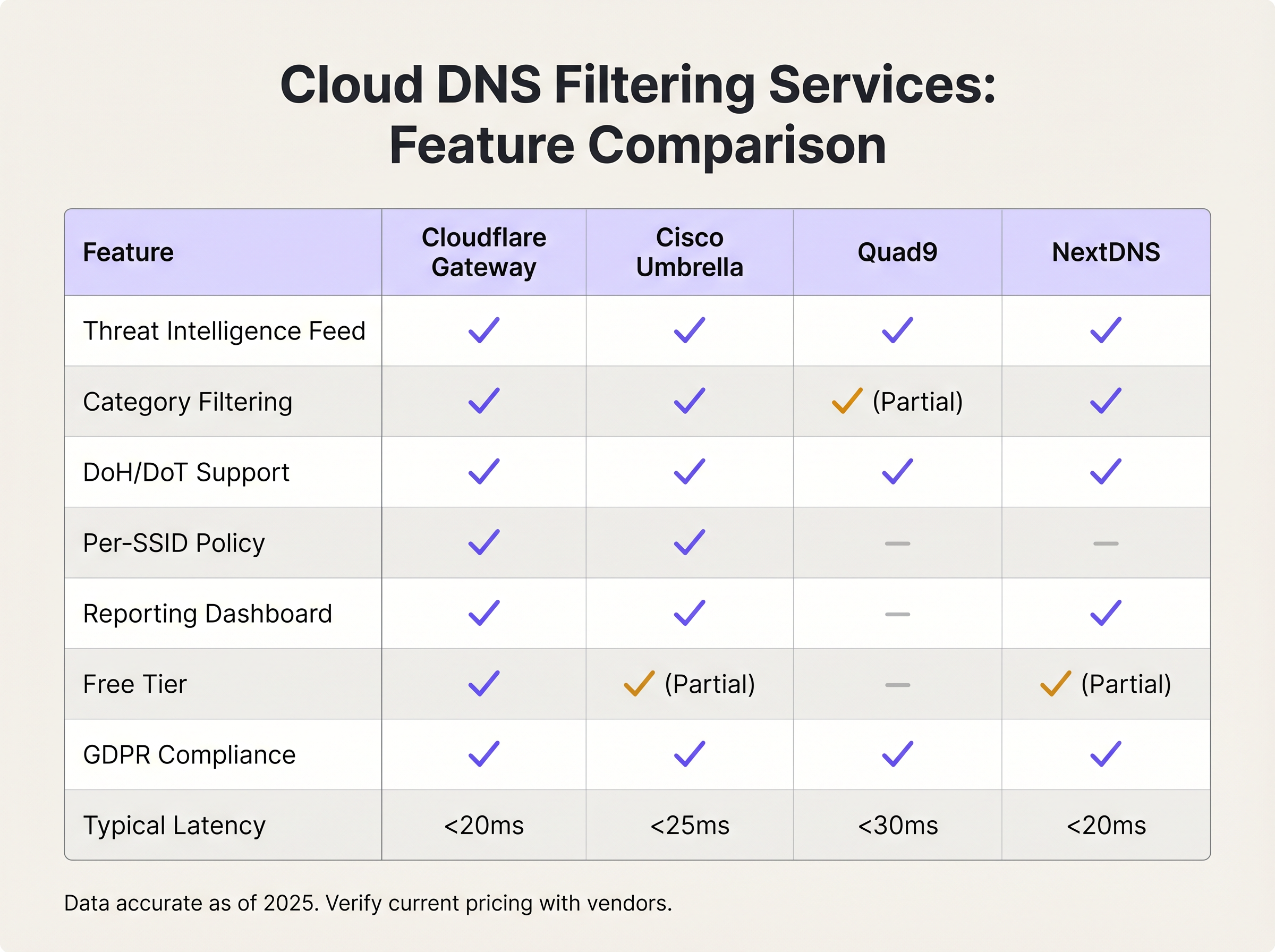
Cloudflare Gateway (part of the Cloudflare Zero Trust platform) offers sub-20ms resolution latency globally, granular category filtering, per-location policy enforcement, and a GDPR-compliant data processing agreement. Its free tier supports basic threat blocking; paid tiers add advanced category filtering, logging, and API access for policy automation.
Cisco Umbrella is the enterprise standard for organisations with existing Cisco infrastructure. It provides the most comprehensive threat intelligence feed — informed by Cisco Talos, one of the largest commercial threat research organisations — and supports per-SSID policy enforcement, which is critical for venues operating multiple SSIDs (staff, guest, IoT). Umbrella integrates with Cisco's broader security portfolio, including Meraki access points, simplifying deployment for Meraki-based networks.
Quad9 (operated by the Quad9 Foundation, a Swiss non-profit) focuses exclusively on security filtering rather than content categorisation. It blocks malicious domains using threat intelligence from over 20 partners, does not log personally identifiable information, and is free to use. It is an excellent choice for organisations with strict data sovereignty requirements or limited budgets, though it lacks the category filtering and reporting capabilities of commercial alternatives.
NextDNS offers a highly configurable cloud DNS service with an extensive category filtering library, per-device profiles, and detailed query logging. Its pricing model — based on monthly query volume — makes it cost-effective for small to medium deployments. It supports DNS-over-HTTPS and DNS-over-TLS natively.
Self-Hosted DNS Filtering: When It Makes Sense
Self-hosted solutions — most commonly Pi-hole with commercial blocklists, or a BIND implementation with Response Policy Zones (RPZ) — provide complete data sovereignty and policy control. They are appropriate for organisations with strict regulatory requirements around DNS query data, or those with existing infrastructure teams capable of managing the operational overhead. The trade-off is significant: self-hosted solutions require high-availability deployment (active-passive or active-active configurations — see RADIUS সার্ভার হাই অ্যাভেইলেবিলিটি: Active-Active বনাম Active-Passive for a parallel discussion of HA patterns), manual threat feed updates, and internal monitoring. For the majority of venue operators, the operational cost exceeds the benefit.
Encrypted DNS: DoH and DoT Considerations
DNS-over-HTTPS (DoH) and DNS-over-TLS (DoT) encrypt DNS queries, protecting user privacy on untrusted networks. However, they also create a bypass vector for DNS filtering. A device configured to use a public DoH resolver (such as https://cloudflare-dns.com/dns-query) will encrypt its DNS queries within HTTPS traffic on port 443, making traditional port 53 interception ineffective.
The mitigation strategy has two components. First, configure your firewall or wireless controller to block outbound connections to known public DoH resolver endpoints. Cloudflare, Google, and other providers publish their DoH endpoint IP ranges. Second, ensure your chosen DNS filtering service supports DoH and DoT natively, so that devices configured to use encrypted DNS can be directed to your secure resolver rather than a public one. Cisco Umbrella and Cloudflare Gateway both support this configuration.
Implementation Guide
Step 1: Select Your DNS Filtering Service
The selection criteria should be driven by three factors: scale, policy granularity, and compliance requirements. The following framework applies to most venue deployments.
| Deployment Scale | Recommended Service | Rationale |
|---|---|---|
| < 100 concurrent users | Cloudflare Gateway (free) or Quad9 | Zero cost, adequate threat blocking |
| 100–500 concurrent users | NextDNS (paid) or Cloudflare Gateway | Category filtering, reporting dashboard |
| 500+ concurrent users, single site | Cisco Umbrella Essentials | Per-SSID policy, enterprise SLA |
| Multi-site enterprise | Cisco Umbrella Advantage or Cloudflare Gateway Enterprise | Centralised policy management, API automation |
| Healthcare / regulated environments | Cisco Umbrella or self-hosted RPZ | Data sovereignty, HIPAA audit logging |
Step 2: Configure DHCP on the Guest SSID
Navigate to your wireless controller or access point management interface and configure the DHCP scope for the guest SSID to assign the DNS filtering service's resolver IP addresses. Do not use the default upstream ISP DNS servers. For Cloudflare Gateway, use the resolver IPs provided in your Zero Trust dashboard. For Cisco Umbrella, use the Umbrella resolver IPs (208.67.222.222 and 208.67.220.220 for legacy deployments; virtual appliance IPs for modern deployments).
For Purple-managed networks, this configuration is applied at the controller level, ensuring consistent policy enforcement across all access points on the guest SSID.
Step 3: Enforce DNS Interception at the Network Edge
This is the most frequently overlooked step. Configure your firewall or wireless controller to intercept all outbound traffic on UDP port 53 and TCP port 53 and redirect it to your DNS filtering resolver. This prevents devices with hardcoded DNS settings from bypassing the filter. On Cisco Meraki, this is implemented via a traffic shaping rule. On Fortinet FortiGate, use a DNS proxy policy. On pfSense or OPNsense, configure a NAT redirect rule.
Additionally, block outbound connections to known public DoH resolver endpoints on port 443 to prevent encrypted DNS bypass. Maintain a regularly updated list of DoH resolver IP ranges.
Step 4: Define Your Filtering Policy
Begin with the security baseline — categories that should be blocked universally regardless of venue type:
- Malware distribution
- Phishing and credential harvesting
- Botnet command-and-control
- Ransomware staging
- Cryptomining
Then apply venue-specific content categories based on your acceptable use policy:
| Venue Type | Recommended Additional Categories to Block |
|---|---|
| Family retail / shopping centre | Adult content, gambling, extremist content |
| Hotel (guest network) | Child sexual abuse material (mandatory), extremist content |
| Stadium / events venue | Adult content, extremist content, illegal streaming |
| Conference centre | Peer-to-peer file sharing, anonymising proxies |
| Healthcare facility | Adult content, gambling, social media (optional) |
| Public sector / library | Adult content, extremist content, gambling |
Step 5: Test and Validate
Before going live, validate the configuration using a test device on the guest SSID. Attempt to access a known test malware domain (most DNS filtering services provide test domains for this purpose). Confirm the block page is displayed. Attempt to use a hardcoded DNS server (e.g., nslookup google.com 8.8.8.8) and confirm the query is intercepted and redirected. Test DoH bypass by configuring a browser to use a public DoH resolver and confirm the connection is blocked.
Step 6: Monitor, Tune, and Report
Review the DNS filtering dashboard daily for the first four weeks. Key metrics to track include total queries, blocked queries by category, top blocked domains, and false positive reports from users. Establish a whitelist review process — any domain added to the whitelist should be documented with a business justification and reviewed quarterly. Schedule monthly reports for the CISO or IT director showing threat volumes and category breakdowns.
Best Practices
Segment guest and corporate DNS policies. Never apply the same DNS filtering policy to guest and staff SSIDs. Guest networks require stricter content filtering; staff networks may require access to categories that would be inappropriate for public users. Cisco Umbrella and Cloudflare Gateway both support per-location or per-network policies.
Align your acceptable use policy with your DNS filtering configuration. The filtering policy displayed in your captive portal's terms of service must accurately reflect what is blocked. Misalignment creates legal exposure. Work with your legal team to ensure the AUP references DNS-level content filtering explicitly. Purple's Guest WiFi captive portal supports customisable AUP text for this purpose.
Implement redundant DNS resolvers. Configure two resolver IP addresses in your DHCP scope — a primary and a secondary. Cloud DNS services provide multiple resolver endpoints for redundancy. A single point of failure in DNS resolution will render the entire guest network non-functional.
Log DNS queries in compliance with your data retention policy. DNS query logs are valuable for security investigations but may constitute personal data under GDPR if they can be linked to an individual. Ensure your DNS filtering service's data processing agreement is compatible with your GDPR obligations, and configure log retention periods accordingly.
Review your SD-WAN architecture for DNS policy consistency. For multi-site deployments, DNS filtering policy must be enforced consistently across all sites. SD-WAN platforms can centralise DNS policy management — see The Core SD WAN Benefits for Modern Businesses for a broader discussion of SD-WAN's role in enterprise network management.
Consider the interplay with retail analytics. In Retail environments, DNS filtering logs can complement WiFi Analytics data to identify unusual device behaviour patterns. A device generating an unusually high volume of blocked DNS queries may indicate a compromised device that warrants investigation.
Troubleshooting & Risk Mitigation
Common Failure Modes
DNS bypass via hardcoded resolvers. Symptom: DNS filtering logs show low query volumes relative to connected device count. Root cause: devices are using hardcoded DNS servers that bypass the DHCP-assigned resolvers. Resolution: implement port 53 interception and redirect at the firewall.
False positives blocking legitimate services. Symptom: user complaints about specific websites being inaccessible. Root cause: the DNS filtering service has miscategorised a legitimate domain. Resolution: check the domain's categorisation in the service's lookup tool, submit a recategorisation request, and add the domain to the whitelist pending correction.
DoH bypass. Symptom: certain devices appear to bypass filtering despite port 53 interception. Root cause: the device is using DNS-over-HTTPS to a public resolver. Resolution: block outbound connections to known DoH resolver IP ranges at the firewall.
DNSSEC validation failures. Symptom: certain domains return SERVFAIL responses. Root cause: the DNS filtering service is performing DNSSEC validation and the domain's DNSSEC records are misconfigured. Resolution: verify the domain's DNSSEC configuration using an online DNSSEC analyser; if the domain is legitimate, add it to the whitelist.
High DNS latency causing slow page loads. Symptom: users report slow browsing despite adequate bandwidth. Root cause: the DNS filtering resolver is geographically distant or experiencing load. Resolution: verify anycast routing is functioning correctly; consider switching to a resolver with a data centre closer to your venue.
Risk Mitigation Framework
The following risk register summarises the primary risks associated with DNS filtering deployment and their mitigations.
| Risk | Likelihood | Impact | Mitigation |
|---|---|---|---|
| DNS bypass via hardcoded resolvers | High | High | Port 53 interception and redirect |
| False positives blocking business-critical services | Medium | High | Whitelist process, pre-deployment testing |
| Single resolver failure causing network outage | Medium | High | Redundant resolver configuration |
| DoH bypass circumventing filter | Medium | Medium | Block known DoH endpoints at firewall |
| GDPR non-compliance via excessive DNS logging | Low | High | Data retention policy, DPA review |
| Threat intelligence feed staleness (self-hosted) | Low | High | Automated feed updates, cloud service preferred |
ROI & Business Impact
Quantifying the Value of DNS Filtering
The return on investment for DNS filtering on guest WiFi is driven by three factors: incident cost avoidance, compliance cost reduction, and operational efficiency.
Incident cost avoidance is the most significant driver. A single malware incident originating from a guest network — resulting in an ISP abuse notice, a regulatory investigation, or reputational damage — can cost tens of thousands of pounds in remediation, legal fees, and lost business. Cloud DNS filtering services cost between zero and a few hundred pounds per month for most venue deployments. The cost-benefit ratio is compelling.
Compliance cost reduction is increasingly relevant as regulatory frameworks tighten. PCI DSS v4.0, GDPR, and the UK's Online Safety Act all create obligations around network monitoring and content control. DNS filtering provides documented evidence of proactive security controls, which reduces the scope and cost of compliance audits.
Operational efficiency is a less obvious but real benefit. DNS filtering reduces the volume of malicious traffic reaching your firewall and security monitoring infrastructure, reducing alert fatigue and the operational overhead of investigating false alarms.
Expected Outcomes
Based on deployments across Hospitality , Retail , Healthcare , and Transport environments, organisations deploying DNS filtering on guest WiFi can expect the following outcomes within 90 days:
| Metric | Typical Outcome |
|---|---|
| Malicious domain requests blocked per day (per 100 devices) | 50–200 |
| Reduction in ISP abuse notices | 80–100% |
| Reduction in guest network security incidents | 60–80% |
| Time to detect compromised device (via DNS anomaly) | < 24 hours |
| Compliance audit finding reduction | 20–40% |
For venues already operating Purple's Guest WiFi platform, DNS filtering integration requires no additional hardware and minimal configuration time — typically two to four hours for a single-site deployment, scaling to one to two days for a multi-site enterprise rollout with per-site policy customisation.
Key Terms & Definitions
DNS Filtering
A security control that intercepts DNS queries and blocks resolution of domains classified as malicious or policy-violating, preventing the client device from establishing a connection to the target host.
IT teams encounter this when evaluating guest WiFi security controls. It is the most cost-effective first layer of defence against malware, phishing, and inappropriate content on public-facing networks.
Anycast Network
A routing methodology in which multiple servers share the same IP address, and client queries are automatically routed to the nearest server based on network topology. Used by cloud DNS providers to minimise query latency globally.
Relevant when evaluating cloud DNS filtering services. Anycast ensures that DNS queries from a venue in Manchester are resolved by a UK data centre, not a US one, keeping latency under 20ms.
Response Policy Zone (RPZ)
A DNS extension that allows a resolver to override standard DNS responses based on a locally defined policy zone. Used in self-hosted DNS filtering implementations to block or redirect queries for specific domains.
Encountered in self-hosted DNS filtering deployments using BIND or Unbound. RPZ provides fine-grained control over DNS responses without requiring a commercial cloud service.
DNS-over-HTTPS (DoH)
A protocol that encrypts DNS queries within HTTPS traffic on port 443, protecting query privacy but also creating a potential bypass vector for DNS filtering systems that rely on port 53 interception.
Increasingly relevant as browsers and operating systems adopt DoH by default. IT teams must account for DoH bypass when deploying DNS filtering on guest networks.
DNS-over-TLS (DoT)
A protocol that encrypts DNS queries using TLS on port 853, providing similar privacy benefits to DoH but using a dedicated port that is easier to detect and manage at the network edge.
Less commonly used than DoH in consumer devices but relevant in enterprise environments. DoT traffic on port 853 can be blocked or redirected at the firewall more straightforwardly than DoH.
Threat Intelligence Feed
A continuously updated database of known malicious domains, IP addresses, and URLs, maintained by security researchers and used by DNS filtering services to classify and block threats in real time.
The quality and freshness of the threat intelligence feed is the primary differentiator between DNS filtering services. Cloud providers like Cisco Talos process billions of queries daily to maintain feed accuracy.
Botnet Command-and-Control (C2)
A server or domain used by malware operators to issue instructions to compromised devices (bots) and receive exfiltrated data. DNS filtering blocks C2 domain resolution, disrupting malware already installed on a guest device.
Critical for guest WiFi security because a guest device may already be infected before connecting to the network. DNS filtering prevents the malware from communicating with its operators, limiting the damage.
DNSSEC (DNS Security Extensions)
A suite of IETF specifications that add cryptographic signatures to DNS responses, allowing resolvers to verify that responses have not been tampered with in transit. Distinct from DNS filtering but complementary.
IT teams may encounter DNSSEC validation failures when deploying DNS filtering if the filtering service performs DNSSEC validation and a domain's records are misconfigured. Understanding the distinction between DNSSEC and DNS filtering prevents diagnostic confusion.
Acceptable Use Policy (AUP)
A formal policy document that defines the permitted and prohibited uses of a network or computing resource. For guest WiFi, the AUP is typically presented at the captive portal and must accurately reflect the DNS filtering categories in effect.
Legal teams require the AUP to reference DNS-level content filtering explicitly to establish a defensible position under GDPR and the UK Online Safety Act. Misalignment between the AUP and the actual filtering policy creates legal exposure.
Per-SSID Policy
A DNS filtering configuration capability that allows different filtering policies to be applied to different wireless network names (SSIDs) — for example, a strict content policy on the guest SSID and a security-only policy on the staff SSID.
Essential for venues operating multiple SSIDs. Without per-SSID policy support, the same filtering rules apply to all networks, which either over-restricts staff access or under-protects guest access.
Case Studies
A 350-room hotel group operating 12 properties across the UK is receiving ISP abuse notices about malware traffic originating from guest devices. Their guest WiFi is managed through Purple. They need to deploy DNS filtering across all properties within 30 days, with minimal disruption to guests and no additional on-site hardware.
The recommended approach is to deploy Cloudflare Gateway (Zero Trust) as the cloud DNS filtering service, configured at the wireless controller level for the guest SSID across all 12 properties.
Week 1 — Service Configuration: Create a Cloudflare Zero Trust account and configure a DNS filtering policy with the security baseline (malware, phishing, botnet C2, ransomware) enabled. Add the hotel's acceptable use categories: adult content and extremist material. Configure the policy to display a branded block page with the hotel's logo and a contact number for guests who believe a site has been incorrectly blocked.
Week 2 — Network Configuration: For each property, access the wireless controller management interface and update the DHCP scope for the guest SSID to assign Cloudflare Gateway's resolver IPs. Configure the firewall at each property to intercept outbound port 53 traffic and redirect to the Cloudflare resolver. Register each property's egress IP in the Cloudflare Zero Trust dashboard to associate queries with the correct location policy.
Week 3 — Testing and Validation: At two pilot properties, connect a test device to the guest SSID and validate: (a) malicious test domain is blocked, (b) hardcoded DNS query is intercepted, (c) legitimate hotel services (booking engine, streaming services) are accessible. Review the Cloudflare dashboard for false positives and whitelist as required.
Week 4 — Full Rollout and Monitoring: Roll out to remaining 10 properties. Configure weekly email reports from the Cloudflare dashboard to the group IT director. Establish a whitelist review process with a designated contact at each property.
Expected outcome: ISP abuse notices cease within 30 days. Dashboard reveals an average of 340 blocked malicious requests per day across the estate. One property shows anomalously high blocked request volume, traced to a compromised IoT device in a conference room, which is isolated and remediated.
A retail chain with 200 stores across Europe is experiencing two problems on its in-store guest WiFi: guests are accessing adult content and video streaming services, causing reputational risk and network congestion. The IT director needs a solution that enforces content filtering consistently across all stores, integrates with the existing Cisco Meraki infrastructure, and provides documented evidence of compliance with GDPR and the UK Online Safety Act.
Deploy Cisco Umbrella Advantage, integrated with the existing Meraki infrastructure via the Meraki-Umbrella integration.
Phase 1 — Policy Design: Define two DNS filtering policies: (a) Guest SSID policy — security baseline plus adult content, video streaming, peer-to-peer file sharing, and anonymising proxies blocked; (b) Staff SSID policy — security baseline only. Work with the legal team to update the captive portal AUP to reference DNS-level content filtering explicitly.
Phase 2 — Meraki Integration: In the Cisco Umbrella dashboard, enable the Meraki integration and link the Umbrella organisation to the Meraki dashboard. Assign the Guest SSID policy to all guest network SSIDs across the 200-store estate. The Meraki integration automatically configures DNS forwarding to Umbrella resolvers — no manual DHCP configuration required per store.
Phase 3 — Enforcement: Configure Meraki to block outbound port 53 traffic to non-Umbrella resolvers using a traffic shaping rule. Enable Umbrella's intelligent proxy to inspect and block DoH traffic to known public resolvers.
Phase 4 — Compliance Documentation: Export Umbrella's policy configuration and audit logs monthly. Store these in the organisation's ISMS (Information Security Management System) as evidence of content filtering controls. Ensure Umbrella's data processing agreement is signed and filed with the DPO.
Expected outcome: Guest network utilisation drops by 35% as video streaming is blocked. Zero adult content incidents reported in the 12 months following deployment. Compliance audit confirms documented filtering controls satisfy Online Safety Act obligations.
Scenario Analysis
Q1. A conference centre operator runs three SSIDs: 'Guest-Public' (open to all attendees), 'Exhibitor-WiFi' (for trade show exhibitors processing card payments), and 'Staff-Internal' (for venue employees). They want to deploy DNS filtering. How should they structure their filtering policies, and what compliance considerations apply to the Exhibitor SSID?
💡 Hint:Consider the different risk profiles and regulatory requirements for each SSID. PCI DSS applies to any network where card data may be present or adjacent.
Show Recommended Approach
Three distinct policies are required. Guest-Public: full security baseline (malware, phishing, C2, ransomware) plus content categories appropriate for a professional environment (adult content, extremist material, anonymising proxies). Exhibitor-WiFi: security baseline only — do not apply content filtering that might block legitimate business tools. Critically, because this SSID is used by exhibitors processing card payments, PCI DSS v4.0 applies. The SSID must be on a separate VLAN with no path to the cardholder data environment, and DNS filtering logs must be retained for at least 12 months as part of the audit trail. Consider deploying Cisco Umbrella with its PCI DSS compliance reporting feature. Staff-Internal: security baseline only, with a documented exception process for staff who need access to categories that might otherwise be blocked. The key compliance consideration for the Exhibitor SSID is that PCI DSS Requirement 6.4 mandates protection of public-facing web applications, and Requirement 10.2 mandates audit log retention — DNS filtering logs satisfy part of this requirement.
Q2. A hotel IT manager deploys Cloudflare Gateway on the guest SSID. After two weeks, the dashboard shows that DNS query volumes are 40% lower than expected based on the number of connected devices. What is the most likely cause, and how should the IT manager investigate and resolve it?
💡 Hint:Think about what could cause DNS queries to bypass the cloud resolver entirely. Consider both device-level and network-level bypass vectors.
Show Recommended Approach
The most likely cause is that a significant proportion of guest devices are using hardcoded DNS resolvers (such as 8.8.8.8 or 1.1.1.1) rather than the DHCP-assigned Cloudflare Gateway resolver. This indicates that the port 53 interception rule at the firewall has not been configured, or is not functioning correctly. Investigation steps: (1) On the firewall, check whether a NAT redirect rule exists for outbound UDP/TCP port 53 traffic from the guest VLAN. (2) From a test device on the guest SSID, run 'nslookup google.com 8.8.8.8' — if this returns a result rather than being intercepted, the firewall rule is missing or misconfigured. (3) Check the firewall logs for outbound port 53 traffic to non-Cloudflare IP addresses. Resolution: configure the firewall to intercept all outbound port 53 traffic from the guest VLAN and redirect it to the Cloudflare Gateway resolver IPs. After implementing this, query volumes should normalise. Additionally, check whether any devices are using DoH — if query volumes remain low after port 53 interception, DoH bypass may be a secondary factor.
Q3. A retail chain's IT director is evaluating DNS filtering for 200 stores. The security team wants Cisco Umbrella for its Talos threat intelligence; the finance team is pushing for a free solution to minimise cost. The stores use Cisco Meraki access points. How should the IT director frame the ROI argument, and what is the recommended solution?
💡 Hint:Consider the total cost of ownership, not just the licensing cost. Factor in the operational overhead of a free solution at scale, and the value of native infrastructure integration.
Show Recommended Approach
The IT director should frame the ROI argument around three cost categories: (1) Incident cost avoidance — a single malware incident at a store, resulting in an ISP abuse notice, regulatory investigation, or POS system compromise, can cost £20,000–£100,000 in remediation and legal fees. At 200 stores, even a 1% annual incident rate without DNS filtering represents a significant expected cost. (2) Operational cost — a free solution like Pi-hole would require deployment and maintenance at 200 stores, with no centralised management. At 1 hour of IT time per store per quarter, this is 800 hours annually — likely exceeding the cost of Cisco Umbrella's licensing. (3) Integration value — Cisco Umbrella's native Meraki integration eliminates per-store DHCP configuration, reduces deployment time from weeks to days, and provides centralised policy management. The recommended solution is Cisco Umbrella Essentials or Advantage, integrated with Meraki. The finance team's concern about cost is valid, but the comparison must be total cost of ownership, not licensing cost alone. The Meraki-Umbrella integration is the decisive factor: it makes the 200-store deployment operationally feasible in a way that no free solution can match at this scale.
Key Takeaways
- ✓DNS filtering is the most cost-effective first line of defence for guest WiFi, blocking malware, phishing, and inappropriate content at the DNS query layer before connections are established — with zero impact on network throughput.
- ✓Cloud DNS filtering services (Cloudflare Gateway, Cisco Umbrella, Quad9, NextDNS) deliver better protection and lower operational cost than self-hosted alternatives for the vast majority of venue operators, with sub-20ms latency via anycast networks.
- ✓Enforcing port 53 interception at the firewall is non-negotiable: without it, devices with hardcoded DNS settings bypass the filter entirely — this is the single most common implementation failure.
- ✓Deploy the security baseline (malware, phishing, botnet C2, ransomware) universally, then layer venue-specific content category filtering based on a documented acceptable use policy that is reflected in the captive portal terms of service.
- ✓DNS-over-HTTPS (DoH) creates a bypass vector that requires both blocking known DoH endpoint IP ranges at the firewall and ensuring your DNS filtering service supports DoH natively.
- ✓DNS filtering contributes to PCI DSS v4.0, GDPR, and HIPAA compliance postures — DNS query logs provide audit evidence, but must be handled in accordance with your data retention policy and data processing agreements.
- ✓For multi-site enterprise deployments, choose a DNS filtering service with native integration for your access point or SD-WAN platform (e.g., Cisco Umbrella with Meraki) to enable centralised policy management and eliminate per-site manual configuration.




