

Guest WiFi Session Timeouts: Balancing UX and Security
This guide provides a practical framework for configuring guest WiFi session timeouts, balancing seamless user experience with robust security. It covers idle timeouts, absolute timeouts, re-authentication strategies, and industry-specific deployment scenarios for IT and venue operations leaders.
🎧 Listen to this Guide
View Transcript
Executive Summary
For modern venues, the guest WiFi network is a critical touchpoint for customer experience and operational analytics. However, setting the right session timeouts often becomes a tug-of-war between IT security teams and guest experience managers. If timeouts are too short, users face frustrating, repetitive captive portal logins. If they are too long, the network suffers from IP pool exhaustion, stale analytics data, and increased security risks from unauthenticated devices.
This guide delivers a practical framework for configuring Guest WiFi session timeouts. We explore the distinct roles of idle timers, absolute timers, and re-authentication policies, providing actionable recommendations for Hospitality , Retail , and public-sector environments. By aligning timeout strategies with user behavior and security mandates, network architects can ensure seamless connectivity while maintaining robust compliance and accurate WiFi Analytics .
Technical Deep-Dive: The Mechanics of Session Timeouts
A "session timeout" is not a single setting but a combination of distinct timers operating at different layers of the network stack. Understanding these mechanics is crucial for effective deployment.
1. Idle Timeout (Inactivity Timer)
The idle timeout monitors active data transmission. If a client device sends or receives no data for a specified duration, the network controller terminates the session.
- Purpose: Reclaims IP addresses (DHCP leases) and AP memory allocated to devices that have left the venue without formally disconnecting.
- Challenge: Modern smartphones frequently sleep to save battery, halting data transmission. Aggressive idle timeouts (e.g., 5 minutes) will disconnect sleeping devices, forcing users to re-authenticate when they wake their phones.
- Recommendation: Set idle timeouts between 30 and 60 minutes for typical environments.
2. Absolute Timeout (Hard Timer)
The absolute timeout dictates the maximum total duration of a session, regardless of activity. Once this timer expires, the session is forcibly terminated, and the user must re-authenticate.
- Purpose: Enforces daily usage limits, ensures users accept updated Terms & Conditions, and forces a periodic security re-validation.
- Challenge: Interrupts active sessions, which can disrupt VoIP calls or large downloads if not communicated clearly.
- Recommendation: Align the absolute timeout with the typical dwell time of the venue (e.g., 12 hours for a hospital, 2 hours for a coffee shop).
3. Captive Portal and Re-authentication
When a session expires, the user is redirected to the captive portal. Modern deployments often use MAC authentication bypass (MAB) or seamless roaming to remember devices for a set period (e.g., 30 days). In these setups, an expired session might not require a manual login; the system silently re-authenticates the recognized MAC address, provided the device hasn't randomized it.
For advanced network topologies, integrating with tools like Sensors and ensuring robust backend infrastructure—such as proper RADIUS সার্ভার হাই অ্যাভেইলেবিলিটি: Active-Active বনাম Active-Passive —is essential to handle authentication spikes without dropping legitimate users.
Implementation Guide: Industry-Specific Strategies
There is no one-size-fits-all timeout configuration. The strategy must reflect the venue's operational goals and guest behavior.
Scenario A: The High-Turnover Retail Store
In Retail , the goal is to capture accurate footfall analytics and deliver targeted marketing while preventing loitering.
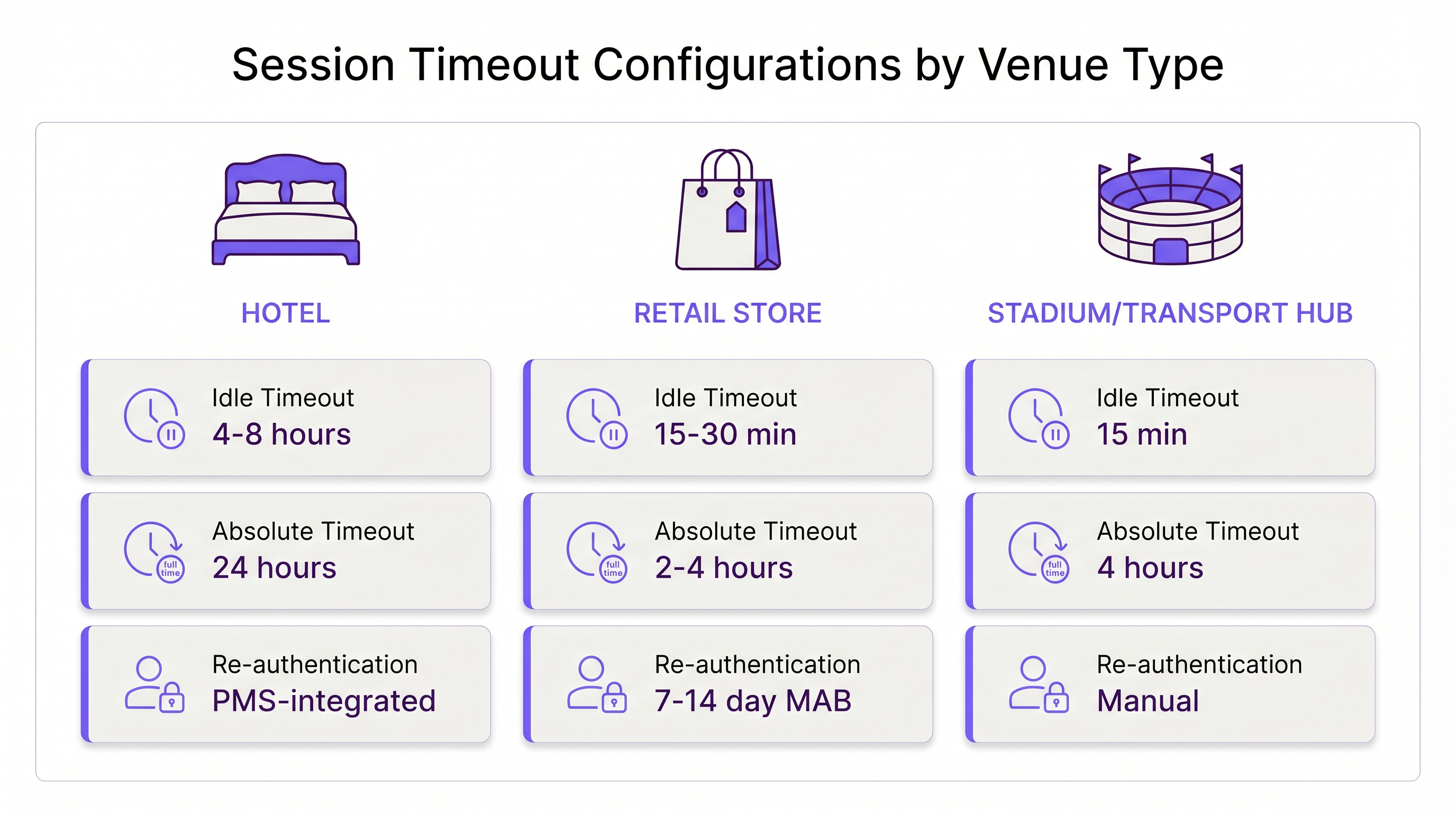
- Idle Timeout: 15–30 minutes. Shoppers move quickly. If a device is silent for 30 minutes, the user has likely left the store.
- Absolute Timeout: 2–4 hours. This covers the longest typical shopping trip.
- Re-authentication: Silent MAC re-authentication for 7–14 days to track returning customers without friction.
Scenario B: The Enterprise Hospitality Environment
In Hospitality , guests expect a "home-like" WiFi experience. Forcing a login every 4 hours is unacceptable and will result in complaints to the front desk.
- Idle Timeout: 4–8 hours. Guests leave devices in their rooms while at the pool; these devices should remain connected.
- Absolute Timeout: 24 hours or tied to the checkout date (e.g., via PMS integration).
- Re-authentication: Seamless roaming across the property for the duration of the stay.
Scenario C: The Busy Transport Hub
In Transport hubs like airports, dwell times are highly variable, and IP address exhaustion is a severe risk due to the massive volume of transient devices.
- Idle Timeout: 15 minutes. Aggressive reclamation is necessary to keep the DHCP pool available.
- Absolute Timeout: 4 hours (the typical maximum layover before a flight).
- Re-authentication: Manual re-authentication required after the absolute timeout to manage bandwidth hogs.
Best Practices for Balancing UX and Security
- Align DHCP Leases with Session Timeouts: A common misconfiguration is setting a 2-hour session timeout but an 8-hour DHCP lease. This exhausts the IP pool. Your DHCP lease time should closely match or slightly exceed your absolute session timeout.
- Account for MAC Randomization: iOS and Android use private MAC addresses by default. If your network relies heavily on MAC-based re-authentication, educate users on the splash page to disable MAC randomization for the venue's SSID if they want a seamless multi-day experience.
- Leverage Analytics: Use WiFi Analytics to monitor session lengths. If 90% of your users naturally leave within 45 minutes, setting a 12-hour absolute timeout is unnecessarily risky.
- Implement WPA3-Open (OWE): For enhanced security on open guest networks, deploy Opportunistic Wireless Encryption (OWE). It provides individualized encryption for each session, mitigating the risk of passive sniffing, regardless of the timeout duration.
Troubleshooting & Risk Mitigation
- Symptom: Constant Re-authentication Complaints.
- Cause: Idle timeout is too short, dropping sleeping smartphones.
- Fix: Increase the idle timeout to at least 30 minutes.
- Symptom: IP Pool Exhaustion (Users cannot connect).
- Cause: Ghost sessions are holding IPs because the idle timeout is disabled or too long.
- Fix: Implement a strict 15-30 minute idle timeout and reduce DHCP lease times.
- Symptom: Stale Analytics Data.
- Cause: Devices are remaining "connected" long after the user has left the venue due to long idle timers.
- Fix: Tune the idle timer to match the physical exit time of the venue.
ROI & Business Impact
Optimizing session timeouts directly impacts the bottom line. A well-tuned configuration reduces helpdesk tickets related to connectivity issues by up to 40%. Furthermore, accurate session data feeds directly into Wayfinding and marketing platforms. If timeouts are configured correctly, marketing teams receive precise dwell-time metrics, enabling higher-converting campaigns.
As businesses modernize their infrastructure—perhaps realizing The Core SD WAN Benefits for Modern Businesses —standardizing these timeout policies across all branch locations becomes a key driver of operational efficiency and consistent guest experience.
Key Terms & Definitions
Idle Timeout
The duration a network connection is maintained while no data is being transmitted by the client device.
Crucial for reclaiming network resources from devices that have physically left the venue without disconnecting.
Absolute Timeout
The hard limit on how long a session can last from the moment of authentication, regardless of activity.
Used to enforce daily usage limits and mandate periodic re-acceptance of Terms & Conditions.
Captive Portal
A web page that a user of a public access network is obliged to view and interact with before access is granted.
The primary interface for guest WiFi authentication, branding, and data capture.
MAC Authentication Bypass (MAB)
A process where the network authenticates a device using its MAC address against a database, bypassing the need for a manual captive portal login.
Essential for creating seamless 'return visitor' experiences in retail and hospitality.
DHCP Lease Time
The amount of time a network device retains an assigned IP address before it must request a renewal.
Must be carefully aligned with session timeouts to prevent IP pool exhaustion in high-density venues.
MAC Randomization
A privacy feature in modern mobile OSs that generates a fake MAC address for each WiFi network the device connects to.
Complicates MAB and analytics, requiring venues to adjust their tracking and re-authentication strategies.
Opportunistic Wireless Encryption (OWE)
A WiFi Alliance standard that provides individualized encryption for devices on open, unpassworded networks.
Improves the security posture of guest WiFi without requiring users to enter a pre-shared key.
Dwell Time
The average amount of time a guest or customer spends physically present within the venue.
The foundational metric used to determine appropriate absolute and idle timeout configurations.
Case Studies
A 200-room hotel is experiencing high volumes of helpdesk calls because guests have to log back into the WiFi every time they return from the pool. The current setup has an idle timeout of 30 minutes and an absolute timeout of 8 hours.
- Increase the idle timeout to 8 hours. Devices left in rooms or sleeping in bags by the pool will not be prematurely disconnected.
- Change the absolute timeout to 24 hours, or ideally, integrate the WiFi controller with the Property Management System (PMS) to set the absolute timeout to the exact time of the guest's checkout.
- Enable MAC-based seamless re-authentication for 7 days so returning guests bypass the captive portal entirely.
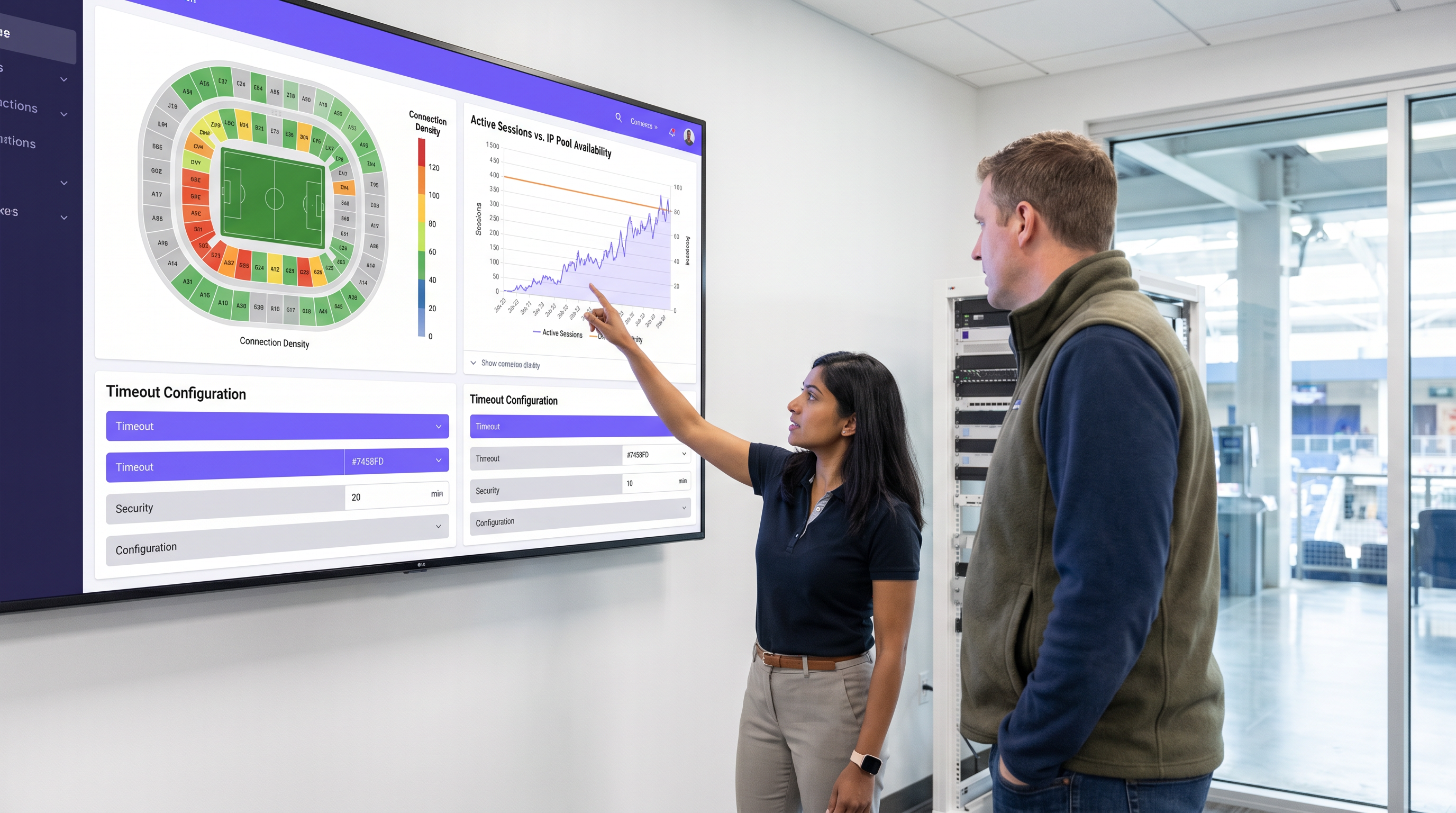
A large sports stadium (capacity 50,000) is running out of IP addresses during the first quarter of games. Users report full WiFi signal but cannot connect to the internet. Current settings: Idle timeout 4 hours, Absolute timeout 12 hours.
- Drastically reduce the idle timeout to 15 minutes. This immediately reclaims IPs from fans who have walked out of range or turned off WiFi.
- Reduce the DHCP lease time to 20 minutes to align with the new idle timeout.
- Reduce the absolute timeout to 5 hours (the maximum duration of a game plus egress time).
Scenario Analysis
Q1. A hospital IT director wants to ensure that visitors in the waiting room don't have to log in multiple times, but also needs to ensure that devices belonging to discharged patients are removed from the network promptly to free up IPs. The average wait time is 3 hours, and the average patient stay is 2 days.
💡 Hint:Differentiate between the transient waiting room users and the long-term admitted patients. Can you apply one policy to both?
Show Recommended Approach
The hospital should deploy two separate Guest SSIDs or utilize role-based access control via the captive portal. For the 'Visitor' tier, set an absolute timeout of 4 hours and an idle timeout of 30 minutes. For the 'Patient' tier (perhaps authenticated via an admission code), set an absolute timeout of 48 hours and an idle timeout of 8 hours. This balances the high turnover of the waiting room with the UX needs of admitted patients.
Q2. Your retail client complains that their returning customer analytics are dropping significantly, even though footfall remains steady. They currently have a 30-day MAB re-authentication policy.
💡 Hint:Think about recent changes in mobile operating system privacy features.
Show Recommended Approach
The drop in analytics is likely due to MAC randomization (Private Wi-Fi Addresses) in iOS and Android. Because devices rotate their MAC addresses, the 30-day MAB policy fails to recognize returning devices, treating them as new visitors. The solution is to update the captive portal splash page to instruct users to disable Private Addresses for the store's network to receive loyalty benefits, or shift analytics reliance toward application-level tracking rather than purely Layer 2 MAC data.
Q3. A conference center hosts events ranging from 1-day seminars to 5-day conventions. The network team currently uses a static 24-hour absolute timeout for all events, leading to complaints during multi-day conventions.
💡 Hint:How can the timeout policy become dynamic rather than static?
Show Recommended Approach
The network team should integrate the WiFi authentication backend (RADIUS) with the venue's event management system, or utilize dynamic vouchers. Instead of a static 24-hour timeout, the captive portal should issue session lengths based on the specific event code entered by the attendee. A 1-day seminar code grants a 12-hour absolute timeout, while a 5-day convention code grants a 120-hour absolute timeout, eliminating mid-event disconnects.
Key Takeaways
- ✓Session timeouts are critical for balancing seamless guest experience with network security and resource management.
- ✓Idle timeouts reclaim resources from inactive devices; absolute timeouts enforce daily limits and security re-validation.
- ✓Hospitality environments require long timeouts for a 'home-like' experience, while stadiums need aggressive idle timers to conserve IP addresses.
- ✓Always align DHCP lease times with your session timeouts to prevent IP pool exhaustion.
- ✓MAC randomization complicates seamless re-authentication, requiring strategic adjustments to captive portal messaging.




