

Mailchimp Plus Purple: Automated Email Marketing from WiFi Sign-Ups
This authoritative guide details how to integrate Purple's guest WiFi platform with Mailchimp to automate email marketing from WiFi sign-ups. It covers architectural setup, segmentation tagging strategies, and the implementation of automated welcome journeys to convert on-premise footfall into engaged digital audiences.
🎧 Listen to this Guide
View Transcript

Executive Summary
For enterprise operators managing high-footfall venues, guest WiFi is fundamentally a data acquisition channel. Every time a user connects to a venue's network via a captive portal, they provide explicit consent and contact data. The integration between Purple and Mailchimp transforms this passive data collection into an active revenue engine. By establishing a direct API connection, venue operators can automatically pipe GDPR-compliant sign-ups into targeted Mailchimp audiences, apply behavioural segmentation tags, and trigger real-time welcome automations. This guide provides the technical architecture and strategic deployment frameworks required to build an automated email marketing pipeline from your Guest WiFi infrastructure.
Technical Deep-Dive
The Architecture of the Sync
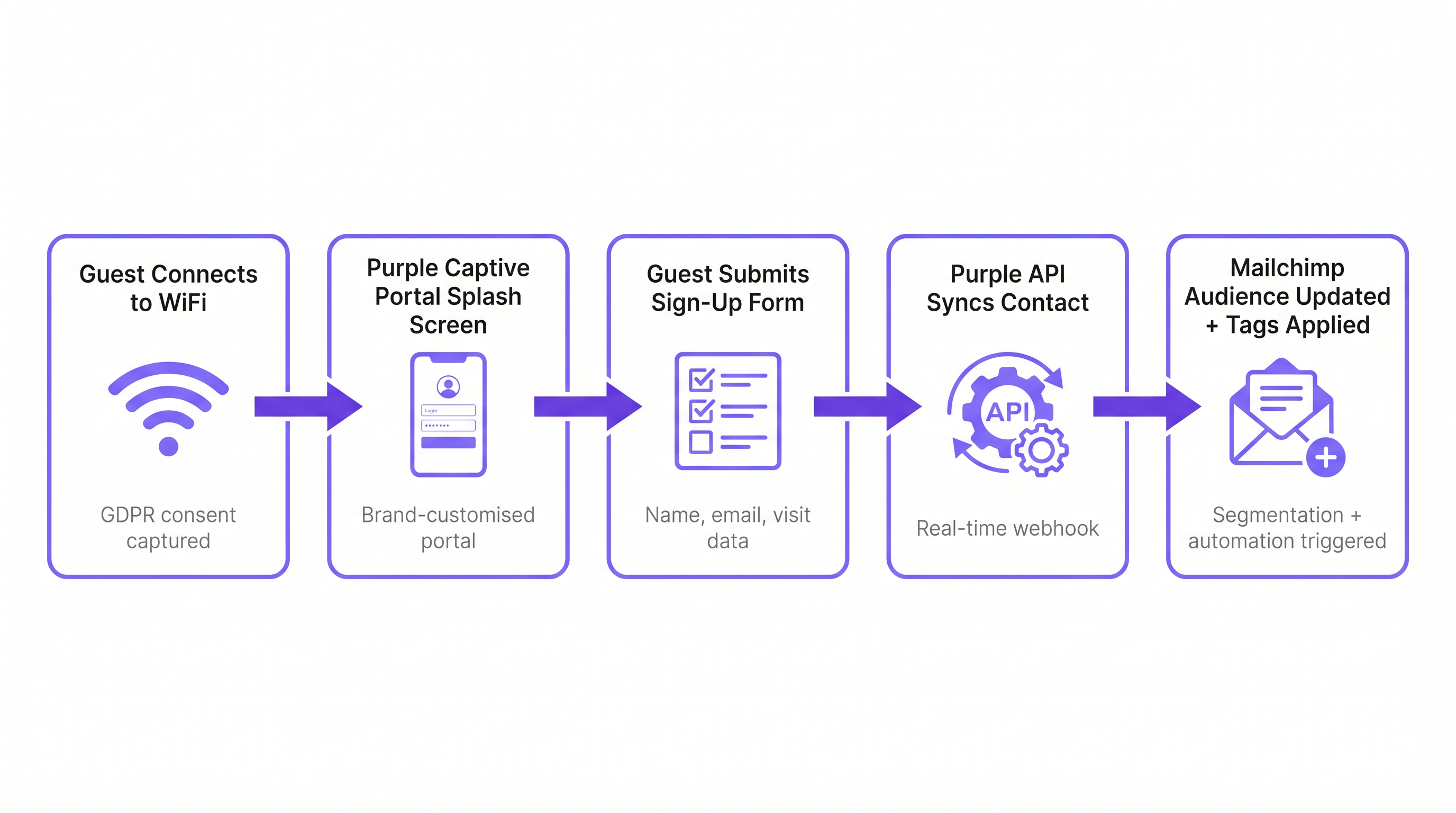
The integration relies on a real-time webhook architecture between Purple's cloud environment and the Mailchimp API. When a guest successfully authenticates through the Purple captive portal, the platform captures the submitted form data alongside metadata about the connection event (venue ID, MAC address, timestamp).
If the guest provides explicit marketing consent, Purple immediately triggers an OAuth-authenticated API call to Mailchimp. This call performs an 'upsert' operation: if the email address does not exist in the designated Mailchimp Audience, a new contact is created. If the contact already exists, their profile is updated, and new tags are appended without overwriting existing data. This ensures that a guest who visits multiple properties within an estate maintains a single, unified profile reflecting their complete visit history.
Compliance and the Consent Gateway
The foundation of any email marketing strategy is compliance. Under GDPR Article 6, organisations must establish a lawful basis for processing personal data. The Purple captive portal acts as the consent gateway. It is critical that the marketing opt-in is decoupled from the general terms of service. A user must be able to access the WiFi without subscribing to marketing communications. The integration respects this boundary; only contacts who explicitly check the marketing opt-in box are synced to Mailchimp. This strict adherence to compliance protocols mitigates risk and ensures the resulting audience is highly engaged.
Implementation Guide
Step 1: Establish the Tagging Taxonomy
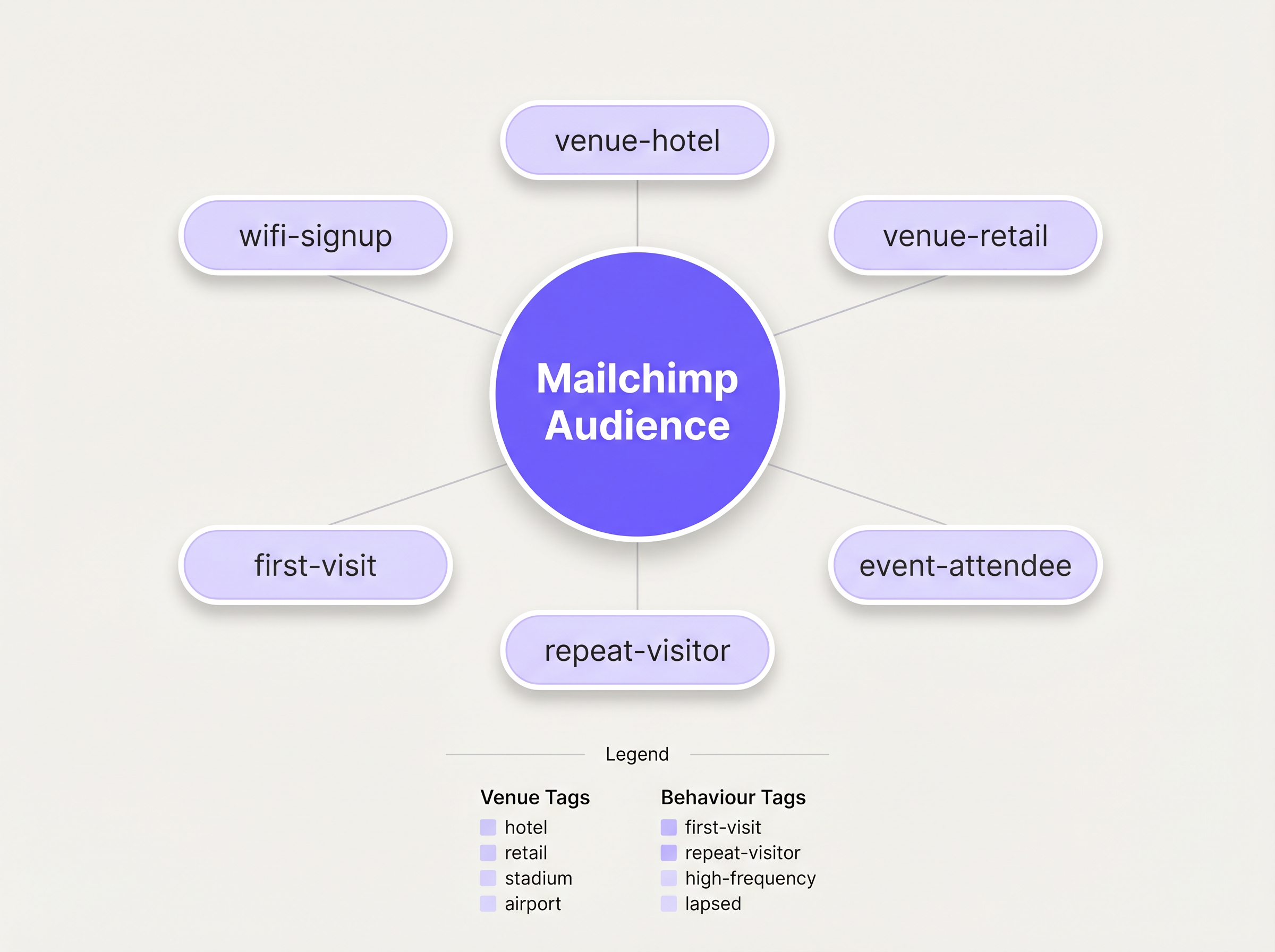
Before enabling the sync, you must define a structured tagging taxonomy. A flat list of contacts is practically useless for targeted marketing. Best practice dictates a multi-dimensional tagging approach:
- Source Tagging: Identify the acquisition channel (e.g.,
wifi-signup). - Venue Tagging: Identify the specific location or property type (e.g.,
venue-hotel,location-london). - Behavioural Tagging: Identify the nature of the visit, often leveraging Purple's WiFi Analytics capabilities (e.g.,
first-visit,repeat-visitor).
Step 2: Configure the Integration
The configuration is managed within the Purple dashboard. Navigate to the venue settings and select the Mailchimp integration. You will be prompted to authenticate via OAuth. Once connected, map the specific Purple venue to the target Mailchimp Audience. Apply the pre-defined tags in the configuration settings. For complex deployments requiring routing to multiple platforms, consider leveraging the Zapier connector, as detailed in our guide on Connecting WiFi Events to 1,500+ Apps with Zapier and Purple .
Step 3: Build the Welcome Automation
The highest ROI activity in this workflow is the immediate welcome email. In Mailchimp, construct a Customer Journey triggered by the addition of the wifi-signup tag. The initial email should fire immediately, capitalising on the guest's physical presence in the venue. For Hospitality venues, this might include a dining discount; for Retail environments, a time-limited promotional code.
Best Practices
The 15-Minute Rule
The contextual relevance of a welcome email decays rapidly. Ensure the initial automation is configured to trigger without delay. A message received while the guest is still on-premise achieves significantly higher engagement rates than one received 24 hours later.
Progressive Profiling
Avoid overwhelming the initial captive portal form. Request only the essential data: Name and Email. Once the contact is in Mailchimp, use subsequent email campaigns to progressively profile the user, requesting additional preferences or demographic information to enrich the profile over time.
Leverage Analytics for Re-engagement
Integrate insights from Purple's WiFi Analytics to identify lapsed visitors. If a previously frequent visitor has not authenticated on the network for 90 days, trigger a specific re-engagement campaign in Mailchimp offering an incentive to return.
Troubleshooting & Risk Mitigation
The Single-Audience Problem
Risk: Dumping all contacts from multiple venues into a single Mailchimp Audience without adequate tagging, destroying the ability to segment by location. Mitigation: Enforce a strict venue-level tagging policy before the integration goes live. Every sync must carry a location identifier.
The Unsubscribe Conflict
Risk: A user unsubscribes via Mailchimp, but reconnects to the WiFi on a subsequent visit. Purple attempts to re-sync the contact. Mitigation: Mailchimp's API handles this gracefully by rejecting the sync for unsubscribed contacts. Ensure your IT operations team understands this expected behaviour and does not flag these rejections as system errors.
ROI & Business Impact
The primary metric for evaluating this integration is the Subscriber Acquisition Cost (SAC) compared to traditional digital channels. WiFi sign-ups typically represent a near-zero marginal cost for acquisition. Secondary metrics include the open and click-through rates of the automated welcome series, which consistently outperform standard broadcast campaigns due to their high contextual relevance. Ultimately, the success of the integration is measured by the conversion rate of these automated campaigns driving repeat visits or on-premise spend.
Listen to the Briefing
For a deeper dive into the architecture and common implementation pitfalls, listen to our 10-minute technical briefing:
Key Terms & Definitions
Captive Portal
A web page that a user is forced to view and interact with before access is granted to a public WiFi network.
This is the primary interface for capturing user data and marketing consent in the Purple ecosystem.
Webhook
An automated message sent from one application to another when a specific event occurs.
Purple uses webhooks to instantly transmit the guest's contact data to Mailchimp the moment they submit the sign-up form.
OAuth
An open standard for access delegation, commonly used as a way for Internet users to grant websites or applications access to their information on other websites but without giving them the passwords.
This is the secure authentication method used to connect the Purple platform to a Mailchimp account.
Upsert
A database operation that updates an existing record if a specified value already exists, or inserts a new record if the specified value doesn't exist.
When Purple syncs data, it performs an upsert on the email address, ensuring existing Mailchimp profiles are updated with new tags rather than duplicated.
Segmentation
The practice of dividing an email subscriber list into smaller groups based on specific criteria, such as location or behaviour.
Effective segmentation, driven by Purple's tagging, is essential for delivering relevant campaigns rather than generic broadcasts.
Customer Journey
Mailchimp's visual automation builder that allows marketers to create automated workflows based on specific triggers and conditions.
This tool is used to build the automated welcome emails triggered by the `wifi-signup` tag.
GDPR Article 6
The section of the General Data Protection Regulation that outlines the lawful bases for processing personal data.
Venue operators must ensure their captive portal splash screens explicitly capture consent for email marketing to comply with this regulation.
Subscriber Acquisition Cost (SAC)
The total cost associated with acquiring a new email subscriber.
Guest WiFi represents a highly efficient acquisition channel, significantly lowering the overall SAC compared to paid digital advertising.
Case Studies
A 200-room hotel needs to differentiate between overnight guests and attendees of a day conference in their Mailchimp marketing.
The hotel configures two separate SSIDs or captive portal splash pages within Purple. The overnight guest portal applies the tags wifi-signup, venue-hotel, and guest-overnight. The conference portal applies the tags wifi-signup, venue-hotel, and guest-conference. In Mailchimp, two distinct Customer Journeys are created. The overnight journey triggers a welcome email highlighting room service and spa facilities. The conference journey triggers an email with the day's agenda and directions to the breakout rooms.
Scenario Analysis
Q1. A retail chain with 50 locations has successfully integrated Purple and Mailchimp. They want to send a targeted campaign only to customers who visited their flagship London store in the last 30 days. How should they structure this segment in Mailchimp?
💡 Hint:Consider both the location tag applied at sign-up and the dynamic data regarding recent activity.
Show Recommended Approach
They should create a segment in Mailchimp with two conditions: 1) Tag includes location-london-flagship AND 2) Campaign activity or date added is within the last 30 days. This relies on Purple having correctly applied the location-specific tag during the initial sync.
Q2. During user acceptance testing, an IT manager notices that a test user who previously unsubscribed from the Mailchimp list is not being re-added when they log back into the guest WiFi. Is this a bug in the integration?
💡 Hint:Review how Mailchimp handles unsubscribed contacts via API.
Show Recommended Approach
No, this is the expected and correct behaviour. Mailchimp's API actively prevents the re-subscription of contacts who have previously opted out, ensuring compliance. The Purple webhook fires, but Mailchimp rejects the upsert for that specific record.
Q3. A venue operator wants to use the Purple captive portal to collect a guest's date of birth for age-gated marketing. How is this data passed to Mailchimp?
💡 Hint:Look beyond standard tags to the advanced integration settings.
Show Recommended Approach
The operator must configure a custom field on the Purple splash screen for 'Date of Birth'. In the Purple integration settings, this custom field must be mapped to a corresponding 'Merge Field' (e.g., DOB) within the target Mailchimp Audience. This allows Mailchimp to store the data as a specific attribute rather than a generic tag.
Key Takeaways
- ✓Guest WiFi sign-ups represent a high-quality, near-zero cost data acquisition channel.
- ✓The Purple-Mailchimp integration uses real-time webhooks to sync contacts instantly.
- ✓A robust tagging taxonomy (Source, Venue, Behaviour) is critical for effective segmentation.
- ✓Marketing consent must be explicitly captured on the captive portal, separate from terms of service.
- ✓Automated welcome emails should be configured to fire immediately while the guest is on-premise.




