

WPA3-Personal vs WPA3-Enterprise: Choosing the Right WiFi Security Mode
This authoritative guide breaks down the architectural differences between WPA3-Personal and WPA3-Enterprise. Designed for IT leaders in hospitality, retail, and public sectors, it provides actionable frameworks for deploying the right security mode based on device fleet, compliance requirements, and venue type.
🎧 Listen to this Guide
View Transcript
Executive Summary
For IT managers and network architects overseeing enterprise WiFi deployments, the transition from WPA2 to WPA3 is no longer optional; it is a critical security mandate. However, deciding between WPA3-Personal and WPA3-Enterprise requires a nuanced understanding of your venue's device ecosystem, user experience goals, and compliance posture. While WPA3-Personal introduces Simultaneous Authentication of Equals (SAE) to mitigate offline dictionary attacks, WPA3-Enterprise mandates 192-bit cryptographic strength and 802.1X authentication, making it the gold standard for corporate and highly regulated environments. This guide provides a vendor-neutral technical comparison, helping operations directors in retail, hospitality, and public sectors choose the optimal security mode, manage legacy device compatibility, and implement Enhanced Open networks for frictionless guest access.

Technical Deep-Dive
The Architecture of WPA3-Personal and SAE
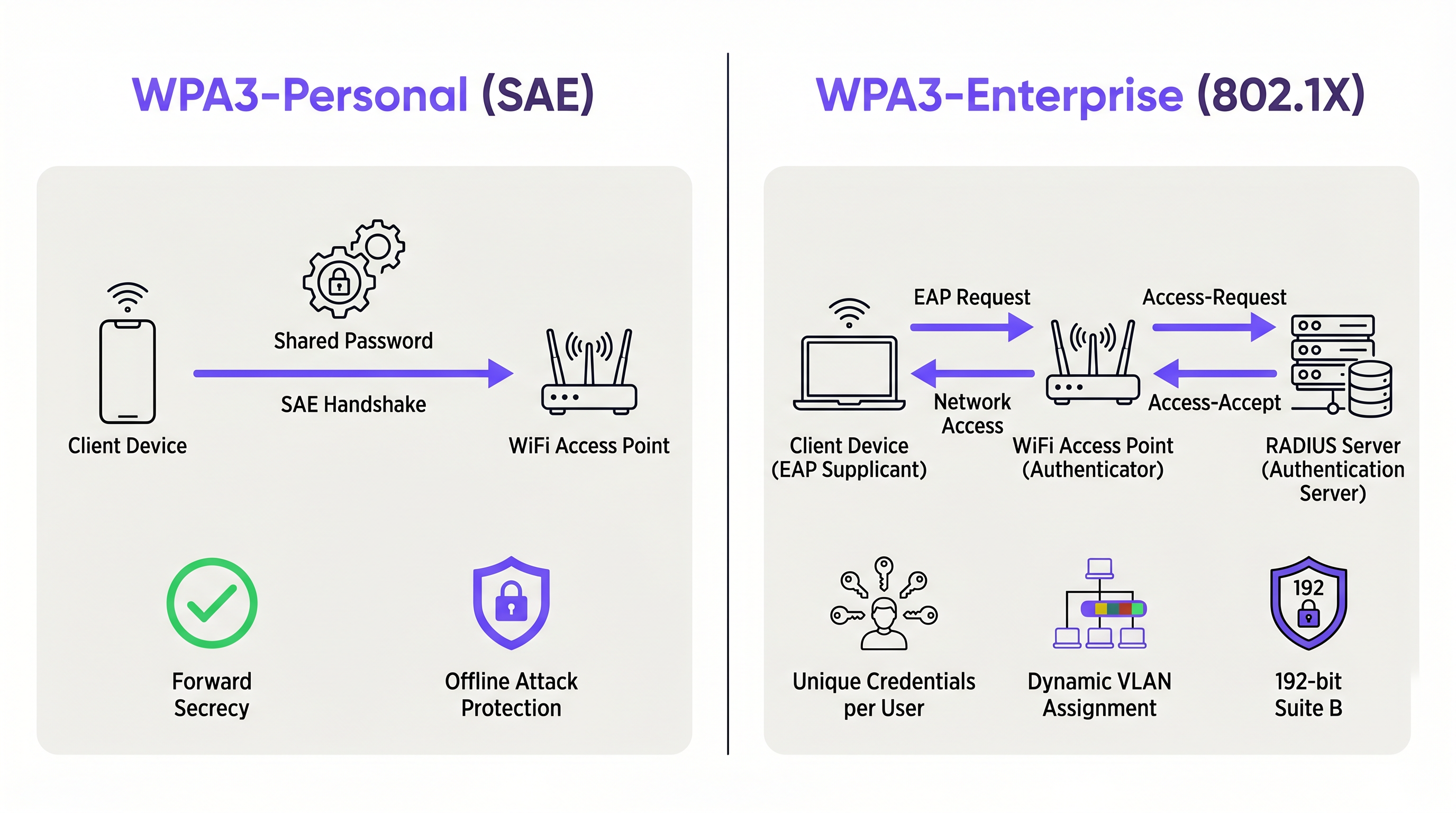
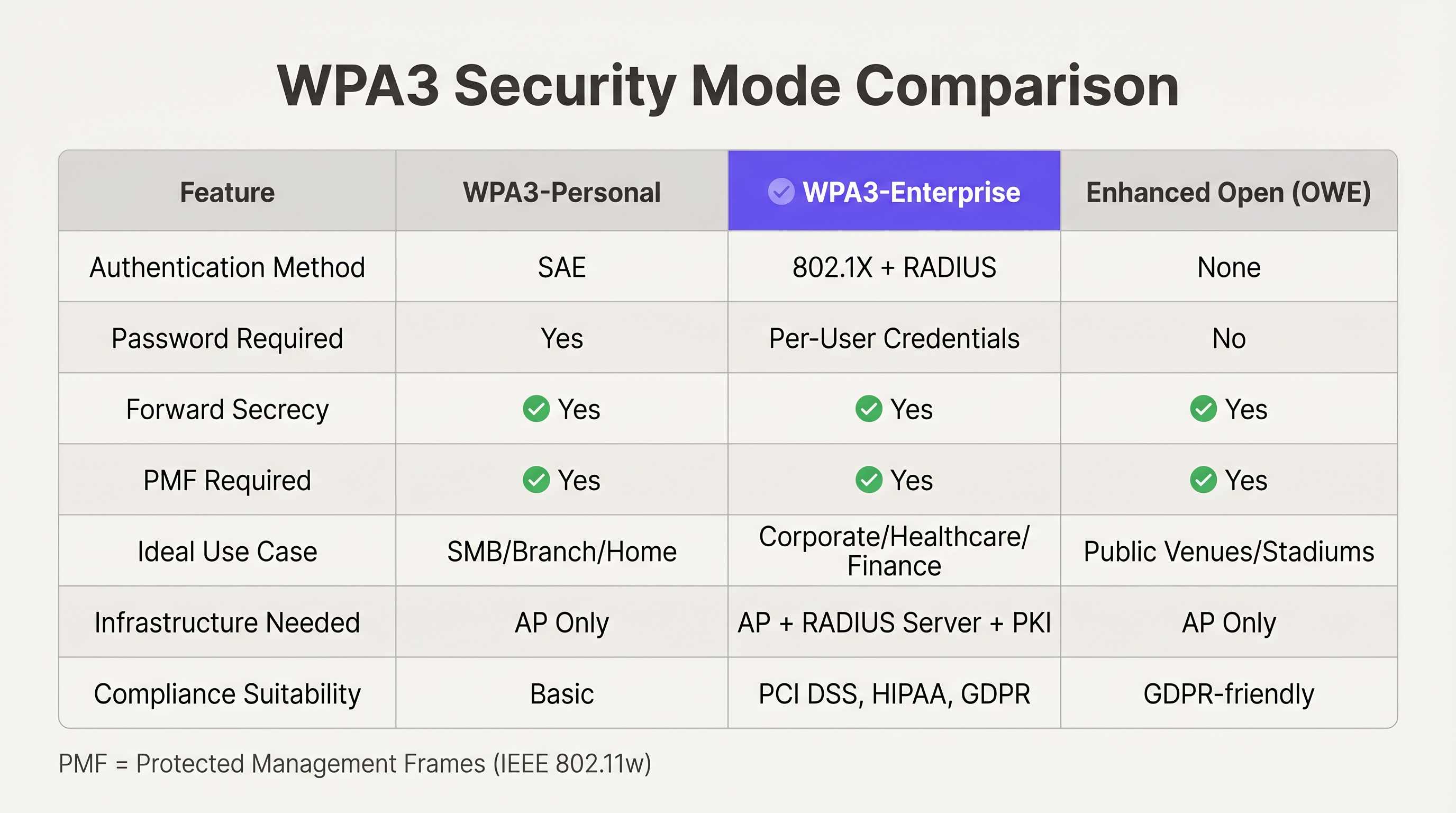
WPA3-Personal replaces the vulnerable Pre-Shared Key (PSK) mechanism of WPA2 with Simultaneous Authentication of Equals (SAE). SAE is a variant of the Dragonfly key exchange protocol, designed to provide forward secrecy and protect against offline dictionary attacks. When a device connects using WPA3-Personal, SAE ensures that even if an attacker captures the handshake traffic, they cannot brute-force the password offline. Each authentication attempt requires active interaction with the access point, severely rate-limiting automated attacks.
For venue operators managing Guest WiFi networks, WPA3-Personal offers a significant security upgrade without requiring the complex infrastructure of an 802.1X deployment. It is particularly effective in environments like coffee shops or smaller retail branches where deploying a RADIUS server is cost-prohibitive.
WPA3-Enterprise: 802.1X and 192-Bit Security
WPA3-Enterprise builds upon the foundation of WPA2-Enterprise but enforces stricter cryptographic standards. It mandates the use of Protected Management Frames (PMF) and introduces an optional 192-bit security mode, often referred to as WPA3-Enterprise Suite B. This mode utilizes the Commercial National Security Algorithm (CNSA) suite, making it suitable for government, financial, and healthcare institutions with stringent compliance requirements.
Unlike WPA3-Personal, WPA3-Enterprise relies on IEEE 802.1X port-based network access control and an authentication server (typically RADIUS). This architecture allows IT teams to assign unique credentials or certificates to each user or device, enabling granular access policies, dynamic VLAN assignment, and robust auditing. For a University Campus WiFi: eduroam, Residence Halls, and BYOD at Scale deployment, WPA3-Enterprise is non-negotiable.
Enhanced Open (OWE): Securing Frictionless Access
For public venues like stadiums or airports, requiring a password (even a shared one) introduces unacceptable friction. Opportunistic Wireless Encryption (OWE), marketed as Wi-Fi Enhanced Open, solves this by providing unauthenticated encryption. It uses a Diffie-Hellman key exchange to encrypt the wireless traffic between the client and the access point, protecting users from passive eavesdropping without requiring them to enter credentials. This is a game-changer for Retail environments looking to gather WiFi Analytics securely.
Implementation Guide
Assessing Your Device Fleet
Before deploying WPA3, IT teams must audit their device fleet. While modern smartphones and laptops support WPA3 natively, legacy IoT devices, point-of-sale (POS) terminals, and older barcode scanners may not.
Transition Modes
To bridge the gap, the Wi-Fi Alliance introduced WPA3 Transition Mode. This allows an access point to broadcast a single SSID that accepts both WPA2-PSK and WPA3-SAE connections. However, Transition Mode is inherently less secure than pure WPA3, as it is susceptible to downgrade attacks. IT architects must view Transition Mode as a temporary migration strategy, not a permanent architecture.
WPA3-Enterprise Deployment Steps
- Audit RADIUS Infrastructure: Ensure your authentication servers support the required EAP types (e.g., EAP-TLS, EAP-TTLS) and the cryptographic suites mandated by WPA3-Enterprise.
- Enable Protected Management Frames (PMF): WPA3 requires PMF (802.11w). Ensure all client devices can negotiate PMF successfully; otherwise, they will fail to connect.
- Certificate Management: If deploying EAP-TLS, establish a robust Public Key Infrastructure (PKI) for issuing and revoking client certificates.
- Phased Rollout: Begin with a pilot group (e.g., the IT department) before rolling out to the wider organization.
Best Practices
- Prioritize EAP-TLS for Enterprise: Whenever possible, use certificate-based authentication (EAP-TLS) rather than credential-based authentication (PEAP-MSCHAPv2) for WPA3-Enterprise. This eliminates the risk of credential theft.
- Segment IoT Devices: Legacy IoT devices that do not support WPA3 should be isolated on a dedicated WPA2-PSK SSID, preferably on a separate VLAN with restricted access to corporate resources.
- Monitor for Downgrade Attacks: Utilize Wireless Intrusion Prevention Systems (WIPS) to detect and alert on attempts to force WPA3 clients to downgrade to WPA2.
- Leverage OWE for Captive Portals: When designing guest networks, combine OWE with your captive portal strategy. This ensures data privacy while maintaining the ability to capture user sign-ups. Consider A/B Testing Captive Portal Designs for Higher Sign-Up Conversion to maximize ROI.
Troubleshooting & Risk Mitigation
The PMF Compatibility Trap
The most common failure mode during a WPA3 migration is device incompatibility with Protected Management Frames (PMF). While PMF is optional in WPA2, it is mandatory in WPA3. Legacy devices, particularly older barcode scanners in Transport and logistics hubs, may fail to associate if PMF is required.
Mitigation: Conduct thorough lab testing with representative devices from your fleet. If critical legacy devices fail, you must maintain a dedicated WPA2 SSID or accelerate device refresh cycles.
Roaming Delays with SAE
In WPA3-Personal networks, the SAE handshake is computationally more intensive than the WPA2-PSK handshake. In high-density environments where devices roam frequently between access points, this can lead to noticeable latency.
Mitigation: Ensure your wireless infrastructure supports 802.11r (Fast BSS Transition) over SAE. This allows clients to roam seamlessly without executing the full SAE handshake at each new access point.
ROI & Business Impact
Deploying WPA3 is not merely a technical exercise; it directly impacts the business's risk profile and operational efficiency. By migrating to WPA3-Enterprise, organizations significantly reduce the likelihood of a costly data breach resulting from compromised credentials. For Healthcare providers, this is a critical component of HIPAA compliance.
Furthermore, implementing OWE on public networks enhances the brand's reputation for security, encouraging higher opt-in rates on captive portals and yielding richer data for Wayfinding and Sensors analytics. Just as businesses recognize The Core SD WAN Benefits for Modern Businesses , modernizing the wireless edge with WPA3 provides a secure foundation for digital transformation.
Key Terms & Definitions
Simultaneous Authentication of Equals (SAE)
A secure key exchange protocol used in WPA3-Personal that replaces the Pre-Shared Key (PSK) method, providing forward secrecy and protection against offline dictionary attacks.
IT teams deploy SAE to secure smaller networks where deploying an 802.1X RADIUS server is impractical.
Protected Management Frames (PMF)
An IEEE 802.11w standard that encrypts management frames (like deauthentication or disassociation frames), preventing attackers from forging them to disconnect clients.
PMF is mandatory in WPA3, which is the primary cause of compatibility issues with legacy IoT devices.
Opportunistic Wireless Encryption (OWE)
Also known as Wi-Fi Enhanced Open, a standard that provides unauthenticated encryption for public Wi-Fi networks using Diffie-Hellman key exchange.
Venue operators use OWE to secure guest Wi-Fi traffic without requiring users to enter a password.
802.1X
An IEEE standard for port-based network access control that provides an authentication mechanism to devices wishing to attach to a LAN or WLAN.
The foundation of WPA3-Enterprise, requiring an authentication server (like RADIUS) to validate user or device credentials.
Extensible Authentication Protocol (EAP)
An authentication framework frequently used in wireless networks and point-to-point connections to provide transport for various authentication methods.
Network architects choose specific EAP types (like EAP-TLS for certificates or PEAP for passwords) when designing WPA3-Enterprise deployments.
WPA3 Transition Mode
A configuration that allows an access point to broadcast a single SSID supporting both WPA2-PSK and WPA3-SAE clients simultaneously.
Used as a temporary migration strategy while an organization phases out legacy WPA2-only devices.
Forward Secrecy
A feature of key agreement protocols ensuring that session keys will not be compromised even if the private key of the server is compromised in the future.
Provided by SAE in WPA3-Personal, ensuring that past captured traffic cannot be decrypted later.
Downgrade Attack
A cryptographic attack on a computer system or communications protocol that makes it abandon a high-quality mode of operation in favor of an older, lower-quality mode.
A significant risk when operating in WPA3 Transition Mode, requiring monitoring via a Wireless Intrusion Prevention System (WIPS).
Case Studies
A 200-room luxury hotel is upgrading its network infrastructure. The IT director needs to provide secure access for hotel staff (using corporate laptops and tablets) and frictionless access for guests in the lobby and rooms. The existing network uses a single WPA2-PSK SSID for staff and an open, unencrypted SSID for guests.
The optimal architecture involves two distinct networks. For the staff network, the hotel should deploy WPA3-Enterprise using 802.1X authentication. Since staff use corporate-owned devices, the IT team can push client certificates via MDM, enabling EAP-TLS for maximum security. For the guest network, the hotel should deploy Wi-Fi Enhanced Open (OWE). This provides unauthenticated encryption, protecting guest traffic from eavesdropping while maintaining the frictionless experience required for a hospitality environment. The captive portal will handle terms of service acceptance and optional email capture.
A large retail chain with 500 locations relies on handheld inventory scanners. The scanners are 5 years old and only support WPA2-PSK. The corporate mandate requires upgrading all store networks to WPA3 by the end of the year. How should the network architect proceed?
The architect cannot deploy a pure WPA3-Personal network, as the legacy scanners will fail to connect due to the mandatory PMF requirement. WPA3 Transition Mode is an option, but it leaves the network vulnerable to downgrade attacks. The most secure and pragmatic solution is SSID segmentation. The architect should create a new WPA3-Personal (SAE) SSID for modern devices (e.g., manager tablets, modern POS systems) and retain a dedicated, hidden WPA2-PSK SSID exclusively for the legacy inventory scanners. The WPA2 SSID should be mapped to a highly restricted VLAN that only allows communication with the inventory management server.
Scenario Analysis
Q1. Your organization is migrating a corporate office to WPA3. The current setup uses WPA2-Enterprise with PEAP-MSCHAPv2 (username and password). The CISO wants to eliminate the risk of credential theft entirely. What is the recommended approach?
💡 Hint:Consider which EAP type relies on certificates rather than passwords.
Show Recommended Approach
Migrate to WPA3-Enterprise and transition the authentication method from PEAP-MSCHAPv2 to EAP-TLS. EAP-TLS uses client-side certificates for authentication, entirely removing passwords from the process and mitigating the risk of credential phishing or theft.
Q2. A stadium IT team wants to implement Wi-Fi Enhanced Open (OWE) for public access during events to protect user data from passive sniffing. However, they are concerned that older smartphones will not be able to connect. How can they implement OWE while supporting legacy devices?
💡 Hint:Similar to WPA3, OWE has a transition mechanism.
Show Recommended Approach
Deploy OWE Transition Mode. In this configuration, the access point broadcasts an open, unencrypted SSID (for legacy devices) and a hidden OWE SSID. Modern devices that support OWE will automatically detect the hidden OWE network via an Information Element in the beacon and connect securely, while older devices will connect to the standard open network.
Q3. During a pilot rollout of WPA3-Personal, several warehouse staff report that their barcode scanners disconnect frequently when moving between aisles, and take several seconds to reconnect. What configuration change should the network engineer investigate?
💡 Hint:The SAE handshake takes longer than WPA2-PSK. How can roaming be optimized?
Show Recommended Approach
The engineer should verify that 802.11r (Fast BSS Transition) is enabled and correctly configured on the WPA3-Personal SSID. Because the SAE handshake is computationally intensive, roaming without 802.11r causes unacceptable delays. 802.11r allows the client to establish security parameters with the new AP before fully roaming, minimizing latency.
Key Takeaways
- ✓WPA3-Personal replaces PSK with SAE, eliminating the risk of offline dictionary attacks.
- ✓WPA3-Enterprise requires 802.1X and offers an optional 192-bit security suite for highly regulated environments.
- ✓Protected Management Frames (PMF) are mandatory in WPA3, which is the primary cause of legacy device incompatibility.
- ✓Enhanced Open (OWE) provides unauthenticated encryption, ideal for public venues and guest networks.
- ✓WPA3 Transition Mode should be viewed as a temporary migration strategy, not a permanent architecture due to downgrade attack risks.
- ✓SSID segmentation is the most secure method for handling legacy IoT devices that cannot support WPA3.




