

गेस्ट WiFi लॉगिन पेज कैसे तैयार करें
यह आधिकारिक गाइड एंटरप्राइज़ स्थानों में एक ब्रांडेड गेस्ट WiFi लॉगिन पेज (कैप्टिव पोर्टल) को डिप्लॉय करने के लिए तकनीकी संरचना, यूएक्स (UX) सर्वोत्तम अभ्यास और सीआरएम (CRM) एकीकरण रणनीतियों का विवरण देता है। आईटी प्रबंधकों, नेटवर्क आर्किटेक्ट्स और वेन्यू ऑपरेशंस डायरेक्टर्स के लिए डिज़ाइन किया गया, यह डेटा कैप्चर आवश्यकताओं को उपयोगकर्ता घर्षण के साथ संतुलित करने, GDPR अनुपालन सुनिश्चित करने और गेस्ट WiFi इंफ्रास्ट्रक्चर से ROI को अधिकतम करने के लिए कार्रवाई योग्य फ्रेमवर्क प्रदान करता है।
🎧 Listen to this Guide
View Transcript
कार्यकारी सारांश
एंटरप्राइज़ स्थानों के लिए — अंतरराष्ट्रीय होटल श्रृंखलाओं से लेकर विशाल खुदरा वातावरण तक — गेस्ट WiFi लॉगिन पेज अब केवल एक नेटवर्क एक्सेस गेटवे नहीं है; यह एक महत्वपूर्ण फर्स्ट-पार्टी डेटा अधिग्रहण संपत्ति है। जैसे-जैसे थर्ड-पार्टी कुकीज़ अप्रचलित होती जा रही हैं और गोपनीयता नियम कड़े होते जा रहे हैं, कैप्टिव पोर्टल एक मजबूत, अनुपालन योग्य ग्राहक डेटाबेस बनाने के लिए सबसे विश्वसनीय तंत्रों में से एक का प्रतिनिधित्व करता है।
यह गाइड गेस्ट WiFi लॉगिन पेज को डिज़ाइन करने, डिप्लॉय करने और ऑप्टिमाइज़ करने के लिए एक व्यापक तकनीकी संदर्भ प्रदान करता है। हम कैप्टिव पोर्टल रूटिंग के वास्तुशिल्प विचारों का पता लगाते हैं, IEEE 802.1X और WPA3 सहित उद्योग मानकों के विरुद्ध प्रमाणीकरण पद्धतियों का मूल्यांकन करते हैं, और केंद्रीय सीआरएम (CRM) और मार्केटिंग प्लेटफॉर्म में प्रमाणित उपयोगकर्ता डेटा को सुरक्षित रूप से प्रवाहित करने के लिए आवश्यक एकीकरण पैटर्न का विवरण देते हैं। जो संगठन नीचे दिए गए फ्रेमवर्क को लागू करते हैं, वे लगातार अपने गेस्ट WiFi इंफ्रास्ट्रक्चर को एक शुद्ध लागत केंद्र से ग्राहक आजीवन मूल्य के एक मापने योग्य चालक में बदल देते हैं — खुदरा और आतिथ्य वातावरण में 300-500% की डेटाबेस वृद्धि दर और स्पष्ट रूप से उच्च औसत लेनदेन मूल्यों के साथ।
तकनीकी गहन-विश्लेषण
कैप्टिव पोर्टल आर्किटेक्चर और रूटिंग
गेस्ट WiFi लॉगिन पेज का मूलभूत तंत्र कैप्टिव पोर्टल तकनीक पर निर्भर करता है। जब कोई क्लाइंट डिवाइस वायरलेस लोकल एरिया नेटवर्क (WLAN) से जुड़ता है, तो नेटवर्क एक्सेस कंट्रोलर (NAC) या वायरलेस एक्सेस पॉइंट (AP) प्रारंभिक HTTP/HTTPS अनुरोधों को इंटरसेप्ट करता है। इस ट्रैफ़िक को इच्छित गंतव्य पर रूट करने के बजाय, इंफ्रास्ट्रक्चर क्लाइंट को एक 'वॉल्ड गार्डन' वातावरण में रीडायरेक्ट करता है — विशेष रूप से, कैप्टिव पोर्टल स्प्लैश पेज पर।
यह रीडायरेक्शन आमतौर पर गेटवे स्तर पर DNS हाइजैकिंग या HTTP रीडायरेक्शन के माध्यम से प्राप्त किया जाता है। कंट्रोलर DNS क्वेरीज़ का जवाब अपने स्वयं के IP पते के साथ देता है, मूल गंतव्य की परवाह किए बिना पोर्टल पेज प्रदान करता है। HTTPS गंतव्यों के लिए, कंट्रोलर TLS हैंडशेक पूरा होने से पहले पोर्ट 80 पर एक TCP रीडायरेक्ट जारी करता है, यही कारण है कि प्रारंभिक पोर्टल ट्रिगर HTTP ट्रैफ़िक पर निर्भर करता है।
यह सुनिश्चित करना महत्वपूर्ण है कि 'वॉल्ड गार्डन' कॉन्फ़िगरेशन प्रमाणीकरण से पहले आवश्यक संसाधनों तक पहुंच की अनुमति देता है। यदि सोशल लॉगिन तंत्रों का उपयोग कर रहे हैं, तो 'वॉल्ड गार्डन' को Facebook, Google, या अन्य OAuth पहचान प्रदाता API से जुड़े IP रेंज या डोमेन को श्वेतसूची में डालना होगा। ऐसा करने में विफलता नए डिप्लॉयमेंट में पोर्टल लोड विफलताओं का सबसे आम कारण है।
प्रमाणीकरण पद्धतियाँ और डेटा कैप्चर
प्रमाणीकरण प्रवाह का डिज़ाइन सीधे कैप्चर किए गए डेटा की मात्रा और गुणवत्ता को निर्धारित करता है। वास्तुशिल्प निर्णय को वेन्यू की व्यापक डिजिटल रणनीति के साथ संरेखित होना चाहिए।
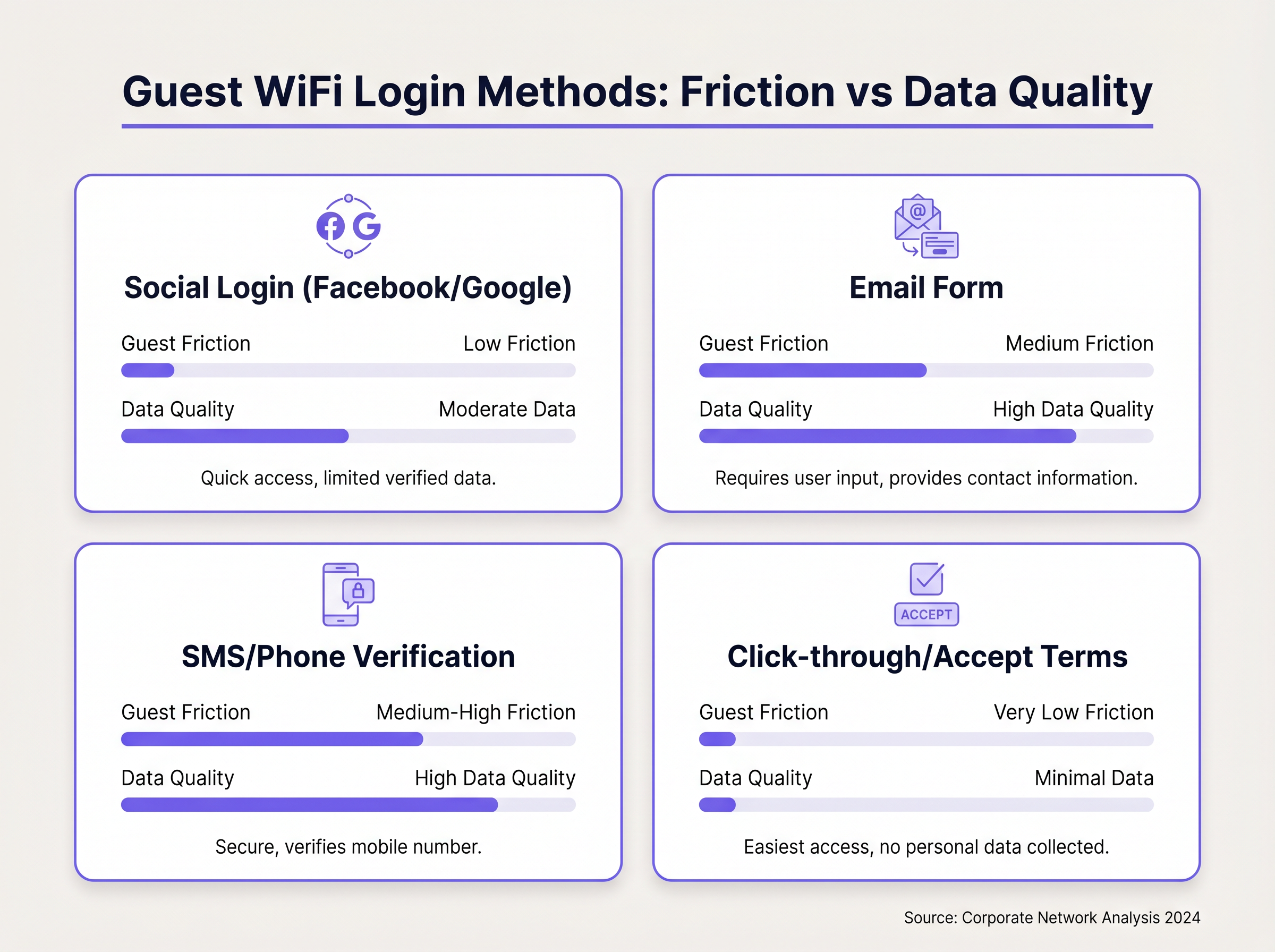
फॉर्म-आधारित प्रमाणीकरण उपयोगकर्ताओं को ईमेल पता, नाम और पिन कोड जैसे विशिष्ट डेटा फ़ील्ड दर्ज करने की आवश्यकता होती है। हालांकि यह उच्च-विश्वसनीयता वाला सीआरएम (CRM) डेटा प्रदान करता है, यह उच्चतम उपयोगकर्ता घर्षण पैदा करता है। ईमेल प्रारूपों के लिए रेगुलर एक्सप्रेशन (regex) और रीयल-टाइम MX रिकॉर्ड सत्यापन सहित मजबूत सत्यापन को लागू करना, डेटाबेस स्वच्छता बनाए रखने और दूषित डेटा को सीआरएम (CRM) में फैलने से रोकने के लिए आवश्यक है।
OAuth 2.0 के माध्यम से सोशल प्रमाणीकरण उपयोगकर्ताओं को Google या Facebook जैसे प्लेटफॉर्म से मौजूदा क्रेडेंशियल का उपयोग करके प्रमाणित करने की अनुमति देता है। यह सत्यापित जनसांख्यिकीय डेटा बिंदुओं को सुरक्षित रूप से पुनर्प्राप्त करते हुए घर्षण को काफी कम करता है। तकनीकी ओवरहेड में API कुंजियों, गुप्त टोकन का प्रबंधन करना और यह सुनिश्चित करना शामिल है कि पोर्टल के कॉलबैक URL पहचान प्रदाताओं के साथ सही ढंग से पंजीकृत हैं। डेटा की गुणवत्ता फॉर्म-आधारित इनपुट की तुलना में काफी अधिक होती है क्योंकि पहचान प्रदाता ने पहले ही उपयोगकर्ता के क्रेडेंशियल को सत्यापित कर लिया होता है।
पासपॉइंट (हॉटस्पॉट 2.0) के माध्यम से निर्बाध प्रमाणीकरण लौटने वाले आगंतुकों को कैप्टिव पोर्टल प्रस्तुत किए बिना फिर से कनेक्ट करने में सक्षम बनाता है। डिवाइस WPA3-एंटरप्राइज़ सुरक्षा के साथ 802.1X/EAP प्रमाणीकरण का उपयोग करता है, जो एक निर्बाध और अत्यधिक सुरक्षित अनुभव प्रदान करता है। Purple कनेक्ट लाइसेंस के तहत OpenRoaming जैसी सेवाओं के लिए एक मुफ्त पहचान प्रदाता के रूप में कार्य करता है, जो विज़िट के दौरान उपयोगकर्ता प्रोफ़ाइल एसोसिएशन को बनाए रखते हुए घर्षण-मुक्त पहुंच को सक्षम बनाता है।
| प्रमाणीकरण विधि | उपयोगकर्ता घर्षण | डेटा गुणवत्ता | तकनीकी जटिलता | इसके लिए सबसे उपयुक्त |
|---|---|---|---|---|
| फॉर्म-आधारित | उच्च | उच्च | कम | होटल, सम्मेलन केंद्र |
| सोशल लॉगिन (OAuth) | कम | मध्यम-उच्च | मध्यम | खुदरा, F&B, कार्यक्रम |
| एसएमएस (SMS) सत्यापन | मध्यम | उच्च | मध्यम | उच्च-सुरक्षा वातावरण |
| क्लिक-थ्रू / AUP | बहुत कम | न्यूनतम | कम | स्वास्थ्य सेवा, सार्वजनिक क्षेत्र |
| पासपॉइंट / OpenRoaming | कोई नहीं (लौटने वाले) | प्रोफ़ाइल-आधारित | उच्च | हवाई अड्डे, परिवहन हब |
नेटवर्क सेगमेंटेशन और सुरक्षा आर्किटेक्चर
गेस्ट ट्रैफ़िक को कॉर्पोरेट इंफ्रास्ट्रक्चर से तार्किक रूप से अलग किया जाना चाहिए। यह एक गैर-परक्राम्य सुरक्षा आवश्यकता है, न कि एक वैकल्पिक कॉन्फ़िगरेशन। अनुशंसित आर्किटेक्चर गेस्ट एक्सेस के लिए एक समर्पित VLAN को डिप्लॉय करता है जिसमें सख्त एक्सेस कंट्रोल लिस्ट (ACLs) होती हैं जो आंतरिक सबनेट में पार्श्व गति को रोकती हैं। यह अलगाव क्यों महत्वपूर्ण है, इसकी विस्तृत जानकारी के लिए, देखें गेस्ट WiFi नेटवर्क और आपके मुख्य नेटवर्क के बीच क्या अंतर है? ।
गेस्ट VLAN को सीधे इंटरनेट ब्रेकआउट प्रदान करना चाहिए — आदर्श रूप से एक अलग भौतिक या तार्किक WAN इंटरफ़ेस के माध्यम से — एक स्टेटफुल फ़ायरवॉल के साथ जो आउटबाउंड ट्रैफ़िक का निरीक्षण करता है। गेटवे स्तर पर DNS फ़िल्टरिंग सामग्री नीतियों को लागू कर सकता है और गेस्ट को रोक सकता है nनेटवर्क को दुर्भावनापूर्ण गतिविधि के लिए एक वेक्टर के रूप में उपयोग होने से बचाना।
कार्यान्वयन मार्गदर्शिका
चरण 1: बुनियादी ढाँचा तैयार करना
पोर्टल को कॉन्फ़िगर करने से पहले, समर्पित गेस्ट VLAN का प्रावधान करें और सत्यापित करें कि NAC या कंट्रोलर Captive Portal रीडायरेक्शन का समर्थन करता है। पुष्टि करें कि वॉल्ड गार्डन कॉन्फ़िगरेशन सही ढंग से स्कोप किया गया है — इसमें पोर्टल होस्टिंग डोमेन, पोर्टल एसेट प्रदान करने वाले कोई भी CDN एंडपॉइंट, और आपके द्वारा समर्थित किए जाने वाले किसी भी सोशल लॉगिन प्रोवाइडर के लिए OAuth API डोमेन शामिल होने चाहिए।
चरण 2: पोर्टल डिज़ाइन और रिस्पॉन्सिव UX
Captive Portal को मोबाइल-फर्स्ट फिलॉसफी के साथ डिज़ाइन किया जाना चाहिए, क्योंकि 85% से अधिक गेस्ट WiFi प्रमाणीकरण मोबाइल उपकरणों पर होते हैं।
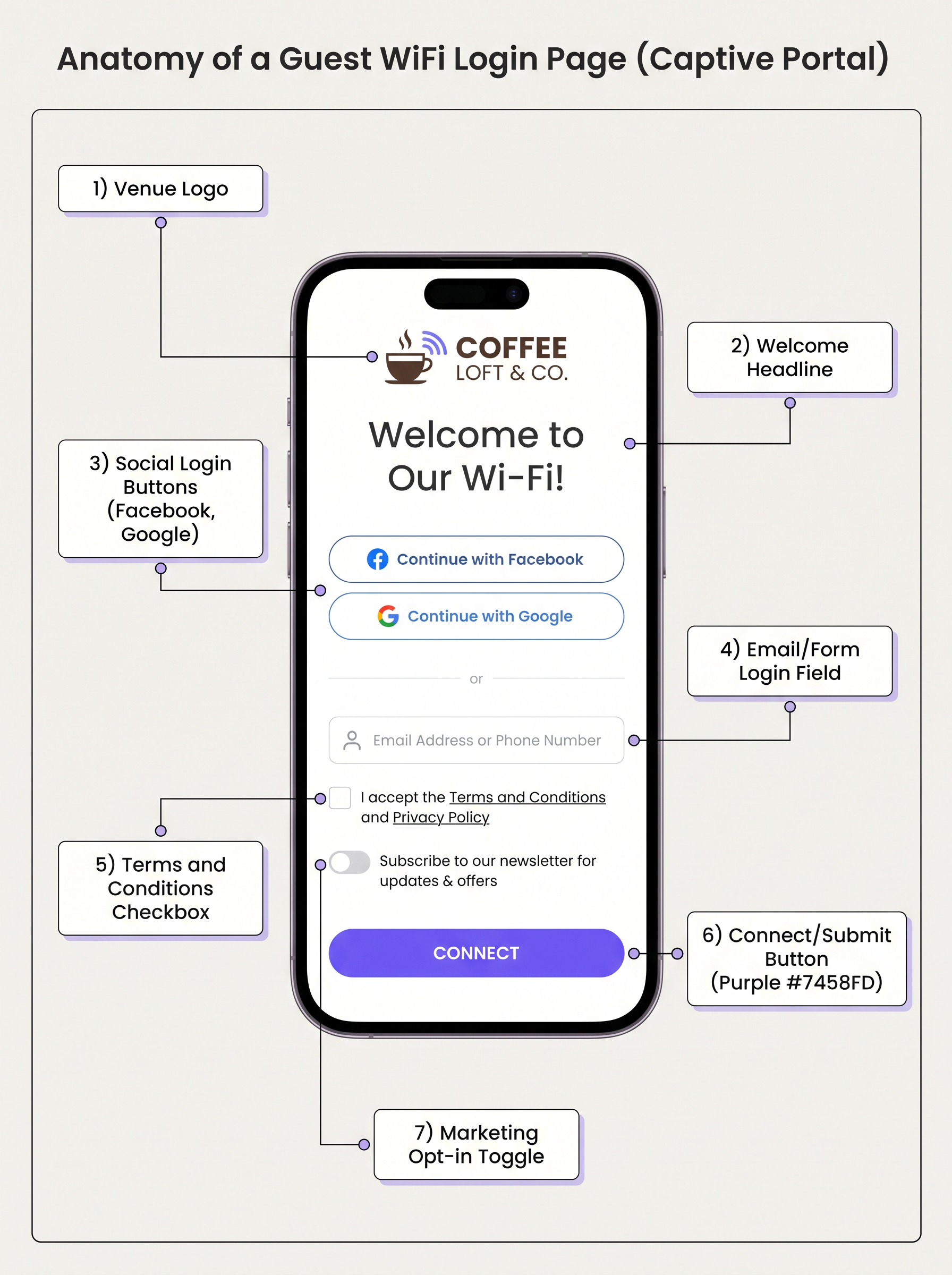
पोर्टल को दो सेकंड के भीतर लोड होना चाहिए। छवियों को कंप्रेस करके, महत्वपूर्ण CSS को इनलाइन करके, और भारी JavaScript फ्रेमवर्क से बचकर पेलोड के आकार को कम करें। एक महत्वपूर्ण बाधा जिसे कई टीमें अनदेखा करती हैं: Apple का Captive Network Assistant (CNA) — मिनी-ब्राउज़र जो iOS और macOS पर स्वचालित रूप से सक्रिय होता है — की क्षमताएं सीमित हैं। यह एक पूर्ण ब्राउज़र की तरह परसिस्टेंट कुकीज़ का समर्थन नहीं करता है, और इसमें सीमित JavaScript निष्पादन होता है। प्रारंभिक प्रमाणीकरण प्रवाह को उन्नत ब्राउज़र सुविधाओं पर निर्भरता के बिना कार्य करने के लिए बनाएं।
UX के दृष्टिकोण से, पोर्टल को एक स्पष्ट पदानुक्रम प्रस्तुत करना चाहिए: शीर्ष पर वेन्यू ब्रांडिंग, एक संक्षिप्त मूल्य प्रस्ताव ("मुफ्त WiFi — सेकंडों में कनेक्ट करें"), प्रमाणीकरण विकल्प, और एक न्यूनतम कानूनी फुटर। पूर्ण नियम और शर्तों को इनलाइन प्रस्तुत करने से बचें; उन्हें वॉल्ड गार्डन के भीतर लिंक करें।
चरण 3: डेटा कैप्चर फ़ील्ड रणनीति
प्रोग्रेसिव प्रोफाइलिंग के सिद्धांत को लागू करें। पहली विज़िट पर, केवल एक ईमेल पता और स्पष्ट मार्केटिंग सहमति मांगें। दूसरी विज़िट पर, पहला नाम पूछें। तीसरी पर, जन्मतिथि या पिन कोड। यह दृष्टिकोण महत्वपूर्ण पहली बातचीत पर कम घर्षण बनाए रखता है, जबकि समय के साथ एक व्यापक CRM प्रोफ़ाइल बनाता है।
GDPR अनुपालन के लिए, सहमति तंत्र स्पष्ट, अनबंडल्ड और दानेदार होना चाहिए। मार्केटिंग ऑप्ट-इन एक अलग, अनचेक किया गया चेकबॉक्स होना चाहिए — इसे सेवा की शर्तों की स्वीकृति के साथ बंडल नहीं किया जा सकता है। सहमति का टाइमस्टैम्प, पोर्टल संस्करण, और प्रस्तुत की गई विशिष्ट सहमति भाषा को रिकॉर्ड करें, क्योंकि यह GDPR के अनुच्छेद 7 के तहत आवश्यक ऑडिट ट्रेल का गठन करता है।
चरण 4: CRM और एनालिटिक्स इंटीग्रेशन
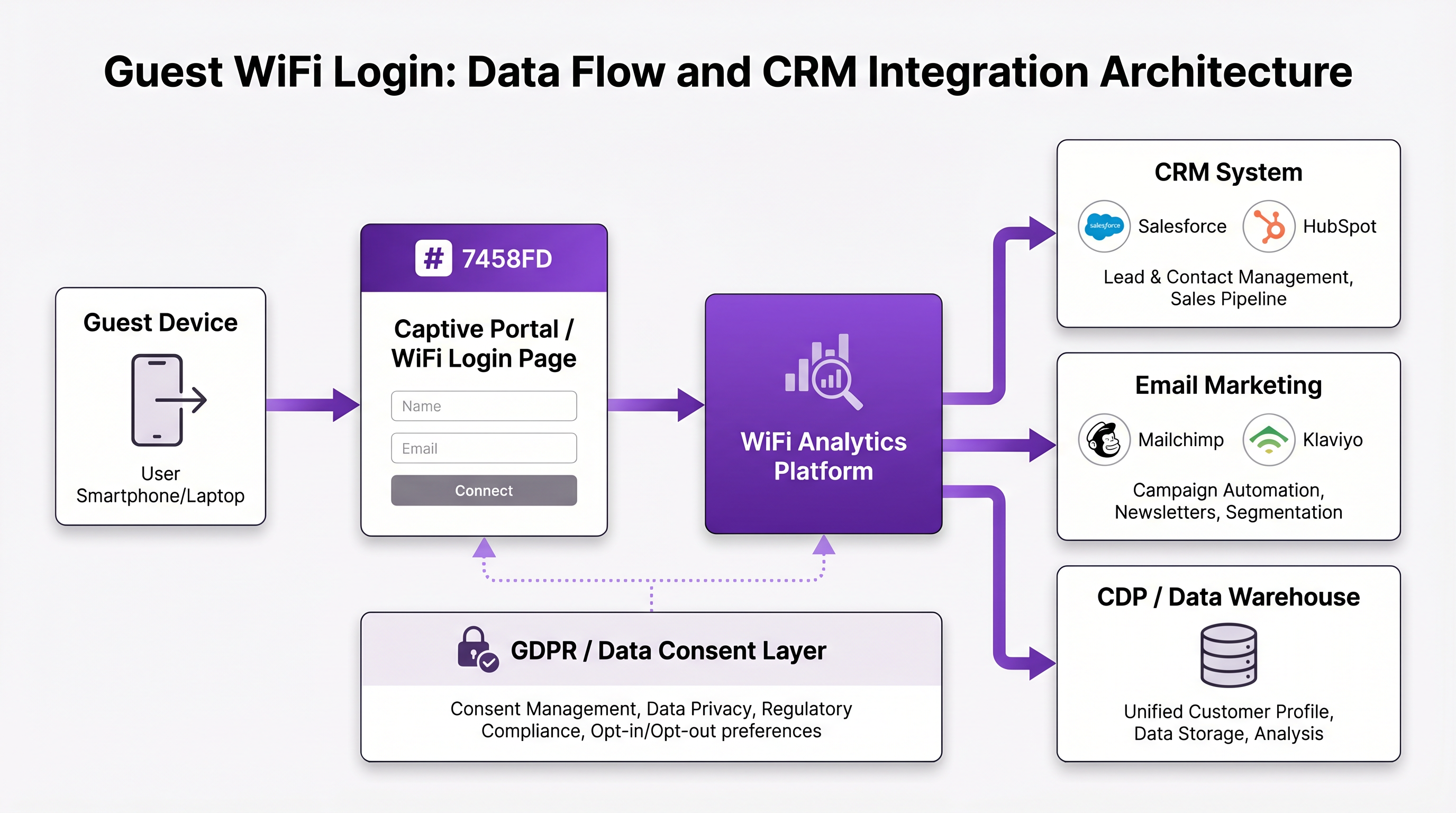
प्रमाणीकरण के बाद, WiFi Analytics प्लेटफॉर्म को प्रमाणीकरण पेलोड को तुरंत पार्स करना चाहिए और डेटा को एक सुरक्षित वेबहुक या REST API कॉल के माध्यम से केंद्रीय CRM या कस्टमर डेटा प्लेटफॉर्म (CDP) पर भेजना चाहिए। यह इंटीग्रेशन स्वचालित मार्केटिंग वर्कफ़्लो को सक्षम बनाता है: कनेक्शन के कुछ सेकंड के भीतर ट्रिगर किया गया एक स्वागत ईमेल, प्रस्थान के 24 घंटे बाद भेजा गया एक पोस्ट-विज़िट सर्वेक्षण, या तीसरी विज़िट पर एक लॉयल्टी रिवॉर्ड नोटिफिकेशन।
वितरित एंटरप्राइज़ डिप्लॉयमेंट के लिए — जैसे Retail वातावरण में खुदरा श्रृंखलाएं — प्रमाणीकरण परत को केंद्रीकृत करना महत्वपूर्ण है। प्रत्येक स्थानीय कंट्रोलर पर जटिल वॉल्ड गार्डन कॉन्फ़िगर करने के बजाय, स्थानीय हार्डवेयर को RADIUS के माध्यम से सभी अप्रमाणित ट्रैफ़िक को केंद्रीय क्लाउड पोर्टल पर रीडायरेक्ट करने के लिए कॉन्फ़िगर किया जाता है। केंद्रीय प्लेटफॉर्म OAuth इंटीग्रेशन का प्रबंधन करता है और API कॉलबैक को संभालता है, जिससे एज हार्डवेयर से जटिलता दूर होती है और सभी स्थानों पर एक सुसंगत ब्रांड अनुभव सुनिश्चित होता है।
सर्वोत्तम अभ्यास
व्यापक फ़ॉर्मों पर प्रोग्रेसिव प्रोफाइलिंग को प्राथमिकता दें। पहली बातचीत में हर डेटा पॉइंट को कैप्चर करने का प्रयास न करें। सहमति के साथ एक एकल ईमेल पता 60% परित्याग दर वाले पूर्ण प्रोफ़ाइल से अधिक मूल्यवान है। कई विज़िट में प्रोफ़ाइल को धीरे-धीरे बनाएं।
डिज़ाइन द्वारा अनुपालन। लॉगिन पेज नियामक अनुपालन के लिए प्राथमिक इंटरफ़ेस है। GDPR अनुच्छेद 7 के लिए आवश्यक है कि सहमति स्वतंत्र रूप से दी गई हो, विशिष्ट, सूचित और स्पष्ट हो। सेवा की शर्तें और गोपनीयता नीति वॉल्ड गार्डन के भीतर आसानी से सुलभ होनी चाहिए, और नियामक ऑडिट की स्थिति में अनुपालन प्रदर्शित करने के लिए सहमति रिकॉर्ड को पर्याप्त मेटाडेटा के साथ संग्रहीत किया जाना चाहिए।
ब्रांड निरंतरता। पोर्टल को वेन्यू के भौतिक और डिजिटल ब्रांड का एक सहज विस्तार महसूस होना चाहिए। सुसंगत टाइपोग्राफी, रंग पैलेट और इमेजरी विश्वास को मजबूत करती है और परित्याग को कम करती है। एक पोर्टल जो सामान्य दिखता है या वेन्यू ब्रांड से मेल नहीं खाता है, उपयोगकर्ताओं को संकेत देता है कि वे एक दुष्ट नेटवर्क पर हो सकते हैं।
प्रदर्शन अनुकूलन। स्टेडियम या कॉन्फ्रेंस सेंटर जैसे उच्च-घनत्व वाले वातावरण में, पोर्टल इन्फ्रास्ट्रक्चर को समवर्ती लोड के लिए डिज़ाइन किया जाना चाहिए। वैश्विक CDN वितरण के साथ क्लाउड-होस्टेड पोर्टल समाधान पीक लोड स्थितियों में ऑन-प्रिमाइसेस पोर्टल सर्वर की तुलना में काफी अधिक लचीले होते हैं।
कई साइटों पर संचालित होने वाले वेन्यू के लिए, आधुनिक व्यवसायों के लिए कोर SD WAN लाभ की खोज प्रासंगिक है — SD-WAN वितरित स्थानों पर क्लाउड-होस्टेड पोर्टल सेवाओं के लिए सुसंगत, उच्च-उपलब्धता WAN कनेक्टिविटी सुनिश्चित कर सकता है।
समस्या निवारण और जोखिम न्यूनीकरण
Captive Portal सक्रिय होने में विफल रहता है
सबसे आम विफलता मोड यह है कि Captive Portal क्लाइंट डिवाइस पर स्वचालित रूप से प्रस्तुत नहीं होता है। यह लगभग हमेशा एक वॉल्ड गार्डन या DNS कॉन्फ़िगरेशन समस्या होती है। सुनिश्चित करें कि कंट्रोलर Captive Portal डिटेक्शन URL पर HTTP अनुरोधों को सही ढंग से इंटरसेप्ट कर रहा है: Apple उपकरणों के लिए captive.apple.com और Android के लिए connectivitycheck.gstatic.com। यदि इन डोमेन को गलती से वॉल्ड गार्डन में श्वेतसूचीबद्ध कर दिया जाता है, तो डिवाइस मान लेता है कि उसके पास पूर्ण इंटरनेट एक्सेस है और पोर्टल ट्रिगर को पूरी तरह से बायपास कर देता है।
MAC एड्रेस रैंडमाइजेशन
आधुनिक ऑपरेटिंग सिस्टम — iOS 14 और बाद के संस्करण, Android 10 और उसके बाद — MAC एड्रेस रैंडमाइज़ेशन लागू करें, प्रत्येक SSID एसोसिएशन के लिए एक अद्वितीय रैंडम MAC एड्रेस जनरेट करते हुए। यह उन पुराने एनालिटिक्स प्लेटफॉर्म को बाधित करता है जो लौटने वाले विज़िटर को ट्रैक करने के लिए MAC एड्रेस को एक स्थायी अद्वितीय पहचानकर्ता के रूप में उपयोग करते हैं। इसका समाधान हार्डवेयर पहचानकर्ताओं से प्रमाणित उपयोगकर्ता प्रोफाइल पर निर्भरता को स्थानांतरित करना है। उपयोगकर्ताओं को लॉगिन की ओर प्रेरित करके (और लौटने वाले विज़िटर के लिए Passpoint जैसी सहज पुनर्संयोजन तकनीकों का उपयोग करके), नेटवर्क उपयोगकर्ता को उनके प्रमाणित प्रोफाइल के आधार पर पहचानता है, न कि उनके क्षणभंगुर हार्डवेयर एड्रेस के आधार पर।
अशुद्ध डेटा और अमान्य सबमिशन
फॉर्म-आधारित पोर्टल उपयोगकर्ताओं द्वारा अमान्य या जानबूझकर गलत डेटा दर्ज करने के प्रति संवेदनशील होते हैं। रीयल-टाइम एज वैलिडेशन लागू करें: ईमेल सिंटैक्स के लिए रेगुलर एक्सप्रेशन (regex) जांच, ईमेल डोमेन के लिए MX रिकॉर्ड सत्यापन, और स्वचालित सबमिशन को रोकने के लिए रेट लिमिटिंग। वैकल्पिक रूप से, प्राथमिक प्रमाणीकरण विधि को Social Login पर स्थानांतरित करें, जो पहचान प्रदाता से स्वाभाविक रूप से सत्यापित ईमेल एड्रेस प्रदान करता है।
SSL सर्टिफिकेट चेतावनियाँ
यदि पोर्टल को HTTPS पर एक सेल्फ-साइंड सर्टिफिकेट के साथ परोसा जाता है, तो उपयोगकर्ताओं को ब्राउज़र सुरक्षा चेतावनियों का सामना करना पड़ेगा जिससे परित्याग में काफी वृद्धि होगी। सुनिश्चित करें कि पोर्टल डोमेन के पास एक वैध, CA-साइंड TLS सर्टिफिकेट है। क्लाउड-होस्टेड पोर्टल समाधानों के लिए, यह आमतौर पर स्वचालित रूप से प्रबंधित होता है।
ROI और व्यावसायिक प्रभाव
एक रणनीतिक गेस्ट WiFi लॉगिन पेज को तैनात करना नेटवर्क इंफ्रास्ट्रक्चर को एक डूबे हुए खर्च से एक मापने योग्य राजस्व चालक में बदल देता है। ROI गणना तीन प्राथमिक वैक्टरों में फैली हुई है।
डेटाबेस वृद्धि और CPA। पारंपरिक डिजिटल मार्केटिंग चैनलों बनाम कैप्टिव पोर्टल के माध्यम से एक ईमेल एड्रेस प्राप्त करने की प्रति अधिग्रहण लागत की गणना करें। स्थानों ने तैनाती के बाद डेटाबेस वृद्धि दरों में लगातार 300-500% की वृद्धि दर्ज की है, जो सशुल्क डिजिटल अधिग्रहण के CPA के एक अंश पर है।
ठहरने का समय और राजस्व सहसंबंध। WiFi Analytics प्लेटफॉर्म से उपस्थिति डेटा का विश्लेषण करके, ऑपरेटर WiFi उपयोग पैटर्न को ठहरने के समय और लेनदेन डेटा के साथ सहसंबंधित कर सकते हैं। रिटेल वातावरण में, बढ़े हुए ठहरने का समय सीधे उच्च औसत लेनदेन मूल्यों से संबंधित होता है। हॉस्पिटैलिटी वातावरण में, कनेक्टेड मेहमान उच्च F&B खर्च और सहायक सेवाओं का उपयोग प्रदर्शित करते हैं।
परिचालन दक्षता। सेल्फ-सर्व, स्वचालित ऑनबोर्डिंग लागू करने से फ्रंट-लाइन कर्मचारियों पर बोझ कम होता है — होटल रिसेप्शनिस्ट अब पासवर्ड के साथ कागज़ की पर्चियां वितरित नहीं करते हैं, और रिटेल सहयोगी WiFi एक्सेस में सहायता के लिए बाधित नहीं होते हैं। यह परिचालन बचत, बनाए गए डेटा एसेट के साथ मिलकर, निवेश के लिए एक आकर्षक व्यावसायिक मामला प्रस्तुत करती है।
ट्रांसपोर्ट और हेल्थकेयर ऑपरेटरों के लिए, ROI गणना में जोखिम न्यूनीकरण भी शामिल है: दस्तावेजित सहमति और नेटवर्क सेगमेंटेशन के साथ एक ठीक से तैनात कैप्टिव पोर्टल संगठन के डेटा सुरक्षा नियामक जोखिम के संपर्क को काफी कम करता है।
Key Terms & Definitions
Captive Portal
A web page that a user of a public-access network is obliged to view and interact with before full internet access is granted. Implemented via DNS hijacking or HTTP redirection at the gateway.
The technical foundation of the guest WiFi login experience. Every guest WiFi login page is, architecturally, a captive portal.
Walled Garden
A restricted network environment that controls which web resources a client device can access prior to completing authentication on the captive portal.
Must be correctly scoped to allow devices to load portal assets and reach OAuth identity provider APIs before authentication. Misconfigured walled gardens are the primary cause of portal load failures.
RADIUS (Remote Authentication Dial-In User Service)
A networking protocol providing centralised Authentication, Authorization, and Accounting (AAA) management for network access. Operates on UDP ports 1812 (authentication) and 1813 (accounting).
The protocol used by the access point or controller to communicate with the central authentication server, verify credentials, and enforce bandwidth or VLAN policies post-authentication.
MAC Address Randomisation
A privacy feature in modern operating systems (iOS 14+, Android 10+) where the device generates a random MAC address per SSID, preventing persistent hardware-level tracking across sessions.
Disrupts legacy analytics platforms that rely on MAC addresses as persistent identifiers. Requires venues to implement authenticated login pages to maintain returning-visitor recognition.
Progressive Profiling
The practice of collecting user data incrementally across multiple interactions rather than demanding a complete profile at the first touchpoint.
Applied to login page design to minimise first-visit friction while building a comprehensive CRM profile over time. Typically: email on visit 1, name on visit 2, phone/postcode on visit 3.
Passpoint / Hotspot 2.0
A Wi-Fi Alliance certification standard (based on IEEE 802.11u) that enables mobile devices to automatically discover and connect to Wi-Fi networks using 802.1X/EAP authentication, without manual credential entry.
Enables seamless, secure WPA3-Enterprise reconnection for returning visitors, bypassing the captive portal while maintaining authenticated user profile association.
Captive Network Assistant (CNA)
The restricted pseudo-browser that automatically invokes on Apple iOS and macOS devices upon detecting a captive portal, presenting the login page within a sandboxed WebKit view.
Has significant limitations compared to a full browser: restricted cookie support, no tab navigation, limited JavaScript execution. Login pages must be designed to function correctly within the CNA environment.
First-Party Data
Customer data collected directly by the organisation from its own interactions with customers, owned entirely by the collecting organisation.
The primary commercial driver for deploying a guest WiFi login page. As third-party cookies are deprecated and privacy regulations tighten, first-party data collected via authenticated WiFi login is increasingly valuable.
OAuth 2.0
An open authorisation framework that enables applications to obtain limited access to user accounts on a third-party service (e.g., Google, Facebook) without exposing the user's credentials.
The protocol underpinning Social Login on captive portals. Allows the portal to retrieve verified user profile data (email, name) from the identity provider upon successful authentication.
VLAN (Virtual Local Area Network)
A logical subdivision of a physical network that isolates traffic between different groups of devices, enforced at the switch or controller level.
Guest WiFi traffic must be segregated onto a dedicated VLAN with strict ACLs to prevent lateral movement into corporate infrastructure — a fundamental security requirement for any guest network deployment.
Case Studies
A 400-room luxury hotel is experiencing a 40% drop-off rate on their current guest WiFi login page. They currently require guests to enter their room number, last name, email address, and accept a 5-page terms of service document before connecting. The IT Director needs to redesign this flow without losing the PMS integration that enables room-based billing.
Implement a tiered authentication model. For basic internet access (Tier 1), offer a Social Login (OAuth via Google or Facebook) option as the primary path — this reduces friction to a single tap and captures a verified email address. For premium, high-speed access (Tier 2), retain the PMS integration: the guest provides their Room Number and Last Name, the portal queries the PMS API, and upon successful match, the user is granted premium bandwidth with room-charge capability enabled. Replace the inline 5-page terms document with a concise, plain-language summary (3–4 sentences) with a required checkbox, linking to the full document hosted within the walled garden. Implement progressive profiling: capture the email on Tier 1 login, and prompt for loyalty programme enrolment on the post-authentication splash page rather than during the login flow itself.
A national retail chain with 150 locations wants to deploy a guest WiFi login page to build their marketing database. Their network estate is heterogeneous — a mix of Cisco, Aruba, and Meraki access points deployed across different store generations. The Head of IT is concerned about the technical overhead of managing OAuth walled garden configurations across three different hardware platforms.
Deploy a centralised, vendor-agnostic cloud captive portal solution. Rather than configuring OAuth walled gardens on each local controller — which would require platform-specific configuration across three different management interfaces — each local AP or controller is configured to redirect all unauthenticated guest traffic to the central cloud portal via a simple RADIUS or URL redirect rule. The central platform manages all OAuth API integrations (Facebook, Google), handles the callback URLs, and processes the authentication. The local hardware simply enforces the RADIUS Access-Accept or Access-Reject response. This architecture abstracts the complexity away from the edge hardware entirely. All 150 locations present an identical, centrally managed brand experience, and all data flows into a single CRM integration point.
Scenario Analysis
Q1. A stadium IT director needs to onboard 50,000 fans onto guest WiFi during a 90-minute pre-match window. The current form-based login page is generating RADIUS server timeouts under peak load and a 35% abandonment rate. What architectural changes should be prioritised?
💡 Hint:Consider the impact of high-density concurrent authentication requests on RADIUS server capacity, and the relationship between form complexity and abandonment rate in time-pressured environments.
Show Recommended Approach
Switch the primary authentication method to Social Login (OAuth) or a 1-click 'Accept Terms' flow. Social login offloads authentication processing to Google/Facebook infrastructure, eliminating the RADIUS bottleneck for the initial credential verification step. The RADIUS server only processes the final Access-Accept/Reject decision. Reduce form fields to zero on first connection — capture email via the OAuth payload rather than a form. Deploy a cloud-hosted portal with CDN distribution to handle the concurrent load spike. Implement progressive profiling post-connection via a lightweight survey on the post-authentication redirect page.
Q2. A hospital network needs to provide guest WiFi for patients and visitors. Legal counsel has confirmed they are prohibited from collecting any personally identifiable information on the portal due to healthcare data regulations. However, the network team must ensure all users have accepted an Acceptable Use Policy before connecting. How should the portal be configured?
💡 Hint:Focus on the compliance requirement: AUP acceptance without PII collection. Consider what session data is necessary for network management versus what constitutes PII.
Show Recommended Approach
Deploy a Click-Through / Accept Terms Only captive portal. The user is presented with the AUP and a single 'Accept & Connect' button — no form fields, no social login. The RADIUS server assigns a session token based on the randomised MAC address (for session management and bandwidth policy enforcement only) without storing any PII. The session record retains the timestamp, MAC address, and AUP version accepted — sufficient for network audit purposes without constituting PII under most healthcare data frameworks. Ensure the AUP is clearly written and accessible within the walled garden.
Q3. After deploying a new email form-based login page across a 30-location restaurant chain, the marketing team reports that 55% of captured email addresses are invalid or clearly fake (e.g., a@a.com, test@test.com). The CRM is being polluted with unusable records. How should the IT team resolve this without introducing significant additional friction for genuine users?
💡 Hint:Consider both technical validation approaches and alternative authentication methods that inherently provide verified data.
Show Recommended Approach
Implement two complementary mitigations. First, add real-time edge validation on the email field: regex checking for syntactically valid email format, combined with MX record DNS lookup to verify the domain actually accepts email. This silently rejects obviously fake entries without adding user-visible friction. Second, introduce Social Login (Google/Facebook OAuth) as an alternative or primary authentication path. Social login provides inherently verified email addresses from the identity provider, reducing the fake data rate to near zero for that authentication path. Over time, as Social Login adoption increases, the proportion of verified records in the CRM will improve significantly.




