

What Is the Difference Between a Guest WiFi Network and Your Main Network?
This technical reference guide explains the architectural differences between guest and corporate WiFi networks, focusing on VLAN segmentation, authentication models, and security best practices for enterprise environments.
🎧 Listen to this Guide
View Transcript
Executive Summary
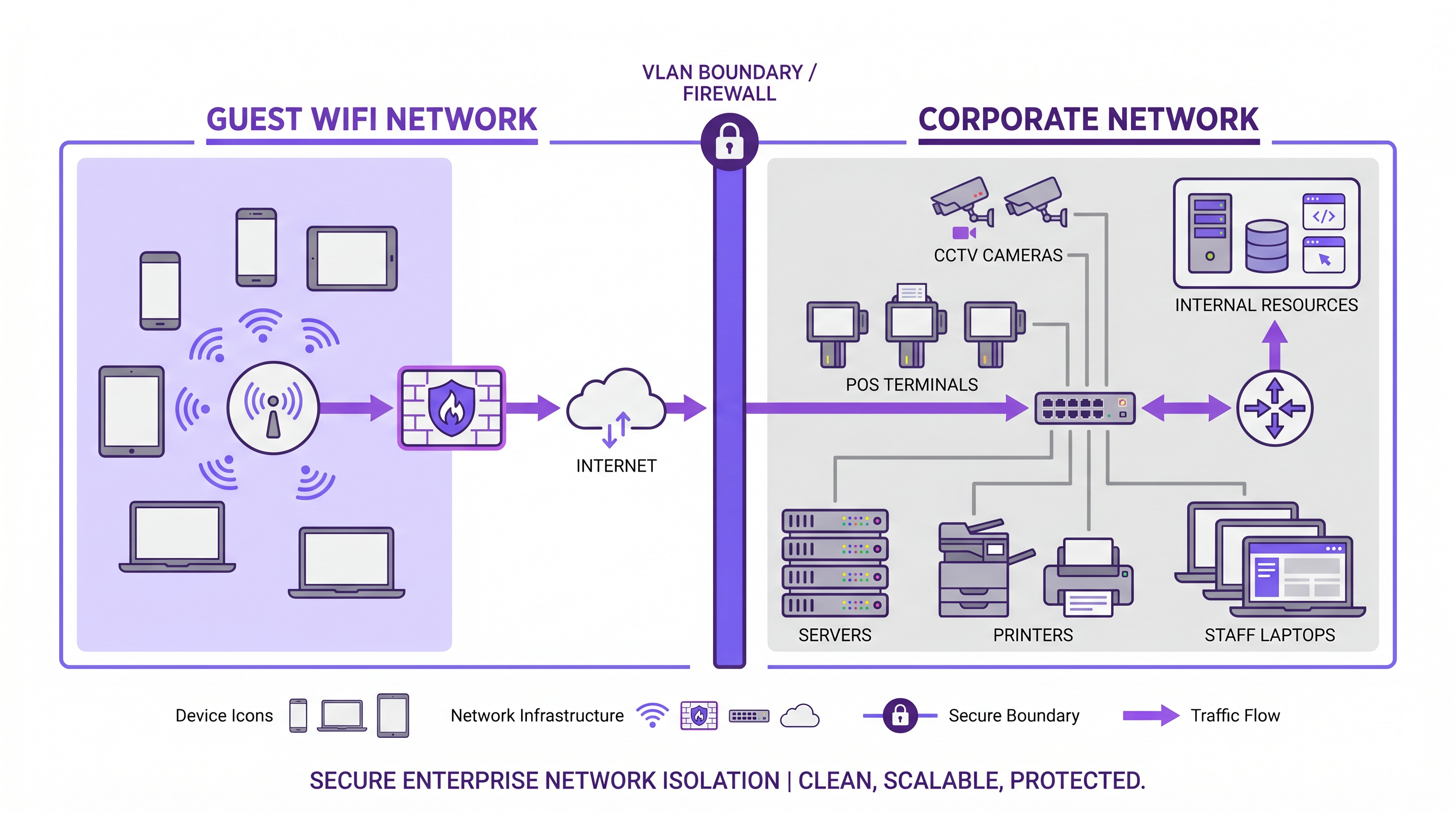
When designing network architecture for public-facing environments, the distinction between a guest WiFi network and a main corporate network is fundamentally a question of security, compliance, and operational integrity. A guest WiFi network provides internet-only access for visitors, customers, and unmanaged devices, while the corporate network hosts business-critical systems, point-of-sale terminals, and proprietary data.
For IT managers and network architects, simply broadcasting a different SSID is insufficient. True network segmentation requires isolation at the VLAN level, distinct authentication models, and separate traffic policies. This guide explores the technical requirements for establishing secure guest access, the implementation of VLAN tagging and captive portals, and the business impact of transforming an operational cost into a first-party data asset using platforms like Guest WiFi and WiFi Analytics .
Technical Deep-Dive: Architecture and Isolation
The core difference between guest and corporate networks lies in the underlying Layer 2 and Layer 3 architecture. A robust enterprise guest WiFi deployment relies on strict logical separation to ensure that unauthenticated traffic never traverses the same broadcast domain as corporate data.
SSID-to-VLAN Mapping
The foundational mechanism for network separation is SSID-to-VLAN mapping. Enterprise-grade access points are configured to broadcast multiple Service Set Identifiers (SSIDs). Each SSID is mapped to a distinct Virtual Local Area Network (VLAN).
- Guest VLAN: Configured with a route exclusively to the internet gateway. Inter-VLAN routing is explicitly disabled.
- Corporate VLAN: Configured with routes to internal resources (domain controllers, file servers, intranet).
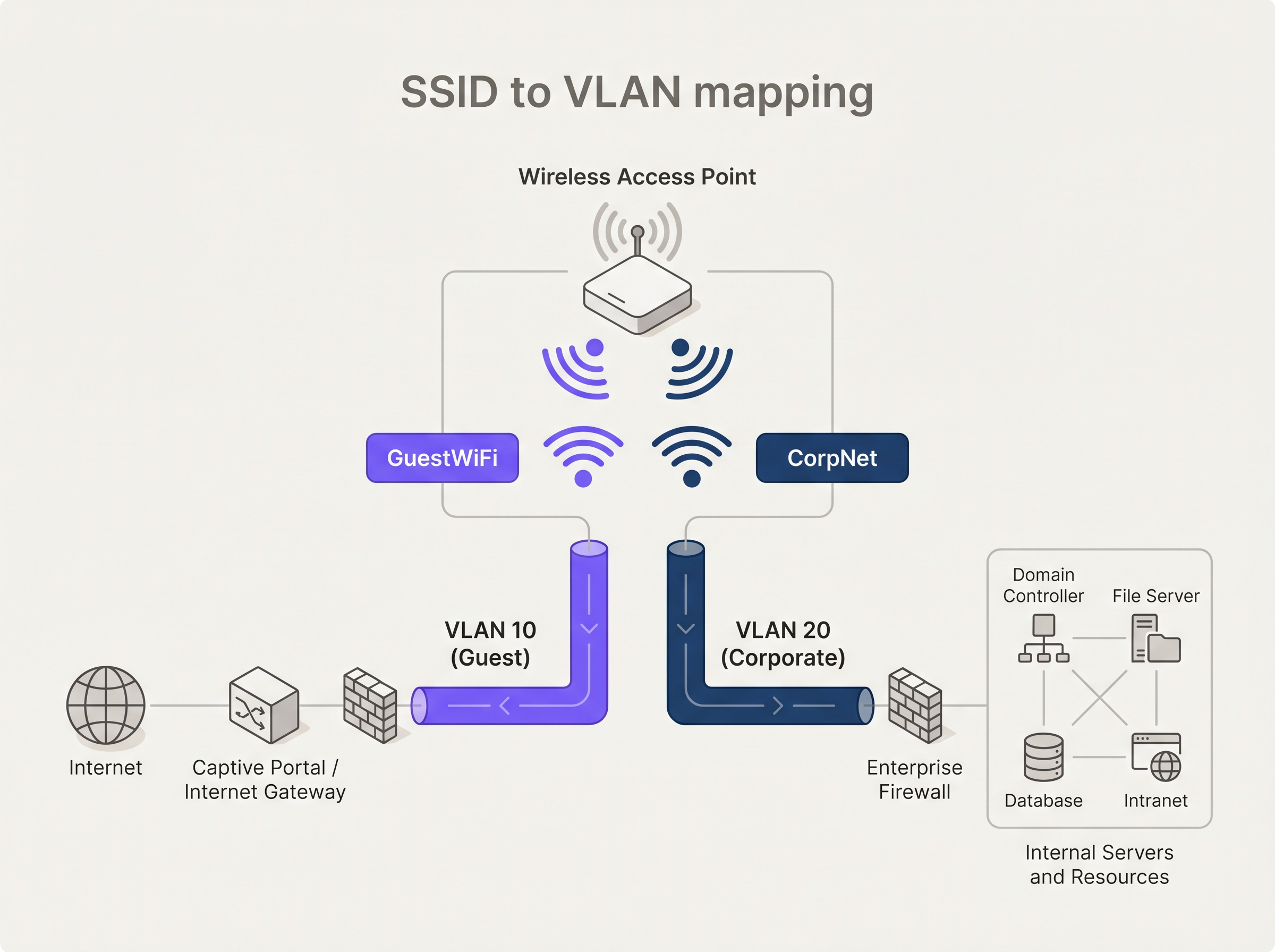
To maintain this separation across the switching infrastructure, access points must be connected to 802.1Q trunk ports rather than access ports. This ensures that VLAN tags are preserved as traffic moves from the edge to the distribution and core layers.
Authentication and Encryption Models
Authentication requirements differ significantly between the two environments.
Corporate Authentication: The enterprise standard is IEEE 802.1X, typically backed by a RADIUS server. Certificate-based authentication (EAP-TLS) is preferred over credential-based methods (PEAP-MSCHAPv2) to ensure only managed devices can connect. For securing the authentication traffic itself, organisations should implement RadSec: Securing RADIUS Authentication Traffic with TLS .
Guest Authentication: Guest devices are unmanaged. The standard approach is a captive portal—a web page that intercepts the initial HTTP/HTTPS request. Modern platforms leverage this interception point not just for terms-of-service acceptance, but for profile-based authentication and GDPR-compliant data capture.
Regarding encryption, WPA3 is the current standard. Guest networks should utilise WPA3-SAE (Simultaneous Authentication of Equals) to provide forward secrecy, protecting past traffic even if the pre-shared key is compromised. Corporate networks should employ WPA3-Enterprise in 192-bit mode.
Implementation Guide: Building Secure Guest Access
Deploying a secure guest wireless network requires careful configuration across the entire network stack.
1. Infrastructure Provisioning
Ensure all wireless controllers, access points, and switches support 802.1Q VLAN tagging. Consumer-grade hardware is unsuitable for enterprise environments. Configure dedicated DHCP scopes for the guest VLAN (e.g., 192.168.100.0/24) and assign public DNS resolvers (like 8.8.8.8 or 1.1.1.1) to prevent DNS-based enumeration of internal resources.
2. Client Isolation
Enable wireless client isolation (also known as AP isolation) on the guest SSID. This prevents devices connected to the same access point from communicating with one another, mitigating the risk of lateral movement or peer-to-peer attacks within the guest network.
3. Traffic Shaping and QoS
Implement strict Quality of Service (QoS) policies. Apply rate limiting to the guest VLAN to cap per-client bandwidth (e.g., 10 Mbps download / 2 Mbps upload) and ensure that corporate traffic, particularly VoIP and video conferencing, receives priority queuing.
4. Captive Portal Integration
Integrate the guest SSID with a robust captive portal solution. For venues in Retail or Hospitality , the captive portal is the primary digital touchpoint. Purple's platform allows venues to authenticate users via social login or form fill, transforming anonymous MAC addresses into actionable customer profiles.
Best Practices and Compliance
Adhering to industry standards is non-negotiable, particularly in regulated sectors.
- PCI DSS Compliance: If your venue processes card payments, the Cardholder Data Environment (CDE) must be strictly isolated from guest traffic. Any shared network segment violates PCI DSS requirements.
- GDPR and Data Privacy: When capturing user data via captive portals, explicit consent mechanisms must be in place. The data architecture must support the right to be forgotten and secure data residency.
- SD-WAN Integration: For distributed retail or hospitality chains, routing guest traffic directly to the internet at the branch edge (local breakout) while backhauling corporate traffic via secure tunnels is highly efficient. Read more about The Core SD WAN Benefits for Modern Businesses .
Troubleshooting & Risk Mitigation
Common failure modes in guest WiFi deployments often stem from configuration drift or inadequate hardware.
Issue: Guests accessing internal IP addresses. Cause: Improper VLAN configuration or enabled inter-VLAN routing on the core switch/firewall. Mitigation: Audit Access Control Lists (ACLs). Implement a default-deny policy for traffic originating from the guest VLAN destined for RFC 1918 private IP space.
Issue: Corporate network degradation during peak visitor hours. Cause: Insufficient bandwidth throttling on the guest network. Mitigation: Enforce strict per-client rate limits and overall guest VLAN bandwidth caps at the firewall edge.
ROI & Business Impact
Historically, guest WiFi was viewed as a sunk cost—an operational necessity for Transport hubs, Healthcare facilities, and retail environments. By implementing a sophisticated captive portal and analytics layer, this cost centre becomes a revenue-generating asset.
The ROI is measured through:
- First-Party Data Acquisition: Building a CRM database of verified visitors.
- Marketing Automation: Triggering automated campaigns based on visit frequency and dwell time.
- Retail Media Monetisation: Utilising the captive portal splash page as premium advertising real estate.
Expert Briefing: Podcast
Listen to our senior consultant break down the architectural differences and common pitfalls in enterprise guest WiFi deployments.
Key Terms & Definitions
VLAN (Virtual Local Area Network)
A logical grouping of devices on the same physical network infrastructure, functioning as if they were on separate isolated LANs.
Used to separate guest traffic from corporate traffic across the same switches and access points.
SSID (Service Set Identifier)
The public name of a wireless network broadcast by an access point.
The primary identifier users see when connecting; must be mapped to specific VLANs for security.
Captive Portal
A web page that intercepts a user's initial internet request on a public network, requiring action (login, acceptance of terms) before granting access.
The primary authentication and data capture mechanism for enterprise guest WiFi.
IEEE 802.1X
An IEEE Standard for port-based Network Access Control (PNAC), providing an authentication mechanism to devices wishing to attach to a LAN or WLAN.
The gold standard for securing the corporate main network, ensuring only authorized, managed devices can connect.
Client Isolation (AP Isolation)
A wireless security feature that prevents devices connected to the same AP from communicating directly with each other.
Critical for guest networks to prevent peer-to-peer attacks and lateral movement between untrusted devices.
QoS (Quality of Service)
Technologies that manage data traffic to reduce packet loss, latency, and jitter on the network by prioritizing specific types of data.
Used to ensure business-critical corporate traffic is not degraded by heavy bandwidth usage on the guest network.
WPA3-SAE
Simultaneous Authentication of Equals, the secure key establishment protocol used in WPA3-Personal.
Provides forward secrecy for guest networks, replacing the vulnerable pre-shared key (PSK) method of WPA2.
Inter-VLAN Routing
The process of forwarding network traffic from one VLAN to another using a router or Layer 3 switch.
Must be explicitly disabled or heavily restricted via ACLs between guest and corporate VLANs to maintain isolation.
Case Studies
A 200-room hotel needs to deploy WiFi for both guests and administrative staff using the same physical access points. How should the network be architected to ensure PCI DSS compliance for the front desk POS terminals?
Deploy 802.1Q VLAN tagging across all switches and APs. Create VLAN 10 for Guests, VLAN 20 for Admin Staff, and VLAN 30 for POS terminals. The Guest SSID maps to VLAN 10 with client isolation enabled and routes directly to the internet via a captive portal. The Admin SSID maps to VLAN 20 with 802.1X authentication. The POS terminals are hardwired to access ports assigned to VLAN 30. The firewall must have strict ACLs explicitly denying any routing between VLAN 10/20 and VLAN 30.
A large retail chain is experiencing poor performance on their corporate inventory scanners because customers are streaming high-definition video on the free guest WiFi.
Implement QoS policies at the wireless controller and firewall levels. Apply a per-client bandwidth limit (e.g., 5 Mbps) on the Guest SSID. Configure the corporate SSID (used by scanners) with high-priority QoS tags (e.g., WMM Voice/Video categories) and guarantee a minimum bandwidth allocation for the corporate VLAN at the WAN edge.
Scenario Analysis
Q1. You are deploying a new guest WiFi network for a hospital. The hospital requires guests to accept a Terms of Service policy before accessing the internet. Which authentication mechanism is most appropriate?
💡 Hint:Consider how unmanaged devices interact with public networks versus managed corporate devices.
Show Recommended Approach
A Captive Portal is the correct mechanism. Unlike 802.1X which requires pre-configured certificates or credentials on managed devices, a captive portal intercepts the initial web request from any unmanaged device and redirects it to a splash page where the Terms of Service can be presented and accepted.
Q2. A network engineer has configured a new 'Guest' SSID with a WPA3 password, but guests are still receiving IP addresses from the internal corporate DHCP server (10.0.0.x). What is the architectural flaw?
💡 Hint:Look at the Layer 2 configuration between the access point and the switch.
Show Recommended Approach
The SSID has not been mapped to a dedicated VLAN, or the access point is connected to an access port rather than a trunk port. Because VLAN tagging is missing or stripped, the guest traffic is falling into the native corporate VLAN broadcast domain, allowing it to reach the internal DHCP server.
Q3. To save costs, a retail manager suggests plugging a consumer-grade wireless router into the back-office switch to provide guest WiFi. Why is this a critical security risk?
💡 Hint:Consider the capabilities of consumer hardware regarding network segmentation.
Show Recommended Approach
Consumer-grade routers typically do not support 802.1Q VLAN tagging. Plugging it directly into the back-office switch places guest traffic on the same Layer 2 network as the corporate devices (like POS systems). This eliminates network segmentation, exposing the corporate network to lateral movement and violating PCI DSS compliance.




