

अपने व्यवसाय के लिए एक Captive Portal कैसे स्थापित करें
यह आधिकारिक मार्गदर्शिका आईटी लीडर्स, नेटवर्क आर्किटेक्ट्स और वेन्यू ऑपरेशंस डायरेक्टर्स को मैनेज्ड प्लेटफॉर्म्स का उपयोग करके एक सुरक्षित, अनुपालनकारी Captive Portal को डिप्लॉय करने के लिए एक चरण-दर-चरण मार्गदर्शिका प्रदान करती है। इसमें RADIUS, 802.1X और वॉल्ड गार्डन कॉन्फ़िगरेशन सहित तकनीकी आर्किटेक्चर, साथ ही कार्यान्वयन की सर्वोत्तम प्रथाएं और गेस्ट WiFi को एक लागत केंद्र से एक रणनीतिक फर्स्ट-पार्टी डेटा अधिग्रहण संपत्ति में कैसे बदला जाए, यह शामिल है।
🎧 Listen to this Guide
View Transcript

कार्यकारी सारांश
एक मजबूत Captive Portal को डिप्लॉय करना एक महत्वपूर्ण इंफ्रास्ट्रक्चर निर्णय है जो नेटवर्क सुरक्षा, उपयोगकर्ता अनुभव और डेटा अधिग्रहण क्षमताओं को सीधे प्रभावित करता है। आईटी मैनेजर्स और नेटवर्क आर्किटेक्ट्स के लिए, एक Captive Portal एंटरप्राइज़ वायरलेस नेटवर्क के लिए गेटकीपर के रूप में कार्य करता है, जो अप्रमाणित ट्रैफ़िक को रोकता है और इंटरनेट कनेक्टिविटी प्रदान करने से पहले एक्सेस नीतियों को लागू करता है। यह मार्गदर्शिका वाणिज्यिक वातावरण — जैसे Retail , Hospitality , और सार्वजनिक क्षेत्र के स्थानों — में Captive Portal को कॉन्फ़िगर और डिप्लॉय करने के लिए एक व्यापक, चरण-दर-चरण मार्गदर्शिका प्रदान करती है, जिसमें Purple के Guest WiFi समाधान जैसे मैनेज्ड प्लेटफॉर्म्स का उपयोग किया गया है।
प्रमाणीकरण प्रवाह को मानकीकृत करके, संगठन कानूनी जोखिमों को कम कर सकते हैं, बैंडविड्थ सीमाओं को लागू कर सकते हैं, और एक व्यापक WiFi Analytics रणनीति में फीड करने के लिए फर्स्ट-पार्टी डेटा को सहजता से कैप्चर कर सकते हैं। हम Captive Portals के अंतर्निहित तकनीकी आर्किटेक्चर, व्यावहारिक कार्यान्वयन चरणों और उद्योग की सर्वोत्तम प्रथाओं का पता लगाएंगे ताकि एक सुरक्षित, स्केलेबल और अनुपालनकारी डिप्लॉयमेंट सुनिश्चित किया जा सके।
तकनीकी गहन-अध्ययन: आर्किटेक्चर और मानक
एक Captive Portal वायरलेस लोकल एरिया नेटवर्क (WLAN) से कनेक्ट होने वाले अप्रमाणित उपकरणों से HTTP/HTTPS ट्रैफ़िक को रोककर कार्य करता है। जब कोई उपयोगकर्ता Service Set Identifier (SSID) से कनेक्ट होता है, तो एक्सेस पॉइंट (AP) या वायरलेस LAN कंट्रोलर (WLC) डिवाइस को एक वॉल्ड गार्डन में रखता है — एक प्रतिबंधित नेटवर्क वातावरण जिसमें एक्सेस केवल प्रमाणीकरण सर्वर और आवश्यक DNS सेवाओं तक सीमित होता है।
इंटरसेप्शन मैकेनिज्म आमतौर पर HTTP रीडायरेक्शन या DNS हाइजैकिंग पर निर्भर करता है। जब क्लाइंट डिवाइस किसी डोमेन को हल करने या HTTP GET अनुरोध भेजने का प्रयास करता है, तो नेटवर्क इंफ्रास्ट्रक्चर अनुरोध को रोकता है और क्लाइंट के ब्राउज़र को बाहरी सर्वर या मैनेज्ड प्लेटफॉर्म पर होस्ट किए गए Captive Portal लॉगिन पेज पर रीडायरेक्ट करता है। इस प्रक्रिया की गहन समझ के लिए, Captive Portal कैसे काम करता है? तकनीकी गहन-अध्ययन देखें।
प्रमुख प्रोटोकॉल और मानक
RADIUS (रिमोट ऑथेंटिकेशन डायल-इन यूजर सर्विस) केंद्रीकृत प्रमाणीकरण, प्राधिकरण और लेखा (AAA) के लिए उपयोग किया जाने वाला उद्योग मानक प्रोटोकॉल है। मैनेज्ड Captive Portals क्रेडेंशियल्स को मान्य करने और सत्र डेटा को ट्रैक करने के लिए RADIUS सर्वर के साथ एकीकृत होते हैं, जिसमें स्थानांतरित बाइट्स और सत्र की अवधि शामिल है। RADIUS UDP पर संचालित होता है, प्रमाणीकरण के लिए पोर्ट 1812 और लेखा के लिए पोर्ट 1813 का उपयोग करता है।
IEEE 802.1X पोर्ट-आधारित नेटवर्क एक्सेस कंट्रोल (PNAC) प्रदान करता है। जबकि Captive Portals अक्सर लेयर 7 पर वेब-आधारित प्रमाणीकरण पर निर्भर करते हैं, मजबूत एंटरप्राइज़ डिप्लॉयमेंट लेयर 2 पर सुरक्षित, प्रमाणपत्र-आधारित प्रमाणीकरण के लिए 802.1X को एकीकृत कर सकते हैं, विशेष रूप से स्टाफ नेटवर्क या पासपॉइंट और ओपनरोमिंग जैसे सहज रोमिंग समाधानों के लिए। Purple जैसे प्लेटफॉर्म कनेक्ट लाइसेंस के तहत ओपनरोमिंग के लिए एक मुफ्त पहचान प्रदाता के रूप में कार्य कर सकते हैं, जिससे फेडरेटेड स्थानों पर सहज, सुरक्षित रोमिंग सक्षम होती है।
वॉल्ड गार्डन कॉन्फ़िगरेशन किसी भी आधुनिक Captive Portal डिप्लॉयमेंट के लिए आवश्यक है। यह IP पतों या डोमेन की एक श्वेतसूची है जिसे क्लाइंट प्रमाणीकरण पूरा करने से पहले एक्सेस कर सकता है। यह OAuth प्रवाह (जैसे, फेसबुक, गूगल लॉगिन) की अनुमति देने और बाहरी रूप से होस्ट किए गए सेवा की शर्तों या गोपनीयता नीति दस्तावेजों तक पहुंच प्रदान करने के लिए महत्वपूर्ण है।
कार्यान्वयन मार्गदर्शिका: चरण-दर-चरण डिप्लॉयमेंट
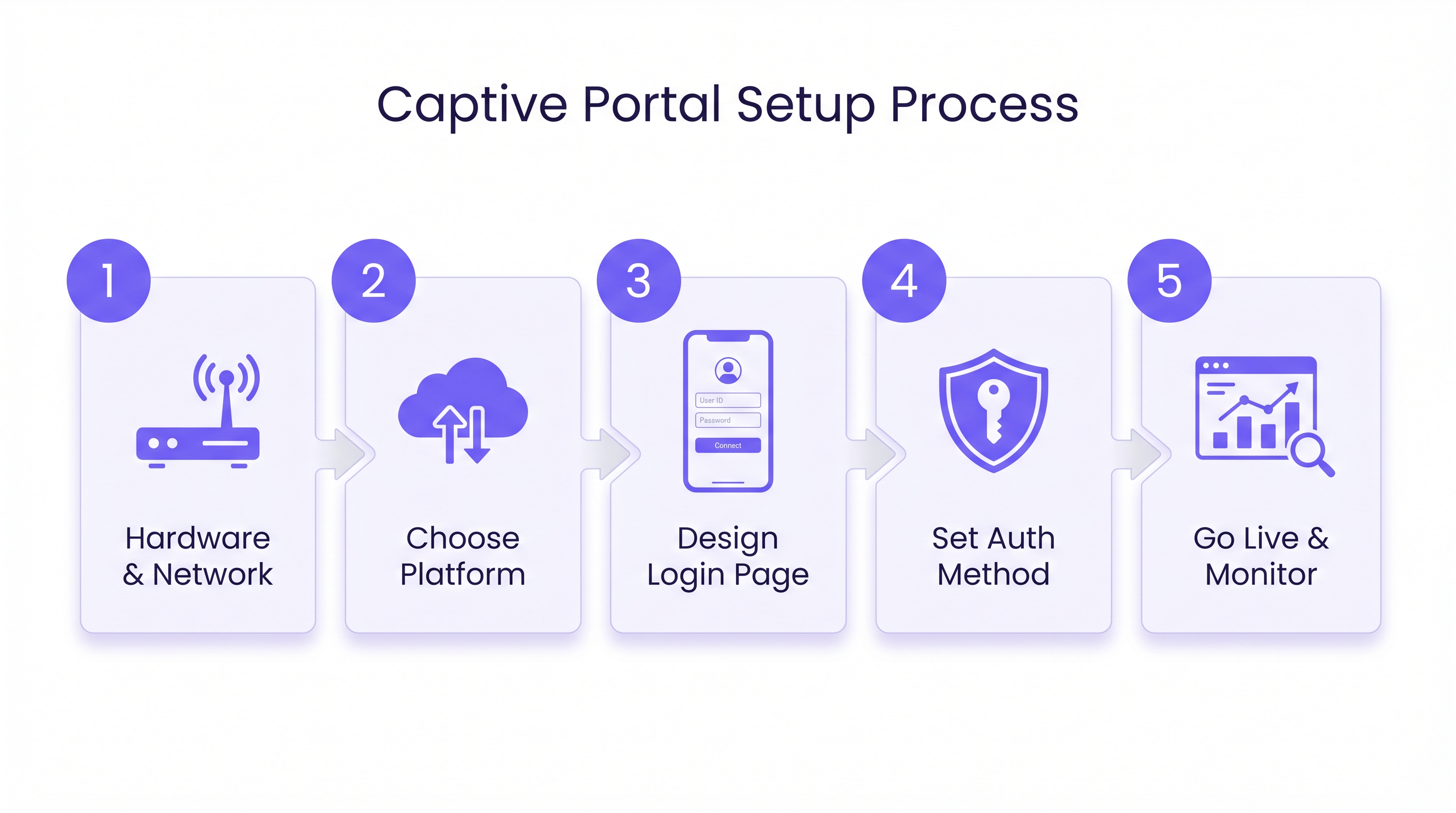
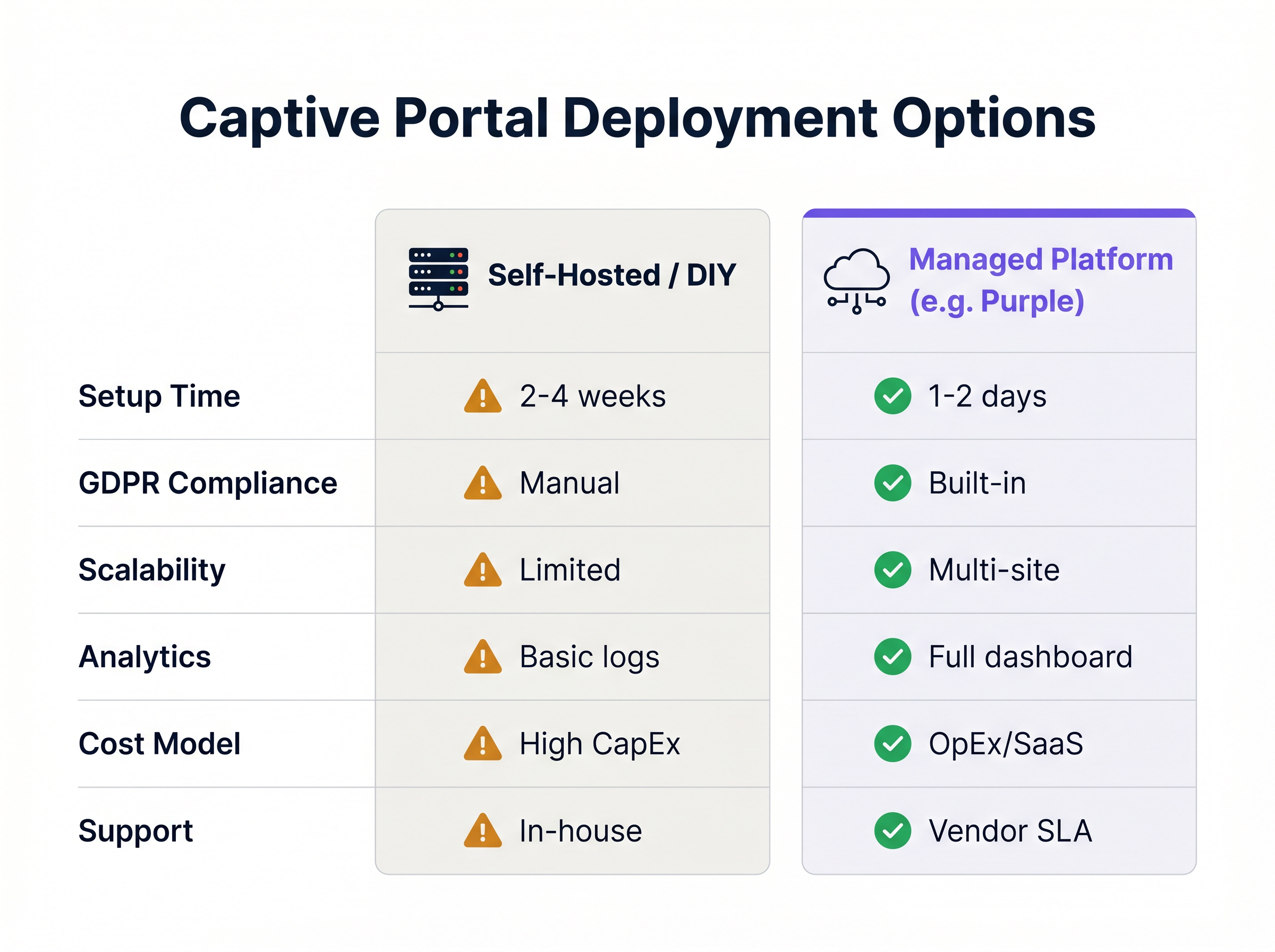
एक Captive Portal स्थापित करने में नेटवर्क हार्डवेयर कॉन्फ़िगरेशन को क्लाउड-आधारित प्रमाणीकरण सेवाओं के साथ समन्वयित करना शामिल है। निम्नलिखित चरण एक मैनेज्ड प्लेटफॉर्म दृष्टिकोण का उपयोग करके एक मानक डिप्लॉयमेंट की रूपरेखा तैयार करते हैं, जिसकी अधिकांश वाणिज्यिक स्थानों के लिए स्व-होस्टेड विकल्पों पर दृढ़ता से अनुशंसा की जाती है।
चरण 1: नेटवर्क इंफ्रास्ट्रक्चर की तैयारी
पोर्टल को कॉन्फ़िगर करने से पहले, सुनिश्चित करें कि अंतर्निहित नेटवर्क इंफ्रास्ट्रक्चर अपेक्षित क्लाइंट घनत्व और थ्रूपुट आवश्यकताओं का समर्थन करने में सक्षम है। VLAN सेगमेंटेशन मूलभूत सुरक्षा आवश्यकता है: गेस्ट ट्रैफ़िक को समर्पित वर्चुअल LANs का उपयोग करके कॉर्पोरेट ट्रैफ़िक से अलग किया जाना चाहिए। गेस्ट एक्सेस के लिए एक समर्पित SSID बनाएं और इसकी सुरक्षा सेटिंग्स को "ओपन" (कोई WPA प्री-शेयर्ड कुंजी नहीं) पर कॉन्फ़िगर करें, प्रमाणीकरण और एक्सेस कंट्रोल के लिए पूरी तरह से Captive Portal पर निर्भर रहें। सुनिश्चित करें कि पीक विज़िटर वॉल्यूम को संभालने के लिए पर्याप्त DHCP लीज पूल उपलब्ध हैं, और पोर्टल पेज पर त्वरित रीडायरेक्शन सुनिश्चित करने के लिए विश्वसनीय DNS सर्वर कॉन्फ़िगर करें।
चरण 2: वॉल्ड गार्डन और रीडायरेक्शन कॉन्फ़िगरेशन
अप्रमाणित ट्रैफ़िक को रीडायरेक्ट करने के लिए एक्सेस पॉइंट्स या वायरलेस कंट्रोलर को कॉन्फ़िगर करें। नेटवर्क हार्डवेयर को मैनेज्ड Captive Portal प्लेटफॉर्म के URL पर इंगित करें — यह आपके SaaS वेंडर द्वारा प्रदान किया गया बाहरी पोर्टल URL है। वॉल्ड गार्डन श्वेतसूची को परिभाषित करें, यह सुनिश्चित करते हुए कि आपकी चुनी हुई प्रमाणीकरण विधियों के लिए आवश्यक सभी डोमेन शामिल हैं। यदि सोशल लॉगिन का उपयोग कर रहे हैं, तो आपको फेसबुक, ट्विटर, गूगल और किसी भी अन्य प्रदाताओं के लिए OAuth डोमेन को श्वेतसूची में डालना होगा। अंत में, मैनेज्ड प्लेटफॉर्म द्वारा प्रदान किए गए RADIUS सर्वर विवरण — IP पते, पोर्ट और साझा रहस्य — को अपने नेटवर्क कंट्रोलर में इनपुट करें।
चरण 3: उपयोगकर्ता अनुभव (UX) डिज़ाइन करना
लॉगिन पेज अक्सर पहला डिजिटल इंटरैक्शन होता है जो ग्राहक का वेन्यू के साथ होता है। यह सहज, तेजी से लोड होने वाला और ब्रांड-अनुरूप होना चाहिए। वेन्यू प्रकार के लिए उपयुक्त प्रमाणीकरण विधियों का चयन करें: सोशल मीडिया लॉगिन डेटा की प्रचुरता को अधिकतम करता है, ईमेल पंजीकरण एक विश्वसनीय CRM फ़ीड प्रदान करता है, SMS सत्यापन पहचान सत्यापन की एक अतिरिक्त परत जोड़ता है, और एक साधारण क्लिक-थ्रू (नियम और शर्तें स्वीकार करना) डेटा कैप्चर के द्वितीयक होने पर घर्षण को कम करता है। निर्धारित करें कि कौन से डेटा बिंदु आवश्यक हैं और अत्यधिक लंबे फ़ॉर्म से बचें। सुनिश्चित करें कि पोर्टल पूरी तरह से प्रतिक्रियाशील है और मोबाइल उपकरणों के लिए अनुकूलित है, क्योंकि अतिथि WiFi कनेक्शन का एक बड़ा हिस्सा स्मार्टफोन से उत्पन्न होता है।
चरण 4: अनुपालन और नीति प्रवर्तन
सुनिश्चित करें कि कैप्टिव पोर्टल परिनियोजन प्रासंगिक कानूनी और नियामक ढाँचों का पालन करता है। स्थान के उपयोग की शर्तों और गोपनीयता नीति के लिंक स्पष्ट रूप से प्रदर्शित करें, और पहुँच प्रदान करने से पहले स्पष्ट सहमति — आमतौर पर एक चेकबॉक्स — की आवश्यकता होती है। यदि व्यक्तिगत डेटा कैप्चर कर रहे हैं, तो सुनिश्चित करें कि प्लेटफ़ॉर्म डेटा सब्जेक्ट एक्सेस रिक्वेस्ट (DSARs), डेटा अनामीकरण, और GDPR या CCPA के अनुरूप सुरक्षित भंडारण के लिए उपकरण प्रदान करता है। प्रबंधित प्लेटफ़ॉर्म आमतौर पर इन अनुपालन आवश्यकताओं को तुरंत संभाल लेते हैं। दुर्भावनापूर्ण वेबसाइटों और अनुचित सामग्री को ब्लॉक करने के लिए DNS-आधारित सामग्री फ़िल्टरिंग लागू करें, जिससे नेटवर्क को देयता से बचाया जा सके और एक सुरक्षित ब्राउज़िंग वातावरण सुनिश्चित किया जा सके।
चरण 5: परीक्षण और परिनियोजन
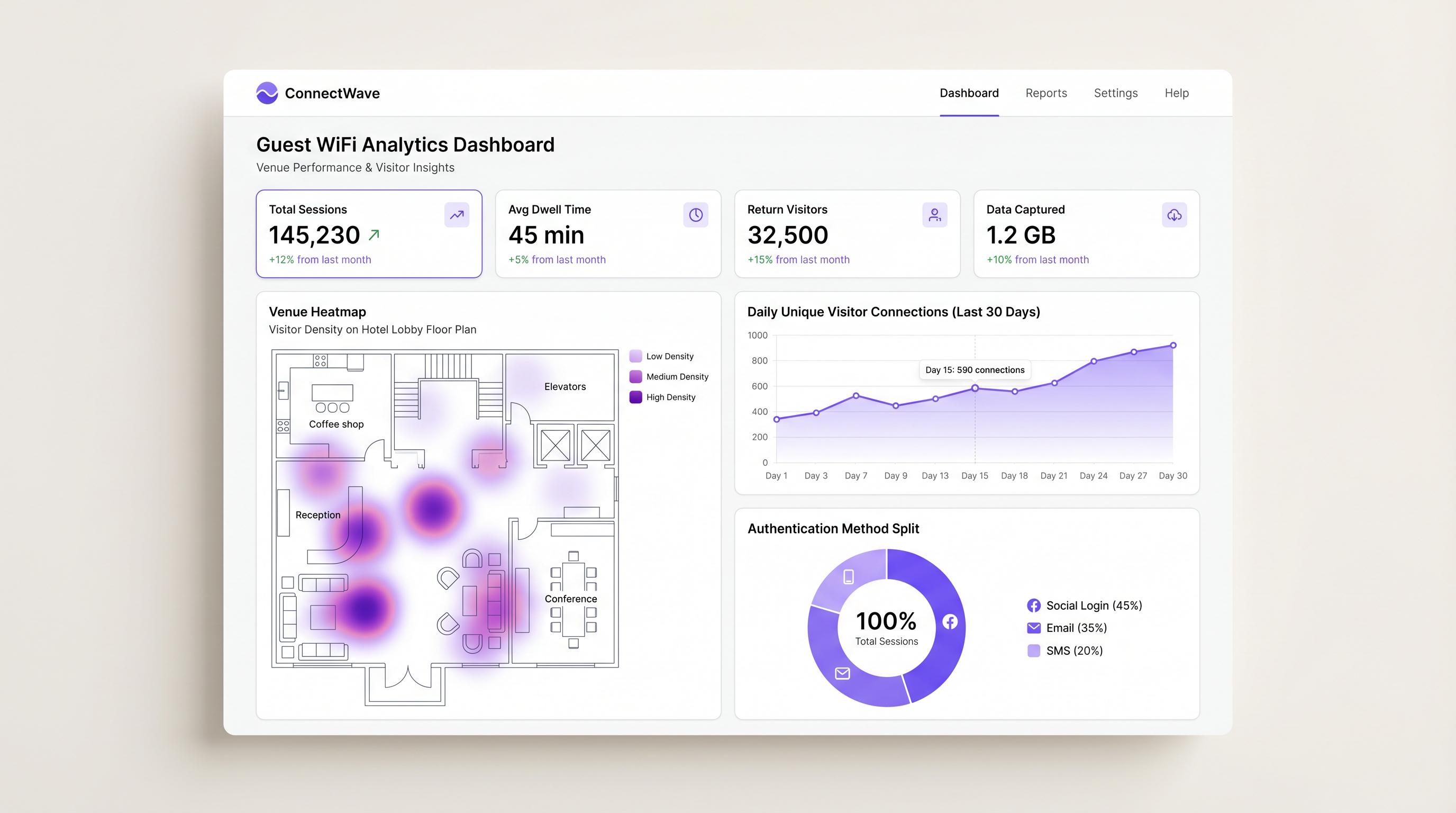
पूर्ण परिनियोजन से पहले कठोर परीक्षण महत्वपूर्ण है। संगतता सुनिश्चित करने के लिए विभिन्न ऑपरेटिंग सिस्टम (iOS, Android, Windows, macOS) और ब्राउज़र प्रकारों में प्रमाणीकरण प्रवाह का परीक्षण करें। नेटवर्क इन्फ्रास्ट्रक्चर और RADIUS सर्वर बिना विलंबता या टाइमआउट के लोड को संभाल सकते हैं, यह सत्यापित करने के लिए चरम कनेक्शन वॉल्यूम का अनुकरण करें। सत्यापित करें कि सत्र डेटा WiFi Analytics डैशबोर्ड में सही ढंग से पॉप्युलेट हो रहा है, प्रमाणीकरण सफलता दर, सत्र अवधि और डेटा कैप्चर वॉल्यूम जैसे मेट्रिक्स की जाँच करें।
सर्वोत्तम अभ्यास
कैप्टिव पोर्टल की प्रभावशीलता और सुरक्षा को अधिकतम करने के लिए, निम्नलिखित उद्योग-मानक सिफारिशों का पालन करें।
बैंडविड्थ थ्रॉटलिंग लागू करें। प्रति-उपयोगकर्ता बैंडविड्थ सीमाएँ कॉन्फ़िगर करें — उदाहरण के लिए, 5 Mbps डाउन और 2 Mbps अप — ताकि एक उपयोगकर्ता को अत्यधिक नेटवर्क संसाधनों का उपभोग करने और दूसरों के अनुभव को खराब करने से रोका जा सके। यह स्टेडियम और सम्मेलन केंद्रों जैसे उच्च-घनत्व वाले स्थानों में विशेष रूप से महत्वपूर्ण है।
सत्र टाइमआउट सेट करें। स्थान के संदर्भ के आधार पर उपयुक्त सत्र टाइमआउट परिभाषित करें: एक कॉफी शॉप के लिए 2 घंटे, एक खुदरा वातावरण के लिए 8 घंटे, और एक होटल के लिए 24 घंटे। यह उचित अंतराल पर पुनः प्रमाणीकरण को मजबूर करता है और IP एड्रेस लीज पूल को कुशलता से प्रबंधित करता है।
MAC एड्रेस प्रमाणीकरण का उपयोग करें। लौटने वाले आगंतुकों के लिए, बाद की विज़िट पर स्प्लैश पेज को बायपास करने के लिए MAC प्रमाणीकरण सक्षम करें। यह एक सहज अनुभव प्रदान करता है जबकि अभी भी विश्लेषण उद्देश्यों के लिए सत्र डेटा लॉग करता है, घर्षण जोड़े बिना डेटा कैप्चर कार्यक्रम के मूल्य को बनाए रखता है।
मौजूदा प्रणालियों के साथ एकीकृत करें। कैप्टिव पोर्टल डेटा को CRM सिस्टम, मार्केटिंग ऑटोमेशन प्लेटफॉर्म और प्रॉपर्टी मैनेजमेंट सिस्टम (PMS) के साथ एकीकृत करने के लिए API का लाभ उठाएं। यह व्यक्तिगत जुड़ाव को बढ़ावा देता है और फुटफॉल डेटा और राजस्व परिणामों के बीच के अंतर को पाटता है। यह एकीकरण रणनीति आधुनिक व्यवसायों के लिए कोर SD WAN लाभ में चर्चा की गई व्यापक नेटवर्क आर्किटेक्चर विचारों के साथ अच्छी तरह से संरेखित होती है, जहाँ एक एकीकृत, सॉफ्टवेयर-परिभाषित नेटवर्क फैब्रिक सिस्टम के बीच डेटा प्रवाह को सरल बनाता है।
समस्या निवारण और जोखिम शमन
एक मजबूत आर्किटेक्चर के साथ भी, समस्याएँ उत्पन्न हो सकती हैं। सामान्य विफलता मोड को समझना त्वरित समाधान के लिए आवश्यक है।
कैप्टिव पोर्टल दिखाई नहीं दे रहा है (CNA विफलता)। कैप्टिव नेटवर्क असिस्टेंट (CNA) मोबाइल ऑपरेटिंग सिस्टम में निर्मित मिनी-ब्राउज़र है जो प्रमाणीकरण की आवश्यकता वाले नेटवर्क से कनेक्ट होने पर पॉप अप होता है। यदि CNA ट्रिगर करने में विफल रहता है, तो उपयोगकर्ता इंटरनेट एक्सेस के बिना फंस सकता है और WiFi को खराब समझेगा। प्राथमिक शमन यह सत्यापित करना है कि DNS सही ढंग से हल हो रहा है और यह जांचना है कि वॉल्ड गार्डन अनजाने में उन विशिष्ट डोमेन को श्वेतसूचीबद्ध नहीं करता है जिनका उपयोग Apple या Google कैप्टिव पोर्टल का पता लगाने के लिए करते हैं, जैसे captive.apple.com या connectivitycheck.gstatic.com।
RADIUS टाइमआउट त्रुटियाँ। यदि नेटवर्क नियंत्रक RADIUS सर्वर तक नहीं पहुँच पाता है, तो सभी उपयोगकर्ताओं के लिए प्रमाणीकरण विफल हो जाएगा। नियंत्रक और RADIUS सर्वर के बीच नेटवर्क कनेक्टिविटी सत्यापित करें, यह सुनिश्चित करने के लिए फ़ायरवॉल नियमों की जाँच करें कि UDP पोर्ट 1812 और 1813 दोनों दिशाओं में खुले हैं, और पुष्टि करें कि साझा रहस्य नियंत्रक और RADIUS सर्वर कॉन्फ़िगरेशन दोनों पर बिल्कुल मेल खाता है।
OAuth लॉगिन विफलताएँ। उपयोगकर्ता सोशल मीडिया प्रदाताओं के माध्यम से लॉग इन नहीं कर सकते। सबसे आम कारण एक अधूरा या पुराना वॉल्ड गार्डन कॉन्फ़िगरेशन है। सोशल नेटवर्क अक्सर अपनी IP रेंज और CDN डोमेन अपडेट करते हैं। शमन यह है कि एक प्रबंधित प्लेटफ़ॉर्म का उपयोग किया जाए जो सोशल प्रदाताओं के लिए वॉल्ड गार्डन सूचियों को स्वचालित रूप से अपडेट करता है, जिससे मैन्युअल रखरखाव का परिचालन बोझ दूर होता है।
ROI और व्यावसायिक प्रभाव
एक ठीक से लागू किया गया कैप्टिव पोर्टल अतिथि WiFi को एक लागत केंद्र से एक रणनीतिक व्यावसायिक संपत्ति में बदल देता है। निवेश पर प्रतिफल कई प्रमुख मेट्रिक्स के माध्यम से मापा जाता है।
डेटा अधिग्रहण प्राथमिक मूल्य चालक है। नेटवर्क प्रमाणीकरण के बिंदु पर सत्यापित ईमेल पते और जनसांख्यिकीय डेटा कैप्चर करके, स्थान लक्षित मार्केटिंग अभियानों के लिए मजबूत फर्स्ट-पार्टी डेटाबेस बनाते हैं — एक पोस्ट-कुकी डिजिटल परिदृश्य में एक महत्वपूर्ण क्षमता।
WiFi Analytics के माध्यम से प्रदान की गई ग्राहक अंतर्दृष्टि फुटफॉल पैटर्न, ठहरने के समय और लौटने वाले आगंतुकों की आवृत्ति पर विस्तृत डेटा प्रदान करती है। यह डेटा परिचालन निर्णयों को सूचित करता है,स्टाफिंग स्तरों और Retail परिवेश में स्टोर लेआउट से लेकर Healthcare और Transport हब में संसाधन आवंटन तक।
उन्नत सहभागिता ट्रिगर किए गए मार्केटिंग संदेशों के माध्यम से — उदाहरण के लिए, जब कोई उपयोगकर्ता कनेक्ट होता है तो भेजा गया एक SMS ऑफ़र — तत्काल इन-वेन्यू रूपांतरणों को बढ़ावा देता है। प्रबंधित Captive Portal प्लेटफॉर्म का उपयोग करने वाले Hospitality ऑपरेटरों ने कनेक्शन के क्षण में दिए गए लक्षित प्रचारों से सहायक राजस्व में मापने योग्य वृद्धि दर्ज की है।
जोखिम न्यूनीकरण एक मात्रात्मक लाभ है जिसे अक्सर कम करके आंका जाता है। सेवा की शर्तों और सामग्री फ़िल्टरिंग को लागू करना सार्वजनिक नेटवर्क पर अवैध डाउनलोडिंग या अनुचित ब्राउज़िंग से जुड़ी देनदारी से व्यवसाय की रक्षा करता है। PCI DSS के अधीन संगठनों के लिए, Captive Portal आर्किटेक्चर द्वारा लागू उचित नेटवर्क सेगमेंटेशन एक अनुपालन आवश्यकता है, न कि केवल एक सर्वोत्तम अभ्यास।
एक बुनियादी, अप्रबंधित ओपन नेटवर्क से एक परिष्कृत Captive Portal समाधान में संक्रमण करके, स्थान मार्केटिंग, संचालन और अनुपालन कार्यों में मापने योग्य, जिम्मेदार व्यावसायिक मूल्य उत्पन्न करते हुए अतिथि अनुभव को महत्वपूर्ण रूप से बढ़ा सकते हैं।
Key Terms & Definitions
Captive Portal
A web page that a user of a public-access network is obliged to view and interact with before full internet access is granted. It enforces acceptable use policies and typically captures user identity data.
The primary mechanism IT teams use to enforce access policies and capture user data on guest networks in hotels, retail stores, stadiums, and public venues.
Walled Garden
A restricted network environment that allows access only to specific, whitelisted IP addresses or domains prior to full authentication. All other outbound traffic is blocked.
Critical for enabling social login OAuth flows and providing access to terms of service before the user has completed authentication and gained full internet connectivity.
RADIUS
Remote Authentication Dial-In User Service; a networking protocol that provides centralised Authentication, Authorization, and Accounting (AAA) management for users connecting to a network service.
The backend protocol that communicates between the wireless controller and the managed portal platform to validate sessions. Uses UDP port 1812 for authentication and 1813 for accounting.
CNA (Captive Network Assistant)
The pseudo-browser built into mobile operating systems (iOS and Android) that automatically detects a captive portal and pops up the login screen without requiring the user to open a browser.
If the CNA fails to trigger due to DNS or walled garden misconfigurations, users will experience a 'broken WiFi' scenario and will be unable to access the login page.
MAC Address Authentication
A method of granting network access based on the unique Media Access Control (MAC) address of the client device, bypassing the splash page for previously authenticated devices.
Used to provide seamless reconnection for returning visitors who have previously completed the captive portal flow, improving UX while maintaining session logging.
VLAN Segmentation
The practice of dividing a single physical network into multiple logical networks (Virtual LANs) to isolate traffic between different user groups or systems.
A fundamental security requirement to ensure guest WiFi traffic is strictly isolated from corporate or operational network traffic. Also a PCI DSS compliance requirement in retail environments.
IEEE 802.1X
An IEEE Standard for port-based Network Access Control (PNAC), providing an authentication mechanism to devices wishing to attach to a LAN or WLAN using EAP (Extensible Authentication Protocol).
Used for highly secure, certificate-based authentication in enterprise environments. Relevant for staff networks and advanced OpenRoaming deployments where platforms like Purple act as the identity provider.
OpenRoaming
A federation of WiFi networks that allows users to automatically and securely connect to participating venues without needing to search for networks or enter credentials, using identity providers.
An advanced deployment scenario where managed platforms can serve as identity providers to facilitate seamless, secure roaming across venues — Purple offers this under their Connect licence.
SSID (Service Set Identifier)
The name of a wireless network broadcast by an access point, which client devices scan for and connect to.
In captive portal deployments, a dedicated guest SSID is created, separate from the corporate SSID, to ensure traffic isolation and appropriate security policies.
Bandwidth Throttling
The intentional regulation of network throughput on a per-user or per-device basis to ensure equitable distribution of available bandwidth across all connected clients.
Essential in high-density venues to prevent individual users from consuming disproportionate bandwidth and degrading the experience for all other guests.
Case Studies
A 200-room hotel needs to provide seamless WiFi access for guests while ensuring bandwidth is distributed fairly across all rooms and returning guests do not have to repeatedly log in during their stay.
Deploy a managed captive portal integrated with the property management system (PMS). Configure the portal to authenticate via room number and guest surname, pulling reservation data from the PMS via API. Implement a session timeout of 24 hours aligned with the standard check-in/check-out cycle. Enable MAC Address Authentication so that once a device is authenticated, it automatically reconnects for the duration of the stay without displaying the splash page again. Configure bandwidth throttling at the wireless controller level to 10 Mbps down / 5 Mbps up per client, and implement QoS policies to prioritise video streaming traffic. Ensure the guest VLAN is fully isolated from the hotel's operational network (PMS, CCTV, POS systems) via strict VLAN segmentation.
A national retail chain wants to implement a captive portal across 50 locations to capture customer emails for their loyalty programme, but they are concerned about GDPR compliance and the operational overhead of managing walled garden configurations for social logins across all sites.
Standardise on a cloud-managed captive portal platform rather than self-hosting. Use the platform's built-in GDPR compliance tools, which include explicit opt-in checkboxes, automated handling of Data Subject Access Requests (DSARs), configurable data retention policies, and audit trails. Rely on the platform's automatically updated walled garden lists to ensure OAuth flows for Facebook and Google login function reliably across all 50 sites without manual intervention. Deploy a centralised management dashboard to push configuration changes, branding updates, and new authentication policies across all sites simultaneously, reducing operational overhead to near zero.
Scenario Analysis
Q1. A stadium IT director notices that during halftime, the captive portal login page takes over 30 seconds to load, leading to massive user drop-off. The network utilises a self-hosted RADIUS server running on a single on-premises virtual machine. What is the most likely architectural bottleneck, and what is the recommended remediation strategy?
💡 Hint:Consider the difference between normal operational load and sudden, massive spikes in concurrent connection requests — the 'thundering herd' problem.
Show Recommended Approach
The self-hosted RADIUS server and portal web infrastructure are likely buckling under the sudden spike of concurrent authentication requests at halftime. A single VM-based RADIUS server has a finite capacity for concurrent authentication requests. The recommended remediation is to migrate to a cloud-managed captive portal platform that leverages auto-scaling infrastructure to handle massive concurrent loads without latency. As an interim measure, deploying a secondary RADIUS server for failover and load balancing would improve resilience.
Q2. You are deploying a captive portal in a hospital environment. The marketing team wants to use Facebook login to capture demographic data for a patient satisfaction programme, but the security team mandates strict control over all outbound traffic and requires a whitelist-only firewall policy. How do you configure the network to satisfy both requirements?
💡 Hint:Think about how the client device communicates with the social network before it has full internet access, and which specific network layer this occurs at.
Show Recommended Approach
You must configure a precise Walled Garden on the wireless controller. This involves identifying and whitelisting the specific IP ranges, domains, and CDN endpoints required by Facebook's OAuth 2.0 API flow. This allows the unauthenticated device to reach Facebook's authentication servers for the login flow only, while all other outbound traffic remains blocked by the firewall until the RADIUS server sends an Access-Accept message. The walled garden must be reviewed and updated regularly as Facebook updates its infrastructure. Using a managed platform that auto-updates social provider walled garden lists is strongly recommended in this context.
Q3. A retail client reports that customers using Apple iPhones are not seeing the login splash page automatically when they connect to the guest WiFi network. Android users are unaffected. What is the technical term for the feature that should be triggering on the iPhone, and what is the most likely cause of its failure?
💡 Hint:Apple devices use a specific mechanism to test for internet connectivity upon joining a network, and this mechanism can be inadvertently bypassed by a common walled garden configuration error.
Show Recommended Approach
The feature is the Captive Network Assistant (CNA). The most likely cause of failure is a misconfigured walled garden that inadvertently whitelists the domain Apple uses to check for internet connectivity — captive.apple.com. When the iPhone connects to the network, it sends a probe request to this domain. If the walled garden allows the request to succeed (even if it returns an unexpected response), iOS may interpret this as full internet access and suppress the CNA popup. The fix is to remove captive.apple.com from the walled garden whitelist, ensuring the probe request is intercepted and redirected, which triggers the CNA correctly.




