

How to Set Up a Captive Portal for Your Business
This authoritative guide provides IT leaders, network architects, and venue operations directors with a step-by-step walkthrough for deploying a secure, compliant captive portal using managed platforms. It covers technical architecture including RADIUS, 802.1X, and walled garden configuration, alongside implementation best practices and how to transform guest WiFi from a cost centre into a strategic first-party data acquisition asset.
🎧 Listen to this Guide
View Transcript
Executive Summary
Deploying a robust captive portal is a critical infrastructure decision that directly impacts network security, user experience, and data acquisition capabilities. For IT managers and network architects, a captive portal acts as the gatekeeper to the enterprise wireless network, intercepting unauthenticated traffic and enforcing access policies before granting internet connectivity. This guide provides a comprehensive, step-by-step walkthrough for configuring and deploying a captive portal in commercial environments — such as Retail , Hospitality , and public-sector venues — using managed platforms like Purple's Guest WiFi solution.
By standardising the authentication flow, organisations can mitigate legal risks, enforce bandwidth limits, and seamlessly capture first-party data to feed into a broader WiFi Analytics strategy. We will explore the technical architecture underlying captive portals, practical implementation steps, and industry best practices to ensure a secure, scalable, and compliant deployment.
Technical Deep-Dive: Architecture and Standards
A captive portal functions by intercepting HTTP/HTTPS traffic from unauthenticated devices connecting to a wireless local area network (WLAN). When a user connects to the Service Set Identifier (SSID), the access point (AP) or wireless LAN controller (WLC) places the device in a walled garden — a restricted network environment with access limited strictly to the authentication server and necessary DNS services.
The interception mechanism typically relies on HTTP redirection or DNS hijacking. When the client device attempts to resolve a domain or send an HTTP GET request, the network infrastructure intercepts the request and redirects the client's browser to the captive portal login page hosted on an external server or managed platform. For a deeper understanding of this process, refer to How Does a Captive Portal Work? Technical Deep Dive .
Key Protocols and Standards
RADIUS (Remote Authentication Dial-In User Service) is the industry standard protocol used for centralized authentication, authorization, and accounting (AAA). Managed captive portals integrate with RADIUS servers to validate credentials and track session data, including bytes transferred and session duration. RADIUS operates over UDP, using port 1812 for authentication and port 1813 for accounting.
IEEE 802.1X provides port-based Network Access Control (PNAC). While captive portals often rely on web-based authentication at Layer 7, robust enterprise deployments may integrate 802.1X for secure, certificate-based authentication at Layer 2, particularly for staff networks or seamless roaming solutions like Passpoint and OpenRoaming. Platforms like Purple can act as a free identity provider for OpenRoaming under the Connect licence, enabling seamless, secure roaming across federated venues.
Walled Garden Configuration is essential for any modern captive portal deployment. This is a whitelist of IP addresses or domains that the client can access before completing authentication. It is critical for allowing OAuth flows (e.g., Facebook, Google login) and for providing access to terms of service or privacy policy documents hosted externally.
Implementation Guide: Step-by-Step Deployment
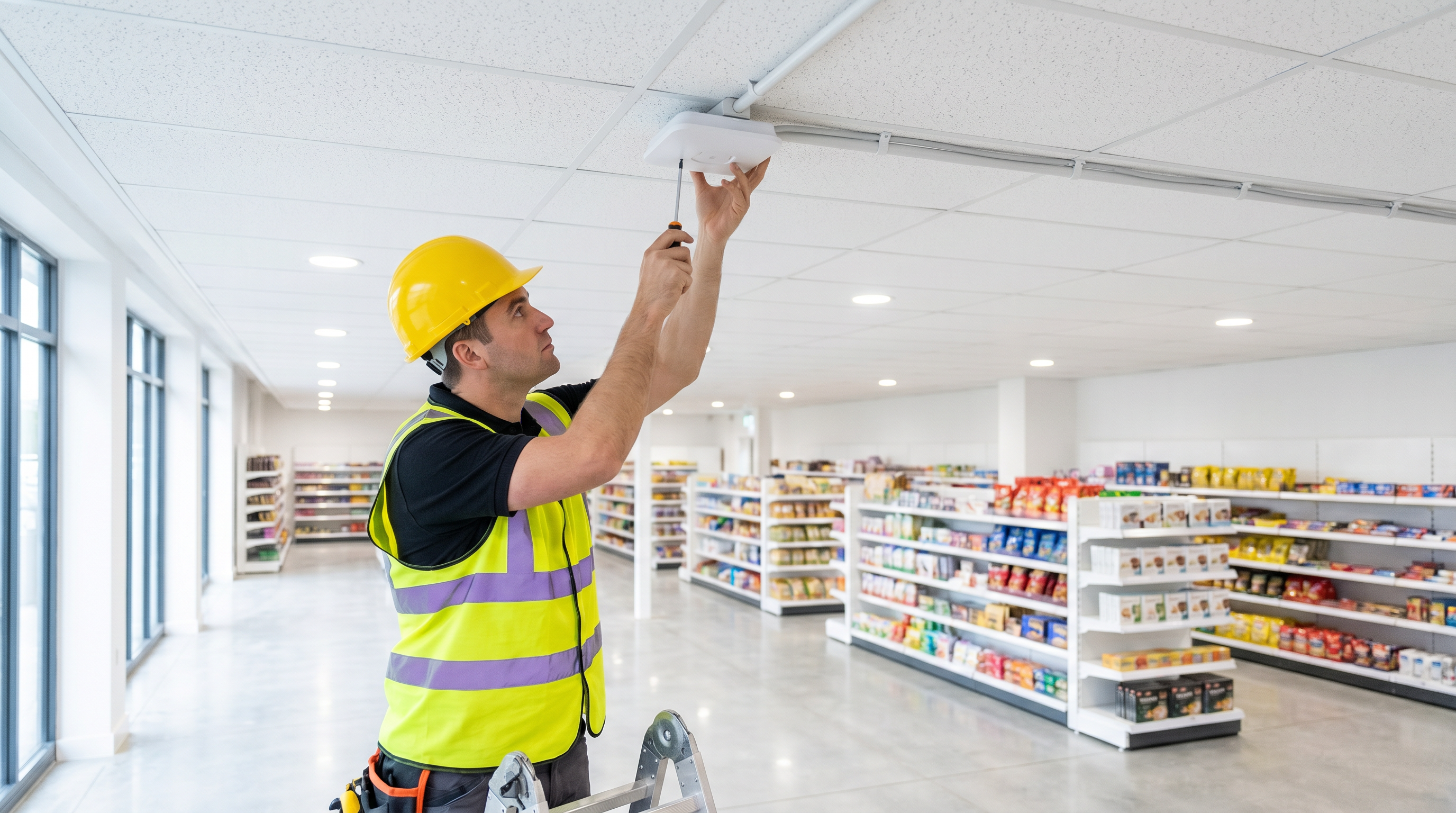
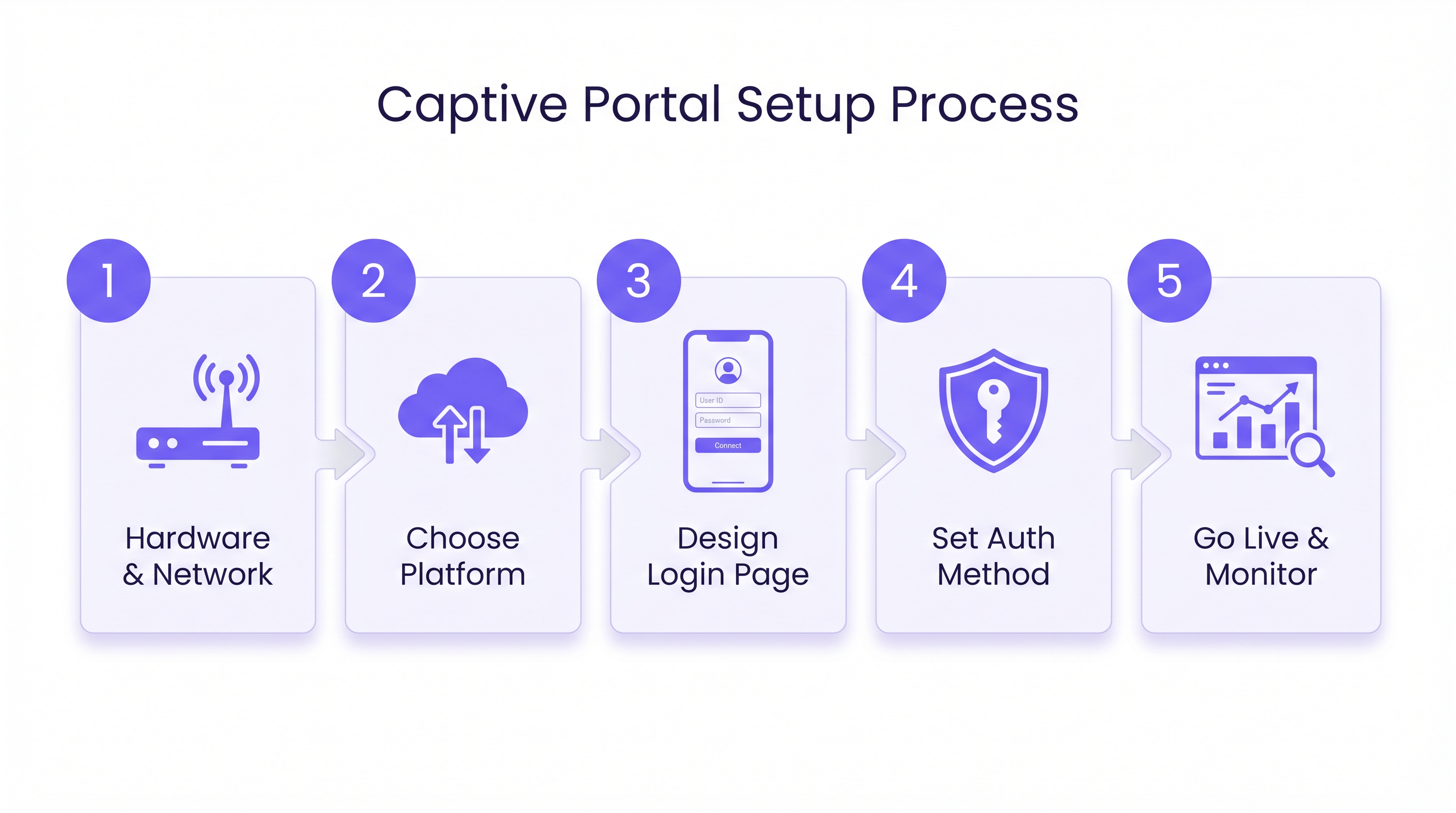
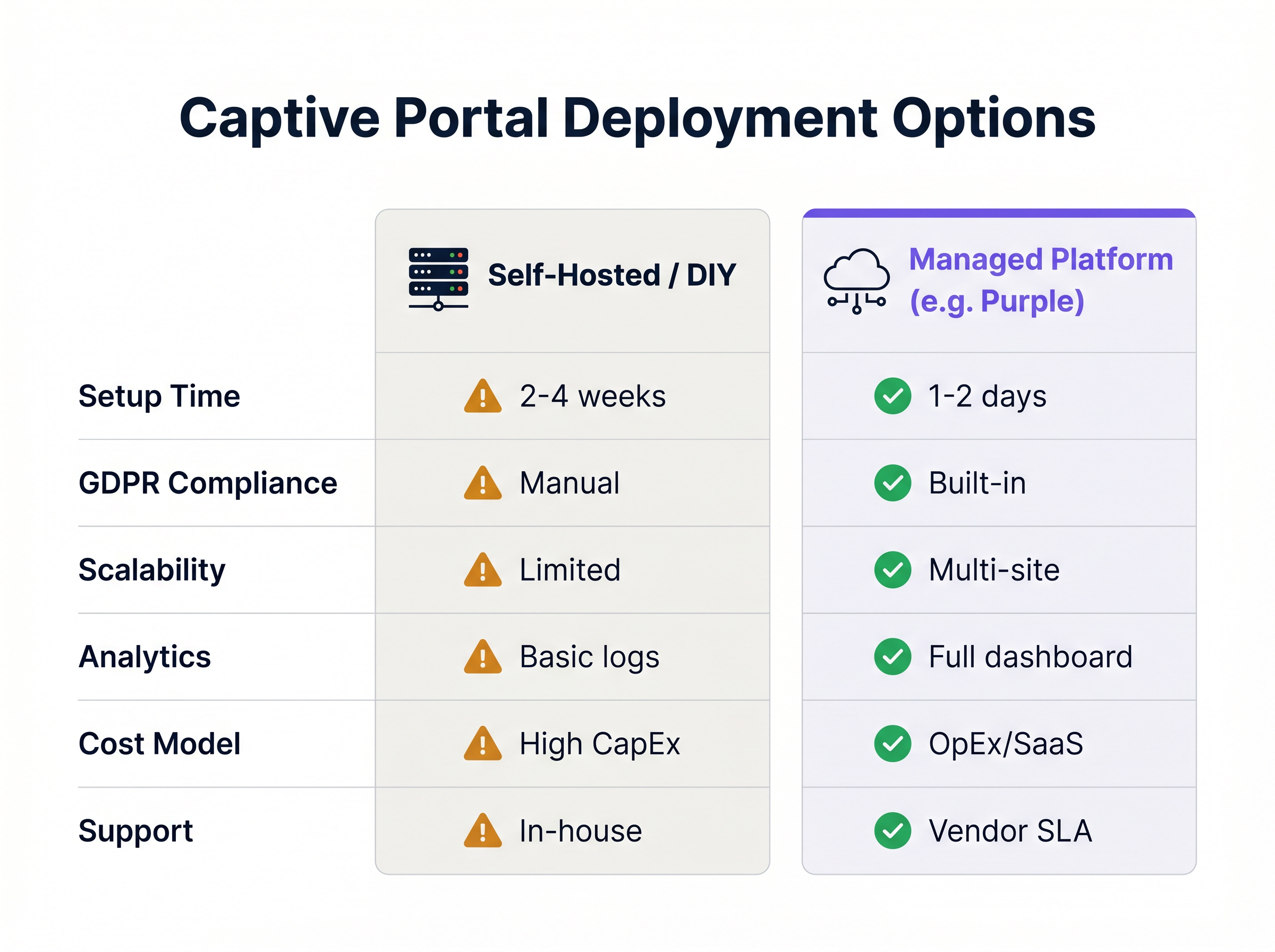
Setting up a captive portal involves coordinating network hardware configuration with cloud-based authentication services. The following steps outline a standard deployment using a managed platform approach, which is strongly recommended over self-hosted alternatives for most commercial venues.
Step 1: Network Infrastructure Preparation
Before configuring the portal, ensure the underlying network infrastructure is capable of supporting the anticipated client density and throughput requirements. VLAN Segmentation is the foundational security requirement: guest traffic must be isolated from corporate traffic using dedicated Virtual LANs. Create a dedicated SSID for guest access and configure its security settings to "Open" (no WPA pre-shared key), relying entirely on the captive portal for authentication and access control. Ensure adequate DHCP lease pools are available to handle peak visitor volumes, and configure reliable DNS servers to ensure swift redirection to the portal page.
Step 2: Walled Garden and Redirection Configuration
Configure the access points or wireless controller to redirect unauthenticated traffic. Point the network hardware to the URL of the managed captive portal platform — this is the external portal URL provided by your SaaS vendor. Define the walled garden whitelist, ensuring all domains required for your chosen authentication methods are included. If using social login, you must whitelist the OAuth domains for Facebook, Twitter, Google, and any other providers. Finally, input the RADIUS server details — IP addresses, ports, and shared secrets — into your network controller as provided by the managed platform.
Step 3: Designing the User Experience (UX)
The login page is often the first digital interaction a customer has with the venue. It must be intuitive, fast-loading, and brand-compliant. Select authentication methods appropriate for the venue type: social media login maximises data richness, email registration provides a reliable CRM feed, SMS verification adds a layer of identity validation, and a simple click-through (Terms & Conditions acceptance) minimises friction where data capture is secondary. Determine which data points are essential and avoid overly lengthy forms. Ensure the portal is fully responsive and optimised for mobile devices, as the vast majority of guest WiFi connections originate from smartphones.
Step 4: Compliance and Policy Enforcement
Ensure the captive portal deployment adheres to relevant legal and regulatory frameworks. Clearly display links to the venue's Terms of Use and Privacy Policy, and require explicit consent — typically a checkbox — before granting access. If capturing personal data, ensure the platform provides tools for Data Subject Access Requests (DSARs), data anonymisation, and secure storage compliant with GDPR or CCPA. Managed platforms typically handle these compliance requirements out-of-the-box. Implement DNS-based content filtering to block malicious websites and inappropriate content, protecting the network from liability and ensuring a safe browsing environment.
Step 5: Testing and Deployment
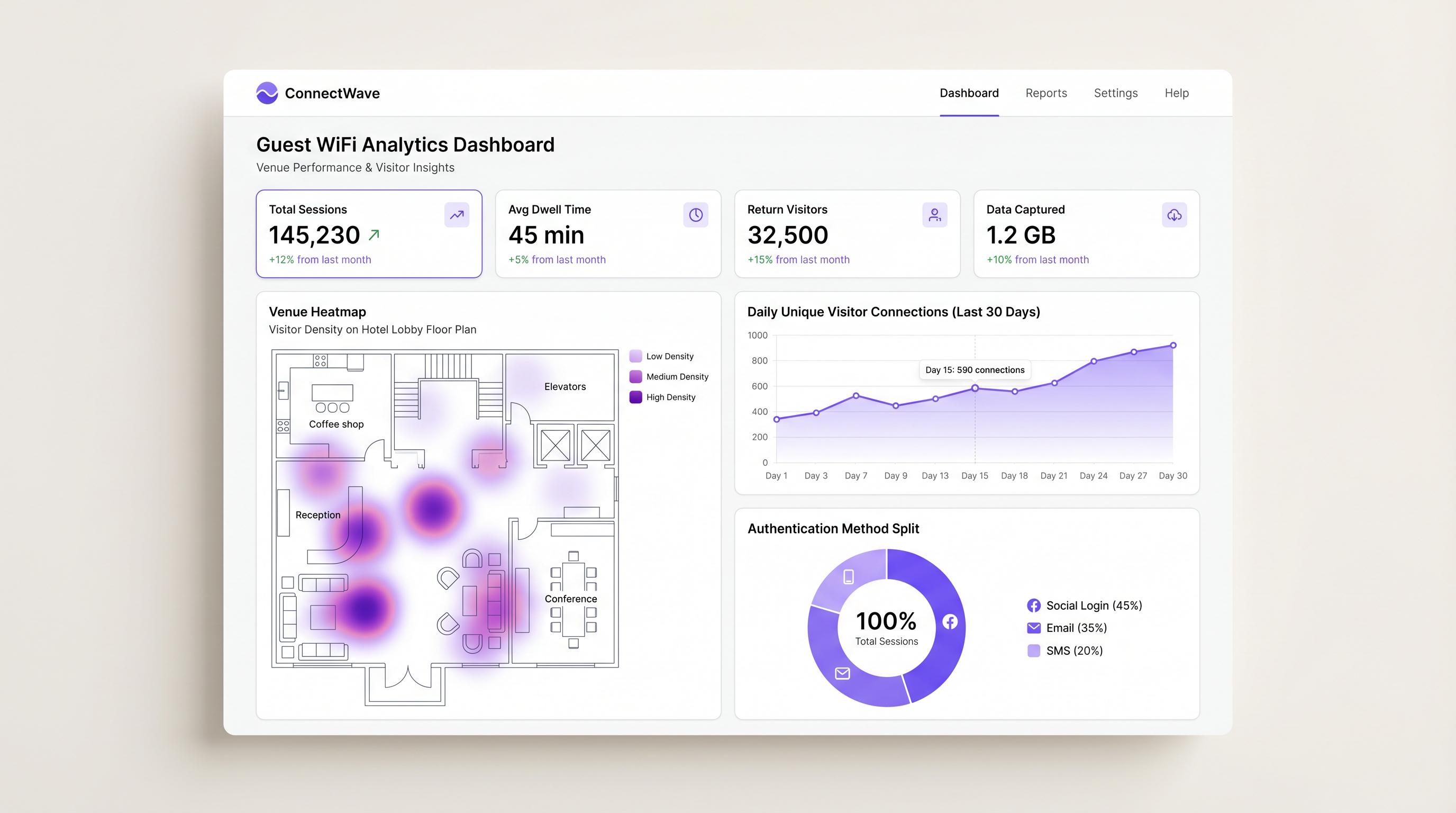
Rigorous testing is crucial before full deployment. Test the authentication flow across various operating systems (iOS, Android, Windows, macOS) and browser types to ensure compatibility. Simulate peak connection volumes to verify the network infrastructure and RADIUS servers can handle the load without latency or timeouts. Verify that session data is correctly populating the WiFi Analytics dashboard, checking metrics such as authentication success rates, session duration, and data capture volume.
Best Practices
To maximise the effectiveness and security of the captive portal, adhere to the following industry-standard recommendations.
Implement Bandwidth Throttling. Configure per-user bandwidth limits — for example, 5 Mbps down and 2 Mbps up — to prevent a single user from consuming excessive network resources and degrading the experience for others. This is particularly important in high-density venues such as stadiums and conference centres.
Set Session Timeouts. Define appropriate session timeouts based on the venue context: 2 hours for a coffee shop, 8 hours for a retail environment, and 24 hours for a hotel. This forces re-authentication at appropriate intervals and manages IP address lease pools efficiently.
Utilise MAC Address Authentication. For returning visitors, enable MAC authentication to bypass the splash page on subsequent visits. This provides a seamless experience while still logging the session data for analytics purposes, maintaining the value of the data capture programme without adding friction.
Integrate with Existing Systems. Leverage APIs to integrate captive portal data with CRM systems, marketing automation platforms, and property management systems (PMS). This drives personalised engagement and closes the loop between footfall data and revenue outcomes. This integration strategy aligns well with the broader network architecture considerations discussed in The Core SD WAN Benefits for Modern Businesses , where a unified, software-defined network fabric simplifies data flow between systems.
Troubleshooting & Risk Mitigation
Even with a robust architecture, issues can arise. Understanding common failure modes is essential for rapid resolution.
Captive Portal Not Appearing (CNA Failure). The Captive Network Assistant (CNA) is the mini-browser built into mobile operating systems that pops up when connecting to a network requiring authentication. If the CNA fails to trigger, the user may be stuck without internet access and will perceive the WiFi as broken. The primary mitigation is to verify DNS is resolving correctly and to check that the walled garden does not inadvertently whitelist the specific domains that Apple or Google use to detect captive portals, such as captive.apple.com or connectivitycheck.gstatic.com.
RADIUS Timeout Errors. If the network controller cannot reach the RADIUS server, authentication will fail for all users. Verify network connectivity between the controller and the RADIUS server, check firewall rules to ensure UDP ports 1812 and 1813 are open in both directions, and confirm that the shared secret matches exactly on both the controller and the RADIUS server configuration.
OAuth Login Failures. Users cannot log in via social media providers. The most common cause is an incomplete or outdated walled garden configuration. Social networks frequently update their IP ranges and CDN domains. The mitigation is to use a managed platform that automatically updates walled garden lists for social providers, removing the operational burden of manual maintenance.
ROI & Business Impact
A properly implemented captive portal transforms guest WiFi from a cost centre into a strategic business asset. The return on investment is measured through several key metrics.
Data Acquisition is the primary value driver. By capturing verified email addresses and demographic data at the point of network authentication, venues build robust first-party databases for targeted marketing campaigns — a critical capability in a post-cookie digital landscape.
Customer Insights delivered through WiFi Analytics provide granular data on footfall patterns, dwell time, and return visitor frequency. This data informs operational decisions, from staffing levels and store layouts in Retail environments to resource allocation in Healthcare and Transport hubs.
Enhanced Engagement through triggered marketing messages — for example, an SMS offer sent when a user connects — drives immediate in-venue conversions. Hospitality operators using managed captive portal platforms have reported measurable increases in ancillary revenue from targeted promotions delivered at the moment of connection.
Risk Mitigation is a quantifiable benefit that is often underestimated. Enforcing terms of service and content filtering protects the business from liability associated with illegal downloading or inappropriate browsing on the public network. For organisations subject to PCI DSS, proper network segmentation enforced by the captive portal architecture is a compliance requirement, not merely a best practice.
By transitioning from a basic, unmanaged open network to a sophisticated captive portal solution, venues can significantly enhance the guest experience while generating measurable, attributable business value across marketing, operations, and compliance functions.
Key Terms & Definitions
Captive Portal
A web page that a user of a public-access network is obliged to view and interact with before full internet access is granted. It enforces acceptable use policies and typically captures user identity data.
The primary mechanism IT teams use to enforce access policies and capture user data on guest networks in hotels, retail stores, stadiums, and public venues.
Walled Garden
A restricted network environment that allows access only to specific, whitelisted IP addresses or domains prior to full authentication. All other outbound traffic is blocked.
Critical for enabling social login OAuth flows and providing access to terms of service before the user has completed authentication and gained full internet connectivity.
RADIUS
Remote Authentication Dial-In User Service; a networking protocol that provides centralised Authentication, Authorization, and Accounting (AAA) management for users connecting to a network service.
The backend protocol that communicates between the wireless controller and the managed portal platform to validate sessions. Uses UDP port 1812 for authentication and 1813 for accounting.
CNA (Captive Network Assistant)
The pseudo-browser built into mobile operating systems (iOS and Android) that automatically detects a captive portal and pops up the login screen without requiring the user to open a browser.
If the CNA fails to trigger due to DNS or walled garden misconfigurations, users will experience a 'broken WiFi' scenario and will be unable to access the login page.
MAC Address Authentication
A method of granting network access based on the unique Media Access Control (MAC) address of the client device, bypassing the splash page for previously authenticated devices.
Used to provide seamless reconnection for returning visitors who have previously completed the captive portal flow, improving UX while maintaining session logging.
VLAN Segmentation
The practice of dividing a single physical network into multiple logical networks (Virtual LANs) to isolate traffic between different user groups or systems.
A fundamental security requirement to ensure guest WiFi traffic is strictly isolated from corporate or operational network traffic. Also a PCI DSS compliance requirement in retail environments.
IEEE 802.1X
An IEEE Standard for port-based Network Access Control (PNAC), providing an authentication mechanism to devices wishing to attach to a LAN or WLAN using EAP (Extensible Authentication Protocol).
Used for highly secure, certificate-based authentication in enterprise environments. Relevant for staff networks and advanced OpenRoaming deployments where platforms like Purple act as the identity provider.
OpenRoaming
A federation of WiFi networks that allows users to automatically and securely connect to participating venues without needing to search for networks or enter credentials, using identity providers.
An advanced deployment scenario where managed platforms can serve as identity providers to facilitate seamless, secure roaming across venues — Purple offers this under their Connect licence.
SSID (Service Set Identifier)
The name of a wireless network broadcast by an access point, which client devices scan for and connect to.
In captive portal deployments, a dedicated guest SSID is created, separate from the corporate SSID, to ensure traffic isolation and appropriate security policies.
Bandwidth Throttling
The intentional regulation of network throughput on a per-user or per-device basis to ensure equitable distribution of available bandwidth across all connected clients.
Essential in high-density venues to prevent individual users from consuming disproportionate bandwidth and degrading the experience for all other guests.
Case Studies
A 200-room hotel needs to provide seamless WiFi access for guests while ensuring bandwidth is distributed fairly across all rooms and returning guests do not have to repeatedly log in during their stay.
Deploy a managed captive portal integrated with the property management system (PMS). Configure the portal to authenticate via room number and guest surname, pulling reservation data from the PMS via API. Implement a session timeout of 24 hours aligned with the standard check-in/check-out cycle. Enable MAC Address Authentication so that once a device is authenticated, it automatically reconnects for the duration of the stay without displaying the splash page again. Configure bandwidth throttling at the wireless controller level to 10 Mbps down / 5 Mbps up per client, and implement QoS policies to prioritise video streaming traffic. Ensure the guest VLAN is fully isolated from the hotel's operational network (PMS, CCTV, POS systems) via strict VLAN segmentation.
A national retail chain wants to implement a captive portal across 50 locations to capture customer emails for their loyalty programme, but they are concerned about GDPR compliance and the operational overhead of managing walled garden configurations for social logins across all sites.
Standardise on a cloud-managed captive portal platform rather than self-hosting. Use the platform's built-in GDPR compliance tools, which include explicit opt-in checkboxes, automated handling of Data Subject Access Requests (DSARs), configurable data retention policies, and audit trails. Rely on the platform's automatically updated walled garden lists to ensure OAuth flows for Facebook and Google login function reliably across all 50 sites without manual intervention. Deploy a centralised management dashboard to push configuration changes, branding updates, and new authentication policies across all sites simultaneously, reducing operational overhead to near zero.
Scenario Analysis
Q1. A stadium IT director notices that during halftime, the captive portal login page takes over 30 seconds to load, leading to massive user drop-off. The network utilises a self-hosted RADIUS server running on a single on-premises virtual machine. What is the most likely architectural bottleneck, and what is the recommended remediation strategy?
💡 Hint:Consider the difference between normal operational load and sudden, massive spikes in concurrent connection requests — the 'thundering herd' problem.
Show Recommended Approach
The self-hosted RADIUS server and portal web infrastructure are likely buckling under the sudden spike of concurrent authentication requests at halftime. A single VM-based RADIUS server has a finite capacity for concurrent authentication requests. The recommended remediation is to migrate to a cloud-managed captive portal platform that leverages auto-scaling infrastructure to handle massive concurrent loads without latency. As an interim measure, deploying a secondary RADIUS server for failover and load balancing would improve resilience.
Q2. You are deploying a captive portal in a hospital environment. The marketing team wants to use Facebook login to capture demographic data for a patient satisfaction programme, but the security team mandates strict control over all outbound traffic and requires a whitelist-only firewall policy. How do you configure the network to satisfy both requirements?
💡 Hint:Think about how the client device communicates with the social network before it has full internet access, and which specific network layer this occurs at.
Show Recommended Approach
You must configure a precise Walled Garden on the wireless controller. This involves identifying and whitelisting the specific IP ranges, domains, and CDN endpoints required by Facebook's OAuth 2.0 API flow. This allows the unauthenticated device to reach Facebook's authentication servers for the login flow only, while all other outbound traffic remains blocked by the firewall until the RADIUS server sends an Access-Accept message. The walled garden must be reviewed and updated regularly as Facebook updates its infrastructure. Using a managed platform that auto-updates social provider walled garden lists is strongly recommended in this context.
Q3. A retail client reports that customers using Apple iPhones are not seeing the login splash page automatically when they connect to the guest WiFi network. Android users are unaffected. What is the technical term for the feature that should be triggering on the iPhone, and what is the most likely cause of its failure?
💡 Hint:Apple devices use a specific mechanism to test for internet connectivity upon joining a network, and this mechanism can be inadvertently bypassed by a common walled garden configuration error.
Show Recommended Approach
The feature is the Captive Network Assistant (CNA). The most likely cause of failure is a misconfigured walled garden that inadvertently whitelists the domain Apple uses to check for internet connectivity — captive.apple.com. When the iPhone connects to the network, it sends a probe request to this domain. If the walled garden allows the request to succeed (even if it returns an unexpected response), iOS may interpret this as full internet access and suppress the CNA popup. The fix is to remove captive.apple.com from the walled garden whitelist, ensuring the probe request is intercepted and redirected, which triggers the CNA correctly.




