

Come configurare un Captive Portal per la tua attività
Questa guida autorevole fornisce a leader IT, architetti di rete e direttori delle operazioni di sede una procedura dettagliata per l'implementazione di un Captive Portal sicuro e conforme utilizzando piattaforme gestite. Copre l'architettura tecnica, inclusi RADIUS, 802.1X e la configurazione del walled garden, insieme alle migliori pratiche di implementazione e a come trasformare il WiFi per gli ospiti da centro di costo a risorsa strategica per l'acquisizione di dati di prima parte.
🎧 Ascolta questa guida
Visualizza trascrizione
Sintesi Esecutiva
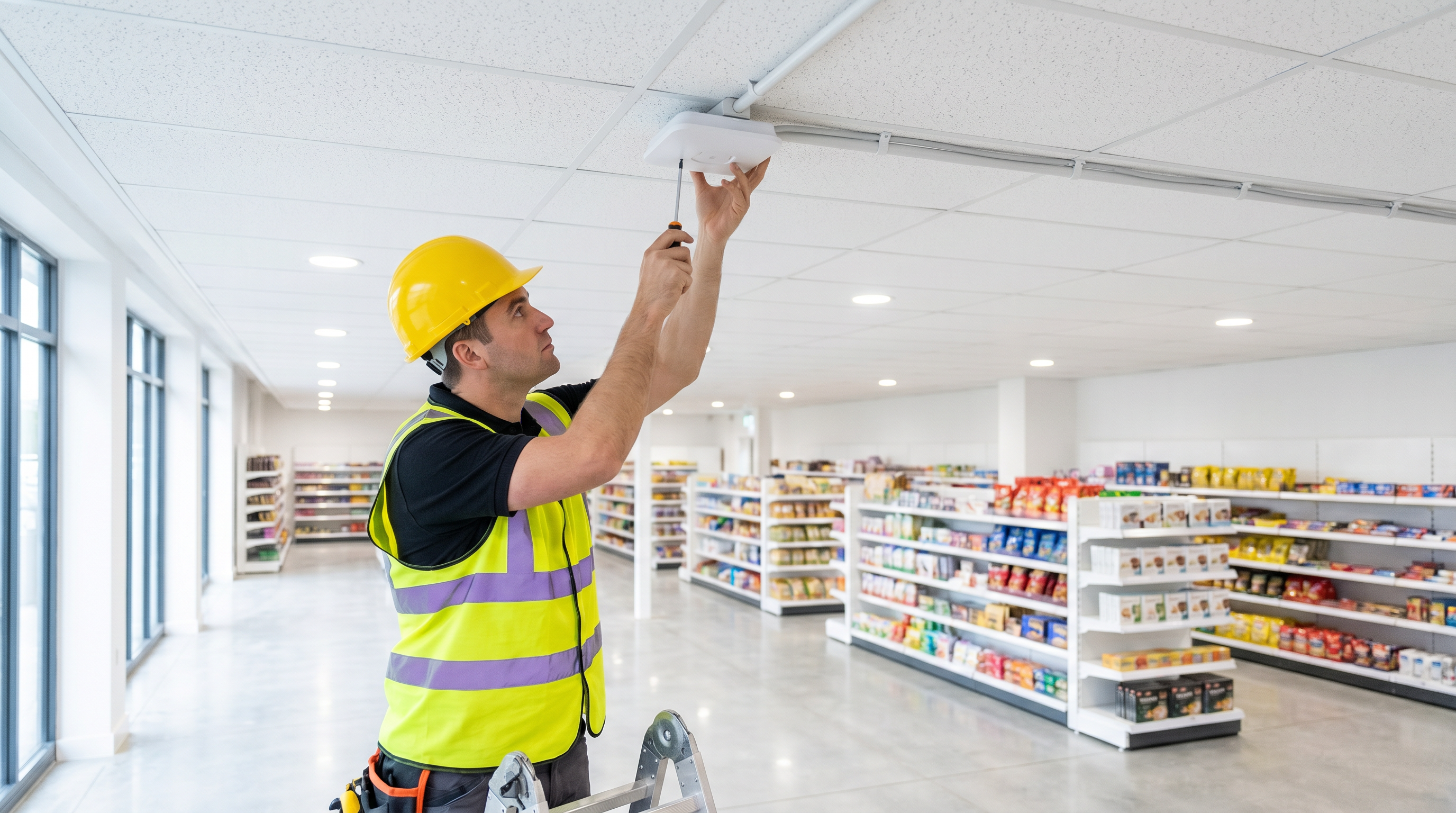
L'implementazione di un Captive Portal robusto è una decisione infrastrutturale critica che incide direttamente sulla sicurezza della rete, sull'esperienza utente e sulle capacità di acquisizione dei dati. Per i responsabili IT e gli architetti di rete, un Captive Portal funge da guardiano della rete wireless aziendale, intercettando il traffico non autenticato e applicando le politiche di accesso prima di concedere la connettività internet. Questa guida fornisce una procedura dettagliata e completa per la configurazione e l'implementazione di un Captive Portal in ambienti commerciali — come Retail , Hospitality e sedi del settore pubblico — utilizzando piattaforme gestite come la soluzione Guest WiFi di Purple.
Standardizzando il flusso di autenticazione, le organizzazioni possono mitigare i rischi legali, imporre limiti di larghezza di banda e acquisire senza soluzione di continuità dati di prima parte da integrare in una più ampia strategia di WiFi Analytics . Esploreremo l'architettura tecnica alla base dei Captive Portal, i passaggi pratici di implementazione e le migliori pratiche del settore per garantire un'implementazione sicura, scalabile e conforme.
Approfondimento Tecnico: Architettura e Standard
Un Captive Portal funziona intercettando il traffico HTTP/HTTPS da dispositivi non autenticati che si connettono a una rete locale wireless (WLAN). Quando un utente si connette al Service Set Identifier (SSID), l'access point (AP) o il controller LAN wireless (WLC) posiziona il dispositivo in un walled garden — un ambiente di rete ristretto con accesso limitato strettamente al server di autenticazione e ai servizi DNS necessari.
Il meccanismo di intercettazione si basa tipicamente sulla reindirizzamento HTTP o sul dirottamento DNS. Quando il dispositivo client tenta di risolvere un dominio o inviare una richiesta HTTP GET, l'infrastruttura di rete intercetta la richiesta e reindirizza il browser del client alla pagina di login del Captive Portal ospitata su un server esterno o una piattaforma gestita. Per una comprensione più approfondita di questo processo, fare riferimento a Come funziona un Captive Portal? Approfondimento Tecnico .
Protocolli e Standard Chiave
RADIUS (Remote Authentication Dial-In User Service) è il protocollo standard del settore utilizzato per l'autenticazione, l'autorizzazione e la contabilità (AAA) centralizzate. I Captive Portal gestiti si integrano con i server RADIUS per convalidare le credenziali e tracciare i dati di sessione, inclusi i byte trasferiti e la durata della sessione. RADIUS opera su UDP, utilizzando la porta 1812 per l'autenticazione e la porta 1813 per la contabilità.
IEEE 802.1X fornisce il controllo degli accessi alla rete basato su porta (PNAC). Mentre i Captive Portal spesso si basano sull'autenticazione basata sul web al Livello 7, le implementazioni aziendali robuste possono integrare 802.1X per un'autenticazione sicura basata su certificati al Livello 2, in particolare per le reti del personale o soluzioni di roaming senza interruzioni come Passpoint e OpenRoaming. Piattaforme come Purple possono fungere da provider di identità gratuito per OpenRoaming sotto la licenza Connect, consentendo un roaming sicuro e senza interruzioni tra sedi federate.
Configurazione del Walled Garden è essenziale per qualsiasi implementazione moderna di Captive Portal. Questa è una whitelist di indirizzi IP o domini a cui il client può accedere prima di completare l'autenticazione. È fondamentale per consentire i flussi OAuth (ad esempio, login Facebook, Google) e per fornire accesso a termini di servizio o documenti di politica sulla privacy ospitati esternamente.
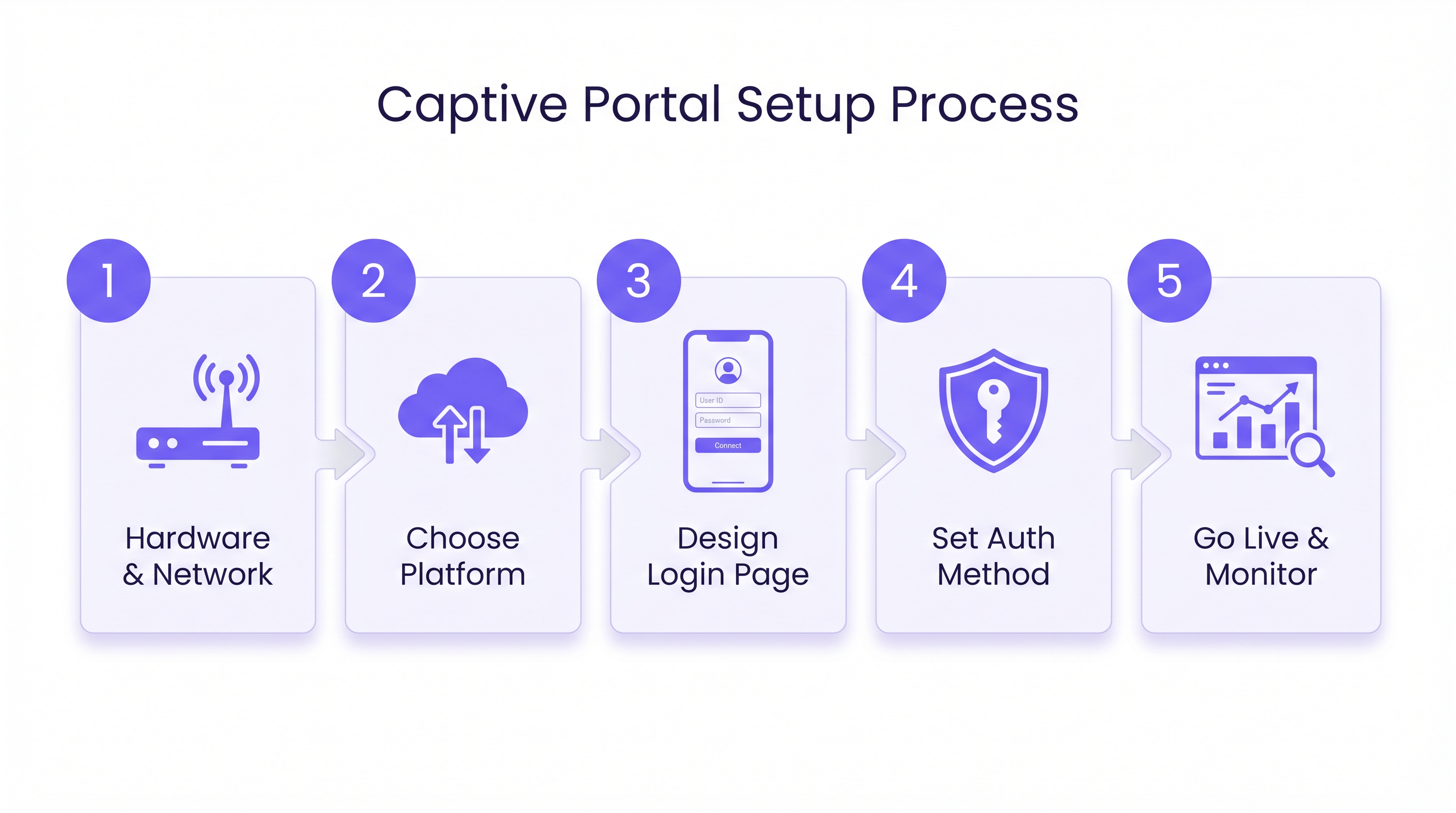
Guida all'Implementazione: Distribuzione Passo Dopo Passo
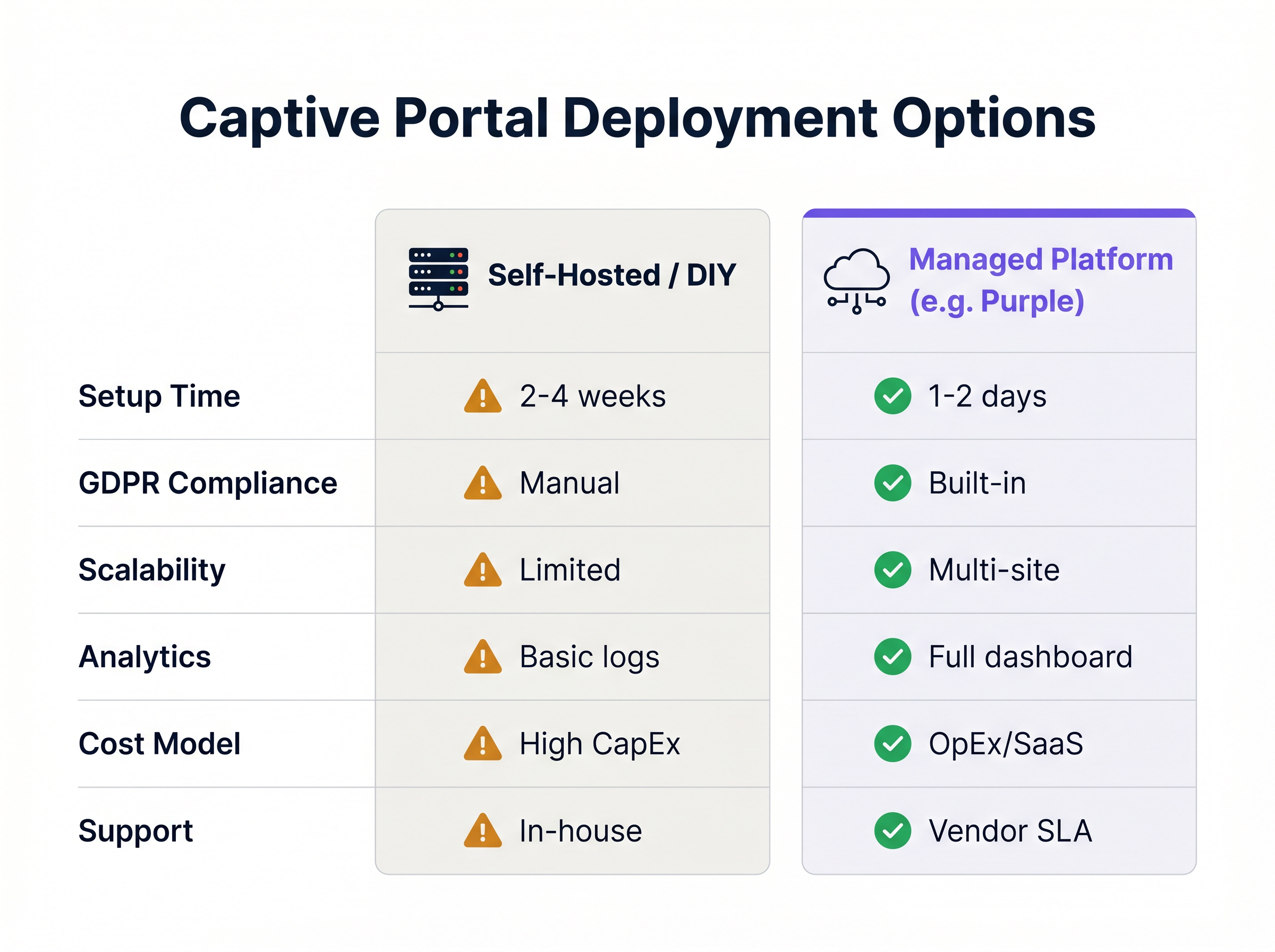
La configurazione di un Captive Portal implica il coordinamento della configurazione dell'hardware di rete con i servizi di autenticazione basati su cloud. I seguenti passaggi delineano un'implementazione standard utilizzando un approccio basato su piattaforma gestita, fortemente raccomandato rispetto alle alternative self-hosted per la maggior parte delle sedi commerciali.
Passaggio 1: Preparazione dell'Infrastruttura di Rete
Prima di configurare il portal, assicurarsi che l'infrastruttura di rete sottostante sia in grado di supportare la densità di client e i requisiti di throughput previsti. Segmentazione VLAN è il requisito di sicurezza fondamentale: il traffico degli ospiti deve essere isolato dal traffico aziendale utilizzando Virtual LAN dedicate. Creare un SSID dedicato per l'accesso degli ospiti e configurare le sue impostazioni di sicurezza su "Aperto" (nessuna chiave pre-condivisa WPA), affidandosi interamente al Captive Portal per l'autenticazione e il controllo degli accessi. Assicurarsi che siano disponibili pool di lease DHCP adeguati per gestire i volumi di visitatori di punta e configurare server DNS affidabili per garantire un rapido reindirizzamento alla pagina del portal.
Passaggio 2: Configurazione del Walled Garden e del Reindirizzamento
Configurare gli access point o il controller wireless per reindirizzare il traffico non autenticato. Puntare l'hardware di rete all'URL della piattaforma Captive Portal gestita — questo è l'URL del portal esterno fornito dal vostro fornitore SaaS. Definire la whitelist del walled garden, assicurandosi che siano inclusi tutti i domini richiesti per i metodi di autenticazione scelti. Se si utilizza il social login, è necessario inserire nella whitelist i domini OAuth per Facebook, Twitter, Google e qualsiasi altro provider. Infine, inserire i dettagli del server RADIUS — indirizzi IP, porte e segreti condivisi — nel controller di rete come fornito dalla piattaforma gestita.
Passaggio 3: Progettazione dell'Esperienza Utente (UX)
La pagina di login è spesso la prima interazione digitale che un cliente ha con la sede. Deve essere intuitiva, a caricamento rapido e conforme al brand. Selezionare i metodi di autenticazione appropriati per il tipo di sede: social Il login tramite social media massimizza la ricchezza dei dati, la registrazione via email fornisce un feed CRM affidabile, la verifica SMS aggiunge un livello di validazione dell'identità, e un semplice click-through (accettazione dei Termini e Condizioni) minimizza l'attrito quando l'acquisizione dei dati è secondaria. Determinate quali punti dati sono essenziali ed evitate moduli eccessivamente lunghi. Assicuratevi che il portale sia completamente responsive e ottimizzato per i dispositivi mobili, poiché la stragrande maggioranza delle connessioni WiFi degli ospiti proviene da smartphone.
Fase 4: Conformità e Applicazione delle Politiche
Assicuratevi che l'implementazione del Captive Portal sia conforme ai quadri legali e normativi pertinenti. Visualizzate chiaramente i link ai Termini di Utilizzo e alla Politica sulla Privacy della sede e richiedete il consenso esplicito — tipicamente una casella di controllo — prima di concedere l'accesso. Se acquisite dati personali, assicuratevi che la piattaforma fornisca strumenti per le Richieste di Accesso dell'Interessato (DSAR), l'anonimizzazione dei dati e l'archiviazione sicura conforme al GDPR o al CCPA. Le piattaforme gestite di solito gestiscono questi requisiti di conformità in modo predefinito. Implementate il filtraggio dei contenuti basato su DNS per bloccare siti web dannosi e contenuti inappropriati, proteggendo la rete da responsabilità e garantendo un ambiente di navigazione sicuro.
Fase 5: Test e Implementazione
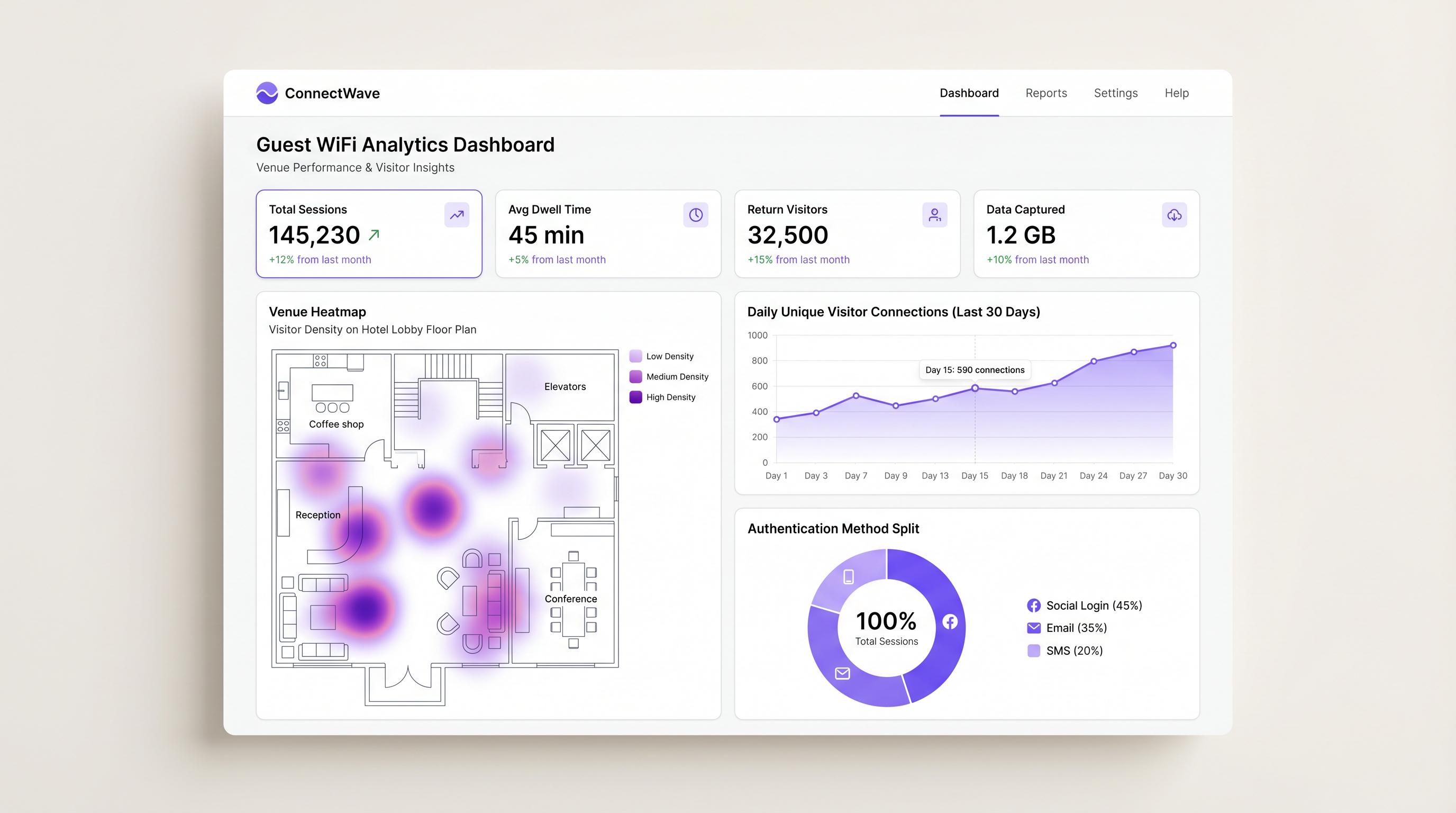
Test rigorosi sono fondamentali prima dell'implementazione completa. Testate il flusso di autenticazione su vari sistemi operativi (iOS, Android, Windows, macOS) e tipi di browser per garantire la compatibilità. Simulate volumi di connessione di picco per verificare che l'infrastruttura di rete e i server RADIUS possano gestire il carico senza latenza o timeout. Verificate che i dati di sessione popolino correttamente la dashboard WiFi Analytics , controllando metriche come i tassi di successo dell'autenticazione, la durata della sessione e il volume di acquisizione dei dati.
Migliori Pratiche
Per massimizzare l'efficacia e la sicurezza del Captive Portal, attenetevi alle seguenti raccomandazioni standard del settore.
Implementare la Limitazione della Larghezza di Banda. Configurate limiti di larghezza di banda per utente — ad esempio, 5 Mbps in download e 2 Mbps in upload — per impedire a un singolo utente di consumare risorse di rete eccessive e degradare l'esperienza per gli altri. Questo è particolarmente importante in luoghi ad alta densità come stadi e centri congressi.
Impostare i Timeout di Sessione. Definite timeout di sessione appropriati in base al contesto del luogo: 2 ore per una caffetteria, 8 ore per un ambiente di vendita al dettaglio e 24 ore per un hotel. Questo impone la riautenticazione a intervalli appropriati e gestisce in modo efficiente i pool di lease degli indirizzi IP.
Utilizzare l'Autenticazione tramite Indirizzo MAC. Per i visitatori di ritorno, abilitate l'autenticazione MAC per bypassare la splash page nelle visite successive. Ciò fornisce un'esperienza senza interruzioni pur registrando i dati di sessione per scopi analitici, mantenendo il valore del programma di acquisizione dati senza aggiungere attrito.
Integrare con i Sistemi Esistenti. Sfruttate le API per integrare i dati del Captive Portal con i sistemi CRM, le piattaforme di automazione del marketing e i sistemi di gestione della proprietà (PMS). Questo favorisce un coinvolgimento personalizzato e chiude il cerchio tra i dati di affluenza e i risultati di fatturato. Questa strategia di integrazione si allinea bene con le considerazioni più ampie sull'architettura di rete discusse in I Vantaggi Chiave dell'SD WAN per le Aziende Moderne , dove un'architettura di rete unificata e software-defined semplifica il flusso di dati tra i sistemi.
Risoluzione dei Problemi e Mitigazione dei Rischi
Anche con un'architettura robusta, possono sorgere problemi. Comprendere le modalità di guasto comuni è essenziale per una rapida risoluzione.
Captive Portal Non Visualizzato (Errore CNA). Il Captive Network Assistant (CNA) è il mini-browser integrato nei sistemi operativi mobili che compare quando ci si connette a una rete che richiede autenticazione. Se il CNA non si attiva, l'utente potrebbe rimanere senza accesso a internet e percepirà il WiFi come non funzionante. La mitigazione principale è verificare che il DNS si risolva correttamente e controllare che il walled garden non inserisca inavvertitamente nella whitelist i domini specifici che Apple o Google utilizzano per rilevare i Captive Portal, come captive.apple.com o connectivitycheck.gstatic.com.
Errori di Timeout RADIUS. Se il controller di rete non riesce a raggiungere il server RADIUS, l'autenticazione fallirà per tutti gli utenti. Verificate la connettività di rete tra il controller e il server RADIUS, controllate le regole del firewall per assicurare che le porte UDP 1812 e 1813 siano aperte in entrambe le direzioni e confermate che il segreto condiviso corrisponda esattamente sia sulla configurazione del controller che su quella del server RADIUS.
Errori di Login OAuth. Gli utenti non riescono ad accedere tramite i provider di social media. La causa più comune è una configurazione del walled garden incompleta o obsoleta. I social network aggiornano frequentemente i loro intervalli IP e i domini CDN. La mitigazione consiste nell'utilizzare una piattaforma gestita che aggiorna automaticamente gli elenchi del walled garden per i provider social, eliminando l'onere operativo della manutenzione manuale.
ROI e Impatto sul Business
Un Captive Portal correttamente implementato trasforma il WiFi per gli ospiti da centro di costo a risorsa strategica per il business. Il ritorno sull'investimento è misurato attraverso diverse metriche chiave.
L'Acquisizione Dati è il principale motore di valore. Acquisendo indirizzi email verificati e dati demografici al momento dell'autenticazione di rete, le sedi costruiscono robusti database di prima parte per campagne di marketing mirate — una capacità critica in un panorama digitale post-cookie.
Le Customer Insights fornite tramite WiFi Analytics offrono dati granulari sui modelli di affluenza, tempo di permanenza e frequenza dei visitatori di ritorno. Questi dati informano le decisioni operative, dai livelli di personale e layout dei negozi negli ambienti Retail all'allocazione delle risorse negli hub Healthcare e Transport .
Coinvolgimento Migliorato tramite messaggi di marketing attivati — ad esempio, un'offerta SMS inviata quando un utente si connette — favorisce conversioni immediate all'interno della sede. Gli operatori del settore Hospitality che utilizzano piattaforme di Captive Portal gestite hanno riportato aumenti misurabili dei ricavi accessori derivanti da promozioni mirate erogate al momento della connessione.
Mitigazione del Rischio è un beneficio quantificabile spesso sottovalutato. L'applicazione dei termini di servizio e il filtraggio dei contenuti proteggono l'azienda dalla responsabilità associata a download illegali o navigazione inappropriata sulla rete pubblica. Per le organizzazioni soggette a PCI DSS, una corretta segmentazione della rete imposta dall'architettura del Captive Portal è un requisito di conformità, non semplicemente una best practice.
Passando da una rete aperta di base e non gestita a una sofisticata soluzione di Captive Portal, le sedi possono migliorare significativamente l'esperienza degli ospiti generando al contempo un valore aziendale misurabile e attribuibile attraverso le funzioni di marketing, operazioni e conformità.
Termini chiave e definizioni
Captive Portal
A web page that a user of a public-access network is obliged to view and interact with before full internet access is granted. It enforces acceptable use policies and typically captures user identity data.
The primary mechanism IT teams use to enforce access policies and capture user data on guest networks in hotels, retail stores, stadiums, and public venues.
Walled Garden
A restricted network environment that allows access only to specific, whitelisted IP addresses or domains prior to full authentication. All other outbound traffic is blocked.
Critical for enabling social login OAuth flows and providing access to terms of service before the user has completed authentication and gained full internet connectivity.
RADIUS
Remote Authentication Dial-In User Service; a networking protocol that provides centralised Authentication, Authorization, and Accounting (AAA) management for users connecting to a network service.
The backend protocol that communicates between the wireless controller and the managed portal platform to validate sessions. Uses UDP port 1812 for authentication and 1813 for accounting.
CNA (Captive Network Assistant)
The pseudo-browser built into mobile operating systems (iOS and Android) that automatically detects a captive portal and pops up the login screen without requiring the user to open a browser.
If the CNA fails to trigger due to DNS or walled garden misconfigurations, users will experience a 'broken WiFi' scenario and will be unable to access the login page.
MAC Address Authentication
A method of granting network access based on the unique Media Access Control (MAC) address of the client device, bypassing the splash page for previously authenticated devices.
Used to provide seamless reconnection for returning visitors who have previously completed the captive portal flow, improving UX while maintaining session logging.
VLAN Segmentation
The practice of dividing a single physical network into multiple logical networks (Virtual LANs) to isolate traffic between different user groups or systems.
A fundamental security requirement to ensure guest WiFi traffic is strictly isolated from corporate or operational network traffic. Also a PCI DSS compliance requirement in retail environments.
IEEE 802.1X
An IEEE Standard for port-based Network Access Control (PNAC), providing an authentication mechanism to devices wishing to attach to a LAN or WLAN using EAP (Extensible Authentication Protocol).
Used for highly secure, certificate-based authentication in enterprise environments. Relevant for staff networks and advanced OpenRoaming deployments where platforms like Purple act as the identity provider.
OpenRoaming
A federation of WiFi networks that allows users to automatically and securely connect to participating venues without needing to search for networks or enter credentials, using identity providers.
An advanced deployment scenario where managed platforms can serve as identity providers to facilitate seamless, secure roaming across venues — Purple offers this under their Connect licence.
SSID (Service Set Identifier)
The name of a wireless network broadcast by an access point, which client devices scan for and connect to.
In captive portal deployments, a dedicated guest SSID is created, separate from the corporate SSID, to ensure traffic isolation and appropriate security policies.
Bandwidth Throttling
The intentional regulation of network throughput on a per-user or per-device basis to ensure equitable distribution of available bandwidth across all connected clients.
Essential in high-density venues to prevent individual users from consuming disproportionate bandwidth and degrading the experience for all other guests.
Casi di studio
A 200-room hotel needs to provide seamless WiFi access for guests while ensuring bandwidth is distributed fairly across all rooms and returning guests do not have to repeatedly log in during their stay.
Deploy a managed captive portal integrated with the property management system (PMS). Configure the portal to authenticate via room number and guest surname, pulling reservation data from the PMS via API. Implement a session timeout of 24 hours aligned with the standard check-in/check-out cycle. Enable MAC Address Authentication so that once a device is authenticated, it automatically reconnects for the duration of the stay without displaying the splash page again. Configure bandwidth throttling at the wireless controller level to 10 Mbps down / 5 Mbps up per client, and implement QoS policies to prioritise video streaming traffic. Ensure the guest VLAN is fully isolated from the hotel's operational network (PMS, CCTV, POS systems) via strict VLAN segmentation.
A national retail chain wants to implement a captive portal across 50 locations to capture customer emails for their loyalty programme, but they are concerned about GDPR compliance and the operational overhead of managing walled garden configurations for social logins across all sites.
Standardise on a cloud-managed captive portal platform rather than self-hosting. Use the platform's built-in GDPR compliance tools, which include explicit opt-in checkboxes, automated handling of Data Subject Access Requests (DSARs), configurable data retention policies, and audit trails. Rely on the platform's automatically updated walled garden lists to ensure OAuth flows for Facebook and Google login function reliably across all 50 sites without manual intervention. Deploy a centralised management dashboard to push configuration changes, branding updates, and new authentication policies across all sites simultaneously, reducing operational overhead to near zero.
Analisi degli scenari
Q1. A stadium IT director notices that during halftime, the captive portal login page takes over 30 seconds to load, leading to massive user drop-off. The network utilises a self-hosted RADIUS server running on a single on-premises virtual machine. What is the most likely architectural bottleneck, and what is the recommended remediation strategy?
💡 Suggerimento:Consider the difference between normal operational load and sudden, massive spikes in concurrent connection requests — the 'thundering herd' problem.
Mostra l'approccio consigliato
The self-hosted RADIUS server and portal web infrastructure are likely buckling under the sudden spike of concurrent authentication requests at halftime. A single VM-based RADIUS server has a finite capacity for concurrent authentication requests. The recommended remediation is to migrate to a cloud-managed captive portal platform that leverages auto-scaling infrastructure to handle massive concurrent loads without latency. As an interim measure, deploying a secondary RADIUS server for failover and load balancing would improve resilience.
Q2. You are deploying a captive portal in a hospital environment. The marketing team wants to use Facebook login to capture demographic data for a patient satisfaction programme, but the security team mandates strict control over all outbound traffic and requires a whitelist-only firewall policy. How do you configure the network to satisfy both requirements?
💡 Suggerimento:Think about how the client device communicates with the social network before it has full internet access, and which specific network layer this occurs at.
Mostra l'approccio consigliato
You must configure a precise Walled Garden on the wireless controller. This involves identifying and whitelisting the specific IP ranges, domains, and CDN endpoints required by Facebook's OAuth 2.0 API flow. This allows the unauthenticated device to reach Facebook's authentication servers for the login flow only, while all other outbound traffic remains blocked by the firewall until the RADIUS server sends an Access-Accept message. The walled garden must be reviewed and updated regularly as Facebook updates its infrastructure. Using a managed platform that auto-updates social provider walled garden lists is strongly recommended in this context.
Q3. A retail client reports that customers using Apple iPhones are not seeing the login splash page automatically when they connect to the guest WiFi network. Android users are unaffected. What is the technical term for the feature that should be triggering on the iPhone, and what is the most likely cause of its failure?
💡 Suggerimento:Apple devices use a specific mechanism to test for internet connectivity upon joining a network, and this mechanism can be inadvertently bypassed by a common walled garden configuration error.
Mostra l'approccio consigliato
The feature is the Captive Network Assistant (CNA). The most likely cause of failure is a misconfigured walled garden that inadvertently whitelists the domain Apple uses to check for internet connectivity — captive.apple.com. When the iPhone connects to the network, it sends a probe request to this domain. If the walled garden allows the request to succeed (even if it returns an unexpected response), iOS may interpret this as full internet access and suppress the CNA popup. The fix is to remove captive.apple.com from the walled garden whitelist, ensuring the probe request is intercepted and redirected, which triggers the CNA correctly.




