

WiFi लैंडिंग पेज बनाम स्प्लैश पेज: क्या अंतर है?
यह तकनीकी संदर्भ मार्गदर्शिका WiFi लैंडिंग पेजों और स्प्लैश पेजों के बीच वास्तुशिल्प और कार्यात्मक अंतरों को स्पष्ट करती है — दो शब्द जिन्हें अक्सर IT टीमों और मार्केटिंग विभागों द्वारा भ्रमित किया जाता है। यह नेटवर्क आर्किटेक्ट्स, IT प्रबंधकों और वेन्यू ऑपरेशंस निदेशकों को कैप्टिव पोर्टल प्रदर्शन को अनुकूलित करने, GDPR और PCI DSS अनुपालन सुनिश्चित करने और हॉस्पिटैलिटी, रिटेल और सार्वजनिक क्षेत्र के वातावरण सहित एंटरप्राइज़ वेन्यू में ROI को अधिकतम करने के लिए कार्रवाई योग्य परिनियोजन रणनीतियाँ प्रदान करता है।
🎧 Listen to this Guide
View Transcript
कार्यकारी सारांश
उच्च-घनत्व वाले स्थानों का प्रबंधन करने वाली एंटरप्राइज़ IT टीमों के लिए — हॉस्पिटैलिटी संपत्तियों से लेकर रिटेल एस्टेट्स तक — "स्प्लैश पेज" और "लैंडिंग पेज" शब्दों को अक्सर भ्रमित किया जाता है। नेटवर्क आर्किटेक्चर में उन्हें एक-दूसरे के स्थान पर उपयोग करने से टूटी हुई उपयोगकर्ता यात्राएँ, सुरक्षा कमजोरियाँ और डेटा कैप्चर के छूटे हुए अवसर पैदा होते हैं।
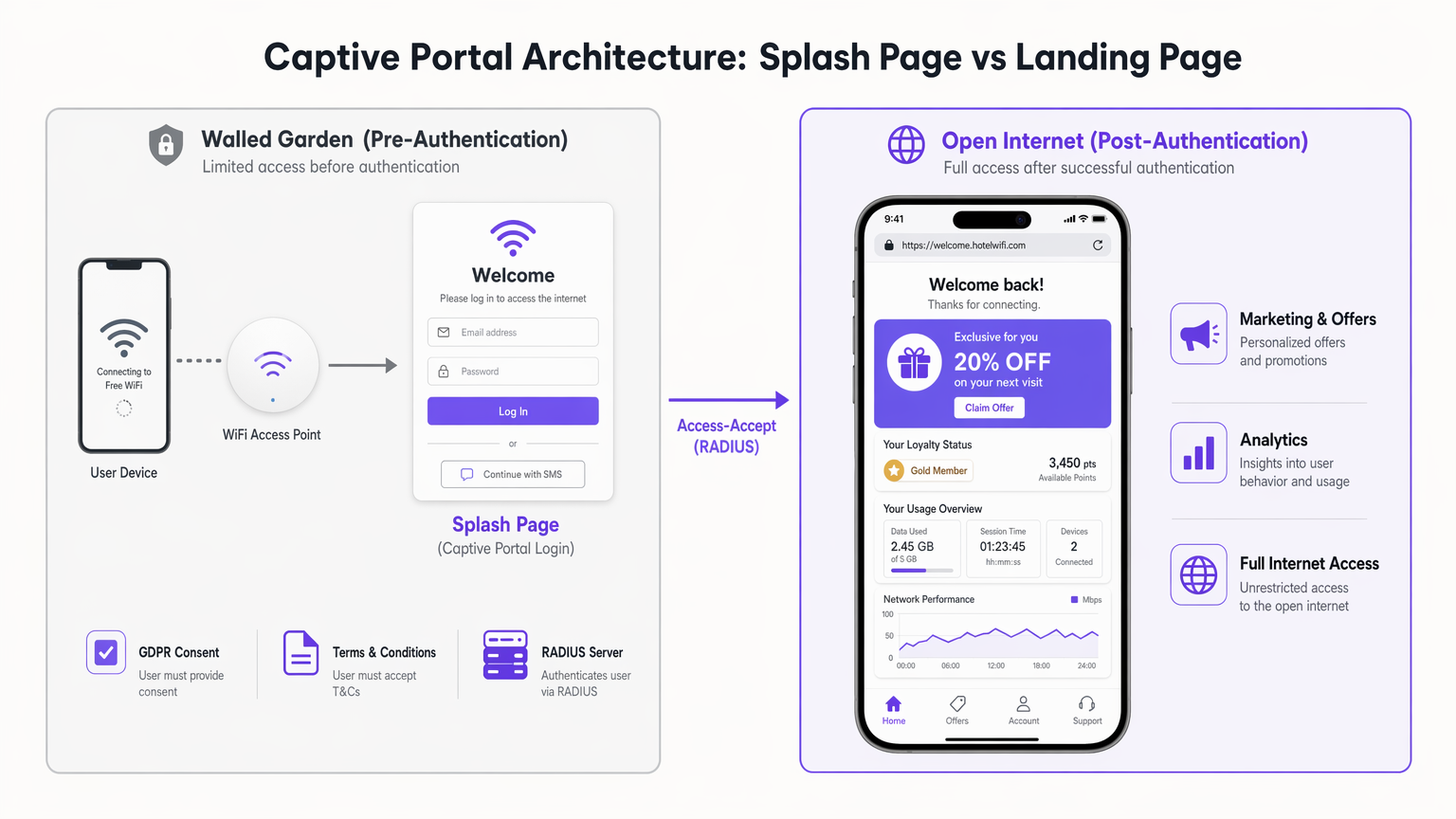
मौलिक स्तर पर, स्प्लैश पेज प्री-ऑथेंटिकेशन गेटकीपर है। यह एक Walled Garden के प्रतिबंधित वातावरण के भीतर मौजूद है, जो पहचान सत्यापन, MAC प्रमाणीकरण और GDPR तथा PCI DSS के तहत कानूनी सहमति के लिए जिम्मेदार है। WiFi लैंडिंग पेज पोस्ट-ऑथेंटिकेशन गंतव्य है। यह खुले इंटरनेट पर संचालित होता है, लॉगिन के दौरान कैप्चर किए गए डेटा का लाभ उठाकर व्यक्तिगत अनुभव प्रदान करता है, ऐप डाउनलोड को बढ़ावा देता है और गेस्ट WiFi एकीकरण के माध्यम से मापने योग्य ROI उत्पन्न करता है।
यह मार्गदर्शिका कैप्टिव पोर्टल डिज़ाइन से जुड़ी तकनीकी विशिष्टताओं, परिनियोजन पद्धतियों और सामान्य विफलता मोड का विवरण देती है — जिससे नेटवर्क आर्किटेक्ट्स किसी भी प्रकार के स्थान पर मजबूत, अनुपालनशील और राजस्व-उत्पादक अतिथि एक्सेस नेटवर्क बनाने में सक्षम होते हैं।
तकनीकी गहन-विश्लेषण
कैप्टिव पोर्टल आर्किटेक्चर
एक कैप्टिव पोर्टल अप्रमाणित क्लाइंट्स से HTTP/HTTPS ट्रैफ़िक को रोकता है और उन्हें एक निर्दिष्ट वेब इंटरफ़ेस पर रीडायरेक्ट करता है। यह तंत्र DNS हाइजैकिंग, HTTP 302 रीडायरेक्शन और RADIUS प्रमाणीकरण के संयोजन पर निर्भर करता है — जिसमें आधुनिक कार्यान्वयन तेजी से RFC 8908 (DHCP और राउटर विज्ञापनों में कैप्टिव पोर्टल पहचान) को अपना रहे हैं ताकि नाजुक HTTP इंटरसेप्शन के बिना नेटिव OS-स्तर पर कैप्टिव पोर्टल की खोज को सक्षम किया जा सके।
इस आर्किटेक्चर के भीतर, स्प्लैश पेज और लैंडिंग पेज प्रमाणीकरण जीवनचक्र के विभिन्न बिंदुओं पर मौलिक रूप से भिन्न भूमिकाएँ निभाते हैं।
1. स्प्लैश पेज (प्री-ऑथेंटिकेशन स्थिति)
जब कोई डिवाइस किसी SSID से जुड़ता है, तो वायरलेस कंट्रोलर उसे एक अप्रमाणित VLAN में रखता है। सभी आउटबाउंड ट्रैफ़िक को रोका जाता है और कैप्टिव पोर्टल होस्टनेम पर रीडायरेक्ट किया जाता है। ऑपरेटिंग सिस्टम का कैप्टिव नेटवर्क असिस्टेंट (CNA) — iOS, Android और Windows में निर्मित एक विशेष, सैंडबॉक्स्ड स्यूडो-ब्राउज़र — कैप्टिव पोर्टल का पता लगाता है और स्प्लैश पेज को रेंडर करता है।
CNA वातावरण की तकनीकी बाधाएँ:
CNA एक पूर्ण ब्राउज़र नहीं है। यह महत्वपूर्ण प्रतिबंधों के साथ संचालित होता है जो सीधे प्रभावित करते हैं कि स्प्लैश पेज पर क्या तैनात किया जा सकता है:
- कुकीज़ और लोकल स्टोरेज अक्सर ब्लॉक या गंभीर रूप से सीमित होते हैं
- जटिल जावास्क्रिप्ट फ्रेमवर्क निष्पादित होने में विफल हो सकते हैं
- बाहरी संसाधन (फ़ॉन्ट, स्क्रिप्ट, इमेज) तभी लोड हो सकते हैं जब उनके डोमेन Walled Garden में श्वेतसूचीबद्ध हों
- यदि CNA यह पता लगाता है कि उपयोगकर्ता ने प्रमाणीकरण पूरा करने से पहले डिवाइस ने इंटरनेट एक्सेस प्राप्त कर लिया है, तो यह स्वचालित रूप से बंद हो जाएगा
- CNA बंद होने पर सत्र की निरंतरता अविश्वसनीय है
स्प्लैश पेज के प्राथमिक कार्य:
इन बाधाओं को देखते हुए, स्प्लैश पेज को विशेष रूप से इसके लिए डिज़ाइन किया जाना चाहिए: प्रमाणीकरण (OAuth के माध्यम से सोशल लॉगिन, SMS OTP, फॉर्म-आधारित क्रेडेंशियल, या लॉयल्टी प्रोग्राम एकीकरण); नियम और शर्तें स्वीकार करना; GDPR सहमति कैप्चर; और भविष्य में सहज लॉगिन के लिए MAC एड्रेस पंजीकरण।
पेलोड अनुशंसा: स्प्लैश पेज को 1MB से कम रखें। इनलाइन CSS का उपयोग करें, बाहरी फ़ॉन्ट लाइब्रेरी से बचें और जावास्क्रिप्ट को कम करें। प्रत्येक बाहरी निर्भरता के लिए एक संबंधित Walled Garden श्वेतसूची प्रविष्टि की आवश्यकता होती है — जिनमें से प्रत्येक एक रखरखाव बोझ और एक संभावित सुरक्षा जोखिम दोनों का प्रतिनिधित्व करता है।
2. लैंडिंग पेज (पोस्ट-ऑथेंटिकेशन स्थिति)
सफल प्रमाणीकरण पर, RADIUS सर्वर एक Access-Accept संदेश लौटाता है। वायरलेस कंट्रोलर क्लाइंट के सत्र को अपडेट करता है, डिवाइस को पूर्ण इंटरनेट रूटिंग के साथ एक प्रमाणित VLAN में माइग्रेट करता है। Walled Garden हटा दिया जाता है। कंट्रोलर — या क्लाउड-आधारित कैप्टिव पोर्टल प्लेटफॉर्म — WiFi लैंडिंग पेज पर एक HTTP 302 रीडायरेक्ट जारी करता है।
इस बिंदु पर, डिवाइस एक पूर्ण ब्राउज़र और अप्रतिबंधित इंटरनेट एक्सेस के साथ संचालित हो रहा है। लैंडिंग पेज आधुनिक वेब डेवलपमेंट की पूरी क्षमता का लाभ उठा सकता है:
- स्प्लैश पेज पर कैप्चर किए गए उपयोगकर्ता प्रोफ़ाइल द्वारा संचालित गतिशील, व्यक्तिगत सामग्री
- पूर्ण एनालिटिक्स इंस्ट्रूमेंटेशन (Google Analytics, कस्टम ट्रैकिंग पिक्सेल, CRM वेबहुक)
- वीडियो, इंटरैक्टिव मैप्स और लॉयल्टी डैशबोर्ड सहित रिच मीडिया
- डीप-लिंक रूटिंग के साथ ऐप डाउनलोड प्रॉम्प्ट
- WiFi एनालिटिक्स डेटा के आधार पर लक्षित प्रचार, जिसमें विज़िट फ़्रीक्वेंसी, ड्वेल टाइम और वेन्यू ज़ोन शामिल हैं
लैंडिंग पेज के प्राथमिक कार्य: मार्केटिंग एंगेजमेंट, लॉयल्टी प्रोग्राम डिस्प्ले, लक्षित प्रचार, वेन्यू नेविगेशन और रूपांतरण-संचालित कॉल टू एक्शन।
प्रमाणीकरण प्रवाह: एंड-टू-एंड
नीचे दिया गया क्रम SSID एसोसिएशन से लैंडिंग पेज डिलीवरी तक के पूर्ण प्रवाह को दर्शाता है:
- क्लाइंट डिवाइस गेस्ट SSID से जुड़ता है
- कंट्रोलर डिवाइस को एक अप्रमाणित VLAN में असाइन करता है
- क्लाइंट एक HTTP अनुरोध का प्रयास करता है; कंट्रोलर इसे रोकता है और स्प्लैश पेज पर एक 302 रीडायरेक्ट जारी करता है
- CNA स्प्लैश पेज लोड करता है (संपत्तियाँ केवल Walled Garden-श्वेतसूचीबद्ध डोमेन से परोसी जाती हैं)
- उपयोगकर्ता प्रमाणीकरण पूरा करता है और नियम और शर्तें स्वीकार करता है
- कैप्टिव पोर्टल प्लेटफॉर्म RADIUS सर्वर को एक Access-Request भेजता है
- RADIUS Access-Accept लौटाता है; कंट्रोलर को एक चेंज ऑफ ऑथराइजेशन (CoA) संदेश प्राप्त होता है
- कंट्रोलर क्लाइंट को प्रमाणित VLAN में माइग्रेट करता है
- कैप्टिव पोर्टल प्लेटफॉर्म WiFi लैंडिंग पेज पर एक 302 रीडायरेक्ट जारी करता है
- क्लाइंट ब्राउज़र खुले इंटरनेट पर पूर्ण लैंडिंग पेज लोड करता है
चिंताओं का यह स्पष्ट पृथक्करण — प्रमाणीकरण पर Splash Page, Landing Page पर जुड़ाव — हर अच्छी तरह से डिज़ाइन किए गए गेस्ट WiFi डिप्लॉयमेंट का वास्तुशिल्प आधार है।
कार्यान्वयन गाइड
एक स्केलेबल, एंटरप्राइज़-ग्रेड गेस्ट WiFi समाधान को डिप्लॉय करने के लिए नेटवर्क कंट्रोल प्लेन को यूज़र एक्सपीरियंस लेयर से अलग करना ज़रूरी है। निम्नलिखित चरण Cisco Meraki, Aruba, Ruckus और Ubiquiti इंफ्रास्ट्रक्चर पर लागू होने वाला एक वेंडर-न्यूट्रल डिप्लॉयमेंट फ्रेमवर्क प्रदान करते हैं।
चरण 1: वॉल्ड गार्डन कॉन्फ़िगरेशन
अपने वायरलेस LAN कंट्रोलर (WLC) को केवल उन डोमेन और IP रेंज को व्हाइटलिस्ट करने के लिए कॉन्फ़िगर करें जो Splash Page के काम करने के लिए सख्ती से ज़रूरी हैं। इसमें आमतौर पर शामिल हैं:
- Captive Portal प्लेटफ़ॉर्म होस्टनेम (जैसे,
portal.purple.ai) - सोशल लॉगिन के लिए आइडेंटिटी प्रोवाइडर डोमेन (जैसे,
accounts.google.com,graph.facebook.com) - OTP प्रमाणीकरण का उपयोग करने पर SMS गेटवे डोमेन
- Splash Page द्वारा उपयोग की जाने वाली कोई भी CDN एसेट
ओवर-व्हाइटलिस्टिंग से बचें। प्रत्येक अतिरिक्त एंट्री आपके प्री-ऑथेंटिकेशन नेटवर्क के अटैक सरफेस को बढ़ाती है और IP रेंज बदलने पर चल रहे रखरखाव को जटिल बनाती है।
चरण 2: SSL सर्टिफ़िकेट मैनेजमेंट
WLC को Captive Portal रीडायरेक्शन होस्टनेम के लिए एक वैध, सार्वजनिक रूप से विश्वसनीय SSL सर्टिफ़िकेट के साथ कॉन्फ़िगर करें। सेल्फ़-साइन किए गए सर्टिफ़िकेट CNA में ब्राउज़र सुरक्षा चेतावनी ट्रिगर करेंगे, जिससे यूज़र कनेक्शन प्रक्रिया को छोड़ देंगे। सर्टिफ़िकेट की समय-सीमा समाप्त होना गेस्ट WiFi आउटेज का एक प्रमुख कारण है — Let's Encrypt या अपने सर्टिफ़िकेट मैनेजमेंट प्लेटफ़ॉर्म के माध्यम से स्वचालित नवीनीकरण लागू करें।
चरण 3: CNA ऑप्टिमाइज़ेशन
Splash Page को विशेष रूप से CNA वातावरण के लिए डिज़ाइन करें। इनलाइन CSS का उपयोग करें, बाहरी JavaScript फ्रेमवर्क से बचें, और कई iOS और Android वर्ज़न पर परीक्षण करें। विशेष रूप से iOS CNA व्यवहार प्रमुख OS रिलीज़ के बीच बदलता है — दोनों प्लेटफ़ॉर्म के कम से कम दो सबसे हाल के प्रमुख वर्ज़न को कवर करने वाला एक रिग्रेशन टेस्ट मैट्रिक्स बनाए रखें।
चरण 4: पोस्ट-ऑथेंटिकेशन रीडायरेक्शन लॉजिक
डायनामिक Landing Page URL को सपोर्ट करने के लिए पोस्ट-ऑथेंटिकेशन रीडायरेक्शन कॉन्फ़िगर करें। RADIUS सर्वर वेंडर-स्पेसिफिक एट्रिब्यूट (VSAs) लौटा सकता है या Captive Portal प्लेटफ़ॉर्म एक पर्सनलाइज़्ड URL बनाने के लिए प्रमाणित यूज़र प्रोफ़ाइल का उपयोग कर सकता है। यह सेगमेंटेशन को सक्षम बनाता है — एक पहली बार आने वाले विज़िटर को वेलकम ऑफ़र मिलता है, जबकि गोल्ड स्टेटस वाले लॉयल्टी मेंबर को एक पर्सनलाइज़्ड डैशबोर्ड मिलता है।
चरण 5: एनालिटिक्स इंटीग्रेशन
अपने एनालिटिक्स स्टैक के साथ Landing Page को इंस्ट्रूमेंट करें। क्योंकि यूज़र अब एक पूर्ण ब्राउज़र के साथ खुले इंटरनेट पर है, मानक एनालिटिक्स टूल सामान्य रूप से काम करते हैं। WiFi सेशन डेटा को खरीद इतिहास, लॉयल्टी स्टेटस और मार्केटिंग एंगेजमेंट मेट्रिक्स के साथ संयोजित करने वाली एक एकीकृत ग्राहक प्रोफ़ाइल बनाने के लिए अपने CRM के साथ इंटीग्रेट करें।
क्लाउड-आधारित बनाम ऑन-प्रिमाइसेस Captive Portal आर्किटेक्चर की विस्तृत तुलना के लिए, क्लाउड-आधारित बनाम ऑन-प्रिमाइसेस Captive Portal: आपके व्यवसाय के लिए कौन सा सही है? देखें।
सर्वोत्तम अभ्यास
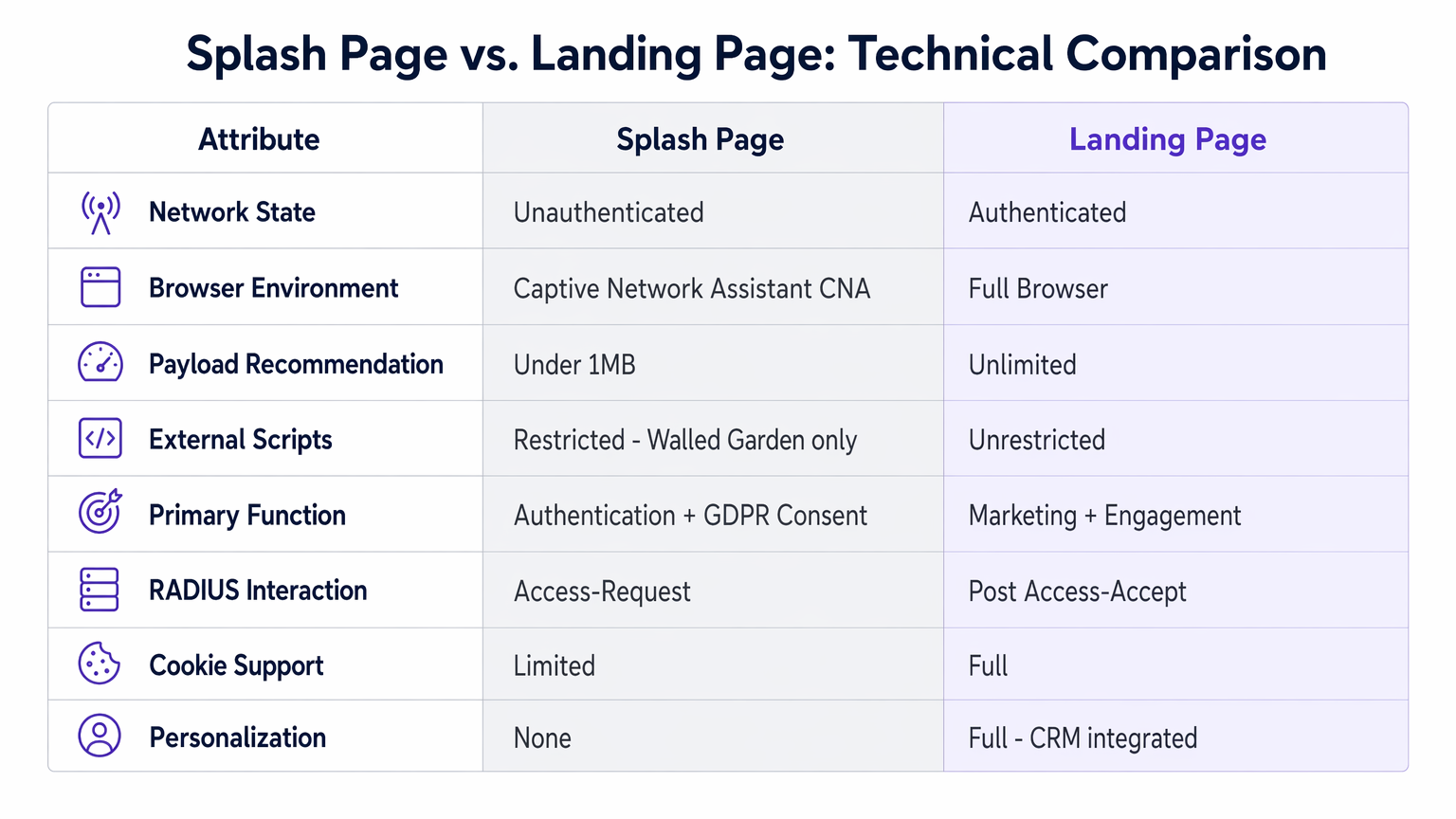
प्रमाणीकरण और मार्केटिंग को अलग करें। सबसे प्रभावशाली वास्तुशिल्प निर्णय Splash Page का उपयोग केवल सुरक्षित एक्सेस और सहमति के लिए करना है, और सभी मार्केटिंग एसेट को Landing Page पर ले जाना है। इससे कनेक्शन दरें बेहतर होती हैं, सपोर्ट टिकट कम होते हैं, और कंप्लायंस ऑडिट सरल होते हैं।
लौटने वाले यूज़र्स के लिए MAC प्रमाणीकरण बाईपास का लाभ उठाएं। लौटने वाले डिवाइस के लिए, MAC प्रमाणीकरण बाईपास (MAB) Splash Page को पूरी तरह से हटा देता है, यूज़र्स को सीधे एक पर्सनलाइज़्ड Landing Page पर रीडायरेक्ट करता है। यह हॉस्पिटैलिटी और रिटेल वातावरण में बार-बार आने वाले विज़िटर के लिए यूज़र एक्सपीरियंस को नाटकीय रूप से बेहतर बनाता है। सुनिश्चित करें कि आपकी गोपनीयता नीति स्पष्ट रूप से लगातार डिवाइस ट्रैकिंग को कवर करती है।
क्लाउड-केंद्रित आर्किटेक्चर अपनाएं। जिस तरह नेटवर्किंग उद्योग केंद्रीकृत प्रबंधन के लिए सॉफ्टवेयर-डिफाइंड WAN की ओर बढ़ा है — जैसा कि आधुनिक व्यवसायों के लिए मुख्य SD WAN लाभ में विस्तृत है — Captive Portal प्लेटफ़ॉर्म क्लाउड-होस्टेड होने चाहिए। यह वितरित वेन्यू एस्टेट में केंद्रीकृत प्रबंधन, कंट्रोलर फ़र्मवेयर परिवर्तनों के बिना तेज़ी से सामग्री अपडेट, और बाहरी CRMs और मार्केटिंग ऑटोमेशन प्लेटफ़ॉर्म के साथ सहज एकीकरण को सक्षम बनाता है।
आधुनिक OS संगतता के लिए RFC 8908 लागू करें। RFC 8908 के माध्यम से नेटिव Captive Portal डिटेक्शन HTTP इंटरसेप्शन पर निर्भरता को कम करता है, आधुनिक iOS और Android वर्ज़न में विश्वसनीयता में सुधार करता है जो तेजी से HTTPS-ओनली ब्राउज़िंग को लागू करते हैं।
एक वॉल्ड गार्डन ऑडिट शेड्यूल बनाए रखें। वॉल्ड गार्डन एंट्रीज़ की तिमाही समीक्षा करें। प्रमुख आइडेंटिटी प्रोवाइडर के लिए IP रेंज बिना सूचना के बदल जाती हैं। पुरानी एंट्रीज़ जो अब हल नहीं होती हैं, प्रमाणीकरण विफलताएं पैदा करती हैं; गुम एंट्रीज़ वैध प्रमाणीकरण प्रवाह को ब्लॉक करती हैं।
समस्या निवारण और जोखिम न्यूनीकरण
कनेक्शन लूप। यदि कोई यूज़र प्रमाणित होता है लेकिन बार-बार Splash Page पर रीडायरेक्ट किया जाता है, तो सत्यापित करें कि RADIUS एक्सेस-एक्सेप्ट मैसेज कंट्रोलर तक पहुंच रहा है और क्लाइंट प्रमाणित VLAN पर सफलतापूर्वक DHCP लीज़ प्राप्त कर रहा है। यह भी जांचें कि CoA (Change of Authorization) पोर्ट (UDP 3799) किसी इंटरमीडिएट फ़ायरवॉल द्वारा ब्लॉक नहीं किया गया है।
CNA का समय से पहले बंद होना। यदि यूज़र प्रमाणित होने से पहले CNA बंद हो जाता है, तो डिवाइस ने शायद इंटरनेट एक्सेस को समय से पहले डिटेक्ट कर लिया है। ऐसा तब हो सकता है जब वॉल्ड गार्डन अत्यधिक अनुमेय हो, प्रमाणीकरण पूरा होने से पहले अनजाने में पूर्ण इंटरनेट रूटिंग की अनुमति दे रहा हो। अत्यधिक व्यापक CIDR रेंज के लिए वॉल्ड गार्डन एंट्रीज़ की समीक्षा करें।
HTTPS इंटरसेप्शन त्रुटियां। आधुनिक ब्राउज़र HTTP स्ट्रिक्ट ट्रांसपोर्ट सिक्योरिटी (HSTS) लागू करते हैं। यदि कोई यूज़र प्रमाणित होने से पहले HSTS-प्रीलोडेड डोमेन पर नेविगेट करने का प्रयास करता है, तो ब्राउज़र Captive Portal रीडायरेक्ट को ब्लॉक कर देगा। नेटिव Captive Portal डिस्कवरी को सक्षम करने के लिए RFC 8908 लागू करें, या यूज़र्स को CNA को ट्रिगर करने के लिए गैर-HSTS डोमेन पर नेविगेट करने का निर्देश दें।
Splash Page पर थर्ड-पार्टी स्क्रिप्ट विफलताएं। यदि मार्केटिंग टीमों ने स्प्लैश पेज में ट्रैकिंग पिक्सेल या एनालिटिक्स स्क्रिप्ट जोड़े हैं, तो यदि उनके डोमेन को श्वेतसूची में नहीं डाला जाता है, तो ये CNA वातावरण में चुपचाप विफल हो जाएंगे। सही समाधान यह है कि इन स्क्रिप्ट को स्प्लैश पेज से पूरी तरह हटा दिया जाए और उन्हें लैंडिंग पेज पर फिर से तैनात किया जाए, जहाँ वे सही ढंग से कार्य करेंगे।
GDPR अनुपालन में कमियाँ। सुनिश्चित करें कि स्प्लैश पेज पर सहमति तंत्र GDPR अनुच्छेद 7 की आवश्यकताओं को पूरा करता है — सहमति स्वेच्छा से, विशिष्ट, सूचित और स्पष्ट होनी चाहिए। पहले से टिक किए गए सहमति बॉक्स गैर-अनुपालक हैं। न्यूनतम तीन वर्षों के लिए सहमति ऑडिट लॉग बनाए रखें।
ROI और व्यावसायिक प्रभाव
एक सही ढंग से लागू स्प्लैश/लैंडिंग पेज आर्किटेक्चर गेस्ट WiFi को एक लागत केंद्र से एक मापने योग्य राजस्व-उत्पादक संपत्ति में बदल देता है। वित्तीय मामला तीन आयामों में संचालित होता है।
डेटा कैप्चर और फर्स्ट-पार्टी इंटेलिजेंस। स्प्लैश पेज को सुव्यवस्थित करके, स्थान कनेक्शन दरों और कैप्चर किए गए फर्स्ट-पार्टी डेटा की मात्रा बढ़ाते हैं। स्वास्थ्य सेवा और परिवहन वातावरण में, यह डेटा परिचालन विश्लेषण का समर्थन करता है — फुटफॉल पैटर्न, ज़ोन के अनुसार ठहरने का समय, और चरम मांग का पूर्वानुमान — जिससे मापने योग्य लागत बचत के साथ संसाधन आवंटन निर्णय सक्षम होते हैं।
प्रत्यक्ष राजस्व एट्रिब्यूशन। लैंडिंग पेज प्राथमिक रूपांतरण सतह है। एक स्टेडियम परिनियोजन इन-सीट भोजन और पेय पदार्थ ऑर्डरिंग को बढ़ावा देने के लिए लैंडिंग पेज का उपयोग कर सकता है, जो नेटवर्क एक्सेस को सीधे लेनदेन राजस्व से जोड़ता है। एक होटल स्पा बुकिंग या रूम अपग्रेड की पेशकश कर सकता है। एक रिटेलर WiFi एनालिटिक्स से वास्तविक समय स्थान डेटा द्वारा संचालित ज़ोन-विशिष्ट प्रचार प्रदान कर सकता है।
निष्ठा और प्रतिधारण। स्प्लैश पेज पर कैप्चर किए गए उपयोगकर्ता प्रोफ़ाइल द्वारा संचालित व्यक्तिगत लैंडिंग पेज अनुभव, निष्ठा कार्यक्रम सहभागिता को बढ़ाते हैं। लौटने वाले उपयोगकर्ता जिन्हें एक व्यक्तिगत स्वागत अनुभव प्राप्त होता है, वे एक सामान्य लैंडिंग पेज के साथ प्रस्तुत उपयोगकर्ताओं की तुलना में काफी अधिक सत्र अवधि और बार-बार विज़िट आवृत्ति प्रदर्शित करते हैं।
एक गेस्ट WiFi परिनियोजन के लिए मापने योग्य KPI में शामिल होना चाहिए: WiFi कनेक्शन दर (लक्ष्य >70% स्थान आगंतुक), डेटा कैप्चर दर (लक्ष्य >85% कनेक्टेड उपयोगकर्ता), प्राथमिक CTA पर लैंडिंग पेज क्लिक-थ्रू दर, और WiFi-संचालित प्रचारों से संबंधित प्रत्यक्ष राजस्व।
नीचे पूरा तकनीकी ब्रीफिंग पॉडकास्ट सुनें:
Key Terms & Definitions
Captive Portal
A web-based access control mechanism that intercepts network traffic from unauthenticated clients and redirects them to an authentication interface before granting broader network access.
The overarching system IT teams deploy to manage guest access, enforce acceptable use policies, capture user consent, and collect first-party data.
Splash Page
The initial authentication interface presented within the captive portal flow, operating within the restricted Walled Garden environment before the user has been granted internet access.
Where network architects must focus on lightweight design, identity verification, and legal consent. Incorrectly overloading this page with marketing assets is the leading cause of guest WiFi connection failures.
WiFi Landing Page
The post-authentication destination page loaded in the user's full browser after the device has been granted internet access by the RADIUS server.
Where marketing and operations teams deploy rich media, personalised content, loyalty integrations, and engagement campaigns. Operates without the constraints of the Walled Garden.
Walled Garden
A restricted network environment that allows unauthenticated users to access only a specific, explicitly whitelisted set of IP addresses or hostnames, blocking all other internet traffic.
The technical boundary within which the Splash Page must operate. Every external resource used by the Splash Page must have its domain or IP range added to the Walled Garden whitelist.
Captive Network Assistant (CNA)
A specialised, sandboxed pseudo-browser built into mobile operating systems (iOS, Android, Windows) that automatically detects and renders captive portal login pages.
The primary reason Splash Pages must be lightweight and avoid complex JavaScript, external cookies, or large media assets. CNA behaviour varies between OS versions and requires ongoing regression testing.
MAC Authentication Bypass (MAB)
A network access control technique that authenticates devices based on their hardware MAC address without requiring user interaction, enabling seamless login for returning devices.
Used to provide frictionless login experiences for returning guests or registered IoT devices. Requires integration between the RADIUS server and the venue's loyalty or device registry database.
RADIUS (Remote Authentication Dial-In User Service)
A networking protocol providing centralised Authentication, Authorisation, and Accounting (AAA) management for network access, defined in RFC 2865.
The backend server infrastructure that validates credentials submitted on the Splash Page, instructs the controller to grant access, and returns user attributes used to personalise the Landing Page.
RFC 8908
The IETF standard defining the Captive Portal API, enabling devices to discover and interact with captive portals natively through DHCP options and Router Advertisements rather than relying on HTTP interception.
A modern standard that improves captive portal reliability across iOS 14+ and Android 11+, reducing CNA-related connection failures caused by HTTPS interception issues.
Change of Authorization (CoA)
A RADIUS extension (RFC 5176) that allows the RADIUS server to dynamically modify an active network session — for example, migrating a client from an unauthenticated to an authenticated VLAN after successful login.
The mechanism by which the captive portal platform instructs the wireless controller to grant internet access after the user completes authentication on the Splash Page.
Case Studies
A 500-room hotel resort is experiencing high drop-off rates on their guest WiFi login. The marketing team recently added a 4MB promotional video and a complex interactive venue map to the initial connection screen. Connection rates have dropped from 68% to 31% since the update. How should the network architect resolve this?
The architect must decouple the authentication and marketing functions. Step 1: Replace the current connection screen with a lightweight Splash Page under 1MB, containing only the authentication form (room number and last name), a GDPR-compliant consent checkbox, and Terms and Conditions acceptance. Step 2: Remove all external script dependencies from the Splash Page and serve all assets from the captive portal platform's own CDN, which is already whitelisted in the Walled Garden. Step 3: Configure the wireless controller's post-authentication redirection to send the user to a newly created Landing Page hosted on the open internet. Step 4: Move the 4MB promotional video and interactive venue map to this Landing Page. Step 5: Instrument the Landing Page with the hotel's CRM integration to personalise the welcome message based on the authenticated user profile. Step 6: Implement MAC Authentication Bypass for returning guests to eliminate the Splash Page entirely on subsequent visits.
A retail chain wants to offer seamless WiFi access to returning loyalty programme members across 50 locations, bypassing the login screen while still displaying a personalised welcome offer and current loyalty points balance. What is the recommended technical architecture?
Implement MAC Authentication Bypass (MAB) integrated with the loyalty database via RADIUS. Architecture: (1) When a returning device associates with the SSID, the controller sends a RADIUS Access-Request containing the device MAC address. (2) The RADIUS server queries the loyalty database to match the MAC address to a loyalty profile. (3) If a match is found, the RADIUS server returns an Access-Accept with a vendor-specific attribute (VSA) containing a signed user token. (4) The controller grants immediate internet access and issues a redirect to the Landing Page URL, appending the signed token as a query parameter. (5) The cloud-hosted Landing Page decodes the token, queries the loyalty API for the user's current points balance and personalised offer, and renders a customised welcome experience. For new users or unrecognised devices, the standard Splash Page flow is presented, with an option to link the device to their loyalty account for future seamless access.
Scenario Analysis
Q1. A public sector organisation requires all guest WiFi users to accept a lengthy Acceptable Use Policy (AUP) before accessing the internet. The communications team also wants to display a dynamic feed of upcoming community events and a live social media wall. How should you architect this requirement across the captive portal flow?
💡 Hint:Consider the constraints of the Captive Network Assistant (CNA) and the Walled Garden when deciding where to place each content element.
Show Recommended Approach
Place the Acceptable Use Policy (AUP) on the Splash Page to ensure legal compliance before authentication. The AUP should be presented as inline text or a scrollable div — not loaded from an external URL — to avoid Walled Garden dependencies. Once the user accepts the AUP and is authenticated, redirect them to the Landing Page to display the dynamic community events feed and social media wall. The social media wall in particular requires external API calls that cannot function within the Walled Garden, making the Landing Page the only viable location.
Q2. During a new deployment at a conference centre, users report that the login screen appears correctly but when they click 'Sign in with LinkedIn', the page times out and returns an error. The controller configuration and RADIUS server are both functioning correctly for email/password authentication. What is the most likely cause and resolution?
💡 Hint:Think about what network access is required for a third-party OAuth identity provider to complete its authorisation flow during the pre-authentication phase.
Show Recommended Approach
The Walled Garden configuration is incomplete. LinkedIn's OAuth flow requires the client device to communicate with LinkedIn's authorisation servers (e.g., www.linkedin.com, api.linkedin.com) during the pre-authentication phase. These domains are not whitelisted, so the OAuth redirect fails. The resolution is to identify all IP ranges and hostnames used by LinkedIn's OAuth API and add them to the Walled Garden whitelist on the wireless controller. Note that LinkedIn (and other major identity providers) may use multiple CDN-hosted domains — review the OAuth documentation or use a packet capture to identify all required endpoints.
Q3. A retail client wants to track user behaviour on the initial WiFi login screen using Google Analytics 4 and a custom retargeting pixel from their advertising platform. The marketing team has provided a tag manager snippet to be added to the Splash Page. Why is this technically problematic, and what is the recommended alternative that preserves the marketing team's measurement requirements?
💡 Hint:Evaluate the capabilities of the CNA mini-browser and the implications of adding external script domains to the Walled Garden.
Show Recommended Approach
This is problematic for two reasons. First, the CNA often blocks cookies and restricts JavaScript execution, rendering client-side tracking scripts ineffective or unreliable. Second, Google Tag Manager and advertising pixels load scripts from multiple external domains — adding all of these to the Walled Garden creates significant security exposure and ongoing maintenance overhead. The recommended alternative is a two-part approach: (1) Capture the authentication event server-side via the captive portal platform's API or RADIUS accounting logs, and push this event to Google Analytics 4 using the Measurement Protocol (server-side), which does not require client-side JavaScript. (2) Deploy the full Google Tag Manager container and retargeting pixel on the post-authentication Landing Page, where the full browser environment ensures reliable script execution and cookie-based tracking functions normally.




