

Cloud-Based vs. On-Premise Captive Portal: Which Is Right for Your Business?
A comprehensive technical comparison of cloud-based versus on-premise captive portal architectures. This guide evaluates the deployment speed, cost structures, scalability, and compliance implications to help IT leaders make informed infrastructure decisions.
🎧 Listen to this Guide
View Transcript
Executive Summary
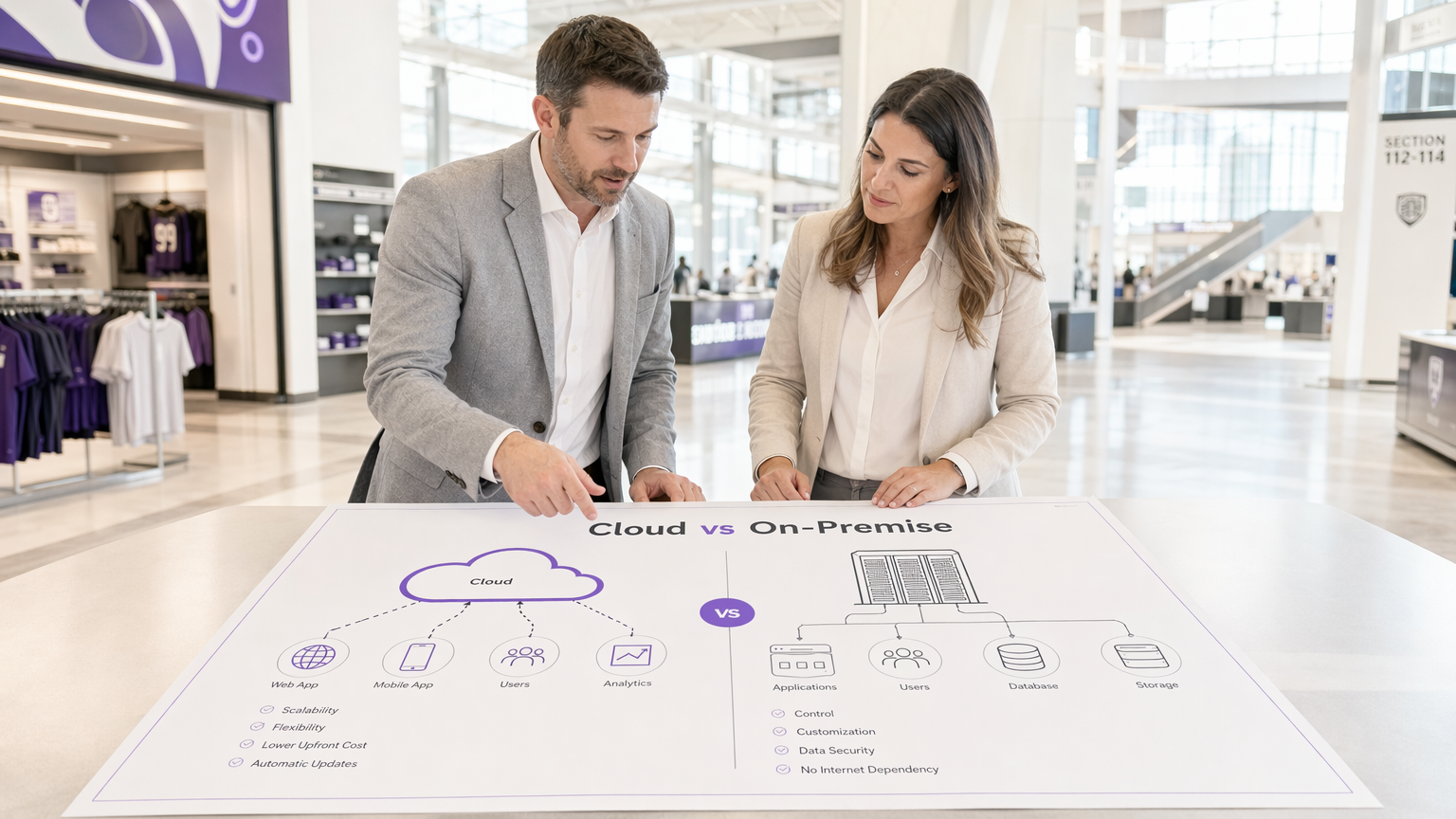
When designing a guest WiFi architecture, the choice between a cloud-based captive portal and an on-premise captive portal server dictates your infrastructure costs, operational overhead, and compliance posture for the lifecycle of the deployment. For IT managers, network architects, and CTOs, this is not merely a software preference; it is a fundamental architectural decision.
A cloud based captive portal shifts the authentication and portal rendering workloads to a vendor-managed environment, offering elastic scalability and significantly reduced maintenance. Conversely, an on-premise captive portal system retains all data and authentication logic within your local network perimeter, providing absolute control at the expense of higher capital expenditure and operational burden.
This guide provides a rigorous technical comparison of both deployment models. We will examine the architecture, evaluate the total cost of ownership, and outline specific implementation scenarios to help you determine which captive portal software aligns with your business objectives and regulatory requirements.
Technical Deep-Dive: Architecture and Authentication Flows
Understanding the distinction between a hosted captive portal and an on-premise solution requires examining the authentication flow and where the underlying processes execute.
The Cloud-Based Captive Portal Architecture
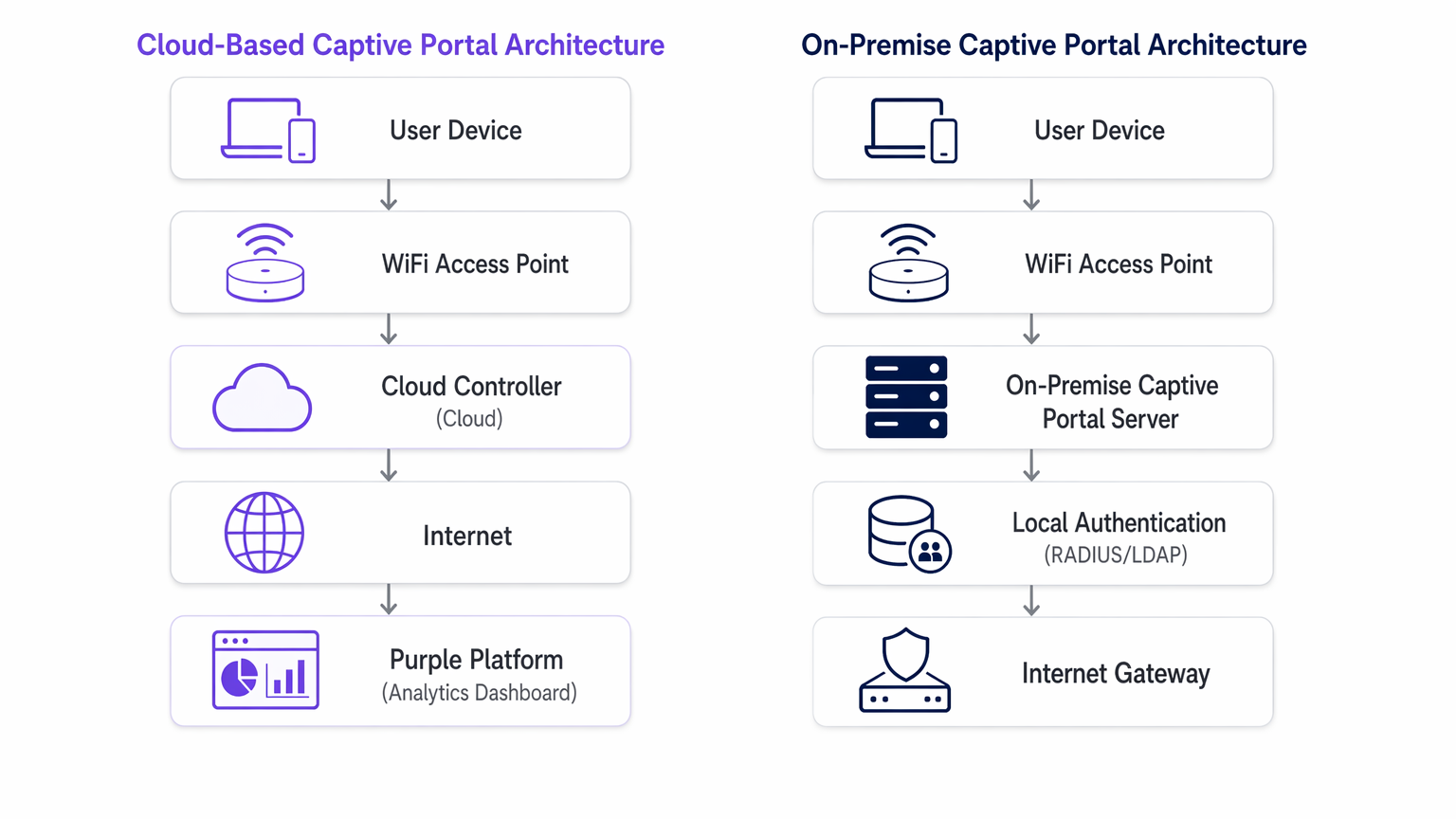
In a cloud-based model, the captive portal logic, RADIUS authentication, and data capture databases reside on third-party infrastructure (e.g., AWS, Azure, GCP) managed by a vendor like Purple.
When a client device associates with the guest SSID, the local access point (AP) or wireless LAN controller (WLC) intercepts the initial HTTP/HTTPS request. Because the device is unauthenticated, the controller redirects the browser to a cloud-hosted URL. The user interacts with the portal—accepting terms, authenticating via social login, or completing a form. Upon successful authentication, the cloud platform communicates back to the local controller (often via RADIUS or a vendor-specific API) to authorise the client's MAC address, granting internet access.
This architecture is highly elastic. During peak load—such as half-time at a stadium or a major sale in Retail —the cloud infrastructure scales automatically to handle thousands of concurrent authentication requests without requiring local hardware upgrades. Furthermore, platforms like Purple provide Guest WiFi analytics and act as a free identity provider for services like OpenRoaming under the Connect licence, adding significant value beyond basic access control.
The On-Premise Captive Portal Server Architecture
An on-premise captive portal server requires deploying dedicated hardware or virtual machines (VMs) within your local network infrastructure. The portal web server, the RADIUS server (e.g., FreeRADIUS, Microsoft NPS), and the user database are all maintained locally by your IT team.
The redirection process is similar, but the client is directed to an internal IP address rather than a public URL. The authentication transaction occurs entirely within the local area network (LAN). This model ensures that no guest data traverses the public internet during the authentication phase, which is often a strict requirement for Healthcare or government facilities governed by stringent data sovereignty policies.
However, the throughput of an on-premise system is strictly bounded by the provisioned hardware. Capacity planning must account for peak concurrent sessions, often resulting in significant over-provisioning. Additionally, the IT team assumes full responsibility for OS patching, SSL certificate renewal, database maintenance, and configuring high-availability failover pairs.
Implementation Guide: Vendor-Neutral Recommendations
Selecting the appropriate architecture depends on your specific operational constraints.
When to Choose a Cloud-Based Captive Portal
- Multi-Site Deployments: If you manage a distributed portfolio, such as a Hospitality chain or a network of Transport hubs, a cloud based captive portal provides centralised management.
- You can push portal updates, branding changes, and policy modifications across hundreds of sites simultaneously.
- Lean IT Operations: When your network team is focused on core infrastructure rather than application maintenance, offloading the captive portal system to a SaaS provider reduces operational overhead.
- Marketing and Analytics Integration: Cloud platforms inherently facilitate data aggregation. If your objective is to leverage WiFi Analytics to drive customer engagement, a hosted captive portal provides the necessary integrations out-of-the-box.
When to Choose an On-Premise Captive Portal
- Strict Data Sovereignty: If regulatory frameworks prohibit guest data from leaving your physical premises or national borders, an on-premise deployment is mandatory.
- Air-Gapped or High-Latency Environments: Venues with unreliable internet uplinks cannot depend on a cloud authentication gateway. If the WAN link fails, a cloud portal fails; an on-premise portal can still authenticate users for local network access.
- Deep Custom Integration: When the portal must interface directly with legacy, locally hosted property management systems (PMS) via proprietary APIs that cannot be exposed to the internet.
Best Practices for Captive Portal Deployment
Regardless of the deployment model, adherence to industry standards is critical for security and user experience.
- VLAN Segmentation: Always isolate the guest WiFi network on a dedicated VLAN, entirely separate from corporate resources.
- SSL/TLS Certificate Management: A captive portal must serve its pages over HTTPS. Expired certificates will trigger severe browser warnings, halting the authentication flow. For on-premise deployments, automate certificate renewal using protocols like ACME (e.g., Let's Encrypt). Cloud vendors manage this automatically.
- WPA3 and 802.1X Considerations: While WPA3-Enterprise with 802.1X is the gold standard for corporate devices, it is impractical for guest networks where you cannot distribute certificates to unmanaged devices. Therefore, an open network with a captive portal, or WPA3-Personal (Opportunistic Wireless Encryption - OWE), remains the standard for public access.
- Data Processing Agreements (DPA): When utilising a hosted captive portal, rigorously review the vendor's DPA. Ensure they comply with GDPR, PCI DSS, and clearly define their sub-processors and data residency locations.
Troubleshooting & Risk Mitigation
Common failure modes differ significantly between the two architectures.
Cloud-Based Risks
- WAN Outages: The primary risk is a loss of internet connectivity. Without an uplink, the cloud controller cannot be reached, and authentication fails. Mitigate this with redundant WAN links (e.g., primary fibre, secondary 5G/LTE) or consider The Core SD WAN Benefits for Modern Businesses to ensure high availability.
- DNS Resolution Failures: If local DNS fails to resolve the cloud portal URL, the redirection breaks. Ensure robust local DNS infrastructure.
On-Premise Risks
- Hardware Failure: A single captive portal server is a single point of failure. You must deploy in an active-passive or active-active cluster to ensure high availability.
- Capacity Exhaustion: Unexpected spikes in user density can overwhelm the local RADIUS server or web server, causing timeouts. Monitor CPU, memory, and concurrent session metrics rigorously.
- Patch Management: Unpatched portal servers are prime targets for exploitation. Implement strict vulnerability management and patch deployment schedules.
For scenarios where the portal is causing more friction than value, consult How to Remove a Captive Portal Login (And When You Should) .
ROI & Business Impact
The financial models for these architectures are fundamentally different.
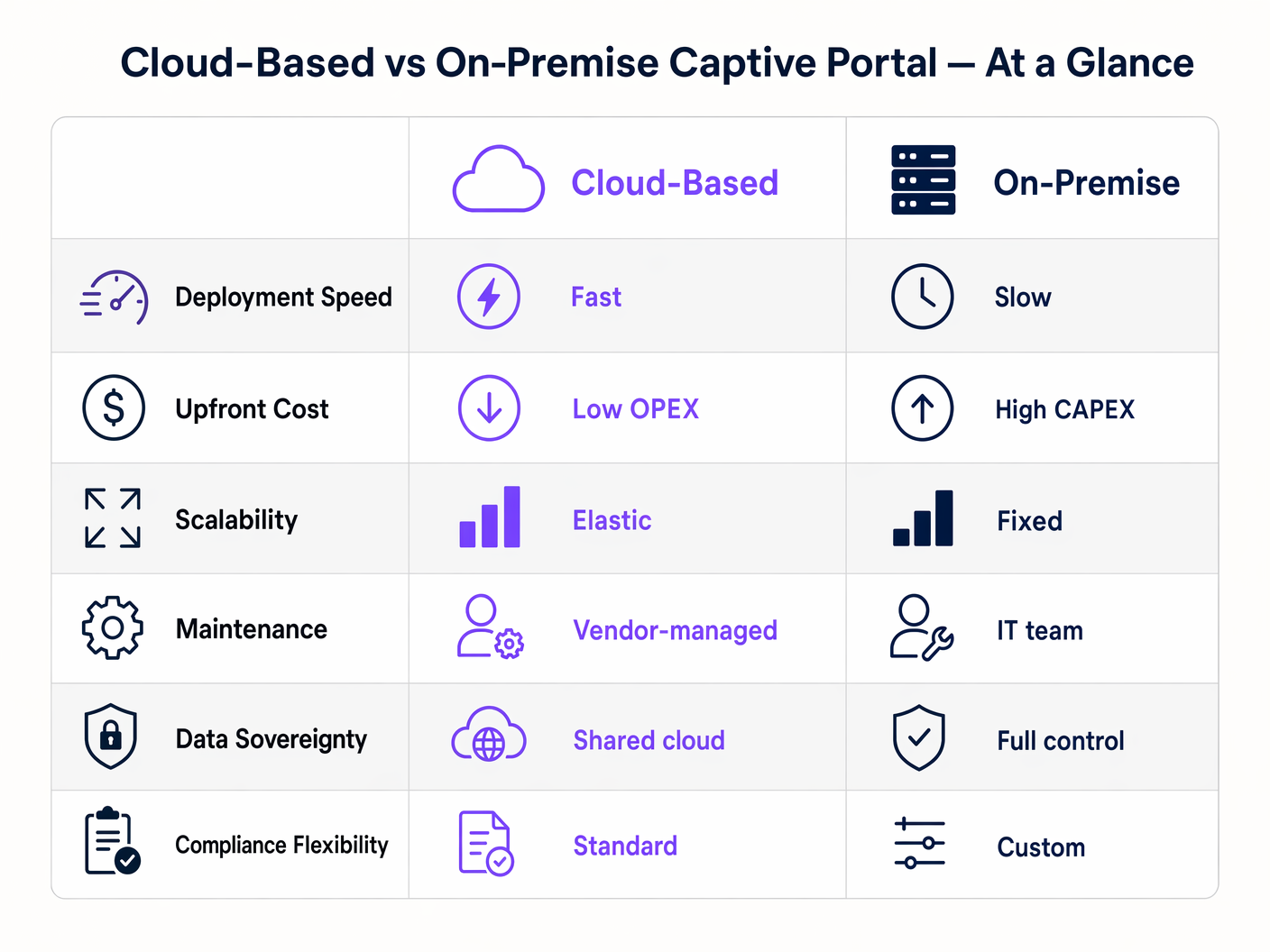
An on-premise captive portal software deployment is a Capital Expenditure (CAPEX) model. You incur significant upfront costs for hardware, hypervisor licensing, and redundant infrastructure. The ongoing costs are hidden in the operational expenditure (OPEX) of your IT team's time spent on maintenance and troubleshooting.
A cloud-based captive portal operates on an OPEX model. The upfront costs are minimal, limited to the access points and initial configuration. You pay a predictable, recurring subscription fee. The ROI of a cloud platform is often realised through the reduction in IT workload and the monetisation of the captured data via advanced analytics and marketing integrations, transforming guest WiFi from a cost centre into a revenue-generating asset.
Key Terms & Definitions
Captive Portal
A web page that a user of a public access network is obliged to view and interact with before access is granted.
The primary mechanism for authenticating guests and capturing marketing consent on public WiFi networks.
RADIUS (Remote Authentication Dial-In User Service)
A networking protocol that provides centralized Authentication, Authorization, and Accounting (AAA) management for users who connect and use a network service.
The backend protocol used by both cloud and on-premise portals to signal the access point that a user is authorized.
Data Sovereignty
The concept that data is subject to the laws and governance structures within the nation it is collected.
A critical deciding factor for government and healthcare venues evaluating cloud vs. on-premise architectures.
MAC Address Authorization
The process of using a device's Media Access Control address to identify it and grant network access after initial authentication.
How the network controller remembers a device so the user doesn't have to log in every time they roam between access points.
WPA3-Enterprise
The latest Wi-Fi security standard requiring 802.1X authentication and a RADIUS server, providing individualized encryption.
The standard for corporate networks, which operates separately from the open/OWE guest network where the captive portal resides.
VLAN Segmentation
The practice of dividing a physical network into multiple logical networks.
Essential for security, ensuring guest WiFi traffic (and the captive portal) is isolated from internal corporate data.
Data Processing Agreement (DPA)
A legally binding contract that states the rights and obligations of each party concerning the protection of personal data.
Mandatory documentation when utilizing a hosted captive portal to ensure GDPR compliance.
OpenRoaming
A federation of Wi-Fi networks that allows users to automatically and securely connect to participating networks without manual login.
An advanced authentication method supported by platforms like Purple, offering a frictionless alternative to traditional captive portals.
Case Studies
A national retail chain with 400 locations needs to deploy a standardized guest WiFi experience. Their IT team consists of 5 network engineers based at headquarters. They require detailed analytics on customer dwell time and visit frequency to integrate with their CRM.
Deploy a cloud-based captive portal system. The lean IT team cannot manage 400 on-premise portal servers or complex VPN routing back to a centralized on-premise data center. A hosted captive portal allows centralized policy management, immediate scalability, and native API integration for CRM data syncing.
A large NHS hospital trust requires guest WiFi across its campus. Strict patient data confidentiality policies dictate that no MAC addresses, device identifiers, or user information can be stored on servers outside the UK, and all authentication traffic must remain within the hospital's private network.
Deploy an on-premise captive portal server. The hospital must provision a high-availability cluster of portal servers within their local data center, integrated with their local Active Directory or a dedicated FreeRADIUS instance for guest accounts.
Scenario Analysis
Q1. A hotel chain is experiencing frequent authentication timeouts during large conferences because their local captive portal server reaches maximum CPU utilization. What is the most operationally efficient architectural solution?
💡 Hint:Consider which deployment model handles elastic scaling automatically.
Show Recommended Approach
Migrate to a cloud-based captive portal system. Cloud architectures provide elastic scalability, automatically absorbing authentication spikes without requiring the local IT team to provision, configure, or maintain additional hardware.
Q2. A government facility must deploy guest WiFi but has a strict policy that no external DNS resolution or outbound internet traffic is permitted from the management VLAN. Which captive portal architecture must be deployed?
💡 Hint:Evaluate how a cloud portal redirects clients.
Show Recommended Approach
An on-premise captive portal server must be deployed. A cloud-based portal requires the client to resolve and reach an external URL for authentication. Without outbound internet access from the management/guest VLAN, the redirection will fail. The authentication process must be handled entirely locally.
Q3. You are calculating the total cost of ownership (TCO) for an on-premise captive portal deployment. Beyond the initial server hardware and software licensing, what critical infrastructure component must be included to ensure network resilience?
💡 Hint:Consider the impact of a single server failure.
Show Recommended Approach
You must include the cost of a secondary server configured for high availability (active-passive or active-active failover). Relying on a single on-premise server creates a single point of failure; if it goes offline, the entire guest network becomes inaccessible.




