

Outdoor WiFi Deployment: Weatherproofing, PoE, and Mesh Options
This authoritative guide details the critical engineering considerations for outdoor WiFi deployment, focusing on weatherproofing (IP ratings), Power over Ethernet (PoE) strategies for long cable runs, and the architectural trade-offs between mesh and wired backhaul. It provides actionable recommendations for IT leaders to ensure resilient, high-performance connectivity in hostile outdoor environments.
🎧 Listen to this Guide
View Transcript
Executive Summary
Deploying WiFi in outdoor environments—whether a sprawling resort, an open-air retail park, or a 50,000-seat stadium—presents physical and architectural challenges fundamentally different from indoor carpeted spaces. IT managers and network architects must treat the outdoor environment as actively hostile to networking equipment. Moisture, extreme temperatures, lightning, and extended physical distances all conspire to degrade performance and destroy hardware.
This guide provides a comprehensive framework for outdoor WiFi deployment. We examine the mandatory Ingress Protection (IP) ratings required for access points (APs) and cabling, strategies for overcoming the 100-metre Ethernet limitation for Power over Ethernet (PoE), and a critical analysis of when to use wireless mesh versus wired backhaul. By adhering to these engineering principles, venue operators can ensure their outdoor networks deliver the deterministic performance required for high-density Guest WiFi and reliable data collection for WiFi Analytics .
Technical Deep-Dive
Weatherproofing and the IP Rating System
The foundation of any outdoor deployment is physical resilience. The industry standard for defining environmental protection is the Ingress Protection (IP) rating system. For enterprise outdoor deployments, consumer-grade or "weather-resistant" hardware is insufficient.
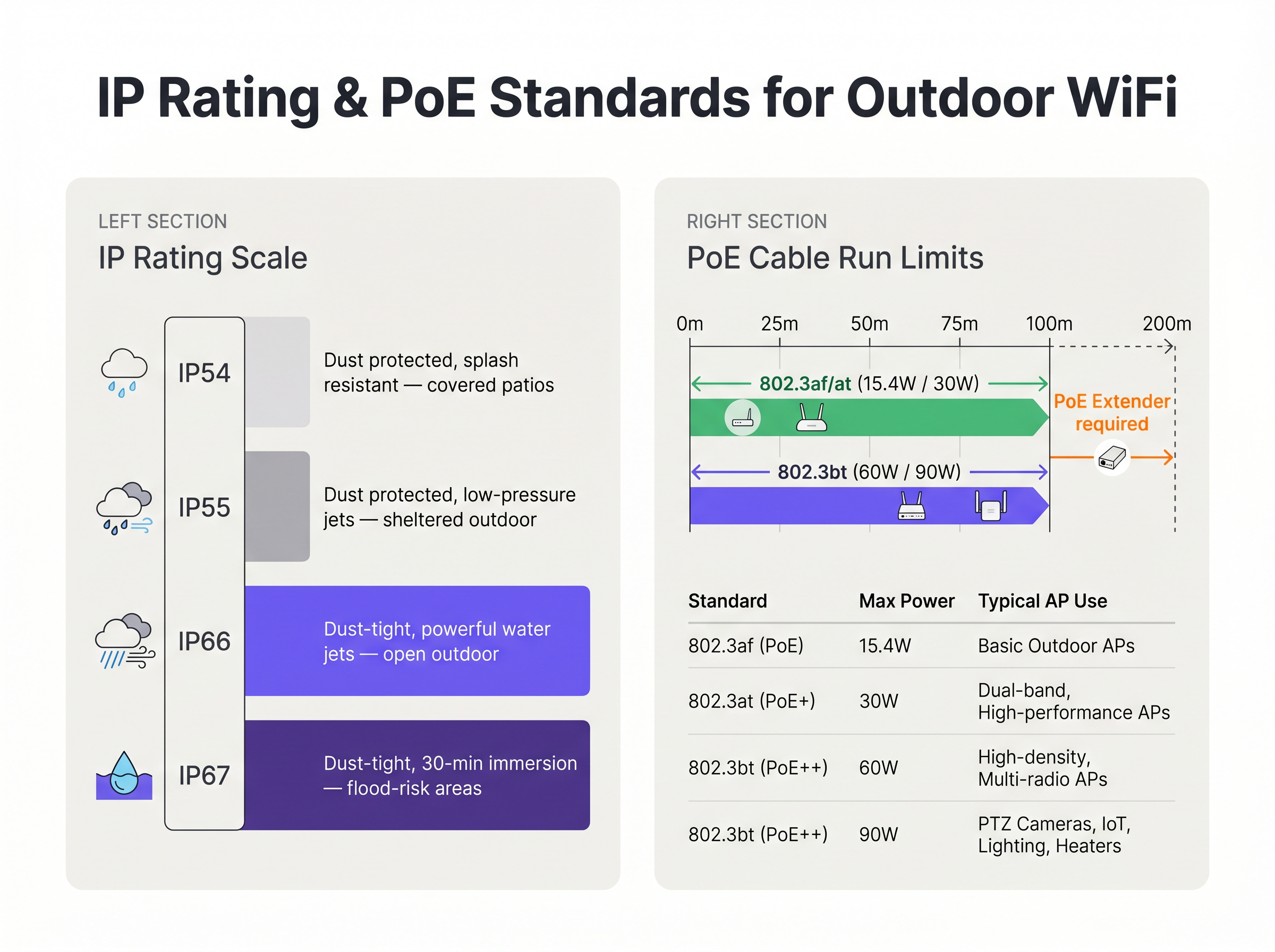
- IP54/IP55: Suitable only for highly sheltered areas, such as deep covered patios or loading bays protected from direct rain.
- IP66: The minimum standard for general outdoor deployment. It ensures the unit is entirely dust-tight and can withstand powerful water jets from any direction.
- IP67: The gold standard for exposed environments, offering protection against temporary immersion in water. This is mandatory for flood-prone areas, marinas, or regions subject to severe tropical storms.
Crucially, the AP housing is rarely the point of failure. The most common vulnerability is cable ingress. Improperly sealed RJ45 connectors allow water to track down the Ethernet cable directly into the AP's chassis or back to the PoE switch. Deployments must utilize manufacturer-approved weatherproof cable glands, outdoor-rated (UV-stabilized) CAT6A cabling, and mandatory drip loops to direct water away from the connector.
Power over Ethernet (PoE) for Extended Distances
Outdoor deployments frequently exceed the 100-metre maximum channel length specified by IEEE 802.3 for standard Ethernet over twisted pair. When an AP is mounted on a light pole 150 metres from the nearest Intermediate Distribution Frame (IDF), engineers must select an appropriate power and data delivery method.
- Fibre Optic with Local Power: Running single-mode fibre provides virtually unlimited distance for data, but requires a local power source at the AP location. This often involves tapping into street lighting power circuits, which may only be energized at night, necessitating costly inline battery backups or rewiring.
- PoE Extenders: Inline repeaters can regenerate the data signal and pass PoE power along, effectively doubling the reach to 200 metres. However, they introduce additional points of failure and must themselves be housed in weatherproof NEMA enclosures.
- Long-Reach PoE Switches: Specialized switches can push power and data up to 250 metres over standard copper, but this typically forces the link to auto-negotiate down to 10 Mbps. While sufficient for low-bandwidth Sensors , it is entirely inadequate for high-density user traffic.
Furthermore, modern high-density outdoor APs, particularly those with internal heaters for cold climates, demand substantial power. They frequently require IEEE 802.3bt (PoE++), drawing up to 60W or 90W. The underlying switch infrastructure must be capable of sustaining this power budget across all utilized ports.
Backhaul Architecture: Mesh vs. Wired
The architectural decision of how to connect the outdoor AP back to the core network dictates the long-term performance and reliability of the deployment.
Wired Backhaul (The Gold Standard) Trenching conduit and pulling fibre or copper to every AP is the most robust solution. It guarantees deterministic latency, provides maximum aggregate throughput, and ensures the backhaul link is immune to RF interference. For permanent venues like stadiums and Transport hubs, wired backhaul is the only acceptable architecture for long-term ROI.
Wireless Mesh (The Pragmatic Alternative) When trenching is economically prohibitive, physically impossible (e.g., heritage sites), or the deployment is temporary, wireless mesh is utilized. Mesh APs connect wirelessly to a root node that has a wired connection.
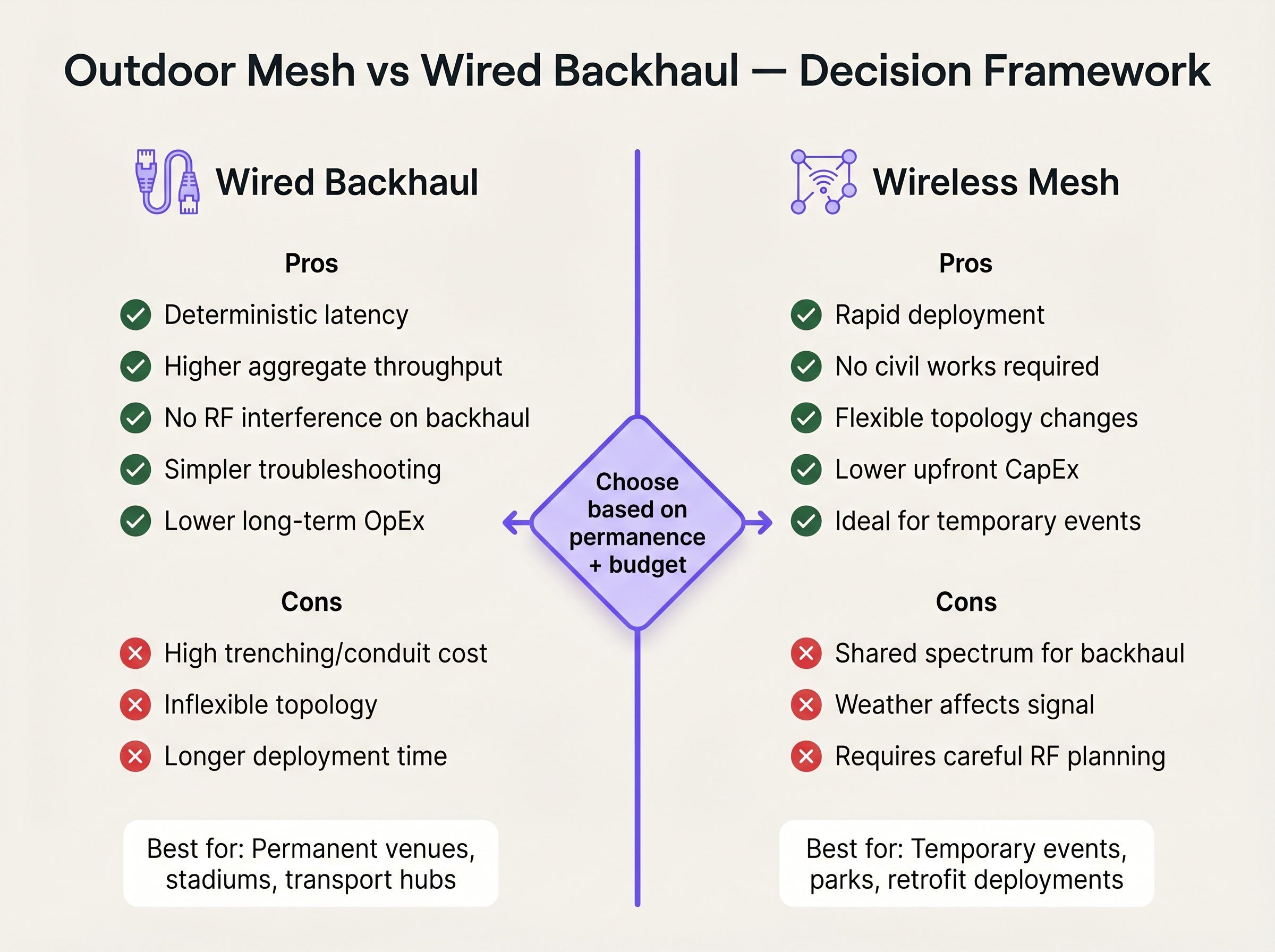
While mesh drastically reduces civil works CapEx and deployment time, it introduces significant technical compromises. Every wireless hop effectively halves the available bandwidth for that path, as the radio must receive and then re-transmit the data. Furthermore, the backhaul link shares the same RF spectrum as client devices, making it vulnerable to interference and weather-induced signal degradation. If mesh is unavoidable, engineers must deploy tri-radio APs, dedicating a 5 GHz or 6 GHz radio exclusively for the backhaul link to preserve client-facing capacity.
Implementation Guide
1. Site Survey and RF Planning
Outdoor RF environments are complex. Signals propagate further without walls to attenuate them, leading to severe co-channel interference if not managed. Conduct a predictive survey using specialized software, followed by an AP-on-a-stick active survey. Utilize directional patch antennas to focus RF energy precisely where users congregate, rather than employing omnidirectional antennas that broadcast signal into empty space.
2. Physical Mounting and Grounding
Mounting an AP on a metal pole creates a lightning hazard. [1]
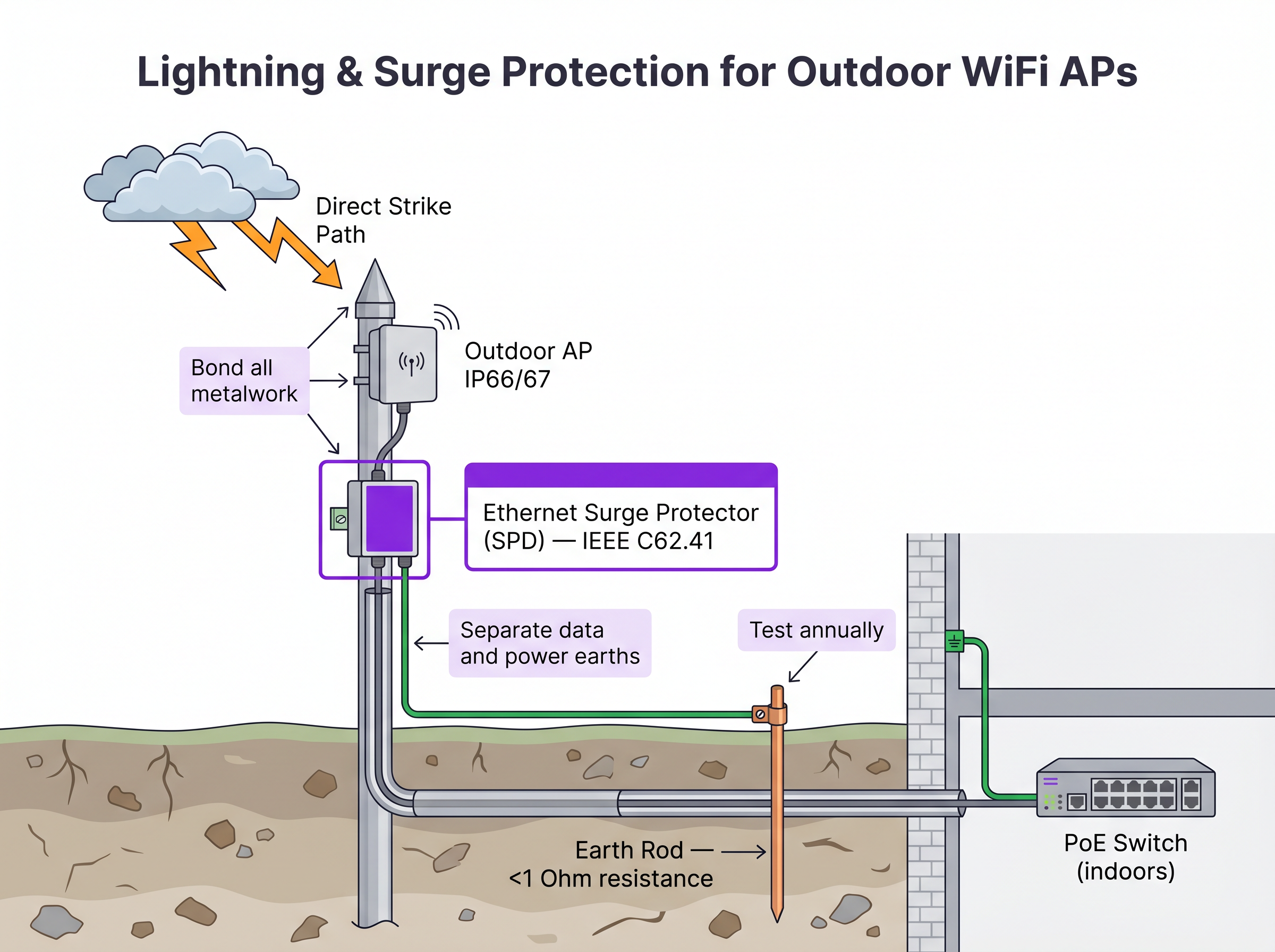
- Surge Protection Devices (SPDs): Install inline Ethernet SPDs at both the AP end and the building ingress point to protect indoor switching infrastructure.
- Bonding: Ensure the AP mount, the pole, and the SPDs are bonded to a dedicated earth rod with a resistance of less than 1 Ohm.
- Wind Load: Verify that the mounting hardware and the pole itself can withstand the local maximum wind load calculations, especially for large directional antennas.
3. Configuration and Security
Outdoor APs are physically accessible to malicious actors.
- Disable unused Ethernet ports on the AP.
- Implement IEEE 802.1X port-based Network Access Control (NAC) on the switch port connecting the AP. If the AP is removed and a rogue device is plugged into the cable, the switch must dynamically disable the port. For detailed NAC comparisons, see our guide: Aruba ClearPass vs Cisco ISE: NAC Platform Comparison .
- Ensure management traffic is segregated on a dedicated VLAN.
ROI & Business Impact
Investing in enterprise-grade outdoor WiFi infrastructure directly impacts venue profitability and operational efficiency. For Hospitality venues, ubiquitous outdoor coverage increases guest satisfaction scores and enables mobile ordering at pools and beaches. In Retail environments, it facilitates curbside pickup and outdoor point-of-sale (POS) systems.
By avoiding the false economy of deploying indoor hardware outdoors, or relying heavily on mesh where trenching was viable, IT teams mitigate the risk of catastrophic hardware failure during severe weather and eliminate the ongoing OpEx drain of troubleshooting intermittent RF backhaul issues. A properly engineered outdoor network provides the reliable foundation necessary for advanced location-based services like Wayfinding and integration with operational platforms, as detailed in Connecting WiFi Events to 1,500+ Apps with Zapier and Purple .
References
[1] IEEE Standard for Local and metropolitan area networks. "IEEE 802.3-2018 - IEEE Standard for Ethernet", IEEE Standards Association.
Key Terms & Definitions
IP67 (Ingress Protection)
An equipment rating certifying the device is completely dust-tight (6) and can withstand temporary immersion in water up to 1 metre deep for 30 minutes (7).
Mandatory baseline for outdoor hardware in areas subject to heavy storms or flooding to ensure survivability.
IEEE 802.3bt (PoE++)
The Power over Ethernet standard capable of delivering up to 60W (Type 3) or 90W (Type 4) of DC power over standard twisted-pair cabling.
Required for modern, high-density outdoor APs that power multiple radios, dedicated security scanning radios, and internal heating elements.
Drip Loop
A deliberate downward U-shape formed in a cable just before it enters a device enclosure.
A critical physical installation technique that forces water running down the cable to drip off the bottom of the loop rather than entering the equipment chassis.
Surge Protection Device (SPD)
An inline component designed to protect electrical devices from voltage spikes by shunting excess current to ground.
Essential for outdoor networking to prevent lightning strikes near outdoor APs from sending destructive surges down the Ethernet cable into core switching infrastructure.
Wireless Mesh Backhaul
A network topology where access points connect to the core network wirelessly through other access points, rather than via a direct cabled connection.
Used when trenching cables is impossible or too expensive, but requires careful RF planning to mitigate bandwidth degradation and latency.
Co-Channel Interference (CCI)
Signal degradation caused when multiple access points on the same network transmit on the same frequency channel simultaneously.
A severe problem in outdoor deployments where signals travel further without physical walls to block them, necessitating careful channel planning and directional antennas.
Directional Patch Antenna
An antenna designed to focus RF energy in a specific direction (e.g., a 60-degree cone) rather than broadcasting in all directions.
Crucial for high-density outdoor deployments like stadiums to sectorize coverage and prevent APs from interfering with each other.
802.1X Port-Based NAC
A security protocol that requires a device to authenticate before the network switch will allow it to pass traffic.
Critical security control for outdoor APs; prevents an attacker from unplugging an AP and connecting a laptop to gain access to the internal corporate network.
Case Studies
A luxury resort needs to provide high-density WiFi coverage to a pool area located 180 metres from the main building's IDF. The ground is paved with expensive decorative stone, making trenching highly undesirable. How should the connectivity be engineered?
- Avoid Trenching: Utilize a Point-to-Point (PtP) wireless bridge using dedicated 60 GHz radios to establish a multi-gigabit wireless backhaul from the main building to a central pole at the pool area. 60 GHz provides high bandwidth and avoids interference with the 5 GHz client WiFi.
- Local Distribution: At the pool pole, install a weatherproof NEMA enclosure containing a hardened, temperature-rated PoE switch.
- Power: Provide local AC power to the NEMA enclosure by tapping into the pool area's lighting or utility power circuit, ensuring it is on a 24/7 unswitched circuit.
- AP Deployment: Connect IP67-rated, dual-band outdoor APs to the hardened PoE switch. Use directional patch antennas to focus coverage on the loungers and cabanas, minimizing signal reflection off the water.
A municipal park is deploying Guest WiFi. The APs will be mounted on metal lampposts. What specific physical layer protections must be implemented to prevent network damage from weather and electrical events?
- Cable Ingress: Use outdoor-rated, UV-stabilized CAT6A cable. Terminate the connection at the AP using the manufacturer-supplied weatherproof cable gland. Crucially, form a 'drip loop' in the cable just before it enters the AP, ensuring water drips off the bottom of the loop rather than running into the connector.
- Lightning Protection: Install an inline Ethernet Surge Protection Device (SPD) on the pole, bonded to the metal pole (if the pole is properly earthed) or a dedicated earth rod.
- Building Protection: Install a second SPD at the point where the Ethernet cable enters the building housing the core switch, bonding it to the building's main earth terminal.
Scenario Analysis
Q1. You are designing the WiFi for a large outdoor music festival that will run for 3 days. Trenching is not permitted. You need to provide coverage to the main stage viewing area, which is 300 metres from the wired network drop. What is the most appropriate backhaul architecture?
💡 Hint:Consider the duration of the event and the performance requirements of a dense crowd.
Show Recommended Approach
A Point-to-Point (PtP) wireless bridge (preferably 60 GHz) should be used to shoot the connection from the wired drop to the main stage area. From there, a localized wireless mesh or temporary cabling can distribute the connection to the individual APs serving the crowd. This avoids trenching while providing a high-capacity backbone, which standard multi-hop mesh cannot provide over 300 metres.
Q2. An outdoor AP mounted on a lighting pole is experiencing intermittent power reboots. The cable run is 115 metres of CAT6. The switch is providing 802.3at (30W) PoE+. What are the two most likely causes of the failure?
💡 Hint:Evaluate both the physical layer limitations and the power requirements.
Show Recommended Approach
- Voltage drop over distance: The 115m run exceeds the 100m Ethernet standard. The resistance in the copper cable causes voltage to drop, meaning the AP may not receive sufficient power to operate under load. 2) Insufficient PoE budget: Modern outdoor APs, especially those with heaters, often require 802.3bt (60W). If the switch only provides 30W, the AP will reboot when it attempts to draw more power than is available.
Q3. During an audit of a newly installed outdoor AP on a building roof, you notice the CAT6A cable runs straight down from the AP port and into a hole drilled in the roof membrane. The AP has an IP67 rating. What is the critical installation error, and what is the risk?
💡 Hint:Consider how water behaves on physical surfaces.
Show Recommended Approach
The critical error is the absence of a drip loop. Without a drip loop, water will run down the outside of the cable and pool directly at the entry point to the roof, or track into the AP's RJ45 connector if the gland fails. The risk is water ingress into the building or the AP chassis, leading to hardware failure, despite the AP's IP67 rating.
Key Takeaways
- ✓Treat the outdoor environment as actively hostile; consumer-grade hardware will fail.
- ✓Mandate IP66 or IP67 ratings for all outdoor access points to ensure dust and water protection.
- ✓Cable ingress is the most common failure point; always use weatherproof glands and drip loops.
- ✓Plan for the 100-metre PoE limit using fibre, extenders, or localized power distribution.
- ✓Wired backhaul is the gold standard for permanent venues; use mesh only when trenching is impossible.
- ✓Every wireless mesh hop halves available bandwidth; dedicate a radio for backhaul if mesh is required.
- ✓Implement rigorous lightning protection with inline SPDs and proper earth bonding to protect indoor core networks.




