Finding the Best Wireless Access Points for Your Business

When you're looking for the best wireless access points, the conversation quickly moves to cloud-managed models packing Wi-Fi 6 or Wi-Fi 6E.When you're looking for the best wireless access points, the conversation quickly moves to cloud-managed models packing Wi-Fi 6 or Wi-Fi 6E. Think of the big players here: Cisco Meraki, Aruba, and Juniper Mist. These aren't just about boosting speed; they're essential for handling crowded spaces and delivering the secure, reliable connection that modern businesses depend on.
Understanding the Best Wireless Access Points for Modern Enterprise Needs

Finding the single ‘best’ wireless access point (WAP) is a bit of a myth. It's not about one perfect product, but about matching the right tech to your specific business goals. The focus has shifted from raw speeds and feeds to how WAPs act as the intelligent heart of a secure, modern network.
Things like user density, security policies, and the applications you run are what really dictate the ideal choice. A WAP is no longer just a simple connectivity device; it's the gateway to smarter networking and a much better user experience.
Evolving Network Demands
The explosion of high-speed internet has completely changed what people expect. In the UK, the push for gigabit-capable broadband has accelerated massively, with projections showing it will reach around 80% of premises by late 2025. This directly fuels the demand for top-tier WAPs, as businesses need powerful indoor networks to cope with all the new devices coming online.
With fixed wireless access networks now reaching 96% of businesses in England, scalable solutions are critical. Wi-Fi 6 is a perfect example, boosting efficiency by up to 40%. You can explore more on these UK broadband statistics to see the full picture.
This connectivity boom means your network has to be ready. Core technologies like Wi-Fi 6/6E and cloud management aren't just nice-to-haves anymore; they're fundamental to any network that hopes to keep up.
A strategic WAP evaluation must put business outcomes first, not just hardware specs. The goal is to build a network that performs brilliantly today and can adapt to whatever comes next.
Core Technologies at a Glance
A modern WAP is defined by its ability to deliver solid performance, tight security, and simplified management. When you're weighing up the options, there are a few technologies that are simply non-negotiable for creating a resilient and efficient wireless environment.
Decoding the Essential Tech in High-Performance WAPs
Choosing the right wireless access points (WAPs) involves looking past the headline speed figures. The real difference between a network that just works and one that excels is found in the underlying technology—the stuff that dictates how a WAP behaves in a crowded room, keeps data locked down, and makes connecting feel effortless. Getting a handle on these core features is the first step to building a network that isn't just fast, but smart, secure, and utterly reliable.
The biggest jump in recent memory has been the move to 802.11ax, better known as Wi-Fi 6 and its big brother, Wi-Fi 6E. While its predecessor, Wi-Fi 5 (802.11ac), did a decent job, Wi-Fi 6 was built from the ground up to solve the congestion problems that plague busy networks. For any serious enterprise or venue deployment today, it's non-negotiable.
Wi-Fi 6E then takes all that goodness and extends it into the wide-open 6 GHz spectrum. This is a huge deal. The 6 GHz band is like a private, multi-lane motorway reserved exclusively for Wi-Fi 6E (and newer) devices. It’s completely free of the interference from older Wi-Fi gadgets, microwaves, and Bluetooth signals that clog up the 2.4 GHz and 5 GHz bands.
For places like conference centres, arenas, or bustling retail shops, that 6 GHz band is a clean, high-capacity express lane for data. The result is dramatically lower latency and much higher speeds, which makes a tangible difference for demanding tasks like 4K video streaming or glitch-free video calls.
MU-MIMO and OFDMA: The Efficiency Power Combo
Inside Wi-Fi 6, two key technologies work together to deliver its impressive performance gains: MU-MIMO (Multi-User, Multiple Input, Multiple Output) and OFDMA (Orthogonal Frequency Division Multiple Access). They might sound like a mouthful, but what they do is pretty simple.
Think of your WAP as a delivery driver and data as packages for different devices (houses).
- MU-MIMO is like having a fleet of vans that can deliver to multiple houses at the same time. It allows the access point to talk to several devices simultaneously, instead of making them wait their turn.
- OFDMA is even smarter. It lets a single van carry packages for several different houses and drop them all off on one efficient route. It carves up a Wi-Fi channel into smaller pieces, letting the WAP serve lots of devices with small bits of data in one go.
This combination absolutely slashes network congestion and wait times, keeping things running smoothly even when hundreds of users are online. It’s exactly this kind of efficiency that's needed in modern spaces where phones, laptops, and IoT sensors are all fighting for airtime. For a deeper look at how this is changing the game, check out our guide to smart access points and intelligent WiFi.
This table breaks down the key technologies you should be looking for and why they matter for your network and your integration with the Purple platform.
Critical WAP Technology Breakdown
Understanding these features is the key to building a network that not only performs well under pressure but also seamlessly supports the advanced identity and engagement services that platforms like Purple provide.
Elevating Security and Simplifying Access
Speed is great, but rock-solid security is absolutely essential. The current standard is WPA3, which offers a massive security upgrade over the old WPA2. It uses stronger encryption and shuts the door on common hacking techniques like offline dictionary attacks, making it incredibly difficult for anyone to brute-force your network password. For guest networks, its "Personal" mode even provides individualised encryption, stopping users on the same Wi-Fi from snooping on each other's traffic.
Beyond just locking things down, modern WAPs also make connecting more secure and far less painful through better authentication.
- Passpoint (and OpenRoaming): This is the magic that lets your phone securely and automatically connect to Wi-Fi without you doing a thing. Once a user authenticates on a Passpoint network, their device is trusted across any other participating network globally. It delivers that "just connects" experience we get with mobile data.
- 802.1X Authentication: This is the benchmark for corporate-level security. Instead of a single password for everyone, it authenticates each user or device with unique credentials, often using digital certificates. This approach is a cornerstone of any zero-trust security model, as it guarantees that only verified and authorised users can touch your network resources.
These features do more than just add layers of security; they remove the friction that people hate about connecting to public and corporate Wi-Fi. By automating the sign-on process, they improve your security posture and make users happier—a win-win for any venue.
Comparing Top Wireless Access Point Vendors
Choosing the right wireless access point goes way beyond comparing spec sheets. It’s about understanding the core philosophy of each major vendor. The big names—Cisco Meraki, Aruba (an HPE company), Ruckus, Juniper Mist, and Ubiquiti—all make fantastic hardware. The real difference lies in how they approach management, security, and network intelligence.
That’s what makes one a better fit for a specific environment over another. You can't just look at features. You have to consider how a vendor’s entire ecosystem aligns with your operational needs and long-term goals. A retail chain that needs dead-simple management across hundreds of stores has completely different priorities than a stadium obsessed with raw RF performance in a high-density nightmare. This is where you have to look past the datasheets and get to the heart of their management philosophy.
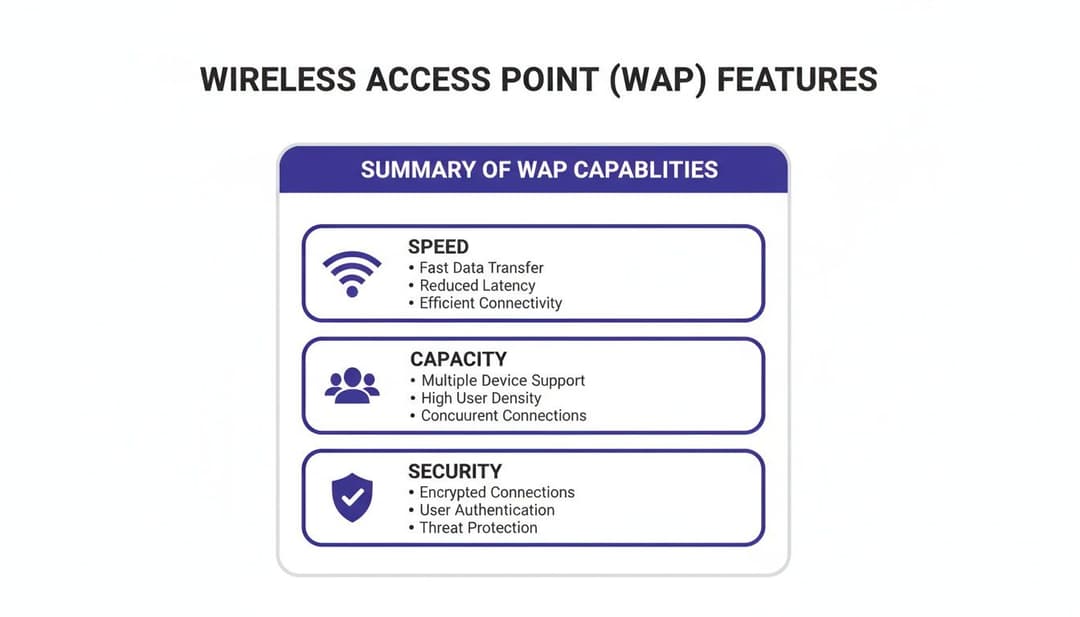
This diagram gives a solid overview of the three pillars you need to nail down when looking at any access point: speed, capacity, and security.

Get these three working together, and you’ve got the foundation for a reliable and secure experience for everyone connecting to your network.
Cisco Meraki: The Cloud-Native Champion
Meraki really invented the whole cloud-managed networking space, and their platform is all about simplicity. Everything from their APs to switches and security appliances is managed from one clean, intuitive web dashboard. It’s no surprise they’re a favourite for organisations with lots of sites but not a lot of on-site IT staff, like retail chains or businesses with multiple branches.
Meraki’s real magic is its "single pane of glass" management. An admin can get a new AP online at a remote shop just by having someone there plug it in. The device pulls its configuration straight from the cloud, making true zero-touch provisioning a reality.
But that simplicity does come with a catch. Meraki uses a co-termination licensing model. If your licence for an AP expires, it stops working. This subscription keeps you on the latest software with full support, but it’s an ongoing operational cost you absolutely have to budget for.
Meraki's greatest strength is abstracting away network complexity. For teams that value speed of deployment and simplified management over granular, hands-on control, it's often the top contender.
Aruba (HPE): The Security-First Architect
Aruba built its name on rock-solid, policy-driven security and fine-grained control. That’s why you see them everywhere in enterprise, government, and higher education. They have a cloud platform, Aruba Central, but their DNA is in powerful on-premises controllers that give you incredible visibility and policy enforcement.
Aruba’s key differentiator is its Role-Based Access Control. You can create policies based on who the user is, what device they’re using, where they are, and what application they’re trying to access. It ensures people only get to see the resources they’re supposed to, making it a perfect match for zero-trust security models.
This level of control means there's a steeper learning curve than you’d find with Meraki. For any organisation with strict compliance rules or complex security demands, though, that investment in training pays off big time with a more secure and resilient network. Their ClearPass Policy Manager is a beast of a tool that plays nicely with a huge ecosystem of third-party security vendors.
Ruckus (CommScope): The High-Density Performer
When you’re dealing with a really challenging radio frequency (RF) environment, Ruckus is almost always part of the conversation. Their patented BeamFlex+ adaptive antenna technology is the real star here. Instead of just blasting a signal out in all directions, Ruckus APs can dynamically change the signal’s path for every single packet, steering it around interference and aiming it right at the connected device.
This is what makes Ruckus so dominant in high-density venues like stadiums, lecture halls, and big public events. Where other APs choke on interference and noise, Ruckus just keeps pushing through, maintaining stable, high-throughput connections for huge numbers of people at once.
Their management platform, SmartZone, gives you both physical and virtual controller options, so you’ve got flexibility for different scales. It might not be as slick as the Meraki dashboard, but it offers the deep RF customisation that network engineers in tough environments desperately need.
Juniper Mist: The AI-Driven Innovator
When Juniper bought Mist, they brought AI right to the forefront of networking. Mist is a cloud-native platform that uses machine learning to automate network operations, proactively troubleshoot problems, and give you incredible insight into the actual user experience. Its Marvis AI engine is like having a virtual network assistant that can answer plain-English questions and find the root cause of an issue before a user even knows something is wrong.
Mist flips the script by focusing on "Service Level Expectations" (SLEs) for things like how long it takes to connect, throughput, and capacity. The system constantly checks performance against these baselines and gives you actionable insights when they’re not being met. It’s a huge shift from reactive troubleshooting to proactive network optimisation.
The need for this kind of reliable connectivity is only growing. The UK Fixed Connectivity Market was valued at USD 34.02 billion in 2024 and is expected to hit USD 40.77 billion by 2029. With 91% of UK households already online, people's expectations for Wi-Fi in public venues are sky-high. Modern WAPs are essential for handling this, especially with technologies like OFDMA and MU-MIMO delivering 30% higher throughput in crowded places. You can discover more insights about the UK's connectivity growth.
Ubiquiti UniFi: The Value Proposition
Ubiquiti has completely shaken up the market by offering enterprise-level features at a price point that’s hard to ignore. The UniFi line of access points performs incredibly well and is managed through a free, self-hosted software controller or a low-cost cloud key appliance. The biggest draw for small-to-medium businesses, hospitality, and anyone on a tight budget is the lack of mandatory recurring licence fees.
The UniFi controller provides a clean interface for managing your entire network stack—APs, switches, and gateways. It might not have the AI brain of Mist or the deep security engine of Aruba, but it nails all the essentials you need for a robust and reliable network. This value-first approach has made UniFi the go-to for countless deployments where cost is a huge factor but performance can't be sacrificed.
Vendor Comparison Matrix for Enterprise Deployments
To help you visualise how these vendors stack up, here’s a quick comparison based on their core philosophies and best-fit scenarios. Think of this as a starting point for figuring out which ecosystem aligns best with your organisation's technical capabilities and business goals.
Ultimately, the "best" vendor is the one whose platform feels like a natural extension of your IT team. Meraki prioritises ease of use, Aruba champions security, Ruckus masters difficult RF, Mist leverages AI, and UniFi delivers unmatched value. Your specific environment and operational style will be the deciding factor.
Finding the Right WAP for Your Space
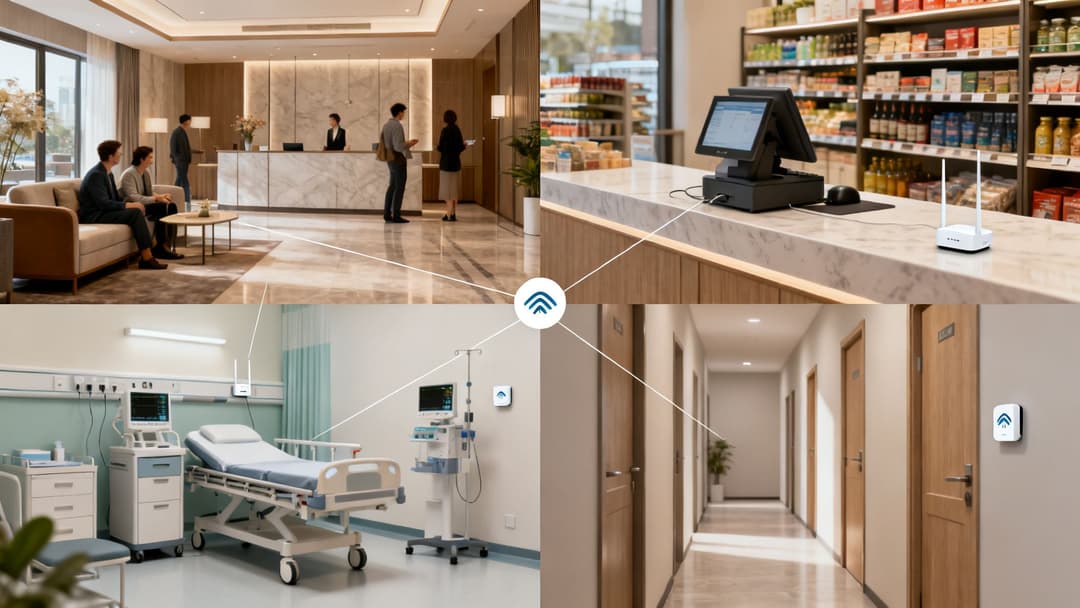
Picking the best wireless access points isn't just about comparing spec sheets; it's about translating those technical details into real-world performance. A WAP that sings in a quiet corporate office might completely fall apart in a chaotic hotel lobby. The right deployment strategy hinges entirely on the unique pressures of your industry—from the sheer number of users and device types to critical security and compliance rules.

This is where the rubber meets the road. Pairing the right hardware with a flexible identity platform like Purple gives you the tools to solve specific industry headaches, whether that’s locking down patient data or personalising a guest’s stay.
Hospitality: Taming High-Density Environments
Hotels, stadiums, and conference centres are some of the most punishing RF environments you can imagine. The main challenge is staggering user density, with thousands of devices all fighting for bandwidth at the same time. In these scenarios, high-performance Wi-Fi 6E access points with powerful MU-MIMO and OFDMA aren't just a nice-to-have; they're non-negotiable.
Think about a hotel: the network needs to deliver flawless coverage from the reception desk to every single guest room. It has to juggle guests streaming 4K video, staff processing payments on mobile PoS systems, and IoT devices like smart thermostats, all without skipping a beat.
In hospitality, the network is part of the guest experience. A WAP deployment has to be engineered for peak capacity, not just average daily use. This is why APs from vendors like Ruckus, who are known for their muscle in dense environments, are often a very smart bet.
When you combine this kind of hardware with a platform that supports Passpoint/OpenRoaming, you create a completely frictionless experience. Guests can connect automatically and securely the moment they walk in, ditching the frustration of clunky captive portals and elevating their entire stay.
Retail: Juggling Operations and Personalisation
In retail, your wireless network has to serve two masters: keeping the back-end operations running smoothly and engaging customers on the shop floor. For operations, the network must deliver rock-solid connectivity for mission-critical systems.
- Point of Sale (PoS) Terminals: Whether fixed or mobile, PoS systems need a stable connection to process transactions instantly.
- Inventory Scanners: Staff depend on handheld scanners to manage stock, requiring seamless network access across the entire store, from the stockroom to the front door.
- Staff Communication: Secure voice-over-Wi-Fi is crucial for staff to coordinate effectively and manage the store efficiently.
At the same time, the guest network is a massive opportunity for engagement. By integrating your WAPs with an identity platform, you can start offering personalised experiences. Imagine a customer connecting to the Wi-Fi and instantly receiving an offer based on their location in the store or their previous purchases. Suddenly, your network isn't just a cost centre—it's a revenue driver.
Healthcare: Where Reliability and Compliance are Everything
Healthcare is one environment where network failure simply isn't an option. Wireless access points have to provide mission-critical reliability for life-sustaining medical equipment, Electronic Health Record (EHR) systems, and staff communication devices. The network has to be built for zero downtime.
Security and compliance are just as critical. WAPs must support WPA3-Enterprise and 802.1X authentication to guarantee that only authorised staff and medical devices can access sensitive patient data, which is essential for maintaining compliance with regulations like GDPR.
Network segmentation is another key piece of the puzzle. A healthcare WAP deployment needs the ability to create completely isolated networks for different user groups:
- Medical Devices: A secure, firewalled network dedicated to life-critical equipment.
- Clinical Staff: A network providing access to patient records, secured through integrations with Entra ID or Okta.
- Patients and Visitors: A separate, public-facing guest network with content filtering and strict bandwidth limits.
This level of granular control protects data integrity while giving everyone in the facility the connectivity they need.
Residential: Creating a Seamless and Secure Home Experience
In multi-dwelling units (MDUs), build-to-rent properties, and student accommodation, the name of the game is providing a "home-like" experience backed by enterprise-grade security. Residents expect all their personal devices—laptops, smartphones, smart speakers, gaming consoles—to connect effortlessly and securely.
The biggest challenge here is network isolation. You have to keep each resident's devices completely separate from their neighbours' to prevent security issues. This is where features like Identity-Based Pre-Shared Keys (iPSK) become invaluable. It allows each resident to have their own private network password for all their devices, even though they're all running on a shared infrastructure.
For property staff, seamless access is equally important. Integrating the WAP system with a platform that supports SSO through directories like Entra ID lets managers access building systems securely from anywhere on site. This approach strikes the perfect balance between resident convenience and robust operational security. For more on optimising connectivity in professional settings, you can explore our solutions for networking in corporate offices.
Planning a Successful Wireless Network Deployment
Choosing the best wireless access points is only half the battle. A truly high-performance network depends on the infrastructure holding it all together. To get the performance you're paying for, your deployment plan needs a sharp focus on power, backhaul, and security.
Getting these foundational elements wrong is like putting a sports car engine in a family hatchback—all that potential is wasted because the chassis can't handle it. This is where IT teams have to nail the details that make or break a wireless project, from calculating power budgets to locking down the network with modern security.
Powering Your Access Points with PoE
Modern access points, especially the powerful Wi-Fi 6/6E models, are thirsty for electricity. They get it directly over their Ethernet cable using Power over Ethernet (PoE), a neat trick that avoids needing a separate power adapter for every AP. But not all PoE is created equal.
You have to match your network switch's PoE capabilities to what your APs demand. Different standards deliver different amounts of power:
- 802.3af (PoE): Provides up to 15.4W, which is fine for older or more basic APs.
- 802.3at (PoE+): Delivers up to 30W, the current standard for most modern Wi-Fi 6 APs.
- 802.3bt (PoE++): Offers a hefty 60W or even 100W, a must-have for high-performance APs juggling multiple radios and advanced features.
A classic mistake is forgetting to calculate the total power budget. You need to be certain your switch can supply enough wattage for every single connected device at the same time. If you overload it, you'll get random AP reboots and performance that’s all over the place.
To sidestep these issues, always check the AP's datasheet for its maximum power draw and then confirm your switch's total PoE budget can handle the load. You can get a head start by using our tool to calculate your access point requirements before you commit to buying any hardware.
Preventing Backhaul Bottlenecks
A Wi-Fi 6E access point can theoretically push multiple gigabits of data per second. But if you plug that powerhouse AP into a standard 1 Gbps switch port, you’ve just created an instant traffic jam. The wireless connection is faster than the wired one, meaning your users will never see the speeds the AP is capable of.
This is why deploying multi-gigabit switching is so critical. Switches with 2.5 Gbps or 5 Gbps ports ensure the wired backhaul can actually keep up with the wireless front end. It’s what allows the network to handle traffic from hundreds of devices without choking, keeping the experience smooth for everyone—a non-negotiable for any high-density environment.
Securing Your Network with Zero Trust Principles
A well-planned deployment is a secure one. Ditching insecure, shared passwords is a cornerstone of a modern Zero Trust security model, which works on the simple principle of "never trust, always verify." Certificate-based authentication like 802.1X is a perfect match for this framework.
Instead of one password that can be leaked or stolen, each user and device gets a unique digital certificate to get on the network. This move alone strengthens your security posture immensely. As part of any deployment planning, understanding methods like Wi-Fi pentesting is also crucial for spotting vulnerabilities before they become a problem.
But what about all those devices that can't handle modern authentication, like IoT sensors or older printers? For these legacy systems, Identity-Based Pre-Shared Keys (iPSK) offer a brilliant, practical solution. Each device or group gets its own unique password, isolating them on the network. A single compromised key can't bring down your entire infrastructure, allowing you to support essential older equipment without lowering your security standards.
Your Actionable WAP Selection Checklist
Choosing the right wireless access points isn't just about comparing spec sheets. It's a structured process that starts with your operational reality and ends with a solution that fits your business like a glove. This checklist boils down the key takeaways from this guide into a practical, step-by-step framework.
Think of this as your roadmap. Following these steps ensures your final choice supports not just great connectivity, but also rock-solid security, a brilliant user experience, and your long-term business goals. It all begins with a frank look at where you are now and where you want to be.
1. Assess Your Environment and Define Requirements
First things first: map out your physical space and get real about the demands you’ll place on the network. A successful deployment is all about matching the hardware's capabilities to the real-world challenges of your venue.
- User and Device Density: How many people and devices will be connected at your absolute busiest? A buzzing hotel lobby has vastly different needs than a quiet back office.
- Application Throughput: What are the non-negotiable applications? Pinpoint the systems—be it video conferencing, PoS terminals, or critical IoT devices—that need low latency and unwavering reliability.
- Physical Coverage: Get a site survey done. There’s no substitute for identifying RF dead zones, coverage gaps, and the best spots for your APs. Don't forget to account for building materials and other sources of interference.
2. Establish Security and Compliance Needs
Next up is your security posture. Today’s networks have to be built on a foundation of robust security to protect sensitive data and tick all the regulatory boxes.
- Authentication Method: How will people connect? Will you use 802.1X for corporate devices, iPSK for legacy hardware, or offer a completely seamless OpenRoaming experience for your guests?
- Compliance Mandates: Are you bound by specific industry rules like GDPR or PCI DSS? Make sure your chosen solution can actually enforce the security policies these regulations demand.
- Zero Trust Alignment: How does this network fit into your wider Zero Trust strategy? Your WAPs are a critical checkpoint for verifying every single user and device, every single time.
3. Evaluate Management and Integration Capabilities
Now, consider how you'll actually manage the new system and how it will play with the technology you already have. The aim here is to simplify your life, not make it more complicated.
The real power of a WAP is unlocked when it talks seamlessly to your core IT systems. You should be looking for solutions with solid APIs and proven compatibility with your identity providers and analytics platforms.
This is arguably the most critical step for making sure your investment lasts. An access point is more than just a radio; it's a data collection and policy enforcement tool.
- Management Preference: Are you a fan of cloud-native dashboards like those from Meraki or Mist, or do you need the granular, on-premises control offered by vendors like Aruba?
- Vendor Ecosystem: How well does the AP vendor's world align with your own? Check for compatibility with your existing switches, firewalls, and security software to avoid headaches down the line.
- Identity Platform Synergy: This is crucial. You must verify that the WAP solution integrates flawlessly with your identity and authentication platform. This link is what makes secure, intelligent, and analytics-rich network access possible.
By working through this checklist, you can move beyond the marketing noise and confidently pick the wireless access points that are perfectly tuned to your unique operational, security, and business needs.
Elevate your network from a simple utility to a powerful business asset. Purple provides a hardware-agnostic identity and authentication layer that integrates with the world's leading WAP vendors, delivering secure, passwordless access and deep user insights. Learn more at https://www.purple.ai.

.png)
.png)