Gone are the days when business Wi-Fi was just about getting online. Today, it’s a strategic tool, delivering secure, identity-based access and invaluable data insights. It’s about ditching the single, insecure password for a system where every user and device connects based on who they are. This transforms your Wi-Fi from a simple utility into a powerhouse for security, marketing, and operational efficiency, making your network both safer and smarter.
What Are Modern Business WiFi Solutions
Think about your traditional office Wi-Fi. It’s probably like having a single master key for the entire building. One password gets handed out to staff, guests, and all your company devices. If that one password gets into the wrong hands, your whole network is exposed.
Modern business Wi-Fi solutions tear up that old blueprint. Instead of a master key, imagine giving everyone a personalised smart access card. Each person and device gets their own unique, verifiable credential, ensuring they only get into the areas they're authorised to access.
This move from a one-size-fits-all password to identity-based access is what modern Wi-Fi is all about. It’s not just about providing an internet connection anymore. It’s about controlling who connects, what they can do, and how securely they do it. Best of all, it plugs right into your company’s core identity systems, making access control a seamless, automated process.
From Cost Centre to Strategic Asset
For years, Wi-Fi was just another line item on the IT budget—a necessary expense that needed to work but didn't offer much in return. That view is completely outdated. The right Wi-Fi solution is now a powerful asset that delivers real value to multiple departments. If you want a refresher on the basics, you can learn more about what WiFi is and how it works .
Here’s how different teams benefit:
- For IT Teams: Security gets a massive upgrade through zero-trust principles. Forget wrestling with complex RADIUS servers or dealing with endless password-related helpdesk tickets. When an employee leaves, their access is revoked automatically. Simple as that.
- For Marketing Departments: Imagine capturing rich, first-party data on visitor behaviour. You can see footfall, track dwell times, and measure visit frequency. This is gold for creating personalised marketing campaigns and truly understanding the customer journey.
- For Operations Leaders: Get actionable insights into how your physical spaces are actually used. A retail manager can fine-tune store layouts based on real customer traffic, while a hotel operator can anticipate peak demand to improve guest services.
A modern Wi-Fi network does more than connect you to the internet; it connects you to your customers and secures your operations. It’s the invisible infrastructure that drives visible business outcomes, from enhanced security to increased customer loyalty.
By bringing management under one roof and integrating with the systems you already use, these solutions offer a complete picture of network activity. This allows you to enforce consistent security policies, analyse user behaviour, and ultimately, turn a simple internet connection into a source of powerful business intelligence. Your network stops being a passive utility and starts actively contributing to your growth and security.
Looking Under the Bonnet at Next-Gen WiFi Tech
To really get what modern business WiFi solutions can do, we need to look under the bonnet at the technologies making it all happen. These aren’t just small tweaks; they represent a total rethink of how devices connect, prove who they are, and stay secure. It’s the difference between a clunky, manual process and a smooth, automatic experience.
Think of Passpoint and its bigger cousin, OpenRoaming, as a global passport for your phone or laptop. Once you’re set up, your device can automatically and securely hop onto thousands of participating WiFi networks all over the world. No more hunting for network names, typing in passwords, or connecting to dodgy public hotspots. Your device is recognised and trusted in an instant.
This is a massive shift, and the industry is taking notice. Research from the Wireless Broadband Alliance shows that a staggering 81% of Wi-Fi industry executives are planning OpenRoaming rollouts in 2025/2026. That's up nearly 19% from 2024, signalling a clear move towards password-free, automated access, especially in places like hotels and shops.
To appreciate how far we've come, let's compare the old way with the new standard.
The Old Way: Captive Portals
We’ve all been there. You connect to the WiFi at a hotel or coffee shop, and that familiar login page pops up. That's a captive portal. You have to find the network, select it, punch in your details, and tick a box saying you agree to the terms. Every. Single. Time.
It’s the digital version of filling out the same form every time you walk into a building. It’s repetitive, clunky, and frankly, it trains people to connect to just about any network that asks for their details—a huge security headache.
The New Standard: Passwordless Authentication
Passwordless authentication is the modern, slick alternative. It’s more like a quick, secure keycard swipe that gets you straight through the door, relying on stronger, certificate-based methods to verify a device’s identity automatically.
This is the key to how modern WiFi delivers both top-notch security and incredible convenience. Once a user or device is authenticated, they stay authenticated on future visits, creating a totally frictionless journey.
A Place for Everything: Identity Pre-Shared Keys
But what about all those other devices that don’t support fancy security certificates, like office printers, smart thermostats, or IoT sensors? This is where Identity Pre-Shared Keys ( iPSK ) come into play. Instead of one password shared across all these miscellaneous devices, an iPSK system gives a unique, individual key to each one.
Think of it as giving every piece of equipment its own personal keycard. If one device ever gets compromised, you just revoke its key. No need to disrupt anything else on the network. This gives you incredibly detailed control and plugs a common security gap.
The table below breaks down the key differences between these old and new approaches, showing why the shift to modern authentication is so important for businesses.
Comparison of WiFi Authentication Methods
As the comparison shows, moving away from captive portals towards passwordless methods isn't just about making life easier for users—it's a critical step in building a more secure and professional network environment.
Of course, these technologies don't exist in a vacuum. They're often built on foundational standards like WiFi 6, which delivers better speed and can handle more devices at once. To learn more, check out our guide on the benefits of WiFi 6 (802.11ax) .
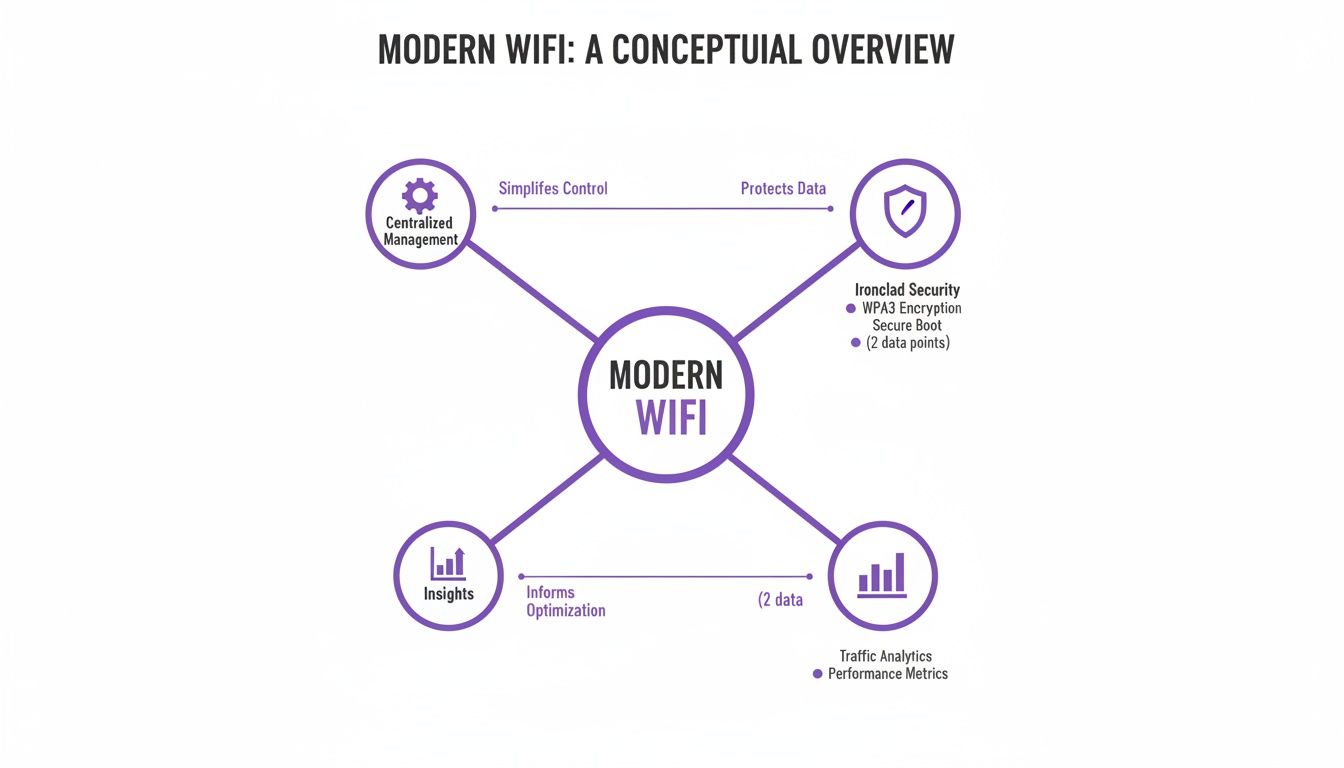
What this shows is that a modern WiFi solution isn’t just one thing. It’s a combination of centralised management, ironclad security, and the power to generate real business insights from network data. Each part supports the others, creating a system that’s much more powerful than the sum of its parts. By bringing together technologies like Passpoint and iPSK, businesses can finally build a network that’s both incredibly secure and effortlessly simple to use.
Building a Zero-Trust Network with Secure WiFi
Modern business WiFi solutions are the perfect foundation for a solid zero-trust security strategy. The central idea is simple but incredibly effective: never trust, always verify. It’s a complete departure from the old "castle-and-moat" mindset, where once you were inside the network walls, you were trusted by default.
Think of a zero-trust network less like a medieval castle and more like a high-security government building. Your identity isn't just checked at the front gate; it's re-verified at every single door you try to open—whether it leads to the server room, the finance department, or even the staff kitchen. Every attempt to access something requires fresh authentication, making sure you only go where you are explicitly allowed.
This is exactly how it works with your WiFi. Every single time a device tries to connect or get to a resource, the network effectively asks, "Who are you, and do you have permission to do that?" This constant cycle of verification drastically shrinks your attack surface and contains any potential threats before they can spread.

Integrating with Your Corporate Identity
The real magic happens when you tie network access directly to an employee's corporate identity. Today’s WiFi solutions can link up seamlessly with the identity providers you already rely on, such as Microsoft Entra ID (what used to be Azure AD), Google Workspace, or Okta.
This integration means an employee’s network login is the very same one they use for everything else. When they connect to the WiFi, the system checks their status in your central directory in real-time. Are they an active employee? Which department are they in? What’s their role?
Based on these verified details, the network automatically assigns them the right level of access. For IT teams, this is a complete game-changer.
Automating Access Control and Offboarding
One of the most persistent security headaches for any organisation is the "lingering access" of former employees. With old-school systems, cutting off access was often a manual, multi-step chore that left dangerous security gaps wide open.
A zero-trust WiFi model closes this loophole entirely. The moment an employee leaves the company and their account is deactivated in your central directory, their WiFi access is revoked instantly and automatically. There’s no time lag and no need for an IT admin to lift a finger.
This automatic revocation ensures that network permissions are always perfectly in sync with an employee’s current status, slamming the door on a critical vulnerability that attackers love to exploit. The second someone is no longer part of the organisation, their digital key to the building simply stops working.
This automated approach brings some huge operational wins.
- No More RADIUS Servers: You can finally say goodbye to managing those complex, often brittle on-premises RADIUS servers. Authentication gets handled in the cloud, massively simplifying your infrastructure.
- Fewer Helpdesk Tickets: Because access is tied to the corporate login people already know, you eliminate an entire category of "I forgot the WiFi password" helpdesk tickets.
- Reduced Vulnerabilities: By strictly enforcing the principle of least privilege—where users can only access the absolute minimum they need to do their jobs—you dramatically limit the potential damage a single compromised account can cause.
At the end of the day, building a zero-trust framework with your business WiFi isn't just about bolting on another layer of security. It's about fundamentally rethinking how access is granted and managed, creating a network that is more intelligent, responsive, and secure by its very design. With a focus on strong data protection, you can confidently build a secure network foundation. You can find more details in our overview of data and security practices .
Turning Your WiFi into a Business Growth Engine
Beyond rock-solid security, modern business WiFi solutions can completely change how you view your network. It stops being just a necessary expense and starts becoming a powerful engine for growth. Every time a guest or customer connects, the data generated becomes a goldmine of first-party business intelligence, offering clear insights into how people actually move around and interact with your physical space.
This isn't about staring at abstract data points; it's about understanding real-world behaviour. Think of it like a web analytics platform, but for your building. Instead of tracking clicks and page views, you're measuring footfall, pinpointing the busiest zones, and seeing how long visitors stick around in different areas.
This shift in perspective turns your WiFi from a passive utility into an active tool. It informs crucial business decisions, helps you create better customer experiences, and ultimately delivers a tangible return on your investment.

Unlocking Actionable Customer Insights
The real value pops when you start applying this data to solve specific business challenges. The insights you gather can fine-tune everything from marketing spend to operational staffing, directly impacting your bottom line.
Here are a few practical examples of how this plays out:
- Retail Analytics: A shopping centre can analyse foot traffic patterns to see which entrances are most popular and which stores pull in the biggest crowds. This data can justify premium rents for high-traffic spots and help store managers tweak product placement based on where customers linger the longest.
- Hospitality Engagement: A hotel can easily track how often guests visit. When a loyal customer who stays several times a year reconnects to the WiFi, the system can automatically send them a personalised "welcome back" email with a voucher for a complimentary drink, building loyalty and encouraging great reviews.
- Venue Management: An arena or conference centre can monitor real-time crowd density during an event. This allows operations teams to proactively manage queues at food stands or redirect foot traffic to less congested areas, dramatically improving the visitor experience.
By turning anonymous foot traffic into identifiable behavioural patterns, your WiFi network provides the first-party data needed to make smarter, evidence-based decisions about your physical environment and customer engagement strategies.
Integrating WiFi Data with Your Marketing Stack
This data becomes exponentially more powerful when it doesn't live in a silo. Modern WiFi platforms are built to integrate directly with your existing business systems, especially your Customer Relationship Management (CRM) platform.
This connection lets you enrich customer profiles with real-world behavioural data. For instance, when a customer logs into your guest WiFi , their visit information can be automatically added to their profile in your CRM.
Powering Personalised Marketing Journeys
Once that integration is in place, you can build incredibly effective, automated marketing campaigns based on physical presence. This is where your business WiFi solution truly proves its worth as a revenue generator.
Just imagine these scenarios:
- Re-engagement Campaigns: If a regular hasn't visited your restaurant in over 60 days, the system can automatically send them a "we miss you" offer with a discount on their next meal.
- Loyalty Programme Growth: You can use the WiFi login page to promote your loyalty scheme. The system can even spot frequent visitors who aren't yet members and show them a targeted sign-up incentive the next time they connect.
- Post-Visit Feedback: Shortly after a guest leaves your hotel, an automated email can be sent asking for a review while their experience is still fresh in their mind, helping to boost your online ratings.
By linking digital marketing efforts to physical presence, you close the loop between online engagement and offline behaviour. Your WiFi stops being just a cost centre and becomes an indispensable tool for driving customer loyalty and increasing revenue.
How Different Industries Use Business WiFi Solutions
The real magic of a modern business WiFi solution isn’t just in the tech itself, but in how it’s applied. A hotel chain’s needs are a world away from a hospital’s, and different again from a busy retail park. Understanding these industry-specific uses is the key to unlocking its true value and seeing how it tackles real-world business challenges.
This flexibility is especially important in the UK, which has made huge strides in its digital backbone. By 2025, an impressive 63% of small and mid-sized businesses will have access to full-fibre broadband. With gigabit coverage now reaching 86% of all premises, the foundation is set for businesses of all stripes to deliver a standout WiFi experience. You can read more about the UK's business broadband transformation and what it means for the future.
Let’s take a look at how different sectors are putting these solutions to work.
Hospitality: Crafting a Seamless Guest Journey
For hotels, resorts, and restaurants, the guest experience is king. Nothing sours a visitor’s opinion faster than a clunky, frustrating WiFi login. The goal isn’t just connectivity; it’s an invisible connection that simply works, every time.
This is where technologies like OpenRoaming and Passpoint really come into their own. A guest authenticates their device once, and on every return visit—or even at another venue in the same network—they’re reconnected automatically and securely. No more fiddly captive portals or forgotten passwords.
This creates a premium, hassle-free experience that genuinely builds loyalty. It also frees up staff from the headache of troubleshooting WiFi problems, letting them focus on what they do best: providing brilliant service.
Retail: Unlocking In-Store Analytics and Personalisation
In the cut-throat world of retail, knowing your customer is everything. Modern WiFi analytics can turn a shopping centre or high street store into a goldmine of first-party data. By looking at footfall patterns, retailers can get a real grip on shopper behaviour.
- Dwell Time Analysis: See which displays or departments are catching customers' eyes the longest, helping to fine-tune product placement.
- Pathing Data: Visualise the most popular routes shoppers take through a store to inform layout changes and where to place key promotions.
- Visit Frequency: Spot loyal, repeat customers and use their WiFi connection as a trigger to push personalised offers or loyalty rewards straight to their device.
This kind of data finally bridges the gap between online marketing campaigns and what actually happens in-store, proving the real-world impact of your efforts.
Healthcare: Ensuring Secure and Segmented Access
Hospitals and clinics handle incredibly sensitive patient data, so network security isn't just a feature—it's an absolute necessity. A solid business WiFi solution is vital for staying compliant and protecting patient confidentiality. The key is network segmentation: creating separate, firewalled networks for different groups of users.
In a healthcare setting, network segmentation isn't just a best practice; it's a critical safety measure. It ensures that a patient streaming video in the waiting room is on a network completely isolated from the one transmitting critical medical data or being used by doctors to access patient records.
This approach delivers distinct, secure environments for everyone:
- Staff Access: Secure, certificate-based authentication for doctors and nurses, giving them reliable access to internal systems on their mobile devices.
- Patient and Guest Access: An easy-to-use, isolated network for patients and visitors that keeps their traffic completely separate from clinical operations.
- Medical Device Network: A dedicated, highly secure network for essential IoT devices like infusion pumps and heart monitors, ensuring they remain protected and fully operational.
Multi-Tenant Housing: Simplifying Private Networks
For residential buildings, student accommodation, or serviced offices, the big challenge is delivering a home-like WiFi experience at an enterprise scale. Every resident needs their own private, secure network where their devices can see each other—but not their neighbours'.
Modern solutions solve this headache by creating a personal area network (PAN) for each flat or unit. This lets a tenant cast a show from their phone to their smart TV just as they would at home, all while being managed from a single, central platform. It simplifies life for property managers while giving residents the privacy and performance they expect.
Your Checklist for Choosing and Deploying a WiFi Solution
Moving to a modern WiFi infrastructure is a serious project, not just a quick hardware swap. A successful rollout hinges on careful planning, from taking stock of what you have now to measuring the final results. This checklist gives you a clear, step-by-step guide to help you choose and deploy the right business WiFi solution for your organisation.
Think of it like designing a new public transport system. You wouldn't just lay down tracks at random. First, you'd map out where people are, where they need to get to, and where the busiest hubs are. In the same way, a great WiFi deployment starts with a solid understanding of your physical space and what your users actually need.
Phase 1: Auditing Your Current Network
Before you can build the future, you need a clear picture of today. This first phase is all about discovery, whether your current kit is from vendors like Meraki , Aruba , or UniFi .
- Conduct a Site Survey: Map out your physical space. The goal is to pinpoint potential dead zones, find areas of signal interference (think thick concrete walls or heavy machinery), and identify high-density zones where lots of users will gather.
- Inventory Existing Hardware: Make a list of all your current access points, switches, and routers. Note their age, what they're capable of (e.g., WiFi 5 vs. WiFi 6), and any performance headaches you already know about.
- Analyse Current Usage: Dig into your existing network data. How many devices are connecting? What kinds of devices are they – laptops, phones, IoT gadgets? When are your peak usage times? This baseline data is absolutely vital for planning your capacity.
Phase 2: Defining Your Access Policies
Once you've got the lie of the land, it's time to set the rules of the road. One of the biggest wins with modern business WiFi solutions is the power to create specific access policies for different groups of people, keeping things secure while giving everyone a great experience.
You’ll want to sort out clear policies for three main groups:
- Staff Access: Will employees connect using their company login details via SSO? This is the zero-trust gold standard, tying network access directly to their verified identity.
- Guest Access: How will visitors get online? A smooth, password-free option like OpenRoaming or a simple email login is best. It gives them a great first impression and lets you capture data for your marketing efforts.
- Device Access (IoT): How will you securely connect devices that don't have a user, like printers, sensors, or smart TVs? An Identity Pre-Shared Key (iPSK) approach is perfect for managing these "headless" devices without compromising security.
Your access policies are the bedrock of your network's security and usability. By splitting users and devices into groups from the very beginning, you make sure everyone gets the access they need without accidentally exposing sensitive company information.
Phase 3: Evaluating and Measuring Success
With your requirements locked in, you can start looking at vendors and, crucially, figure out how you’ll measure success. Key Performance Indicators (KPIs) give you hard data to prove the value of your investment. Use the table below to track how things are performing before and after your new system is in place.
Key Performance Indicators for Evaluating Business WiFi
Use these KPIs to measure the success and effectiveness of your business WiFi solution across technical performance, user experience, and business impact.
By following this structured path—auditing your setup, defining your policies, and measuring the outcome—you can confidently pick and implement a business WiFi solution that not only meets your technical needs but also delivers real, measurable value from day one.
Your Questions Answered: Business Wi-Fi Solutions
Stepping into modern connectivity always brings up a few practical questions. Here are some clear, straightforward answers to the queries we hear most often about putting advanced business Wi-Fi solutions to work.
How Hard Is It Really to Go Passwordless?
Making the switch from a traditional password system to a modern, passwordless solution is a lot more straightforward than you might think, especially with today's cloud platforms. Forget the idea of a complete hardware rip-and-replace.
Instead, solutions like Purple are designed to act as an authentication layer that sits right on top of your existing network. It integrates smoothly with hardware from major players like Meraki , Aruba , and UniFi . The main job is just configuring the platform to talk to your access points and connecting it to your identity provider, like Entra ID. Because it's a cloud solution, you can sidestep the headache of setting up complex on-premises RADIUS servers, which dramatically simplifies the whole process.
What's the Actual Difference Between Guest and Staff Wi-Fi?
The fundamental difference comes down to trust and access rights, all viewed through a zero-trust security lens. Guest Wi-Fi is completely walled off from your internal corporate network. A visitor gets online using a public method, like OpenRoaming or a simple email check, and they're only granted access to the internet.
Staff Wi-Fi, on the other hand, is all about identity. An employee connects using their verified company credentials, often through certificate-based SSO. This process confirms who they are and what their role is, giving them secure, encrypted access only to the internal resources they're actually allowed to use.
In a nutshell: guests get a secure but firewalled pipe to the internet. Staff get verified, role-based access to the tools they need for their job, with permissions that can be cut off instantly if their status changes in the company directory.
Can We Actually Measure the ROI of a New Wi-Fi Solution?
Absolutely. One of the biggest advantages of a modern business Wi-Fi solution is the ability to directly link connectivity data to business outcomes, which is how you measure its return on investment (ROI). This is what turns Wi-Fi from a simple utility cost into a measurable business asset.
For example, a retail centre can track rises in footfall and how long people stay, then correlate that data with sales figures. A hotel can see how many guests with a seamless Wi-Fi experience come back for another stay. By plugging Wi-Fi analytics into your CRM, you can directly attribute loyalty programme sign-ups or marketing campaign wins right back to the Wi-Fi onboarding experience.
Ready to turn your network from a cost centre into a strategic asset? Purple delivers secure, passwordless access for guests and staff, works with your existing hardware, and provides the analytics you need to prove your ROI. Discover the Purple platform today.