

ভেন্যুগুলোর জন্য Access Point স্থাপন এবং কভারেজ পরিকল্পনা
A technical reference for IT leaders on designing high-performance WiFi networks in complex venues. This guide provides actionable best practices for access point placement, coverage planning, and capacity calculation to improve guest experience and operational ROI.
🎧 Listen to this Guide
View Transcript

এক্সিকিউটিভ সামারি
যেকোনো আধুনিক ভেন্যুর জন্য কার্যকর WiFi নেটওয়ার্ক ডিজাইন একটি অত্যন্ত গুরুত্বপূর্ণ অবকাঠামোগত উপাদান, যা সরাসরি অতিথিদের সন্তুষ্টি, পরিচালনগত দক্ষতা এবং রাজস্ব আয়ের ওপর প্রভাব ফেলে। এই গাইডটি আইটি ম্যানেজার, নেটওয়ার্ক আর্কিটেক্ট এবং ভেন্যু অপারেটরদের জন্য একটি টেকনিক্যাল রেফারেন্স হিসেবে কাজ করে, যা অ্যাক্সেস পয়েন্ট (AP) স্থাপন এবং কভারেজ পরিকল্পনার জন্য ভেন্ডর-নিরপেক্ষ ও কার্যকর সর্বোত্তম অনুশীলনগুলো প্রদান করে। আমরা তাত্ত্বিক ধারণার বাইরে গিয়ে হসপিটালিটি, রিটেইল, বড় পাবলিক ভেন্যু এবং কর্পোরেট পরিবেশের অনন্য চ্যালেঞ্জগুলোর সাথে মানানসই ব্যবহারিক ডিপ্লয়মেন্ট কৌশল অফার করি। এখানে একটি সফল WiFi ডিপ্লয়মেন্টের মূল স্তম্ভগুলোর মধ্যে ভারসাম্য বজায় রাখার ওপর জোর দেওয়া হয়েছে: কভারেজ, সক্ষমতা (capacity) এবং ক্লায়েন্ট অভিজ্ঞতা। উল্লেখিত নীতিগুলো অনুসরণ করে, প্রতিষ্ঠানগুলো নিরবচ্ছিন্ন রোমিং নিশ্চিত করতে, ইন্টারফারেন্স বা বাধা কমাতে এবং বর্তমানের ডিভাইস-নির্ভর ব্যবহারকারীদের জন্য প্রয়োজনীয় উচ্চ-গতির কানেক্টিভিটি প্রদান করতে পারে। এই ডকুমেন্টটি সঠিক AP ঘনত্ব গণনা, সিগন্যাল ওভারল্যাপ ও চ্যানেলাইজেশনের পরিকল্পনা এবং ডিপ্লয়মেন্টের সাধারণ ভুলগুলো এড়ানোর ফ্রেমওয়ার্ক প্রদান করে, যা শেষ পর্যন্ত একটি উন্নত ও অধিক নির্ভরযোগ্য ওয়্যারলেস অভিজ্ঞতা নিশ্চিত করে এবং বিনিয়োগের পরিমাপযোগ্য রিটার্ন (ROI) প্রদান করে।
টেকনিক্যাল ডিপ-ডাইভ
সফল WiFi ডিপ্লয়মেন্ট রেডিও ফ্রিকোয়েন্সি (RF) আচরণের গভীর উপলব্ধির ওপর নির্ভর করে। এর প্রাথমিক লক্ষ্য হলো একটি বিস্তৃত এবং নির্ভরযোগ্য কভারেজ ম্যাপ তৈরি করা, এবং একই সাথে ক্লায়েন্ট ডিভাইসের প্রত্যাশিত ঘনত্ব সামলানোর জন্য পর্যাপ্ত সক্ষমতা প্রদান করা। এর জন্য পরিকল্পনার ক্ষেত্রে একটি নিয়মতান্ত্রিক পদ্ধতি প্রয়োজন।
AP ঘনত্ব এবং সক্ষমতা গণনা
AP ঘনত্ব কোনো সর্বজনীন মেট্রিক নয়। এটি তিনটি চলকের ওপর নির্ভর করে: এলাকার ভৌত আকার, সমসাময়িক ব্যবহারকারীর সংখ্যা এবং তারা যে ধরনের অ্যাপ্লিকেশন ব্যবহার করবে।
- কভারেজ-ভিত্তিক ডিজাইন: হোটেল বা ওয়্যারহাউসের মতো পরিবেশে, প্রাথমিক লক্ষ্য হলো একটি বড় এলাকা জুড়ে সামঞ্জস্যপূর্ণ সিগন্যাল প্রদান করা। এখানে, বিল্ডিংয়ের উপকরণগুলো থেকে সৃষ্ট অ্যাটেন্যুয়েশন (সংকেত হ্রাস) বিবেচনায় নিয়ে AP-এর কার্যকর কভারেজ ব্যাসার্ধ দিয়ে পরিকল্পনা শুরু হয়।
- সক্ষমতা-ভিত্তিক ডিজাইন: কনফারেন্স সেন্টার বা স্টেডিয়ামের মতো উচ্চ-ঘনত্বের পরিবেশে, একটি AP একই সাথে কতগুলো কানেকশন সামলাতে পারে তার ওপর পরিকল্পনায় অগ্রাধিকার দিতে হবে। এর ফলে প্রায়শই শুধুমাত্র কভারেজের জন্য প্রয়োজনীয় সংখ্যার চেয়ে বেশি AP স্থাপন করতে হয়, যা ছোট ও আরও ফোকাসড সেল তৈরি করতে কম ট্রান্সমিট পাওয়ারে কাজ করে।
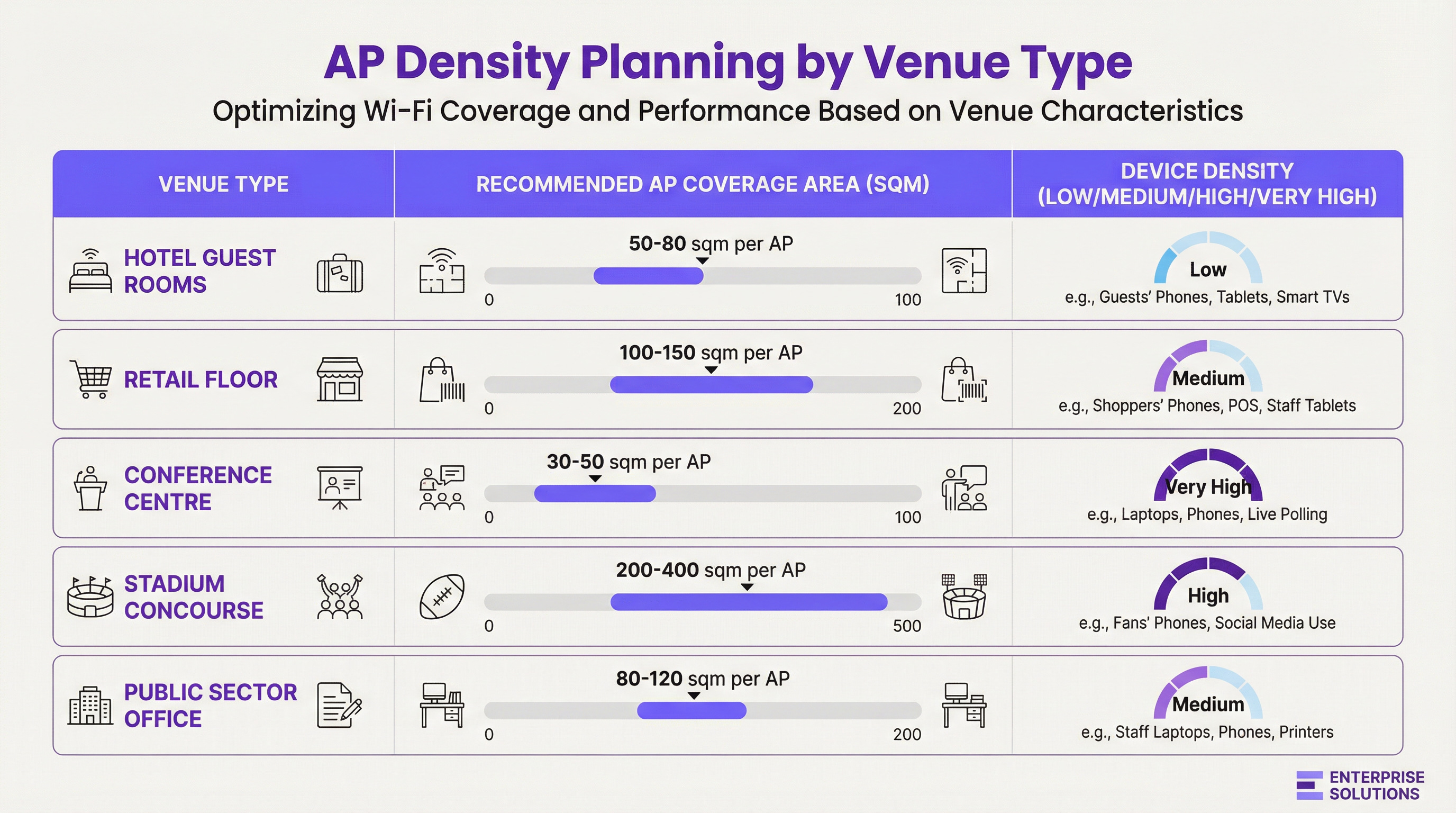
সিগন্যাল অ্যাটেন্যুয়েশন এবং উপকরণের প্রভাব
RF সিগন্যালগুলো বিল্ডিংয়ের উপকরণ দ্বারা শোষিত, প্রতিফলিত এবং বিচ্ছুরিত হয়। একটি বিস্তৃত সাইট সার্ভেতে সাধারণ বাধাগুলোর কারণে সৃষ্ট dB লস অবশ্যই বিবেচনায় রাখতে হবে:
| উপকরণ | 2.4 GHz অ্যাটেন্যুয়েশন (আনুমানিক) | 5 GHz অ্যাটেন্যুয়েশন (আনুমানিক) | স্থাপনের ওপর প্রভাব |
|---|---|---|---|
| ড্রাইওয়াল | -3 dB | -4 থেকে -5 dB | ন্যূনতম প্রভাব, অফিস পরিবেশের জন্য স্ট্যান্ডার্ড। |
| কংক্রিটের দেয়াল | -10 থেকে -15 dB | -15 থেকে -20 dB | উচ্চ প্রভাব; উভয় পাশে AP প্রয়োজন। |
| কাঁচের জানালা | -4 dB | -7 dB | মাঝারি প্রভাব; প্রতিফলনের কারণ হতে পারে। |
| ধাতব দরজা/এলিভেটর | -15 থেকে -25 dB | -20 থেকে -30 dB | RF শ্যাডো তৈরি করে; এগুলোর চারপাশে কভারেজের পরিকল্পনা করুন। |
চ্যানেল প্ল্যানিং এবং সিগন্যাল ওভারল্যাপ
নিরবচ্ছিন্ন রোমিং নিশ্চিত করতে, পাশাপাশি থাকা AP কভারেজ সেলগুলোর মধ্যে ইচ্ছাকৃতভাবে ১৫-২০% ওভারল্যাপ রাখার পরামর্শ দেওয়া হয়। এটি একটি ক্লায়েন্ট ডিভাইসকে পূর্ববর্তী AP থেকে সিগন্যাল হারানোর আগেই একটি নতুন AP খুঁজে পেতে এবং তার সাথে যুক্ত হতে সাহায্য করে। তবে, ইন্টারফারেন্স এড়াতে এই ওভারল্যাপটি একটি সঠিক চ্যানেল প্ল্যানের মাধ্যমে পরিচালনা করতে হবে।
- কো-চ্যানেল ইন্টারফারেন্স (CCI): একই চ্যানেলে থাকা দুটি AP খুব কাছাকাছি থাকলে এটি ঘটে। তাদের এয়ারটাইমের জন্য প্রতিযোগিতা করতে হয়, যা সংযুক্ত সকল ক্লায়েন্টের পারফরম্যান্স কমিয়ে দেয়।
- অ্যাডজাসেন্ট চ্যানেল ইন্টারফারেন্স (ACI): ওভারল্যাপিং চ্যানেলে থাকা AP-গুলো খুব কাছাকাছি থাকলে এটি ঘটে (যেমন, 2.4 GHz ব্যান্ডের চ্যানেল 1 এবং 2)।
2.4 GHz ব্যান্ডের জন্য, শুধুমাত্র 1, 6, এবং 11 চ্যানেলগুলো নন-ওভারল্যাপিং এবং যেকোনো এন্টারপ্রাইজ ডিপ্লয়মেন্টে একচেটিয়াভাবে এগুলো ব্যবহার করা উচিত। 5 GHz ব্যান্ডে অনেক বেশি সংখ্যক নন-ওভারল্যাপিং চ্যানেল রয়েছে, যা এটিকে সক্ষমতা-চালিত ডিজাইনের জন্য পছন্দের বিকল্প করে তোলে।
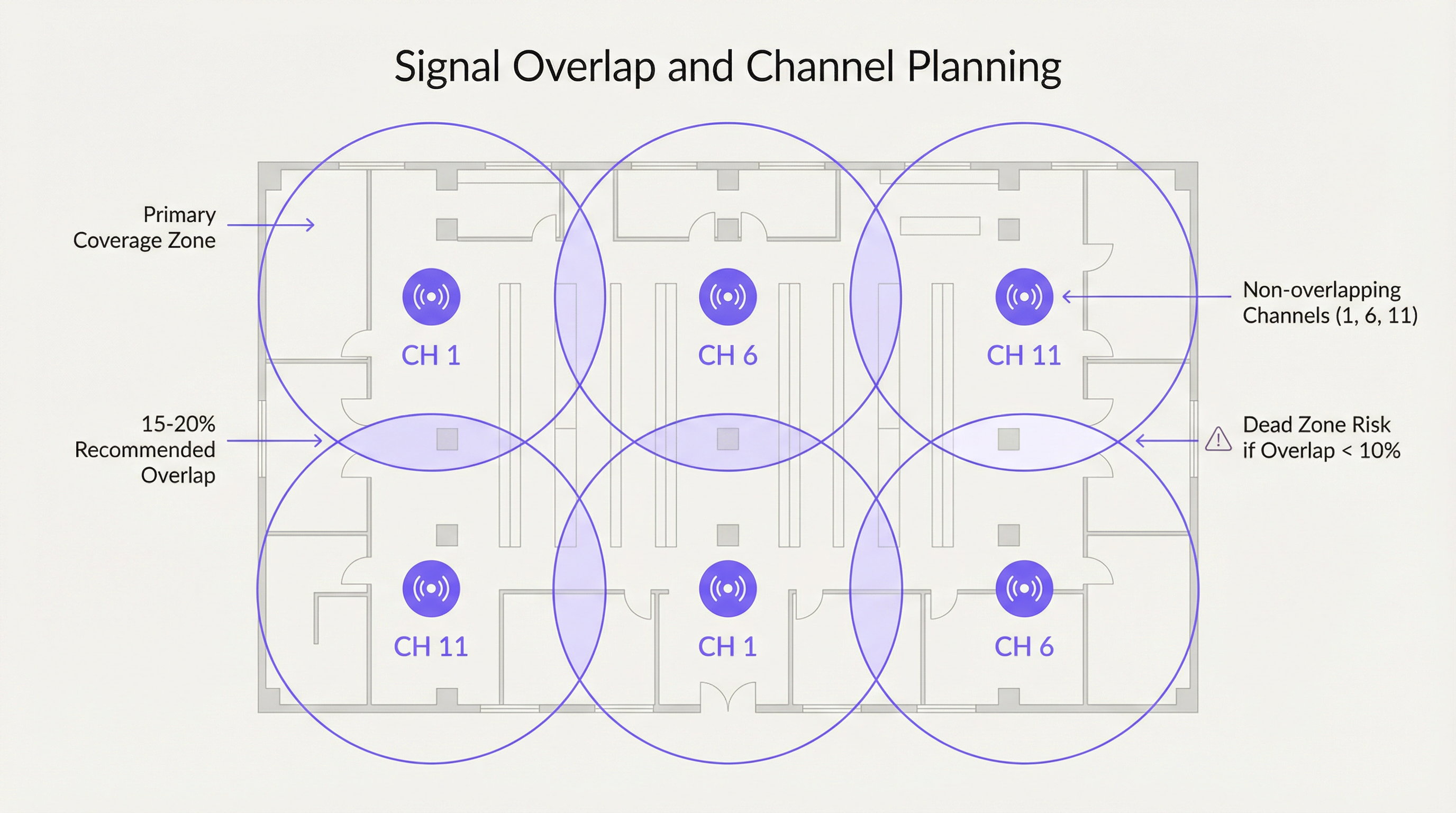
ইমপ্লিমেন্টেশন গাইড
একটি সফল এবং স্কেলেবল WiFi ডিপ্লয়মেন্টের জন্য একটি কাঠামোগত ওয়ার্কফ্লো অনুসরণ করা অত্যন্ত গুরুত্বপূর্ণ। এই প্রক্রিয়াটি নিশ্চিত করে যে প্রাথমিক পরিকল্পনা থেকে শুরু করে ইনস্টলেশন-পরবর্তী অপ্টিমাইজেশন পর্যন্ত সমস্ত চলক বিবেচনা করা হয়েছে।
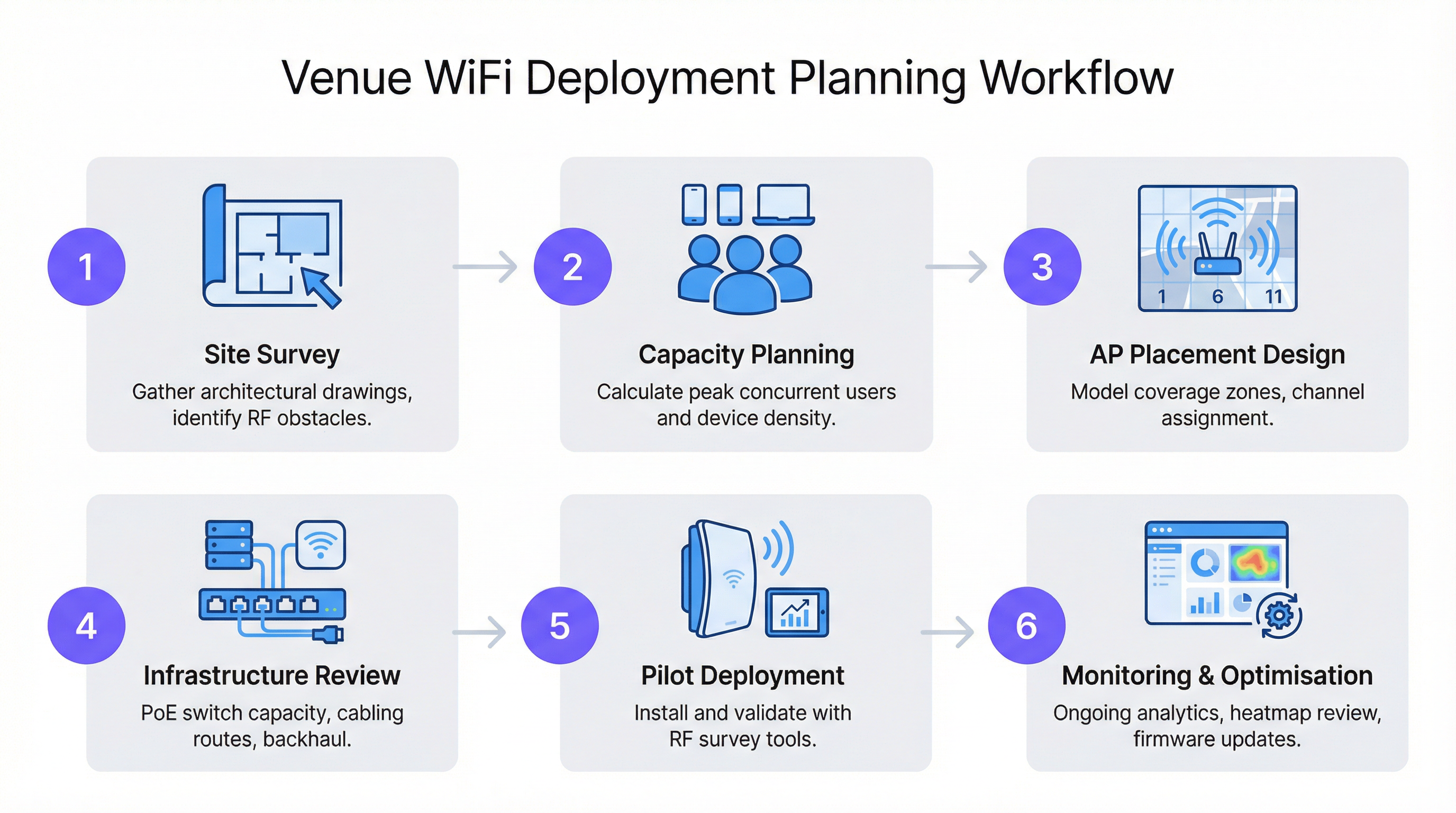
ধাপ ১: সাইট সার্ভে
একটি পেশাদার সাইট সার্ভে যেকোনো নেটওয়ার্ক ডিজাইনের মূল ভিত্তি। এর দুটি পর্যায় রয়েছে:
- প্রেডিক্টিভ সার্ভে: ফ্লোর প্ল্যান এবং Ekahau বা AirMagnet-এর মতো সফটওয়্যার ব্যবহার করে RF প্রোপাগেশনের মডেল তৈরি করা এবং একটি প্রাথমিক AP প্লেসমেন্ট ম্যাপ তৈরি করা।
- ফিজিক্যাল সার্ভে: প্রেডিক্টিভ মডেল যাচাই করতে, RF ইন্টারফারেন্সের উৎস (যেমন মাইক্রোওয়েভ ওভেন বা প্রতিবেশী নেটওয়ার্ক) শনাক্ত করতে এবং বিল্ডিং উপকরণের RF বৈশিষ্ট্যগুলো নিশ্চিত করতে স্পেকট্রাম অ্যানালাইজার এবং সার্ভে টুল নিয়ে ভেন্যুটি ঘুরে দেখা।
ধাপ ২: মাউন্টিং এবং প্লেসমেন্ট
- সিলিং মাউন্ট: উঁচু সিলিং (৩-৫ মিটার) যুক্ত খোলা জায়গা, যেমন রিটেইল ফ্লোর বা বলরুমের জন্য আদর্শ। ফোকাসড কভারেজের জন্য ডাউন-টিল্ট অ্যান্টেনা প্যাটার্ন ব্যবহার করুন।
- ওয়াল মাউন্ট: হসপিটালিটি (হোটেলের রুম) এবং অফিসে বেশি পছন্দনীয়। বেশিরভাগ আসবাবপত্র এবং বাধার ওপরে রাখতে AP-গুলোকে ২.৫-৩ মিটার উচ্চতায় মাউন্ট করুন।
- সিলিং ভয়েড এড়িয়ে চলুন: ড্রপ সিলিংয়ের ওপরের ফাঁকা জায়গায় AP স্থাপন করলে সিগন্যালের শক্তি ৩-৫ dB কমে যেতে পারে এবং রক্ষণাবেক্ষণের জন্য ফিজিক্যাল অ্যাক্সেস কঠিন হয়ে পড়ে।
- ভার্টিক্যাল স্ট্যাগারিং: বহুতল ভবনে, প্রতিটি ফ্লোরের একই স্থানে AP স্থাপন করা উচিত নয়। প্লেসমেন্ট স্ট্যাগার বা এদিক-ওদিক করে রাখলে ফ্লোরগুলোর মধ্যে কো-চ্যানেল ইন্টারফারেন্স কমাতে সাহায্য করে।
সর্বোত্তম অনুশীলন
- 5 GHz-কে অগ্রাধিকার দিন: সক্ষম ক্লায়েন্টদের 5 GHz ব্যান্ডের দিকে পরিচালিত করুন। এতে বেশি চ্যানেল, কম ইন্টারফারেন্স এবং উচ্চতর ডেটা রেট রয়েছে। এটিকে উৎসাহিত করতে আপনার AP-গুলোতে ব্যান্ড-স্টিয়ারিং ফিচার ব্যবহার করুন।
- সঠিক ট্রান্সমিট পাওয়ার নির্ধারণ: সর্বোচ্চ পাওয়ার সবসময় সেরা নয়। উচ্চ-ঘনত্বের ডিজাইনে, ট্রান্সমিট পাওয়ার কমালে ছোট মাইক্রোসেল তৈরি হয়, যা আরও ঘন ঘন চ্যানেল পুনঃব্যবহারের সুযোগ দিয়ে সামগ্রিক নেটওয়ার্ক সক্ষমতা বৃদ্ধি করে।
- আধুনিক স্ট্যান্ডার্ডের ব্যবহার: Wi-Fi 6 (802.11ax) বা Wi-Fi 6E সক্ষম AP স্থাপন করুন। OFDMA এবং MU-MIMO-এর মতো ফিচারগুলো বিশেষভাবে যানজটপূর্ণ পরিবেশে পারফরম্যান্স উন্নত করার জন্য ডিজাইন করা হয়েছে।
- ব্যাকহলের জন্য পরিকল্পনা: নিশ্চিত করুন যে আপনার সুইচিং ইনফ্রাস্ট্রাকচার প্রয়োজনীয় Power over Ethernet (PoE) বাজেট (উচ্চ-পারফরম্যান্স AP-এর জন্য PoE+ বা PoE++) প্রদান করতে পারে এবং পুঞ্জীভূত ওয়্যারলেস ট্রাফিক সামলানোর জন্য পর্যাপ্ত আপলিংক সক্ষমতা রয়েছে।
ট্রাবলশুটিং এবং ঝুঁকি প্রশমন
- লক্ষণ: শক্তিশালী সিগন্যাল থাকা সত্ত্বেও ধীরগতি। কারণ: সম্ভবত কো-চ্যানেল ইন্টারফারেন্স বা অতিরিক্ত লোড হওয়া AP। সমাধান: প্রতিযোগী নেটওয়ার্কগুলো শনাক্ত করতে একটি স্পেকট্রাম অ্যানালাইসিস করুন। AP ক্লায়েন্ট লোড পর্যালোচনা করুন এবং সক্ষমতা বৃদ্ধি বা ক্লায়েন্টদের লোড-ব্যালেন্স করার কথা বিবেচনা করুন।
- লক্ষণ: চলাচলের সময় কানেকশন ড্রপ হওয়া। কারণ: অপর্যাপ্ত কভারেজ ওভারল্যাপ (<১০%) বা অনুপযুক্ত রোমিং কনফিগারেশন। সমাধান: প্রভাবিত এলাকায় AP ঘনত্ব বাড়ান বা একটি বড় ওভারল্যাপ জোন তৈরি করতে সংলগ্ন AP-গুলোর ট্রান্সমিট পাওয়ার সামঞ্জস্য করুন।
- লক্ষণ: নির্দিষ্ট কিছু এলাকায় কোনো কভারেজ নেই (ডেড জোন)। কারণ: অপ্রত্যাশিত RF বাধা (যেমন, নতুন ধাতব শেল্ভিং)। সমাধান: ডেড জোন শনাক্ত করতে একটি ইনস্টলেশন-পরবর্তী সার্ভে পরিচালনা করুন এবং শূন্যস্থান পূরণের জন্য একটি অতিরিক্ত AP স্থাপন করুন।
ROI এবং ব্যবসায়িক প্রভাব
একটি সুপরিকল্পিত WiFi নেটওয়ার্ক কেবল খরচের খাত নয়; এটি বিজনেস ইন্টেলিজেন্স এবং উন্নত গ্রাহক অভিজ্ঞতার একটি সহায়ক মাধ্যম। একটি রিটেইল চেইনের জন্য, Purple-সক্ষম WiFi নেটওয়ার্ক থেকে সংগৃহীত ডেটা স্টোরের লেআউট সংক্রান্ত সিদ্ধান্ত নিতে, ফুটফল (দর্শনার্থীর সংখ্যা) পরিমাপ করতে এবং পার্সোনালাইজড মার্কেটিং পরিচালনা করতে সাহায্য করতে পারে। হসপিটালিটি খাতে, এটি অতিথিদের সন্তুষ্টি স্কোরের একটি মূল চালিকাশক্তি এবং মোবাইল চেক-ইন ও ইন-রুম স্ট্রিমিংয়ের মতো পরিষেবাগুলো সক্ষম করে। এর ROI পরিমাপ করা হয় নিচের বিষয়গুলোর মাধ্যমে:
- অতিথিদের সন্তুষ্টি ও বিশ্বস্ততা বৃদ্ধি: উচ্চ-পারফরম্যান্সের WiFi এখন একটি প্রাথমিক সুবিধা, যা বুকিংয়ের সিদ্ধান্তকে প্রভাবিত করে।
- উন্নত পরিচালনগত দক্ষতা: স্টাফদের ডিভাইসগুলোর (POS সিস্টেম, ইনভেন্টরি স্ক্যানার, যোগাযোগের সরঞ্জাম) জন্য নির্ভরযোগ্য কানেক্টিভিটি ডাউনটাইম কমায়।
- নতুন রাজস্ব আয়ের উৎস: লোকেশন-ভিত্তিক অ্যানালিটিক্স এবং Captive Portal মার্কেটিং এনগেজমেন্ট ও বিক্রয়ের নতুন সুযোগ তৈরি করতে পারে।
Key Terms & Definitions
Access Point (AP)
A networking hardware device that allows a Wi-Fi compliant device to connect to a wired network. APs are the bridge between the wireless and wired worlds.
This is the fundamental building block of your WiFi network. IT teams will be physically deploying and configuring these devices based on the network plan.
Site Survey
The process of planning and designing a wireless network to provide a solution that will deliver the required wireless coverage, data rates, network capacity, roaming capability and Quality of Service (QoS).
This is the most critical pre-deployment step. Skipping or rushing a site survey is the number one cause of poor WiFi performance. It provides the data needed to justify AP count and placement to management.
AP Density
The concentration of access points within a given physical area. High density refers to a large number of APs in a small area, typically for capacity reasons.
This term is central to budget discussions. A CTO needs to understand why a high-density area like a conference room requires a higher AP density (and thus cost) than a hallway.
Signal-to-Noise Ratio (SNR)
A measure that compares the level of a desired signal to the level of background noise. It is expressed in decibels (dB). A higher SNR means a cleaner, more reliable signal.
When troubleshooting a user's complaint of 'bad WiFi', SNR is a key metric. A strong signal is useless if the background noise (from other networks, microwaves, etc.) is also high. Aim for an SNR of 25 dB or higher for good performance.
Co-Channel Interference (CCI)
Interference that occurs when two or more access points on the same channel operate in close proximity. They are forced to share the available airtime, reducing throughput for all clients.
This is why channel planning is crucial. A network architect must design the AP layout to minimize CCI by reusing channels effectively across the venue.
Roaming
The process of a wireless client device moving from one access point to another within the same network without losing connectivity.
For venue operations, seamless roaming is essential for staff using mobile devices (e.g., scanners, tablets) and for guests on calls. It relies on having sufficient coverage overlap between APs.
Power over Ethernet (PoE)
A standard that allows electrical power to be passed along with data on twisted-pair Ethernet cabling. This allows a single cable to provide both data connection and electrical power to devices like APs.
This simplifies deployment and reduces costs by eliminating the need for a separate power outlet at every AP location. Network architects must ensure their switches have a large enough PoE budget to power all planned APs.
Wi-Fi 6 (802.11ax)
The latest generation of Wi-Fi technology, offering faster speeds and, more importantly, better performance in congested, high-density environments through technologies like OFDMA and MU-MIMO.
When planning a new deployment, especially for a high-traffic venue, specifying Wi-Fi 6 is a form of future-proofing and risk mitigation. It ensures the network can handle the increasing number of devices per user.
Case Studies
A 200-room, 5-story luxury hotel needs to upgrade its WiFi. The building is concrete and steel. The goal is to provide high-performance streaming for guests and reliable connectivity for staff operations.
A capacity-driven design is required. Plan for one AP per 2-4 guest rooms, depending on wall density. Given the concrete construction, placing APs in hallways is not viable; an in-room or near-room wall-plate AP strategy is necessary. For example, a wall-plate AP in every other room, with careful channel planning to avoid interference with rooms on adjacent floors. A staggered floor-by-floor layout is critical. For common areas like the lobby and restaurant, a ceiling-mounted, high-density AP solution is required, with APs placed approximately 10-15 meters apart. The entire network should be designed using Wi-Fi 6 APs to handle the high number of devices and streaming applications. A physical site survey is mandatory to validate RF penetration through the hotel's specific wall types.
A large retail store (5,000 sq. meters) wants to deploy guest WiFi and support staff inventory scanners and POS devices. The store has high ceilings and wide, open aisles, but also dense shelving units.
A mixed-coverage and capacity approach is needed. The primary design should be coverage-oriented, using ceiling-mounted APs with omnidirectional antennas placed in a grid pattern across the open floor areas, approximately 15-20 meters apart. However, a secondary survey must be done to identify potential RF dead zones created by high, metal shelving units. In these areas, additional, lower-power APs may be needed, mounted to the ends of aisles or on pillars. Channel planning should use a standard 1, 6, 11 rotation for 2.4 GHz and a wider range of non-overlapping channels for 5 GHz. The network must be configured with separate SSIDs and VLANs for guest and corporate traffic, in line with PCI DSS compliance for the POS systems.
Scenario Analysis
Q1. You are designing WiFi for a historic hotel with thick plaster and lath walls. A predictive survey suggests a single AP in the corridor can cover four rooms. What is your primary concern and how do you validate your design?
💡 Hint:Historic building materials are notoriously unpredictable for RF signals.
Show Recommended Approach
The primary concern is that the predictive model is inaccurate due to the variable density of the plaster and lath walls. The model should not be trusted. The only way to validate the design is with a physical pilot test. Place a single AP on a temporary stand in the corridor and use a survey tool (like Ekahau Sidekick) to measure the actual signal strength inside each of the four rooms. It is highly likely that an in-room or two-room deployment model will be required.
Q2. A conference is reporting that WiFi performance is excellent in the main hall but becomes unusable in the smaller breakout rooms. All APs are the same model. What is the most likely cause?
💡 Hint:Think about user density and the difference between a large hall and a small room.
Show Recommended Approach
The most likely cause is a capacity issue, not a coverage one. The AP density was likely planned for the lower-density main hall and not adjusted for the much higher user density in the breakout rooms. During breakout sessions, a large number of users move into small spaces, overwhelming the few APs covering those rooms. The solution is to increase the AP density in the breakout rooms and potentially use directional antennas to focus coverage and limit interference.
Q3. Your company is deploying a new network in a multi-tenant office building. You do not control the other tenants' networks. What is the most critical step in your site survey process?
💡 Hint:You can't control your neighbours, but you need to account for them.
Show Recommended Approach
The most critical step is a thorough spectrum analysis. In a multi-tenant building, the RF environment is chaotic. You must identify all other WiFi networks operating in the space, paying close attention to the channels they are using and their signal strength in your deployment area. This analysis is crucial for creating a channel plan that avoids the most congested channels, mitigating co-channel and adjacent channel interference from networks you do not control. You may need to rely more heavily on the 5 GHz band and potentially use narrower channel widths (e.g., 20 MHz) to find clean spectrum.
Key Takeaways
- ✓AP placement is a balance of providing wide coverage and sufficient capacity for users.
- ✓A physical site survey is non-negotiable to understand a building's unique RF characteristics.
- ✓Plan for 15-20% signal overlap between APs to ensure seamless roaming.
- ✓In the 2.4 GHz band, only ever use channels 1, 6, and 11 to avoid interference.
- ✓High-density venues like conference halls require more APs for capacity, not just coverage.
- ✓Deploy Wi-Fi 6 (802.11ax) for better performance in crowded environments.
- ✓A WiFi network is not 'set and forget'; it requires continuous monitoring and optimisation.




