

গেস্ট WiFi নেটওয়ার্কের জন্য ফায়ারওয়াল রুলস
This guide provides IT managers and network architects with an authoritative reference for configuring firewall rules for guest WiFi networks, specifically in support of a Purple deployment. It offers actionable, vendor-neutral guidance on network segmentation, port configuration, and security best practices to ensure both seamless guest access and robust protection of corporate assets.
🎧 Listen to this Guide
View Transcript
এক্সিকিউটিভ সামারি
আধুনিক এন্টারপ্রাইজের জন্য, গেস্ট WiFi প্রদান করা আর কোনো বিলাসিতা নয়—এটি একটি মিশন-ক্রিটিক্যাল পরিষেবা যা কাস্টমার এনগেজমেন্ট বাড়ায়, মূল্যবান অ্যানালিটিক্স প্রদান করে এবং অন-সাইট অভিজ্ঞতা উন্নত করে। তবে, একটি সঠিকভাবে সুরক্ষিত না হওয়া গেস্ট নেটওয়ার্ক কর্পোরেট পরিবেশে অন্যতম প্রধান অ্যাটাক ভেক্টর হিসেবে কাজ করে। এই টেকনিক্যাল রেফারেন্স গাইডটি আইটি লিডার এবং নেটওয়ার্ক আর্কিটেক্টদের জন্য গেস্ট WiFi নেটওয়ার্কগুলোতে শক্তিশালী, সুরক্ষিত এবং হাই-পারফরম্যান্স ফায়ারওয়াল কনফিগারেশন প্রয়োগ করার একটি কার্যকর ফ্রেমওয়ার্ক প্রদান করে। এটি নেটওয়ার্ক আইসোলেশন, লিস্ট-প্রিভিলেজ অ্যাক্সেস এবং প্রোঅ্যাক্টিভ মনিটরিংয়ের মূল নীতিগুলোর ওপর ফোকাস করে। এই ভেন্ডর-নিউট্রাল বেস্ট প্র্যাকটিসগুলো মেনে চলার মাধ্যমে, প্রতিষ্ঠানগুলো সিকিউরিটি ঝুঁকি কমাতে, রেগুলেটরি কমপ্লায়েন্স (যেমন PCI DSS এবং GDPR) নিশ্চিত করতে এবং তাদের WiFi ইনফ্রাস্ট্রাকচারের ROI সর্বোচ্চ করতে পারে। এই ডকুমেন্টটি প্রথাগত থিওরির বাইরে গিয়ে হসপিটালিটি, রিটেইল এবং বড় পাবলিক ভেন্যুগুলোতে এন্টারপ্রাইজ নেটওয়ার্ক ডিপ্লয় এবং পরিচালনা করার দায়িত্বে থাকা ব্যস্ত টেকনিক্যাল প্রফেশনালদের জন্য বাস্তবসম্মত, ধাপে ধাপে গাইডেন্স এবং রিয়েল-ওয়ার্ল্ড উদাহরণ প্রদান করে।
টেকনিক্যাল ডিপ-ডাইভ
সুরক্ষিত গেস্ট WiFi আর্কিটেকচারের মূল ভিত্তি হলো কঠোর নেটওয়ার্ক সেগমেন্টেশন। গেস্ট নেটওয়ার্কটিকে একটি অবিশ্বস্ত, এক্সটার্নাল পরিবেশ হিসেবে বিবেচনা করতে হবে, যা বিশ্বস্ত কর্পোরেট LAN (যেখানে গুরুত্বপূর্ণ বিজনেস সিস্টেম, সার্ভার এবং কর্মীদের ডেটা থাকে) থেকে লজিক্যালি আলাদা থাকবে। এটি ভার্চুয়াল ল্যান (VLANs) ব্যবহার করে সবচেয়ে কার্যকরভাবে অর্জন করা যায়, যেখানে একটি ফায়ারওয়াল এগুলোর মধ্যে এনফোর্সমেন্ট পয়েন্ট হিসেবে কাজ করে।
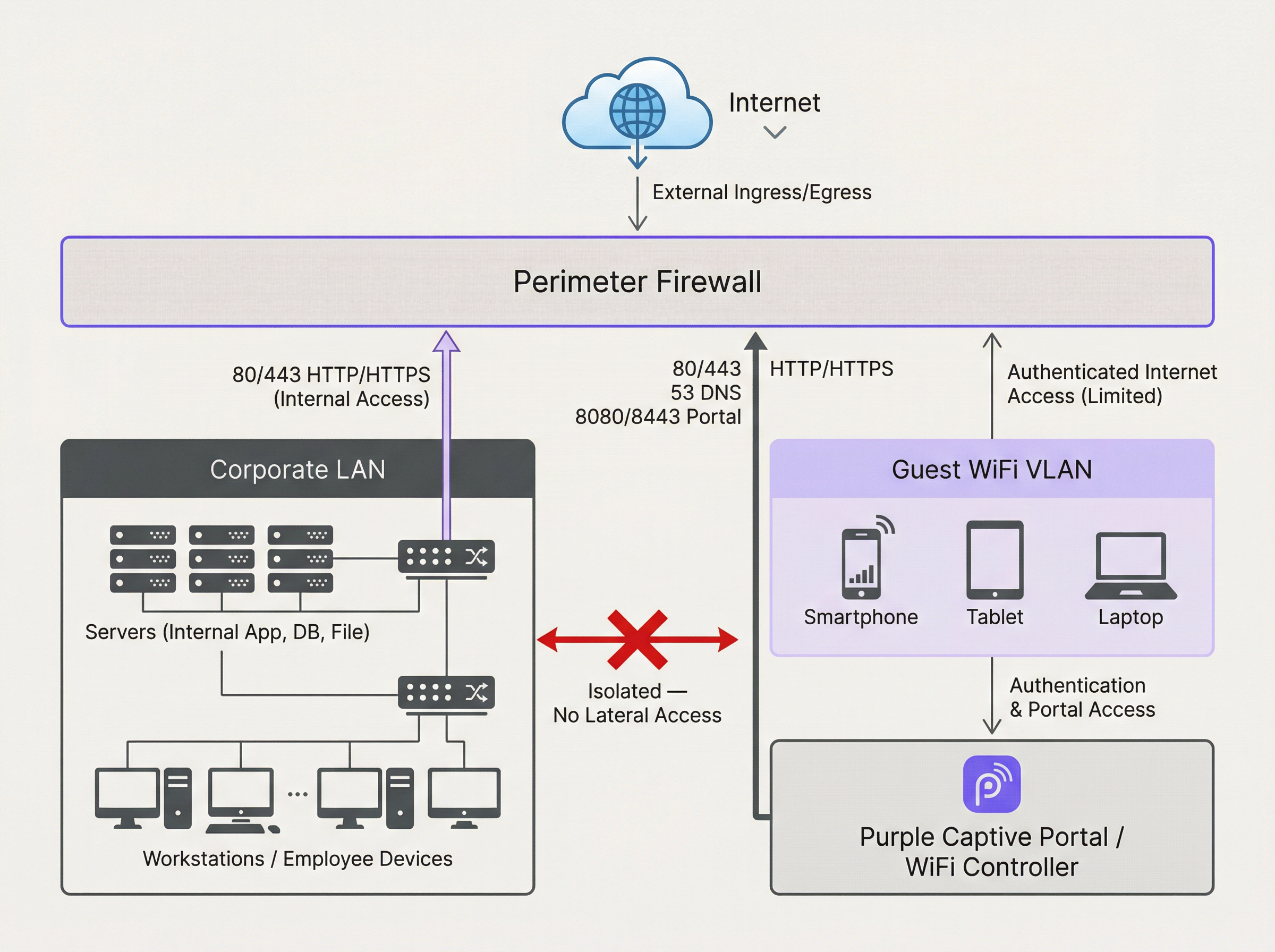
ওপরের ডায়াগ্রামটি আদর্শ আর্কিটেকচার তুলে ধরে। গেস্ট WiFi VLAN থেকে আসা সমস্ত ট্রাফিক ইন্টারনেট বা অন্য কোনো নেটওয়ার্ক সেগমেন্টে পৌঁছানোর আগে ফায়ারওয়াল দ্বারা নিয়ন্ত্রিত এবং ইনস্পেক্ট করা হয়। সবচেয়ে গুরুত্বপূর্ণ বিষয় হলো, গেস্ট VLAN থেকে কর্পোরেট LAN-এ যাওয়া যেকোনো ট্রাফিক ডিনাই (deny) করার জন্য একটি ফায়ারওয়াল রুল স্পষ্টভাবে থাকতে হবে। এটি কোনো কম্প্রোমাইজড গেস্ট ডিভাইসকে ইন্টারনাল রিসোর্সে আক্রমণ করার পিভট পয়েন্ট হিসেবে ব্যবহার করা থেকে বিরত রাখে।
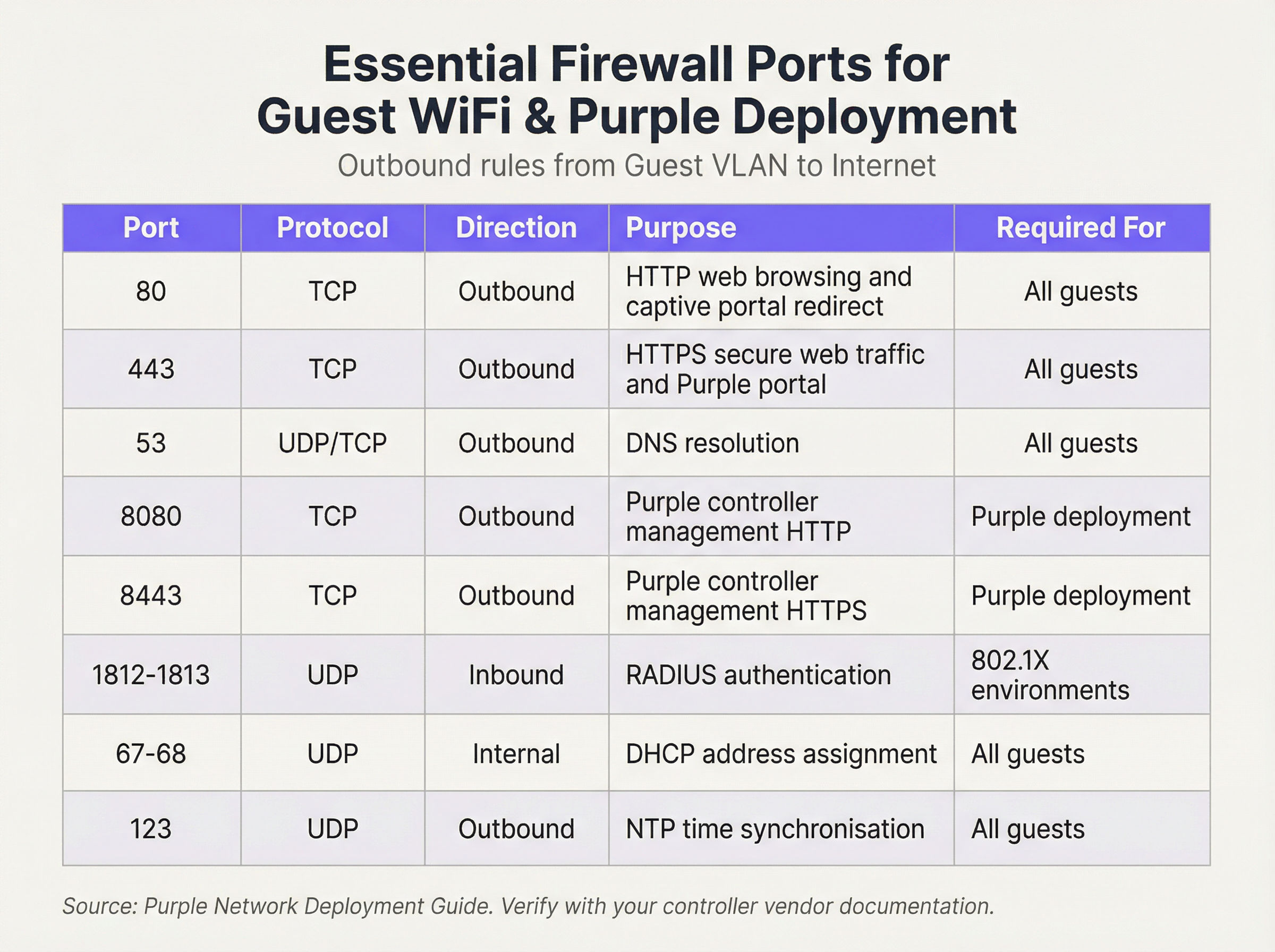
আমরা একটি ‘ডিফল্ট ডিনাই (Default Deny)’ সিকিউরিটি পোস্চারে কাজ করি। এর মানে হলো, কোনো রুল স্পষ্টভাবে অনুমতি না দেওয়া পর্যন্ত ফায়ারওয়াল সমস্ত ট্রাফিক ব্লক করবে। নিচের আউটবাউন্ড রুলগুলো একটি কার্যকর এবং সুরক্ষিত গেস্ট নেটওয়ার্কের বেসলাইন তৈরি করে:
ইনবাউন্ড রুলস এবং পোর্ট ফরোয়ার্ডিং:
গেস্ট VLAN-এর জন্য, ইনবাউন্ড পলিসি খুবই সহজ: ইন্টারনেট থেকে আসা সমস্ত ট্রাফিক ডিনাই করুন। কোনো এক্সটার্নাল এনটিটির পক্ষে গেস্টের ডিভাইসে কানেকশন শুরু করার কোনো বৈধ ব্যবসায়িক কারণ নেই। একমাত্র ব্যতিক্রম হলো অন-প্রিমিস হার্ডওয়্যারের ক্ষেত্রে। আপনি যদি ক্লাউড-হোস্টেড সলিউশন ব্যবহার করার পরিবর্তে আপনার নেটওয়ার্কের মধ্যে নিজস্ব WiFi কন্ট্রোলার বা Captive Portal সার্ভার হোস্ট করেন, তবে আপনাকে একটি নির্দিষ্ট পোর্ট ফরোয়ার্ডিং (বা ডেস্টিনেশন NAT) রুল তৈরি করতে হবে। এই রুলটি আপনার পাবলিক আইপি অ্যাড্রেসের একটি নির্দিষ্ট পোর্টকে কন্ট্রোলারের ইন্টারনাল আইপি অ্যাড্রেস এবং পোর্টের সাথে ম্যাপ করে, উদাহরণস্বরূপ, TCP পোর্ট 443-এ আসা ট্রাফিককে 192.168.100.10:8443-এ ফরোয়ার্ড করা। এই রুলটি যতটা সম্ভব রেস্ট্রিক্টিভ হতে হবে, যেখানে সঠিক সোর্স (যদি জানা থাকে), ডেস্টিনেশন এবং পোর্ট নির্দিষ্ট করা থাকবে।
ইমপ্লিমেন্টেশন গাইড
- VLAN তৈরি: আপনার নেটওয়ার্ক সুইচগুলোতে, গেস্ট ট্রাফিকের জন্য একটি নতুন, ডেডিকেটেড VLAN তৈরি করুন (যেমন, VLAN 100)। আপনার গেস্ট নেটওয়ার্ক ব্রডকাস্ট করে এমন SSID-তে এই VLAN ID-টি অ্যাসাইন করুন।
- ফায়ারওয়াল ইন্টারফেস কনফিগারেশন: আপনার ফায়ারওয়ালে একটি নতুন ইন্টারফেস বা সাব-ইন্টারফেস কনফিগার করুন এবং এটি গেস্ট VLAN-এ অ্যাসাইন করুন। এই ইন্টারফেসটি সমস্ত গেস্ট ডিভাইসের জন্য ডিফল্ট গেটওয়ে হিসেবে কাজ করবে।
- DHCP সার্ভিস: স্বয়ংক্রিয়ভাবে আইপি অ্যাড্রেস অ্যাসাইন করার জন্য গেস্ট VLAN-এর জন্য একটি DHCP সার্ভার কনফিগার করুন। নিশ্চিত করুন যে DHCP স্কোপ শুধুমাত্র আইপি অ্যাড্রেস, সাবনেট মাস্ক এবং ফায়ারওয়ালের গেস্ট ইন্টারফেসকে ডিফল্ট গেটওয়ে হিসেবে প্রদান করে। প্রদত্ত DNS সার্ভারগুলো পাবলিক রিভলভার হওয়া উচিত (যেমন, 1.1.1.1, 8.8.8.8)।
- আউটবাউন্ড ফায়ারওয়াল রুলস: পোর্ট রেফারেন্স টেবিলে বিস্তারিতভাবে দেওয়া প্রয়োজনীয় আউটবাউন্ড ফায়ারওয়াল রুলগুলো তৈরি করুন। সবচেয়ে নির্দিষ্ট রুলগুলো দিয়ে শুরু করুন এবং একটি ‘ডিনাই অল (Deny All)’ রুল দিয়ে শেষ করুন। এই ক্রমটি অত্যন্ত গুরুত্বপূর্ণ। ফায়ারওয়াল ওপর থেকে নিচে রুলগুলো মূল্যায়ন করে এবং প্রথম ম্যাচটি অ্যাকশন নির্ধারণ করে।
- ক্লায়েন্ট আইসোলেশন: আপনার ওয়্যারলেস অ্যাক্সেস পয়েন্টগুলোতে ‘ক্লায়েন্ট আইসোলেশন’ (যাকে কখনও কখনও ‘AP আইসোলেশন’ বা ‘গেস্ট মোড’ বলা হয়) ফিচারটি চালু করুন। এটি একটি গুরুত্বপূর্ণ কন্ট্রোল যা একই WiFi নেটওয়ার্কের গেস্ট ডিভাইসগুলোকে একে অপরের সাথে যোগাযোগ করতে বাধা দেয়, যার ফলে পিয়ার-টু-পিয়ার অ্যাটাকের ঝুঁকি কমে।
- লগিং এবং মনিটরিং: সমস্ত ফায়ারওয়াল রুলের জন্য, বিশেষ করে ডিনাই করা ট্রাফিকের জন্য বিস্তারিত লগিং চালু করুন। অস্বাভাবিক অ্যাক্টিভিটির কোরিলেশন এবং অ্যালার্টিংয়ের জন্য এই লগগুলোকে একটি সেন্ট্রাল SIEM (সিকিউরিটি ইনফরমেশন অ্যান্ড ইভেন্ট ম্যানেজমেন্ট) সিস্টেমে ফরোয়ার্ড করুন।
বেস্ট প্র্যাকটিস
- স্টেটফুল ফায়ারওয়াল ব্যবহার করুন: একটি স্টেটফুল ফায়ারওয়াল অ্যাক্টিভ কানেকশনের স্টেট ট্র্যাক করে এবং এস্টাবলিশড সেশনের জন্য স্বয়ংক্রিয়ভাবে রিটার্ন ট্রাফিকের অনুমতি দেয়। এটি রুল তৈরি করা সহজ করে, কারণ আপনাকে শুধুমাত্র গেস্ট-ইনিশিয়েটেড ট্রাফিকের জন্য আউটবাউন্ড রুল ডিফাইন করতে হবে।
- নিয়মিত অডিট করুন: আপনার ফায়ারওয়াল রুলসেটের ত্রৈমাসিক রিভিউ শিডিউল করুন। যেকোনো অস্থায়ী, অব্যবহৃত বা অতিরিক্ত পারমিসিভ রুলগুলো সরিয়ে ফেলুন। সিকিউরিটি একটি চলমান প্রক্রিয়া, কোনো এককালীন কনফিগারেশন নয়।
- IPv6 অ্যাড্রেস করুন: নিশ্চিত করুন যে আপনার ফায়ারওয়াল রুলগুলো IPv4 এবং IPv6 উভয় ট্রাফিকের ক্ষেত্রেই প্রযোজ্য। অনেক আধুনিক ডিভাইসে ডিফল্টরূপে IPv6 থাকে এবং এটি উপেক্ষা করলে একটি বড় সিকিউরিটি গ্যাপ তৈরি হতে পারে।
- ইন্ডাস্ট্রি স্ট্যান্ডার্ড অনুসরণ করুন: প্রতিষ্ঠিত সিকিউরিটি ফ্রেমওয়ার্কগুলোর সাথে আপনার কনফিগারেশন অ্যালাইন করুন। রিটেইলের ক্ষেত্রে, PCI DSS Requirement 1.2.1 স্পষ্টভাবে বিশ্বস্ত এবং অবিশ্বস্ত নেটওয়ার্কগুলোর মধ্যে ট্রাফিক সীমাবদ্ধ করার দাবি করে। ব্যক্তিগত ডেটা পরিচালনার জন্য, GDPR ডেটা সুরক্ষার জন্য ‘টেকনিক্যাল এবং অর্গানাইজেশনাল মেজারস’ বাধ্যতামূলক করে, যার জন্য নেটওয়ার্ক সেগমেন্টেশন একটি মৌলিক কন্ট্রোল।
ট্রাবলশুটিং এবং রিস্ক মিটিগেশন
- সমস্যা: Captive Portal লোড হচ্ছে না: এটি প্রায় সবসময়ই একটি DNS বা ফায়ারওয়াল রুলের সমস্যা। নিশ্চিত করুন যে গেস্ট পোর্টালের হোস্টনেম রিজলভ করতে পারে (পোর্ট 53 চেক করুন) এবং প্রমাণীকরণের আগে পোর্টালের আইপি অ্যাড্রেস এবং পোর্টে (সাধারণত 80/443) ট্রাফিক যাওয়ার অনুমতি রয়েছে।
- সমস্যা: ধীরগতির গেস্ট WiFi: অতিরিক্ত পারমিসিভ ফায়ারওয়াল রুলগুলো ব্রডকাস্ট স্টর্ম বা ক্ষতিকারক ট্রাফিককে ব্যান্ডউইথ ব্যবহার করার অনুমতি দিতে পারে। শুধুমাত্র প্রয়োজনীয় ট্রাফিক সীমাবদ্ধ করতে লিস্ট প্রিভিলেজের নীতি প্রয়োগ করুন।
- ঝুঁকি: জিরো-ডে ওয়ার্ম: একজন গেস্ট এমন একটি ডিভাইস দিয়ে কানেক্ট করেন যা স্বয়ংক্রিয়ভাবে ছড়িয়ে পড়া জিরো-ডে ওয়ার্ম দ্বারা সংক্রমিত। মিটিগেশন: ক্লায়েন্ট আইসোলেশন হলো আপনার প্রাথমিক প্রতিরক্ষা, কারণ এটি ওয়ার্মটিকে একই WiFi নেটওয়ার্কের অন্যান্য গেস্টদের মধ্যে ছড়িয়ে পড়তে বাধা দেয়। কঠোর ইগ্রেস ফিল্টারিং ম্যালওয়্যারটি পরিচালনা করার জন্য প্রয়োজনীয় কমান্ড-অ্যান্ড-কন্ট্রোল ট্রাফিককেও ব্লক করতে পারে।
ROI এবং বিজনেস ইমপ্যাক্ট
একটি সুরক্ষিত এবং সুপরিচালিত গেস্ট WiFi নেটওয়ার্ক ব্যবসায়িক সাফল্যে সরাসরি অবদান রাখে। রিটেইল পরিবেশে, এটি Purple-এর অ্যানালিটিক্সে অ্যাক্সেস সক্ষম করে, যা ফুটফল, ডুয়েল টাইম এবং কাস্টমার বিহেভিয়ার সম্পর্কে ইনসাইট প্রদান করে, যা সরাসরি মার্কেটিং এবং অপারেশনাল সিদ্ধান্ত নিতে সাহায্য করে। হসপিটালিটি খাতে, একটি হাই-পারফরম্যান্স গেস্ট নেটওয়ার্ক গেস্ট স্যাটিসফ্যাকশন এবং পজিটিভ রিভিউয়ের মূল চালিকাশক্তি। একটি সঠিক ফায়ারওয়াল আর্কিটেকচারে বিনিয়োগ করে, আপনি কেবল ঝুঁকিই কমাচ্ছেন না; আপনি একটি গুরুত্বপূর্ণ বিজনেস ইন্টেলিজেন্স এবং কাস্টমার এনগেজমেন্ট প্ল্যাটফর্মের নির্ভরযোগ্যতা এবং পারফরম্যান্স নিশ্চিত করছেন। একটি সুরক্ষিত ডিপ্লয়মেন্ট বিশ্বাস তৈরি করে এবং ব্র্যান্ডকে রক্ষা করে, যা ব্যয়বহুল ডেটা ব্রিচ এবং কমপ্লায়েন্স ফেইলিওর রোধ করে বিনিয়োগের সুস্পষ্ট রিটার্ন প্রদান করে।

পডকাস্ট ব্রিফিং
এই মূল পয়েন্টগুলোর একটি অডিও সামারির জন্য, আমাদের ১০ মিনিটের টেকনিক্যাল ব্রিফিংটি শুনুন।
Key Terms & Definitions
VLAN (Virtual LAN)
A method of creating logically separate networks on the same physical network infrastructure. Devices on different VLANs cannot communicate without passing through a router or firewall.
IT teams use VLANs as the primary tool to enforce segmentation between the guest network and the corporate network, which is a foundational requirement for security and compliance.
Firewall Egress Filtering
The practice of filtering traffic as it leaves a network, as opposed to when it enters. It controls what outbound connections internal devices are permitted to make.
For a guest network, egress filtering is critical. By only allowing outbound traffic on specific ports (like 80 and 443), you can block malware, prevent users from running unauthorised services, and reduce your attack surface.
Client/AP Isolation
A security feature on wireless access points that prevents devices connected to the same WiFi network from communicating directly with each other.
This is a critical defence against peer-to-peer attacks on the guest network. If one guest's device is compromised, Client Isolation prevents it from attacking other guests' laptops or phones in the same venue.
Stateful Firewall
A firewall that tracks the state of network connections (e.g., TCP streams). It automatically allows return traffic for connections that were initiated from inside the network.
Using a stateful firewall simplifies administration. An IT manager only needs to write a rule allowing a guest to connect to a website on port 443; the firewall automatically handles the return traffic without needing a complex inbound rule.
Default Deny
A security posture where any traffic that is not explicitly permitted by a firewall rule is blocked.
This is a best-practice principle for all firewall configuration. It ensures that any new or un-categorised traffic is blocked by default, providing a much higher level of security than a 'default allow' policy.
PCI DSS
The Payment Card Industry Data Security Standard, a set of security standards designed to ensure that all companies that accept, process, store or transmit credit card information maintain a secure environment.
For any retail or hospitality business, proving that the guest WiFi network is robustly isolated from the network that handles payments (the Cardholder Data Environment) is a fundamental requirement for passing a PCI DSS audit.
Captive Portal
A web page that the user of a public-access network is obliged to view and interact with before access is granted. It is used for authentication, payment, or accepting terms of service.
The firewall must be configured to allow unauthenticated users to access the captive portal (and its supporting services like DNS) before they have full internet access. This pre-authentication access is often managed via a walled-garden configuration.
Port Forwarding (Destination NAT)
A technique used to redirect a communication request from one address and port number combination to another while the packets are traversing a network gateway, such as a router or firewall.
If a venue hosts its own on-premise WiFi controller, IT teams must configure port forwarding to allow guest devices on the internet to reach the captive portal on the internal network. This is a critical step for enabling the guest journey.
Case Studies
A 200-room hotel is experiencing frequent guest complaints about slow WiFi and connection drops. An initial check reveals a flat network architecture where guest and hotel operational traffic (CCTV, staff PCs) share the same subnet. The firewall has a permissive 'allow any-to-any' rule for all internal traffic.
- Immediate Action: Create a new Guest VLAN (e.g., VLAN 200) and a corresponding guest SSID. 2. Segmentation: Migrate all guest-facing access points to the new VLAN. 3. Firewall Policy: Create a new zone and interface for the Guest VLAN on the firewall. Implement a strict outbound policy allowing only ports 53, 80, 443, and 123. Add a rule to explicitly deny any traffic from the Guest VLAN to the corporate VLAN. 4. Enable Client Isolation: Activate AP/Client Isolation on the wireless controller for the guest SSID. 5. Remove Permissive Rule: Once guest traffic is successfully segmented, remove the legacy 'allow any-to-any' rule and replace it with specific rules for required corporate traffic.
A retail chain is opening a new flagship store and needs to provide guest WiFi that is compliant with PCI DSS 4.0. The store will have point-of-sale (POS) terminals, inventory scanners, and corporate PCs on the same physical network infrastructure.
- Define CDE: The first step is to define the Cardholder Data Environment (CDE). Create a dedicated VLAN for all POS terminals. 2. Isolate Guest Network: Create a separate VLAN for guest WiFi. 3. Isolate Corporate Services: Create a third VLAN for other corporate services like inventory scanners and staff PCs. 4. Firewall Enforcement: The firewall must enforce strict segmentation. There must be an explicit 'deny all' rule for any traffic originating from the Guest VLAN or the Corporate Services VLAN to the CDE VLAN. 5. Restrict CDE Egress: The CDE VLAN should only be allowed outbound access to the specific IP addresses of the payment processor, and nothing else. 6. Prove Isolation: Use tools like
nmapor a vulnerability scanner to run tests from the guest network to prove that no CDE hosts or ports are reachable.
Scenario Analysis
Q1. A stadium is hosting a major sporting event and expects 50,000 concurrent users on its guest WiFi. What is the most critical firewall consideration to ensure network stability and security?
💡 Hint:Consider the impact of broadcast and multicast traffic in such a high-density environment.
Show Recommended Approach
The most critical consideration is the aggressive filtering of all unnecessary traffic, particularly broadcast and multicast traffic (like mDNS), at the firewall and access point level. In a high-density environment, this traffic can quickly lead to a broadcast storm, consuming all available bandwidth and bringing the network to a halt. Strict egress rules allowing only essential web and DNS traffic, combined with Client Isolation, are paramount.
Q2. You discover that a previous administrator has configured the guest network to use the internal corporate DNS servers. What are the risks, and what is the immediate remediation?
💡 Hint:What information can be gleaned from internal DNS records?
Show Recommended Approach
The risks are significant. It exposes the names and IP addresses of all internal corporate servers (e.g., payroll.internal.corp, dc01.internal.corp) to anyone on the guest network, providing a detailed map for an attacker. It also creates a potential vector for DNS cache poisoning attacks against the corporate network. The immediate remediation is to change the DHCP configuration for the guest VLAN to assign public DNS servers only (e.g., 1.1.1.1, 8.8.8.8) and ensure the firewall blocks the guest VLAN from sending any traffic to the internal DNS servers.
Q3. A user reports they cannot access their corporate VPN over the guest WiFi. Your firewall logs show denied UDP traffic on port 500 and 4500 from the user's IP. What is the issue and how would you decide whether to resolve it?
💡 Hint:What protocol uses UDP ports 500 and 4500?
Show Recommended Approach
The issue is that the firewall is blocking the IKE and IPsec NAT-T protocols, which are commonly used to establish IPsec VPN tunnels. The decision to resolve this is a policy-level one. For a venue catering to business travellers (like a hotel or conference centre), allowing VPN access is often a business requirement. The resolution would be to create a specific outbound firewall rule to allow UDP traffic on ports 500 and 4500. For a public library or school, the policy might be to block VPNs to ensure traffic can be filtered. The decision must balance user needs against the organisation's security policy and risk tolerance.
Key Takeaways
- ✓Always isolate guest WiFi traffic on its own dedicated VLAN.
- ✓Operate on a 'Default Deny' firewall policy; only allow what is essential.
- ✓Enable Client Isolation on access points to prevent peer-to-peer attacks.
- ✓Use public DNS servers for guests; never expose internal DNS.
- ✓Strictly limit inbound traffic and only use port forwarding for specific, on-premise services.
- ✓Regularly audit firewall rules and monitor logs for anomalies.
- ✓A secure guest network is a prerequisite for compliance (PCI DSS, GDPR) and leveraging WiFi analytics.




